

How to Follow Up on Trade Show Leads Without Burning Money or Your Domain
Following up on trade show leads is where most teams light their budget on fire. You spend $10,000-$30,000 on a booth, fly reps across the country, and come home with a spreadsheet of badge scans where half the rows are missing phone numbers and a third have catch-all emails that'll bounce.
Now do the math: at roughly $112 per lead, a booth generating 200 leads represents $22,400 in captured contacts. Around 80% of trade show leads never receive any follow-up - a figure widely attributed to CEIR research. That's roughly $17,920 in lead spend left to rot.
This isn't an email problem. It's a data and process problem.
If You Only Do Three Things
- Score your leads before you touch them. Route hot, warm, and cold into different cadences - not one generic blast. (If you need a deeper framework, start with lead scoring.)
- Verify and enrich your badge-scan data. Catch-all emails and missing numbers will tank your sequences and your domain reputation. (More options: data enrichment services.)
- Run a multi-channel cadence. Email alone won't cut it. Add phone and social touches to actually get replies. (Related: sales prospecting techniques.)
Score First, Then Sequence
In practice, only a small slice of event leads - often around 5-15% - is truly in-market. Treating every badge scan like a hot prospect wastes your reps' time and annoys the vast majority who aren't ready to buy.
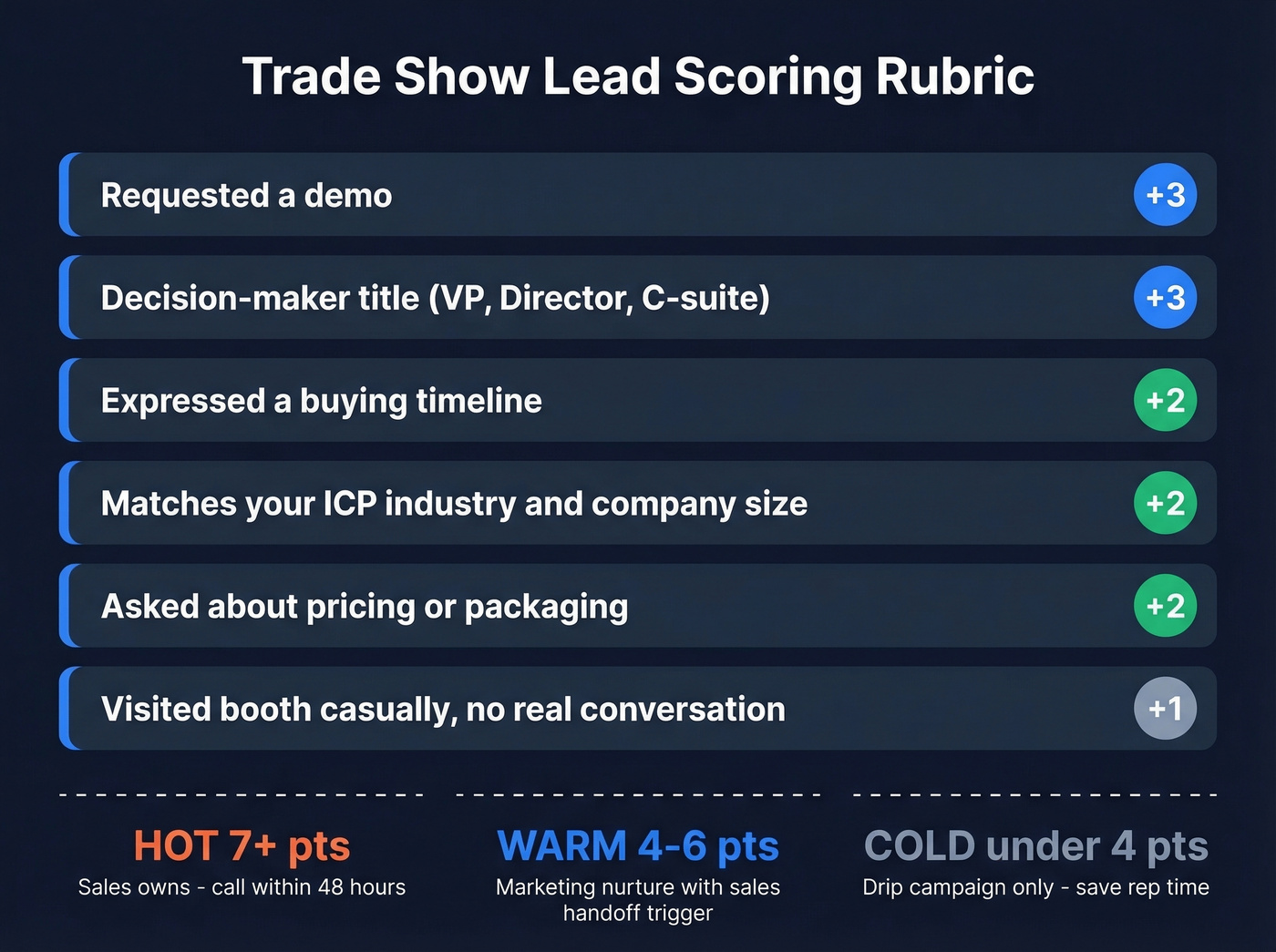
Here's a lightweight scoring rubric adapted from BANT/CHAMP frameworks:
| Signal | Points |
|---|---|
| Decision-maker title | +3 |
| Expressed timeline | +2 |
| Matches ICP industry/size | +2 |
| Asked about pricing | +2 |
| Requested a demo | +3 |
| Visited booth casually | +1 |
Hot (7+ points): Sales owns these. Direct dial within 48 hours, personalized email Day 1.
Warm (4-6): Marketing nurture sequence with a sales handoff trigger.
Cold (under 4): Drip campaign - don't waste rep hours here.
The biggest mistake we see is teams dumping every lead into one sequence. A VP who asked about pricing and an intern who grabbed a free t-shirt shouldn't get the same outreach. That sounds obvious, but it happens constantly.
What to Capture at the Booth
Your scoring rubric is useless if booth staff don't capture the right information. Train everyone to log these five fields for every meaningful conversation:
- Problem they mentioned - the specific pain, in their words.
- Current tool or vendor - what they're using today and what's broken about it.
- Timeline - are they evaluating now, next quarter, or "just looking"?
- Next step you agreed on - "I'll send you the case study" or "Let's book a call next week." This is the single highest-leverage field because it turns your follow-up from a cold email into a commitment reminder.
- Personal hook - their kid's soccer tournament, the talk they're excited about, anything that makes your Day 1 email feel human.
Print this list and tape it to the booth table. Reps who wing it always forget the details that actually convert.
Five Mistakes That Waste Event Spend
Before we get into data cleanup and cadences, a quick gut-check. If you're doing any of these, fix them first:
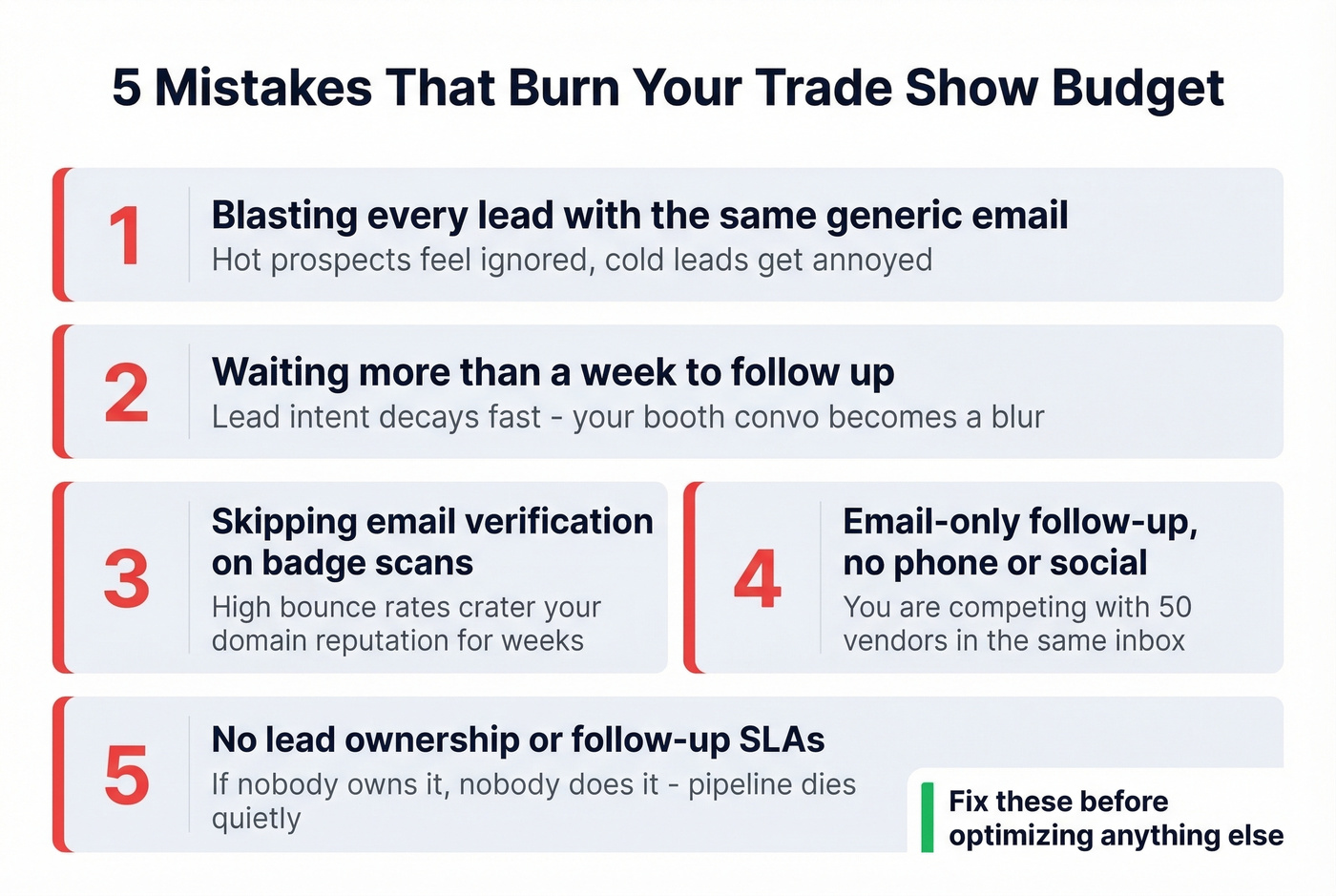
- Blasting every lead with the same generic email. A one-size-fits-all sequence guarantees your hottest prospects feel ignored. (If you want plug-and-play copy, see sales follow-up templates.)
- Waiting more than a week to follow up. After a week, your booth conversation is a blur and your lead intent is colder.
- Skipping data verification. Sequencing raw badge-scan data is how you get high bounce rates and a domain reputation crater. (More on the mechanics: email bounce rate.)
- Email-only follow-up. You're competing with 50 other vendors in their inbox. Phone and social touches break through.
- No lead ownership or SLAs. If nobody owns the lead, nobody follows up. We've seen this kill more pipeline than bad data.

Half your badge-scan data is outdated titles, catch-all emails, and missing phone numbers. Prospeo enriches your event CSV with 50+ data points per contact at a 92% match rate - verified emails at 98% accuracy and direct dials from 125M+ mobile numbers. Fix your trade show data in minutes, not days.
Stop sequencing dirty badge scans. Enrich first, outreach second.
Fix Your Data Before You Outreach
Look - badge scans are terrible data. Event organizers hand you whatever the attendee registered with, often a catch-all company email, a personal Gmail, or a title from two jobs ago. Launch a 500-contact sequence on that raw data and you're asking for trouble. If your list is dirty, bounce rates spike fast, and once you trip provider thresholds (Google Postmaster and Microsoft SNDS both track this), your deliverability can stay depressed for weeks. (If you need a full checklist, use an email deliverability guide.)
The fix is a 10-minute step most teams skip entirely: export your badge-scan CSV, run it through an enrichment and verification tool, and load only clean contacts into your sequencer. This single step separates a successful event lead follow-up from one that craters your sender reputation.
One concrete step people miss: suppress catch-all-only results from your cold sequences entirely and route them to manual review. A catch-all domain accepts any email address, so verification tools can't confirm the specific mailbox exists. Sequencing those contacts is a coin flip that risks your sender reputation. (Related: spam trap removal.)

The 21-Day Follow-Up Cadence
If you're only sending emails, you're leaving the majority of your responses on the table. Multi-channel outreach delivers 2-3x better results than single-channel campaigns - email alone typically pulls 2-5% response rates, while adding phone and social pushes that to 15-25%.
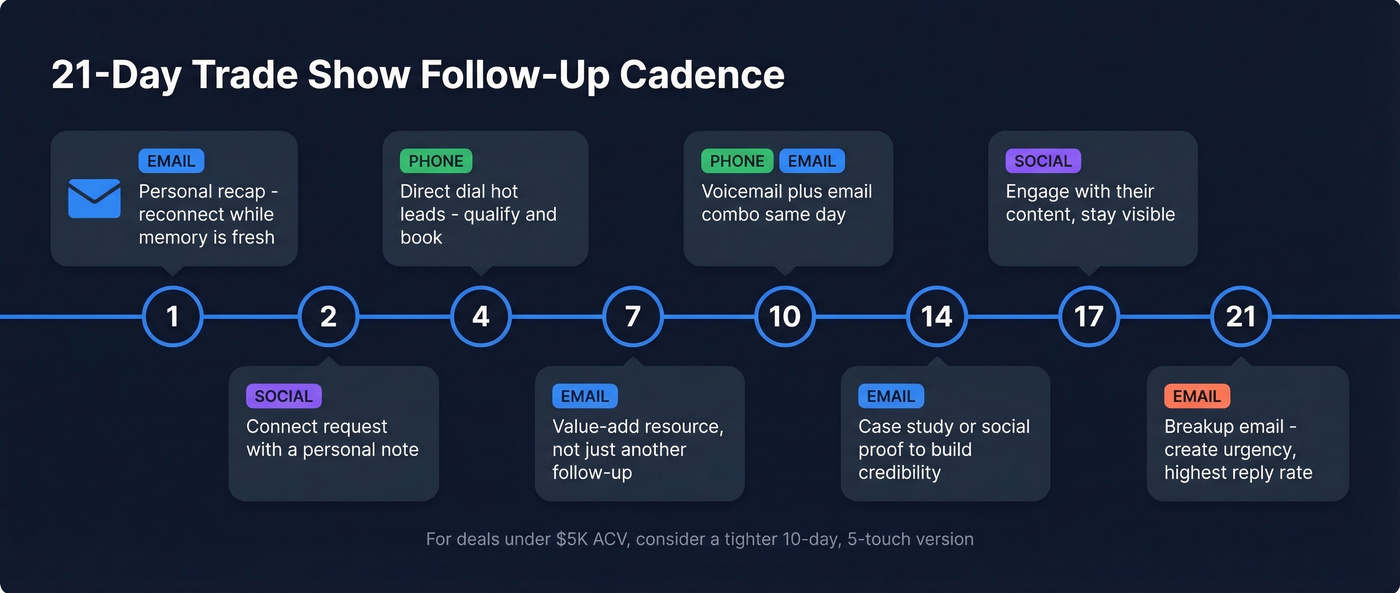
Here's the cadence we recommend:
| Day | Channel | Action | Purpose |
|---|---|---|---|
| 1 | Personal recap (Template 1) | Reconnect while fresh | |
| 2 | Social | Connect request + note | Open a second channel |
| 4 | Phone | Direct dial (hot leads) | Qualify and book meeting |
| 7 | Value-add resource (Template 2) | Relevance, not just follow-up | |
| 10 | Phone | Voicemail + email combo | Multi-touch same day |
| 14 | Case study or social proof | Build credibility | |
| 17 | Social | Engage with their content | Stay visible, not pushy |
| 21 | Breakup email (Template 3) | Final touch; create urgency |
For the phone touches, call verified direct dials - not main office lines. Prospeo's Mobile Finder returns numbers with a 30% pickup rate across 125M+ verified mobiles, and its 5-step verification includes catch-all handling and spam-trap filtering, which is exactly what protects your domain when you're sequencing hundreds of event contacts.
Ops Coordination
One owner per lead. One sequence at a time. Log every touch in your CRM to avoid two reps emailing the same person - nothing kills credibility faster than duplicate outreach from the same company. If you're running sequences through Outreach, Instantly, or Lemlist, make sure your CRM integration is deduping on import. (If you're standardizing process, use a sequence management playbook.)
Hot take: If your average contract value is under $5,000, you probably don't need a 21-day cadence at all. Run a tight 10-day, 5-touch sequence and move on. The full cadence pays for itself when deals are large enough to justify the rep time.
One important nuance: don't panic-blast on Day 1. A well-prepared Day 2 follow-up with personalization beats a generic "great meeting you!" email fired from the airport. The 5-minute rule applies to inbound web leads, not trade shows where everyone expects a short lag.
Your 21-day cadence needs direct dials to actually work. Prospeo's Mobile Finder delivers verified numbers with a 30% pickup rate - so your Day 4 and Day 10 phone touches reach real people, not voicemail trees. At $0.01 per email and 10 credits per mobile, cleaning 500 event leads costs less than one airport coffee.
Turn badge scans into booked meetings before your competitors even follow up.
Email Templates That Get Replies
Template 1 - Day 1: Personal Recap (Hot/Warm Leads)
Subject: {{first_name}}, following up from [Event Name]
Hi {{first_name}},
Good talking at [Event] - especially about [specific topic you discussed]. You mentioned you wanted [specific next step you agreed on] - still the right move?
I mentioned we've helped teams like [similar company] solve [specific problem], and I wanted to share a quick resource: [link].
Worth a 15-minute call this week to dig into how this maps to your situation?
Template 2 - Day 7: Value-Add (All Leads)
Subject: Thought you'd find this useful
Hi {{first_name}},
After our conversation at [Event], this [guide/report/case study] came to mind - it covers [relevant topic] and the results [Company X] saw.
[Link]
Happy to walk through how this applies to {{company}}. Open to a quick chat next week?
Template 3 - Day 21: Breakup (No Response)
Subject: Should I close the loop?
Hi {{first_name}},
I've reached out a few times since [Event] and haven't heard back - totally understand if the timing isn't right.
If [problem you discussed] is still on your radar, I'm here. Otherwise, I'll stop filling your inbox.
Either way, it was great meeting you at [Event].
The breakup email consistently gets the highest reply rate of any touch in the sequence. People respond to the threat of losing access more than to another value prop. In our experience, the "should I close the loop?" subject line alone outperforms every clever alternative we've tested.
Build Your Strategy Before the Show
The follow-up starts before the show. Teams that scramble after the event always lose leads to delay and disorganization. Whether you're attending a niche industry summit or a mega-event like Dreamforce, the prep work is identical - only the lead volume changes. A large-conference follow-up can mean processing thousands of contacts in 48 hours, so having your systems pre-built isn't optional.
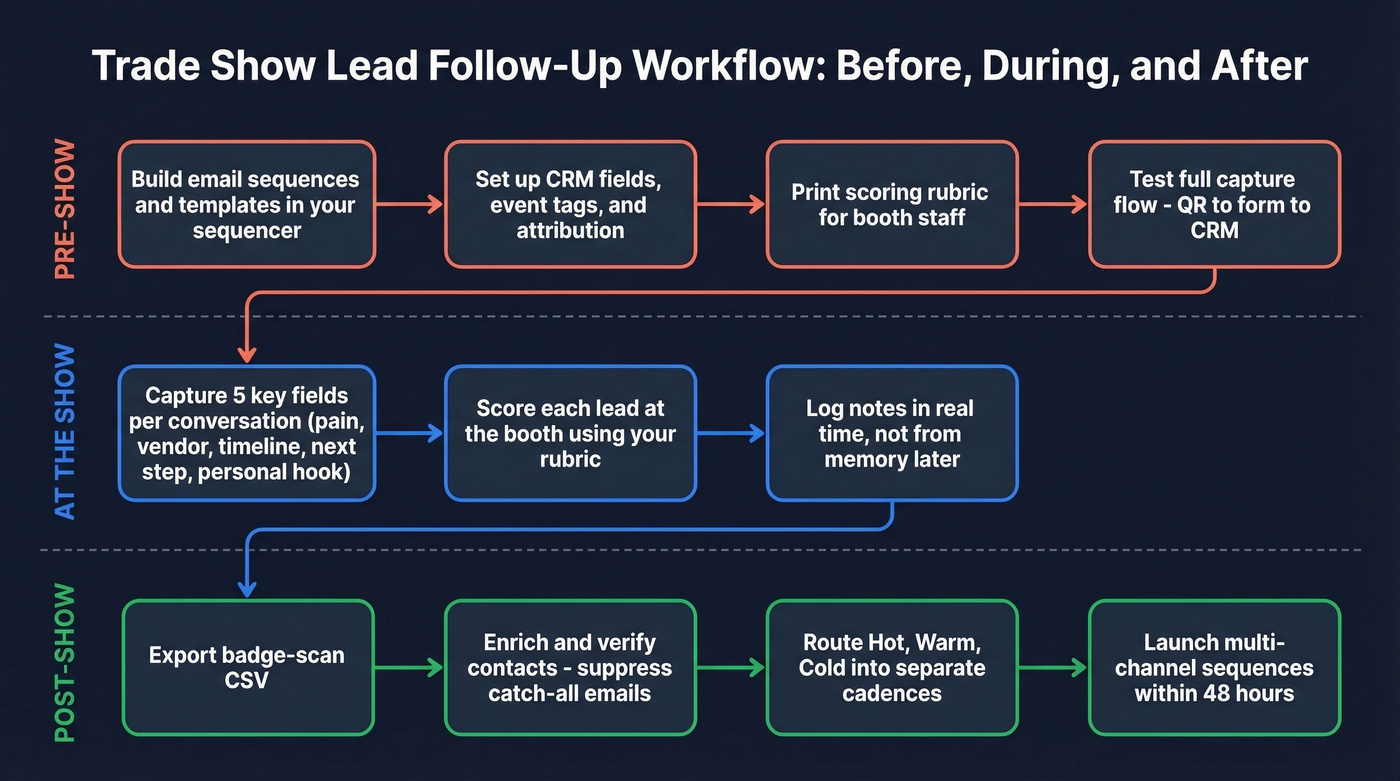
Pre-build your email sequences in your sequencer - Outreach, Instantly, Lemlist, whatever you use. Templates ready, cadence locked. (If you're tightening your outbound stack, compare follow up email software.)
Set up CRM fields and tags for the event. In HubSpot's free CRM tier, create an Event Tag property and use a hidden form field to auto-tag contacts. Associate contacts to a Marketing Event object so reporting and attribution aren't a mess later. Tools like Momencio can auto-sync badge scans to HubSpot with real-time lead scoring.
Define your scoring criteria using the rubric above and print it for booth staff. Everyone should score the same way. (If you want a ready-made doc, use an ideal customer profile template.)
Test your full capture flow the day before - QR code to form to CRM to sequence. Broken forms at the booth are unrecoverable.
If you're using a shared booth iPad, add a "reset form" link to clear autofill and cookies between attendees. One rep's saved info auto-populating the next attendee's submission is a silent data killer - and a surprisingly common one, based on HubSpot Community threads where teams troubleshoot corrupted event data.
Assign follow-up ownership and SLAs. Hot leads get a named rep and a 48-hour SLA. No exceptions, no "we'll sort it out when we're back."
FAQ
How soon should you follow up after a trade show?
Within 48 hours for hot leads, within one week for everyone else. A personalized email referencing a specific booth conversation beats a rushed generic blast every time - speed matters, but thoughtful personalization always outperforms a fast, empty message.
How many touches convert a trade show lead?
Plan 6-10 touches across email, phone, and social over 21 days. Multi-channel sequences convert 2-3x better than email alone, with phone touches on verified direct dials driving the highest meeting-book rates.
What if my badge scans are missing emails or phone numbers?
Run your CSV through an enrichment and verification tool before sequencing. Prospeo's enrichment returns an 83% match rate with 50+ data points per contact - including verified emails at 98% accuracy and direct dials - so you recover most of the missing fields without manual research.
Does the same approach work for conferences and smaller events?
Yes. The cadence and scoring framework apply whether you're following up on trade show leads from a 30,000-person expo or a 200-person conference. Smaller events let you personalize more deeply, while larger ones demand tighter automation and faster data cleanup.