

How to Find Anyone's Email Address in 2026: 7 Methods That Actually Work
You've got 200 target accounts and need their emails by Friday. Your boss doesn't care how you get them - just that they're accurate enough to not torch your domain reputation on the first sequence. We've run campaigns through most of the tools and tactics below, and here's what we know: the gap between "found" and "verified" is where most outbound teams blow up their sender score.
Every method worth knowing is here, from free Google tricks to paid tools that do the work in seconds. Whether you're tracking down a single high-value prospect or building a list of thousands, the fundamentals don't change.
1. Use an Email Finder Tool
This is the fastest path for most people. Paste a name and company, get a verified email back. The difference between tools comes down to three things: accuracy, database size, and whether you're paying for bad data alongside the good. If you want a broader comparison, start with our breakdown of email finding tools.
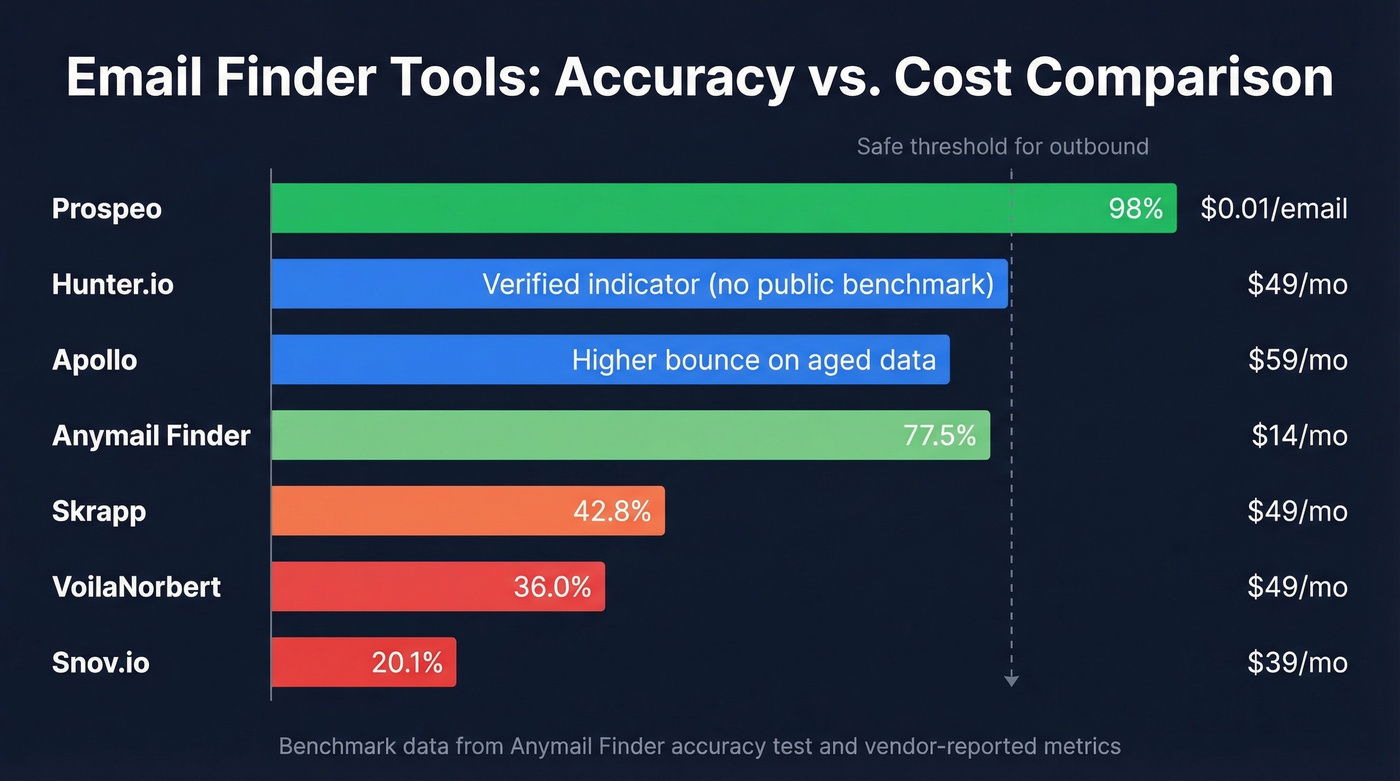
Here's the thing - we've tested enough of these to know that the tool you pick matters less than whether you verify the output. That said, some tools make verification unnecessary because they bake it in.
Prospeo
The reason we'd pick Prospeo over other finders for a 500-contact campaign comes down to verification depth. Every email runs through a 5-step pipeline - MX checks, SMTP validation, catch-all detection, spam-trap removal, and honeypot filtering - before it counts as "found." You only pay for verified results, at roughly $0.01 per email.

The database covers 300M+ professional profiles and 143M+ verified emails, with a 98% email accuracy rate. That last number matters more than database size - a tool returning 10,000 emails at 60% accuracy is worse than one returning 7,000 at 98%. The 7-day data refresh cycle seals it. Most tools refresh every six weeks or so, which means you're working with stale data by default. For outbound agencies running client campaigns, weekly refresh is the difference between 2% bounce rates and 8%. (If you’re building a workflow around this, see our guide to email verification best practices.)
Use if: You're running sequences where bounce rate directly impacts deliverability.
Free tier: 75 emails/month - enough to test the workflow before committing.
Hunter.io
Everyone knows Hunter. It built its reputation on domain search - type in a company domain, get a list of associated emails with confidence scores. Hunter also runs email verification before returning results and marks deliverable emails with a "Verified" indicator.

Agency operators on Reddit describe it as "better as a verification layer than a primary source," and that tracks with our experience. Hunter's database includes 100M+ professional email addresses, which is smaller than larger databases like Apollo's 275M+ and Prospeo's 143M+ verified emails, so you'll hit more dead ends on niche companies. The Chrome extension is clean, though - if that’s your workflow, compare options in our roundup of email finder Chrome extensions - and the domain search is still the best in the category for mapping out an entire company's email structure at a glance.
Use if: You need to map every email at a single company domain.
Skip if: You're building large prospect lists across dozens of companies - the database gaps will slow you down.
Pricing: Free plan available (up to 50 searches/month). Paid plans start around $49/mo.
Apollo
Apollo's database is massive - 275M+ contacts - and the free tier is generous enough to get started without a credit card. Sounds great on paper. The reality is messier.
The consensus across r/sales and r/coldoutreach is that Apollo's data "feels bad sometimes," especially on older contacts. Bounce rates on aged records run higher than you'd expect from a database that size. We've seen the same pattern: Apollo is excellent for discovering contacts you didn't know existed, but you need to verify everything through a separate tool before sending. Don't trust their confidence scores blindly. (Related: Apollo email verification accuracy.)
Pricing: Paid plans start around $59/mo per user. The free tier is the best entry point in the category.
Snov.io
Snov.io bundles email finding with drip campaign automation, which saves you a separate tool if you're running sequences. It's popular with smaller teams selling into non-US markets - practitioners on Reddit consistently call it "good for international leads."
The accuracy story is rough, though. Snov.io scored last in the Anymail Finder benchmark at 20.1% verified rate - meaning around 80% of emails weren't verified in that test. The built-in automation and $39/mo starting price make it appealing, but pair it with a dedicated verification step or you'll burn through sender reputation fast. If you want a deeper breakdown, see our Snov.io email finder review.
Use if: You sell internationally and want finding + sequencing in one tool.
Skip if: Email accuracy is your top priority.
Other Tools Worth Knowing
GetProspect offers 50 free emails per month and paid plans from $49/mo. Decent for quick lookups but nothing remarkable in accuracy benchmarks. Anymail Finder gives 100 free credits and charges only for valid emails; plans start at $14/month, and pay-as-you-go pricing is around $0.01/email. It scored 77.5% verified rate in its own benchmark - the "pay for verified only" model is genuinely appealing. Skrapp has a free plan with paid tiers starting around $49/mo; it scored 42.8% verified rate in the same benchmark. VoilaNorbert offers 50 free leads and starts at $49/mo, but landed at 36.0% verified rate - hard to recommend at that price. Cognism is worth a look if you're selling into EU/UK markets; practitioners praise its European coverage, and pricing typically lands in enterprise territory ($15,000-$50,000+/year depending on seats and regions). If you’re choosing between vendors, our overview of B2B data suppliers can help.
| Tool | Free Tier | Paid From | Billing Model |
|---|---|---|---|
| Prospeo | 75 emails/mo | ~$0.01/email | Pay for verified only |
| Hunter | Up to 50 searches/mo | ~$49/mo | Credit-based |
| Apollo | Free tier available | ~$59/mo per user | Per-seat |
| Snov.io | Free tier available | $39/mo | Credit-based |
| GetProspect | 50 emails/mo | $49/mo | Credit-based |
| Anymail Finder | 100 credits | $14/mo or ~$0.01/email | Pay for verified only |
| Skrapp | Free plan available | $49/mo | Credit-based |
| VoilaNorbert | 50 leads | $49/mo | Credit-based |
| Cognism | Demo required | ~$15,000-$50,000+/yr | Annual contract |

You just read 7 methods to find anyone's email. Only one gives you 98% accuracy with 5-step verification, catch-all detection, and a 7-day refresh cycle - so every address you find is current, not six weeks stale.
Find 75 emails free this month. Pay nothing for unverified results.
2. Google Advanced Search: Free Email Lookup
No budget? No problem. Google dorks are free, surprisingly effective, and most people never learn the syntax. Copy these templates, swap in your target company, and you'll surface emails that don't show up in any database. For more query patterns, see our full guide to Google dorks email search.
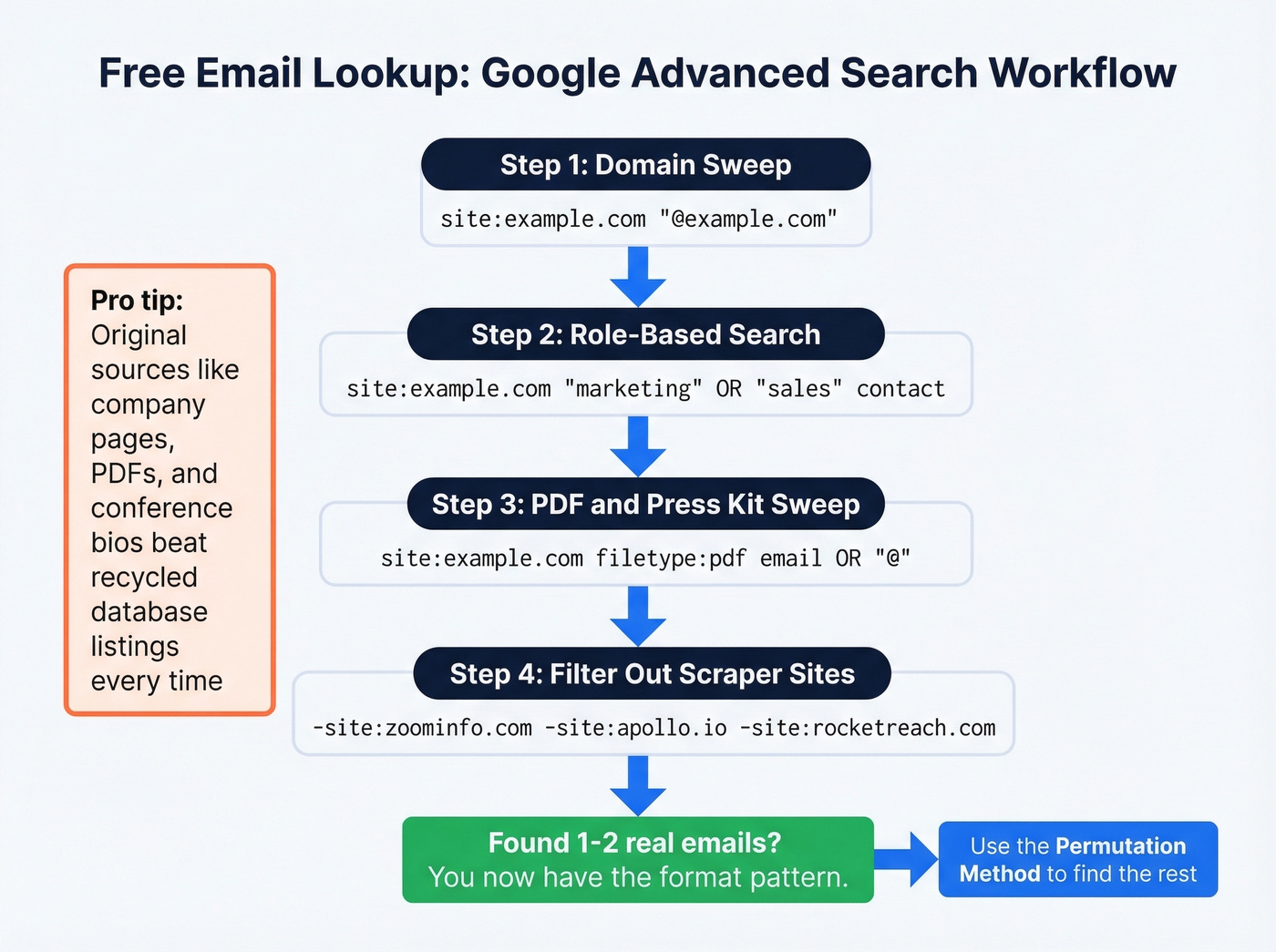
Company domain sweep:
site:example.com ("@example.com" OR "contact" OR "team" OR "email")
Role-based search:
site:example.com ("marketing" OR "PR" OR "sales") (contact OR email OR "@")
PDF sweep - companies bury emails in whitepapers and press kits:
site:example.com filetype:pdf (email OR "@")
Press contacts:
site:example.com (press OR "media") ("contact" OR "email")
The trick most guides skip: exclude scraper sites to filter noise. Add these to any query:
-site:zoominfo.com -site:apollo.io -site:rocketreach.com -site:lusha.com
This surfaces original sources - company pages, PDFs, conference bios - instead of recycled database listings. Once you find one or two real emails from a company, you've got the format pattern. From there, you can guess the rest using the permutation method below.
3. Guess the Format (Permutation Method)
If you know someone's name and company domain, you can guess their email format and verify it. This works because email formats are predictable. In our experience, the permutation method works best for companies under 200 employees where formats haven't been standardized by IT. (If you need examples to sanity-check your guesses, use these business email address examples.)
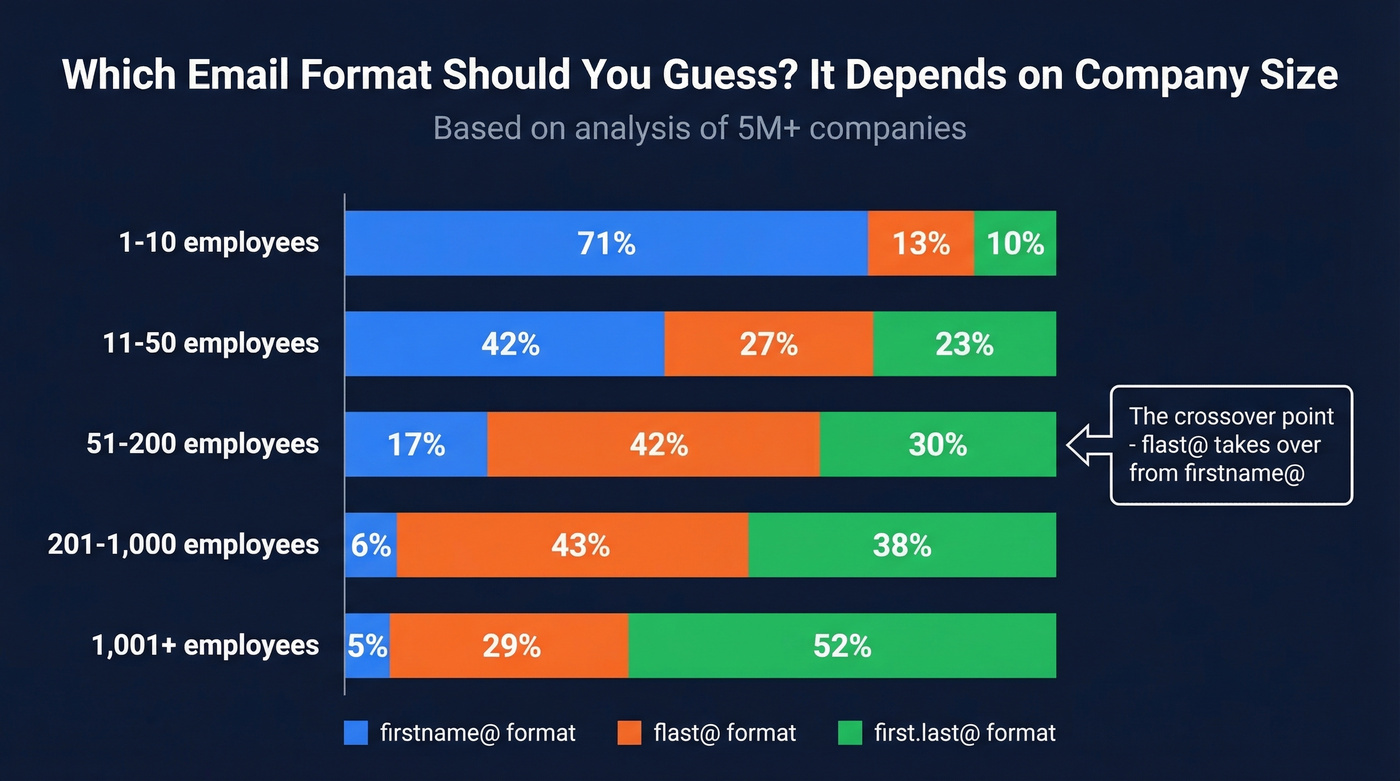
An analysis of 5M+ companies shows a clear crossover point. Small companies overwhelmingly use firstname@company.com. Once you hit 51-200 employees, flast@ takes over. Above 1,000 employees, first.last@ dominates.
| Company Size | #1 Format | #2 Format | #3 Format |
|---|---|---|---|
| Solo | firstname@ (61%) | flast@ (15%) | first.last@ (13%) |
| 1-10 | firstname@ (71%) | flast@ (13%) | first.last@ (10%) |
| 11-50 | firstname@ (42%) | flast@ (27%) | first.last@ (23%) |
| 51-200 | flast@ (42%) | first.last@ (30%) | firstname@ (17%) |
| 201-500 | flast@ (45%) | first.last@ (35%) | firstname@ (7%) |
| 501-1,000 | flast@ (42%) | first.last@ (41%) | firstname@ (5%) |
| 1,001-5,000 | first.last@ (48%) | flast@ (35%) | firstname@ (4%) |
| 5,001-10,000 | first.last@ (55%) | flast@ (26%) | firstname@ (3%) |
| 10,001+ | first.last@ (56%) | flast@ (22%) | firstname@ (7%) |
Free permutator tools like Metric Sparrow (46 permutations) and Enrichley (44 permutations) generate every possible combination. But here's the critical step most people skip: you must verify before sending. A permutator gives you guesses. Verification tells you which guess is real.
4. Check Public Sources First
Before you reach for any tool, check the obvious places. You'd be surprised how often the email is sitting in plain sight.
Company "About" and "Team" pages are the first stop - smaller companies especially list emails directly. Press releases almost always include a PR contact's email in the footer. Conference speaker bios are another goldmine; event organizers frequently publish speaker emails alongside session descriptions. Beyond those three, check podcast show notes for guest contact info, SEC filings for public companies where officer contact details appear in 10-K and proxy filings, and author bylines on company blog posts.
This won't scale to 500 contacts, but for high-value targets - the CEO you really need to reach, the VP who doesn't show up in any database - five minutes of manual research often beats any tool. If that’s your use case, this guide on executive email goes deeper.
Every method above has the same problem: you still need to verify what you find. Prospeo's 5-step pipeline - MX checks, SMTP validation, spam-trap removal, honeypot filtering - runs before you ever pay a credit. At $0.01 per verified email, your bounce rate stays under 4% instead of torching your domain.
Skip the verification step. Every Prospeo email is already verified.
5. OSINT for Hard-to-Find Contacts
Some people are genuinely hard to find. They don't show up in databases, their company site lists a generic info@ address, and Google dorks come up empty. When standard methods fail, OSINT techniques fill the gap.
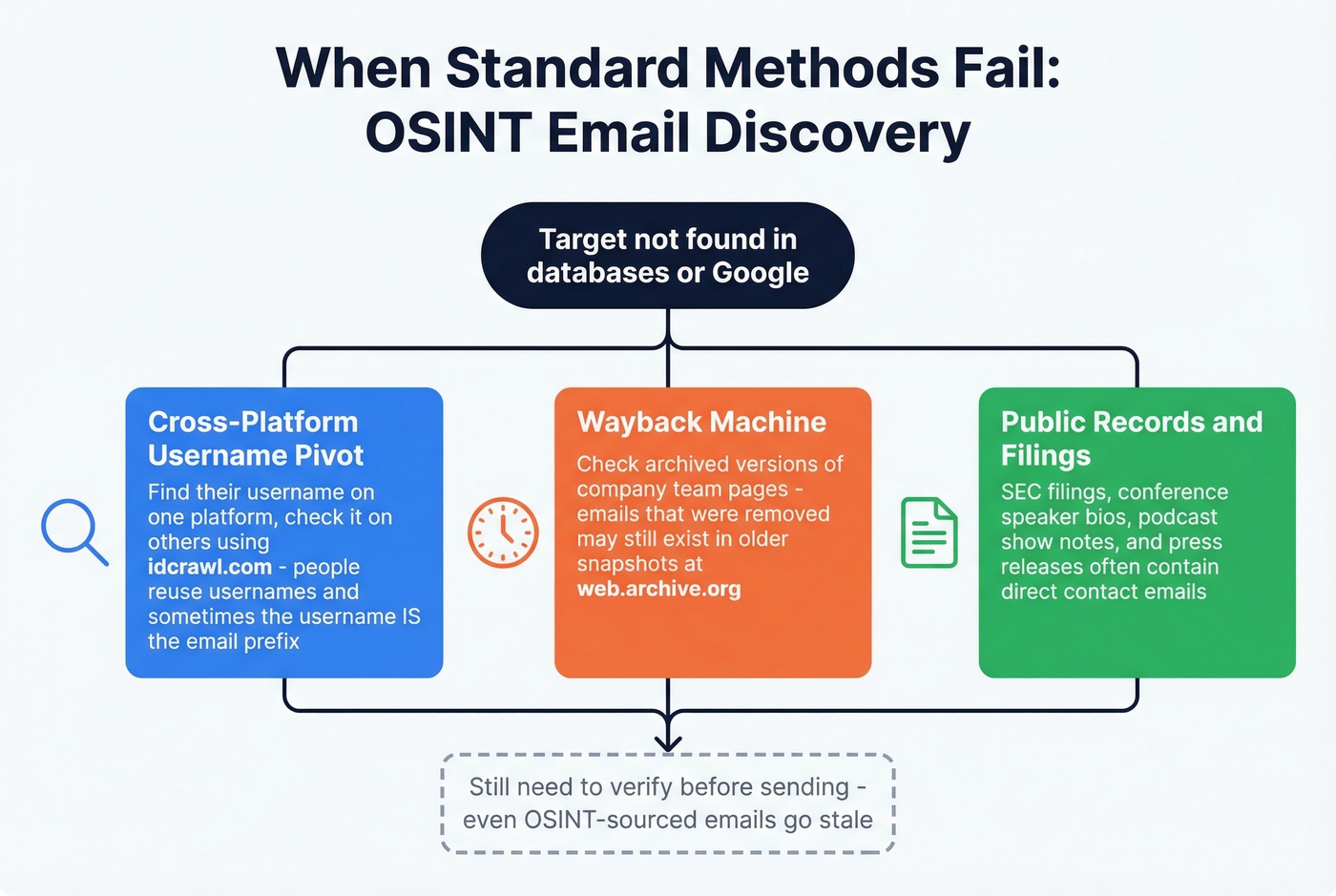
Cross-platform username pivots. If you know someone's username on one platform, check it across others using idcrawl.com. People reuse usernames, and sometimes that username is their email prefix.
Wayback Machine. Company websites change constantly. The team page that lists emails today gets replaced with a contact form tomorrow. Check web.archive.org for archived versions of team and contact pages - you'll often find emails that have since been scrubbed from the live site.
Gmail internal search. If you've ever exchanged emails with anyone at the target company, search your own inbox for @company.com. Past introductions, newsletters, and receipts surface real email addresses you've already interacted with.
Cached pages. Google cache:company.com/team to see the most recent cached version, which sometimes includes contact info that's been removed from the live page.
These techniques come from the OSINT community - r/OSINT is worth browsing if you want to go deeper. Keep everything framed around publicly available information. You're looking for professional contact details, not building a dossier. For tool options, see our list of OSINT email lookup tools.
6. Email Finder Accuracy: Real Numbers
Every tool claims 95%+ accuracy on their landing page. Independent benchmarks tell a different story.
A Dropcontact study tested 15 tools on 20,000 real contacts - then actually sent emails to measure hard bounces and wrong-domain matches. The results are sobering:
| Tool | Effective Enrichment | Hard Bounce | Overall Error |
|---|---|---|---|
| Dropcontact | 54.9% | 0.9% | 1.9% |
| Fullenrich | 48.3% | 3.6% | 15.3% |
| Enrow | 40.9% | 2.3% | 8.1% |
| Findymail | 39.9% | 1.1% | 6.2% |
| Icypeas | 31.6% | 1.0% | 6.8% |
A separate Anymail Finder benchmark tested 5,000 contacts and measured verified rates across eight tools. Worth noting: this benchmark tested tools on raw exports without standardized domain input, which penalizes tools designed for name+company workflows. The rankings shift depending on methodology, but the gap between claimed and actual accuracy is consistent:
| Tool | Verified Rate |
|---|---|
| Anymail Finder | 77.5% |
| Findymail | 75.1% |
| GetProspect | 61.9% |
| Skrapp | 42.8% |
| Hunter | 37.6% |
| VoilaNorbert | 36.0% |
| Snov.io | 20.1% |
| Prospeo | 16.9% |

Both benchmarks are vendor-funded - Dropcontact and Anymail Finder each tested their own tools. The rankings aren't gospel, but the gap between claimed and actual accuracy is real across the board. No matter which tool you pick, verify independently before sending. If you’re shopping specifically for verification, start with our ranking of the best email verification tools.
Let's be honest about what these numbers mean in practice. If your average deal size is under five figures, you probably don't need the most expensive tool in the category. What you do need is one that doesn't lie about its accuracy. A $39/mo tool with honest 60% accuracy plus a verification step will outperform a $200/mo tool that claims 95% but actually delivers 70%.
7. Verify Before You Send
Finding an email is half the job. Verifying it is the half that protects your domain.
A list you verified six months ago is probably 25-30% bad by now. People change jobs, companies get acquired, mail servers get reconfigured. Email decay is constant, and it doesn't care about your campaign timeline.
Bounce-rate thresholds that matter:
- Under 2% - you're safe
- Over 5% - email providers start throttling your sends
- Around 10% - you're basically blacklisted
Proper verification checks five things. MX record validity confirms the domain can receive mail. SMTP validation confirms the specific mailbox exists. Catch-all detection flags domains that accept everything, making verification unreliable. Spam-trap identification catches recycled addresses that ISPs use to flag bulk senders. And honeypot filtering removes addresses planted specifically to catch scrapers - hitting one of these is an instant reputation killer that can take weeks to recover from. If you want the full SOP, use our email verification process.
The minimum cadence: verify when you first find the email, verify again before each campaign, and run a monthly CRM sweep. Quarterly is the absolute floor. Anything less and you're gambling with your sender reputation.
Legal Reality Check
Finding someone's email is legal. Adding them to a commercial email list without a lawful basis is where you get into trouble.
Two frameworks matter for most B2B teams. GDPR covers anyone in the EU - fines run up to EUR 20M or 4% of annual global turnover, whichever is higher. CAN-SPAM covers US recipients with penalties up to $46,517 per email.
The practical version: if you're sending cold B2B email, include a clear opt-out mechanism, honor unsubscribe requests promptly, don't use deceptive subject lines, and have a legitimate business reason for reaching out. "Legitimate interest" under GDPR gives B2B outreach more room than most people think - but it doesn't mean you can blast purchased lists with no targeting.
FAQ
What's the most common email format at large companies?
first.last@company.com dominates above 1,000 employees, accounting for 48-56% of companies in that range. Below 50 employees, firstname@ is most common at 42-71%. The crossover happens around 51-200 employees, where flast@ takes the lead.
How many email finder tools do I actually need?
One good tool plus a verification step covers most teams. Stacking ten tools optimizes for affiliate commissions, not your workflow. Pick one with high accuracy, verify everything before it hits a sequence, and move on.
Do free email finders actually work?
For one to five lookups, absolutely. Most tools offer free tiers with 25-75 emails per month. For campaigns over 100 contacts, paid plans save hours and protect your domain. The math on a bounced sequence is always worse than the cost of a paid plan.
What's a catch-all domain and why does it matter?
A catch-all domain accepts email sent to any address at that domain, even completely fake ones. Tools that can't detect catch-all domains will mark undeliverable addresses as "found" - and you'll pay for bounces. Look for tools with explicit catch-all handling in their verification pipeline.
Can I find someone's personal email address?
These methods focus on professional business emails. Personal email lookup raises serious privacy concerns and often violates platform terms of service. For B2B outreach, stick to work addresses - they're what recipients expect to receive business communication on, and they're what the tools above are designed to find.