

How to Write Business Emails That Actually Get Read
Nobody teaches you how to write business emails. Not in college, not during onboarding, not ever. Yet every colleague, client, and boss judges you by the ones you send. You don't need to master the art of professional writing - you need three rules, eight templates, and about ten minutes.
Why Your Emails Aren't Working
The average worker spends roughly 20 hours per week on digital communication tools. A huge chunk of that is email, and bad email costs real money. Ineffective communication drains up to $12,506 per employee per year.
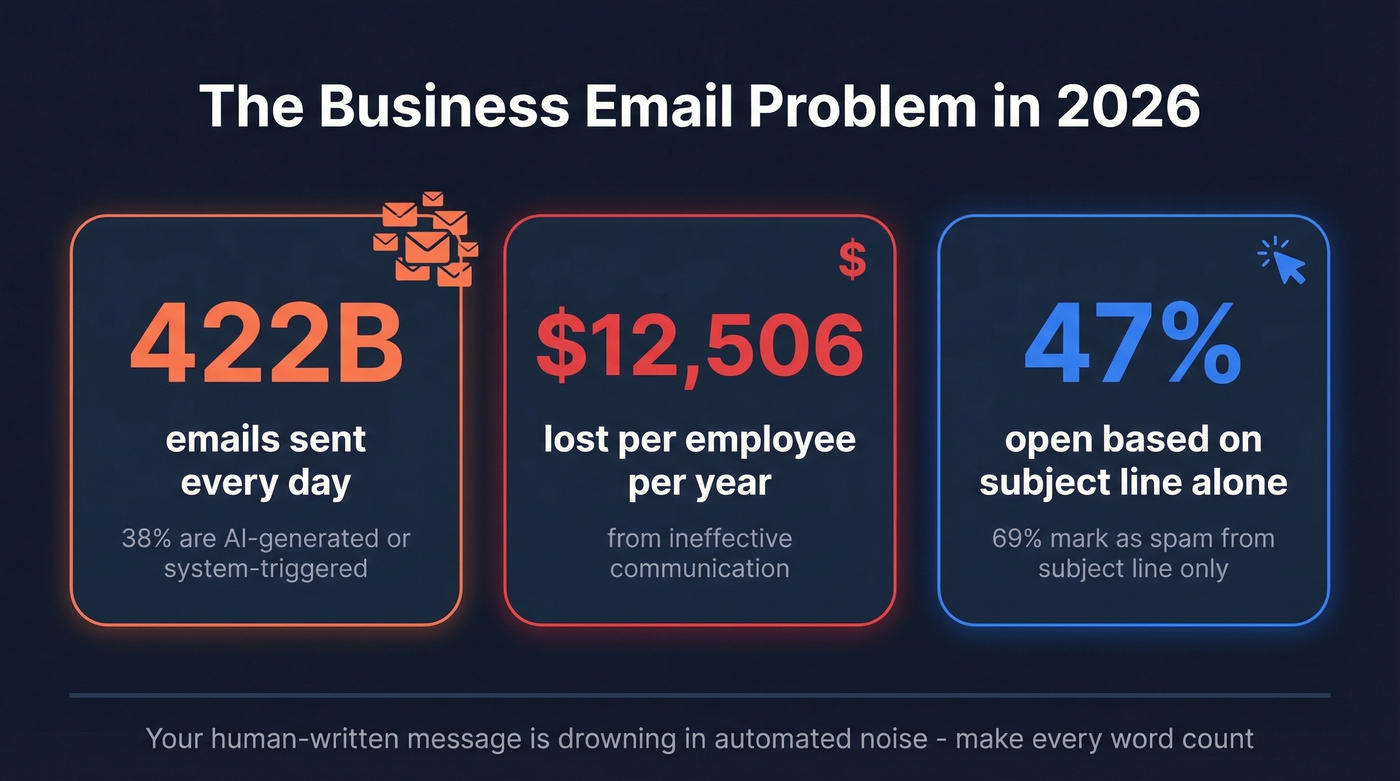
That's not an abstract number. That's salaries burned on emails that get ignored, misread, or buried.
The volume isn't slowing down, either. In 2026, roughly 422 billion emails are sent every single day, and 38% of that daily volume is AI-generated or system-triggered. Your human-written message is drowning in automated noise. If you don't earn attention in the subject line, the body doesn't matter. (If you want more swipeable ideas, start with these subject line examples.)
The anxiety is real, too. Reddit threads on business email writing are full of people describing the experience as a "brain malfunctions" moment - smart people who can write essays but freeze when they need to email a VP. Others admit they "reread it a million times" before hitting send. That overthinking is the real productivity killer, and templates are the cure.
Three Rules That Fix 90% of Emails
Here's the thing: most email advice overcomplicates this. Three rules handle almost everything.
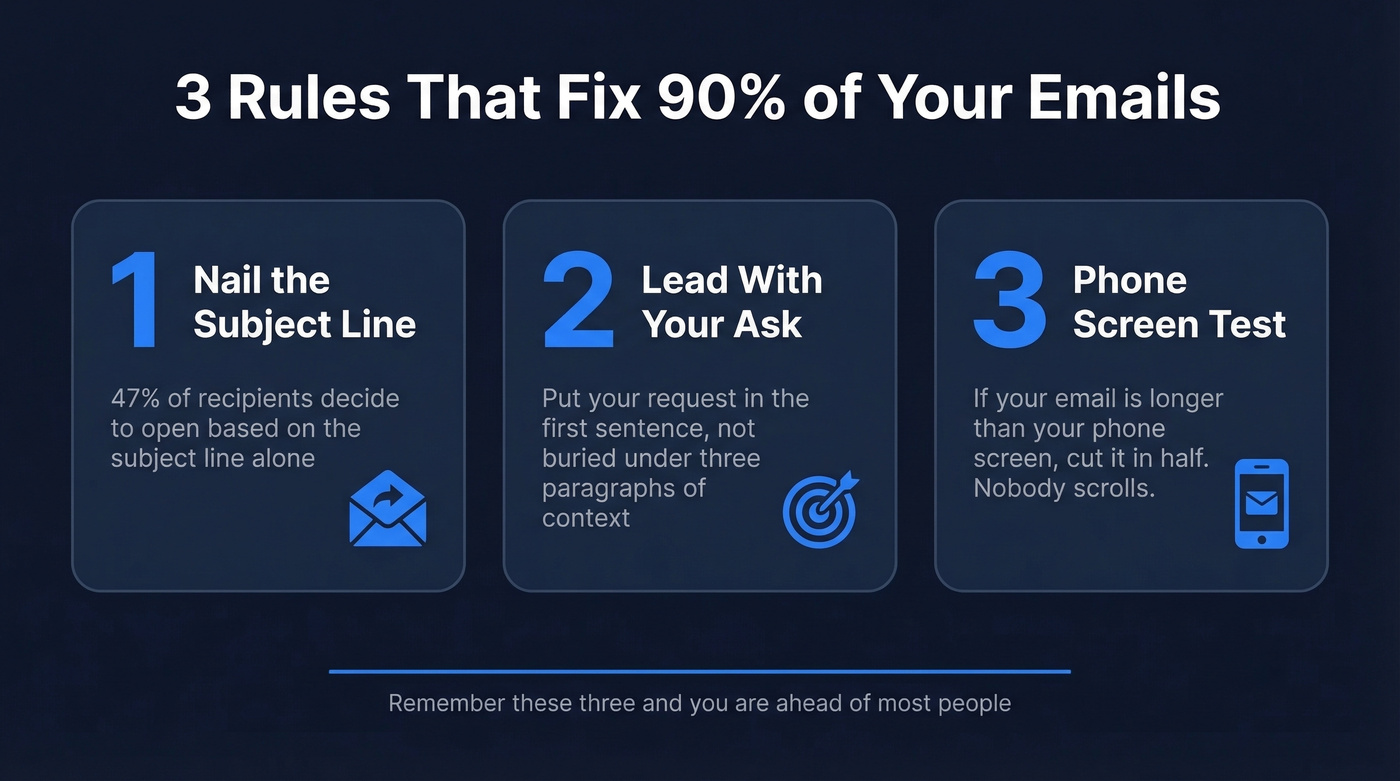
- Nail the subject line. 47% of recipients decide whether to open based on it alone. (More data-backed patterns: subject lines that get opened.)
- Lead with your ask in the first sentence. Don't bury it under three paragraphs of context. (If you need help making the ask obvious, use a clear email call to action.)
- If your email is longer than your phone screen, cut it in half. Nobody scrolls.
The rest of this guide gives you templates, data, and frameworks for every scenario. But if you only remember those three things, you're already ahead of most people.
Five Parts of Every Professional Email
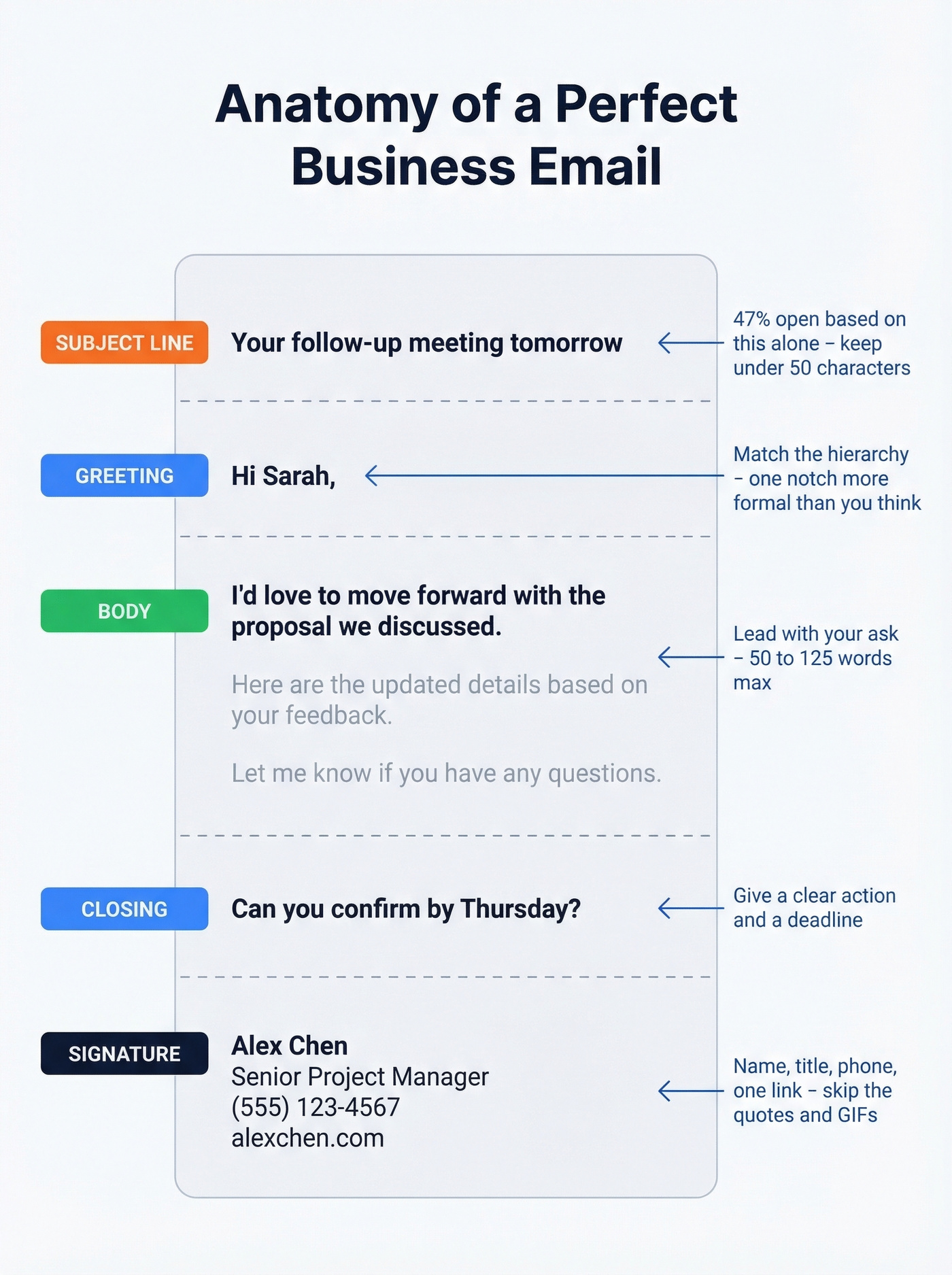
Every effective business email has the same five components. We've broken down what makes each one work - and where most people trip up.
Subject Line
This is the most underinvested six words in business communication. 47% of recipients open based on the subject line alone. Even scarier: 69% mark emails as spam based on nothing but the subject line.
Desktop open rates tend to be highest at 61-70 characters. But mobile screens often cut off beyond ~40 characters. The safe rule: keep it under 50. (If you're testing variations, a subject line tester helps.)
Criminally Prolific's template library tested this directly: the subject line "Your follow-up meeting tomorrow" pulled a 67% open rate. "Meeting tomorrow" - same email, same body - hit 23%. A 44-point swing from four extra words. Subject lines deserve disproportionate attention. Everything else is irrelevant until you nail those few words.
Greeting
Match the recipient's position in the hierarchy. For peers and people you've emailed before, "Hi [Name]" works perfectly. For first contact with executives or external stakeholders, "Dear [Name]" signals respect without being stuffy.
The r/LifeProTips consensus is practical: informality is fine with peers, but dial it up one notch for anyone above you. When in doubt, start slightly more formal. You can always relax in the reply chain.
Body
Lead with your thesis. State what you need, then justify it. Never put three paragraphs of background before your actual request - that's how emails get skimmed and ignored.
The University of Waterloo lays out two common approaches: direct structure (main point first, then context, then closing) and indirect structure (context first, then the ask). Default to direct. It respects the reader's time. The phone-screen test is your editing tool: open your draft on your phone. If you have to scroll, you've written too much. Aim for 50-125 words. (For deeper tactics, see emails that get responses.)
Closing
Your closing signals the next step and sets the tone. "Let me know if you have questions" is fine but passive. "Can you confirm by Thursday?" is better - it gives a clear action and a deadline.
Pick a sign-off and be consistent. "Best," for standard emails. "Thanks," when you're asking for something. "Best regards," for formal contexts. Nobody's judging your sign-off as long as it matches the email's tone.
Signature
Keep it clean: name, title, phone number, and one relevant link like your company site or calendar booking page. Skip the inspirational quotes, animated GIFs, and five social media icons.
Don't send business emails from a personal Gmail address. john.smith@yourcompany.com signals legitimacy. john123@gmail.com signals "I might be a spam bot." If you're a freelancer without a company domain, get one. It costs $6-$15/month and changes how people perceive your emails. (If you're sending at scale, protect deliverability with an email deliverability guide.)
Tone Calibration Guide
Tone is where most email anxiety lives. You can't hear someone's voice in an email, so every word carries extra weight. A sentence that sounds perfectly normal out loud - "That's not what I asked for" - reads as aggressive in writing.
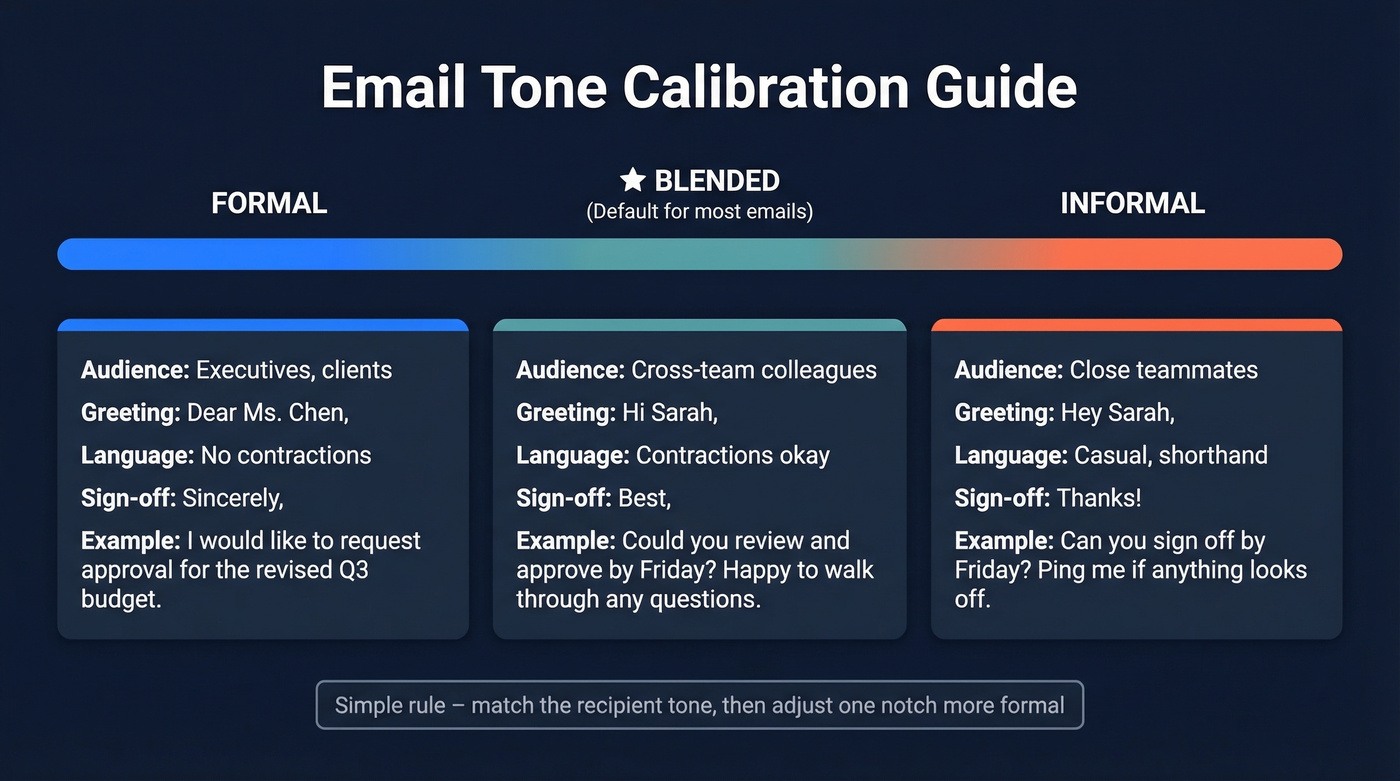
The GrammarBook framework breaks tone into dimensions:
| Dimension | Formal | Blended | Informal |
|---|---|---|---|
| Audience | Executives, clients | Cross-team colleagues | Close teammates |
| Language | No contractions | Contractions okay | Casual, shorthand |
| Greeting | "Dear Ms. Chen," | "Hi Sarah," | "Hey Sarah," |
| Sign-off | "Sincerely," | "Best," | "Thanks!" |
| Example | "I'd like to request..." | "Could we schedule..." | "Can we grab 15 min?" |
The practical default for most professional correspondence is blended. It's professional without being stiff, warm without being sloppy.
The simplest calibration rule: match the recipient's last email tone, then adjust one notch more formal. If they wrote "Hey, quick question" - reply with "Hi [Name]," and keep it conversational. If they wrote "Dear Mr. Johnson," don't reply with "Yo."
Let's see the same message at three levels:
Formal: "Dear Mr. Patel, I'm writing to request approval for the revised Q3 budget. Please find the updated figures attached. I'd appreciate your review by end of week."
Blended: "Hi Raj, Attached is the revised Q3 budget. Could you review and approve by Friday? Happy to walk through any questions."
Informal: "Hey Raj - updated budget attached. Can you sign off by Friday? Ping me if anything looks off."
All three are professional. The right one depends on your relationship with Raj.

You just learned how to write emails that get read. But even the best-written email is worthless if it lands in the wrong inbox - or bounces entirely. Prospeo gives you 98% verified email addresses for 300M+ professionals, so your carefully crafted message actually reaches the person you wrote it for.
Stop perfecting emails that bounce. Start sending to verified addresses.
Eight Templates You Can Copy Now
You don't need to master email writing. You need a template for each situation and the confidence to hit send. We've used variations of all eight of these in our own outreach, and they cover about 90% of workplace scenarios. (If you're doing sales outreach, these sales follow-up templates pair well with the sequences below.)
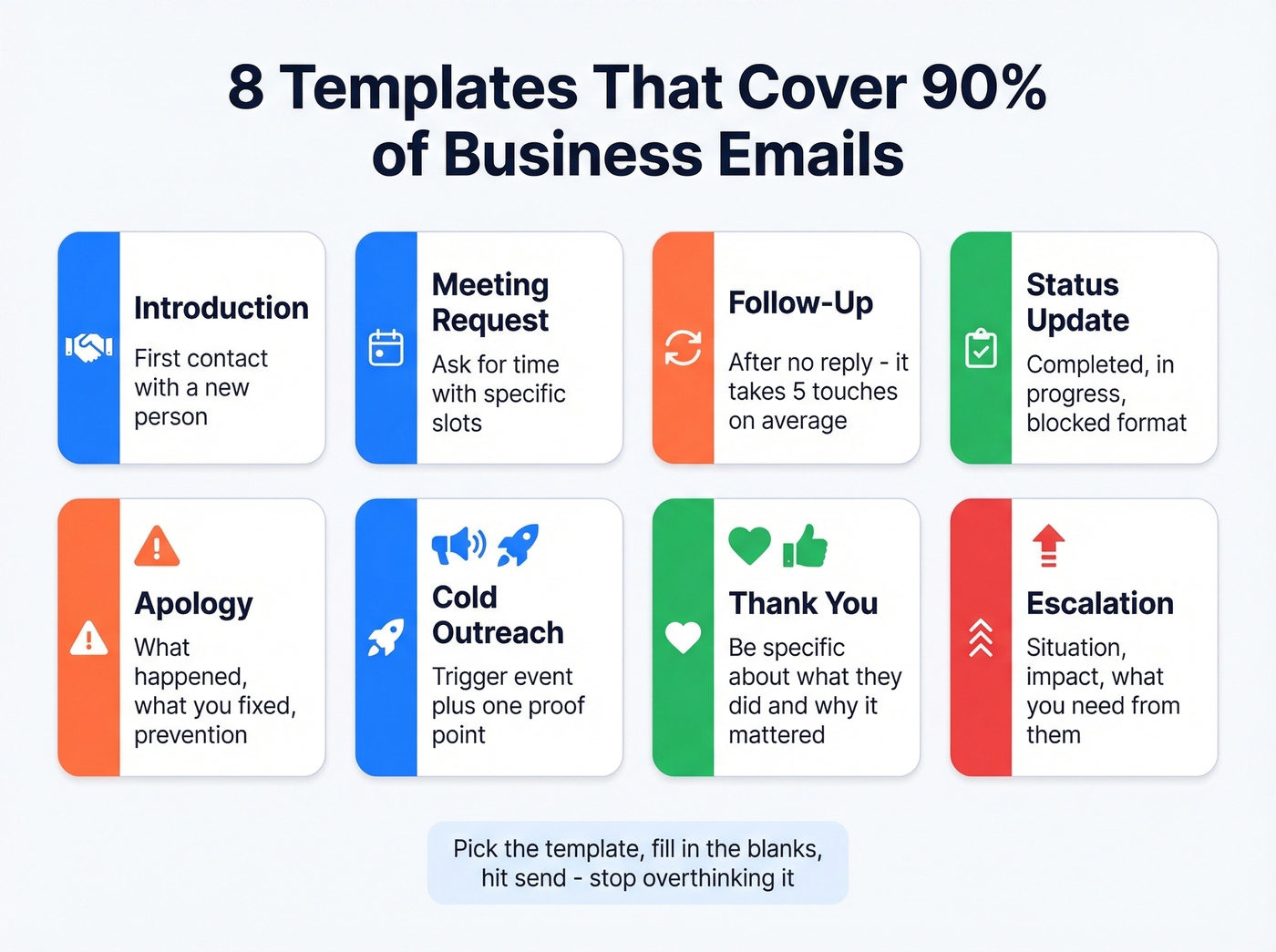
Introduction / First Contact
Knowing how to start business mail with a new contact is half the battle. Lead with who you are, what you do, and one clear question.
Subject: Quick intro - [Your Name] at [Company]
Hi [Name], I'm [Your Name], [title] at [Company]. We work with teams like yours on [specific problem]. I'd love to learn how you're currently handling [relevant challenge] - would a 15-minute call next week work?
Best, [Your Name]
Why this works: It's specific about the value, asks one clear question, and respects the reader's time by staying under 50 words.
Meeting Request
Subject: 15 min this week? [Topic]
Hi [Name], I'd like to set up a quick call to discuss [topic]. I'm free [two specific time slots]. Would either work for you? If not, happy to work around your schedule.
Thanks, [Your Name]
Follow-Up After No Reply
Subject: Following up - [original topic]
Hi [Name], Bumping this to the top of your inbox - I sent a note on [date] about [topic]. Is this still relevant for your team?
Best, [Your Name]
Don't feel guilty about following up. Outreach's data shows it takes an average of 5 touches to engage a prospect, and roughly 9 for executives. Sending one email and waiting is the real mistake. (More timing guidance: when should i follow up on an email.)
Status Update
Subject: [Project name] update - week of [date]
Hi team, Quick update on [project]:
- Completed: [item]
- In progress: [item] - on track for [date]
- Blocked: [item] - need [specific input] from [person]
Let me know if questions. [Your Name]
Bullet points let the reader scan in five seconds. The "Blocked" line names a person and an action - no ambiguity about who needs to do what.
Apology / Mistake Acknowledgment
This one trips people up because the instinct is to over-explain. Don't. The recipient wants to know three things: what happened, what you've done about it, and that it won't happen again.
Subject: My mistake on [specific thing] - here's the fix
Hi [Name], I made an error on [specific thing]. Here's what happened: [one sentence]. Here's how I've fixed it: [one sentence]. I've [taken step to prevent recurrence]. Apologies for the inconvenience.
[Your Name]
Cold Outreach
Subject: [Specific result] for [their company]
Hi [Name], [One sentence about their company or a trigger event]. At [Your Company], we help [type of team] [achieve specific outcome]. [One proof point - a number, a client result, a relevant stat]. Worth a 15-minute conversation?
Best, [Your Name]
Cold outreach is a volume game with a quality filter. The 5-touch benchmark means your first email is just the opening move. Plan the full sequence before you send email one. And if you're running outbound at scale, skip this template section entirely and invest in a dedicated cold email marketing tool - generic templates won't cut it past 50 sends a week.
Thank You
Subject: Thanks for [specific thing]
Hi [Name], Thanks for [specific thing they did]. It made a real difference in [specific outcome]. Looking forward to [next interaction].
Best, [Your Name]
Escalation
Subject: Need your help - [issue], [project name]
Hi [Name], I'm escalating [issue] because [one sentence on why it needs attention at this level].
Situation: [2-3 sentences max] What I need: [specific ask with deadline]
Happy to provide more context on a call if helpful.
Regards, [Your Name]
The bold labels let a busy executive scan the ask in three seconds. The different sign-off ("Regards") signals this is a more serious email - a subtle tonal shift that matches the escalation context.
Common Mistakes to Avoid
Emotion Dumping
One Reddit user described writing a workplace escalation email that was "10 paragraphs, 7-12 sentences long each paragraph." That's not an email. That's a therapy session with a CC line.
If you're angry, write the long version. Then delete it. Rewrite in 3-4 sentences: what happened, what you need, what the deadline is.
Vague Subject Lines
"Quick question" and "Following up" tell the recipient nothing. Remember the A/B test: specific subject lines outperform vague ones by 44 percentage points. Spend 30 seconds making your subject line descriptive. It's the highest-ROI edit you'll make.
Reply-All Abuse and CC Confusion
CC means visibility without action. If you CC someone and expect a response, say so explicitly in the body. BCC protects privacy in large-group sends but carries a trust risk if used to hide communication - use it for mass announcements, not for secretly looping in your boss.
And "Thanks!" to a 15-person distribution list is how you become the person everyone silently resents.
Sending Without a Final Check
Before you hit send:
- Subject line present and specific?
- Right recipient? (Autocomplete has ruined careers.)
- Attachments actually attached?
- Tone re-read - does anything sound harsher than intended?
- Mobile preview - does it fit one screen?
- Heavy images or GIF-laden signatures? Keep images under 150KB - bloated signatures can hurt deliverability. (If you're troubleshooting bounces, start with email bounce rate.)
This takes 20 seconds and prevents the "oh no" moment that takes 20 minutes to fix. Assume every email can be forwarded. Write accordingly.
When Email Is the Wrong Channel
63% of employees prefer email as their primary communication tool, making it the top choice by a wide margin. But preference doesn't mean it's always the right call.
| Channel | Best for |
|---|---|
| Formal requests, paper trails, async updates across time zones, confirmation emails summarizing verbal agreements | |
| Slack / Teams | Quick one-line questions, real-time coordination, informal check-ins |
| Call / Video | Sensitive conversations, complex topics that would take five email rounds, anything where tone matters more than documentation |
| In-person | Relationship-building, high-stakes negotiations, reading the room |
The Purdue business writing team puts it simply: before you write, ask whether email is the right channel. If the answer is "this would be faster as a call," make the call.
Look, most internal emails shouldn't be emails at all. If your company has Slack and you're emailing a teammate two desks away to ask a yes-or-no question, you're part of the 422-billion-emails-a-day problem. Save email for what it's actually good at: documentation, external communication, and anything that needs a paper trail.
One underused tactic we swear by: the confirmation email. After any important phone call or meeting, send a brief email summarizing what was agreed. "Per our conversation, we're moving forward with X by Friday." This turns a verbal agreement into a written record - and it's saved more projects than any project management tool.
AI Tools for Faster Drafting
Using AI to draft emails is common, practical, and nothing to be embarrassed about. Three tools are worth knowing. (If you're using AI for outreach, this guide to AI for sales emails goes deeper.)
ChatGPT (free / $20/mo Plus) is best for generating first drafts. Describe the situation, paste in context, and ask for a concise email. It's especially useful for cold outreach and tricky tone situations where you're not sure how formal to go.
Grammarly (free + paid plans) is best for polish. It catches tone issues, grammar mistakes, and wordiness in real time. The free tier handles basics; paid plans add tone detection and rewrite suggestions.
Lavender (around $29-$50/user/month) is best for sales email coaching. It scores your emails before you send them and suggests improvements based on what actually gets replies. For teams doing outbound at scale, it pays for itself quickly.
The caveat with all AI tools: they can't read your relationship with the recipient. A draft that's technically perfect could be tonally wrong for someone you've worked with for three years. Always review before sending.
Writing Is Only Half the Battle
If you're writing cold outreach or sales emails, the quality of your writing only matters if the email lands. Around 30% of B2B contact data decays every year. That means a third of the email addresses in your CRM are going stale while you're perfecting your subject lines.
The 5-touch engagement benchmark assumes every touch actually reaches someone. When emails bounce, you're not just wasting a send - you're damaging your domain reputation, which tanks deliverability for every future email you send. We've seen teams lose months of sender reputation over a single bad list. (If you're trying to recover, start with how to improve sender reputation.)
Prospeo handles this before you hit send. It verifies emails through a 5-step process - catch-all handling, spam-trap removal, honeypot filtering - across 300M+ professional profiles at 98% accuracy. Data refreshes every 7 days, compared to the 6-week industry average. The free tier gives you 75 verified emails per month, no credit card required, which is enough to test the workflow before committing.
You can write the perfect cold email, but it's worthless if it bounces. Verify first, write second.

Great business emails need two things: sharp copy and the right recipient. You've got the templates now. Prospeo's Chrome extension - used by 40,000+ professionals - finds verified emails and direct dials from any LinkedIn profile or company website in one click. At $0.01 per email, bad data is no longer an excuse.
Find any decision-maker's verified email in seconds, not hours.
FAQ
How long should a business email be?
50-125 words - short enough to read on a phone screen without scrolling. If you need more space, use bullet points or attach a separate document. The phone-screen test is the fastest way to check.
Is using AI for business emails okay?
Yes. ChatGPT and Grammarly are widely used for drafting and tone-checking professional messages. Review every AI draft for tone and accuracy before sending - AI can't gauge relationship dynamics or office politics.
What's the best subject line length?
Under 50 characters or 6-10 words. Research shows 61-70 characters get the highest desktop open rates, but mobile screens cut off beyond ~40 characters. Front-load the most important words.
How do I prevent outreach emails from bouncing?
Verify every address before sending. Prospeo checks emails in real time with 98% accuracy through a 5-step process - catch-all handling, spam-trap removal, and honeypot filtering - so your message reaches a real inbox instead of damaging your sender reputation.
Should I use "Dear" or "Hi"?
"Hi [Name]" works for most contexts and is the safe default. Use "Dear" for first contact with executives, external clients, or anyone you haven't emailed before. When in doubt, go one notch more formal than you think necessary.