

Lead Marketing Automation: The 2026 Playbook for Scoring, Workflows & Tools
Your team runs a webinar. 400 people register, 180 show up. Marketing dumps all 400 into a drip sequence, sales gets a spreadsheet, and three weeks later nobody can tell you which of those leads actually bought. That's not a lead problem - it's a lead marketing automation problem. 96% of your website visitors aren't ready to buy, and the marketing automation market sits at roughly $53B in 2026, projected to hit $81B by 2030, because every team is trying to figure out what to do with the other 96%.
Here's the thing most vendors won't tell you: the tool matters less than the system. A $49/mo ActiveCampaign setup with clean data and tight scoring will outperform a $3,960/mo HubSpot instance running on garbage contacts. Every time. Let's build the system that actually works.
What You Need (Quick Version)
Three components, no more - and the goal is reducing task sprawl, not adding to it.
First, a CRM with built-in automation like ActiveCampaign or HubSpot, depending on budget. Second, a verified data source so your workflows aren't mailing dead addresses (see email verification). Third, an orchestration layer like Zapier (free tier; from $19.99/mo billed annually) or Make (free tier) to connect everything.
Set up lead scoring with 5-7 criteria. Build a 4-email nurture sequence. Route hot leads to sales within 5 minutes. Everything below shows you exactly how.
What Is Lead Marketing Automation?
Lead marketing automation is the system that captures, scores, nurtures, and routes leads without a human touching every step. Think of it as three moving parts: the offer (what you're giving in exchange for contact info), the channel (where you're reaching people), and the conversion path (how that lead data flows into your tools and eventually to a salesperson).
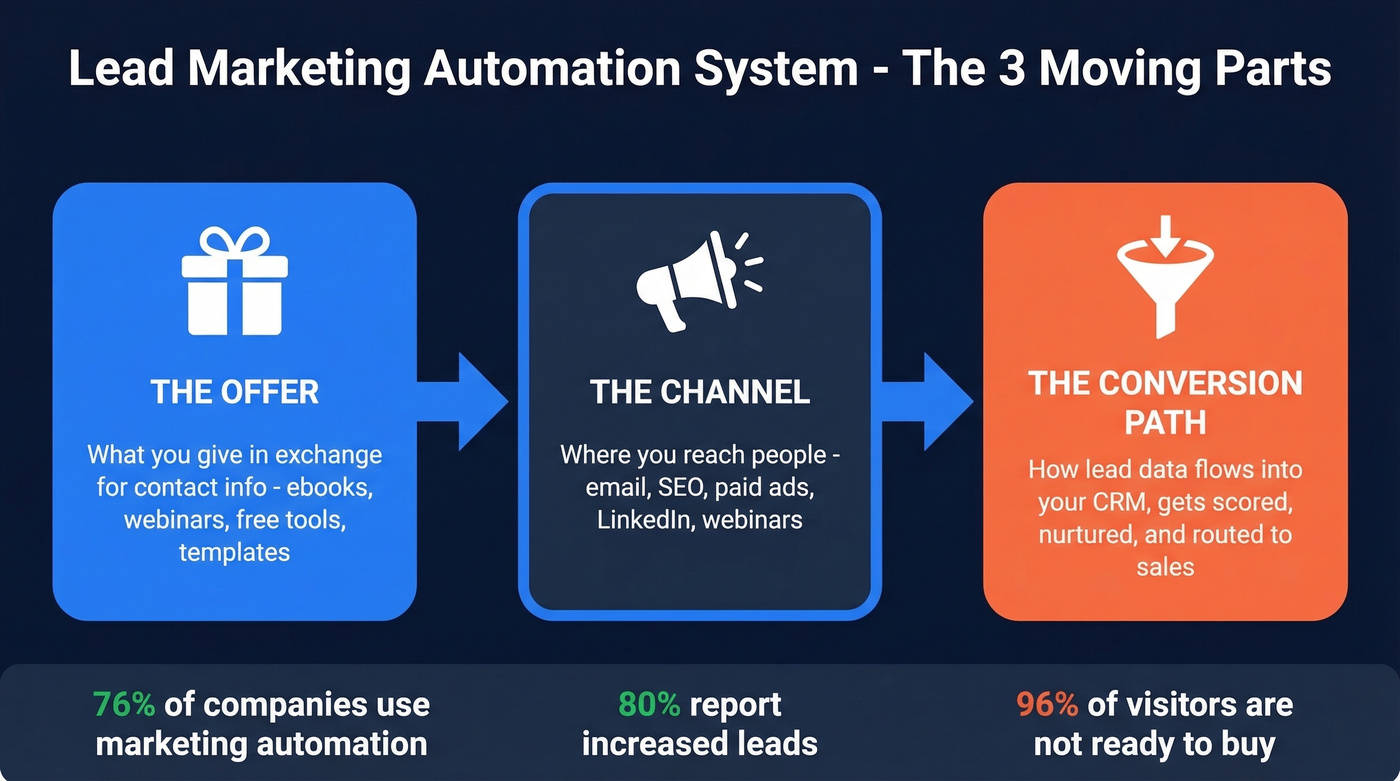
About 76% of companies use some form of marketing automation now, and 80% report increased leads after implementing it. Those numbers sound impressive until you realize most of those companies are still doing it badly - blasting the same emails to every contact and calling it "automation." The difference between a system that works and one that just sends emails is scoring, segmentation, and data quality.
How to Build Your Automation System
Most guides give you 20 steps. You need six.
Define your personas. Not a 12-page document - just nail down 2-3 buyer profiles with job titles, company sizes, and the problems they're searching for. This shapes every automation rule downstream (use an ideal customer profile template to keep it tight).
Set up capture points. Forms, landing pages, chatbots. Keep forms to 3 fields max - 3-field forms convert 27% better than 5-field forms. You can enrich the rest later (more on data enrichment services).
Build your scoring model. We'll cover this in detail below. Start with 5-7 criteria and a threshold that flags your top 20% of leads.
Create nurture sequences. A 4-email drip that moves leads from "just browsing" to "ready to talk." Timing matters more than copy - more on that shortly (use these email subject line examples if you need quick wins).
Set routing rules. Decide your SQL criteria upfront. Hot leads go to sales instantly. Responding within 5 minutes makes you 100X more likely to book a meeting than waiting 30 minutes. Everything else stays in nurture.
Measure and iterate. Track CPL, lead-to-SQL rate, speed-to-lead, and pipeline created. 34.1% of businesses don't use any attribution model at all, which means they literally can't tell which automation is working. If you're not measuring, you're guessing (tie this into your funnel metrics).
Lead Scoring Model (Copy This)
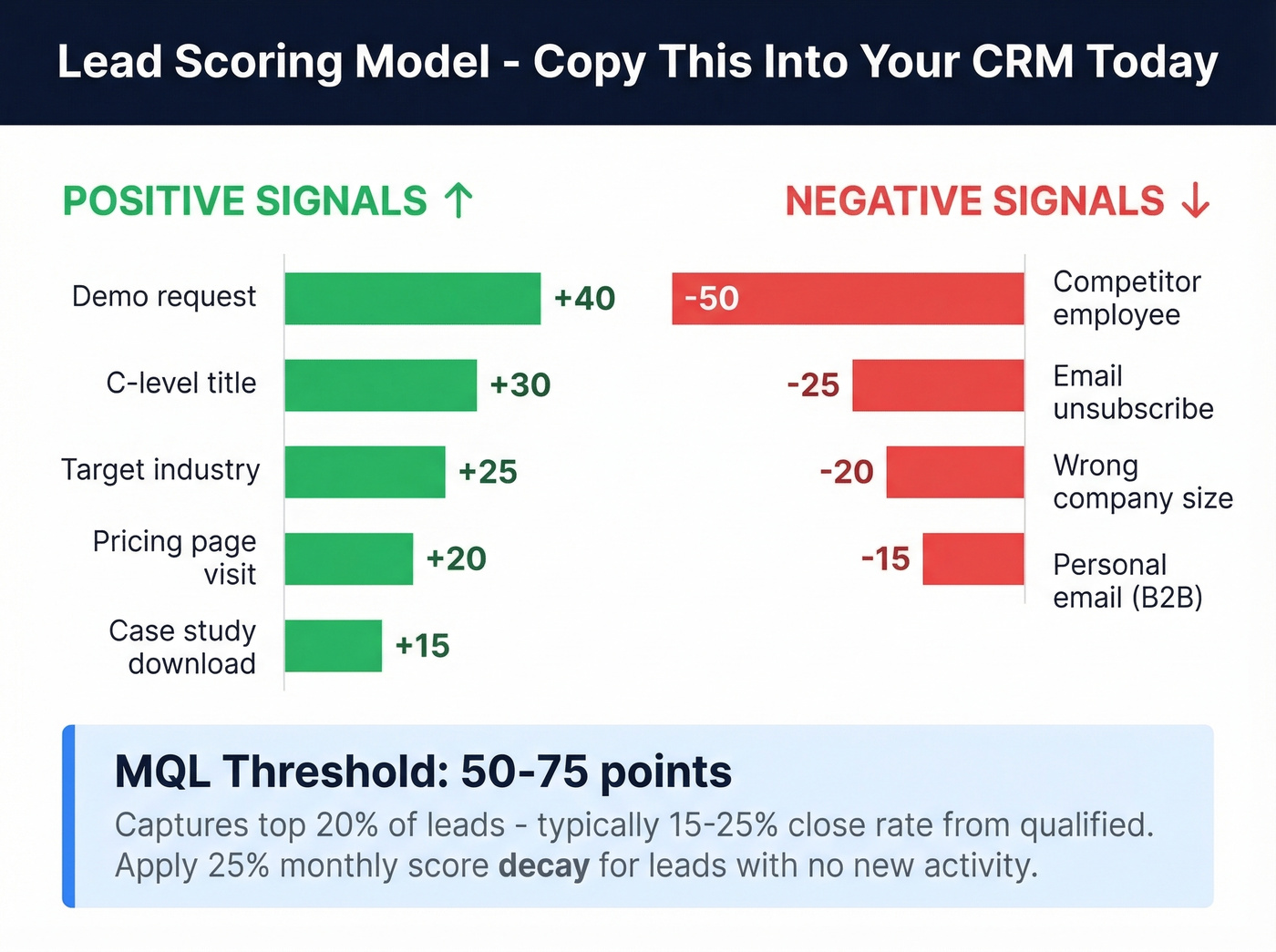
Most teams skip scoring because it feels complicated. It's not. Here's a starter model you can drop into HubSpot or ActiveCampaign today.
| Signal | Points |
|---|---|
| C-level title | +30 |
| Target industry | +25 |
| Demo request | +40 |
| Pricing page visit | +20 |
| Case study download | +15 |
| Personal email (B2B) | -15 |
| Competitor employee | -50 |
| Email unsubscribe | -25 |
| Wrong company size | -20 |
Set your MQL threshold at 50-75 points. That should capture roughly the top 20% of your leads, which typically convert at 15-25% from qualified to closed. Drowning in MQLs? Raise the threshold. Sales is starving? Lower it.
One rule most teams forget: score decay. A lead who visited your pricing page six months ago isn't the same as one who visited yesterday. Apply a 25% monthly decay to any lead without new activity - this keeps your pipeline honest and prevents sales from chasing ghosts.
HubSpot offers manual scoring on Professional plans and predictive scoring on Enterprise. ActiveCampaign handles scoring at lower price points. Either works. The model matters more than the tool.

Your scoring model is worthless if 15% of your emails bounce. Prospeo's 5-step verification delivers 98% email accuracy with a 7-day refresh cycle - so your nurture sequences actually reach real inboxes. At $0.01 per email, fixing your data costs less than one bounced campaign.
Stop automating garbage data. Start with contacts that convert.
Nurture Workflows That Convert
Your welcome email needs to land within 15 minutes of opt-in. That's the highest-engagement window, and most teams waste it by batching sends hourly or daily.
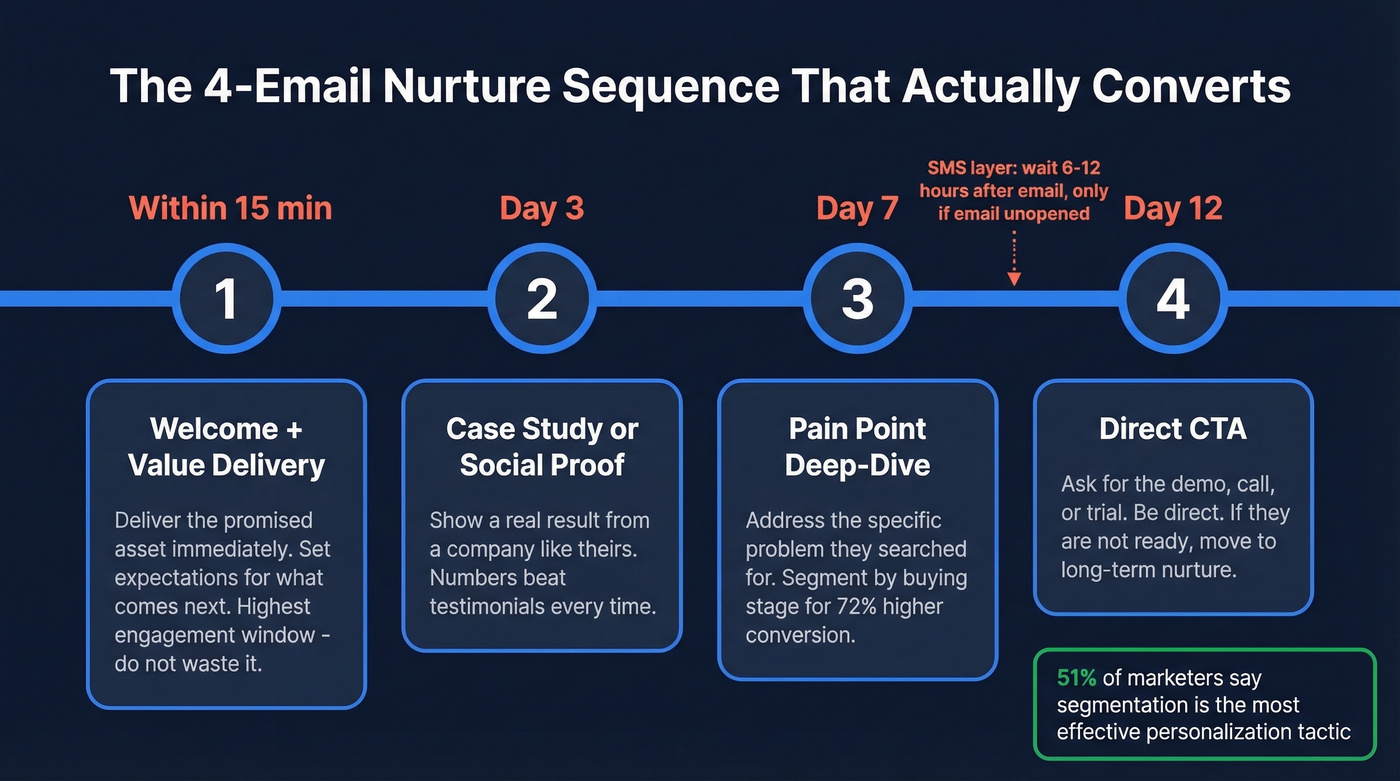
Here's the 4-email structure we've seen consistently perform:
- Welcome + value delivery - immediate, within 15 min
- Case study or social proof - Day 3
- Pain point deep-dive - Day 7
- Direct CTA (demo, call, trial) - Day 12
51% of email marketers say segmentation is the most effective personalization tactic, and the data backs them up. Targeting content by buying stage yields 72% higher conversion rates. A lead who downloaded a top-of-funnel ebook shouldn't get the same sequence as someone who requested pricing - that's where most "automation" falls apart (see intent based segmentation).
If you're layering in SMS, don't blast it simultaneously with email. Wait 6-12 hours, and only send SMS if the email wasn't opened.
For channel planning, here's how the numbers break down:
| Channel | Conversion Rate | CPL |
|---|---|---|
| 6.5% | $30-$45 | |
| Webinars | 11.2% | $60-$80 |
| SEO/Content | 1.8% | $30-$60 |
| Google Ads | 4.5% | $90-$150 |
| LinkedIn Ads | 3.2% | $120-$200 |
Webinars convert highest but cost more per lead. Email is the workhorse - low CPL, solid conversion, and it's the channel your automation platform is built around.
Data Quality Is Step Zero
Look, your workflows are only as good as your data. We've seen teams paying about $970/mo for HubSpot at ~10K contacts while 15% of their emails bounce. That's not an automation problem - it's a garbage-in, garbage-out problem, and every bounced email damages your sender reputation, which tanks deliverability for the emails that are valid (use an email deliverability guide to diagnose the root causes).
The alternative is what one Reddit user described as "blowing up operation cost with tools like Clay" - enrichment stacks that become uneconomical the moment you try to scale past a few hundred leads per week.
Automation Costs at Scale
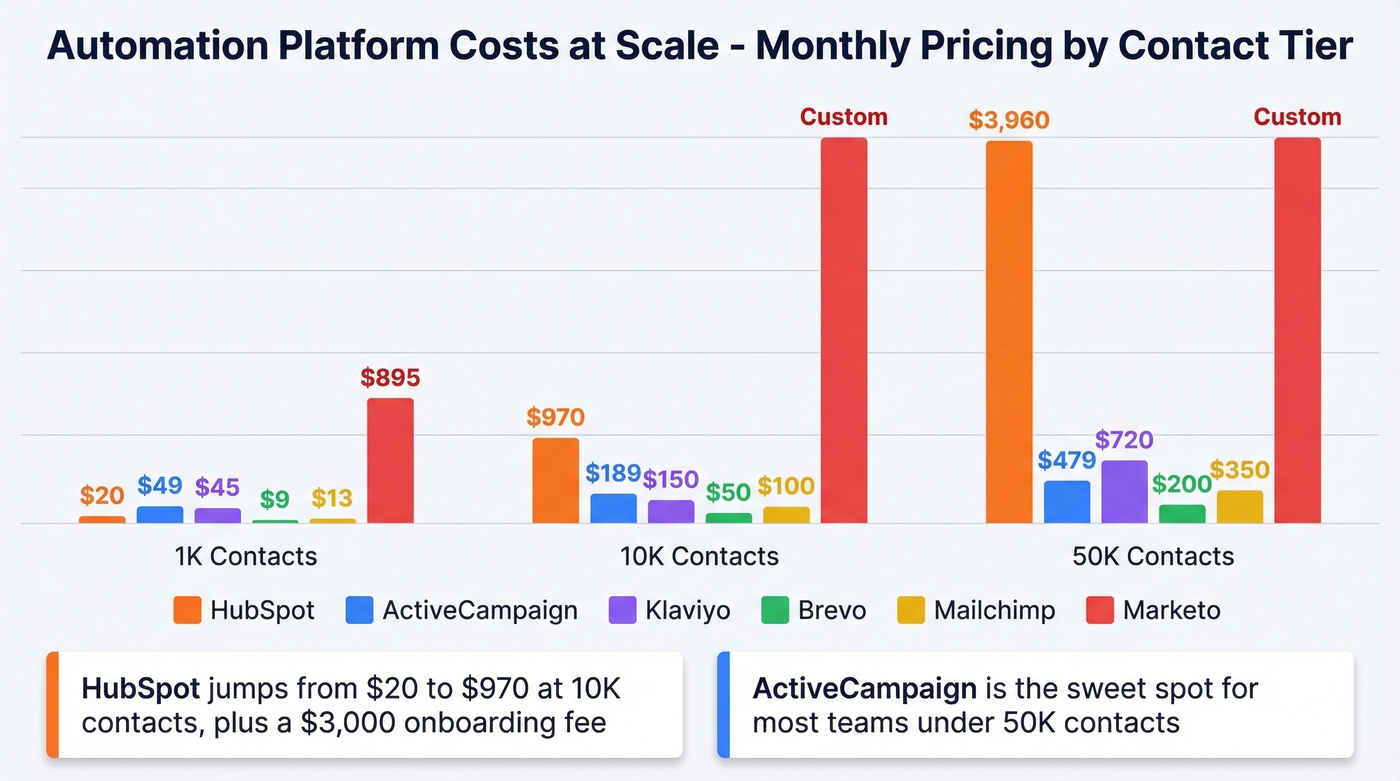
Automation pricing is contact-based, and it scales faster than most teams expect.
| Tool | 1K Contacts | 10K Contacts | 50K Contacts | Notes |
|---|---|---|---|---|
| HubSpot | $20/mo | $970/mo | $3,960/mo | $3K onboarding fee |
| ActiveCampaign | $49/mo | $189/mo | $479/mo | Best mid-range value |
| Klaviyo | $45/mo | $150/mo | $720/mo | E-commerce focus |
| Brevo | $9/mo | ~$50/mo | ~$200/mo | Budget-friendly |
| Mailchimp | $13/mo | ~$100/mo | ~$350/mo | Simpler automation |
| Marketo | ~$895/mo+ | Custom | Custom | $10K-$50K setup |
HubSpot's pricing curve is brutal. $20/mo at 1K contacts sounds great until you hit 10K and you're suddenly at nearly $1,000/mo, plus a $3,000 onboarding fee. ActiveCampaign is the sweet spot for most teams under 50K contacts. Marketo is enterprise-only - if you're reading this article, you probably don't need it.
Your automation platform is only half the equation. Verification and enrichment at ~$0.01/email is a rounding error compared to the cost of wrecked deliverability, and it's the layer most teams skip until it's too late (benchmarks and fixes: email bounce rate).
Mistakes That Kill Your Workflows
Do this: Add UTM parameters only when none already exist. Check for existing parameters before appending.
Not that: Auto-append UTMs to every link. One team's automation overwrote existing UTM tags and pushed all revenue into the "(other)" bucket, breaking attribution for months.
Do this: Automate list syncing and the initial thank-you email after webinars. Write the real follow-up manually.
Not that: Fully automate post-webinar sequences. Attendees can smell a bot, and the conversion drop is real (use sales follow-up templates to keep it human).
Do this: Test your forms monthly. Click every button. Submit test leads. Verify they arrive in your CRM.
Not that: Assume forms work because they worked last quarter. Broken form fields cause silent lead loss - you won't know until pipeline dries up.
Do this: Set rate limits and cost caps on enrichment APIs before scaling.
Not that: Run 10,000 leads through an enrichment tool without checking per-lead costs. We've seen teams burn through $2,000 in a weekend on enrichment they didn't budget for.
You just built a scoring model and a 4-email nurture sequence. Now you need contacts worth scoring. Prospeo gives you 300M+ profiles with 30+ filters - buyer intent, technographics, job changes, funding - so every lead entering your automation is pre-qualified before it ever hits a workflow.
Fill your automation with leads that actually match your ICP.
FAQ
Lead Scoring vs. Lead Grading
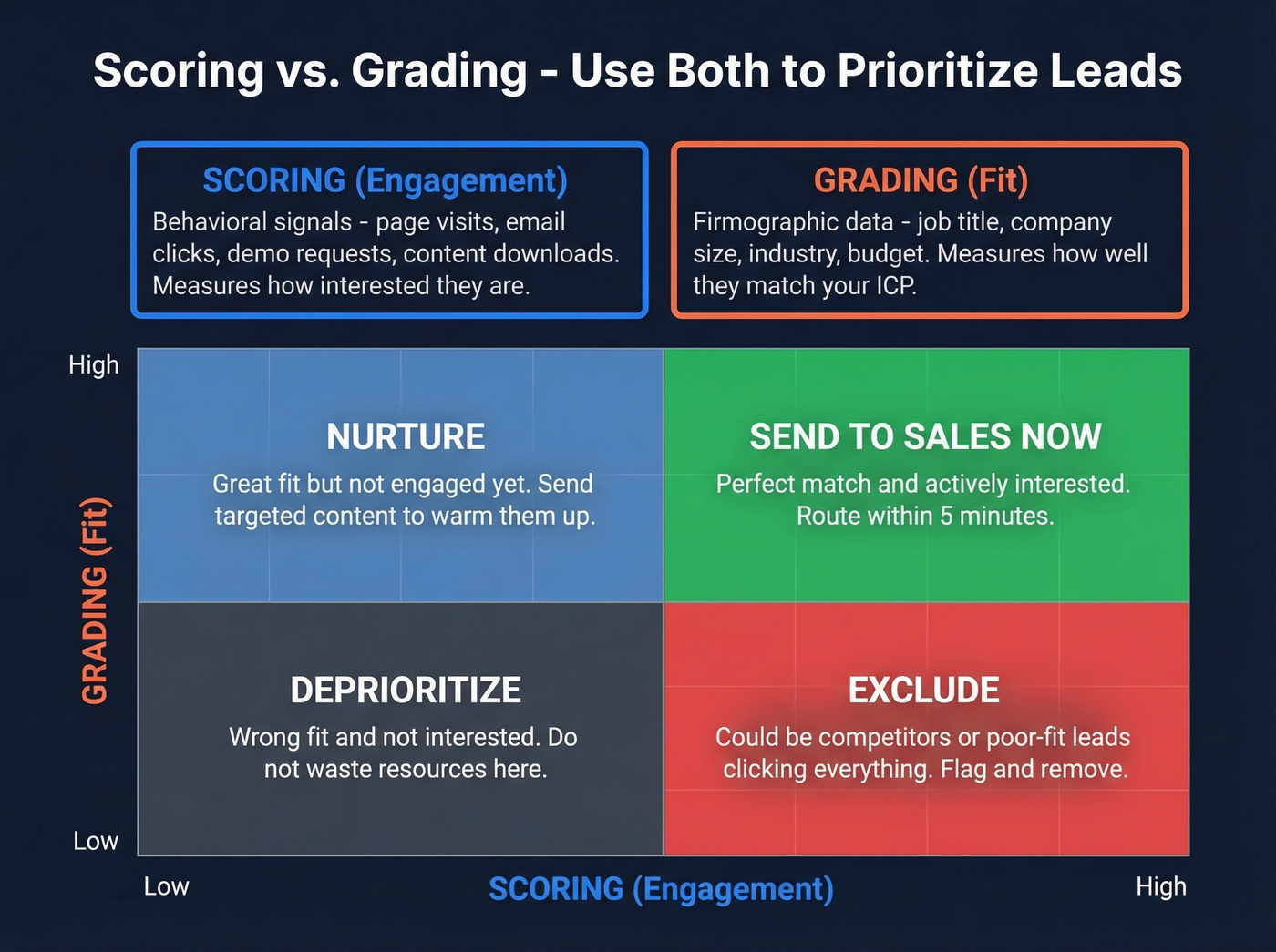
Scoring measures engagement - behavioral signals like page visits, email clicks, and demo requests. Grading measures fit - firmographic data like job title, company size, and industry. Use both together: a high-fit, low-engagement lead needs nurturing, while a high-engagement, poor-fit lead (like a competitor clicking everything) should be excluded entirely.
How Long Should a Nurture Sequence Be?
Start with 4-6 emails over 2-3 weeks. Fire the welcome email within 15 minutes of opt-in, then space subsequent sends 2-4 days apart. Track engagement drop-off - if opens crater after email 3, shorten the sequence. More emails don't mean more pipeline if nobody's reading them.
How Do I Keep Automation Data Clean?
Run your contact database through a verification tool before launching any automated workflow, then re-verify quarterly. A 7-day refresh cycle catches job changes and stale emails before they damage sender reputation. Apply 25% monthly score decay for inactive leads and remove hard bounces immediately.
What's the Best Free Tool for Automated Lead Generation?
For capture and nurturing, HubSpot's free CRM handles basic workflows and up to 1K contacts. For data quality - the layer most free stacks miss - Prospeo's free tier includes 75 verified emails plus 100 Chrome extension credits monthly, with 98% accuracy. Pair the two and you've got a functional lead marketing automation stack at zero cost.