

How to Filter Leads: The 2026 Playbook
79% of marketing leads never convert to sales. Not because they're bad leads - because nobody filtered them. They sit in a CRM, unscored, unrouted, and eventually forgotten. Meanwhile, 71% of B2B leads are never even contacted. B2B buyers now use 10 channels on average before purchasing, up from 5 in 2016. Without a leads filter system catching intent across those channels, you're guessing.
The lead generation software market hit $7.4B last year and is climbing toward $16.2B by 2034. Companies are spending more than ever to generate leads. But generating them isn't the bottleneck - sorting them is. A filtering system doesn't need to be complex. It needs to exist.
Here's the thing: a tool without a filtering methodology behind it is just expensive software. This guide gives you both the system and the stack to run it.
The Quick Version
Before you build anything elaborate, nail these five things:
- Fix your data quality first. Filtering garbage is pointless. If a big chunk of your emails bounce, your scoring model is ranking contacts that don't exist. Verify before you filter. (If you need a benchmark, start with email bounce rate.)
- Use the 3-pillar criteria taxonomy. Every filter maps to one of three categories: engagement signals, demographic fit, or company/ICP attributes - plus a fourth negative layer for disqualification. (If you want a template, use an Ideal Customer Profile.)
- Copy the scoring model below into your CRM today. Don't overthink it. A simple point system you actually use beats a perfect model you never build. (More detail: lead scoring.)
- Automate routing with the workflow blueprint. Manual lead routing doesn't scale once volume ramps. (Related: lead status.)
- Recalibrate quarterly against closed-won data. Your scoring thresholds drift. What counted as "hot" six months ago is probably lukewarm now. (Track it like a system: funnel metrics.)
Filtering vs. Scoring vs. Qualification
These three terms get used interchangeably, and that's where teams get confused. They're sequential steps, not synonyms - and 67% of lost sales happen because reps don't qualify properly.
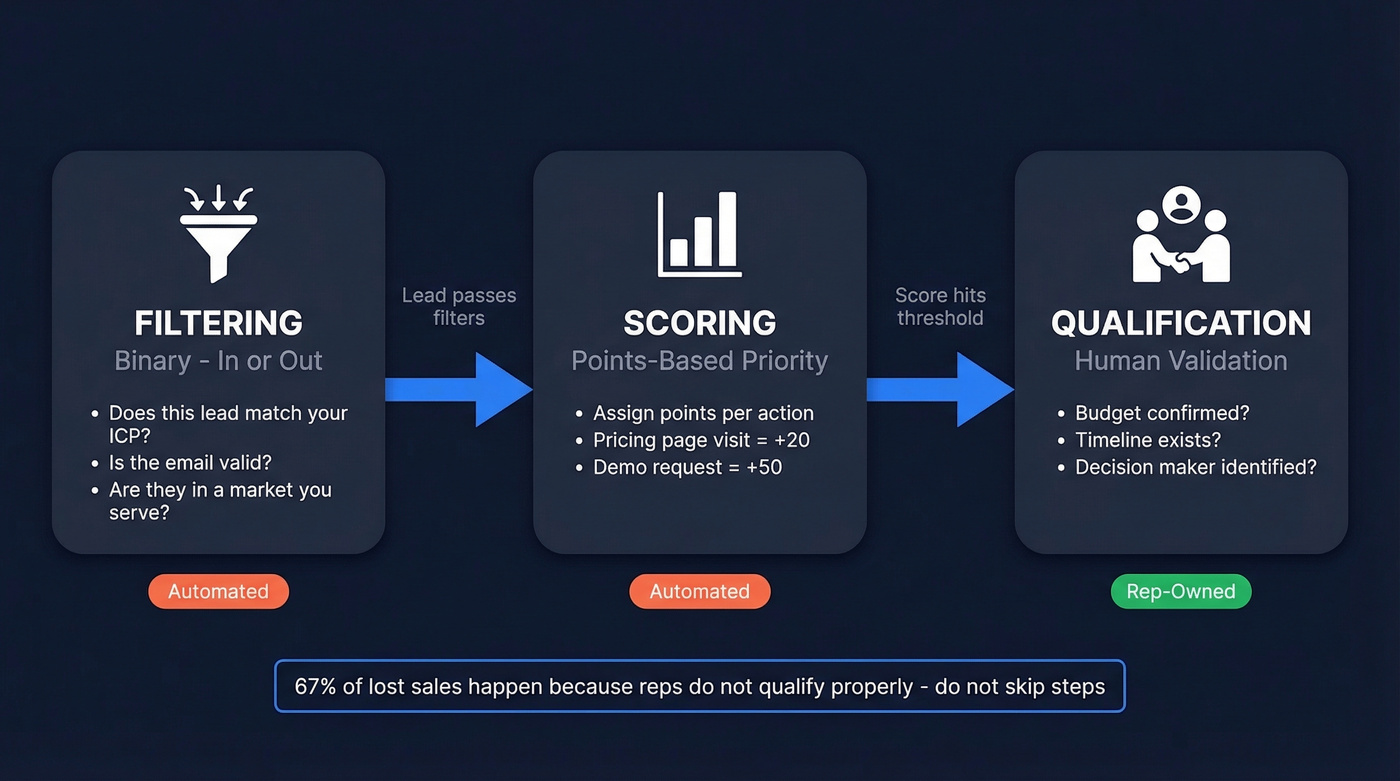
Filtering is binary. You're deciding whether a lead belongs in your pipeline at all. Does this person match your ICP? Is the email valid? Are they in a market you serve? If not, they're out. No score needed.
Scoring comes next. Once a lead passes your filters, you assign points based on engagement and fit. An email click is worth more than an open. A pricing page visit is worth more than a blog read. The score tells you who to prioritize, not who to include.
Qualification is the human layer. A lead hits your score threshold, and now a rep validates whether there's genuine need, budget, and timeline. Frameworks like BANT, CHAMP, and GPCTBA/C&I all live here. Automation handles filtering and scoring. Reps handle qualification. Mixing up these responsibilities is how leads fall through the cracks.
Lead Filter Criteria That Matter
Engagement Signals
These are the behavioral signals that separate curious visitors from actual buyers. Not all engagement is equal - weight accordingly.
- Pricing page visits - one of the strongest intent signals on most B2B sites
- Demo requests - obvious, but track partial form fills too
- Email clicks over opens - opens are unreliable since Apple Mail Privacy Protection killed open tracking accuracy; clicks mean they cared enough to act
- Webinar attendance - especially live attendance vs. just registering
- Content downloads - whitepapers and case studies signal research-stage intent
- Return visits to key pages - a prospect revisiting your ROI calculator or case studies is sharing internally
Demographic Fit
This is the "who" layer. Does this person have the authority and context to buy?
Job title and seniority matter most. A Director of Revenue Operations is a different conversation than a marketing intern. Industry alignment is next - if you sell to SaaS companies, a manufacturing lead is noise. Geography matters if you've got territory restrictions or compliance requirements.
Company & ICP Attributes
Company size, revenue range, and tech stack are the big three. But modern filtering goes deeper: growth trajectory (are they hiring aggressively or just raised a round?), existing customer status for upsell and cross-sell opportunities, and active buying signals. These separate "technically fits our ICP" from "actively in a buying window." (If you want a deeper breakdown, see firmographic and technographic data.)
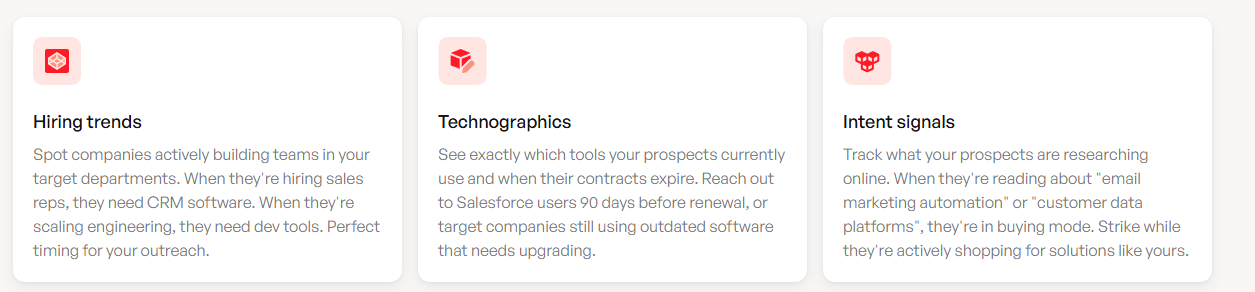
This is where database-level filtering tools earn their keep. Platforms that layer intent data with technographics and growth signals let you build a list like "VP of Sales at a 50-200 person SaaS company using a sales engagement platform that's actively researching sales engagement" without manual research. Prospeo's 30+ search filters cover buyer intent across 15,000 topics, job changes, headcount growth, funding signals, and tech stack - so that kind of precision is a few clicks, not a few hours.
Negative / Disqualification Signals
Equally important: knowing who to exclude.
- Competitor domains - they're researching you, not buying from you
- Student and personal email addresses - unless you sell to consumers, these are noise
- Bounced emails - a contact that doesn't exist can't convert
- 60+ days of zero engagement - if they haven't opened, clicked, or visited in two months, they've moved on
- Unsubscribes - respect the signal and stop wasting score on them
Build a Lead Scoring Model
The Point System (Copy This)
Here's a straightforward model you can drop into HubSpot, Salesforce, or any CRM with lead scoring. Adjust the numbers to your business, but the ratios matter more than the absolutes.
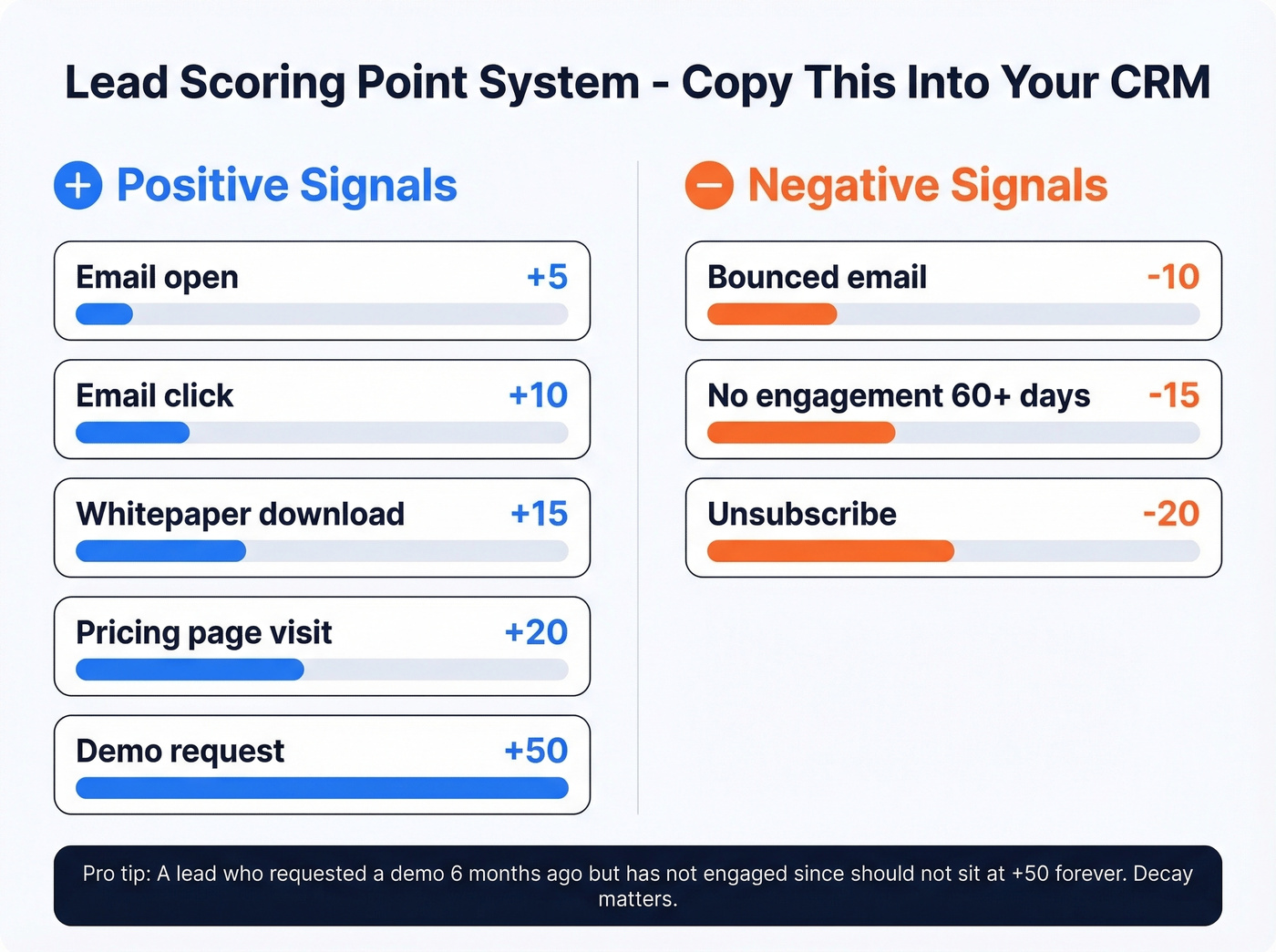
Positive Scoring
| Action | Points |
|---|---|
| Email open | +5 |
| Email click | +10 |
| Whitepaper download | +15 |
| Pricing page visit | +20 |
| Demo request | +50 |
Negative Scoring
| Signal | Points |
|---|---|
| Unsubscribe | -20 |
| Bounced email | -10 |
| No engagement 60+ days | -15 |
The negative scoring is where most teams skip. Don't. A lead who requested a demo six months ago but hasn't engaged since shouldn't sit at +50 forever. Decay matters.
Threshold Ladders
Two models work well depending on your sales cycle complexity.
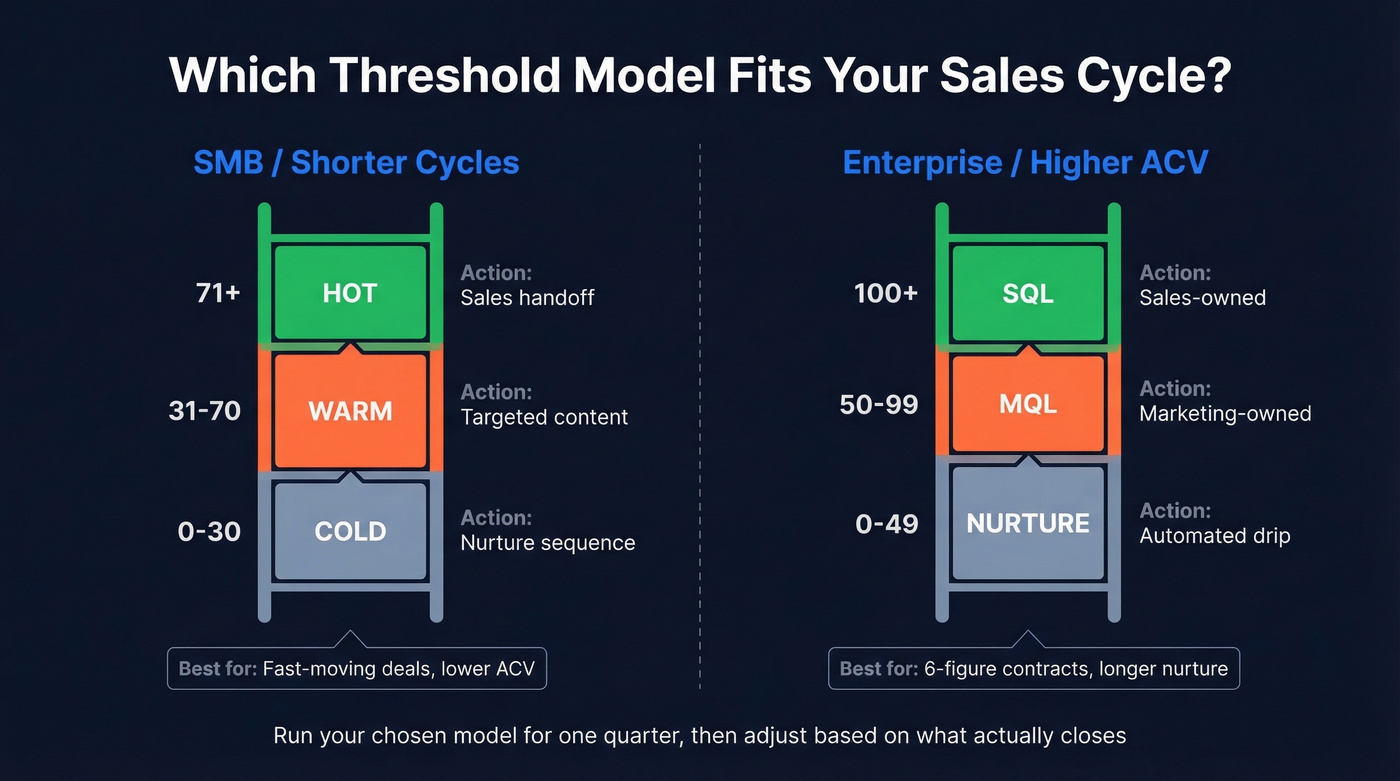
Simple Model (SMB / shorter cycles)
| Score Range | Status | Action |
|---|---|---|
| 0-30 | Cold | Nurture sequence |
| 31-70 | Warm | Targeted content |
| 71+ | Hot | Sales handoff |
Enterprise Model (longer cycles / higher ACV)
| Score Range | Status | Action |
|---|---|---|
| 0-49 | Nurture | Automated drip |
| 50-99 | MQL | Marketing-owned |
| 100+ | SQL | Sales-owned |
In our experience, most teams set their MQL threshold too high and starve their sales team of opportunities. For faster-moving deals, the 71-point hot threshold gets reps involved sooner. For enterprise accounts with six-figure contracts, the 100-point SQL threshold gives marketing more room to nurture. Pick one, run it for a quarter, then adjust based on what actually closes.
Once a lead hits SQL status, qualification frameworks kick in. BANT is the classic. CHAMP flips the order to prioritize challenges first. GPCTBA/C&I goes deeper into goals and plans. The framework matters less than consistently using one.
Filter Before the CRM
Your intake forms are your first leads filter - and most teams waste them. Instead of collecting name and email and dumping everything into the same bucket, use form-level qualification to triage leads before they touch your CRM.
The questions that actually separate buyers from browsers:
- What's your role? (Authority signal)
- How large is your team? (Fit signal)
- What are you currently using to solve this? (Competitive intelligence + pain validation)
- Do you have budget allocated? Use ranges - "$0-5k," "$5-25k," "$25k+" - people answer ranges more honestly than open fields.
- What's the cost of doing nothing? This reveals urgency better than asking about timeline. Prospects who can quantify the cost of inaction are further along.
Apply the momentum principle: easy questions first, harder asks last. People who've invested effort answering three easy questions are more likely to complete the form.
Triage into three buckets:
| Bucket | Criteria | Action |
|---|---|---|
| Immediate Opportunity | High fit + high urgency | Route to sales |
| Nurture Candidate | Good fit + no timeline | Enroll in drip |
| Non-Fit | Wrong size or industry | Redirect to self-serve |
Teams using this kind of conversational qualification see roughly a 28% increase in sales velocity.

You just read why filtering garbage is pointless. Prospeo's 5-step verification delivers 98% email accuracy - so every lead entering your scoring model is a real, reachable contact. 30+ filters including buyer intent, technographics, and headcount growth let you build pre-filtered lists in clicks.
Start with clean data or don't start at all.
Prospect Sorting for Outbound
Everything above assumes leads are coming to you. For outbound, you need to filter before the first touchpoint - at the database level, before leads ever enter your CRM. This is what separates high-performing outbound teams from those blasting generic sequences into the void. (If you want more list-building tactics, see sales prospecting techniques.)
Most outbound teams build lists that are too broad, then wonder why reply rates are terrible. The filter stack is the fix. A good outbound filter combination: VP-level or above + 50-200 employees + runs a specific tech stack + showing hiring intent in the sales department. That's not a list of 50,000 names. That's maybe 800 highly relevant prospects.

We've seen this play out with real teams. Meritt's pipeline tripled from $100K to $300K per week after switching to pre-filtered, verified prospect data. Their bounce rate dropped from 35% to under 4%, and connect rates jumped to 20-25%.
Once you've got a filtered list, keep your cold emails tight. 100-150 words max. Real personalization - reference their specific role, a recent company event, or a pain point relevant to their tech stack. Propose an exact day and time, not "let me know if you're interested." (If you need copy, steal from these sales follow-up templates.) And remember: contacting a lead within 5 minutes of an inbound signal increases qualification rates by 21x. Speed compounds the quality of your filtering.
Automate Your Filters
Manual filtering breaks at scale. Here's a workflow blueprint you can implement in HubSpot, Salesforce, or any marketing automation platform with scoring and routing:
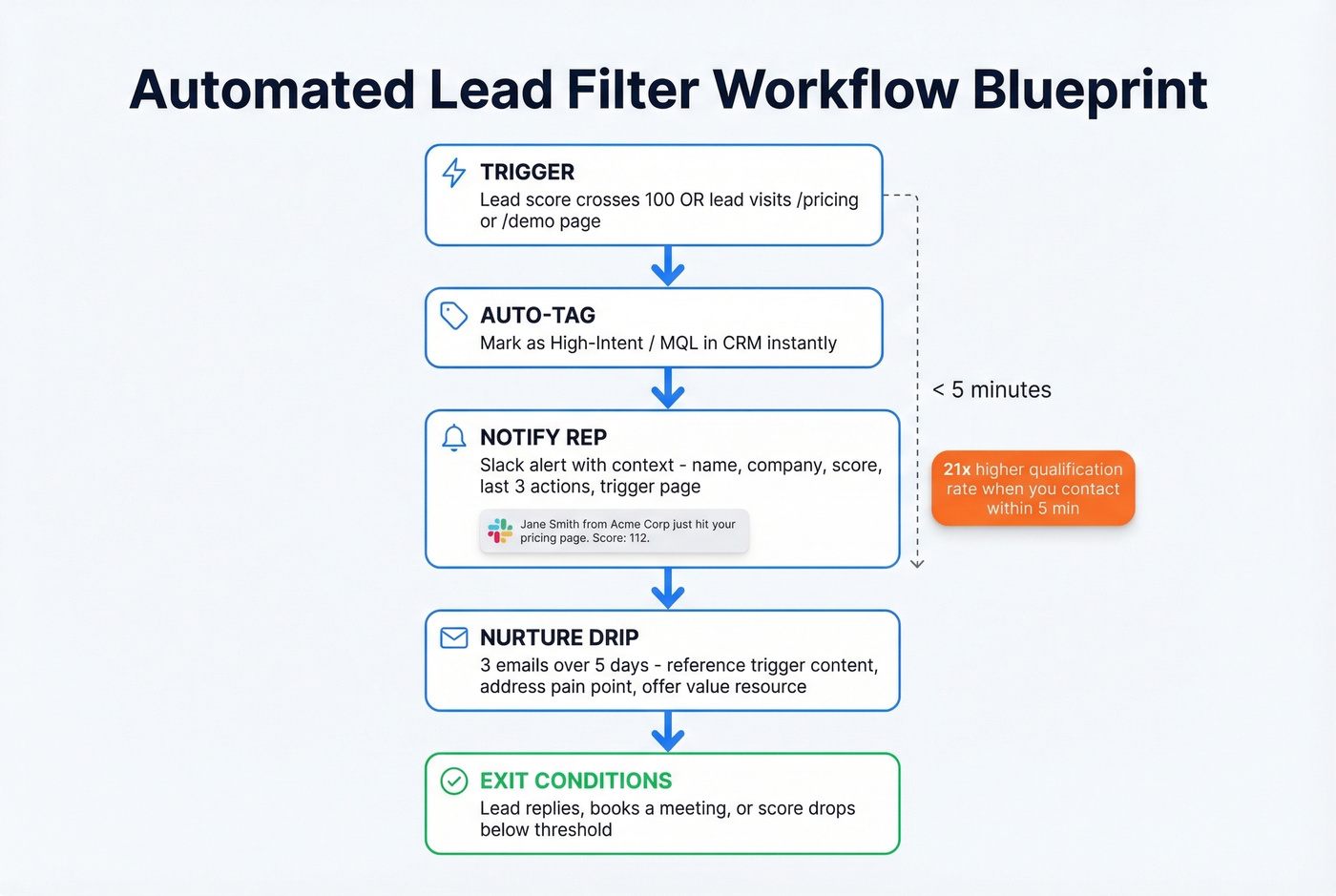
- Trigger: Lead score crosses 100 OR lead visits /pricing or /request-demo page
- Immediate action: Auto-tag as "High-Intent / MQL" in your CRM
- Notification: Fire a Slack message to the assigned rep with trigger context - "Jane Smith from Acme Corp just hit your pricing page. Score: 112. Last 3 actions: downloaded ROI guide, opened 4 emails, visited pricing twice."
- Nurture sequence: Launch a 3-email drip over 5 days. First email references the specific page or content that triggered the workflow, second addresses a common pain point, third offers a value resource.
- Exit conditions: Lead replies, books a meeting, or is manually removed by the rep. If none happen after 5 days, move to long-term nurture.
The exit conditions are the part everyone forgets. Without them, leads get stuck in sequences after they've already booked a call. That's how you annoy prospects who were ready to buy.
Filtering Junk from Paid Channels
If you're running Google PMax for lead gen, you know the pain. CPL looks fantastic in-platform. Then you open your CRM and it's full of bot spam, fake phone numbers, and people who thought they were clicking on something else. The r/PPC subreddit is full of practitioners asking how to filter junk without killing volume.
Three fixes that actually work:
Offline conversion tracking is the big one. Feed only SQLs - not MQLs, not form fills - back to Google as conversion events. This teaches the algorithm what a real lead looks like, not just what a click looks like.
Placement exclusions cut the worst offenders. Review where PMax is serving your ads and exclude bot-heavy placements aggressively.
Email and phone verification before leads enter your pipeline. If bounce rates are high, your scoring model is ranking ghosts. Snyk's sales team faced exactly this - bounce rates of 35-40% across 50 AEs. After switching to verified data with 98% email accuracy, bounces dropped below 5%, AE-sourced pipeline jumped 180%, and the team generated 200+ new opportunities per month.
Tools That Make Lead Filtering Work
Let's be honest: most teams don't need more tools. They need fewer tools that actually talk to each other. A low-cost CRM with working lead scoring beats an expensive stack where data sits in silos. (If you're evaluating options, start with these examples of a CRM.)
| Tool | Best For | Starting Price |
|---|---|---|
| Prospeo | Data quality + outbound lists | Free tier; from ~$39/mo |
| HubSpot | Mid-market CRM scoring | ~$800/mo (Professional) |
| Apollo.io | All-in-one on a budget | ~$49/user/mo |
| Salesforce | Enterprise with admin resources | ~$1,250/mo (Marketing Cloud) |
| Chili Piper | High-volume inbound routing | ~$150/mo platform fee |
| Close CRM | Small teams wanting a fast, built-in sales CRM | Not public |
HubSpot's Professional tier is the sweet spot for most mid-market teams - flexible lead scoring, visual automation workflows, and it plays nicely with basically every tool in your stack. For teams under ~50 reps, HubSpot often wins on time-to-value over Salesforce. Salesforce is more powerful, but you'll need a dedicated admin and probably a consultant.
Apollo.io deserves a look if you want database and sequencing in one platform. The free tier is generous, though it's not as accurate on email verification. The built-in sequencer means fewer tools to manage. Chili Piper shines at high-volume inbound routing - if you're getting hundreds of demo requests each month, it pays for itself. Skip Close if you're already on HubSpot or Salesforce; it's best for small teams starting fresh.
One note: LeadsFilter.com shows up in search results for this topic, but it's a lead marketplace, not a filtering system. If you need a methodology and toolset for filtering your own pipeline, that's what this guide covers.
The 3-pillar filter system above works best when your database already layers intent, technographics, and growth signals. Prospeo tracks 15,000 intent topics, tech stack data, job changes, and funding - so you can filter to 'VP Sales at a growing SaaS company actively researching your category' without manual research.
Replace hours of lead research with a few precise clicks.
Maintain Your Filters
A scoring model that worked in Q1 is often useless by Q3. Markets shift, buyer behavior changes, and your product evolves. We've tested both simple and complex recalibration approaches, and a quarterly audit with five checks covers 80% of teams:
Pull your closed-won deals from the last 90 days. What scores did they have at MQL stage? If most closed deals entered sales at 60 points but your threshold is 100, you're holding leads too long.
Check your lifecycle stage definitions. Are PQL to MQL to SAL to SQL handoffs happening cleanly, or are leads getting stuck between stages? HubSpot's community forums are full of teams debating exactly this - the answer is usually simpler handoff rules, not more stages.
Review early vs. late-stage signals. Early-stage behavior looks like educational content consumption. Late-stage looks like revisiting pricing and engaging with ROI calculators. Make sure your scoring weights reflect this difference, because a whitepaper download and a pricing page visit shouldn't carry the same weight when a lead has been in your pipeline for 60 days.
Kill zombie criteria. If "downloaded whitepaper" hasn't correlated with a closed deal in two quarters, drop the points.
Align with sales. Ask reps which MQLs they actually wanted and which ones wasted their time. This conversation alone is worth more than any dashboard. I've seen teams completely restructure their scoring after a single 30-minute sync with their top closer. (If you want a structured way to run that conversation, use QBR questions to ask.)
Start simple, measure what closes, and iterate. The teams that win aren't the ones with the most leads - they're the ones who filter fastest.
FAQ
What's a leads filter vs. lead scoring?
A leads filter removes obvious non-fits using hard criteria like industry, company size, and email validity before any scoring happens. Scoring then ranks the remaining leads by engagement and fit signals to decide who gets attention first. They're sequential steps - filter first, score second - not interchangeable terms.
How often should I update my scoring model?
Quarterly at minimum. Pull your closed-won deals, compare their scores at each lifecycle stage against your current thresholds, and adjust. If your "hot" threshold is 71 but most deals closed at 55, you're leaving revenue on the table.
What's a good lead score threshold for passing to sales?
Most mid-market teams use 70-100 points as the MQL-to-SQL handoff. Start at 75, run it for a quarter, and calibrate based on your actual conversion data. There's no universal number - it depends on your sales cycle length and deal complexity.
Can I filter leads before they enter my CRM?
Yes. Use form-level qualification questions for inbound and database-level filters for outbound. For outbound, platforms with 30+ search filters let you pre-qualify by intent, technographics, and company size before exporting. For inbound, tools like HubSpot forms can triage leads on submission.
How do I stop junk leads from paid campaigns?
Feed offline conversions - SQLs only, not form fills - back to Google or Meta so the algorithm learns what a real lead looks like. Layer in placement exclusions for bot-heavy sites, and verify every email and phone number before leads enter your pipeline.