


Mailshake vs Yesware (2026): Which Sales Email Tool Fits Your Workflow?
Mailshake vs Yesware only feels like a hard choice if you ignore how outbound breaks in real life: caps, mailbox math, and deliverability.
Pick the wrong operating model and you'll either hit a campaign ceiling (Yesware) or end up managing more process than your team will tolerate (Mailshake).
Here's the hook: the "better" tool is the one that matches how your team actually sends.
30-second verdict (and "Skip both if...")
- Pick Yesware if you want inbox-native selling: templates, tracking, and light sequencing that feels like "email, but faster." It's best when each rep owns their book and you care more about workflow than scale.
- Pick Mailshake if you want scalable outbound + deliverability controls: warmup, email verification, throttling, and (critically) rotation up to 50 sending addresses per campaign. It's built for higher throughput and multi-mailbox operations.
Skip both if your bounce rate's rising or your list isn't verified. No sending tool fixes bad data. Clean the list first, then send.
Look, most teams don't have a tooling problem. They've got a discipline problem.
Hot take: If your average deal size is small, you don't need a "sales engagement platform." You need clean data, a sane ramp, and a tool your reps will actually use daily.
Three real-world scenarios
- You're a founder or AE doing tight, 1:1-ish outbound from your inbox: Yesware wins. Less context switching, faster follow-ups, fewer moving parts.
- You're running repeatable outbound motions (SDR team, agency, or multi-mailbox): Mailshake wins. Rotation + warmup + throttling is the difference between "we scaled" and "we got throttled."
- You're trying to send more without buying more domains/mailboxes: neither tool's magic. You'll hit provider limits and reputation limits. Your best lever is list quality + ramp discipline.

Key differences that actually matter (before you look at features)
Yesware is an inbox extension. Adoption is its superpower: reps stay in Gmail/Outlook, so templates, tracking, and sequences get used instead of ignored.
Mailshake is an outbound ops tool. It's built for teams that treat outbound like a system: multiple mailboxes, controlled volume, and deliverability guardrails.
If you're deciding fast, use this rule:
- Choose Yesware when the bottleneck is rep workflow.
- Choose Mailshake when the bottleneck is throughput without wrecking domains.
What each tool actually is (inbox extension vs outreach platform)
Yesware lives inside Gmail/Outlook. It's a productivity layer: templates, sequences ("Campaigns"), tracking, meeting scheduling, and CRM logging, without forcing reps into a separate sending UI.
That matters because behavior follows the interface. When the tool's in the inbox, reps use it. Inbox-native tools win adoption battles in teams that hate "yet another tab," and in our experience that's most sales teams after week two of any new rollout.
Mailshake is a standalone outreach + engagement platform. You build campaigns in Mailshake, connect one or more mailboxes, and run outbound from there. It's designed around operational controls: scheduling, throttling, warmup, email verification, and multi-inbox sending, which is exactly what you need once you're past "a few sequences" and into "we're running outbound as a channel with real volume and real risk."
The cleanest way to think about it:
- Yesware = rep workflow optimization.
- Mailshake = outbound operations.
Side-by-side comparison table (features + limits that change the decision)
| Category | Yesware | Mailshake |
|---|---|---|
| Best for | Inbox-native reps | Multi-mailbox outbound ops |
| Product type | Gmail/Outlook add-on | Standalone platform |
| Recipient caps | Premium/Enterprise: 900/upload; 5,000/campaign | No campaign cap; scale via mailboxes + rotation |
| Scaling bottleneck | Campaign caps + pooled allowance | Mailbox count + deliverability discipline |
| Multi-inbox sending | Limited model | Rotate up to 50 senders/campaign |
| Deliverability tooling | Light | Warmup + verification + throttling |
| CRM depth | Strong on Enterprise (Salesforce) | Solid integrations |
| Free plan / trial | Free plan + 14-day trial | No free trial; pay up front |

Two specifics worth underlining:
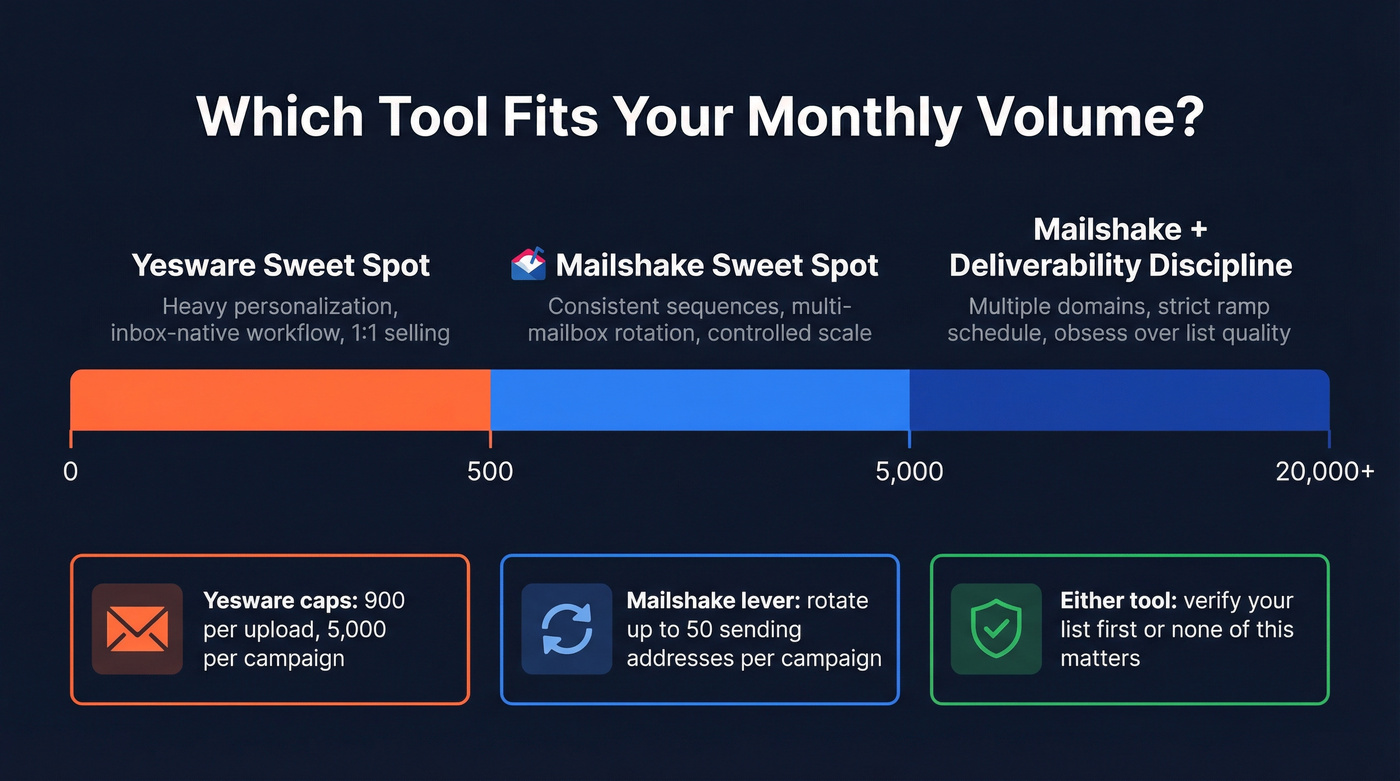
- Yesware's hard caps (Premium/Enterprise): 900 recipients per upload and 5,000 recipients per campaign.
- Mailshake's scaling lever: email rotation up to 50 sending addresses per campaign.

Neither Mailshake nor Yesware will save you from bounces caused by stale data. Prospeo's 7-day refresh cycle and 98% email accuracy mean your sequences actually land - no warmup tool can compensate for a 35% bounce rate.
Clean the list first, then send. Start with 100 free credits.
Mailshake vs Yesware pricing in 2026 (tiers & gotchas)
Pricing is where these tools quietly force your operating model.
Yesware pricing (per seat)
Yesware's plans:
| Plan | Monthly | Annual (per mo) | Who it's for |
|---|---|---|---|
| Free | $0 | $0 | Testing basics |
| Pro | $19 | $15 | Solo rep workflow |
| Premium | $45 | $35 | Teams running campaigns |
| Enterprise | $85 | $65 | Salesforce-heavy orgs |
What you can't do (the practical constraints):
- Free and Pro are basically for testing Campaigns, not running outbound at scale: 10 recipients/month (Free) and 20 recipients/month (Pro).
- Premium/Enterprise show "Unlimited" recipients added to campaigns, but scaling's still shaped by the 900/upload and 5,000/campaign caps.
Yesware also sells Prospector-style credit packs. Expect roughly ~$40/mo (Starter) up to ~$125/mo (Growth) on annual billing (their main pricing page doesn't list exact pack pricing in the same place as seat pricing, so you'll see this as an add-on).
Mailshake pricing (per user)
Mailshake's plans (monthly):
| Plan | Price (mo) | Sending limits |
|---|---|---|
| Starter | $29 | 1,500 sends/month |
| Email Outreach | $49 | Unlimited sends/month |
| Sales Engagement | $99 | Unlimited sends/month |
Yearly billing is also shown on Mailshake's pricing page: Starter $29.25/mo, Email Outreach $49.45/mo, Sales Engagement $99.85/mo.
Clarifier that matters: Mailshake includes unlimited email warmup and unlimited email verification on plans. Warmup protects sender reputation; verification reduces bounces before sending.
Two pricing realities that matter:
- No free trial. Payment up front.
- Billing is user-based, and each paid user connects one mail account. Teams scale sending identities by adding users/mail accounts and using rotation.
Mailshake vs Yesware limits & throughput (caps, rotation, mailbox math)
Most teams don't fail because their copy's bad. They fail because they didn't do the math on caps, mailbox capacity, and ramp speed.
Yesware: pooled monthly allowance + hard caps
Yesware's Campaigns limits work like a shared bucket. Your monthly campaign recipient allowance is pooled across all campaigns and resets on the 1st.
Two implications:
- Creating more campaigns doesn't increase capacity. The allowance's shared.
- End-of-month pushes get messy: teams burn through the allowance, then "adding to campaigns" suddenly stops.
Hard caps still apply on Premium/Enterprise:
- 900 recipients per upload
- 5,000 recipients per campaign
Decision rule: Yesware's excellent when you're sequencing hundreds of prospects per rep per month, not thousands.
Mailshake: mailbox count + rotation = your scaling lever
Mailshake's limits are ops-shaped:
- Email addresses shown on the pricing page: Starter 1, Email Outreach 2, Sales Engagement 10, and Agency offers unlimited (talk to sales).
- Rotation: up to 50 sending addresses per campaign, splitting sends evenly.
Rotation's the feature that makes scale feel controlled instead of chaotic. I've seen teams duct-tape multi-inbox sending with inbox tools; it works right up until deliverability wobbles, and then it collapses fast because nobody knows which mailbox caused the problem, which domain got burned, or which sequence pushed volume too hard.
Decision rule: If you need to reach 5,000-20,000 prospects/month across a team, Mailshake's multi-mailbox model fits the job.
"If you need X prospects/month" quick rules
- Up to ~500 prospects/month per rep, heavy personalization: Yesware.
- 1,000-5,000 prospects/month across a small team, consistent sequences: Mailshake.
- 5,000+/month with multiple domains/mailboxes: Mailshake, then obsess over deliverability discipline.
Deliverability & scaling playbook (what to do so you don't get throttled)
Deliverability's the whole game now. The tool's secondary.
And yes, that's annoying.
Deliverability checklist (do this before you scale)
- Use a dedicated sending domain (or subdomain) for outbound.
- Set up SPF, DKIM, DMARC correctly (see SPF, DKIM, DMARC).
- Use a custom tracking domain if you're tracking.
- Keep copy plain: fewer images, fewer heavy templates, don't stuff links.
- Verify your list before upload. It's the cheapest deliverability win you'll ever buy (use an email verification list SOP).

Warmup + ramp schedule (the conservative plan that actually works)
Mailshake's warmup sends emails between real inboxes, generates replies, and corrects misclassification when messages land in spam/junk.
A timeline that works:
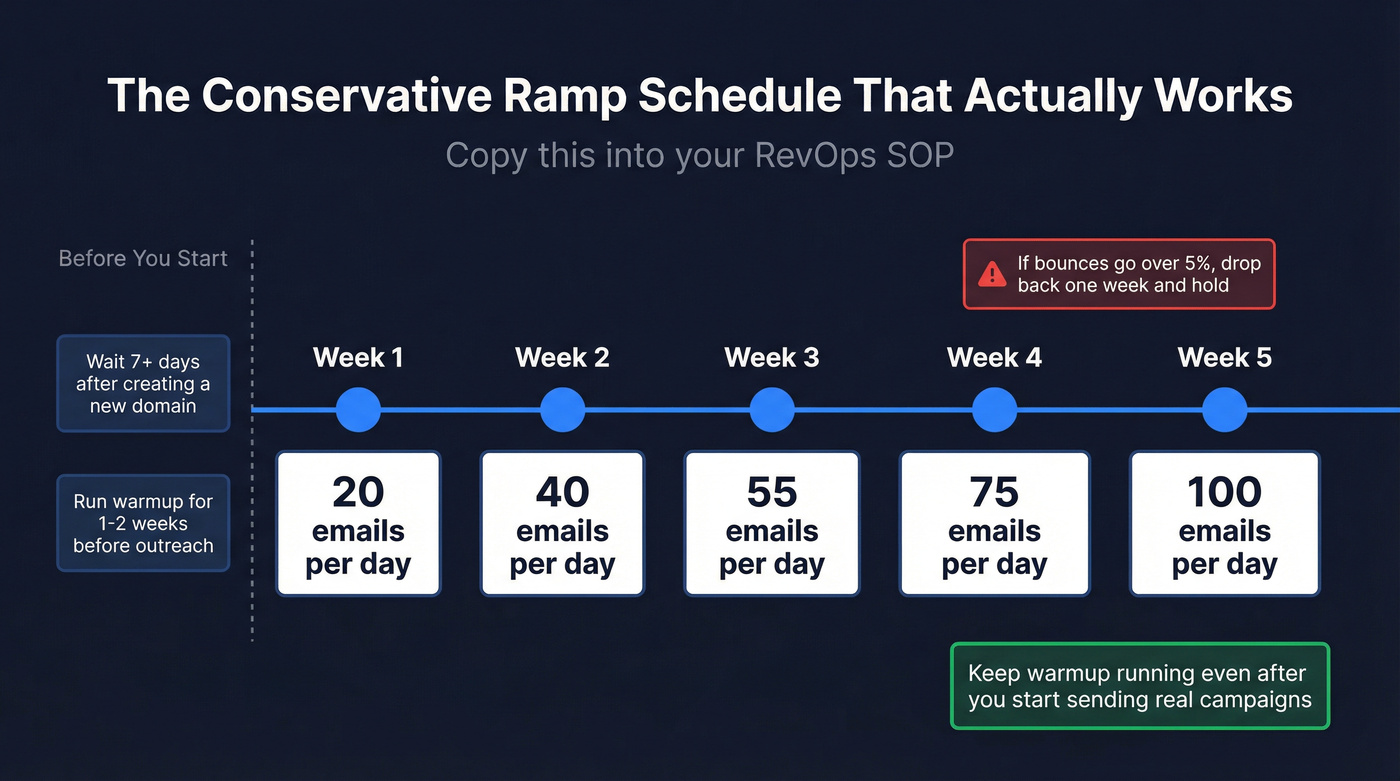
- Wait 7+ days after creating a new domain before starting warmup.
- Start warmup 1-2 weeks before outreach (and keep it running) - the mechanics are the same as any automated email warmup program.
- Connect one email first, wait a month, then connect the rest.
Ramp schedule (copy/paste into your RevOps SOP) Week 1: 20/day Week 2: 40/day Week 3: 55/day Week 4: 75/day Week 5: 100/day
If bounces go over 5%, drop back one week's volume and hold.
Throttling + rotation (how to avoid self-inflicted chaos)
When Google throttles you, Mailshake stops sending and resumes after ~24 hours. That's a guardrail, not a bug.
Rotation's powerful if you keep it disciplined:
- Keep one campaign per ICP + offer.
- Rotate only across mailboxes with similar warmup maturity/history.
- Don't toss brand-new inboxes into a mature rotation pool. Ramp them separately, then add them.
If you're routinely getting blocked or seeing weird provider errors, the fix is usually pacing: see email pacing and sending limits and the common 550 Recipient Rejected failure mode.
Tracking & reporting reality in 2026 (why opens lie)
Open tracking's still a directional signal, but it isn't truth.
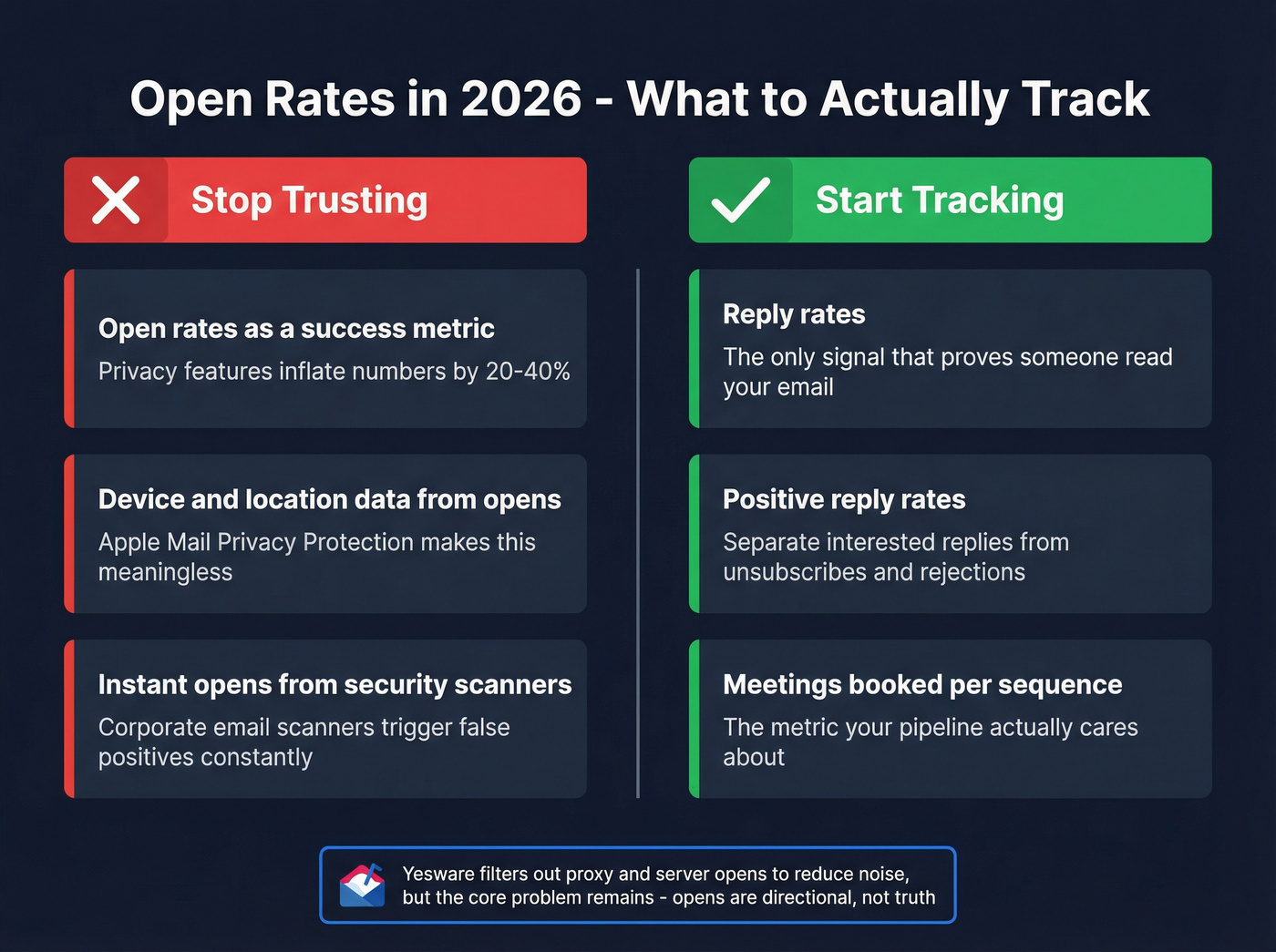
Myth: "Open rates tell me if my messaging's working." Reality: Opens are polluted by privacy features, security scanners, and image blocking.
Yesware handles this more honestly than most: proxy/server activity can create instant "opens," and Yesware filters those out to reduce noise. Apple privacy also wrecks location/device accuracy.
What to track instead:
- Reply rate (positive/neutral/negative separated)
- Click rate (only if you include at least one link)
- Meetings per 100 delivered
- Bounce rate (deliverability KPI, not just a data KPI)
If your team's still celebrating "70% open rates," you're optimizing the wrong scoreboard. If you want a deeper breakdown of what still works, see best email open tracker.
Workflow fit & integrations (CRM sync, team collaboration, daily ops)
Day-in-the-life: Yesware
Yesware shines when reps live in their inbox:
- Send, track, template, and enroll prospects without leaving Gmail/Outlook.
- Enterprise is built for Salesforce-heavy teams: Inbox Sidebar, bi-directional activity sync, list view imports, plus SSO and trusted IP ranges.
If you're a RevOps lead trying to enforce consistent logging, Yesware Enterprise's the "less fighting with reps" option.
Day-in-the-life: Mailshake
Mailshake is better when outbound is a process:
- Campaigns live in Mailshake, not in the rep's inbox.
- You get unified inbox handling, scheduling/throttling controls, and multi-mailbox operations.
- Sales Engagement adds phone plus social automation, pushing it closer to a light engagement platform.
Integrations snapshot
| Integration | Yesware | Mailshake |
|---|---|---|
| Salesforce | Strong (Enterprise) | Yes |
| HubSpot | Yes | Yes |
| Pipedrive | Limited | Yes |
| Zapier | Yes | Yes |

What users complain about (G2 + TrustRadius synthesis)
Both tools review well overall: Yesware 4.4/5 (820 reviews) and Mailshake 4.7/5 (356 reviews). The complaints map cleanly to what each product is.
Yesware: praise vs complaints (and mitigation)
What people like
- Inbox-native workflow: reps can run templates, tracking, and Campaigns without leaving Gmail/Outlook.
What frustrates people
- Customer support responsiveness comes up a lot in Yesware reviews.
- Reply detection can fail in an edge case: if a prospect replies from a different email address than the one enrolled, sequences might not stop automatically unless the contact's removed.
Mitigation
- Train reps: opens are a weak signal; optimize for replies/clicks.
- Add a "reply hygiene" SOP: if a reply comes from an alternate address, manually stop future steps for that contact.
Mailshake: praise vs complaints (and mitigation)
What people like
- Ease of setup and automation comes up constantly, and warmup tooling gets called out as a deliverability help.
What frustrates people
- Some users want a more modern UI.
- No free trial: you pay up front to test.
Mitigation
- Use Mailshake for scalable sequences, and keep true 1:1 in the inbox.
- Run a small paid pilot with one mailbox before rolling out.
Pair-with-either: Prospeo for verified data (so your sending tool doesn't take the blame)
Here's a scenario I've watched play out: a team switches sending tools, sees replies dip, assumes the tool's the issue, and spends two weeks rewriting sequences - only to realize their bounce rate quietly climbed into the danger zone because the list was stale.
That's not a Mailshake problem or a Yesware problem. That's a data problem.
Prospeo ("The B2B data platform built for accuracy") is the cleanest fix for that part of the stack: 300M+ professional profiles, 143M+ verified emails, and 125M+ verified mobile numbers, backed by 98% email accuracy and a 7-day data refresh cycle (the industry average is about 6 weeks). You can build lists with 30+ filters, verify in real time (including catch-all handling), and enrich your CRM/CSV with 50+ data points per contact via API with a 92% match rate.
If you're serious about scaling outbound without burning domains, verified data isn't optional. It's the foundation. (If you’re comparing tools, start with these email lookup tools.)
You just read about caps, rotation, and mailbox math. None of it matters if your list is garbage. Prospeo gives you 143M+ verified emails with 5-step verification and spam-trap removal - at $0.01 per email, 90% cheaper than ZoomInfo.
Fix your data before you debate which sending tool to buy.
Other alternatives (when neither fits)
QuickMail (Tier 2)
QuickMail's the "keep it simple, keep it deliverable" option for teams that care more about reliable sending than shiny UI. It's built around multi-inbox sending, rotation, and steady deliverability, which makes it great for agencies or SDR teams that already have a list and just need consistent execution. Expect roughly $49-$99/user/month depending on plan and sending needs. If Mailshake feels like more platform than you want, QuickMail's often the cleaner scaling tool.
Groove by Clari (Tier 3)
Groove is for Salesforce-first teams that want engagement workflows tightly wrapped around CRM. It's less about raw outbound scale and more about rep execution + pipeline hygiene. Pricing is typically enterprise-style (~$100-$180/user/month) depending on package.
Mailtrack (Tier 3)
Mailtrack's the lightweight choice when you mainly want tracking in Gmail without adopting a full sequencing platform. It's ideal for solo users and founders doing manual follow-up. Expect ~$10-$30/user/month, with higher tiers for team features.
Klenty (Tier 3)
Klenty sits closer to sales engagement: sequencing plus calling/automation features for SDR teams running repeatable plays. It's a strong fit when you want a broader engagement layer than Mailshake's email-first approach. Expect ~$60-$120/user/month depending on modules.
FAQ
Is Mailshake or Yesware better for Gmail vs Outlook/Microsoft 365?
Yesware's better for Gmail or Outlook/Microsoft 365 when you want reps to work inside the inbox with templates, tracking, and light sequences. Mailshake's better when you want a standalone outreach platform with warmup, throttling, and multi-mailbox ops across providers.
Does Yesware have a campaign recipient limit (and what are the caps)?
Yesware limits how many contacts you can add to Campaigns each month based on your plan, and that allowance is pooled across campaigns and resets on the 1st. On Premium/Enterprise, "Unlimited" still comes with hard caps: 900 recipients per upload and 5,000 recipients per campaign.
Does Mailshake have a free trial in 2026?
Mailshake doesn't offer a free trial in 2026 and collects payment up front. Plan for a paid pilot with 1 mailbox for 2-4 weeks so you can validate deliverability, ramp speed, and reply rates before rolling out.
Are open rates reliable anymore (what should I track instead)?
Open rates aren't reliable in 2026 because privacy features, proxies, and security scanners can trigger or hide opens, and location/device data's often wrong. Track reply rate, click rate (only if you include a link), meetings per 100 delivered, and keep bounces under 5%.
Should I verify emails before uploading to Mailshake/Yesware?
Yes, verify emails before upload to cut bounces, protect domain reputation, and avoid throttling. For most teams, getting bounces from ~8-10% down to under 5% is the difference between "scaling" and "getting flagged."
Summary: the simplest way to choose
If you're choosing based on how your team actually works (not feature checklists), it's straightforward.
- Yesware fits inbox-native reps who want faster follow-ups, templates, and light sequencing without leaving Gmail/Outlook.
- Mailshake fits teams that need multi-mailbox scale, warmup, throttling, and rotation to protect deliverability.
And if you only remember one thing from this Mailshake vs Yesware comparison: list quality and ramp discipline matter more than the tool. Verify first, then scale.