Marketing Database: What It Is, How to Build One, and What It Actually Costs in 2026
You sent a 50,000-email campaign last quarter. 12,000 bounced. Your domain reputation tanked, your sequences stalled, and the VP of Marketing spent a week explaining to Finance why you're paying for three overlapping tools that can't even keep an email address current. That's not a strategy problem - it's a data infrastructure problem. And 70% of CRM data is outdated, incomplete, or inaccurate, so you're far from alone.
A marketing database isn't a tool you buy. It's a system you build. The tool matters less than the data going into it. A $0 CRM with clean, verified data outperforms a $50K CDP filled with garbage every single day.
What You Need (Quick Version)
SMBs: HubSpot free CRM + a verification tool for clean B2B contact data + Klaviyo if you're in ecommerce. You're under $100/month and you've got a real system for storing and activating customer data.
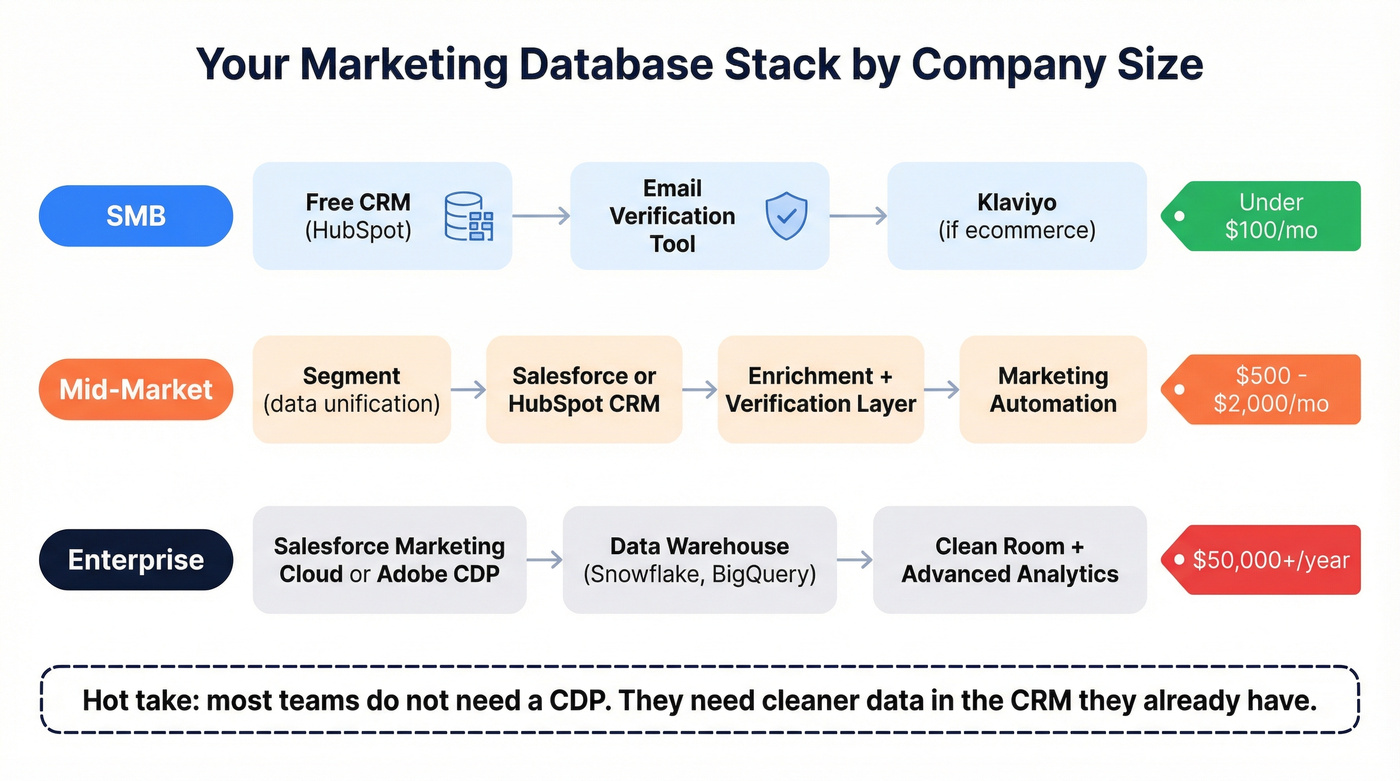
Mid-market: Segment for data unification + Salesforce or HubSpot CRM + an enrichment and verification layer. Budget $500-$2,000/month.
Enterprise: Salesforce Marketing Cloud, Adobe Real-Time CDP, or Bloomreach. Budget $50,000+/year - and that's before implementation costs.
The contrarian take nobody wants to hear: most teams don't need a CDP. They need cleaner data in the CRM they already have. If your average deal size is below five figures, you almost certainly don't need a CDP. Start with data hygiene.
What Is a Marketing Database?
A marketing database is a centralized system that collects, stores, organizes, and activates customer and prospect data across every touchpoint - website visits, email engagement, purchases, ad interactions, support tickets, and more. It's not a spreadsheet. It's not your CRM's contact list. It's the unified layer that connects all of those things so you can actually segment, personalize, and measure.
The concept isn't new. Database marketing dates back to the 1980s, when pioneers like Robert Kestnbaum and Robert Shaw first applied direct-mail principles to computerized customer records. What started as basic mail-merge has evolved through multiple phases into today's real-time, AI-powered systems. The fundamentals haven't changed - know your customer, reach them with the right message - but the infrastructure has become unrecognizably more powerful.
The distinction matters because most teams think they have a centralized data system when they really have data scattered across five tools. You've got an email address in your ESP, a name in your CRM, and an address in your transactional system, but bringing that data together is causing your team major headaches. That fragmentation is the core problem a unified customer data layer solves.
B2B vs B2C - the data is different. B2B databases lean on firmographic data: company size, industry, revenue, tech stack, funding stage, department headcount, and buying committee structure. You're targeting accounts and the 6-10 people involved in a purchase decision. B2C databases focus on demographic and lifestyle data: age, location, purchase history, browsing behavior, loyalty program activity, and household composition. The architecture is similar, but the inputs and segmentation logic diverge sharply. A B2B database segments by "Series B SaaS companies with 50-200 employees using Salesforce." A B2C database segments by "women aged 25-34 who bought running shoes in the last 90 days."
91% of companies with 10+ employees use a CRM to manage customer data. But a CRM alone isn't a marketing database - it's one input into it.
Why Centralized Marketing Data Matters in 2026
The spending tells the story. The CDP market is projected to grow from $3.28 billion in 2025 to $12.96 billion by 2032 - a 21.7% CAGR. The B2B data marketplace alone generated $863.2 million in 2024 and is on track to hit $3.2 billion by 2030. Companies aren't spending this money because it's trendy. They're spending it because the ROI is undeniable.
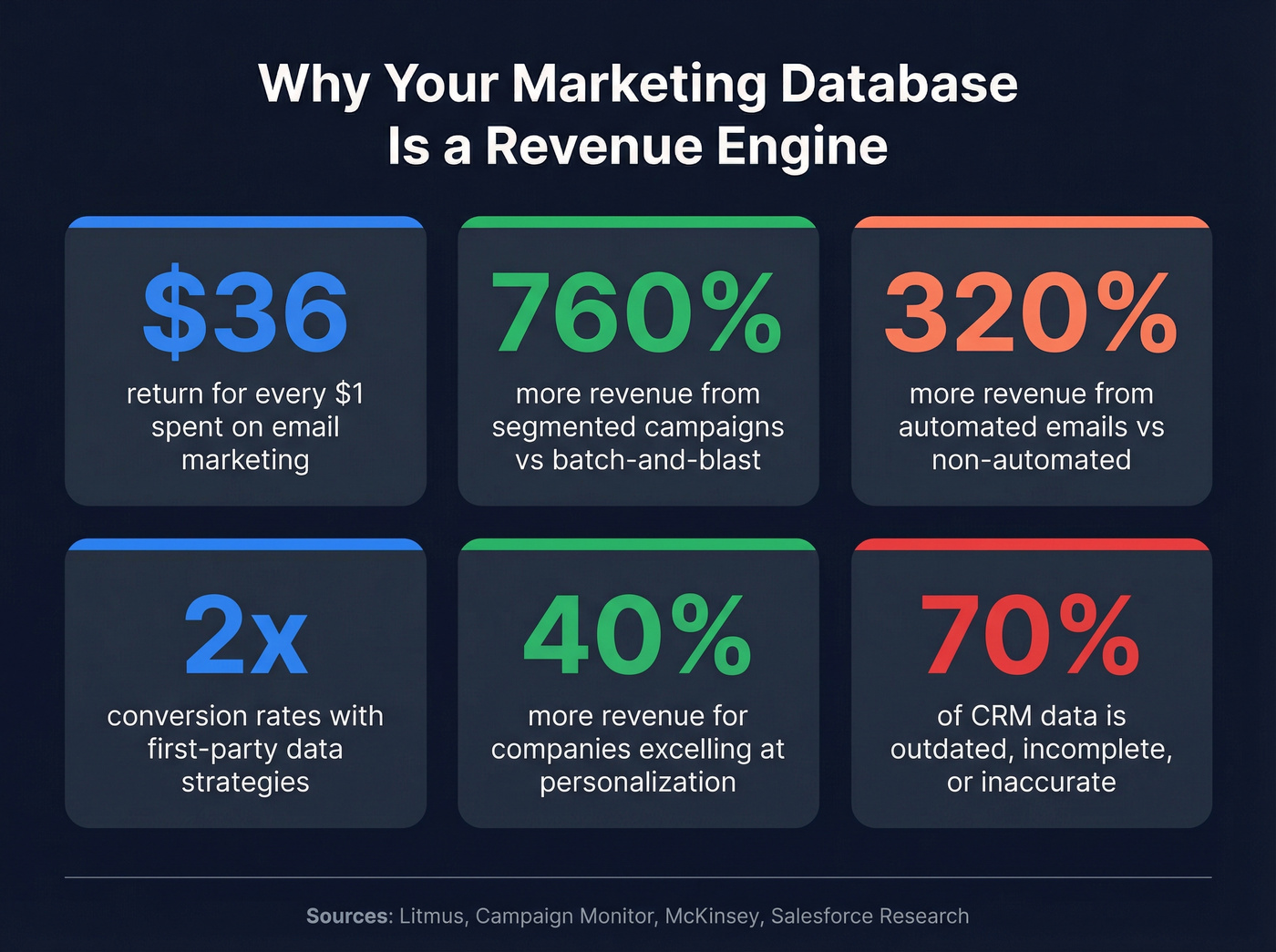
Email marketing - still the workhorse of most database-driven campaigns - delivers $36 for every $1 spent, the highest ROI of any digital channel. Segmented campaigns drive a 760% increase in revenue compared to batch-and-blast. Automated emails generate 320% more revenue than non-automated ones, and behavioral trigger emails produce 10x greater revenue than standard sends. These aren't marginal improvements. They're the difference between a marketing team that's a cost center and one that's a revenue engine.

The privacy shift is accelerating all of this. Google implemented its user-choice model for cookies in April 2025, and consent rates tend to mirror Apple's App Tracking Transparency rollout. Usable third-party cookie data dropped sharply as opt-in became the default. That makes first-party data infrastructure non-negotiable. Companies using first-party data strategies see double the conversion rates and 30% lower customer acquisition costs. The teams that built their data systems two years ago are now reaping the rewards. The teams that didn't are scrambling.
71% of consumers expect personalized interactions, and 76% get frustrated when brands fail to deliver. Companies excelling at personalization generate 40% more revenue than their competitors. You can't personalize without data. You can't activate data without a database.
The math is simple.
Types of Marketing Databases - CDP vs CRM vs DMP vs Data Warehouse vs Clean Room
This is where most teams get confused. There are five major system categories, and they're complementary - not interchangeable.

| Feature | CDP | CRM | DMP | Data Warehouse |
|---|---|---|---|---|
| Data types | 1st, 2nd, 3rd party | 1st party (manual) | 3rd party | All types |
| Identity resolution | Yes | No | No | No |
| Real-time | Yes | Limited | Limited | Batch |
| Best for | Omnichannel activation | Sales pipeline | Ad targeting | BI & reporting |
| Examples | Segment, Adobe CDP | Salesforce, HubSpot | Permutive, Oracle | Snowflake, BigQuery |
Customer Data Platform (CDP)
A CDP ingests first, second, and third-party data, resolves identities across channels, and builds persistent unified customer profiles. It's the system that stitches together a website visit, an email open, an app signup, and a purchase into one person.
CDPs are best for mid-market and enterprise teams needing cross-channel personalization. But here's the uncomfortable stat: 67% of companies that adopted a CDP use less than half of its capabilities. That's a lot of money sitting idle.
CRM
CRMs store known customer interactions - calls, deals, support tickets, purchase history. Data is often entered manually by sales and support teams. A CRM is essential for sales-led organizations, but it's one input into your broader data infrastructure, not the whole thing. We've seen plenty of teams treat their CRM as the single source of truth and then wonder why their marketing campaigns feel disconnected from reality.
DMP (Data Management Platform)
DMPs deal primarily in third-party, anonymous data. They build audience profiles for programmatic advertising - lookalike audiences, retargeting segments, DSP/SSP connections. Data retention is short. DMPs are losing relevance as third-party cookies disappear, but they still serve advertising teams running large-scale programmatic campaigns.
Data Warehouse
Data warehouses (Snowflake, BigQuery, Redshift) store all data types for long-term reporting and analytics. They're typically batch-oriented, not real-time, and require significant IT resources. Best for enterprise teams needing a single source of truth for BI.
Data Clean Rooms
Clean rooms (AWS Clean Rooms, Google Ads Data Hub, InfoSum) let brands share and analyze data with partners without exposing raw PII. Two companies can match their first-party audiences, measure campaign overlap, and build joint segments - all without either side seeing the other's raw records. They're emerging as a fifth category, particularly relevant now that third-party cookies are disappearing and walled gardens control more data than ever.
When to Adopt Each
Early-stage companies benefit from a CDP - it handles data collection, identity resolution, and routing without requiring a data engineering team. As reporting needs grow, a data warehouse becomes the source of truth. At scale, the CDP remains useful for reverse ETL - getting data out of the warehouse and into activation tools like your email platform or ad manager.
CDPs and CRMs are complementary. Your CRM continues handling sales automation while the CDP resolves identities and processes signals in real-time.

You just read that 70% of CRM data is outdated. Prospeo refreshes every 7 days - not 6 weeks. Enrich your marketing database with 50+ data points per contact at 98% email accuracy, and stop explaining bounce rates to Finance.
Clean data in, revenue out. Start enriching for $0.01 per email.
What Data Goes Into a Marketing Database
Not all data is created equal. Here are the seven categories that matter:

| Data Type | Examples | Source |
|---|---|---|
| Demographic | Name, email, title, location | Forms, CRM, enrichment |
| Firmographic | Company size, revenue, industry | Enrichment tools, CRM |
| Behavioral | Page visits, email opens, clicks | Web analytics, ESP |
| Transactional | Purchases, contract value, renewal dates | E-commerce, billing |
| Technographic | Tech stack, tools used | Enrichment, job postings |
| Psychographic | Values, pain points, motivations | Surveys, interviews |
| Intent | Active research topics, content consumption | Bombora, G2, review sites |

First-party vs third-party vs zero-party. First-party data is what you collect directly - website behavior, purchase history, email engagement. 84% of marketers now rely on first-party data as their primary source. Third-party data comes from external providers - enrichment tools, data brokers, intent platforms. Zero-party data is what customers voluntarily share - survey responses, preference center selections, quiz answers.
Only 16% of marketers use zero-party data. That's a massive missed signal.
Preference centers, progressive profiling forms, and post-purchase surveys are low-effort, high-value data sources that most teams ignore entirely. Progressive profiling - gathering data incrementally rather than demanding everything upfront - is the smart approach. Don't ask for company size, revenue, and tech stack on the first form fill. Ask for email. On the second visit, ask for company name. By the third interaction, you have enough context to route them to the right nurture track without ever presenting a 10-field form that kills conversion. Then enrich the rest automatically.
RFM analysis (Recency, Frequency, Monetary value) is the segmentation framework that turns raw transactional data into actionable tiers. Score each customer on how recently they purchased, how often they buy, and how much they spend. High-RFM contacts get VIP treatment. Low-recency, high-monetary contacts get win-back campaigns. It's simple, it works, and most teams overcomplicate segmentation when RFM would solve 80% of their needs.
How to Build a Marketing Database
Map Your Data Stack Architecture
The average marketing team uses over 100 platforms daily. That's not a typo.
Your data stack needs a clear architecture to avoid turning into a spaghetti diagram. The five-layer model works:
- Data Sources - Advertising platforms, web analytics, CRM, email/marketing automation, social media, e-commerce, backend databases
- Data Integration/Pipelines - ETL/ELT tools (Fivetran, Airbyte, Stitch) that move data from sources to storage
- Data Warehouse - Centralized storage (Snowflake, BigQuery, Redshift) for long-term analysis
- Transformation - Cleaning and modeling layer (dbt, Dataform) that makes raw data usable
- BI/Analytics - Dashboards and reporting (Looker, Tableau, Metabase) that turn data into decisions
Yodel Mobile saved 80% of reporting time by centralizing their marketing data in BigQuery with automated pipelines to Looker Studio. That's not an outlier - it's what happens when you stop manually pulling reports from six different tools.
Collect and Centralize Your Data
Data collection methods span the obvious and the overlooked: website and app tracking (Google Tag Manager is a common standard for event collection), transactional records from your billing system, surveys and feedback forms (Typeform and Tally are excellent for this), social media interactions, and preference centers for voluntary data sharing.
The consent-first approach isn't optional anymore - it's the law in many markets. Build consent into your collection infrastructure from day one. Your cookie banner must make declining as easy as accepting. Regulators are actively fining companies that use dark patterns to nudge consent.
I've seen teams spend months building elaborate tracking setups while ignoring the simplest data source: asking customers what they want. A well-designed preference center takes a day to build and generates higher-quality data than any third-party enrichment tool.
Clean Before You Import
This is where most migrations fail. The seven-step migration checklist:
- Audit current data - What do you actually have? How much is garbage?
- Decide what to bring - Not everything deserves to migrate. Years of irrelevant contacts don't belong in your new system.
- Clean and standardize - Deduplicate, fix formatting, normalize fields
- Map fields - Align source fields to destination fields before importing
- Run a test import - Small batch first. Always.
- Full import - Only after the test batch checks out
- Double-check - Verify record counts, field mapping, and data integrity
Common migration mistakes I've watched play out: importing years of clutter because "we might need it someday," skipping the test import to save time (it never saves time), and ignoring GDPR by bringing over contacts who never consented to your new system.
Set Database Size Expectations
Don't overthink this.
- SMB: 1,000-50,000 records. Implementation timeline: 2-6 months.
- Mid-market: 50,000-500,000 records. Implementation timeline: 3-8 months.
- Enterprise: 500,000-10M+ records. Implementation timeline: 6-12 months.
These timelines assume you're doing it right - cleaning data, mapping fields, testing integrations. If someone tells you they can stand up an enterprise-grade system in 30 days, they're selling you something.
Data Quality - The Make-or-Break Factor
The Data Decay Problem
Your marketing database is rotting right now. Data decays at 2-3% per month. That means 23-30% of email addresses become outdated every year. 18% of phone numbers change annually. People switch jobs, companies rebrand, domains expire.
70% of CRM data is outdated, incomplete, or inaccurate. That's not a rounding error - it's the majority of your database.
What Bad Data Costs You
Bad data costs the average organization $12.9 million per year. Sales reps lose 500 hours annually - 62 working days - chasing bad prospect data. 73% of lead data is inaccurate according to marketers themselves.
But the hidden cost is worse: domain reputation damage. Send enough emails to invalid addresses and your ESP starts throttling you. Your deliverability tanks. Your open rates crater. Recovering a damaged sender reputation takes months, not days.
Companies with accurate data see 66% higher conversion rates.
How to Fix It
The fix isn't complicated. It's just not optional.
Regular verification and enrichment workflows are the foundation. Deduplicate on a schedule. Automate syncing between tools - a third of companies still move data manually, which is honestly baffling in 2026. And stop treating data hygiene as a quarterly project. It needs to be continuous.
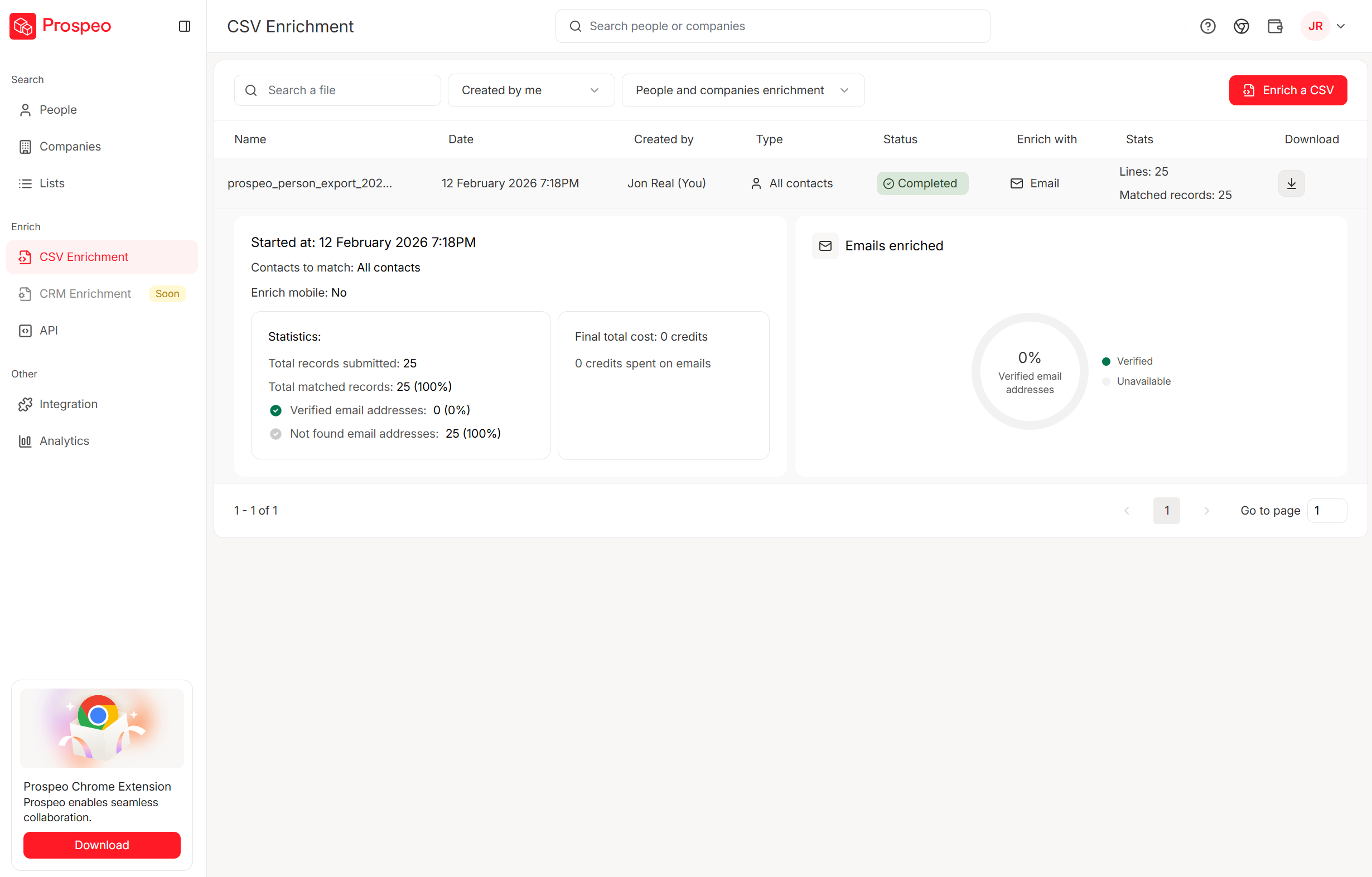
A $50K CDP filled with garbage loses to a clean database every time. Prospeo gives you 300M+ verified profiles, 30+ filters for firmographics and intent, and an 83% enrichment match rate - so your segments actually convert.
Stop building campaigns on bad data. Get 100 free credits now.
Best Marketing Database Tools in 2026
No single tool is "the" marketing database. Your stack will combine tools from at least two of these three categories. Here's what's worth your time.
| Tool | Category | Starting Price | Best For | Key Limitation |
|---|---|---|---|---|
| HubSpot | CRM + automation | Free ($0) | SMB all-in-one | Needs enrichment layer |
| Salesforce MC | CRM + automation | ~$1,250/mo | Enterprise ecosystem | Steep learning curve |
| Klaviyo | CRM + automation | Free (250 contacts) | Ecommerce email/SMS | Limited outside ecom |
| ActiveCampaign | CRM + automation | ~$29/mo | Small team automation | Less capable at scale |
| Segment | CDP | Free (1K visitors) | Data unification | No native activation |
| Adobe RT CDP | CDP | ~$50K+/yr | Enterprise Adobe stack | Complex, expensive |
| Bloomreach | CDP | ~$1,000+/mo | Ecommerce personalization | Niche focus |
CRMs & Marketing Automation
Skip HubSpot if you're an enterprise team with complex multi-touch attribution needs. Choose HubSpot if you're an SMB that wants to be operational in a week, not a quarter. The free CRM is genuinely useful - not a bait-and-switch trial. Marketing Hub starts around $20/mo for Starter, jumping to around $890/mo for Professional (where the real automation lives). Users consistently praise the ease of use. The limitation: HubSpot isn't a true marketing database on its own. It needs an enrichment layer to keep contact data fresh and fill in firmographic gaps. Pair it with a verification tool and you've got a solid foundation for under $100/month.
The case against starting with Salesforce Marketing Cloud: it runs around $1,250-$4,200/mo and is built for large organizations already deep in the Salesforce ecosystem. The power is undeniable - journey builder, audience segmentation, cross-channel orchestration. But implementation costs easily double the license fee, the learning curve is brutal, and I've watched mid-market teams spend six months just getting it configured. If you're not already on Salesforce, don't start here.
Klaviyo is free up to 250 contacts, with paid plans from ~$20/mo. For ecommerce teams, it's the clear winner. The segmentation engine is excellent - behavioral triggers, purchase history, predictive analytics. RFM scoring is built in, which saves you from building it manually. Outside ecommerce, it's limited.
ActiveCampaign ($29-$149/mo) is the beginner-friendly automation platform for small teams graduating from spreadsheets. It handles email sequences, lead scoring, and basic CRM functions well. Where it falls short: reporting depth and scalability. Teams that outgrow it typically move to HubSpot Professional or Salesforce within 12-18 months. Think of it as training wheels - good training wheels, but training wheels nonetheless.
Customer Data Platforms
Segment (Twilio) is the leading CDP for data collection and routing. Free up to 1,000 visitors/month, Team plan at around $120/mo. It excels at unifying data across dozens of sources and routing it to downstream tools. The catch: it's an access CDP - it doesn't include native activation channels. You still need your ESP, your ad platform, and your CRM. Segment is the plumbing, not the faucet.
Adobe Real-Time CDP is enterprise pricing territory - $50,000-$200,000+/year. Best for large organizations already using Adobe Experience Cloud. If you're not in the Adobe ecosystem, the integration overhead isn't worth it.
Bloomreach offers custom pricing, typically $1,000-$5,000+/mo for mid-market. It's an actionable CDP with native ecommerce personalization - product recommendations, search, and content built in. If you're running a mid-to-large ecommerce operation and want a CDP that actually does things (not just routes data), Bloomreach is the strongest option in this price range.
Data Enrichment & Verification
This is the accuracy layer that makes your marketing database actually work. Without it, you're building on sand. Prospeo checks 300M+ professional profiles with 98% email accuracy and a 92% API match rate, refreshing data every 7 days. Teams like Meritt tripled their pipeline from $100K to $300K/week after switching - their bounce rate dropped from 35% to under 4%. The free tier gives you 75 verified emails per month. Paid plans run ~$0.01/email with no annual contracts. Native integrations with Salesforce, HubSpot, Smartlead, Instantly, Lemlist, Clay, Zapier, Make, Outreach, and Salesloft mean enriched data flows directly into your existing stack.
If you're comparing vendors, start with accuracy and workflow fit (not just list size): email verifier websites, email lookup tools, and lead enrichment tools tend to be the fastest way to narrow down options.
Pricing tier summary: SMBs can build a real marketing database for under $100/month. Mid-market teams should budget $500-$2,000/month for a CDP + CRM + enrichment stack. Enterprise CDPs start at $50,000+/year before implementation.
Mistakes That Kill Your Marketing Database
1. Manual data movement. A third of companies still move some or all data manually between tools. In 2026. Copy-pasting between spreadsheets and CRMs introduces errors, creates lag, and doesn't scale. Automate or accept that your data will always be wrong.
2. Separate CRM and marketing databases. When sales and marketing operate on different data, leads fall through cracks. Same lead gets emailed twice by two reps on the same day. Unify or suffer.
3. No cleaning cadence. Data decays at 2-3% per month. If you're not verifying and deduplicating at least quarterly, a quarter of your database is garbage by year's end. Most teams know this. Most teams still don't do it.
4. Missing lead source data. If you can't attribute leads to channels, you can't optimize spend. Yet most CRMs have a "lead source" field that's either blank or filled with "web" for 90% of records. Fix this at the form level, not after the fact.
5. Using generic integration tools for full database syncs. Zapier and Make are great for lightweight automations. They're not meant for syncing entire large databases. Configuration errors - a required field missing in the source, a rate limit hit mid-sync - can leave ready-to-buy leads stuck in limbo.
6. Importing clutter during migration. "We might need those 2019 contacts someday" is how you start a new CRM with 40% dead data. Be ruthless. If a contact hasn't engaged in 18 months, leave them behind.
7. Under-utilizing your tools. 87% of marketers say their data is under-utilized. You don't need another tool. You need to actually use the ones you have.
Privacy and Compliance
Here's the thing: privacy compliance isn't a checkbox exercise anymore. It's an enforcement reality with real financial consequences.
GDPR cumulative fines have reached EUR5.88 billion since 2018, with EUR1.2 billion in 2024 alone. Recent fines include TikTok (EUR530M), Google (EUR200M), and SHEIN (EUR150M). These aren't small companies getting caught on technicalities - they're major brands with legal teams.
In the US, 20 states now have privacy laws covering roughly 150 million Americans - 43% of the population. California ended its 30-day cure period on December 31, 2024, meaning violations now result in immediate penalties. No more "fix it and we'll let it slide."
What this means for your data infrastructure:
Double opt-in is the standard for email marketing consent. Single opt-in is technically legal in some jurisdictions, but it's not worth the risk - and it leads to worse data quality anyway.
Consent Management Platforms (CMPs) are required. You need to block tracking scripts until consent is granted. Google Consent Mode v2 handles measurement when consent is denied, but you need the CMP infrastructure in place first.
Legitimate interest no longer justifies behavioral advertising under GDPR. If you've been relying on "legitimate interest" as your legal basis for tracking and targeting, that door is closing.
Data retention policies are mandatory. You can't keep data indefinitely "just in case." Define retention periods, automate deletion, and document your policies. Regulators ask for this documentation - and they expect it to exist before they ask.
The California cure period ending is the canary in the coal mine. US enforcement is shifting from "educate and warn" to "fine first, ask questions later." If your database doesn't have documented consent records, retention policies, and automated deletion workflows, you're operating on borrowed time.
Real-World Examples
Coca-Cola's "Share a Coke" campaign is the textbook database marketing success story. By mining purchase data and demographic insights, Coca-Cola replaced its logo with the 250 most popular names in each market. The result: a 2.5% increase in US sales (reversing a decade-long decline), 6 million+ virtual bottles shared online, and a 7% uptick in young adult consumption. The data didn't just inform the campaign - it was the campaign.
Nike built its customer data system around behavioral data from the Nike Run Club and Training Club apps. Every run logged, every workout completed, every product browsed feeds into personalized recommendations. App engagement increased 80% year-over-year, and repeat purchase rates climbed with it. The database isn't just storing data - it's creating a feedback loop between activity and commerce.
Starbucks processes 40% of US transactions through its mobile app, with 16M+ loyalty members generating a constant stream of purchase history, location data, and preference signals. The company uses geolocation combined with AI to send personalized push notifications when customers are near a store. That's not batch marketing - it's real-time activation powered by a system that knows where you are and what you usually order.
Amazon maintains 150M+ user profiles feeding its recommendation engine. 49% of shoppers purchased items they didn't intend to buy, driven entirely by personalized recommendations. Amazon's data infrastructure isn't just a competitive advantage - it's the business model.
Sephora uses purchase history to power its recommendation engine and Virtual Artist AR tool. App users drive an 11% lift in in-store sales compared to non-app users. The system bridges digital and physical retail - your online browsing history informs the in-store experience.
AI and the Future of Marketing Databases
AI doesn't replace your marketing database. It makes it exponentially more valuable - but only if the data is clean.
90% of marketers using AI say it helps them make decisions faster. Companies using churn prediction models see churn rates drop 13-31%. Predictive lifetime value models let teams shift from reactive retention to proactive strategy. Content production time drops 30-50% with generative AI. These aren't theoretical benefits - they're production results from teams with solid data infrastructure.
JPMorgan Chase used AI-written ad copy generated from its customer data insights and saw a 450% lift in click-through rates versus human-written copy. The database didn't just store customer data - it trained the AI that wrote better ads than the marketing team could. Grammarly takes a different approach: its weekly AI-powered writing reports use aggregated user data to deliver personalized insights, turning product usage data into a retention engine.
AI-generated dashboards and smart alerting for KPI anomalies are becoming standard. Instead of a marketer manually checking campaign performance every morning, the system flags when something deviates from expected patterns. That's only possible when the underlying data is centralized, clean, and flowing in near real-time.
Here's the framework that works: centralize, enrich, activate, optimize. Centralize your data in a CDP or warehouse. Enrich it with verified contact data, firmographics, and intent signals. Activate it through your marketing channels. Optimize using AI-driven insights. Companies following this framework see double the conversion rates and 30% lower CAC.
But the prerequisite is non-negotiable. Clean, centralized data pipelines are the backbone. A sophisticated ML model trained on a database where 30% of emails bounce and half the firmographic data is wrong will produce sophisticated garbage.
The teams winning with AI in 2026 aren't the ones with the fanciest models. They're the ones that spent 2024 and 2025 building clean, enriched, well-structured data systems. The AI part is almost easy once the data is right.
FAQ
What is an email marketing database?
An email marketing database stores subscriber contact information - email addresses, engagement history, segmentation tags, and consent records - specifically for powering email campaigns. It tracks opens, clicks, bounces, and unsubscribes to enable audience segmentation and personalized sends. Email still delivers the highest ROI of any digital channel at $36 per $1 spent, which is why most teams start here before expanding to a full omnichannel system.
How often should I clean my marketing database?
At minimum, quarterly - data decays at 2-3% per month, so waiting a full year means 25-30% of your records are invalid. B2B teams with active outbound programs should verify emails monthly to protect sender reputation and keep bounce rates under 4%.
What's the best free tool for building a marketing database?
HubSpot's free CRM is the strongest starting point - it handles contacts, deals, and basic automation without a credit card. Pair it with a free enrichment tier for data accuracy, and you've got a functional system for $0. Klaviyo is free up to 250 contacts for ecommerce teams.
How much does a marketing database cost?
SMBs start under $100/month with a free CRM plus a verification tool. Mid-market teams typically spend $500-$2,000/month on a CDP + CRM + enrichment stack. Enterprise CDPs like Salesforce Marketing Cloud or Adobe start at $50,000+/year, with implementation costs often doubling the license fee.
Do I need a CDP or just a CRM?
Most teams don't need a CDP on day one - start with a clean CRM and a verification tool. Graduate to a CDP when you have multiple data sources and need identity resolution across channels. 67% of CDP adopters use less than half its capabilities, so don't buy complexity you won't use.