

Reminder Email Templates: 15+ Copy-Paste Examples Backed by Real Data
42% of replies come from follow-ups - not the first email. That means nearly half your results depend on the reminder email templates you almost didn't send because you were worried about being "annoying."
Stop apologizing for following up. The "gentle reminder" framing that dominates most advice actually undermines your message by signaling that you think your own email isn't worth the recipient's time. A clear, concise reminder with a specific ask outperforms a timid one every time.
What You Need (Quick Version)
Five things that actually move the needle:
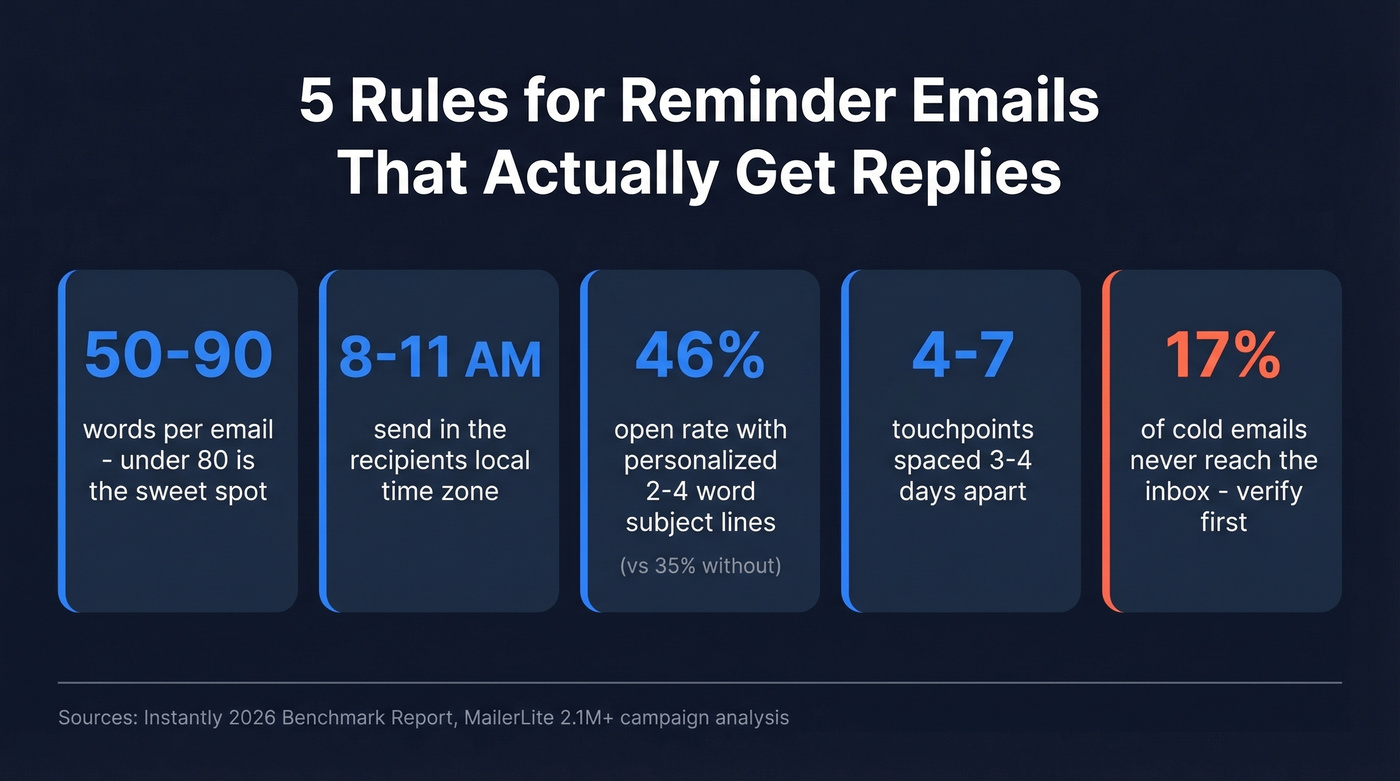
- Keep reminders around 50-90 words. Under 80 words performs best in cold sequences.
- Send between 8-11 AM in the recipient's local time zone.
- Use 2-4 word personalized subject lines. Personalized subjects hit a 46% open rate vs 35% without personalization.
- Plan 4-7 touchpoints spaced 3-4 days apart. Beyond 7, diminishing returns set in.
- Verify your email list before sending. ~17% of cold emails never reach the inbox. Templates don't matter if they bounce.
The Data Behind Effective Reminders
Across Instantly's cold email benchmark report, the overall average reply rate sits at 3.43%. Top-quartile campaigns push past 5.5%, and elite senders break 10%. The difference isn't magic - it's structure, timing, and persistence.
58% of replies come from the first email in a sequence, but the remaining 42% come from subsequent touches. That's a massive chunk of pipeline you'd leave on the table by sending one email and giving up.
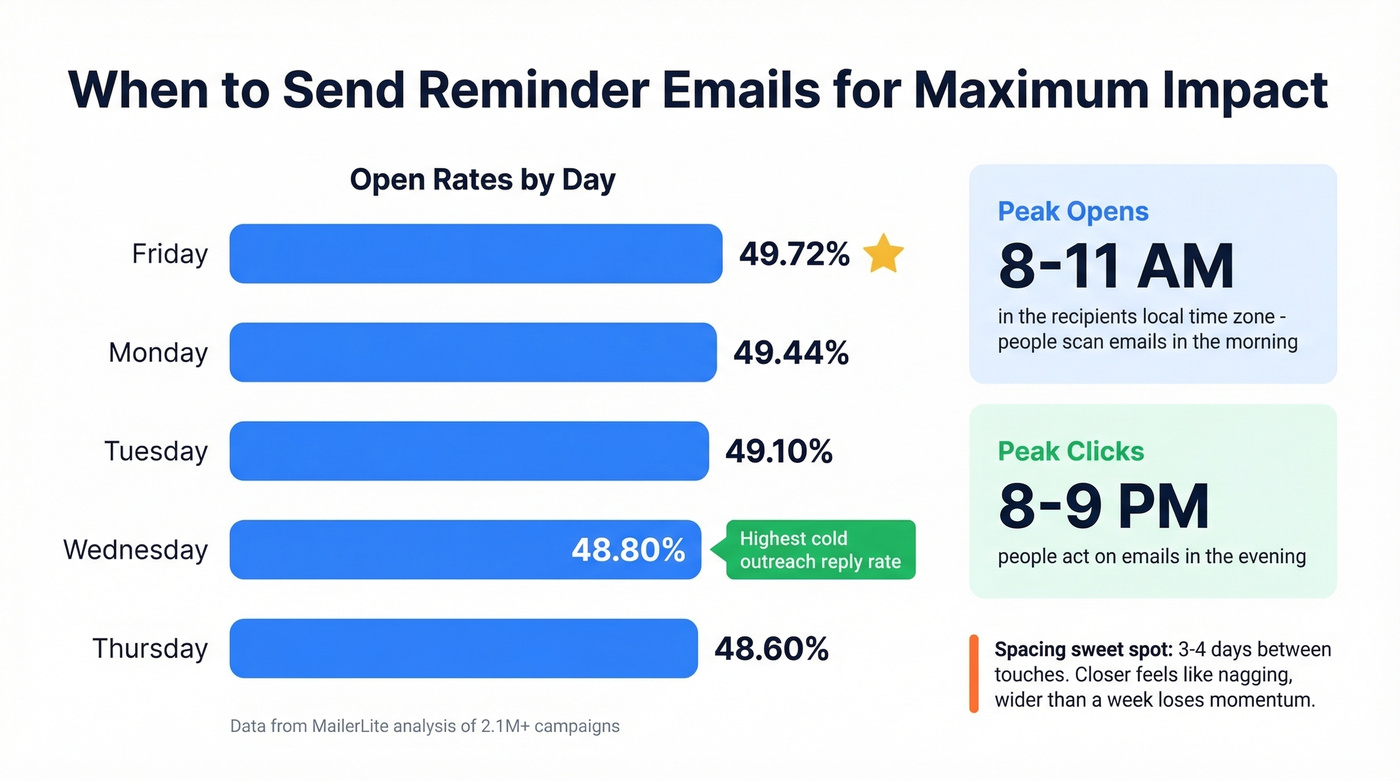
On timing, a [MailerLite analysis of 2.1M+ campaigns](https://www.mailerlite.com/blog/compare-your-email-performance-metrics-industry-benchmarks) found Friday leads with a 49.72% open rate, followed by Monday at 49.44%. Opens peak between 8-11 AM local time, while clicks peak in the evening around 8-9 PM.
The length sweet spot? 50-90 words, with under 80 performing best in cold sequences. Step 2 emails that feel like casual replies rather than formal follow-ups outperform by roughly 30%. But don't go so short that you sound robotic - a two-sentence email with no context reads as cold, not efficient.

Anatomy of a Reminder Email
Every effective reminder has five components. Miss one and you're leaving replies on the table.
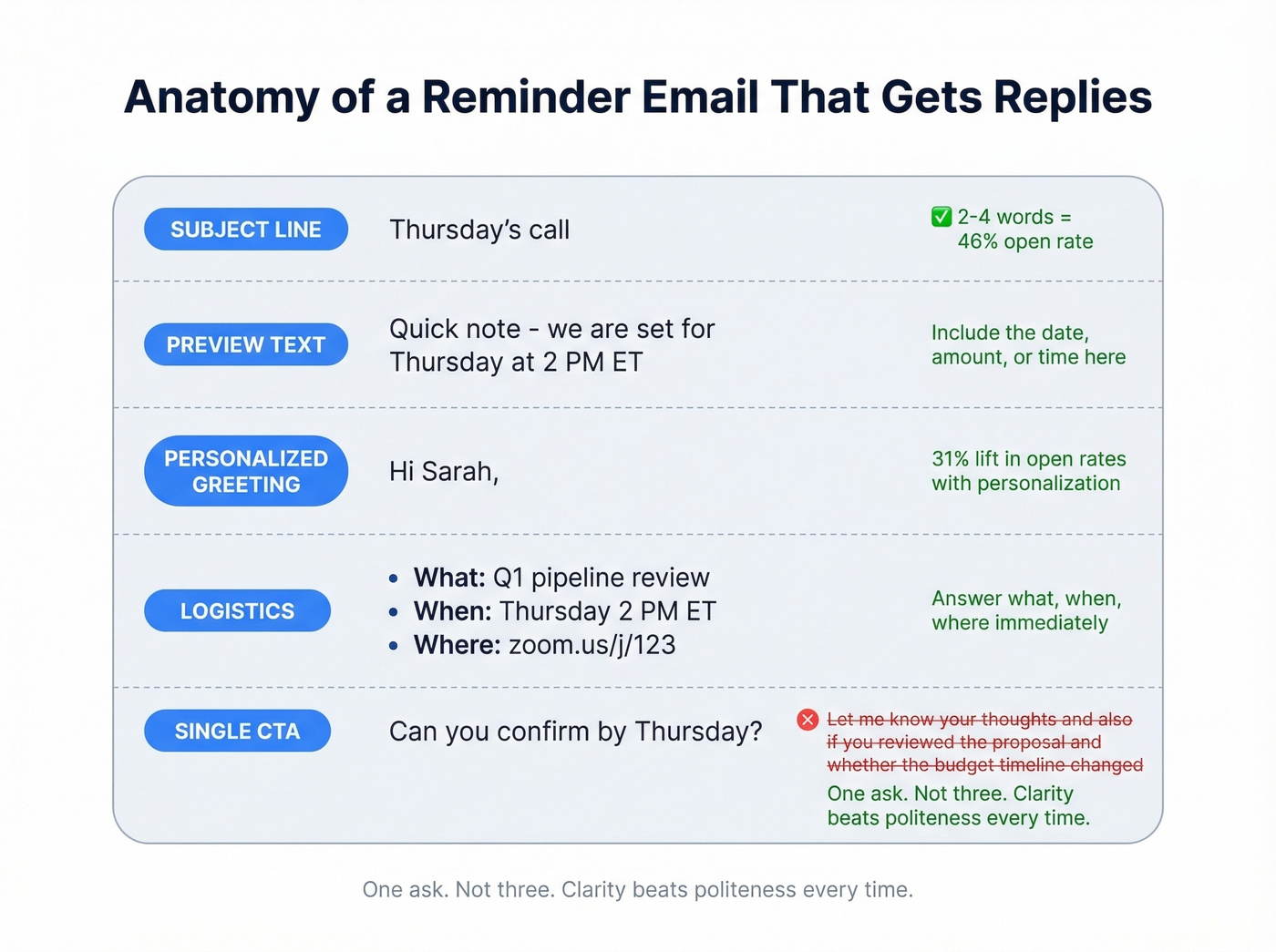
Subject line. Keep it to 2-4 words. That sweet spot delivers a 46% open rate. Longer subject lines of 7+ words drop to ~39%, and anything over 10 words falls to ~34%. iPhone screens truncate at roughly 33-41 characters, so front-load the important stuff. One exception: appointment-specific subject lines can run ~45 characters since they need to include the date and time.
Preview text. This is the sentence fragment that appears next to your subject line in the inbox. Most people waste it by letting their email client auto-pull "Hi [Name], I wanted to..." Use it deliberately - add the date, the amount owed, or the meeting time. (If you want to test variations, use preview text like a second subject line.)
Greeting with personalization. First name at minimum. Reference the specific thing you're reminding them about - the invoice number, the meeting topic, the deliverable name. Personalized subject lines see a 31% lift in open rates, and reply rates jump from 3% to 7%.
Logistics. Answer what, when, and where immediately. Don't bury the meeting link three paragraphs down. Include the date and time with timezone, the location or video link, and any prep needed. For payment reminders, state the amount, due date, and a direct payment link.
A single clear CTA. One ask. Not three. "Can you confirm by Thursday?" beats "Let me know your thoughts, and also if you've had a chance to review the proposal, and whether the budget timeline has changed." (More examples: email call to action.)
15+ Templates for Sales, Meetings, and Payments
Meeting & Appointment Reminders
Here's the thing: the biggest anxiety around meeting reminders is sounding too pushy. Reddit threads confirm this. You won't sound pushy. People are busy, their calendars are chaos, and they'll thank you for the nudge. A double-touch strategy - 24-48 hours before plus day-of - can reduce cancellations by up to 30%.
48-hour reminder:
Subject: Thursday's call
Hi {{first_name}},
Quick note - we're set for Thursday at 2 PM ET. Here's the link: {{meeting_link}}
I'll have a few questions about your current workflow. No prep needed on your end.
Talk soon, {{your_name}}
24-hour reminder:
Subject: Tomorrow at 2 PM
Hi {{first_name}},
Just confirming our call tomorrow (Thursday) at 2 PM ET: {{meeting_link}}
Looking forward to it.
{{your_name}}
Day-of reminder (for morning appointments, send the evening before):
Subject: See you at 10
Hi {{first_name}},
We're on for 10 AM ET tomorrow morning. Here's the link: {{meeting_link}}
See you there. {{your_name}}
Send the 48-hour reminder mid-morning. For early-morning appointments, send the day-of reminder the evening before. For high-stakes meetings, add an optional SMS nudge about 2 hours before. (If you're building a full cadence, see sequence management.)
Payment & Invoice Reminders
Payment reminders are emotionally loaded on both sides. One Reddit user described being $2,600 short across nine clients with rent due Friday - and still struggling to find the right words. The key is clarity and friction reduction: re-attach the invoice PDF, include a direct payment link, and use a subject line formula of company name + invoice number + status.
Here's what NOT to write: "I hope this finds you well! I just wanted to gently check in regarding the outstanding balance on your account..." That's 25 words before you've said anything useful.
Pre-due reminder (3 days before):
Subject: {{company}} Invoice #{{number}} - due Friday
Hi {{first_name}},
Quick reminder that Invoice #{{number}} for ${{amount}} is due this Friday, {{date}}.
I've re-attached the invoice. You can pay directly here: {{payment_link}}
Let me know if you have any questions.
{{your_name}}
7-day overdue:
Subject: {{company}} #{{number}} - 7 days past due
Hi {{first_name}},
Flagging that Invoice #{{number}} (${{amount}}) was due on {{date}} and is now 7 days past due.
Invoice attached. Direct payment link: {{payment_link}}
If there's an issue with the invoice, happy to sort it out. Otherwise, can you process this week?
Thanks, {{your_name}}
21-day overdue (firm):
Subject: {{company}} #{{number}} - 21 days overdue, action needed
Hi {{first_name}},
Invoice #{{number}} for ${{amount}} has been outstanding since {{original_due_date}}. This is the third reminder I've sent.
I need this resolved by {{deadline - 5 business days out}}. Please process payment via {{payment_link}} or reply with a specific date I can expect it.
Thank you, {{your_name}}
Send payment reminders mid-morning (8-11 AM). Monday and Friday lead on opens, and Tuesday-Wednesday are consistently strong.
Follow-Up / No-Response Reminders
The framework here is tone escalation: each touch gets slightly more direct, but never aggressive. Space them 3-4 days apart, and make step 2 feel like a reply rather than a new campaign email. (If you want more options, compare these with sales follow-up templates and cold email follow-up templates.)
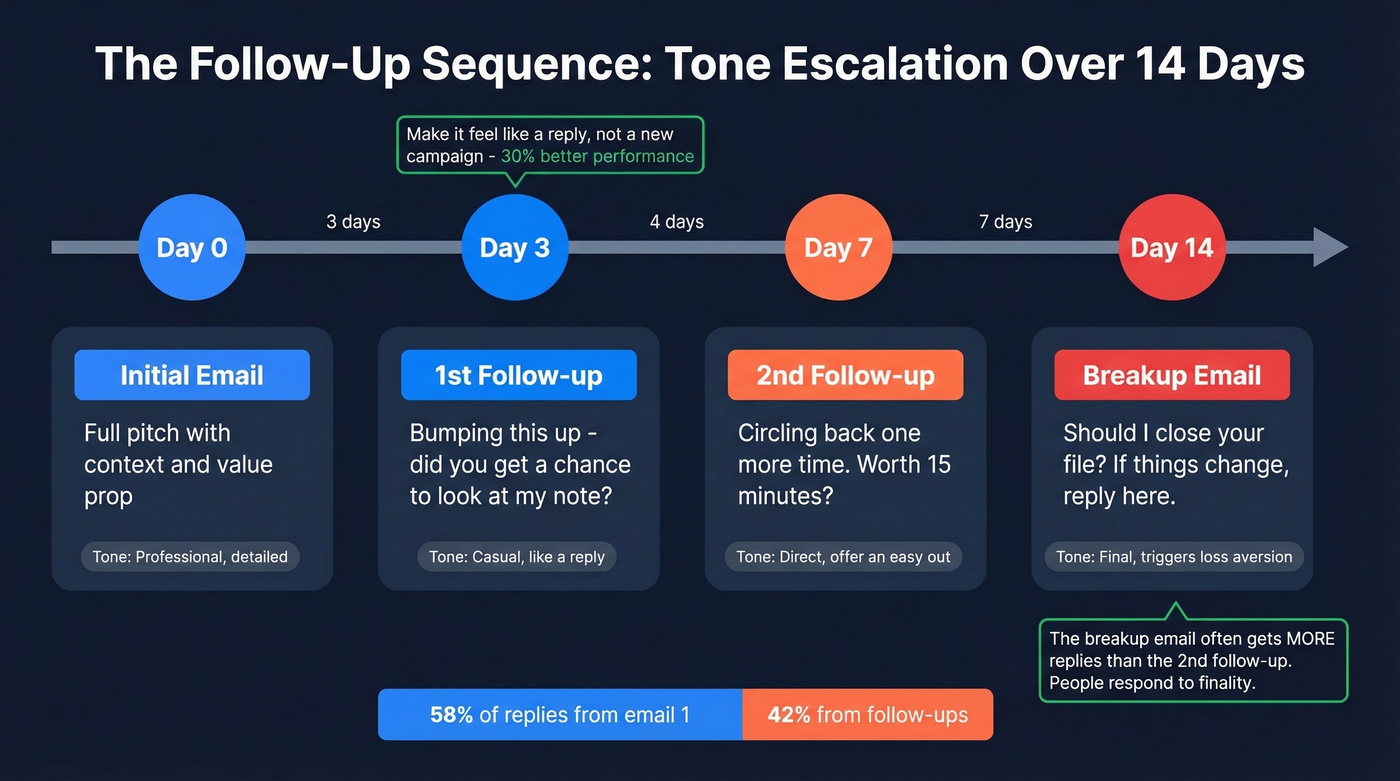
1st follow-up (3 days after initial email):
Subject: Re: {{original subject}}
Hi {{first_name}},
Bumping this up - did you get a chance to look at my note from Tuesday?
Happy to jump on a 15-minute call this week if that's easier.
{{your_name}}
2nd follow-up (7 days after initial):
Subject: Re: {{original subject}}
{{first_name}} - circling back one more time. I know things get buried.
The short version: {{one-sentence value prop}}. Worth 15 minutes?
If the timing's off, just say so - no hard feelings.
{{your_name}}
Final / breakup email (14 days after initial):
Subject: Should I close your file?
Hi {{first_name}},
I've reached out a few times and haven't heard back, so I'll assume the timing isn't right.
I'm going to close this out on my end. If things change, just reply to this thread and we'll pick up where we left off.
All the best, {{your_name}}
That "Should I close your file?" subject line is a classic for a reason - it triggers loss aversion. In our experience, the breakup email generates more replies than the second follow-up. People respond to finality.
Event & Webinar Reminders
1-week-out:
Subject: {{event_name}} - next Thursday
Hi {{first_name}},
{{event_name}} is one week out - {{date}} at {{time}} {{timezone}}.
Quick agenda: {{2-3 bullet points}}
Add to calendar: {{calendar_link}}
See you there.
Day-of:
Subject: Starting in 2 hours
Hi {{first_name}},
{{event_name}} kicks off at {{time}} {{timezone}} today.
Join here: {{event_link}}
See you soon.
Deadline, Survey & Renewal Reminders
Deadline reminder:
Subject: {{deliverable}} due Friday
Hi {{first_name}},
{{deliverable}} is due by end of day Friday, {{date}}. If you need an extension, let me know by Wednesday so we can adjust the timeline.
{{your_name}}
Survey / feedback reminder:
Baseline survey response rates hover around 2%, so standard "your voice matters" copy won't cut it. We've found that specificity and a little honesty work better:
Subject: 90 seconds, real talk
Hi {{first_name}},
We sent a survey last week. Most people ignored it (fair). But the 3 people who responded already changed how we're building {{feature/product}}.
90 seconds, 6 questions: {{survey_link}}
{{your_name}}
Renewal reminder:
Subject: Your {{product}} plan renews {{date}}
Hi {{first_name}},
Your {{plan_name}} subscription renews on {{date}} at ${{amount}}/{{period}}. No action needed to continue. To make changes before then: {{account_link}}

17% of cold emails never reach the inbox. Your perfectly crafted reminder templates are worthless against bad data. Prospeo verifies every email through a 5-step process - delivering 98% accuracy and bounce rates under 4%.
Stop writing reminders to email addresses that don't exist.
When to Send Reminders
Timing isn't everything, but it's close.
| Day | Avg Open Rate | Avg Click Rate |
|---|---|---|
| Friday | 49.72% | 8.09% |
| Monday | 49.44% | 7.51% |
| Tuesday | 49.10% | 7.84% |
| Wednesday | 48.80% | 7.62% |
| Thursday | 48.60% | 7.45% |
Data from MailerLite's analysis of 2.1M+ campaigns. Opens peak between 8-11 AM local time, while clicks peak around 8-9 PM - people scan in the morning and act in the evening.
For cold outreach specifically, Wednesday drives the highest reply rates per Instantly's data. The sweet spot for spacing between touches is 3-4 days. Closer than that feels like nagging; wider than a week and you lose momentum. (More timing data: best time to send cold emails.)
The practical framework: plan 4-7 touchpoints total. Front-load them (days 1, 4, 7, 11) and stretch the gaps as you go. Beyond 7 touches, you're getting diminishing returns unless each message adds genuinely new information.
Let's be honest about something most teams get wrong: they overthink timing and underthink list quality. Sending on the "perfect" day to an unverified list is like optimizing the font on a letter addressed to the wrong house. Fix deliverability first, then optimize timing. (Start here: email deliverability guide.)
5 Mistakes That Kill Your Reminders
1. Writing too much. Emails over 120 words see significantly lower reply rates. Your reminder isn't a proposal. State the context, make the ask, stop. (If you want a tighter structure, use this email copywriting framework.)
2. Wrong timing. Sending a payment reminder at 4 PM Friday means it sits unread all weekend. Send financial reminders mid-morning when people are processing admin.
3. Accusatory tone. "I still haven't heard from you" puts the recipient on the defensive. "Bumping this up" or "circling back" keeps it neutral. The goal is a reply, not a guilt trip.
4. Zero personalization. You're leaving a 31% open rate lift on the table by not personalizing. At minimum, use the recipient's first name and reference the specific thing you're reminding them about - the invoice number, the meeting date, the proposal title. (More ideas: personalized outreach.)
5. Sending to unverified lists. This is the silent killer. Roughly 17% of emails never reach the inbox due to bounces and spam filtering. Gmail's spam complaint threshold is 0.1% - exceed that and your entire domain reputation takes a hit. Every bounced reminder damages your ability to send the next one. Prospeo's 5-step email verification catches invalid addresses, spam traps, and honeypots with 98% accuracy, and it takes minutes to run a list through before you hit send. (Benchmarks and fixes: email bounce rate.)
Automation Tools
Most email platforms support basic reminder sequences on their entry-level plans. Advanced conditional logic - like "if opened but didn't reply, send version B on day 4" - typically requires mid-tier plans in the $19-50/mo range. (If you're evaluating options, start with follow up email software.)
| Tool | Starting Price | Free Tier | Best For |
|---|---|---|---|
| Brevo | $0/mo | 9,000 emails/mo | Budget automation |
| Zoho Campaigns | $4/mo | Limited | Zoho ecosystem |
| Mailchimp | $13/mo | Limited automation | Simple sequences |
| ActiveCampaign | $19/mo | No | Conditional logic |
| HubSpot | $20/mo/seat | Free tools available | CRM-integrated |
One thing none of these platforms handle: pre-send list verification. That's a separate step, and skipping it is how domains get burned. Verify first, then automate.
A common frustration worth flagging: reminder automation breaks down when you need to reply in the same Outlook thread and keep original attachments intact. Reddit users have documented this pain extensively. If your workflow requires thread-reply with attachments, you'll likely need Google Apps Script or Power Automate - standard ESPs won't cut it.
Beyond Email: SMS Reminders
For high-stakes meetings or time-sensitive payments, pair your email with an SMS sent about 2 hours before:
Hey {{first_name}}, quick reminder - we're on at {{time}} today. Link: {{meeting_link}}
Keep SMS short. A double-touch strategy can reduce cancellations by up to 30%, and adding a fast text nudge is a practical way to make sure the reminder actually gets seen.
Reminder sequences need 4-7 touchpoints to work. But you can't follow up with people you can't reach. Prospeo gives you 143M+ verified emails refreshed every 7 days - so your follow-ups land in real inboxes, not bounce logs.
Every template above works better when the email address is real.
Compliance Checklist
Any promotional content in a reminder converts it from transactional to commercial, triggering stricter requirements. If you're sending reminders to people who haven't opted in - prospects, cold leads, anyone who isn't already a customer - treat every email as commercial and include an unsubscribe link.
CAN-SPAM (US): Include a valid physical address, provide a working unsubscribe mechanism, honor opt-outs within 10 business days, no deceptive subject lines.
GDPR (EU/UK): Requires affirmative opt-in consent. Document who consented, when, and how. Withdrawal must be one-click easy. Respond to data subject requests within one month. Penalties run up to EUR 20M or 4% of global turnover.
CASL (Canada): Requires express consent. Must identify the sender and provide contact info. Process unsubscribes within 10 business days. Penalties up to $10M CAD.
Skip the compliance section if you're only sending internal reminders to your own team - these rules apply to external recipients.
FAQ
How many reminder emails should I send before stopping?
Plan 4-7 touchpoints spaced 3-4 days apart. Beyond 7, diminishing returns set in unless each message introduces genuinely new information or a different angle.
What's the best day and time to send a reminder?
Friday and Monday lead for opens (49.72% and 49.44% respectively). Wednesday drives the highest cold outreach reply rates. Send between 8-11 AM in the recipient's local time zone.
How long should a reminder email be?
50-90 words. Emails over 120 words see significantly lower reply rates. State the context, make one clear ask, and stop.
Should I reply in the same thread or start a new one?
Reply in the same thread for payment and meeting reminders - it preserves context and keeps attachments accessible. Start a new thread only if the original subject no longer matches your ask.
How do I stop reminder emails from landing in spam?
Verify your list before sending to catch invalid addresses and spam traps. Keep spam complaints below Gmail's 0.1% threshold, include an unsubscribe link, and avoid ALL CAPS or urgency words like "URGENT" in subject lines.