

10 Sample Emails to Approach a New Client - With Data to Back Them Up
You crafted 200 emails last Tuesday. Forty bounced. Another eighty hit spam. The twelve replies you got? Half were "please remove me."
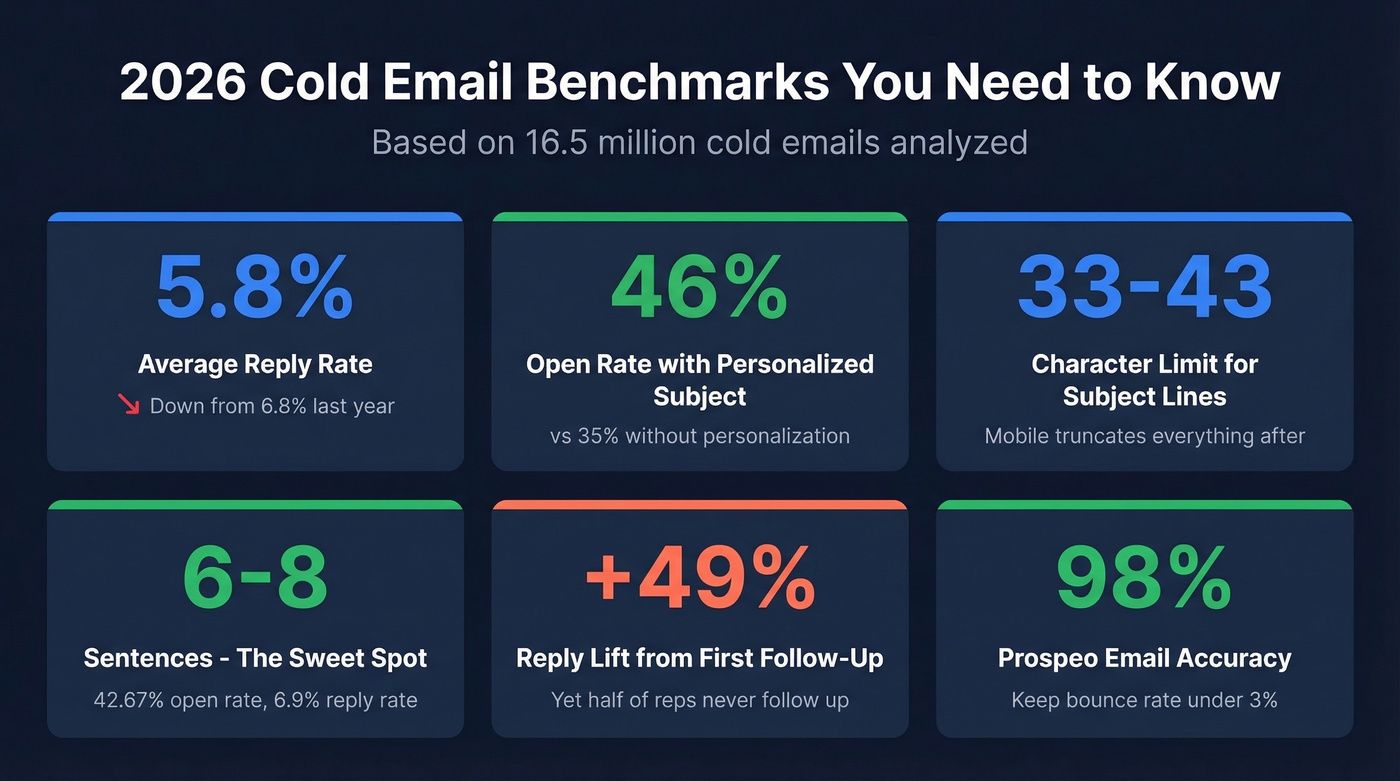
The problem wasn't your copy - it was everything underneath it. Reply rates across 16.5 million cold emails dropped from 6.8% to 5.8% year-over-year, according to Belkins' 2026 cold email benchmarks. Inboxes are harder to reach, and most guides on writing a sample email to approach a new client spend all their ink on copywriting and none on whether the email actually arrives. We're going to fix that ratio. You'll get 10 templates you can steal today, a follow-up cadence backed by real data, and the infrastructure setup that separates emails that land from emails that vanish.
What You Need (Quick Version)
Three things make outbound work: a verified prospect list so your emails arrive, two or three short templates tailored to your scenario, and a follow-up sequence because nobody replies to email one. Start with Template #1 (cold intro) and Template #6 (trigger event), bolt on the five-email follow-up cadence below, and you're running. Use the benchmarks at the end to check if your numbers are healthy.
What Makes a Client Outreach Email Work
Most cold emails fail for the same reasons. They're too long, too vague, and they ask for too much. The consensus on r/sales is blunt: short, to the point, tailored first line, no links or attachments. One SDR on that subreddit reported booking 6-7 meetings per week dropping 100-500 prospects into this exact framework.
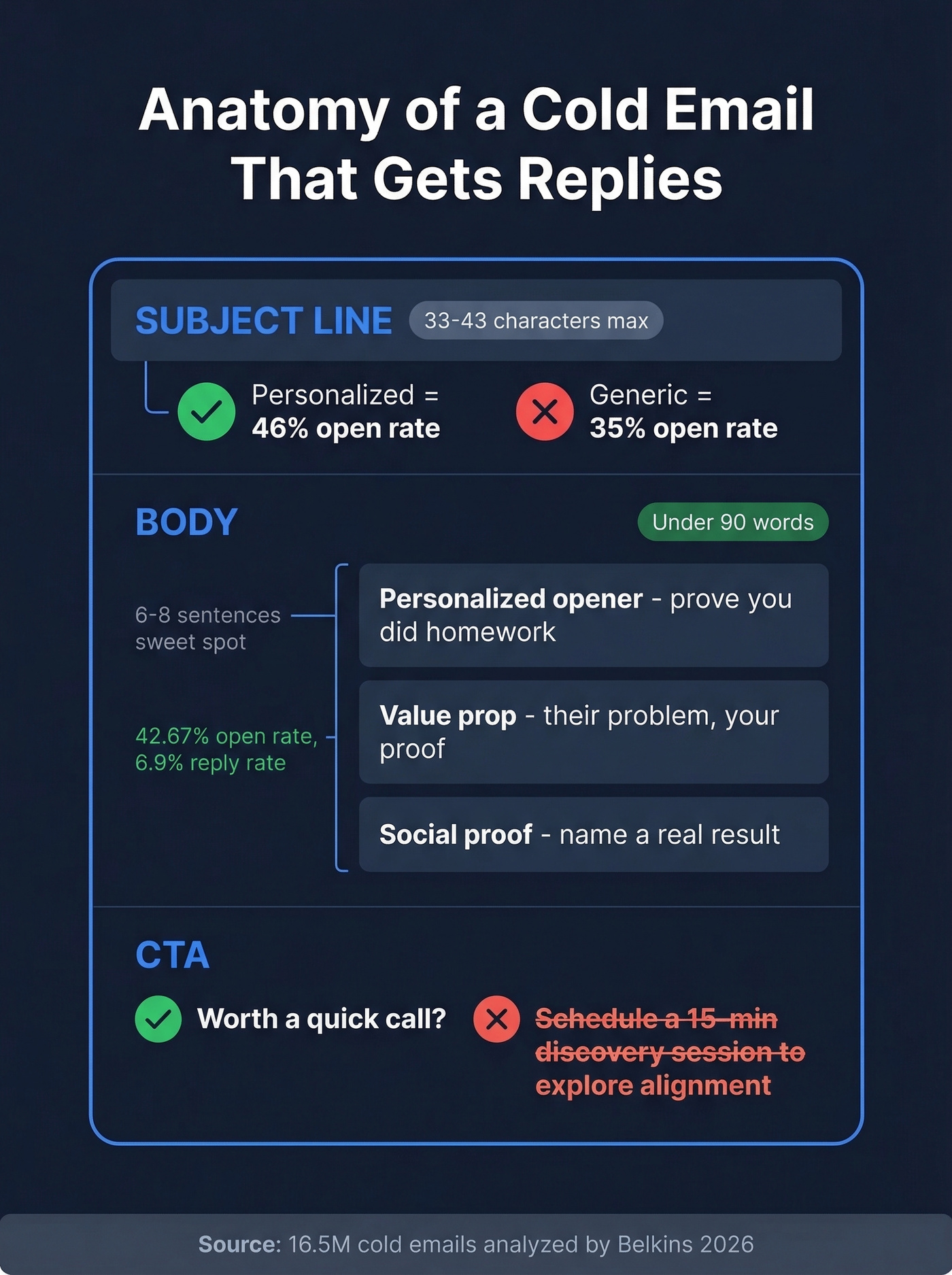
Here's what that framework looks like.
Subject Line Rules
Mobile clients truncate subject lines at roughly 33-43 characters. Anything after that disappears. Personalized subject lines hit 46% open rates versus 35% without personalization. The best-performing lines look like they came from a colleague, not a marketing team: "quick question," "idea for {{Company}}," "congrats on the raise."
The Body Framework
Emails with 6-8 sentences hit a 42.67% open rate and 6.9% reply rate - the sweet spot in the 16.5-million-email dataset. Keep total length under 90 words if you want the r/sales-style format that's easiest to read and hardest to ignore. Two-sentence paragraphs. Write like you talk. If it sounds like a press release, rewrite it.
One CTA Only
One question. One ask. "Worth a quick call?" works. "Would you like to schedule a 15-minute discovery session to explore alignment opportunities?" doesn't. Every additional CTA dilutes the one that matters. (If you want more examples, see our Email Call to Action guide.)
10 Templates for Approaching New Clients
Each template below is under 90 words, uses a single CTA, and avoids links or attachments. Copy, customize the bracketed fields, and send.
Template 1: The Cold Intro
Subject: Quick question, {{FirstName}}
Hi {{FirstName}},
I help {{role/industry}} teams solve {{specific problem}}. Noticed {{Company}} is growing fast in {{area}} - usually that means {{pain point}} becomes a headache around now.
We helped {{similar company}} cut that problem in half in about 60 days.
Worth a 15-minute call this week?
{{Your name}}
Why it works: Names the problem before pitching the solution. The "noticed" line proves you did homework - and that proof is the entire difference between a reply and a delete. This is the strongest first introduction email you can send when you have zero prior relationship. (For more intros, compare with these Company Introduction Email Examples.)
Template 2: The Pain-Point Opener
Subject: {{Pain point}} at {{Company}}?
Hi {{FirstName}},
Most {{role}} leaders I talk to are dealing with {{specific pain}} right now - especially teams scaling past {{milestone}}.
We built {{product/service}} specifically for that. {{Client name}} saw {{result}} within {{timeframe}}.
If that's on your radar, happy to share what worked for them.
{{Your name}}
Why it works: Leads with their problem, not your product. The case study adds proof without a link.
Template 3: The Case Study Drop
This is our favorite template for industries where results speak louder than features. Instead of describing what you do, you show what happened to someone like them.
Subject: How {{similar company}} fixed {{problem}}
Hi {{FirstName}},
{{Similar company}} was losing {{metric}} to {{problem}}. We helped them {{specific result}} in {{timeframe}}.
{{Company}} looks like it's in a similar spot based on {{observation}}.
Want me to walk you through what they did?
{{Your name}}
The observation line is what separates this from a mass blast. Even a surface-level detail - a recent job posting, a product launch, a new office - signals that you looked at their company before hitting send. (If you’re building a repeatable system, this pairs well with Account-Based Selling Best Practices.)
Template 4: The Referral Mention
Subject: {{Mutual contact}} suggested I reach out
Hi {{FirstName}},
{{Mutual contact}} mentioned you're the right person to talk to about {{topic}} at {{Company}}.
We work with teams like yours on {{value prop}} - {{Mutual contact}}'s team saw {{result}}.
Would you be open to a quick chat this week?
{{Your name}}
A warm name in the first line changes everything. This template requires an explicit referral - someone who said "you should talk to {{FirstName}}." That's a higher bar than Template 7, and it produces higher reply rates.
Template 5: The Free Audit Offer
Subject: Free {{audit type}} for {{Company}}
Hi {{FirstName}},
I put together a quick {{audit/teardown}} of {{Company}}'s {{area}} - found a few things that might be costing you {{metric}}.
Happy to walk you through it. No strings, takes about 10 minutes.
Want me to send it over?
{{Your name}}
Giving value before asking for anything flips the dynamic. The low-commitment CTA removes friction - they're not agreeing to a call, just receiving something useful.
Template 6: The Trigger Event
Subject: Congrats on {{event}}
Hi {{FirstName}},
Saw {{Company}} just {{trigger - funding round, new hire, product launch, expansion}}. Congrats.
Teams going through that usually start running into {{related challenge}}. We help with exactly that - {{one-line value prop}}.
Worth a conversation?
{{Your name}}
Timeliness is the best personalization. A real event proves you're paying attention, not batch-sending. Skip this one if you can't find a genuine trigger - a fake "congrats" is worse than no congrats at all. (To operationalize this, use a simple process for How to Track Sales Triggers.)
Template 7: The Loose Connection
Unlike Template 4, this one doesn't need an explicit referral. A shared connection, a mutual group, even attending the same conference works. The bar is lower, and so is the reply rate - but it still beats a fully cold open.
Subject: We both know {{connection}}
Hi {{FirstName}},
Noticed we're both connected to {{person}} - small world. I work with {{role}} teams on {{problem}}, and {{Company}} looks like a great fit.
Would love to swap notes. Free for a quick call this week?
{{Your name}}
Template 8: The Expert-Opinion Ask
Subject: Your take on {{topic}}?
Hi {{FirstName}},
I'm researching how {{role}} leaders are handling {{challenge}} in 2026. Your work at {{Company}} keeps coming up.
Would you be open to a 10-minute conversation? Happy to share the findings when it's done.
{{Your name}}
Flattery that's specific doesn't feel like flattery. Asking for expertise instead of a meeting changes the power dynamic entirely.
Templates 9 & 10: The Re-Engagement Pair
These two work as a sequence. Send the re-engagement first. If there's no reply in 5-7 days, send the breakup. Together, they're the highest-converting pair in the entire list because they target people who already know your name.
Re-Engagement:
Subject: Still relevant, {{FirstName}}?
Hi {{FirstName}},
We chatted back in {{month}} about {{topic}}. Timing wasn't right then - totally get it.
Wanted to check if {{problem}} is still on your plate. We've shipped {{new feature/result}} since we last talked.
Worth revisiting?
{{Your name}}
Breakup:
Subject: Should I close your file?
Hi {{FirstName}},
I've reached out a few times about {{topic}} - don't want to be a pest.
If the timing's off, no worries at all. If things change, I'm here.
Either way, I'll stop filling your inbox after this one.
{{Your name}}
The breakup email consistently pulls replies from people who ignored everything else. Loss aversion is real - and "should I close your file?" triggers it without being manipulative.
The Follow-Up Sequence
You don't need 55 templates. You need five that work and the discipline to follow up. Most responses come after the second or third email, yet nearly half of reps never follow up at all.
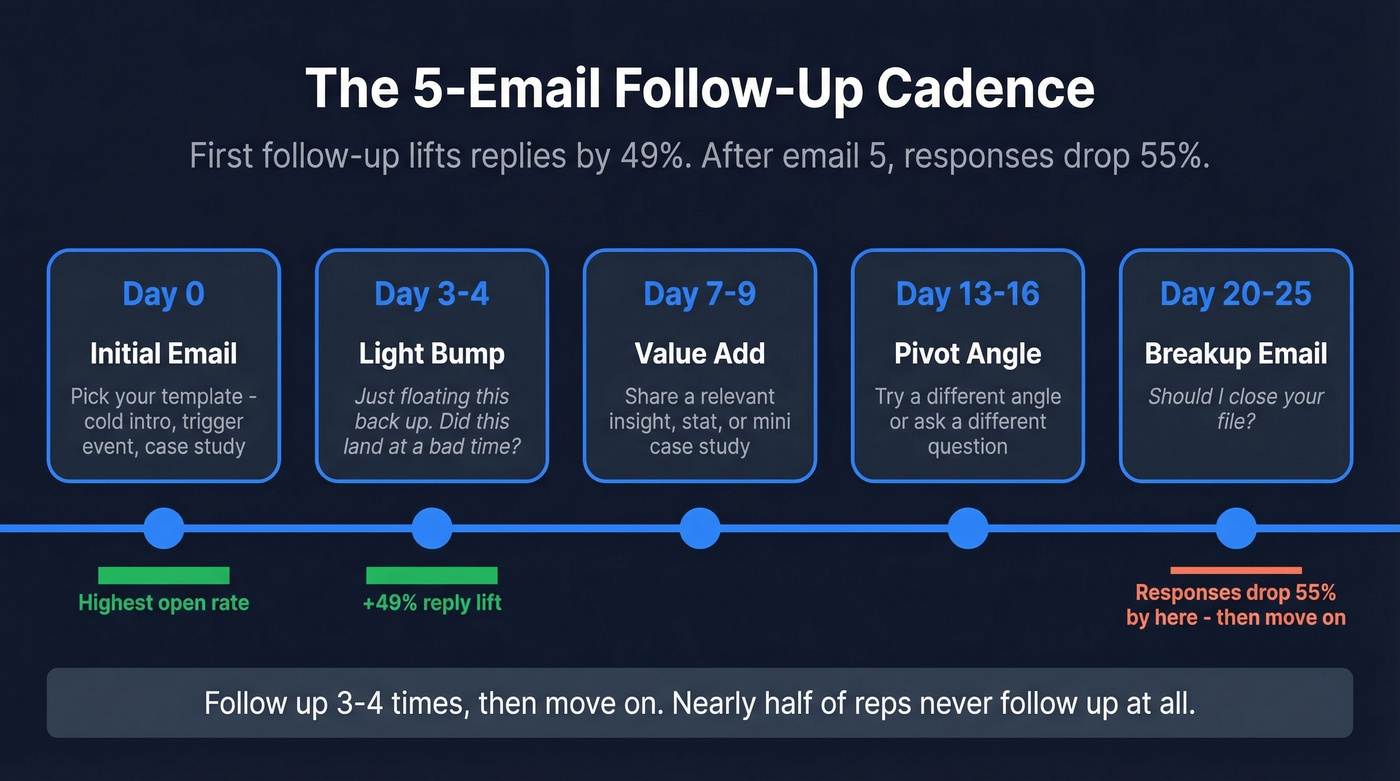
- Day 0: Initial email (pick a template above)
- Day 3-4: Light bump - "Just floating this back up. Did this land at a bad time?" (More options: How to Say Just Checking In Professionally.)
- Day 7-9: Value-add - share a relevant insight, stat, or mini case study
- Day 13-16: Pivot - try a different angle or ask a different question
- Day 20-25: Breakup - Template #10 above
The first follow-up lifts replies by up to 49%. By email five, responses drop 55% compared to earlier touches. The math is clear: follow up three or four times, then move on. (If you want more sequences, use these Cold Email Follow-Up Templates.)

Your outreach templates are only as good as the data behind them. 40 bounces out of 200 emails means 20% of your pipeline never had a chance. Prospeo's 98% email accuracy and 7-day data refresh cycle mean every sample email you send reaches a real person at a real address.
Stop perfecting copy that bounces. Start with emails that arrive.
Cold Email Infrastructure
Here's the thing most outreach guides skip entirely: the plumbing. Infrastructure isn't glamorous, but it's the difference between a 5.8% reply rate and 0%.
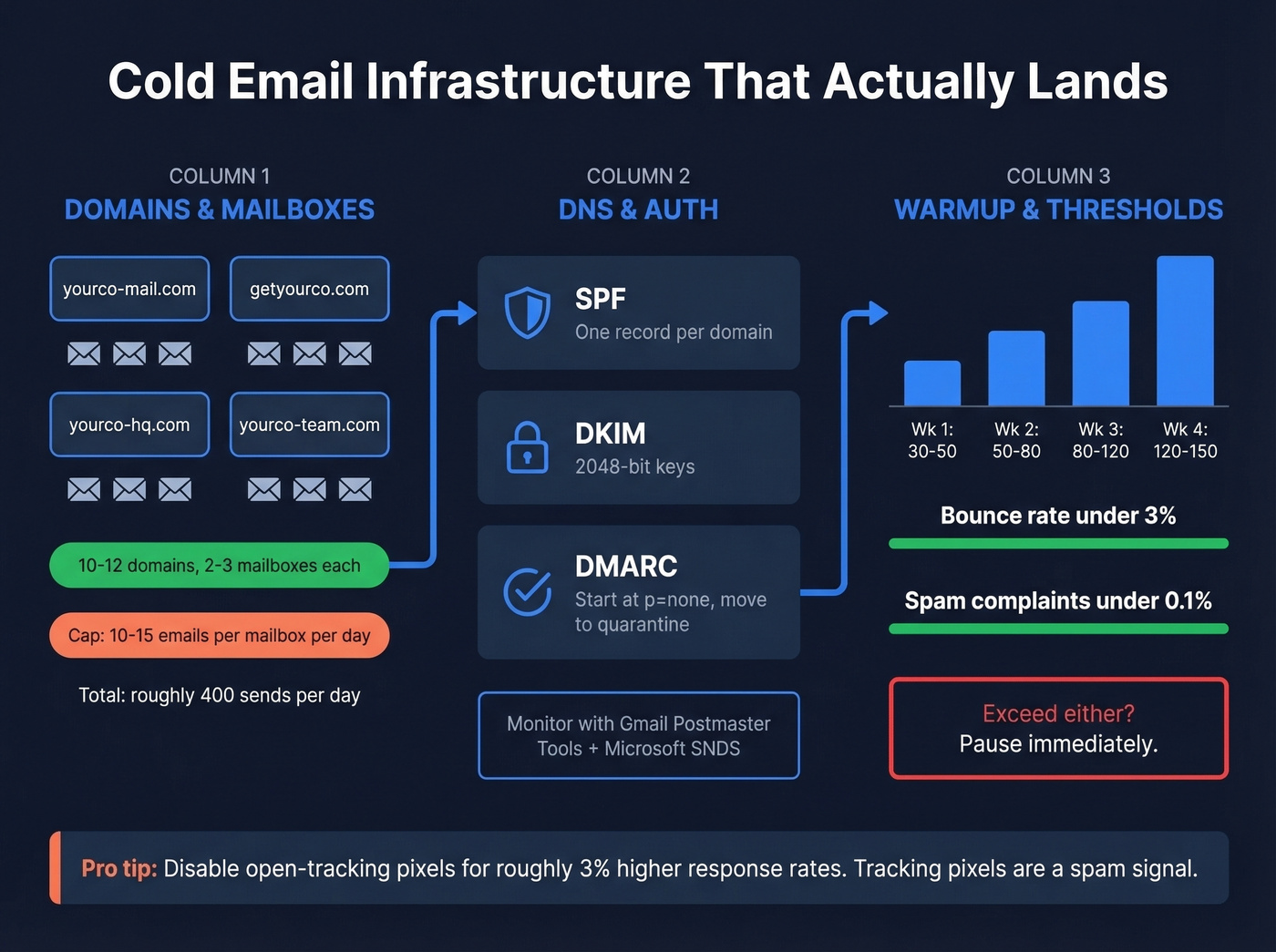
Never send from your primary domain. Buy 10-12 secondary lookalike domains (yourcompany-mail.com, getyourcompany.com). Set up 2-3 mailboxes per domain. Cap each mailbox at 10-15 emails per day. That gets you to about 400 sends daily without torching any single domain's reputation. (For safe limits, see Email Velocity.)
DNS is non-negotiable. Publish one SPF record, configure DKIM with 2048-bit keys, and start DMARC at p=none with reporting enabled. Move toward quarantine once alignment is clean. Monitor reputation with Gmail Postmaster Tools and Microsoft SNDS. (If you want the technical checklist, start with Email Deliverability Guide and DMARC Alignment.)
Warm up every mailbox. Here's the ramp schedule we've seen work consistently:
| Week | Emails/Day/Mailbox |
|---|---|
| Week 1 | 30-50 |
| Week 2 | 50-80 |
| Week 3 | 80-120 |
| Week 4 | 120-150 (if bounce <3%) |
Keep bounce rates under 3% and spam complaints under 0.1% per mailbox. Exceed either threshold and pause immediately. (If you need tooling options, see Best Unlimited Email Warmup Tools.)
One more lever most people miss: we've seen disabling open-tracking pixels produce roughly 3% higher response rates, consistent with the 16.5-million-email dataset. Tracking pixels are a spam signal. Turn them off. (Deep dive: Email Tracking Pixels.)
Before you load a single address into your sending tool, verify it. This is where most campaigns quietly die. Prospeo runs every address through a 5-step verification process - catch-all handling, spam-trap removal, honeypot filtering - and delivers 98% email accuracy. Stack Optimize built their agency to $1M ARR on Prospeo-verified lists: 94%+ deliverability, under 3% bounce, zero domain flags across all clients. (If you’re troubleshooting, start with Email Bounce Rate.)
How to Personalize at Scale
Every guide says "personalize your emails." None of them explain how when you're sending 200 a day.
Step 1: Create two custom CRM fields: prospect_post and custom_message. (If you’re still choosing a system, see Examples of a CRM.)
Step 2: For each prospect, grab a recent post, news mention, or company announcement. Use Google Alerts, a social listening tool, or manual browsing to find the raw material.
Step 3: Feed the prospect_post into an LLM - GPT-4o mini handles this fine - with a prompt that generates a custom first line. Store the output in custom_message.
Step 4: Export your CSV and inject {{custom_message}} as the opening variable in your sending tool.
We've watched teams triple their response rate with this workflow versus generic outreach. The difference is night and day.
Mistakes That Kill Your Reply Rate
- Opening with "I hope this email finds you well" or apologizing for reaching out
- Sending from your primary domain
- Skipping warm-up on new mailboxes
- Loading unverified email lists
- Including multiple CTAs in one email
- Missing an unsubscribe link
- Using HTML-heavy formatting or multiple links
- Forgetting SPF, DKIM, or DMARC setup
- Writing emails over 125 words
- Having no follow-up plan
- Leaving open-tracking pixels enabled
Let's be honest: if your average deal size is under five figures, you probably don't need a $30k/year sales engagement platform. A verified list, a good sending tool, and these templates will outperform most enterprise stacks. The bottleneck is almost never the software - it's the list quality and the follow-up discipline.
Trigger events, referral mentions, pain-point openers - every template above needs one thing: the right contact at the right company. Prospeo gives you 300M+ profiles with 30+ filters including job changes, funding rounds, and headcount growth, so your personalized first line is backed by fresh, accurate data at $0.01 per email.
Build the prospect list these templates were made for.
Cold Email Benchmarks (2026 Data)
Let's put real numbers on what "good" looks like. The most comprehensive dataset available - 16.5 million cold emails tracked by Belkins - gives us the clearest picture.
| Metric | Number |
|---|---|
| Avg reply rate | 5.8% |
| Best day (Thursday) | 6.87% |
| Worst day (Monday) | 5.29% |
| Best window (8-11 PM) | 6.52% |
| Optimal length | 6-8 sentences |
| 1-2 contacts/company | 7.8% reply |
| 10+ contacts/company | 3.8% reply |
Instantly's benchmarks frame it simply: 5-10% is solid, 10-15% is excellent, 15%+ is best-in-class on tight segments. (For a deeper breakdown, see Best Time to Send Cold Emails.)
Two things jump out. First, contacting 1-2 people per company massively outperforms spray-and-pray - the reply rate is more than double what you get when you blast 10+ contacts at the same org. Second, Thursday evenings beat Monday mornings by over a full percentage point. Small edges compound when you're sending at volume.
FAQ
How long should a new-client outreach email be?
Between 50 and 125 words, or roughly 6-8 sentences. The 16.5M-email dataset shows 6-8 sentence emails hit a 6.9% reply rate - the highest of any length bracket.
What's a good reply rate for cold emails in 2026?
5-10% is solid for most B2B campaigns. 10-15% means your targeting and copy are dialed in. Above 15% is best-in-class, typically on small, hyper-targeted segments.
How many follow-ups should I send?
Three to four after your initial email. The first follow-up lifts replies by up to 49%, but by the fifth email total, responses drop 55%. Diminishing returns hit fast after email three.
How do I make sure my cold emails don't land in spam?
Verify every address before sending. Set up SPF, DKIM, and DMARC on your sending domains. Warm up new mailboxes for two to three weeks. Keep bounces under 3% and complaints under 0.1%.
When's the best time to send cold emails?
Thursday evenings between 8-11 PM produce the highest reply rates at 6.52%. Thursday overall leads all days at 6.87%. Monday mornings are the worst performing slot at 5.29%.