

How to Write a Schedule a Meeting Email Subject That Gets Opened
Your subject line gets about 40 characters before most mobile inboxes cut it off. That's 6-8 words to earn an open - or get ignored.
Most "subject line guides" dump 90 templates without a single data point. Let's do the opposite: start with what 5.5 million emails actually tell us, then build templates from there. (If you want more swipeable options, see our email subject line examples.)
What 5.5 Million Emails Reveal
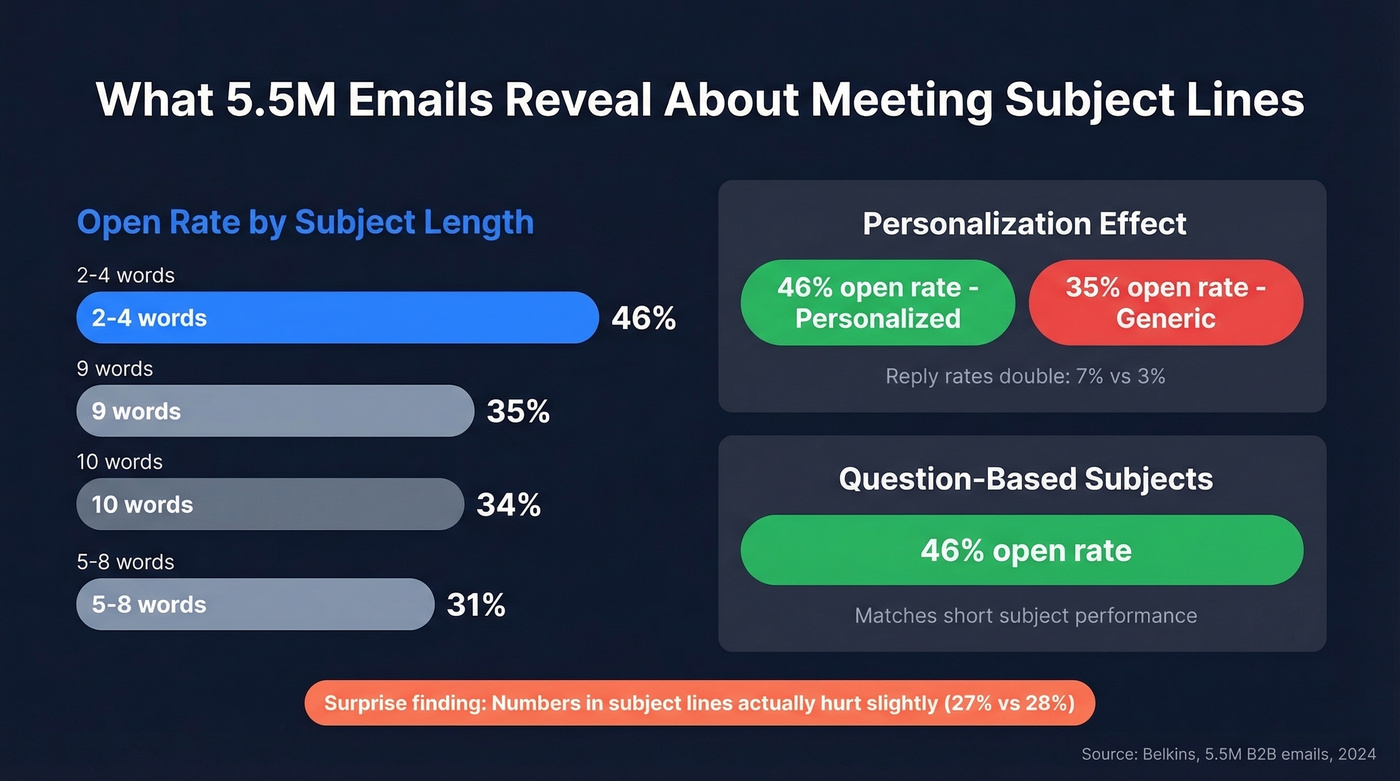
A Belkins study analyzed 5.5 million B2B cold emails sent throughout 2024. The patterns are clear:
| Factor | Open Rate | Notes |
|---|---|---|
| 2-4 word subject | 46% | Sweet spot |
| 9 word subject | 35% | Steep drop |
| 10 word subject | 34% | Diminishing fast |
| Personalized | 46% | vs 35% without |
| Question-based | 46% | Curiosity works |
| Contains numbers | 27% | vs 28% without |
Personalization doesn't just lift opens - it doubles reply rates (7% vs 3%). And question-based subject lines match the performance of short ones, which means a well-crafted four-word question is the ideal format. If you're building a full sequence, pair this with proven B2B cold email sequence structure.
The numbers finding surprised us too. Including digits in your subject line actually hurts slightly. Save the stats for the email body.
Character Limits by Device
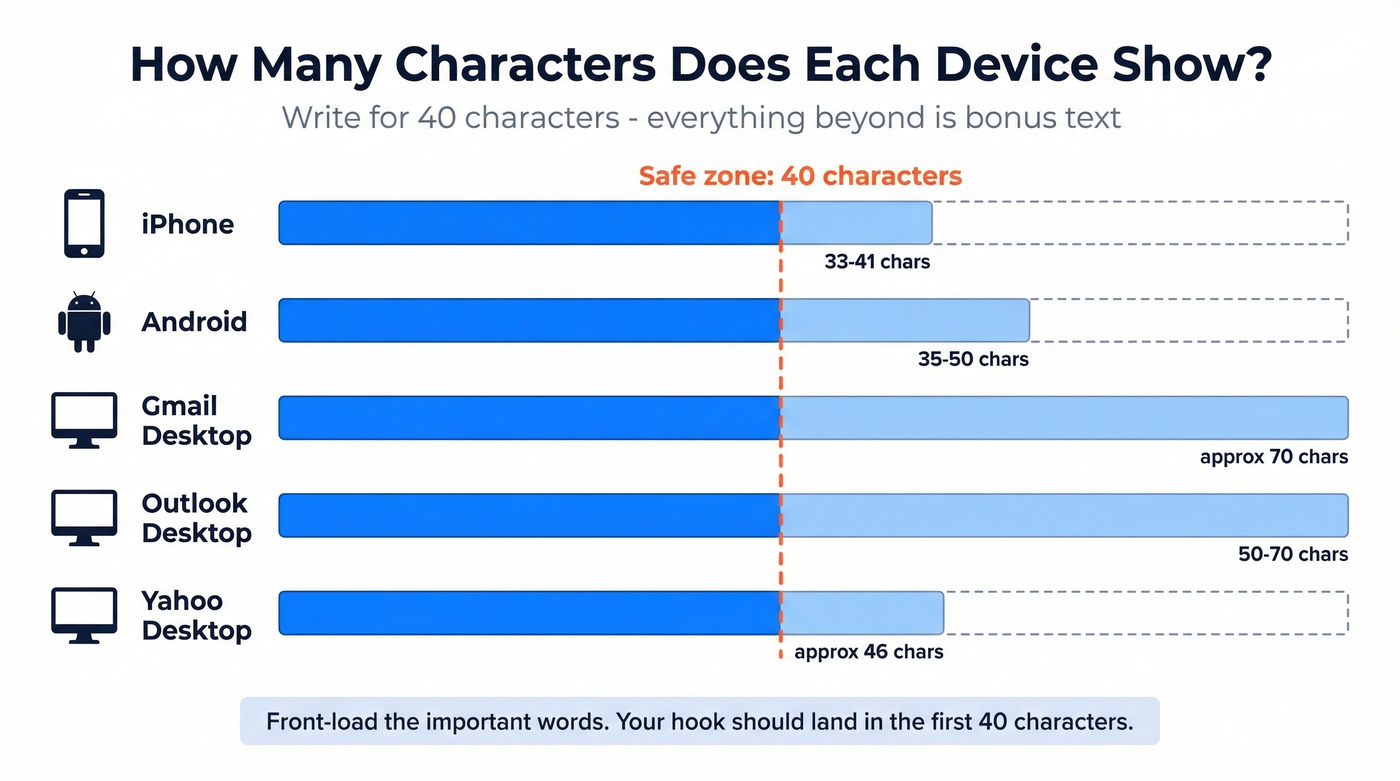
Write for 40 characters. Everything beyond that is bonus text that might not appear. Here's the breakdown per Twilio SendGrid's truncation data:
| Device/Client | Visible Characters |
|---|---|
| iPhone | 33-41 |
| Android | 35-50 |
| Gmail (desktop) | ~70 |
| Outlook (desktop) | 50-70 |
| Yahoo (desktop) | ~46 |
Front-load the important words. If your email subject for scheduling a meeting is "Quick sync on Q3 pipeline targets - 15 min Thursday," an iPhone user sees something like "Quick sync on Q3 pipeline targ..." That's fine. The hook landed.
Subject Lines by Scenario
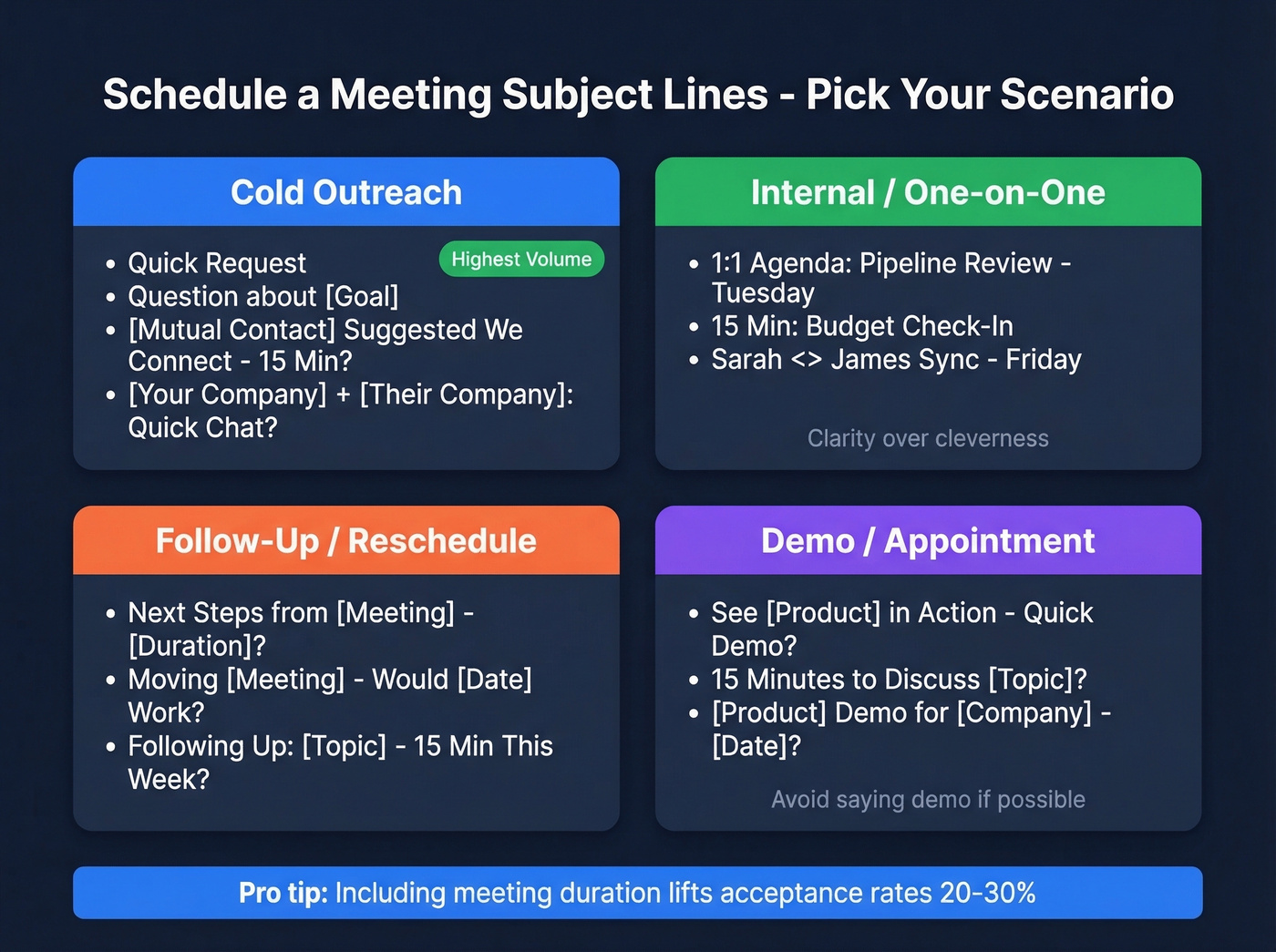
Including the meeting duration in your subject line lifts acceptance rates 20-30%. It signals respect for the recipient's time and lowers the perceived commitment. (For more on the body copy itself, use this email wording to schedule a meeting guide.)
Cold Outreach
- "Quick Request"
- "Question about [Goal]"
- "[Mutual Contact] Suggested We Connect - 15 Min?"
- "[Your Company] + [Their Company]: Quick Chat?"
A popular r/sales thread recommends benefit-focused, short templates like "Quick Request" and "Question about [Goal]" over clever or overly formal alternatives. "Quick Request" is almost stupidly simple - and it works because it's low-threat and curiosity-driven. If you need more ways to fill the top of funnel, start with these sales prospecting techniques.
Another tactic from that same thread: leaving the subject line completely blank. It can trigger curiosity, but it can also look spammy. Test it with a small batch before committing.
Internal / One-on-One
Skip the bullet templates here - internal meetings need clarity, not intrigue. Your colleague doesn't care about a clever hook. They need to know what you're meeting about, how long it'll take, and when.
Something like "1:1 Agenda: Pipeline Review - Tuesday" or "15 Min: Budget Check-In" tells them everything in a glance. Use the arrow format ("Sarah <> James Sync - Friday") for recurring one-on-ones so they're instantly recognizable in a crowded inbox.
Here's the thing most guides miss: your subject line also appears on the calendar, and calendar views truncate aggressively on mobile. If your subject reads "Discussion regarding upcoming quarterly planning session," your calendar shows "Discussion regarding upco..." which tells the recipient nothing when they're scanning their day at 8 AM. Front-load the topic, not the meeting type.
Follow-Up / Reschedule
- "Next Steps from [Meeting] - [Duration]?"
- "Moving [Meeting] - Would [Date] Work?"
- "Following Up: [Topic] - 15 Min This Week?"
If you're struggling to get replies on the second touch, borrow a few sales follow-up templates and adapt the subject lines to match.
Appointment Request Subjects
Demo subject lines are where most reps get too salesy. The best-performing appointment request email subject line treats the demo as a conversation, not a pitch. Try "See [Product] in Action - Quick Demo?" or simply "15 Minutes to Discuss [Topic]?" The second one works because it doesn't even say "demo" - it lowers resistance. (For the call itself, keep a simple product demo checklist handy.)
For warm leads who've already engaged with your content, "[Product] Demo for [Company] - [Date]?" adds enough specificity to feel personalized without being pushy.

You just spent time crafting the perfect meeting request subject line. Don't waste it on a dead inbox. Prospeo delivers 98% verified emails across 300M+ professional profiles - so your carefully written subject line actually reaches a real person.
Stop optimizing subject lines for emails that bounce.
Preview Text: Free Real Estate
Preview text is the snippet displayed next to your subject line in the inbox. Most senders let it auto-generate from the first line of their email body - usually something like "Hi [Name], I hope this email finds you well." That's wasted space.
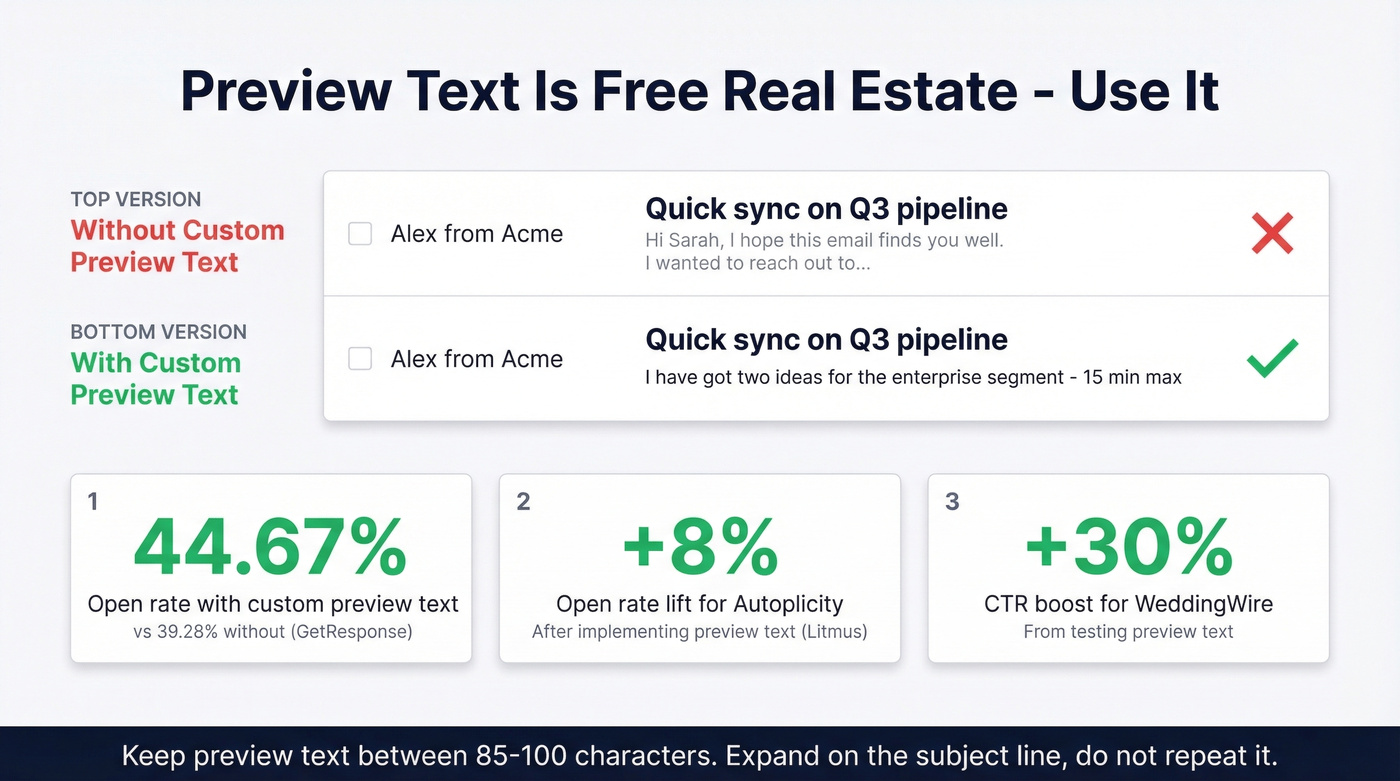
GetResponse found that custom preview text lifted open rates from 39.28% to 44.67%. Autoplicity saw an 8% open rate increase after implementing preview text, and WeddingWire got a 30% CTR boost from testing it.
Keep preview text between 85-100 characters. Use it to expand on the subject line, not repeat it. If your subject is "Quick sync on Q3 pipeline," your preview text should be something like "I've got two ideas for the enterprise segment - 15 min max." If you want a tighter testing process here, run an email preview text A/B testing plan alongside your subject tests.
Words and Tactics That Backfire
With 160 billion spam emails sent daily, filters are aggressive - even one trigger word can route your meeting request to junk. If deliverability is a recurring issue, start with an email deliverability guide and a basic email spam checker.
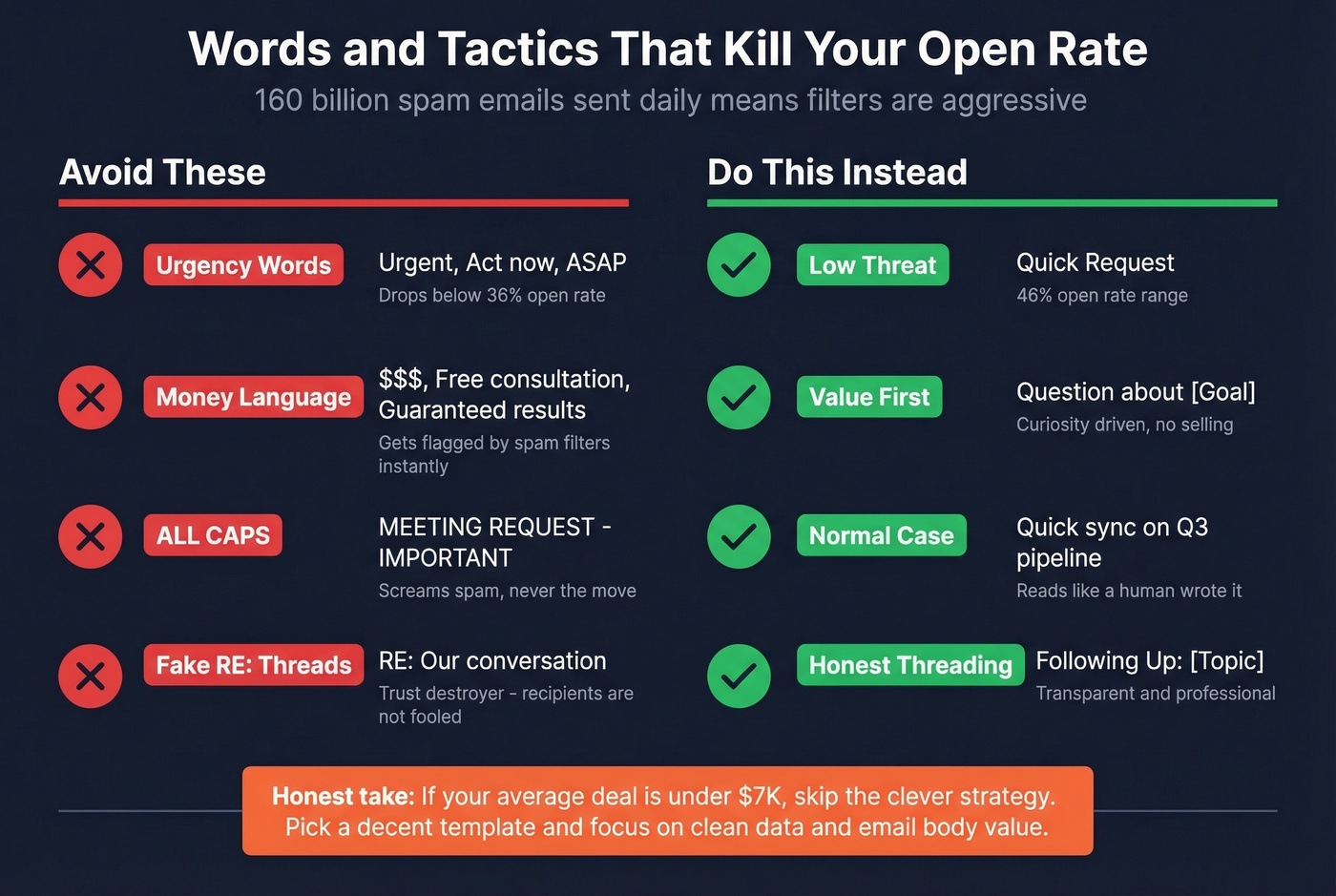
Urgency words like "Urgent," "Act now," and "ASAP" drop subject lines below 36% open rates. Money language - "$$$," "Free consultation," "Guaranteed results" - gets flagged instantly. ALL CAPS is never the move. And fake "RE:" threads? Adding "RE:" to make a cold email look like an ongoing conversation is a trust-destroyer. It might get one open, but it poisons every future touchpoint. The r/sales community calls this out regularly, and recipients aren't fooled.
Our honest take: if your average deal is under $7K, you don't need a clever subject line strategy. You need volume with clean data. Spend 10 minutes picking a decent template from this page, then spend the rest of your time making sure your list is accurate and your email body delivers value. Subject lines get opens; everything else gets meetings.
How to A/B Test Subjects
No template works universally. You need to test with your audience.
Send each variant to at least 250 contacts - 500+ is better for statistical confidence. Change only the subject line and keep everything else identical. Measure positive reply rate, not just opens, because opens tell you the subject line worked while replies tell you the email worked. Aim for a 5%+ positive reply rate; the average B2B cold email sits around 4%. (If you're also watching sending volume, track your email velocity so tests don’t distort deliverability.)
Run tests for two weeks minimum before drawing conclusions. Short tests get skewed by day-of-week effects.
Verify Your List Before Sending
None of this matters if your emails bounce. A perfectly crafted meeting request subject line sent to a dead address books zero meetings - and tanks your sender reputation in the process. We've seen teams obsess over subject line copy for weeks while sending to lists with 15%+ bounce rates. That's backwards. If you’re diagnosing the root cause, start with email bounce rate benchmarks and fixes.
Before launching any campaign, run your list through verification. Prospeo delivers 98% email accuracy across 143M+ verified addresses, with a 7-day refresh cycle that keeps data current. Upload a CSV, get results in minutes, and push clean contacts straight to your sequencer.
A/B testing subject lines on bad data gives you bad results. Prospeo's 7-day data refresh means every contact in your test is current - not a 6-week-old record that's already changed jobs. Start at $0.01 per verified email.
Clean data turns great subject lines into booked meetings.
FAQ
How long should a meeting email subject line be?
Two to four words hit 46% open rates across 5.5 million B2B emails. Stay under 40 characters so nothing gets truncated on mobile - iPhone inboxes cut off as early as 33 characters.
Should I personalize the subject line?
Yes. Personalized subject lines hit 46% open rates versus 35% without, and reply rates jump from 3% to 7%. Even a simple "[First Name], quick question" outperforms generic alternatives.
Does preview text actually matter?
Custom preview text increased open rates from 39.28% to 44.67% in aggregate testing. It's 85-100 characters of free real estate that most senders waste on auto-generated text like "Hi [Name], I hope this finds you well."
What's the best free tool to verify emails before sending meeting requests?
Prospeo's free tier includes 75 verified emails per month with 98% accuracy - enough to validate a small outbound list before you commit to a paid plan.