

How to Send Bulk Emails That Actually Reach the Inbox
You built a list of 5,000 contacts, wrote a solid campaign, hit send - and watched 22% of your emails bounce. Open rate: 8%. Two days later, your domain's flagged.
The campaign didn't fail because of your copy or your offer. It failed because you skipped the infrastructure work that determines whether bulk email actually lands. Authentication, list hygiene, IP warm-up, ESP selection - the unsexy stuff that separates campaigns that convert from campaigns that get your domain blacklisted.
We've watched teams burn through three domains in a quarter because they treated mass email as a one-click operation. It isn't. But the process is straightforward once you understand the mechanics.
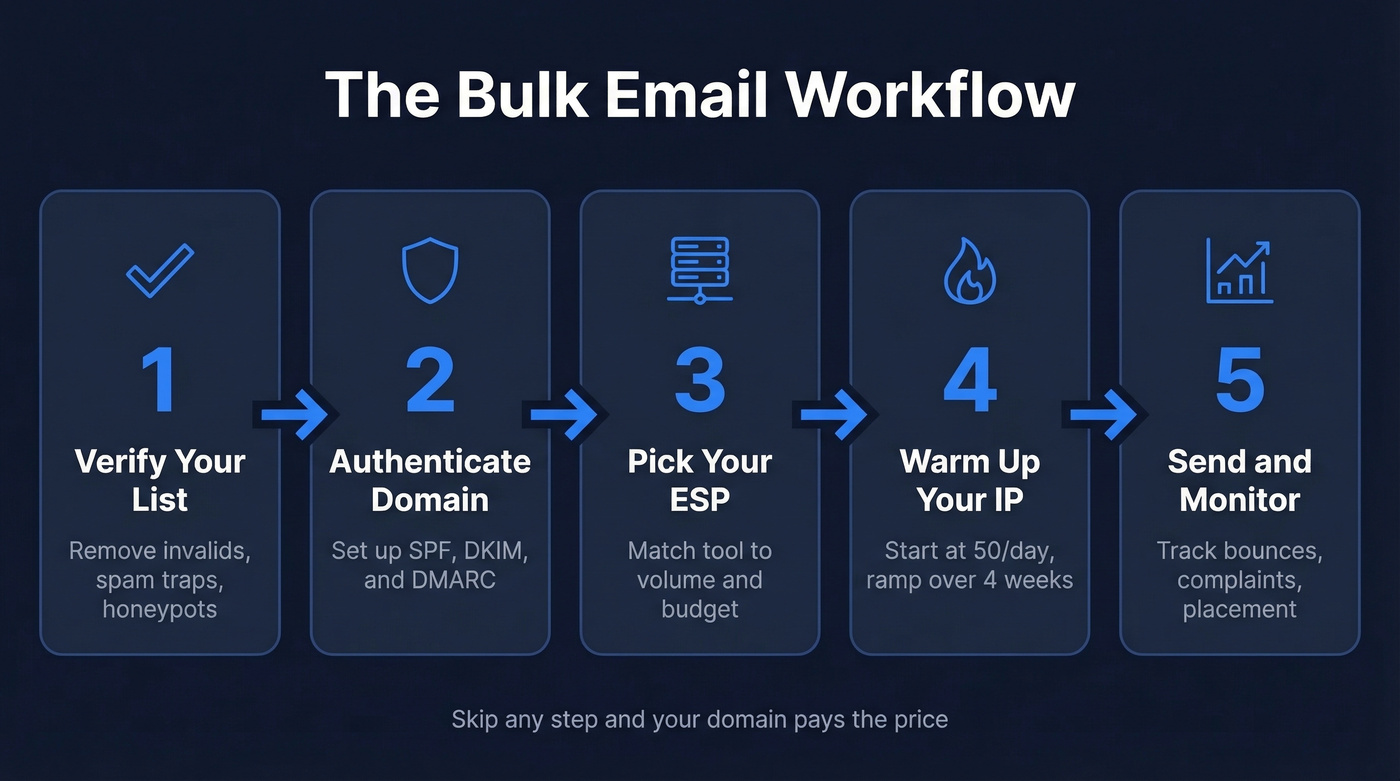
The Bulk Email Workflow (30 Seconds)
- Verify your list. Dead emails kill your sender reputation on the first send. Run every address through a verification tool to catch invalids, spam traps, and honeypots before they do damage. If you need options, compare bulk email address list cleaners.
- Authenticate your domain. SPF, DKIM, and DMARC aren't optional anymore - Gmail and Microsoft reject non-compliant bulk mail.
- Pick an ESP. Brevo for beginners, Amazon SES for scale, SendGrid for API-heavy workflows. If you want a broader shortlist, see the best mass emailing service.
- Warm up your IP. Start at 50 emails/day and ramp over 4 weeks. Skip this and ISPs will throttle you immediately.
- Send and monitor. Watch bounce rates, spam complaints, and inbox placement. Adjust in real time. For a deeper ops view, use an email workflow checklist.
Why Gmail and Outlook Can't Handle Mass Sends
Every few months, someone on r/Emailmarketing asks how to send 10,000 emails through Gmail. The answer is always the same: you can't. Not without destroying your domain.
Google Workspace caps you at around 2,000 emails per day. Free Gmail sits around 500/day. Hit those limits and Google temporarily restricts sending. Microsoft enterprise plans have higher ceilings but still lack any real bulk deliverability infrastructure - see current Office 365 sending limits.
Neither platform gives you ESP-style bounce analytics, inbox placement reporting, or campaign-level engagement tracking. Worse, you're sending from your primary business domain with no reputation isolation. One bad campaign and your regular business emails start landing in spam too.
The consensus on r/coldemail and r/digital_marketing is consistent: dedicated ESP, clean list, proper authentication. That's how businesses dispatch 10k-50k messages per day without landing in spam. Mail merge plugins bolt onto Gmail and pretend the limits don't exist. They don't. If you're still tempted, read how to mail merge email safely.
Verify Your List Before Anything Else
Think of this as Step 0 - the step most guides bury at the bottom and most teams skip entirely.
Do this if: You have any list older than 30 days, any list you didn't build yourself, or any list over 1,000 contacts. That covers basically everyone. Skip this if: You enjoy watching your sender reputation crater on the first campaign.
Here's what happens when you send to an unverified list: invalid addresses bounce, ISPs flag your domain, and your inbox placement drops. The average deliverability across 15 major ESPs is only 83.1% - meaning nearly 17% of emails don't reach the inbox even under normal conditions. Sending to a dirty list makes those numbers dramatically worse. If you want a step-by-step, use this guide on how to check if an email is valid.
Real results: Meritt went from a 35% bounce rate to under 4% after switching their verification workflow. Stack Optimize maintains 94%+ deliverability and sub-3% bounce rates across every client campaign. That's the difference between a list that works and a list that gets your domain blacklisted.
Upload a CSV, run verification, export the clean list, load it into your ESP. Takes 10 minutes. Saves your domain.

2026 Deliverability Benchmarks
"Deliverability" sounds binary - either your email arrives or it doesn't. The reality is messier.
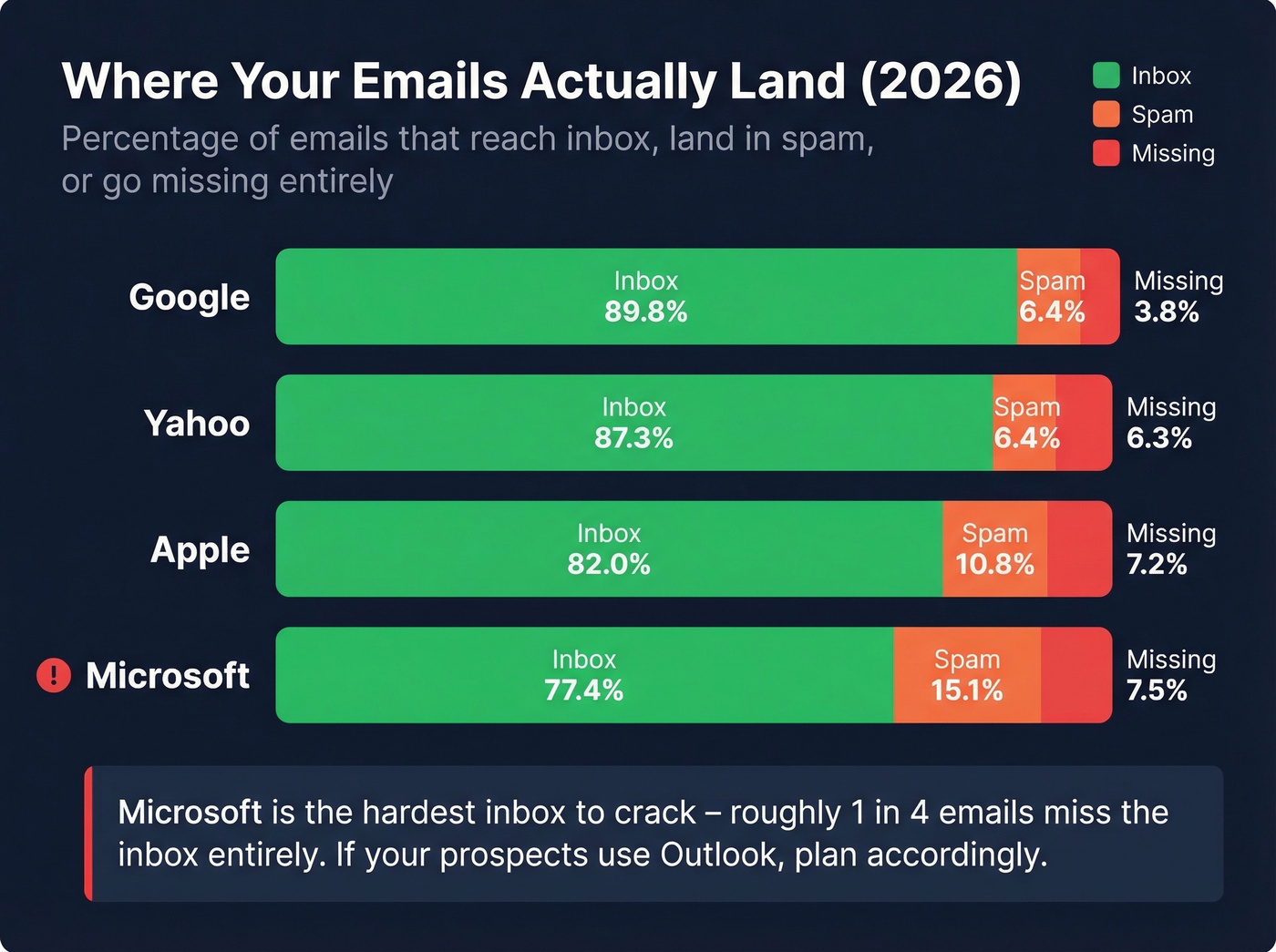
EmailTooltester's cross-provider testing found that 10.5% of all emails land in spam and 6.4% go missing entirely. That 83.1% average isn't a worst case - it's the norm. And it varies wildly by inbox provider.
| Inbox Provider | Inbox Rate | Spam Rate | Missing |
|---|---|---|---|
| 89.8% | 6.4% | 3.8% | |
| Yahoo | 87.3% | 6.4% | 6.3% |
| Apple | 82.0% | 10.8% | 7.2% |
| Microsoft | 77.4% | 15.1% | 7.5% |
Microsoft is the hardest inbox to reach. If your prospect list skews toward corporate Outlook users, expect roughly 1 in 4 emails to miss the inbox entirely.
It's getting worse, not better. GlockApps' Q1 2025 data shows inbox placement declining year over year across most monitored platforms:
| ESP | Q1 2024 Inbox Rate | Q1 2025 Inbox Rate | Change |
|---|---|---|---|
| 50.10% | 45.65% | -4.45% | |
| SendGrid | 45.30% | 35.31% | -9.99% |
| Amazon SES | 54.90% | 40.30% | -14.60% |
| Mailgun | 53.80% | 26.05% | -27.75% |
| MailChimp | 51.93% | 32.30% | -19.63% |
| Brevo | 30.40% | 24.93% | -5.47% |
The inbox-provider numbers are even more alarming. Outlook/Hotmail inbox rates collapsed from 49.33% to 26.77% year over year. Office365 went from 77.43% to 50.70%. Even Gmail dropped from 58.72% to 53.70%.
Here's the thing: content barely matters for deliverability anymore. Sender reputation does. Your list quality, authentication, and sending patterns matter more than whether your subject line has an emoji. If you want to benchmark engagement too, check the average email campaign open rate.
Benchmarks to aim for: Above 95% inbox placement is excellent. Above 89% is good. Below 80% means something's broken and needs immediate attention.

Meritt dropped their bounce rate from 35% to under 4%. Stack Optimize holds 94%+ deliverability across every client. Both run their lists through Prospeo's 5-step verification - catching invalids, spam traps, and honeypots before they torch your sender reputation.
Clean your list in 10 minutes. Save your domain permanently.
Gmail and Microsoft Are Cracking Down
Both major inbox providers tightened their bulk sender requirements, and enforcement is ramping through 2026. If you aren't compliant, you're already losing emails.
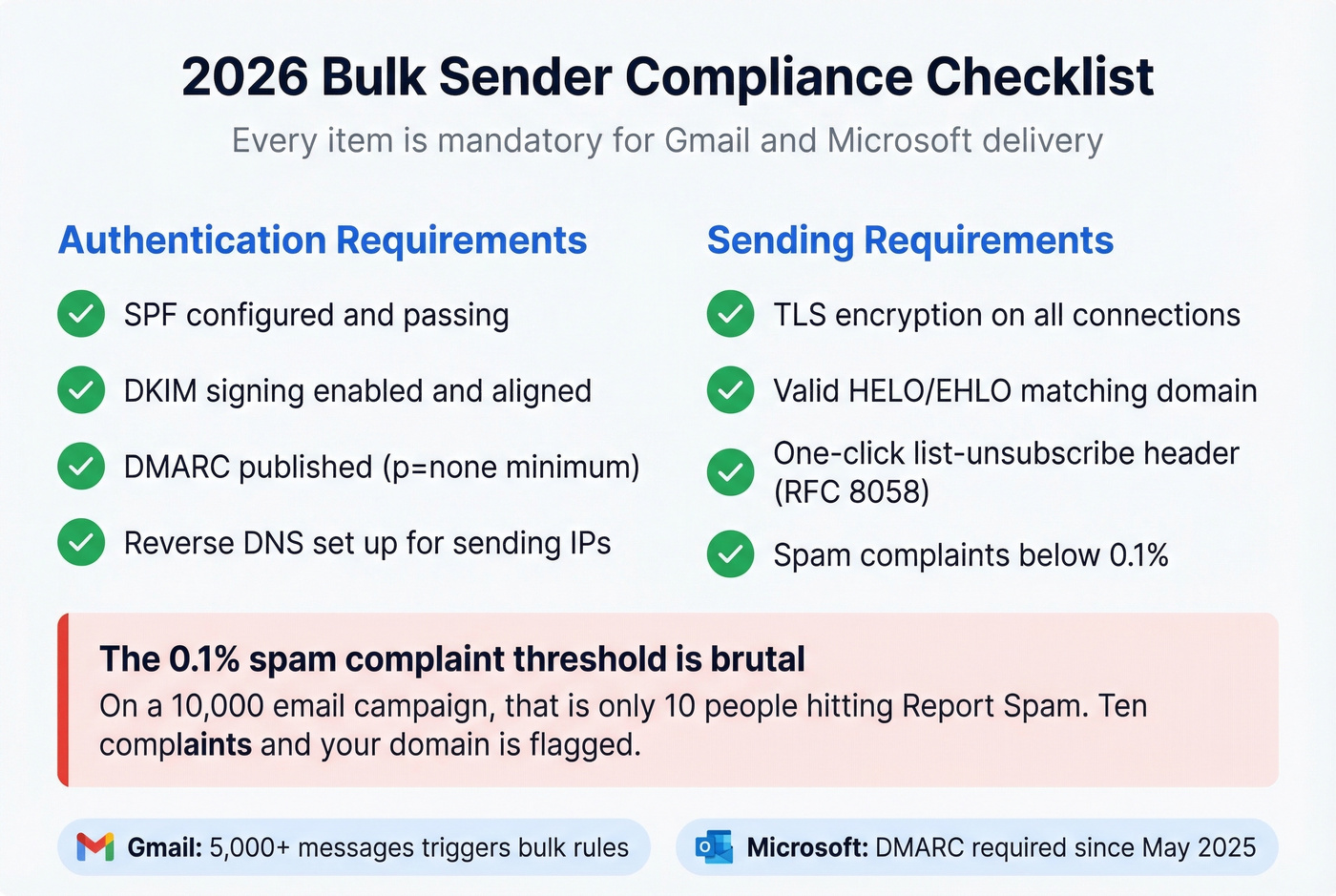
Gmail defines a bulk sender as anyone sending 5,000+ messages to Gmail addresses in a 24-hour period. Starting November 2025, Google began ramping enforcement - non-compliant traffic sees temporary deferrals first, then permanent rejections. Microsoft followed suit: starting May 2025, bulk senders must publish DMARC with at least p=none, and messages must pass DMARC alignment via SPF or DKIM, or get routed to Junk - with outright rejection coming next.
Every item on this compliance checklist is mandatory:
- SPF configured and passing for your sending domain
- DKIM signing enabled and aligned
- DMARC published with at least p=none (p=quarantine or p=reject is better)
- Reverse DNS set up for sending IPs
- TLS encryption on all connections
- Valid HELO/EHLO matching your sending domain
- One-click list-unsubscribe header per RFC 8058
- Spam complaint rate below 0.1% in Google Postmaster Tools
That 0.1% threshold is brutal. On a 10,000-email campaign, that's 10 complaints. Ten people hitting "Report Spam" instead of unsubscribing, and you're flagged. This is why list quality and targeting matter more than ever - sending to people who don't want your email is a technical death sentence for your domain. For setup and monitoring, use this Google Postmaster Tools guide.
How to Warm Up a New IP
If you're moving to a dedicated IP or switching ESPs, you can't start blasting at full volume. ISPs treat new IPs as untrusted by default.
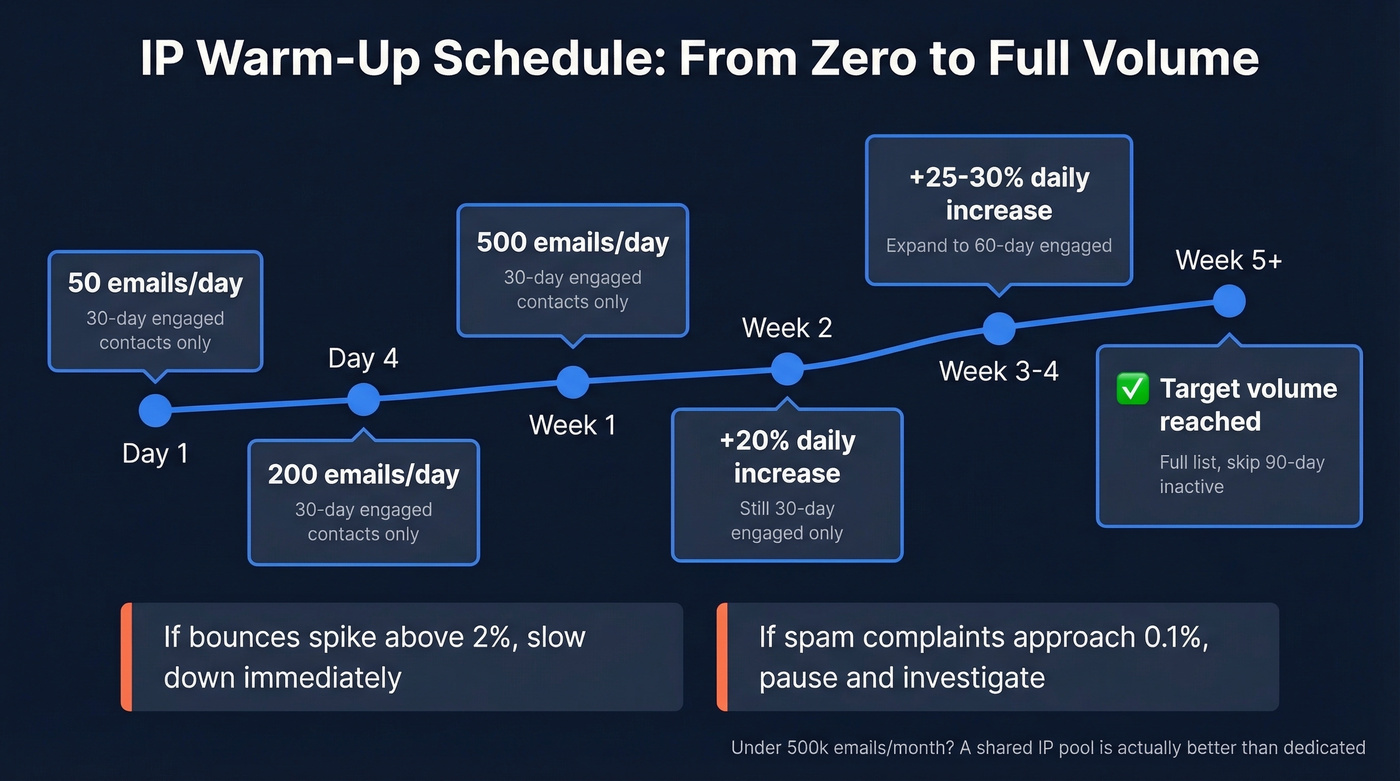
| Timeframe | Daily Volume | Audience Segment |
|---|---|---|
| Day 1 | 50 | 30-day engaged |
| Day 4 | 200 | 30-day engaged |
| Day 7 | 500 | 30-day engaged |
| Week 2 | +20%/day | 30-day engaged |
| Week 3 | +25%/day | Expand to 60-day |
| Week 4 | +30%/day | Expand to 60-day |
| Week 5+ | Target volume | Full list, avoid 90-day+ inactive |
The segmentation matters as much as the volume ramp. During weeks 1-2, send exclusively to contacts who've engaged in the last 30 days - opens, clicks, replies. Weeks 3-4, expand to 60-day engaged. For the first 6 weeks, avoid anyone who hasn't engaged in 90+ days. Those addresses are where spam traps hide.
One caveat worth noting: if you're sending fewer than 500,000 messages per month, a shared IP pool is actually better than a dedicated IP. You don't have enough volume to build and maintain reputation on your own. Most ESPs handle this automatically on their lower-tier plans.
Monitor everything during warm-up. Google Postmaster Tools shows your domain and IP reputation with Gmail. Microsoft SNDS does the same for Outlook. If bounce rates spike above 2% or spam complaints approach 0.1%, slow down immediately. Better to extend the warm-up by a week than to burn the IP. For safe scaling rules, see cold email volume best practices.
Best Tools for Bulk Email
Picking an ESP comes down to three things: your monthly volume, your technical resources, and how much you want to spend. We've tested or evaluated all of these - here's where each one fits. If you're comparing platforms, start with best bulk email software.
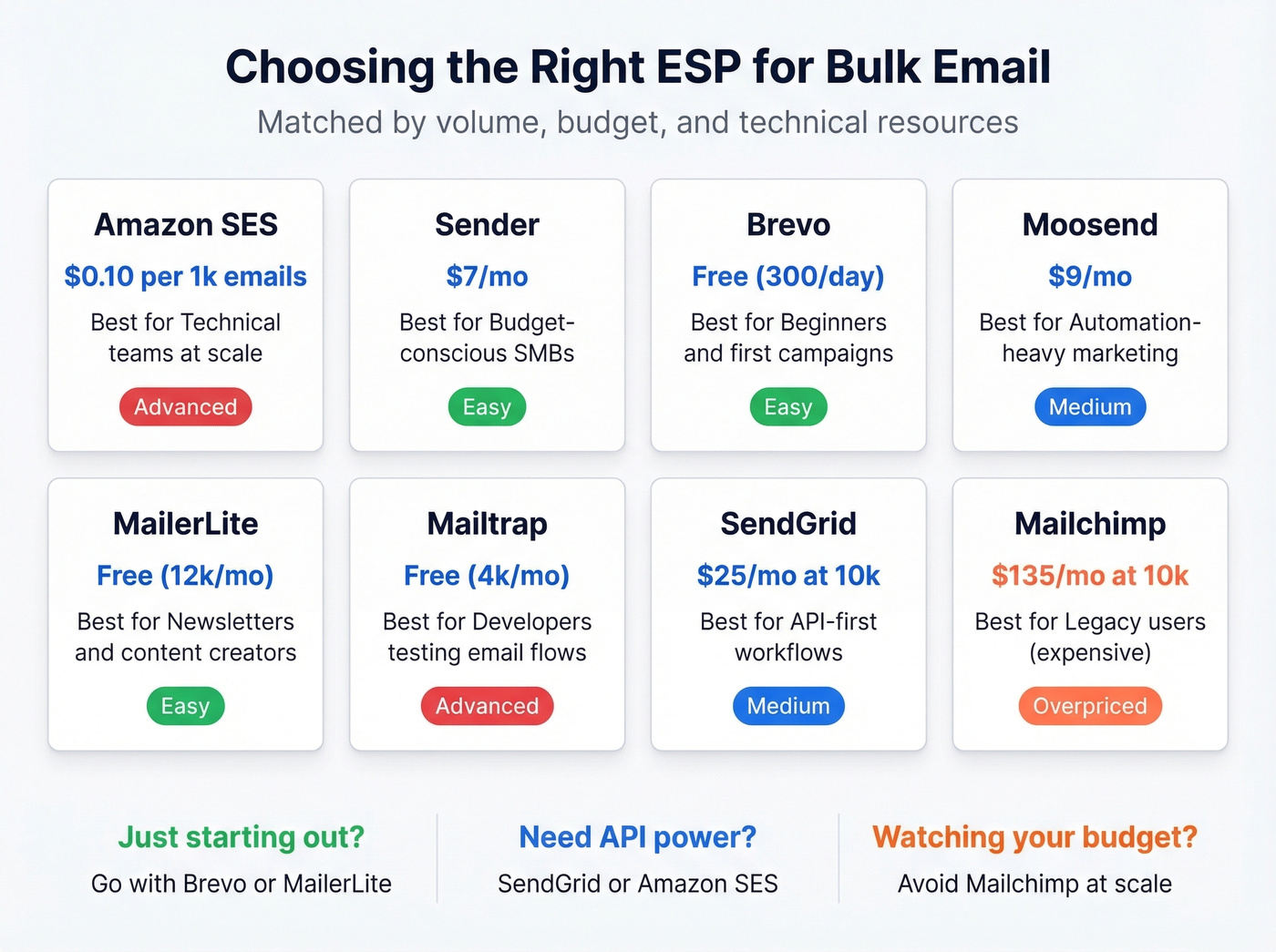
| Tool | Starting Price | Best For |
|---|---|---|
| Amazon SES | $0.10/1k emails | Technical teams, infrastructure-first sending |
| Sender | $7/mo | Budget SMBs |
| Brevo | Free (300/day), paid from $9/mo | Beginners |
| Moosend | $9/mo | Automation-heavy marketing |
| MailerLite | Free (12k/mo), paid from $10/mo | Newsletters |
| Mailtrap | Free (4,000/mo), paid from $15/mo | Developers |
| SendGrid | ~$25/mo at 10k emails | API workflows |
| Mailchimp | ~$135/mo at 10k emails | Legacy users |
Brevo
Use this if: You're sending your first bulk campaigns and want email builder, CRM, transactional emails, and marketing automation in one place.
Skip this if: You're sending 100k+ emails monthly where per-email pricing adds up fast.
Brevo's free tier gives you 300 emails per day - enough to test campaigns before committing. Paid plans start at $9/mo for 5,000 emails. Transactional emails run on a separate pricing track at $15/mo for 20,000, which keeps your marketing sends from contaminating your transactional reputation. For most small businesses launching their first real email program, Brevo is the right starting point.
Amazon SES
The cheapest option at scale - and it's not close. Amazon SES charges $0.10 per 1,000 emails, putting 50,000 emails at roughly $5.
But that headline number is only the outbound email line item. Add common infrastructure and the picture changes:
- Dedicated IP (Standard): $24.95/mo per IP
- Virtual Deliverability Manager (0-10M tier): $0.07 per 1,000 emails (~$3.50 at 50k)
- Attachments/data: $0.12 per GB (varies)
A realistic 50k/month setup with a dedicated IP and VDM lands around $33-$35/month before attachment data. There's no drag-and-drop editor, no templates, and no campaign dashboard. This is infrastructure, not a marketing platform. If you have a developer on staff, it's unbeatable. If you don't, look elsewhere.
SendGrid
Use this if: You need an API-first platform that handles both transactional and marketing email. Documentation is excellent, the integration ecosystem is the widest in the category, and deliverability is solid when you follow their warm-up guidance.
Skip this if: You're cost-sensitive at scale - 100k emails/month commonly lands around ~$200/mo, which is dramatically more than SES.
In our experience, teams that run SendGrid alongside a dedicated cold outreach tool get good results from both streams. If you're building that stack, compare cold email marketing tools.
MailerLite
The most generous free tier for newsletter-style sending: 12,000 emails per month. The UI is clean and noticeably snappier than Mailchimp's bloated interface. Paid plans start at $10/mo. Purpose-built for content-driven email - newsletters, updates, nurture sequences - rather than high-volume transactional or cold outreach.
Mailtrap
Developer-focused with a clean separation between transactional and marketing streams. Free tier covers 4,000 emails per month; paid starts at $15/mo for 10,000. The testing sandbox, where you inspect emails before they hit real inboxes, is genuinely useful for teams iterating on templates.
Moosend
Strong automation at budget pricing. $9/mo gets you 500 contacts with unlimited sends - aggressive pricing for teams that send frequently to smaller lists. The automation builder punches above its weight.
Sender
Cheapest paid option at $7/mo for 12,000 emails. Free tier: 15,000 emails/month to 2,500 subscribers. Basic, functional, no upsell pressure.
Mailchimp
Look, we'll be blunt: it's overpriced. At 10,000 emails per month, you're paying roughly $135/mo - compared to $9 at Brevo or $7 at Sender for similar functionality. There's no rational reason to pick it over the alternatives above if you're choosing fresh.
Which One Should You Pick?
For teams sending under 5,000 emails/month, Brevo or MailerLite are both free and capable enough that you might never need to upgrade. Between 5,000-50,000/month, Moosend fits automation-heavy workflows, Mailtrap suits developer teams, and Brevo paid wins on simplicity. Above 50,000/month, Amazon SES is the answer if you have engineering resources; SendGrid if you don't.
What It Costs at Scale
The ESP subscription is the obvious cost. The less obvious costs are what kill your budget.
Market ranges from EmailVendorSelection's pricing guide: at 10,000 contacts, expect $25-$155/mo depending on the platform. At 50,000 contacts, that widens to $45-$345/mo. At 100,000 contacts, you're looking at $65-$540/mo.
The spread is enormous because pricing models differ. Some ESPs charge per contact - you pay for everyone on your list whether you email them or not. Others charge per email sent, so you pay for volume regardless of list size. Per-email pricing favors teams that send infrequently to large lists. Per-contact pricing favors teams that send frequently to smaller, engaged segments.
The cheapest ESP is the one that doesn't get your domain blacklisted - and that often means paying more for better deliverability infrastructure and list management.
Mistakes That Kill Sender Reputation
Let's be honest: most bulk email failures aren't technical mysteries. They're predictable mistakes that teams keep making.
- Sending to unverified or purchased lists. Purchased lists are riddled with spam traps and dead addresses. Even your own list degrades every month. Verify before every campaign.
- Skipping IP warm-up. Sending 10,000 emails from a brand-new IP on day one triggers immediate throttling or blocks. Follow the 4-week ramp.
- No SPF/DKIM/DMARC. Gmail and Microsoft reject non-compliant bulk mail. Fix your DNS records before your next send. If you’re doing outreach specifically, follow a cold email domain setup checklist.
- Ignoring bounce rates above 2%. Over 5% is an emergency. Pause sending, clean your list, investigate the source. (If you need the math, see how to calculate email bounce rate.)
- No unsubscribe link. A missing unsubscribe forces recipients to hit "Report Spam" instead, which counts against your complaint rate. One-click unsubscribe headers are now mandatory.
- Inconsistent sending volume. Going from 500 emails/week to 50,000 in a day triggers throttling. Maintain a consistent cadence and ramp gradually.
We worked with one outbound agency that was cycling through new domains every two weeks because they kept skipping verification. After they built a proper pre-send checklist - verify, authenticate, warm up - they haven't burned a domain in six months. The infrastructure isn't glamorous, but it's what makes everything else work.
Deliverability is collapsing - Outlook inbox rates dropped from 49% to 27% in one year. The only lever you fully control is list quality. Prospeo refreshes 300M+ profiles every 7 days and removes catch-alls, spam traps, and honeypots before they reach your ESP.
Stop sending bulk emails to addresses that died last month.
FAQ
How many emails can I send with Gmail?
Google Workspace caps at roughly 2,000 per day; free Gmail around 500. For anything beyond a few hundred recipients, use a dedicated ESP like Brevo (free tier: 300/day) or Sender (15,000/month free).
What's the best free bulk email tool?
Sender offers 15,000 emails/month free - the highest free volume available. Brevo gives 300/day with a built-in CRM. MailerLite covers 12,000/month and is strongest for newsletters. All free tiers cap features; they're for testing and small lists.
Do I need a dedicated IP?
Only if you exceed 500,000 emails per month. Below that threshold, shared IP pools outperform dedicated IPs because you lack the volume to build standalone reputation. Most ESPs default to shared pools on starter plans.
How do I verify my list before sending?
Upload your CSV to a verification service like Prospeo before loading it into your ESP. Verification catches invalid addresses, spam traps, and honeypots that would destroy sender reputation on the first campaign. Prospeo's free tier covers 75 verifications per month - enough to test a segment before committing.
What's a good open rate for bulk email?
For marketing campaigns, 20-25% is solid and 30%+ is excellent. Below 15% signals deliverability problems, weak subject lines, or poor list quality - usually all three. Check Google Postmaster Tools to isolate whether it's a reputation issue.