

How to Send Mass Emails Without Getting Flagged as Spam
You've got a product launch next Tuesday, 5,000 contacts in a spreadsheet, and no clue how to get those emails into inboxes instead of spam folders. You hit "send" from Gmail, and by contact #501, your account locks. Your launch is dead and your domain reputation is bruised.
We've watched this exact scenario play out dozens of times. The mechanics aren't complicated - Gmail limits, the tools worth paying for, authentication setup, deliverability benchmarks, and the compliance rules that carry real fines - but most teams skip the boring stuff and pay for it later. Whether you're planning a bulk introduction to new prospects or scaling outbound for an established pipeline, the fundamentals don't change.
What You Need (Quick Version)
Three things, in order of priority:
- Under 500 contacts? Use Gmail with a mail merge extension. Over 500? Get a dedicated ESP - Gmail wasn't built for this.
- Verify your list before you send anything. One bad campaign with 800 bounces can get your domain flagged for months. (If you need a workflow, see email verification.)
- Set up SPF, DKIM, and DMARC first. Major inbox providers now enforce bulk-sender requirements hard, and non-compliant mail gets deferred or rejected. Use a SPF record example to avoid syntax mistakes.
Skip any of these and you're gambling with your domain.
Can You Send Mass Emails from Gmail?
Use Gmail if: you're emailing fewer than ~200 people, they already know you, and you don't need tracking or automation. A mail merge extension like GMass turns Gmail into a basic bulk sender, and it works fine at low volume. If you're using GMass specifically, GMass deliverability is worth understanding before you scale.
Skip Gmail if: you're sending to 500+ contacts, running cold outreach, or need deliverability reporting.
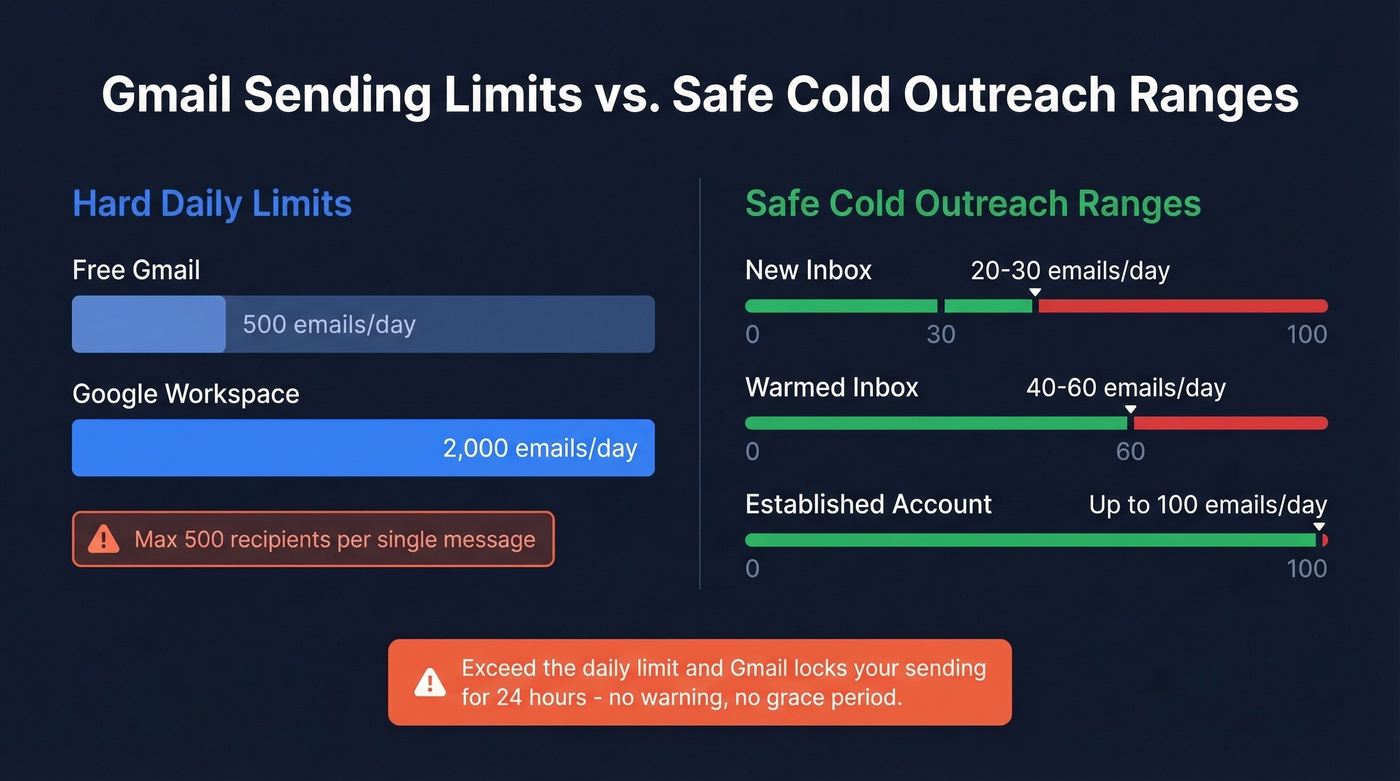
Here are the hard limits. Free Gmail accounts cap at 500 emails per day across web, app, and SMTP. Google Workspace bumps that to 2,000 per day. Either way, you can't exceed 500 recipients per single message - exceed the daily limit and Gmail locks your sending for 24 hours with no warning and no grace period.
For cold outreach, the safe ranges are much lower. A new inbox should stay under 20-30 emails per day. A warmed inbox can handle 40-60. Even an established account with good reputation shouldn't push past 100 per day for cold sends. Google doesn't publish exact hourly limits, but sending 50-100 emails in a burst of a few minutes can trigger restrictions even if you're under the daily cap. For more on pacing, see email velocity.
Here's the thing: once you cross ~200 recipients, you need segmentation, bounce tracking, and unsubscribe management that Gmail simply doesn't offer. At that scale, the answer is always a dedicated bulk email tool.
Clean Your List First
Every other guide buries this at the bottom. It should be step zero.
Picture this: you upload 5,000 contacts to your shiny new ESP and blast your launch email. 800 bounce. Your ESP suspends your account within hours. Your domain gets flagged by Gmail and Outlook. Now every email you send - even one-to-one replies to clients - lands in spam. We've seen this play out with teams that skipped verification, and it takes weeks to recover. If you want the benchmarks and fixes, start with email bounce rate.
The data backs this up. Meritt, an outbound agency, saw bounce rates drop from 35% to under 4% after switching to verified data. That's the difference between a campaign that builds pipeline and one that destroys your sender reputation.

Prospeo runs every address through a 5-step verification process with catch-all handling and spam-trap removal, delivering 98% email accuracy. Upload a CSV, get results in minutes, and export a clean list ready for your ESP. At roughly $0.01 per email with a free tier of 75 verifications per month, there's no reason to skip this step. (If you're comparing vendors, see Bouncer alternatives.)
For teams also building prospect lists from scratch, Prospeo's database covers 300M+ professional profiles with 30+ search filters - find contacts and verify them in one workflow. If you're building lists from zero, how to generate an email list breaks down the process.

800 bounces from one bad send can tank your domain for weeks. Prospeo's 5-step verification catches invalid addresses, spam traps, and honeypots before they wreck your reputation - 98% accuracy at ~$0.01 per email.
Clean your list in minutes. 75 free verifications, no credit card.
Set Up Email Authentication
Authentication isn't optional anymore. In 2026, bulk-sender requirements are industry standard across Microsoft, Google, and Yahoo, and non-compliant mail gets deferred or rejected outright.
The three non-negotiables:
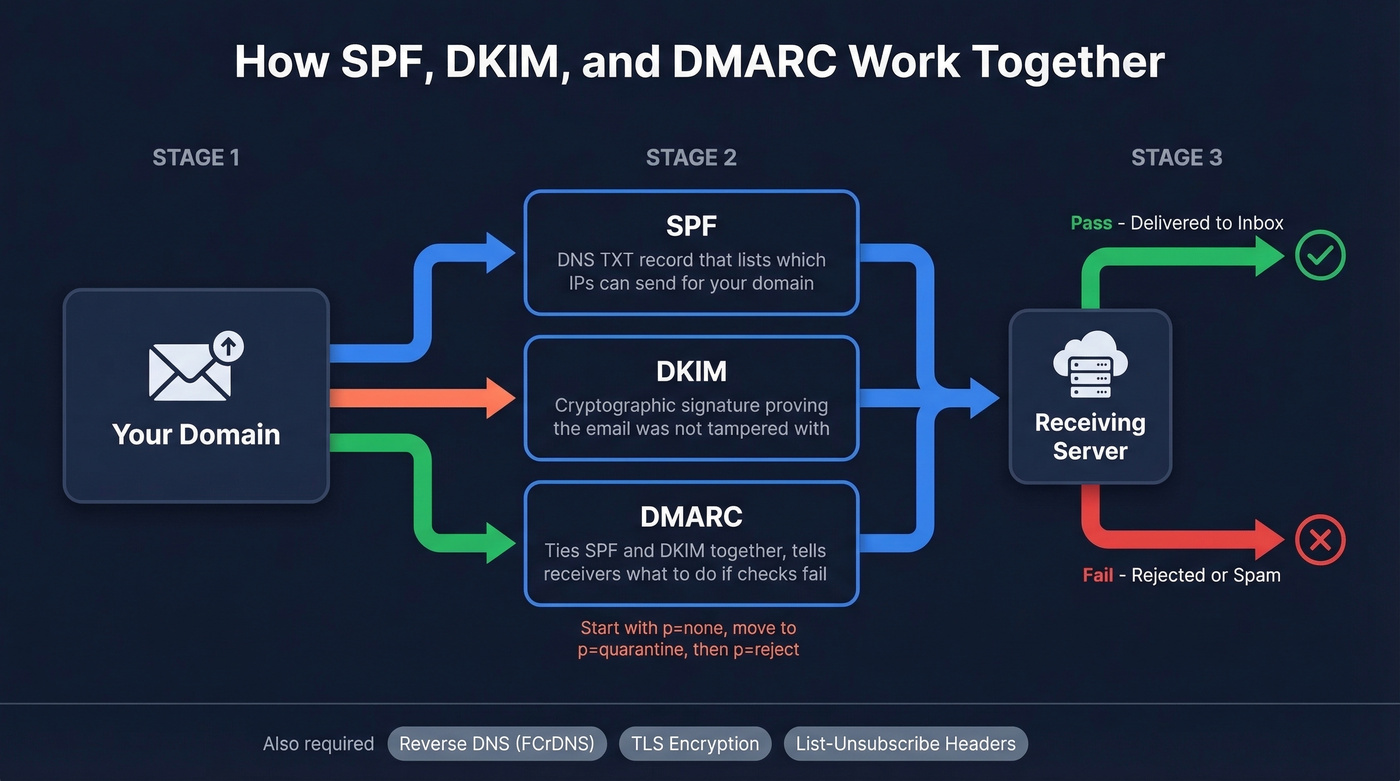
- SPF (Sender Policy Framework) tells receiving servers which IPs are authorized to send on behalf of your domain. It's a DNS TXT record - your ESP will give you the exact value to add.
- DKIM (DomainKeys Identified Mail) adds a cryptographic signature to your emails proving they haven't been tampered with. Your ESP provides the DNS record. If you want to confirm setup, use how to verify DKIM is working.
- DMARC ties SPF and DKIM together and tells receivers what to do with messages that fail. Start with
p=noneat minimum, butp=quarantineorp=rejectis where you want to end up. For the gotchas, see DMARC alignment.
Beyond the big three, make sure your sending IPs have valid reverse DNS (FCrDNS) and that TLS encryption is enabled. Most ESPs handle TLS automatically, but verify it.
Enforcement timeline:
| Date | What Changed |
|---|---|
| Feb 2024 | Google/Yahoo start enforcement; temporary 421 errors |
| Apr 2024 | Rejection rates increase for non-compliant mail |
| May 2025 | Microsoft rejects non-compliant bulk mail |
| Nov 2025 | Gmail issues permanent 550 rejections |
| 2026 | Full enforcement across all major providers |
You also need to support one-click unsubscribe via List-Unsubscribe and List-Unsubscribe-Post headers and process unsubscribe requests within 2 days. Keep your spam complaint rate below 0.1% - and never let it hit 0.3%. Cross that line and inbox providers throttle or block you, sometimes permanently. If you're troubleshooting placement, use an email deliverability guide.
Best Mass Email Tools in 2026
Under 500 contacts and you're comfortable in Gmail? Use GMass. Between 500 and 5,000 contacts? Brevo or Sender will handle it for free or near-free. Over 5,000 and you have a developer? Amazon SES is the cheapest option by a wide margin.
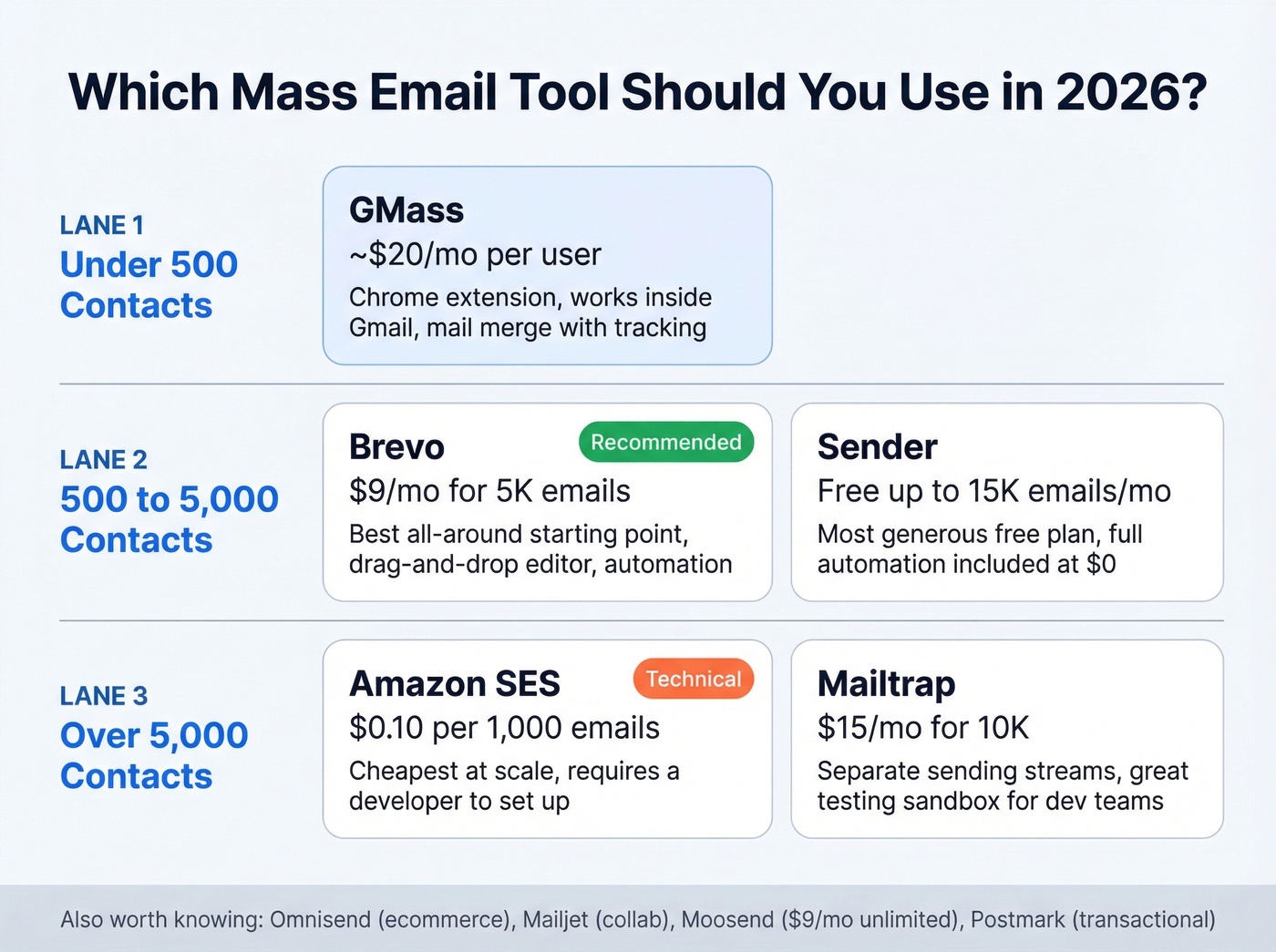
Look, most teams overthink tool selection. If your deal sizes are modest and you're sending fewer than 10,000 emails a month, Sender's free plan or Brevo's $9/mo tier will cover the essentials. Save the enterprise ESP budget for when you actually have enterprise volume. If you're evaluating more modern options, compare AI bulk email senders.
| Tool | Free Tier | Entry Paid | Cost per 10K Emails | Best For |
|---|---|---|---|---|
| Sender | 15,000/mo | $7/mo | Free | Budget senders |
| Brevo | 300/day | $9/mo | ~$9-17 | All-rounders |
| Amazon SES | 62K/mo on EC2 | $0.10/1K | $1 | High volume / devs |
| Mailtrap | 4,000/mo | $15/mo | ~$15 | Developer teams |
| GMass | Limited | ~$20/mo | ~$20 | Gmail power users |
| Omnisend | 500/mo | $16/mo | ~$16 | Ecommerce |
| Mailjet | 200/day | $17/mo | ~$17 | Collab teams |
| Constant Contact | None | $30/mo | $30+ | SMBs (pricey) |
Brevo
Brevo is the best starting point for most people who want to run bulk email campaigns at scale. The free tier gives you 300 emails per day and includes a drag-and-drop editor, automation workflows, and SMS. The Starter plan runs $9/mo for 5,000 emails, scaling to around $29/mo for 20,000. The interface is clean, onboarding takes minutes, and deliverability is solid out of the box. If you're sending your first real campaign and want a tool that works immediately, start here.
Sender
Sender has the most generous free plan in the space, and it's not close. You get 15,000 emails per month to up to 2,500 subscribers - with full automation included on the free tier. Most tools gate automation behind paid plans, so this is genuinely unusual. Paid plans start at $7/mo when you need more volume. The editor isn't as polished as Brevo's, but for a team with under 2,500 contacts, you'll never need to pay for an ESP. Hard to beat.
Amazon SES
Amazon SES costs $0.10 per 1,000 emails. At 100,000 emails, you're paying $10. If you're running on EC2, the first 62,000 emails per month are free.
The catch? There's no drag-and-drop editor, no template library, no automation builder. You need a developer to set it up, integrate it with your app, and manage bounce handling. For technical teams sending at scale - think SaaS transactional emails or newsletter platforms - SES is unbeatable on price. For everyone else, it's overkill.
GMass
Use this if you live in Gmail, send under 2,000 emails per day, and want mail merge with tracking without leaving your inbox. GMass is a Chrome extension that turns Gmail into a basic bulk email tool with campaign reporting, scheduling, and follow-up sequences.
Skip this if you need advanced automation or segmentation, or you're sending to more than 2,000 contacts. Gmail's sending limits still apply, and GMass can't override them. Paid plans start around $20/mo per user.
Mailtrap
Built for developers who want to test emails before sending them to real inboxes. The free tier includes 4,000 emails per month, and paid plans start at $15/mo for 10,000. The standout feature is separate sending streams - you can isolate transactional email from marketing email, which matters for deliverability. If your team ships code and sends email, Mailtrap's testing sandbox alone is worth the price.
More Options Worth Knowing
Omnisend is purpose-built for Shopify and WooCommerce stores. Pre-built ecommerce automations like cart abandonment and post-purchase flows work out of the box, with a free tier covering 500 emails per month and paid starting at $16/mo. For B2B, look elsewhere. Mailjet offers 200 emails per day free and starts at $17/mo - its real differentiator is real-time collaboration on email templates. Moosend starts at $9/mo with unlimited sends and solid automation. Postmark gives you 100 free emails per day and excels at transactional email but isn't designed for marketing blasts. Constant Contact starts at $30/mo with no free plan - hard to justify when Sender offers 15,000 emails per month for free.
Warm Up Before You Blast
Sending 5,000 emails from a brand-new domain on day one is the fastest way to land in spam. Inbox providers don't trust new senders, and a sudden spike from an unknown domain looks exactly like a spammer. This applies whether you're running campaigns to opted-in subscribers or cold outreach to a new prospect list.
Here's a practical warm-up schedule:
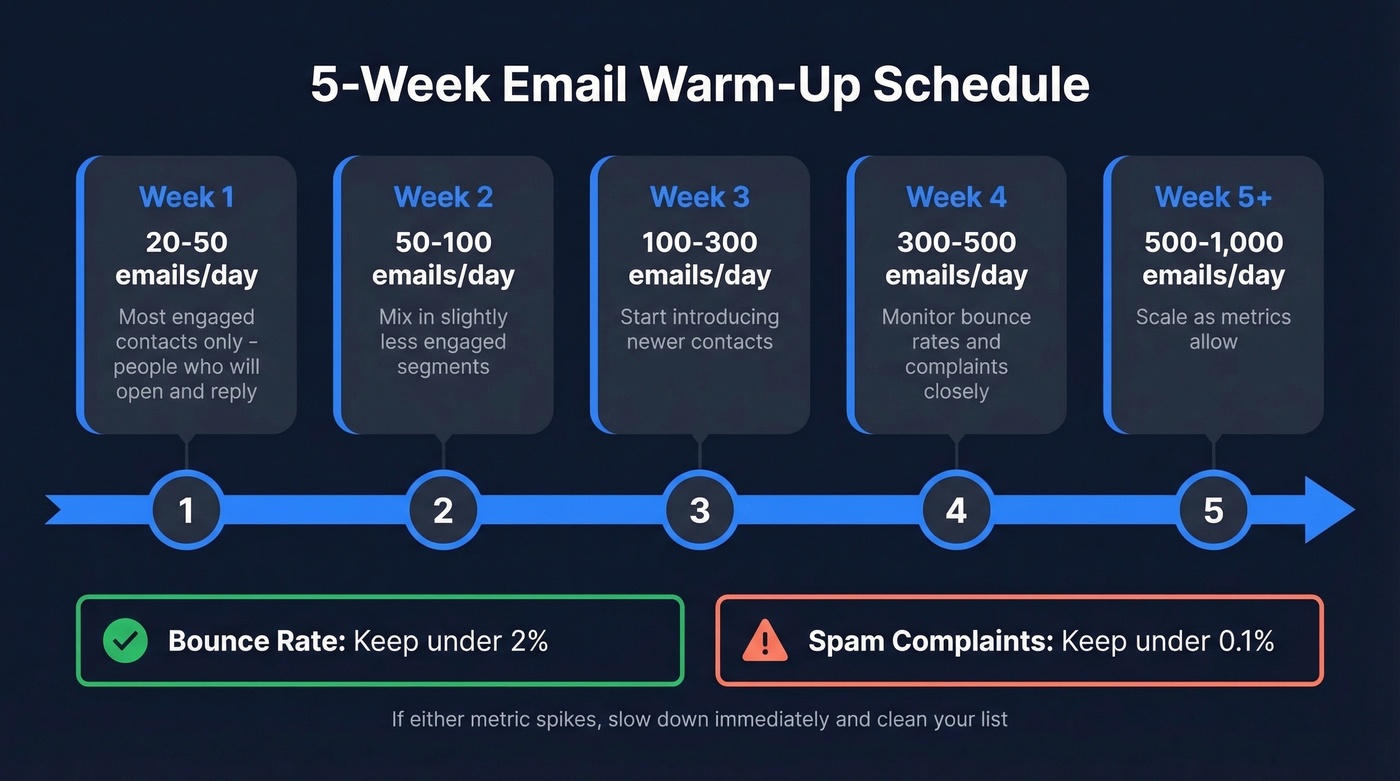
- Week 1: 20-50 emails/day to your most engaged contacts - people who'll open and reply.
- Week 2: 50-100/day. Mix in slightly less engaged segments.
- Week 3: 100-300/day. Start introducing newer contacts.
- Week 4: 300-500/day. Monitor bounce rates and complaints closely.
- Week 5+: 500-1,000/day, scaling as metrics allow.
At each stage, watch two numbers: bounce rate under 2% and spam complaint rate under 0.1%. If either spikes, slow down and clean your list. A popular thread on r/coldemail emphasizes the same basics - permission-based sending, regular list cleaning, and gradual volume increases - because they're the practices that actually move the needle. If you're doing this for outbound, cold email marketing covers the operational side.
One more thing: design for mobile. Mobile devices dominate email opens, and a broken mobile layout tanks engagement rates, which in turn hurts your sender reputation.
Deliverability Benchmarks for 2026
Let's talk about what actually happens to your emails once you hit send. The numbers aren't pretty.
GlockApps' Q1 2025 data shows average inbox placement rates that should make every bulk sender pay attention: Gmail sits at 53.7%, Outlook/Hotmail at 26.8%, Office365 at 50.7%, and Yahoo/AOL at 41.0%. If you send 10,000 emails, roughly 4,600 never reach a Gmail inbox. For Outlook, it's closer to 7,300 missing.
The volume-based numbers are even more sobering. Senders pushing 1M+ emails per month saw inbox placement drop from 50% to 27.6% year over year, while smaller senders at 1-10K per month held steady around 50%. Volume without reputation is a death sentence for deliverability.
Microsoft's own stance makes the priority clear: "It's all about sender reputation - content is not a determining factor anymore." You can A/B test subject lines all day, but if your domain reputation is damaged from bad bounces and spam complaints, none of it matters. Authentication, list hygiene, and gradual warm-up are the three levers that actually control whether your bulk campaigns reach inboxes. If you're actively repairing issues, how to improve sender reputation is the next read.
Legal Requirements You Can't Ignore
The fines are real: up to $53,088 per email under CAN-SPAM, EUR20M under GDPR, and $10M CAD under CASL.
| Law | Consent Model | Unsubscribe Window | Max Penalty |
|---|---|---|---|
| CAN-SPAM (US) | Opt-out | 10 business days | $53,088/email |
| GDPR (EU) | Explicit opt-in | Without delay | EUR20M or 4% revenue |
| CASL (Canada) | Express opt-in | 10 business days | $10M CAD |
CAN-SPAM's seven requirements: no false headers, no deceptive subject lines, identify ads, include a physical address, provide a clear opt-out mechanism, honor opt-outs within 10 business days, and take responsibility for third-party sends on your behalf.
GDPR is stricter. Consent must be freely given, specific, informed, and unambiguous - no pre-ticked boxes. Withdrawal must be as easy as opting in. If you're emailing EU residents, you need explicit opt-in before sending. Period. Consider using double opt-in for both compliance and deliverability; it keeps your list cleaner and signals quality to inbox providers.
Cold B2B email and marketing email have different compliance requirements. CAN-SPAM technically allows bulk cold email as long as you follow the seven rules above. GDPR has a "legitimate interest" basis that some B2B senders rely on. CASL requires express consent for most commercial messages. Know which law applies to your recipients, not just your company's location. If list sourcing is part of your plan, read is it illegal to buy email lists.
FAQ
How many emails can I send from Gmail per day?
Free Gmail: 500/day. Google Workspace: 2,000/day. Exceed either and Gmail locks sending for 24 hours with no warning. For cold outreach on a new inbox, stay under 50/day until you've built reputation over 3-4 weeks.
Is it legal to send mass emails?
Yes, if you comply with CAN-SPAM, GDPR, or CASL depending on your recipients' location. Every jurisdiction requires an unsubscribe mechanism, a physical address, and timely opt-out honoring. Penalties reach $53,088 per email under CAN-SPAM and EUR20M under GDPR.
What's the best free bulk email tool?
Sender offers 15,000 emails per month free with full automation - the most generous free tier available. Brevo gives 300 emails per day free with a drag-and-drop editor. For list building and verification before you send, Prospeo's free tier includes 75 email verifications per month.
How do I avoid the spam folder when sending in bulk?
Set up SPF, DKIM, and DMARC before your first send. Verify your list to keep bounce rates under 2%. Warm up new domains over 4-5 weeks. Keep spam complaints below 0.1% and use a dedicated ESP rather than Gmail once you're past a few hundred recipients.
Should I verify my email list before sending?
Always - this is non-negotiable. A bounce rate above 5% signals bad list hygiene and can get your domain flagged for months. Meritt cut their bounce rate from 35% to under 4% by switching to verified data. Run every list through verification before it touches your ESP.