

SPF Checker: Read Results, Fix Errors, Pick the Right Tool
It's Monday morning. Your sales team's outbound sequences bounced 18% overnight, and the VP of Marketing wants to know why customer invoices are landing in spam. You pull up your SPF record and it looks fine - until you run it through an SPF checker and discover a PermError that's been silently failing authentication for every email your domain sends.
This scenario plays out constantly, and it's getting worse. Google and Yahoo's stricter enforcement rules mean that any sender delivering 5,000+ messages per day without properly configured SPF, DKIM, and DMARC can see messages rejected or shoved into spam. Spam complaint rates above 0.3% trigger the same fate. The margin for DNS misconfiguration is zero.
SPF isn't new. But the consequences of getting it wrong have never been higher.
What You Need (Quick Version)
If you're in a hurry:
- Quick-check your domain with MxToolbox or Red Sift's SPF checker. Both are free and give you results in seconds.
- If you see "too many DNS lookups," jump straight to the 10-lookup fix section below. It's the most common deliverability-killing error and it has real solutions.
- SPF alone won't save your deliverability. DKIM alignment and clean email data matter more than a perfect SPF record. Authentication is table stakes - what you send and who you send to determines whether you hit the inbox.
What Is SPF and How Does It Work?
SPF (Sender Policy Framework) is a DNS-based authentication protocol that tells receiving mail servers which IP addresses are authorized to send email on behalf of your domain. When someone receives an email claiming to be from yourcompany.com, the receiving server looks up your domain's SPF record in DNS and checks whether the sending server's IP is on the approved list.
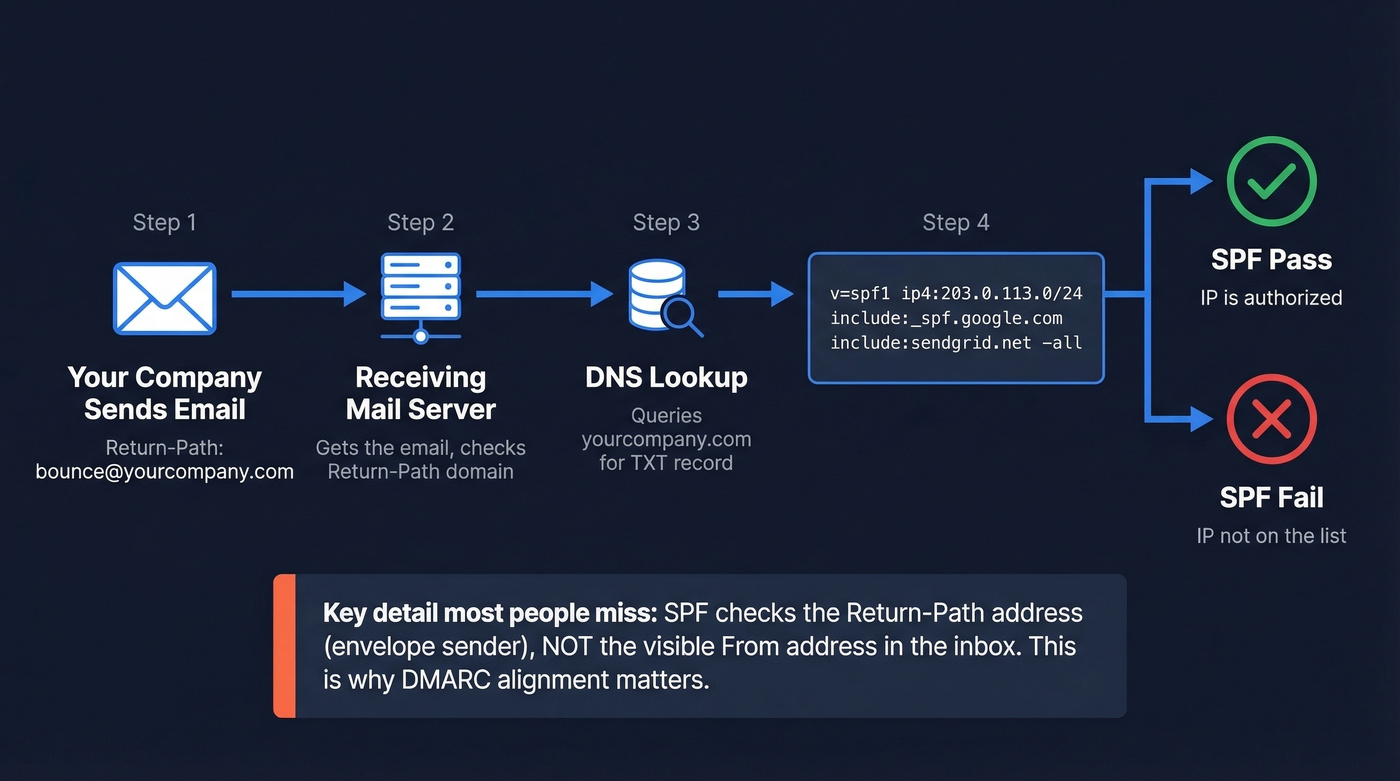
Here's what a typical SPF record looks like:
v=spf1 ip4:203.0.113.0/24 include:_spf.google.com include:sendgrid.net -all
This says: allow emails from the 203.0.113.0/24 IP range, anything Google Workspace authorizes, anything SendGrid authorizes, and reject everything else (-all).
Here's the thing most people miss - and it's the reason half of SPF troubleshooting goes sideways: SPF doesn't check the "From" address that recipients see in their inbox. It checks the Return-Path (the envelope sender, or RFC5321.MailFrom). This is the address used for bounce handling, and it's often different from the visible From address. That gap is exactly why DMARC alignment exists. Don't add an include: for a third-party service unless your domain is actually the Return-Path for that service's emails. If the ESP uses their own envelope sender domain, your include wastes a lookup and does nothing for authentication.
SPF mechanisms are evaluated left-to-right. The receiving server walks through your record from the first mechanism to the last and stops at the first match. This evaluation order matters - if your lookup budget runs out before reaching a later, high-volume sender, those emails fail authentication even though the record technically includes them.
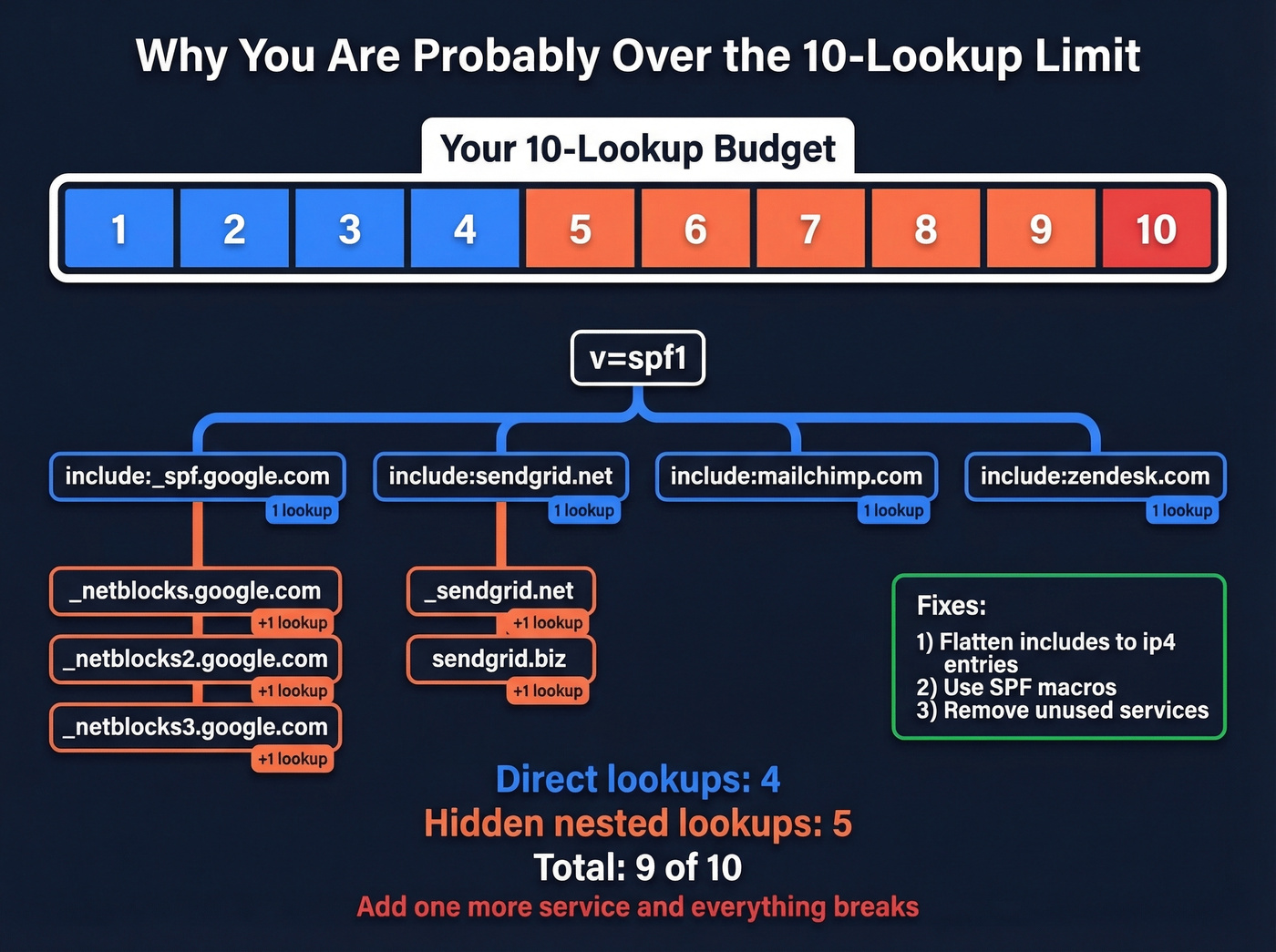
Each include: and several other mechanisms trigger a DNS lookup, and SPF caps you at 10 total lookups per evaluation. Exceed that limit and the entire check returns a PermError - which means every email you send fails SPF. Not some emails. All of them.
Best Free SPF Lookup Tools
Every tool on this list is free for basic lookups. The differences come down to what they show you beyond a simple pass/fail, and how quickly they surface the errors that actually matter.
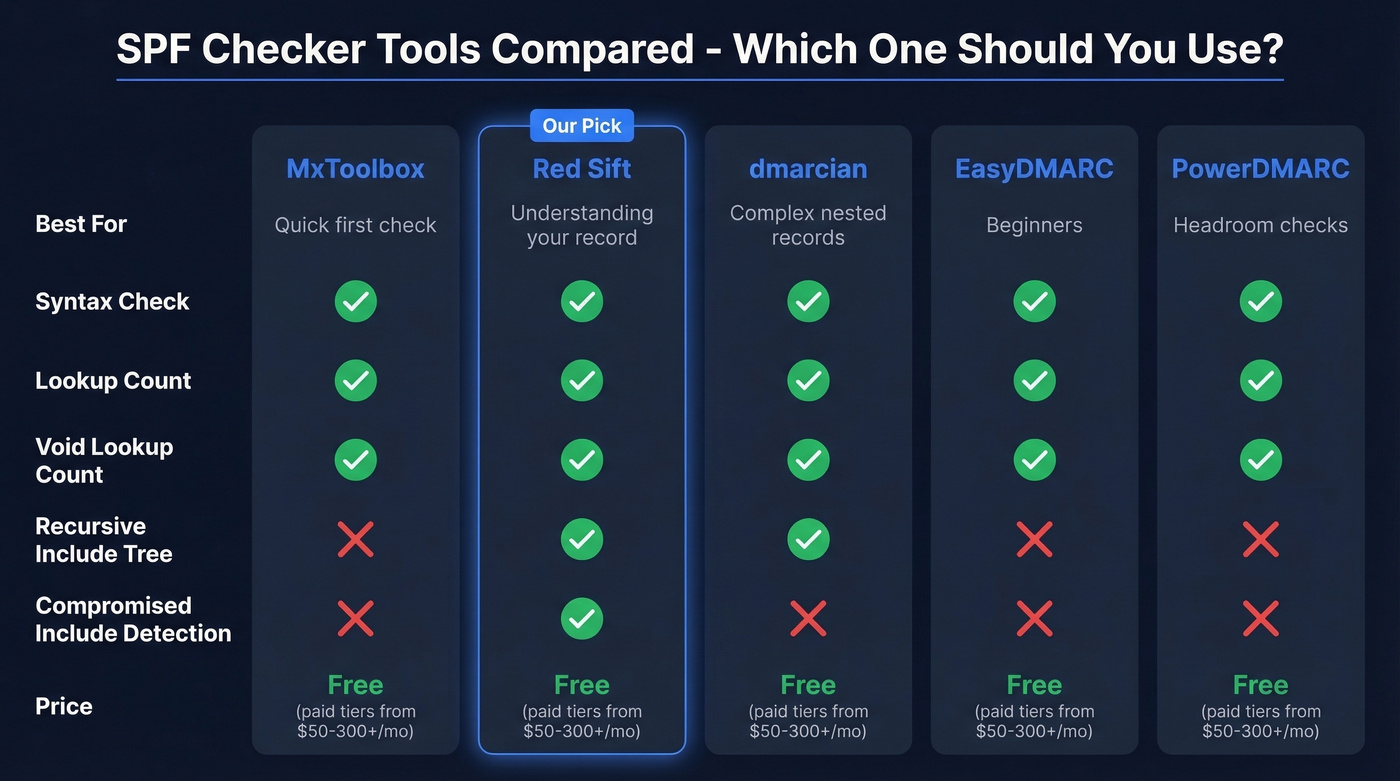
Tier 1 Tools
| Feature | MxToolbox | Red Sift | dmarcian |
|---|---|---|---|
| Syntax check | ✅ | ✅ | ✅ |
| 10-lookup count | ✅ | ✅ | ✅ |
| Void lookup count | ✅ | ✅ | ✅ |
| Recursive include analysis / visualization | ❌ | ✅ | ✅ |
| SubdoMailing / compromised-include detection | ❌ | ✅ | ❌ |
Tier 2 Tools
| Feature | EasyDMARC | PowerDMARC |
|---|---|---|
| Syntax check | ✅ | ✅ |
| 10-lookup count | ✅ | ✅ |
| Void lookup count | ✅ | ✅ |
| Recursive include analysis / visualization | ❌ | ❌ |
All tools above are free for basic lookups. Need ongoing SPF management? Paid monitoring tiers typically start around $50-100/month for small teams and run $300+/month for enterprise features. Free checkers are sufficient for one-time audits and quarterly reviews.
One feature power users want - pre-publish testing to validate SPF changes before they go live - usually isn't available in the major free tools. The closest workaround is using a tester on a staging subdomain.

MxToolbox
MxToolbox is the SPF lookup tool most people try first, and for good reason. It's fast, the interface is familiar, and it highlights errors that can impact delivery.
The #1 complaint on r/DMARC about these tools? People run MxToolbox, see a wall of yellow warnings, and panic. Not all MxToolbox warnings are deliverability problems. Some are best-practice suggestions that won't affect whether your emails land. Focus on the red errors first - those are the ones breaking authentication.
Red Sift
Red Sift is the tool we'd recommend if you want to actually understand your SPF record, not just get a pass/fail. Its tree visualization expands every include: recursively, color-coded by severity, so you can see exactly where your lookup budget is being spent.
The standout feature is SubdoMailing detection - it flags compromised includes in your chain that attackers may have taken over. If you manage domains with a long history of third-party integrations, Red Sift should be your primary validator.
dmarcian SPF Surveyor
dmarcian's SPF Surveyor goes deepest on recursive analysis. It's the power-user tool - less polished than Red Sift, but it'll trace nested includes and show you exactly which mechanisms are consuming your lookup budget. If you're troubleshooting a complex record with 8+ includes and nested vendor chains, start here.
EasyDMARC - Best for Beginners
Skip this if you already know your way around DNS records. EasyDMARC's SPF record lookup has one of the cleanest interfaces for people setting up email authentication for the first time. It contextualizes results within the broader email authentication picture, which helps when you're configuring all three protocols simultaneously.
PowerDMARC - Best for Headroom Checks
PowerDMARC shows your DNS lookup count and your void lookup count in a single report. That's its killer feature: when you're about to add another include and need to know if you have room, PowerDMARC gives you the answer fast.
Quick Mentions
Kitterman has been around forever - no frills, no visualization, just paste a domain and get a raw evaluation. DNS Checker is useful for verifying propagation across multiple geographic locations after a DNS change.
How to Read SPF Record Results
SPF checkers return one of six possible results. Here's what each one means and whether you should care:
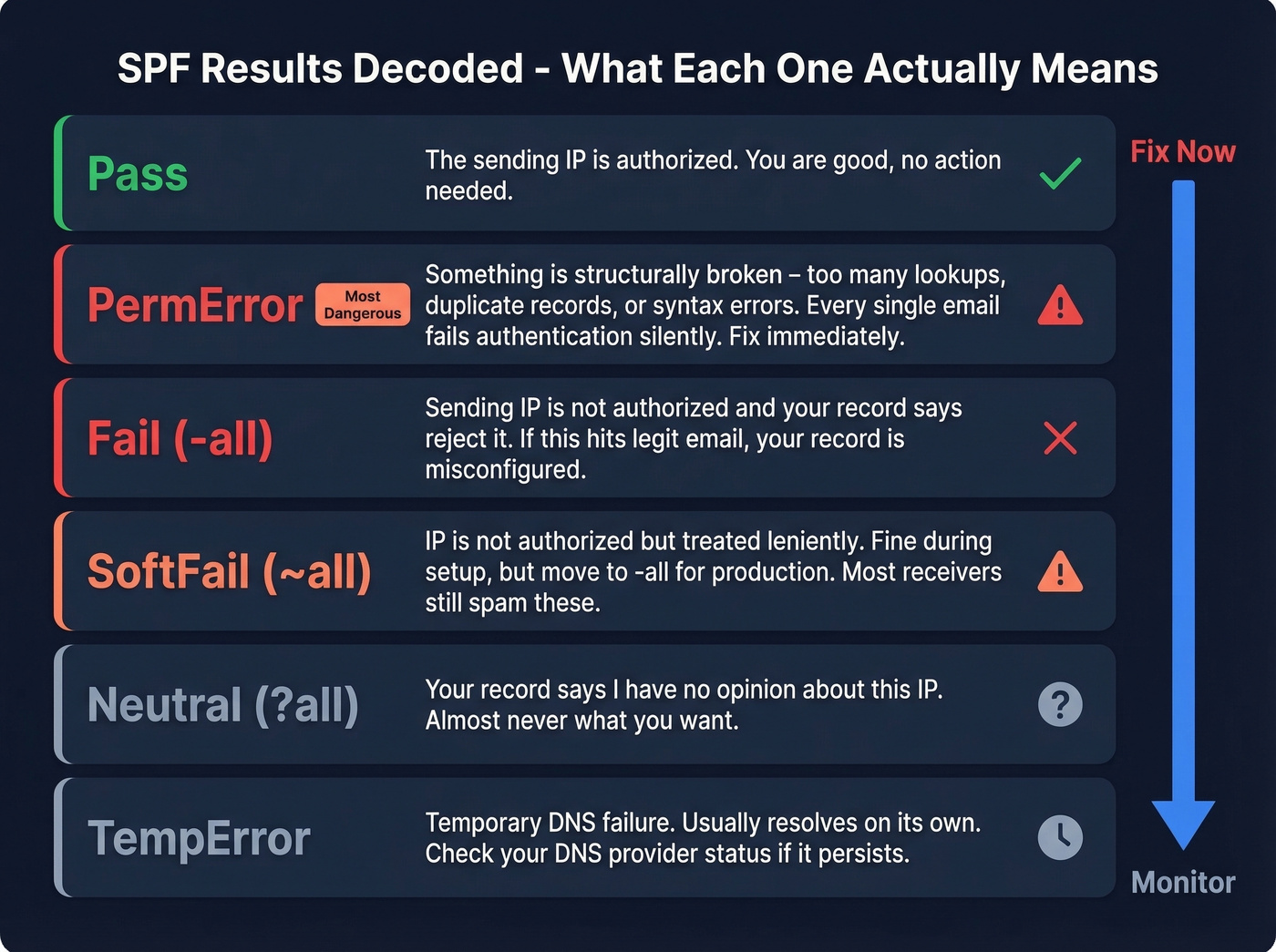
Pass - The sending IP is authorized. No action needed.
Fail (-all) - The sending IP isn't authorized and your record says to reject it. If this is happening to legitimate email, you've got a misconfigured record. Fix it immediately.
SoftFail (~all) - The sending IP isn't authorized, but your record says to treat it leniently. Most receivers will still deliver these to spam. SoftFail is fine during initial setup, but leaving ~all in production long-term is a security weakness. Move to -all once you've confirmed all legitimate senders are listed.
Neutral (?all) - Your record explicitly says "I have no opinion about this IP." This is almost never what you want.
PermError - Something is structurally wrong with your record: too many DNS lookups, multiple SPF records, syntax errors. This fails authentication for every email. It's the most dangerous result because it's silent - your emails just stop authenticating and you don't notice for days.
TempError - A temporary DNS failure prevented the lookup. Usually resolves on its own. If it persists, check your DNS provider's status page.
The anxiety most people feel comes from MxToolbox showing 6-8 warnings alongside a "Pass" result. If your record passes and you don't have a PermError, the warnings are worth reviewing but aren't emergencies. Prioritize PermError and Fail results above everything else.
Common SPF Errors and Fixes
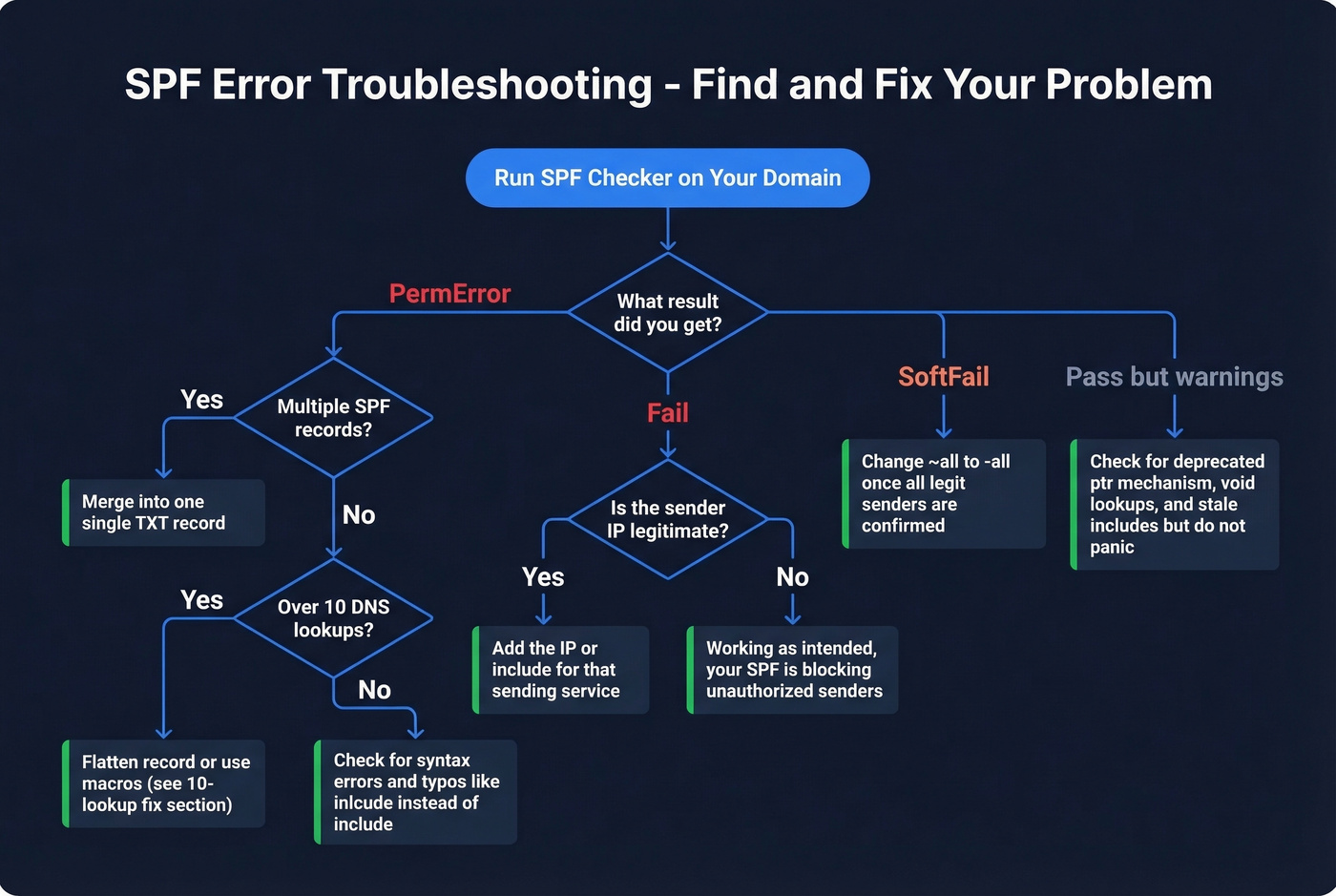
Multiple SPF Records (PermError)
Your domain can only have one SPF TXT record. If you have two - usually because someone added a new one instead of editing the existing one - SPF evaluation returns PermError. Merge them into a single record. This is the easiest fix on the list and one of the most common mistakes. If you need a walkthrough, follow our guide on merge them into a single record.
Too Many DNS Lookups
The 10-lookup limit generates the most confusion and the most forum posts. Every include:, a, mx, ptr, and redirect mechanism triggers a DNS lookup. Nested includes count too - if include:_spf.google.com itself contains three more includes, that's four lookups total, not one. This gets its own deep-dive below.
The M365 Paradox - Microsoft Rejecting Its Own SPF
One of the most disorienting failures happens in Microsoft 365 environments. You'll see an SPF fail referencing protection.outlook.com from an IPv6 address, making it look like Microsoft is rejecting its own infrastructure. Threads on r/sysadmin light up about this regularly. The root cause is usually envelope-from/Return-Path misalignment in multi-hop relay configurations - the message routes through additional hops that change the envelope sender before reaching the recipient. If you're seeing this, check whether your mail flow rules or connectors are rewriting the Return-Path. The SPF record itself is usually fine; the routing is the problem. (If you want the deeper mechanics, see our guide to ESP routing.)
Void Lookup Limit Exceeded
RFC 7208 also limits "void lookups" - DNS queries that return no records - to two per evaluation. If you have stale includes pointing to domains that no longer publish SPF records, you'll hit this limit. The fix: audit your includes and remove any that resolve to NXDOMAIN or empty responses.
Syntax Errors and Typos
We've seen SPF records with inlcude: instead of include:, missing the v=spf1 prefix entirely, and - our personal favorite from a Reddit thread - include:mail.edgedatacetner.com (note the typo in "datacenter"). That misspelled domain either returns a void lookup or a PermError depending on the resolver. Vendor support teams are notorious for sending customers SPF snippets via email, and copy-paste errors happen constantly. Always run an SPF lookup after publishing to validate the exact string.
Deprecated PTR Mechanism
The ptr mechanism isn't recommended per RFC 7208 because it's slow, unreliable, and creates unnecessary DNS load. Some legacy configurations still include it. Remove it and replace with explicit ip4: or ip6: entries, or the appropriate include: for the sending service.
Record Size Exceeded
SPF records are stored as DNS TXT records, which have a 255-character string limit per chunk, and some guidance also references a 512-byte overall limit. If your record is pushing these limits, consolidate includes or move senders to subdomains.

A perfect SPF record means nothing if you're emailing invalid addresses. Prospeo's 5-step verification delivers 98% email accuracy - keeping bounce rates under 4% and your domain reputation intact.
Fix your SPF record, then fix your email list.
How to Fix the 10-Lookup Limit
This is the error that sends people down rabbit holes. Three real solutions, ranked from simplest to most advanced.
Solution 1: Remove unnecessary includes and consolidate senders. Audit every include: in your record. Do you still use that ESP you signed up for in 2022? Is that appointment reminder service still active? Remove anything that's no longer sending mail as your domain. Then check whether any of your senders can be consolidated through a single relay. This alone often gets you under 10.
Solution 2: Subdomain delegation with DMARC relaxed alignment. Each subdomain gets its own SPF evaluation and its own 10-lookup budget, because SPF is evaluated against the RFC5321.MailFrom domain. Move your marketing ESP to marketing.yourcompany.com, your transactional sender to notify.yourcompany.com, and so on. Your DMARC record on the apex domain can still pass under relaxed alignment (aspf=r) as long as the subdomain shares the same organizational domain. Don't set aspf=s (strict) or this breaks. (If you’re troubleshooting alignment failures, use our DMARC alignment check.)
Solution 3: SPF macros. This is the advanced approach, but it's powerful. Macros let you dynamically route SPF evaluation based on the local part of the sending address:
v=spf1 include:_spf.google.com include:%{l}._spf.example.com -all
Then you create per-sender policies:
support._spf.example.com TXT "v=spf1 include:mail.zendesk.com -all"
billing._spf.example.com TXT "v=spf1 include:sendgrid.net -all"
The security benefit is real too - you're restricting third-party services to sending only from specific addresses rather than granting broad domain-wide authorization.
Why flattening is a trap. Look, flattening your SPF record by replacing include: mechanisms with static IP addresses is tempting. It "solves" the lookup limit instantly. It also creates a ticking time bomb. Flattening produces a snapshot of your vendors' current IPs, but those IPs change. When SendGrid or Google rotates infrastructure, your flattened record silently stops authorizing their traffic. You've traded a visible problem (too many lookups) for an invisible one (legitimate email failing authentication with no warning). Don't do it.
SPF, DKIM, and DMARC Alignment
SPF can pass and DMARC can still fail. DMARC requires alignment - the domain in the SPF check (Return-Path) must match the domain in the visible From header. If your ESP uses its own Return-Path domain for bounce handling, SPF passes for their domain, not yours. DMARC sees the mismatch and fails.
This is why DKIM is the more reliable backbone of email authentication. DKIM signatures travel with the message and survive forwarding, which SPF can't do. When a mailing list or forwarding rule changes the envelope sender, SPF breaks. DKIM doesn't. (If you need to validate your setup, run a DKIM checker and an email authentication checker.)
Google and Yahoo require SPF, DKIM, and DMARC for senders delivering 5,000+ messages per day. The safe rollout sequence: start with p=none to monitor without affecting delivery, then move to p=quarantine with a pct= ramp - start at 5%, increase weekly. Graduate to p=reject once you've confirmed all legitimate mail passes alignment. Rushing to p=reject without monitoring is how you accidentally quarantine your own invoices. (For the full rollout playbook, see our DMARC guide.)
The Security Risk Nobody Checks For
In February 2024, Guardio Labs uncovered a campaign called SubdoMailing that had been running since 2022. Attackers exploited stale SPF includes and dangling DNS records to take over subdomains of legitimate brands, then sent authenticated phishing emails that fully passed SPF checks. The scale was staggering: 8,000 domains and 13,000 subdomains compromised.
The mechanism is straightforward. A company adds include:some-vendor.com to their SPF record. Years later, that vendor goes out of business or lets the domain lapse. An attacker registers the expired domain, publishes an SPF record authorizing their own infrastructure, and suddenly they can send authenticated email as the original company. The receiving server checks SPF, sees the include chain resolves to an authorized IP, and delivers the phishing email to the inbox.
Red Sift's tool detects compromised includes in your chain. If your domain has been around for more than a few years, run this check. Remove any includes pointing to domains you don't recognize or vendors you no longer use. This isn't a theoretical risk - it's an active, large-scale attack vector.
SPF Best Practices Checklist
- Use
-allin production.~allis for testing only. (If you’re seeing~allissues, read SPF Softfail.) - Only add
include:mechanisms for services where your domain is the Return-Path. If the ESP uses their own envelope sender, adding their include wastes a lookup and doesn't help authentication. - Avoid
mxandamechanisms for third-party ESPs - their MX IPs often differ from their outbound sending IPs. Use the provider's recommendedinclude:instead. - Avoid
redirect=- it limits your ability to add other sources. Useinclude:and explicit mechanisms. - Order mechanisms by volume. Put your highest-volume sender first in the record, since evaluation is left-to-right and stops at first match.
- Audit your includes quarterly. Stale includes are a security risk. Run an SPF record lookup each time to catch drift.
- Don't rely on SPF flattening. It creates a static snapshot that breaks when vendors rotate IPs.
- Test changes before publishing. Use a staging subdomain to validate before touching your apex record.
- Verify your email list before every campaign - bad contact data tanks sender reputation faster than any SPF misconfiguration. Prospeo's 5-step verification catches invalid addresses, spam traps, and honeypots with 98% accuracy. (Benchmarks: see average bounce rate for email campaigns.)
- Monitor DMARC reports. They'll tell you when SPF fails for legitimate senders before your recipients notice. (Start here: how to check DMARC records.)
Let's be honest: if your deal sizes are under $15k and you're sending fewer than 5,000 emails per day, you probably don't need a paid SPF management platform. A free lookup tool, a quarterly audit, and clean email data will get you 95% of the way there. The companies that actually need dmarcian or Red Sift OnDMARC at $300+/month are managing dozens of domains with complex vendor ecosystems. Everyone else is overpaying for a dashboard.

You just spent an hour debugging DNS lookups to protect deliverability. Don't waste that effort on stale data. Prospeo refreshes 300M+ contacts every 7 days - so your outbound hits real inboxes, not spam traps.
Clean authentication deserves clean data at $0.01 per email.
SPF Mechanisms and Qualifiers Reference
Mechanisms
| Mechanism | What It Does | Counts Toward 10-Lookup Limit? |
|---|---|---|
v=spf1 |
Version tag (required) | No |
ip4: |
Authorize IPv4 address/range | No |
ip6: |
Authorize IPv6 address/range | No |
a |
Authorize domain's A record IPs | Yes |
mx |
Authorize domain's MX record IPs | Yes |
include: |
Include another domain's SPF | Yes |
redirect= |
Replace with another domain's SPF | Yes |
ptr |
Reverse DNS check (deprecated) | Yes |
exists: |
Check if domain resolves | Yes |
Qualifiers
| Qualifier | Meaning | Recommendation |
|---|---|---|
+ (Pass) |
Authorize (default if omitted) | Never use explicitly with all |
- (Fail) |
Reject unauthorized | Use in production (-all) |
~ (SoftFail) |
Flag but don't reject | Testing only (~all) |
? (Neutral) |
No opinion | Avoid - provides no protection |
SPF Checker FAQ
Is the 10-DNS-lookup limit actually enforced?
Yes. It's codified in RFC 7208 and widely enforced by major receivers including Google and Microsoft. Exceeding it causes a PermError, which fails SPF for every email you send. Confirm your count with any SPF validator before adding new includes.
What's the difference between softfail and hardfail?
Softfail (~all) tells receiving servers "this IP might not be authorized, but don't reject outright." Hardfail (-all) says "reject it." Use ~all only during initial setup while confirming all legitimate senders are listed, then switch to -all for production.
Does SPF prevent email spoofing by itself?
No. SPF checks the envelope sender (Return-Path), not the From address recipients see. An attacker can spoof your visible From address while using a different Return-Path that passes SPF. You need DMARC with alignment to block visible-From spoofing.
How often should I audit my SPF record?
Run an SPF check after any change to your email stack - new ESP, CRM, or marketing automation tool - and at minimum quarterly. Stale includes are both a deliverability risk and a security vulnerability. Set a calendar reminder.
My SPF record passes but emails still land in spam - why?
SPF is one authentication signal among many. Sender reputation, content quality, sending patterns, bounce rates, and list hygiene all influence inbox placement. Sending to invalid addresses or spam traps destroys domain reputation regardless of how clean your DNS is. In our experience, teams that pair proper authentication with verified contact data see the biggest deliverability gains - authentication gets you in the door, but data quality keeps you there.