

Follow-Up Email Subject Lines for Clients (2026)
You type "just following up" and immediately delete it. Good instinct. That subject line is where follow-up emails to clients go to die. With cold email reply rates averaging around 3%, the subject line is doing most of the heavy lifting - and "just checking in" isn't lifting anything.
Three Lines That Work Right Now
If you're in a rush, steal these:
- "Next steps on [project]" - 22 characters
- "Quick question about [deliverable]" - 34 characters
- "[Name], need your input by [date]" - 33 characters
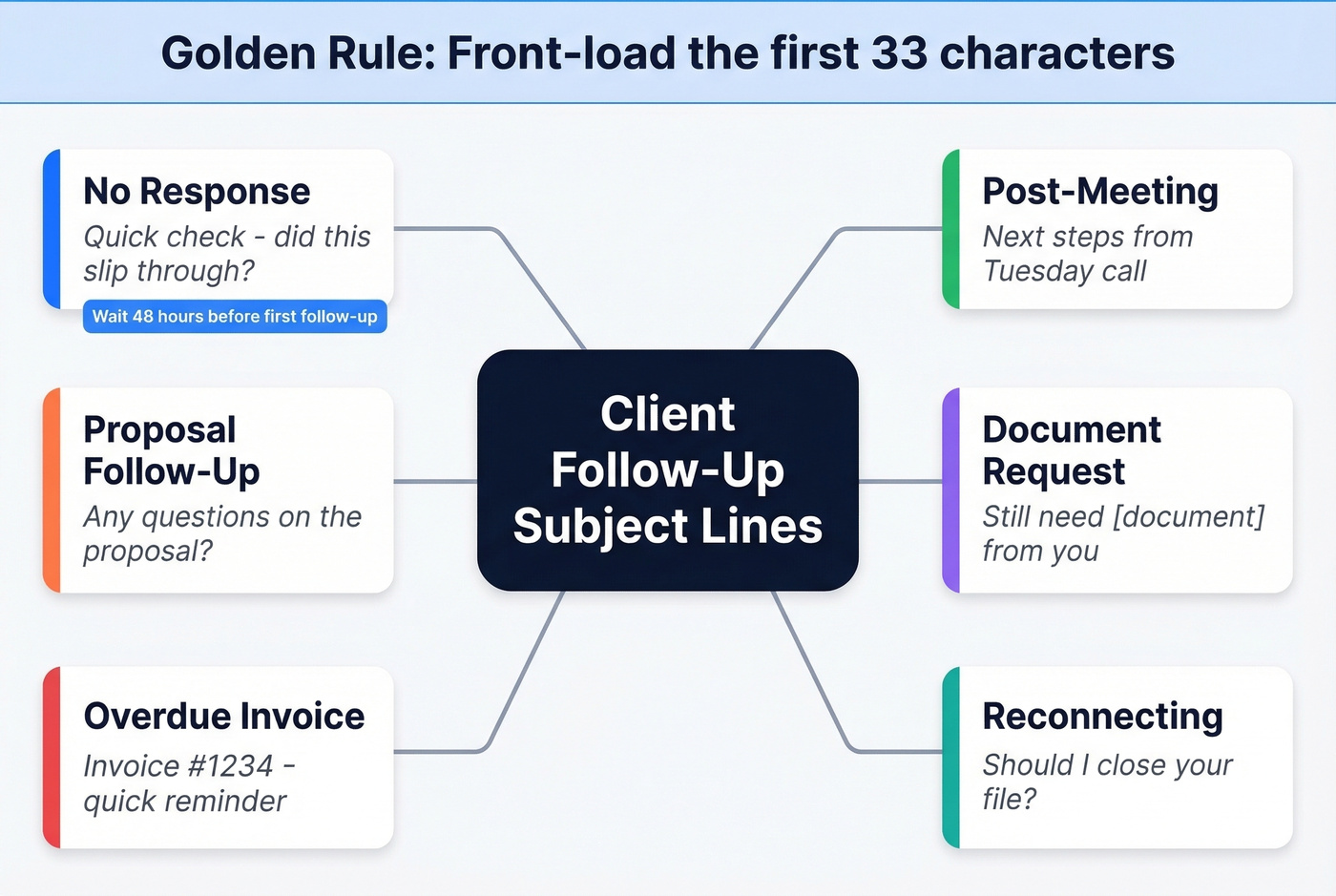
Front-load the first 33 characters. That's the safest cutoff across major devices, and it keeps your point visible even when inboxes chop the rest. If you need more options, pull from these email subject line examples and adapt them to your client context.
25+ Subject Lines for Every Client Scenario
Most follow-up guides dump 50 subject lines in a list and call it a day. That's useless without context. Here's what actually works, organized by the situation you're in. For full sequences (not just subject lines), use these sales follow-up templates.
No Response
When someone ghosts you, the instinct is to sound more desperate. Do the opposite.
A sales practitioner on Reddit uses this angle: "I'm trying to finalize my schedule for next week..." and then proposes a specific date. The logic is sound - a concrete next step forces a yes-or-no decision instead of an indefinite maybe. If you're unsure about spacing, this guide on when you should follow up on an email breaks down timing by scenario.
- "Quick check - did this slip through?" - soft, zero pressure
- "Still need your input on [project]" - reminds them there's a blocker
- "[Name], any update on [topic]?" - personalized, direct
- "One more thing on [deliverable]" - curiosity without clickbait
Timing matters: Wait 48 hours before your first follow-up, then space subsequent ones 3-5 days apart. Anything faster reads as desperate. If you're doing this at scale, keep an eye on email velocity so you don’t trip deliverability issues.
Post-Meeting Next Steps
- "Next steps from Tuesday's call" - anchors to a specific event
- "Action items from our meeting" - implies shared responsibility
- "[Name] - recap + next steps" - clean, scannable
- "Two things before we move forward" - creates a small, finite ask
If you want a full message to match the subject line, use a sales meeting follow-up email framework.
Proposal or Quote Follow-Up
This is where we've seen people overthink it the most. You sent a proposal. They haven't replied. The subject line doesn't need to be clever - it needs to reopen the conversation without pressure.
- "Any questions on the proposal?" - opens dialogue
- "[Project] proposal - valid through [date]" - soft deadline
- "Wanted to make sure the numbers work" - collaborative framing
- "Ready when you are on [project]" - patient but present
Document or Info Request
Anyone who's chased a client for a missing K-1 or a signed contract knows this particular brand of frustration. The r/Accounting thread about clients who "take half a year to send the last piece of missing info" captures it perfectly - and the consensus there is that naming the exact document in the subject line works better than any polite generality.
- "Still need [specific document] from you" - names the exact item
- "[Document] - holding up [project/filing]" - shows the consequence
- "Can you send [item] by [date]?" - clear ask, clear deadline
- "Missing one thing to move forward" - makes it feel small
Overdue Invoice or Payment
Keep these short and professional. No passive aggression.
- "Invoice #[number] - quick reminder" - professional, specific
- "Payment update on [project]" - neutral framing
Reconnecting After Silence
- "Should I close your file?" - the classic break-up email
- "Last note from me on this" - low pressure, high open rate
- "Worth another conversation?" - reframes as their choice
Why 33 Characters Is the Only Number That Matters
You've probably seen the advice that subject lines should be "7 words or 41 characters." That's recycled from older studies, and newer data contradicts it. Twilio SendGrid's analysis found that 2-4 word subject lines performed best - shorter than most guides recommend. That data comes from high-volume marketing sends, but the truncation physics are identical for your 1:1 client follow-up. If you want to go deeper on what consistently gets opened, see subject lines that get opened.
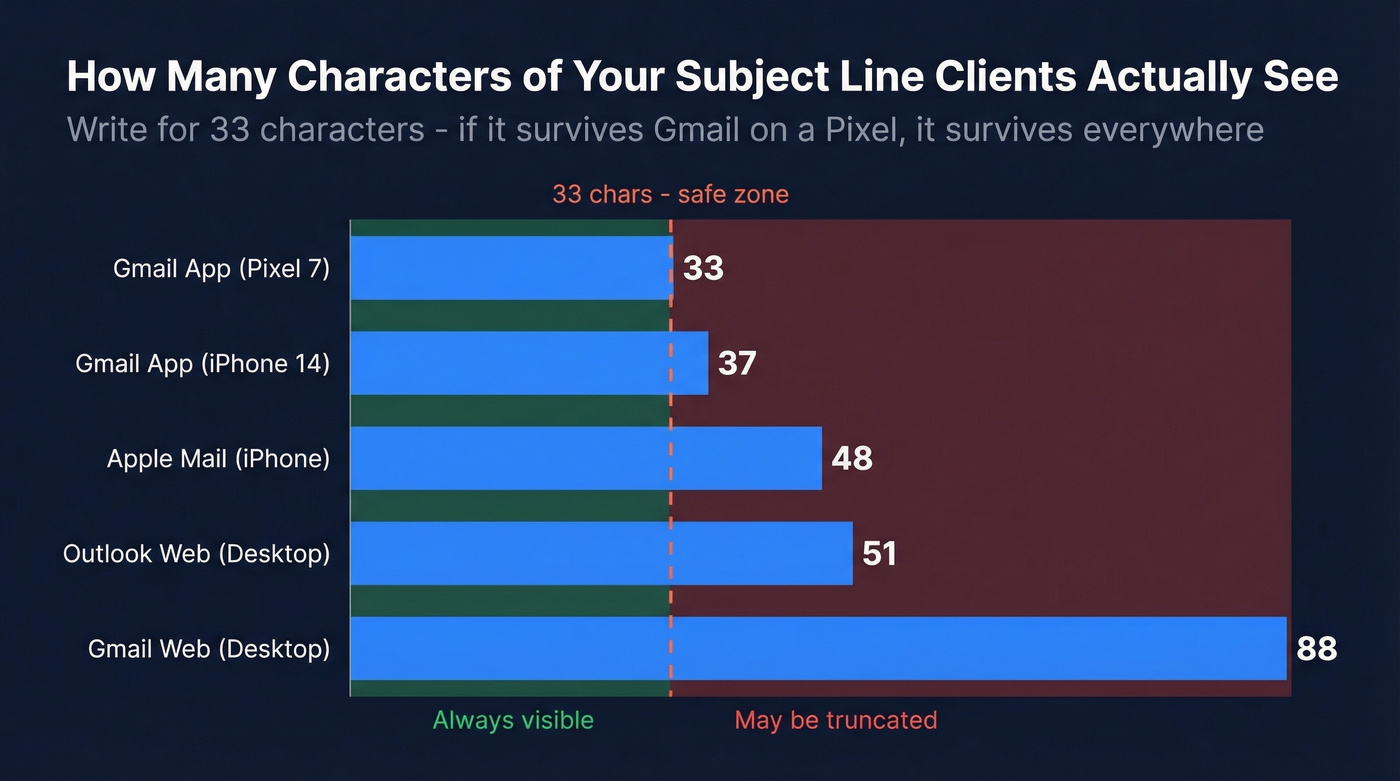
Here's how different clients chop your subject line:
| Email Client / Device | Characters Shown |
|---|---|
| Gmail app (Pixel 7) | 33 |
| Gmail app (iPhone 14) | 37 |
| Apple Mail (iPhone) | 48 |
| Outlook web (desktop) | ~51 |
| Gmail web (desktop) | ~88 |
Per EmailToolTester's device testing
Write for 33 characters. If your key message survives Gmail on a Pixel, it survives everywhere. And don't forget the preheader - that grey text after the subject line. Use it to extend your message past the truncation point when you need more room. You can also run quick checks with a free subject line tester before sending.

A killer follow-up subject line is wasted on a bad email address. Prospeo delivers 98% verified emails with a 7-day refresh cycle - so your carefully crafted follow-ups actually reach the client's inbox, not a dead address.
Stop perfecting subject lines for emails that bounce.
Tone Calibration for Client Follow-Ups
The same follow-up scenario can sound like a doormat or a demand letter depending on tone. That r/Accounting poster who felt "doormat-ish" chasing clients for documents? They were stuck at level one. Here's the full spectrum, using a missing document as the example:
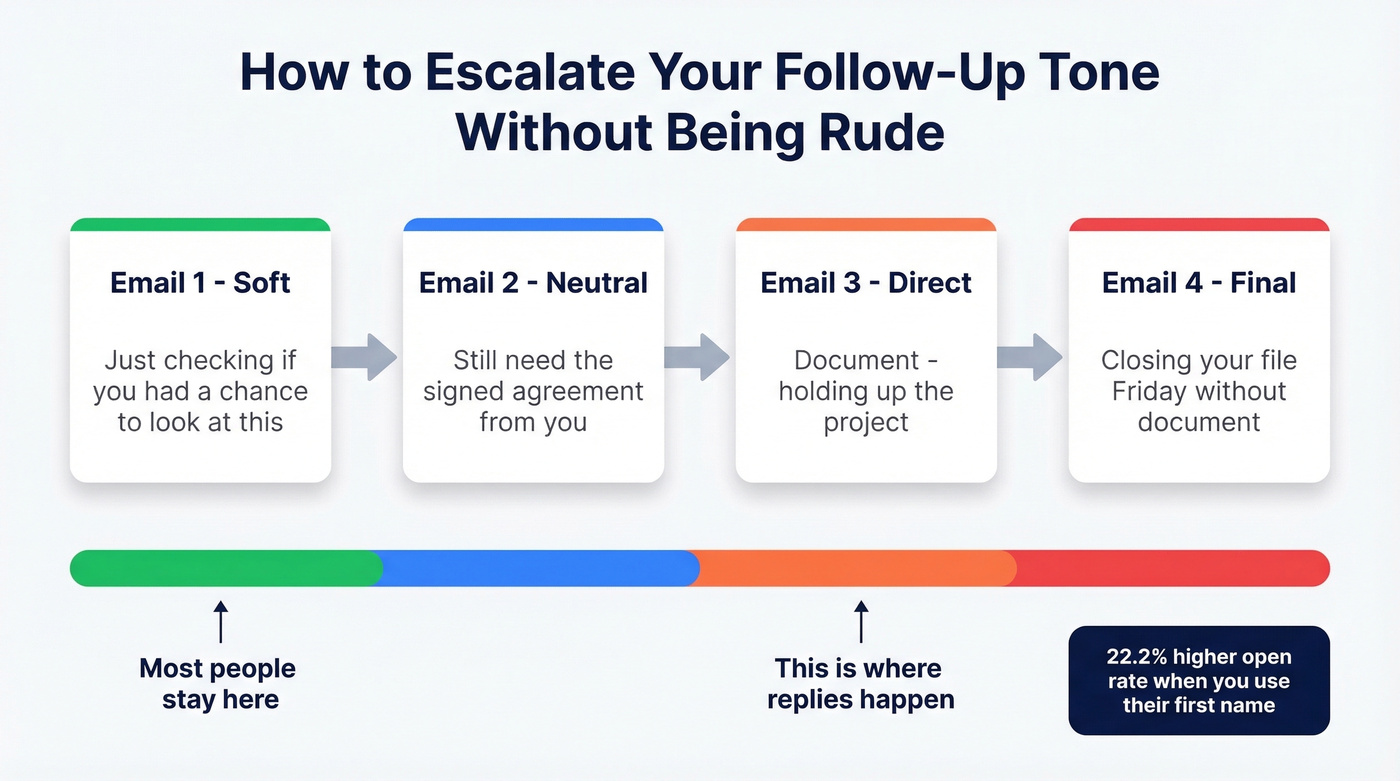
- Soft: "Just checking if you had a chance to look at this"
- Neutral: "Still need the signed agreement from you"
- Direct: "[Document] - holding up the project"
- Final: "Closing your file Friday without [document]"
Start soft. Escalate with each follow-up. And personalize - using the recipient's first name in the subject line drives a 22.2% higher chance of being read compared to generic lines. If you’re looking for alternatives to “just checking in,” this guide on how to say just checking in professionally helps.
Here's the thing: most people stay at "soft" for all four follow-ups because they're afraid of being rude. You're not being rude. You're being clear. A client who needs a direct nudge on email three will respect you more for it than for another "just circling back." In our experience running outbound campaigns, the third email in a sequence - the one that finally drops the politeness buffer and states the consequence - gets more replies than emails one and two combined. If you want benchmarks for how your sequence should perform, compare against follow-up email reply rate data.
Subject Lines That Land in Spam
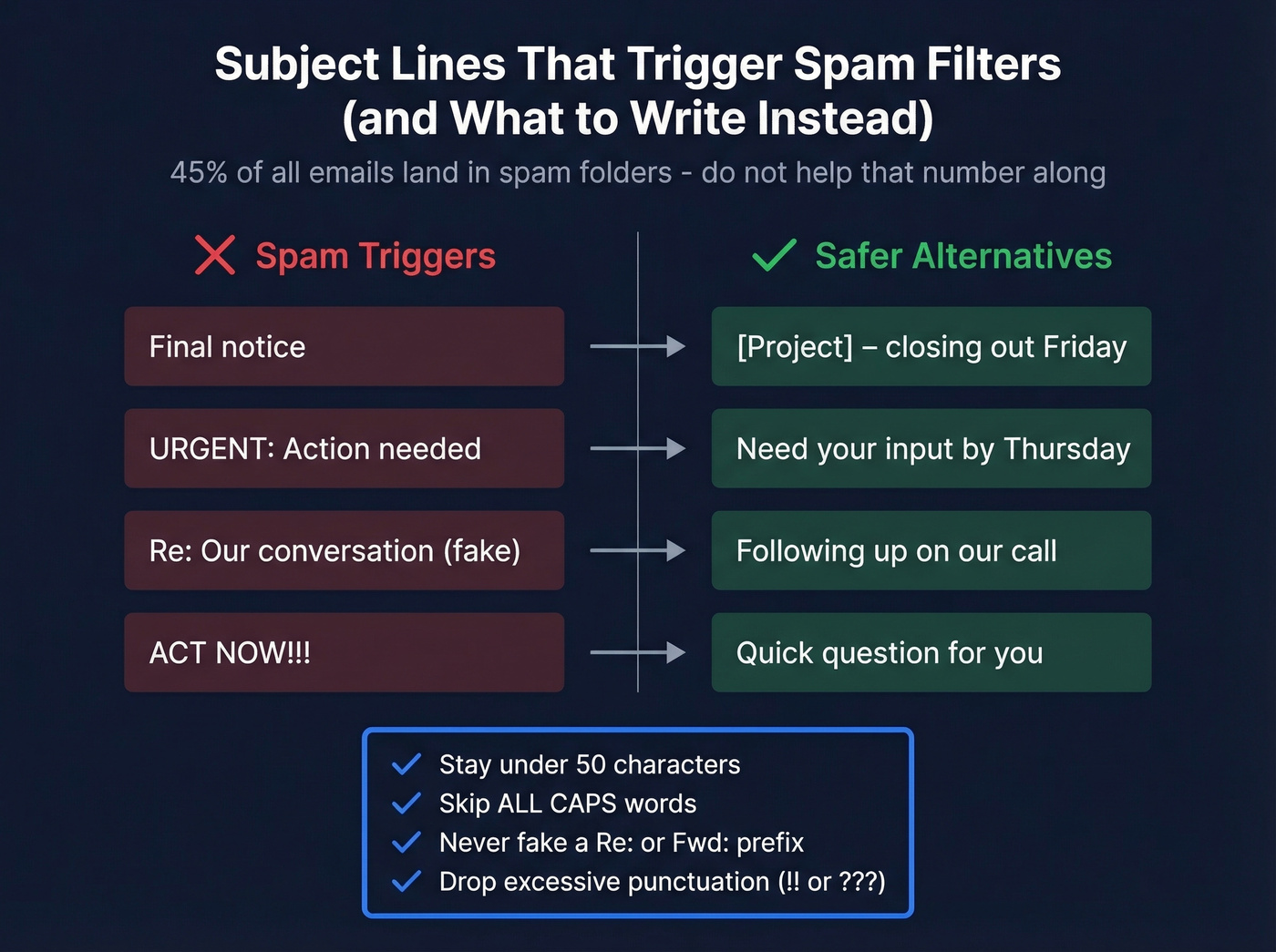
Half the "power words" other guides recommend are literally on spam-trigger lists. Roughly 45% of all emails land in spam folders. Don't help that number along. For a deeper checklist, use an email spam checker before you send.
| Spam Trigger | Safer Alternative |
|---|---|
| "Final notice" | "[Project] - closing out Friday" |
| "URGENT: Action needed" | "Need your input by Thursday" |
| "Re: Our conversation" (fake) | "Following up on our call" |
| "ACT NOW!!!" | "Quick question for you" |
Before you hit send, check four things: stay under 50 characters, skip ALL CAPS words, never fake a "Re:" or "Fwd:" prefix on new emails, and drop the excessive punctuation. Adding a fake "Re:" to a cold email isn't just sleazy - it's a spam trigger that can hurt your domain reputation. The short-term open bump isn't worth the long-term damage. If deliverability is a recurring issue, start with this email deliverability guide.
Verify Before You Follow Up
Let's be honest - your subject line doesn't matter if the email bounces. With average bounce rates across cold outreach sitting around 7.5%, about 1 in 13 follow-ups goes nowhere. We've watched teams spend hours crafting the perfect follow-up sequence only to discover a third of their contact list was stale. Before you send that carefully crafted follow-up, verify the address is still active. Tools like Prospeo handle this - paste a domain or upload a CSV, get verified emails back in seconds with 98% accuracy. If you want to understand the numbers behind this, see email bounce rate benchmarks and fixes.
Skip this step if you're only following up with a handful of clients you email regularly. But for teams running outbound at any kind of scale, verification isn't optional.
You've nailed the subject line and the tone escalation. Now make sure you're following up with the right contact. Prospeo's 300M+ profiles and 30+ filters help you find the actual decision-maker - at $0.01 per email.
Send your follow-up to the person who can actually say yes.
FAQ
How many follow-ups should I send before stopping?
Three to four follow-ups spaced over two to three weeks, changing the subject line each time. If there's no response after the fourth, send a "closing the loop" break-up email and move on - that final message often gets the reply the others didn't.
Should I use "Re:" in a follow-up subject line?
Only if you're replying within an existing email thread. Adding a fake "Re:" to a new message is a spam trigger that hurts deliverability. Spam filters recognize the pattern, and recipients who notice feel manipulated. Keep it honest.
What if my follow-up emails keep bouncing?
The email address is likely outdated or invalid - a 7.5% average bounce rate means a meaningful chunk of follow-ups hit dead inboxes. Use a verification tool to check addresses before sending. Upload a CSV, get results in minutes, and stop burning your domain reputation on bad data.
Does personalizing the subject line actually help?
Yes - including the recipient's first name drives a 22.2% higher open rate compared to generic lines. Combine a name with a specific project reference like "[Name], update on [project]" for the strongest results. Keep the total under 33 characters so nothing gets truncated on mobile.