

Subject Line Spam Checker: How to Use One (and What It Can't Do)
You just rewrote your subject line for the fourth time, swapped "free" for "complimentary," and the spam checker still gives you a 62. Meanwhile, your competitor writes "Free demo - 15 min" and lands in Primary. The disconnect isn't your word choice. It's that a subject line spam checker tests something much narrower than most people realize.
Here's what actually matters, what these tools can and can't tell you, and what to fix first if your emails are still hitting spam.
Quick Answer
A subject line spam checker scans your text against a list of known trigger words and patterns, then returns a score or ratio. That's it - a useful sanity check, not a deliverability diagnosis.
Do this:
- Keep subject lines to 40-60 characters (roughly 6-10 words) so they don't truncate on mobile
- Run your line through a checker before sending to catch obvious red flags like ALL CAPS or stacked exclamation marks
- Treat the score as one signal among many, not a pass/fail grade
Don't expect this:
- The score won't predict whether you'll land in inbox, spam, or promotions
- Different tools give different scores because they use different keyword lists and heuristics
- A "perfect" score means nothing if your domain authentication is broken or your bounce rate is 12%
| What a checker can tell you | What it can't tell you |
|---|---|
| Flagged trigger words | Your sender reputation |
| Character/word count | Inbox vs. spam placement |
| Basic readability issues | Whether recipients engage |
What These Tools Actually Test
When you paste a subject line into one of these tools, three things happen under the hood.
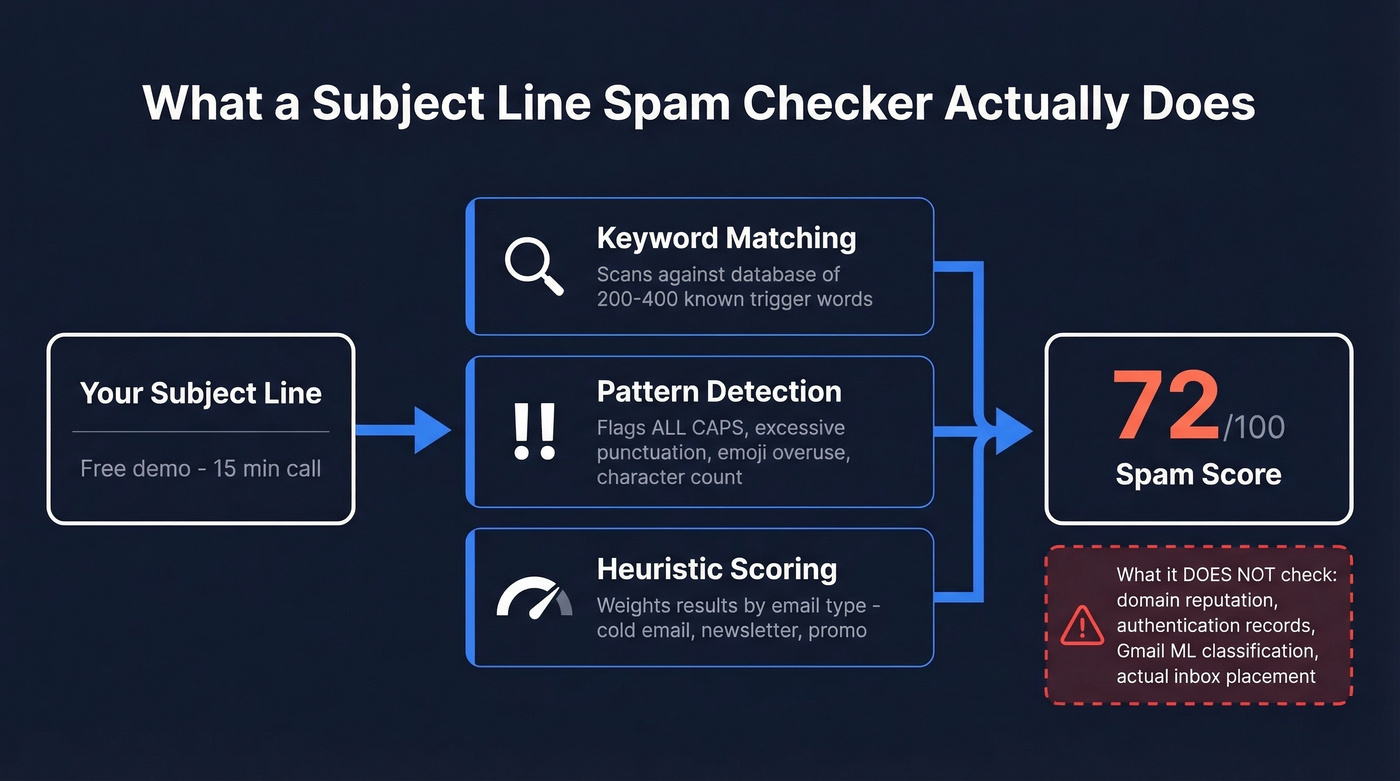
Keyword matching. The tool compares your text against a database of known spam trigger words - things like "act now," "guaranteed," "100% free," or "$$$." ZeroBounce, for example, checks your subject against a collection of well-known spam trigger words and returns a ratio of flagged words to safe words. At its core, every email subject line tester is really a spam word checker: it scans for risky vocabulary and tells you what it found.
Pattern detection. Beyond individual words, some tools flag structural patterns: ALL CAPS, excessive punctuation (!!!), or emoji overuse. A few check character count and estimate mobile truncation.
Heuristic scoring. Tools like Warmup Inbox layer in purpose-based scoring - they ask whether you're sending a B2B cold email, a newsletter, a promo, or a transactional message, then weight the analysis accordingly. Others, like CoSchedule, blend engagement prediction with spam risk.
What none of them do is check your domain reputation, verify your authentication records, or simulate how Gmail's ML models will classify your message. Warmup Inbox is upfront about this on their tool page: they scan for trigger words but don't verify domain reputation. These tools are pattern matchers, not inbox placement predictors.
Think of it like running spell-check before submitting a legal brief. It catches typos, but it won't tell you if your argument holds up in court.
Why "Spam Words" Are Overrated
Here's the myth: using the word "free" in your subject line sends you to spam. Here's the reality: "free" appears in plenty of legitimate emails that get delivered every day.
Modern spam filters don't work like a banned-words dictionary. They work more like a credit score. No single factor tanks your deliverability - it's the accumulation of negative signals across multiple dimensions. A subject line with "free trial" from a domain with clean authentication, low complaints, and strong engagement history lands in inbox just fine. The same subject line from a domain with no DMARC record, a 6% bounce rate, and zero reply history? Spam folder. Same words, opposite outcomes.
The practical takeaway: check your authentication first, then worry about word choice. If you need a full framework beyond subject lines, use an email deliverability guide to prioritize fixes.
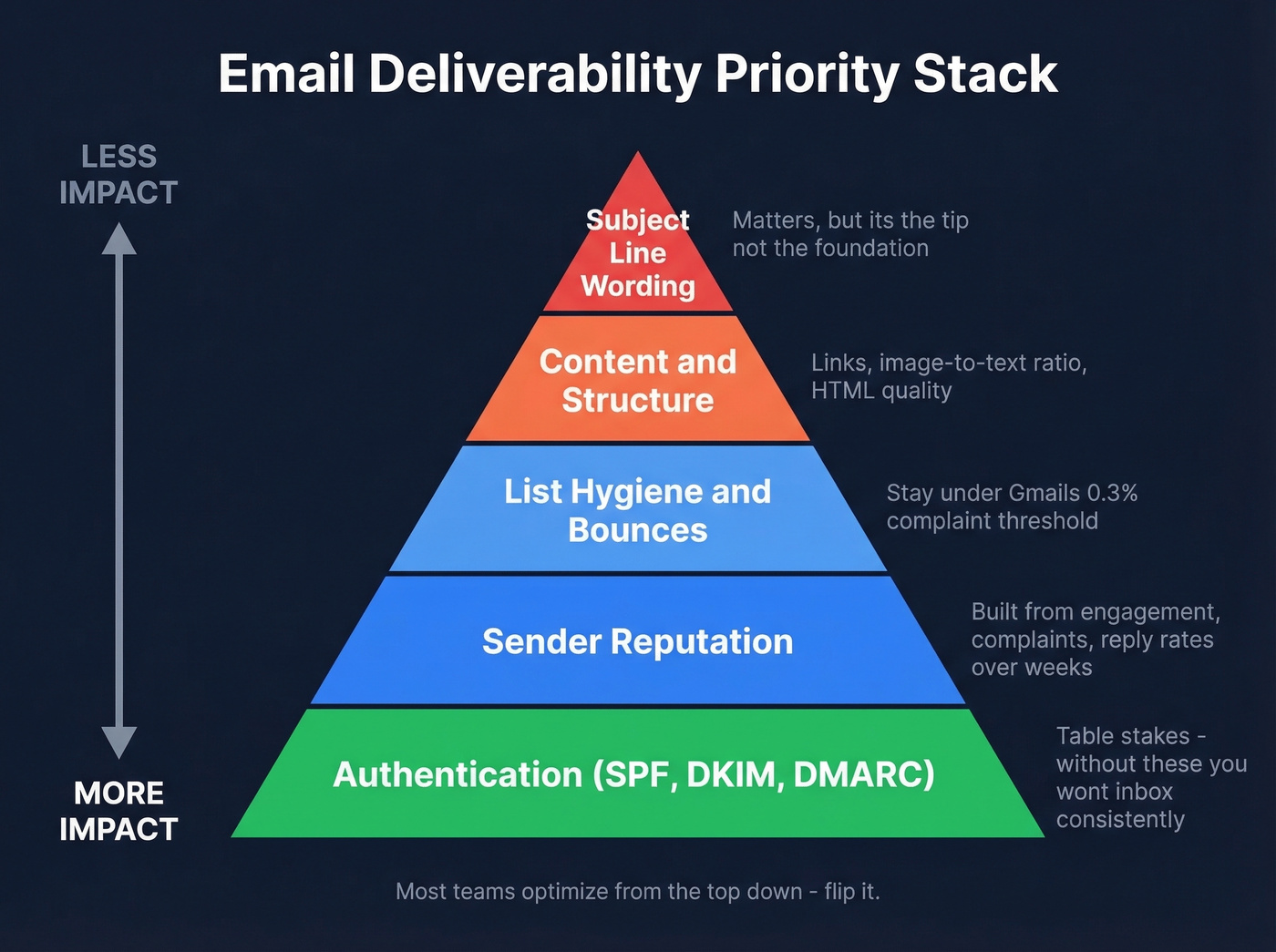
The priority stack for deliverability, from most to least impactful:
- Authentication (SPF/DKIM/DMARC) - the table stakes. Without these, you'll struggle to inbox consistently. If you're unsure what “aligned” means, see DMARC alignment and these SPF record examples.
- Sender reputation - built over weeks and months from engagement patterns, complaint rates, and sending consistency. Reply rates are one of the strongest signals here. (If you're actively trying to repair it, follow this guide on how to improve sender reputation.)
- List hygiene and bounces - Gmail's 0.3% complaint threshold is the red line. Cross it, and you can face SMTP-level rejection, not just spam folder placement. If you want benchmarks and fixes, start with email bounce rate.
- Content and structure - link patterns, image-to-text ratio, HTML quality, broken personalization.
- Subject line wording - yes, it matters. But it's the top of the pyramid, not the foundation.
We've seen teams spend weeks A/B testing subject lines when their bounce rate was sitting at 8%. That's like optimizing your resume font while showing up to the interview in pajamas.
Here's the thing: if your domain is under two months old and you haven't warmed it up, no subject line checker on earth will save you. Stop testing words and go build sending reputation. (If you're scaling outreach, pair that with safe email velocity practices.)
How Gmail Filters Spam
Gmail's spam filtering is ML-driven and engagement-first. It doesn't maintain a static list of banned words. Instead, it evaluates your email through multiple layers in real time.
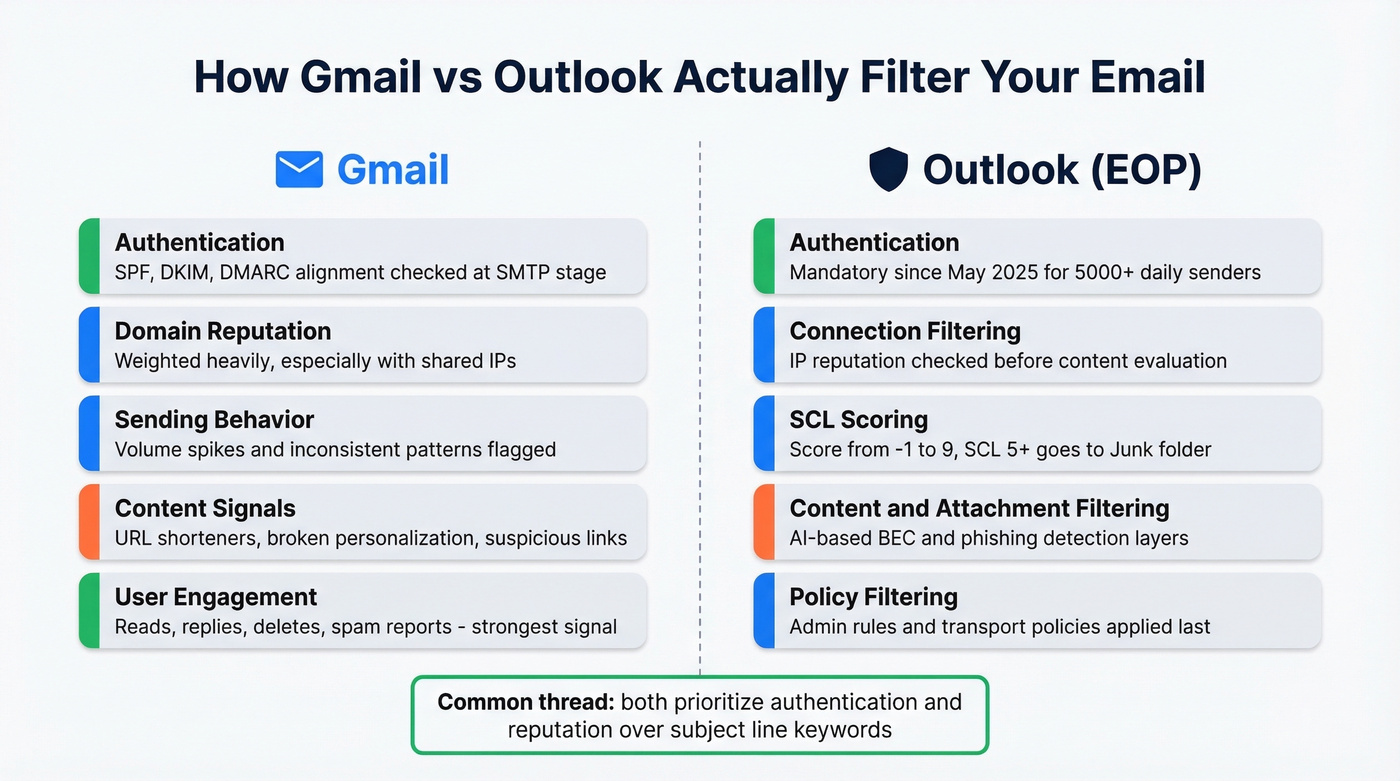
Authentication records - SPF, DKIM, and DMARC alignment. Bulk senders failing these can be rejected at the SMTP stage, blocked before delivery even happens.
Domain reputation - Gmail often weighs domain reputation heavily, especially because shared and rotating IPs make IP-based signals less reliable.
Sending behavior - volume spikes, inconsistent patterns, and sudden list size changes all raise flags.
Content patterns - URL shorteners (bit.ly), excessive redirects, suspicious link destinations, and broken personalization tokens like "Hey [FIRSTNAME]" all contribute to a negative content signal.
Real-time user actions - this is the big one. Gmail watches whether recipients read, reply, delete-without-opening, or hit "Report Spam." Reply rates are one of the strongest signals for inbox placement. If your recipients consistently engage, Gmail learns to trust your domain. If they don't, your next campaign starts at a disadvantage. For more on engagement mechanics, see follow-up email reply rate.
The 0.3% complaint rate threshold is the number to remember. That's 3 spam reports per 1,000 emails. Cross it consistently, and Gmail can start rejecting your mail at the server level. No subject line tweak fixes that.
How Outlook Filters Spam
Outlook's filtering runs through Exchange Online Protection (EOP), which evaluates mail across five layers: connection filtering, sender reputation, content filtering, attachment filtering, and policy filtering.
Authentication Is Mandatory
Since May 2025, Microsoft rejects non-compliant mail outright for domains sending more than 5,000 emails per day to Outlook.com, Hotmail.com, and Live.com addresses. The requirements: published SPF, DKIM, and DMARC records. No exceptions, no grace period.
SCL Scoring
Outlook assigns a Spam Confidence Level (SCL) score ranging from -1 to 9. An SCL of -1 means the message bypassed filtering - typically internal or whitelisted mail. SCL 5 or higher routes to Junk. You can check your SCL by examining email headers; look for X-MS-Exchange-Organization-SCL or X-Forefront-Antispam-Report.
What Changed Recently
Microsoft deprecated SmartScreen back in November 2016 and has since layered in advanced AI-based detection targeting business email compromise and sophisticated phishing. The filtering is getting smarter, not simpler. Trigger words in your subject line are a tiny fraction of what EOP evaluates - sender reputation and authentication carry far more weight.
For outbound teams, the practical takeaway: get your SPF, DKIM, and DMARC records right, keep complaint rates low, and Outlook's content filtering becomes a non-issue for legitimate email.

You just read that bounce rates matter more than subject line wording. Prospeo's 5-step email verification delivers 98% accuracy - teams using it consistently see bounce rates drop from 35%+ to under 4%. That's the difference between inbox and spam folder.
Stop optimizing words. Start sending to verified emails.
What About SpamAssassin?
SpamAssassin uses an additive scoring model. Every email gets evaluated against hundreds of rules, each adding or subtracting points. When the total exceeds a threshold - typically 5.0 - the email gets flagged as spam.
Subject line rules exist and they're concrete. ACT_NOW_CAPS fires when "acting now" appears in all capitals. KAM_NUMSUBJECT triggers when a subject line ends in numbers, a common spam pattern. These are real rules with real scores, not folklore.
SpamAssassin remains relevant for smaller, self-hosted mail servers and some enterprise gateways. But Gmail, Outlook, and Yahoo all use proprietary ML systems that bear little resemblance to SpamAssassin's rule-based approach. A SpamAssassin score of 2.1 tells you nothing about how Gmail will classify your message. Treat SpamAssassin-style checkers as directional guidance for avoiding obvious red flags - not as a predictor of inbox placement at major providers.
Using a Spam Trigger Words Checker
Roughly 160 billion spam emails are sent every day. Filters have to separate legitimate messages from that firehose, and certain words and phrases do raise flags - especially when they stack together or appear alongside other negative signals.
Mailmeteor maintains a categorized list of 349+ spam trigger words. Mailtrap publishes 240 across eight categories. But a definitive blacklist isn't technically possible because spam tactics evolve constantly. That's why running your copy through a spam trigger words checker before every send is a smart habit - the databases update as new patterns emerge.
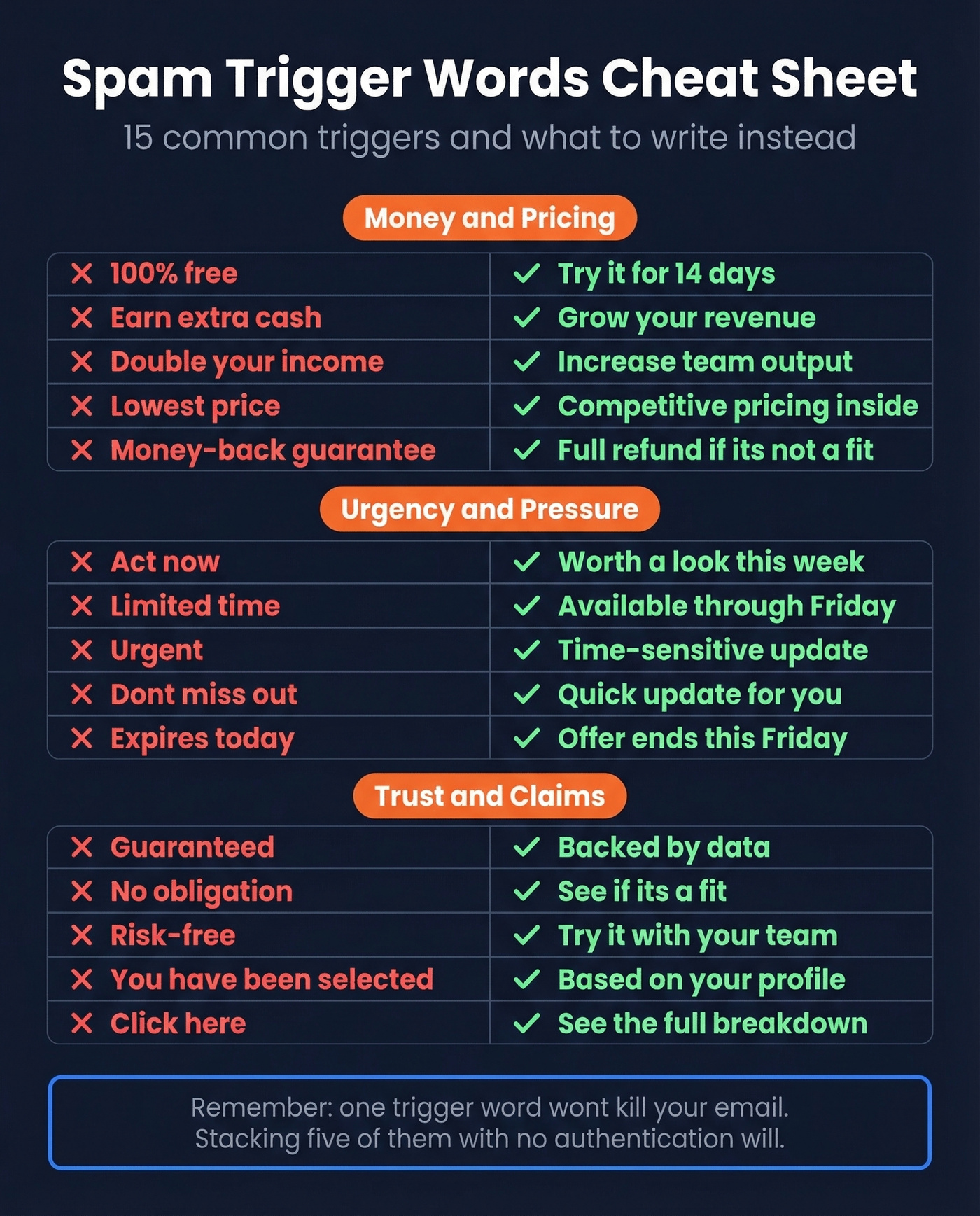
The tables below cover 50+ common trigger words with safer alternatives. These aren't banned words - they're risk signals. Using one in an otherwise clean email from a reputable domain is fine. Stacking five of them in a subject line with no authentication? That's a problem.
Money & Pricing Claims
| Trigger word/phrase | Why it flags | Write this instead |
|---|---|---|
| 100% free | Classic spam pattern | Try it for 14 days |
| $$$ / Cash bonus | Financial spam signal | Save on your next order |
| Earn extra cash | MLM/scam association | Grow your revenue |
| Double your income | Overpromise pattern | Increase team output |
| No cost | Evasion of "free" | Included at no extra charge |
| Lowest price | Price-bait signal | Competitive pricing inside |
| Eliminate debt | Financial spam staple | Reduce overhead costs |
| Money-back guarantee | Infomercial language | Full refund if it's not a fit |
| Credit card required | Phishing pattern | Start your trial today |
| Cheap | Low-quality signal | Affordable option for teams |
| Prize / You won! | Lottery scam pattern | Your results are ready |
| Billion / Million dollars | Nigerian prince territory | Revenue growth data inside |
| Investment opportunity | Securities spam | ROI breakdown attached |
Urgency & Pressure
| Trigger word/phrase | Why it flags | Write this instead |
|---|---|---|
| Act now | High-pressure tactic | Worth a look this week |
| Limited time | Artificial scarcity | Available through Friday |
| Urgent | Panic trigger | Time-sensitive update |
| Expires today | Pressure + deadline | Offer ends March 15 |
| Don't miss out | FOMO manipulation | Quick update for you |
| Last chance | Terminal urgency | Final reminder |
| Immediately | Pressure language | At your convenience |
| Before it's too late | Fear-based | Wanted to share this |
| Only X left | Scarcity spam | Spots are filling up |
| Call now | Telemarketing signal | Let's find a time |
| Apply now | Loan/credit spam | See if it's a fit |
| Order now | Direct-response spam | Ready when you are |
Overpromises & Hype
| Trigger word/phrase | Why it flags | Write this instead |
|---|---|---|
| Guaranteed | Overpromise signal | Backed by data |
| Revolutionary | Hype language | A different approach to X |
| Incredible deal | Infomercial tone | Worth comparing |
| Once in a lifetime | Extreme hype | Unusual opportunity |
| Congratulations | Lottery/phishing | Great news about X |
| Amazing results | Unsubstantiated claim | Results from Q1 |
| Risk-free | Too-good-to-be-true | No commitment needed |
| Best price ever | Superlative spam | Updated pricing for 2026 |
| Miracle | Health spam crossover | Significant improvement |
| Secret method | Guru/scam language | Framework we've been using |
| Click here | Generic CTA spam | See the breakdown |
| Click below | Variant of above | Details inside |
Scam & Fraud Signals
| Trigger word/phrase | Why it flags | Write this instead |
|---|---|---|
| Wire transfer | Fraud pattern | Payment details |
| Nigerian prince | Literal scam archetype | (just don't) |
| Confidential | Phishing signal | For your review |
| Password reset | Phishing staple | Account security update |
| Verify your account | Phishing pattern | Action needed on your account |
| Suspicious activity | Fear + phishing | Security notice |
| Dear friend | Scam greeting | Hi [First Name] |
| No questions asked | Evasion signal | Simple process |
| This isn't spam | Ironic self-report | (remove entirely) |
| Multi-level marketing | MLM signal | Partnership opportunity |
| Work from home | Legacy spam category | Remote role details |
| Pre-approved | Credit scam pattern | You qualify for X |
Mistakes That Hurt More Than Trigger Words
Beyond individual words, these structural mistakes actively damage your sender reputation and inbox placement.
Fake Re: or Fwd: prefixes. Adding "Re:" to a cold email to fake a prior conversation is deceptive - and CAN-SPAM explicitly prohibits misleading subject headings. Filters catch this pattern, and recipients who realize the trick will report you.
ALL CAPS SUBJECT LINES. Writing in all caps is the email equivalent of shouting. SpamAssassin has specific rules for this (ACT_NOW_CAPS, among others), and every major provider treats it as a negative signal.
Excessive punctuation. "Don't miss this!!!" or "HUGE savings???" Multiple exclamation marks or question marks are a classic spam fingerprint. One is fine. Three is a flag.
Clickbait that doesn't match the body. "You won't believe what happened" followed by a product pitch trains recipients to delete-without-opening - which Gmail tracks and uses against your domain.
Too long for mobile. 35% of recipients open emails based on the subject line alone, and if yours truncates at 30 characters on a phone screen, you've lost them before they even decide. Stick to 40-60 characters. If you're testing beyond the subject line, consider email preview text A/B testing.
Vague "quick question" subject lines. The consensus on r/sales is that these are so overused in cold outreach they've become invisible. Recipients recognize the pattern and delete or report without a second thought. If you want proven alternatives, use these cold email subject line examples.
Broken personalization tokens. "Hey [FIRSTNAME], quick question" is worse than no personalization at all. It screams mass email and guarantees a spam report from anyone who sees it. For a better approach, see personalized outreach.
Best Free Tools Compared
| Tool | Score type | AI rewrites | Mobile preview | Purpose scoring | Best for |
|---|---|---|---|---|---|
| Omnisend | Letter grade | Yes | No | No | AI rewrite suggestions |
| Mailmeteor | Pass/fail + tips | Yes | No | No | Quick check + AI suggestions |
| ZeroBounce | Ratio (flagged/safe) | No | No | No | Seeing exactly which words flagged |
| CoSchedule | Numeric (1-100) | No | No | No | Benchmarking across campaigns |
| Warmup Inbox | Numeric + tips | No | Yes | Yes | B2B cold email context |
| Send Check It | Numeric (1-100) | No | No | No | Simple, no-signup scan |
| MailerLite | Score + suggestions | No | No | No | Newsletter senders |
| SubjectLine.com | Numeric (1-100) | No | No | No | Depth - scores against 3B+ tracked emails |
| EmailSubjectLineGrader | Letter grade | No | No | No | Basic pass/fail |
Full deliverability platforms that bundle subject line testing with warmup, inbox placement, and reputation monitoring typically run $20-$200+/month for SMB tiers.
Which One to Pick
For a fast scan: ZeroBounce. Paste your subject line, get a ratio of flagged-to-safe words in seconds. The ratio format is more useful than an arbitrary score because you can see exactly which words triggered - it doubles as a quick spam word checker you can run before every campaign.
For overall optimization: CoSchedule or Omnisend. Both go beyond spam detection to evaluate engagement potential. Omnisend adds AI rewrite suggestions, which saves time when you're stuck. CoSchedule's numeric score is easy to benchmark across campaigns.
For B2B cold email: Warmup Inbox. It's one of the few free checkers that asks about your email's purpose before scoring, and it includes a mobile preview. The purpose-based scoring matters - a B2B cold email and a transactional receipt have completely different risk profiles.
Skip the paid deliverability suites if you're only looking for subject line feedback. The free tools above cover that use case. Where paid platforms earn their money is warmup, inbox placement testing, and reputation monitoring - different problems entirely. If you want a broader comparison, see our roundup of the best free subject line testers.
None of these tools will tell you whether your email actually lands in inbox. They're heuristic scanners. Use them to catch obvious mistakes, not as a deliverability guarantee.
If You're Still in Spam
You've optimized your subject line, run it through a checker, and emails are still landing in spam. Stop tweaking words. The subject line isn't your problem. Work through this checklist in order.
Fix Authentication First
Check your SPF, DKIM, and DMARC records. All three need to be published and aligned. In 2026, this is non-negotiable - Microsoft rejects unauthenticated mail outright for high-volume senders, and Gmail can do the same. Use MXToolbox or your ESP's built-in checker to verify. If any of the three are missing or misconfigured, fix them before touching anything else. (If you need a step-by-step, start with how to verify DKIM is working.)
Fix Bounces and Complaints
If your bounce rate is above 5%, you have an urgent list hygiene problem. Every bounced email tells the receiving server you're sending to addresses that don't exist - which is exactly what spammers do. And if your complaint rate is anywhere near Gmail's 0.3% complaint threshold, you're one bad send away from SMTP rejection.
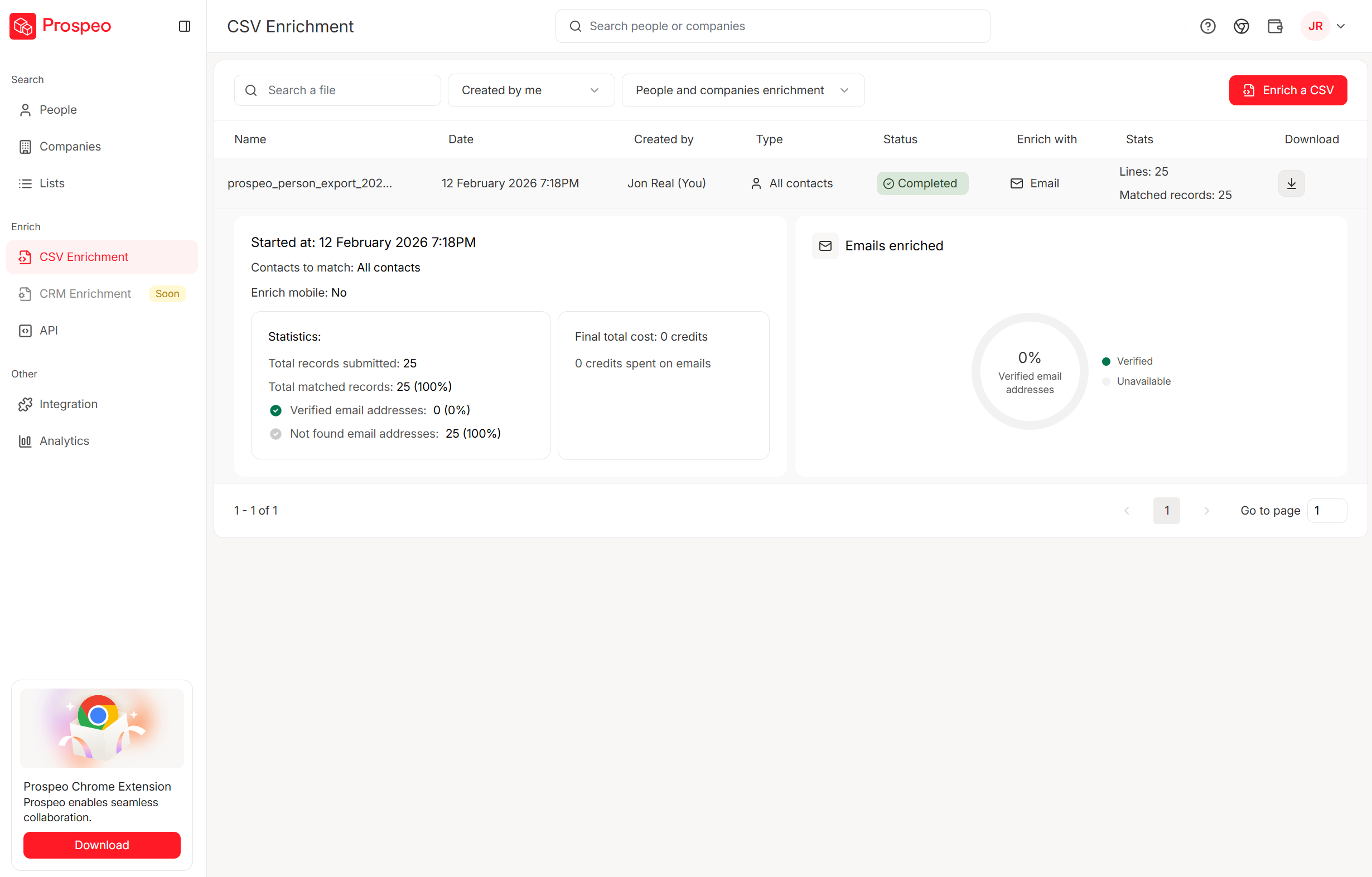
This is where a subject line spam checker can't help you, but list verification can. We've watched teams go from 35% bounce rates to under 4% just by running their lists through proper verification before sending. Prospeo's email verification uses a 5-step process that catches invalid addresses, spam traps, and honeypots before they damage your sender reputation - 98% email accuracy with catch-all domain handling included. At roughly $0.01 per email, it's the cheapest insurance your domain reputation can get.
Then Optimize Content
Once authentication is solid and your list is clean, then it makes sense to optimize subject lines, body content, link structure, and sending patterns. At this point, running your subject line through a checker becomes genuinely useful - you've eliminated the bigger variables, so content tweaks can actually move the needle. For a deeper look at content-level pitfalls, see our email spam checker guide.
Reply rates are one of Gmail's strongest inbox signals, and you can't get replies if you're emailing dead addresses. Prospeo refreshes 300M+ profiles every 7 days - not every 6 weeks - so your list stays clean and your sender reputation stays intact.
Clean data builds sender reputation. No subject line hack can replace that.
FAQ
Do spam trigger words automatically send emails to spam?
No. Modern providers like Gmail use ML models that weigh hundreds of factors - authentication, reputation, engagement, and content together. A single trigger word in an otherwise clean email from a reputable domain won't cause spam placement. Problems start when trigger words stack alongside weak authentication or poor sender reputation.
What's the best subject line length?
Aim for 40-60 characters, roughly 6-10 words. This range avoids mobile truncation on most devices. 69% of customers mark an email as spam based on the subject line alone, so clarity and brevity matter more than cleverness.
Can emojis trigger spam filters?
Emojis alone don't trigger spam filters at Gmail or Outlook. Excessive emoji use - especially combined with trigger words and ALL CAPS - contributes to a spammy content signal. One relevant emoji is fine. A string of fire-rocket-money-bag alongside "ACT NOW" is asking for trouble.
Why do different checkers give different scores?
Each tool uses its own keyword database, weighting system, and scoring scale. ZeroBounce returns a flagged-to-safe ratio, CoSchedule uses a 1-100 numeric score, and Omnisend gives letter grades. There's no universal standard - use checkers to catch obvious problems, not to chase a perfect number.
My emails still land in spam. What should I fix first?
Start with authentication - verify your SPF, DKIM, and DMARC records are published and aligned. Then check your bounce rate; anything above 5% means you need list verification immediately. Only after authentication and list hygiene are solid should you spend time optimizing subject lines.