

Virtual Assistant Cold Email: The Operational Playbook for Emails That Actually Get Replies
You send 200 cold emails. Zero replies. Not because your offer's bad - because 190 of those emails landed in spam or bounced. That's the reality for most virtual assistant cold email campaigns, and it's entirely fixable.
The average cold email reply rate sits at 3.43%. Top performers hit 5.5%+, and elite campaigns clear 10.7%. In our experience, the gap between 0% and 5% isn't copywriting talent - it's operational discipline. Framing your outreach as help rather than a sales pitch matters, sure, but no amount of positioning saves an email that never reaches the inbox.
Why Most VA Cold Emails Fail
Three things separate virtual assistants who book meetings from those who burn domains:
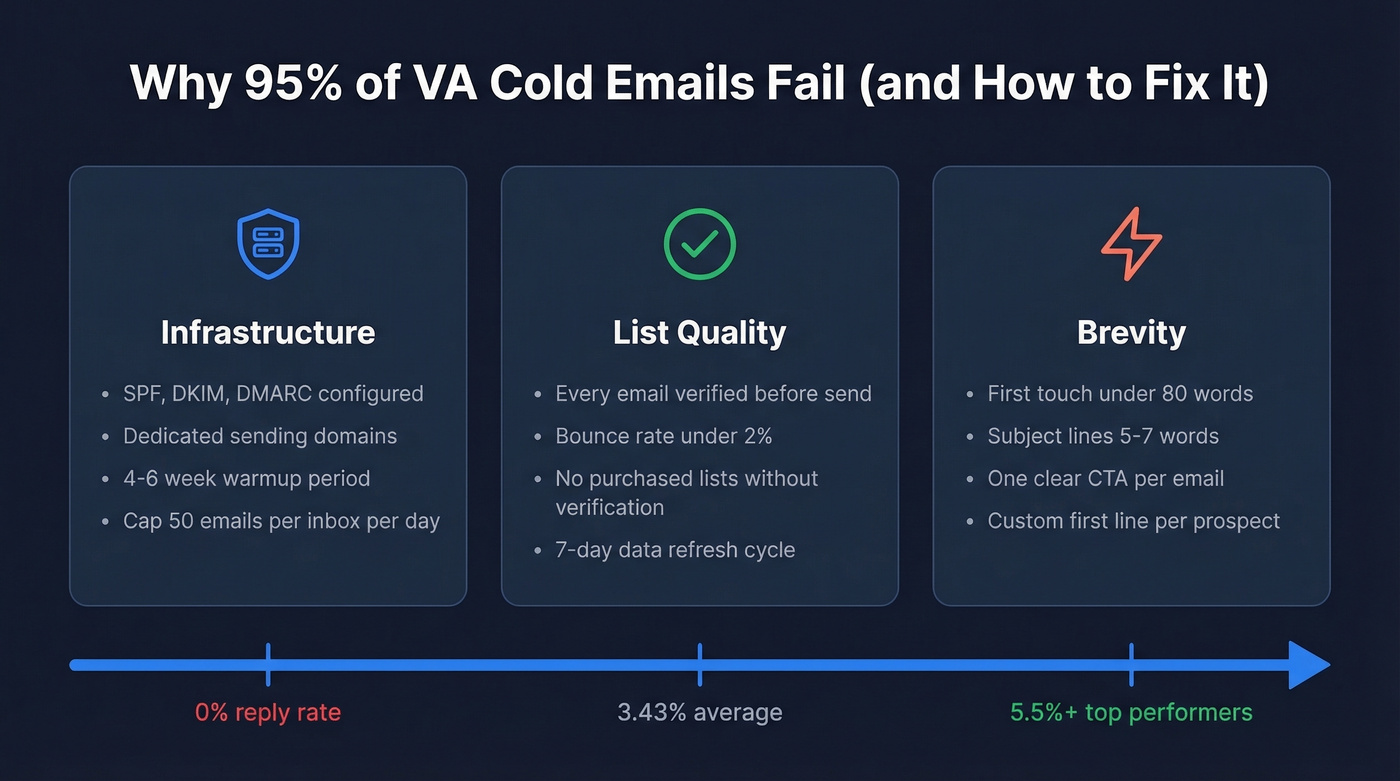
- Infrastructure: SPF, DKIM, and DMARC configured. Dedicated sending domains warmed for 4-6 weeks. Inbox rotation.
- List quality: Every email verified before sending. Bounce rate under 2%, no exceptions.
- Brevity: First-touch emails under 80 words. Subject lines kept short - 5-7 words tends to work best.
Set Up Sending Infrastructure First
Don't send a single cold email until SPF, DKIM, and DMARC are configured on your sending domain. These authentication protocols have been non-negotiable since 2025 - Gmail, Yahoo, and Microsoft's bulk sender rules demand all three plus RFC 8058 one-click unsubscribe headers.
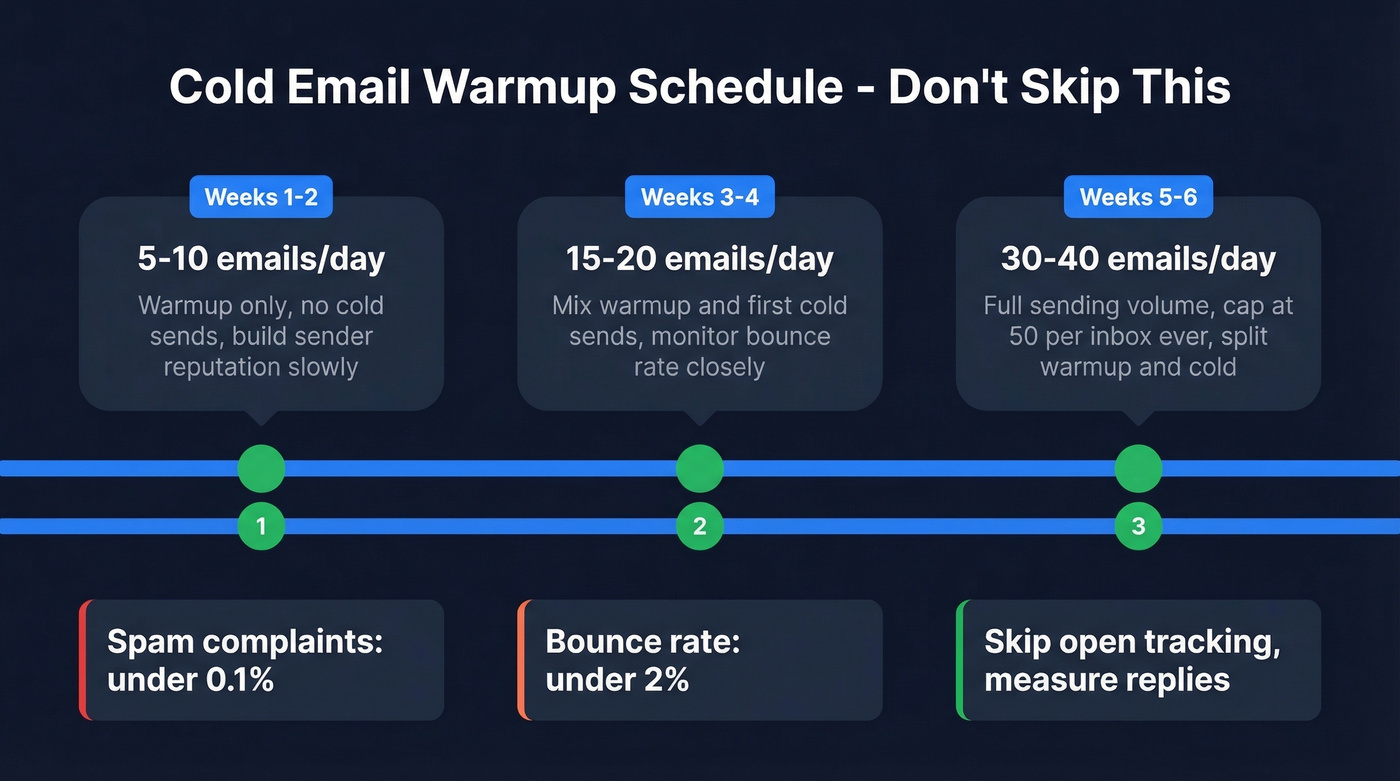
Here's the warmup schedule that works: 5-10 emails per day in weeks 1-2, ramp to 15-20 in weeks 3-4, then 30-40 in weeks 5-6. Cap at 50 per inbox per day - ever. Split that between warmup and actual cold sends to keep patterns natural. Set up a custom tracking domain via CNAME to isolate your reputation from shared tracking infrastructure.
The guardrails: spam complaints under 0.1% (the 0.3% threshold is the bulk sender ceiling, and best practice is well below that), bounce rate under 2%, and skip open-rate tracking entirely. Tracking pixels hurt deliverability on cold outreach. Measure replies instead.
Build and Verify Your List
Here's where most VA campaigns actually die. One practitioner on r/Entrepreneur shared their turnaround - bounce rate dropped from 11% to under 2% after switching from purchased lists to manually verified contacts. Their reply rate doubled from 3% to 6%. They also expanded from 3 to 7 sending domains, capping each at 26 emails/day.
We've tested this ourselves. Prospeo handles both list building and verification - use the 30+ search filters to build targeted lists using signals like buyer intent, technographics, job changes, headcount growth, and funding, then run every email through the 5-step verification before it touches your sending tool. With 98% email accuracy and a 7-day data refresh cycle (compared to the 6-week industry average), you're not emailing stale contacts. The free tier covers 75 emails per month, enough to validate a weekly prospecting batch.
If you want to go deeper on list ops, start with a simple lead generation workflow and tighten your firmographic filters before you scale volume.

Your VA's custom first lines won't matter if the email bounces. Prospeo's 30+ search filters let you build hyper-targeted lists by buyer intent, job changes, and technographics - then verify every contact through 5-step verification. 98% email accuracy. 7-day data refresh. No stale contacts torching your domain.
Give your VA a list worth sending to.
Write the Email
Keep your first touch under 80 words. That's not a suggestion - it's what the benchmark data shows works best. One practitioner cut their emails from 141 words to under 56 and saw their reply rate double.
The structure: custom first line, value prop, low-friction CTA. Here's a template for a VA pitching services:
Subject: Quick question about [Company]'s outreach
Hi {{first_name}},
{{custom_first_line}}
I help [type of company] book 15-20 qualified meetings/month by running their cold email ops end-to-end - domains, lists, copy, sending, and reply handling.
Worth a 10-minute call this week?
[Your name]
Include your rate range if you're pitching VA services. It prequalifies prospects and saves both sides time. If you're running outreach on behalf of a client, swap the value prop for theirs. The structure stays the same.
That {{custom_first_line}} variable is where the magic happens. Scrape a recent prospect signal - company news, a post, a job listing - run it through GPT to generate a relevant first line, then import the CSV with the custom variable into your sending tool. Spend about 3 minutes per prospect on this step. One team reported roughly 3x the response rate after switching from generic mail-merge to this workflow, which tracks with what we've seen across our own campaigns.
If you're tightening messaging, pull ideas from proven cold email subject line examples and keep your CTA aligned with high-performing email call to action patterns.
At $0.01 per verified email, Prospeo costs less than a single hour of VA time - and eliminates the bounce rate problem that kills most campaigns. One practitioner cut bounces from 11% to under 2% after switching to verified data. Stack Prospeo with your VA's sending tool and keep bounce rates where they belong.
Stop paying your VA to email addresses that don't exist.
Follow-Up Cadence That Works
58% of replies come from the first email. The other 42% come from follow-ups. Skip them and you're leaving nearly half your results on the table.
| Touch | Day | Angle |
|---|---|---|
| Email 1 | Day 0 | Custom first line + value prop |
| Follow-up 1 | Day 3 | New angle or case study |
| Follow-up 2 | Day 8 | Social proof or quick stat |
| Follow-up 3 | Day 15 | Breakup / permission close |
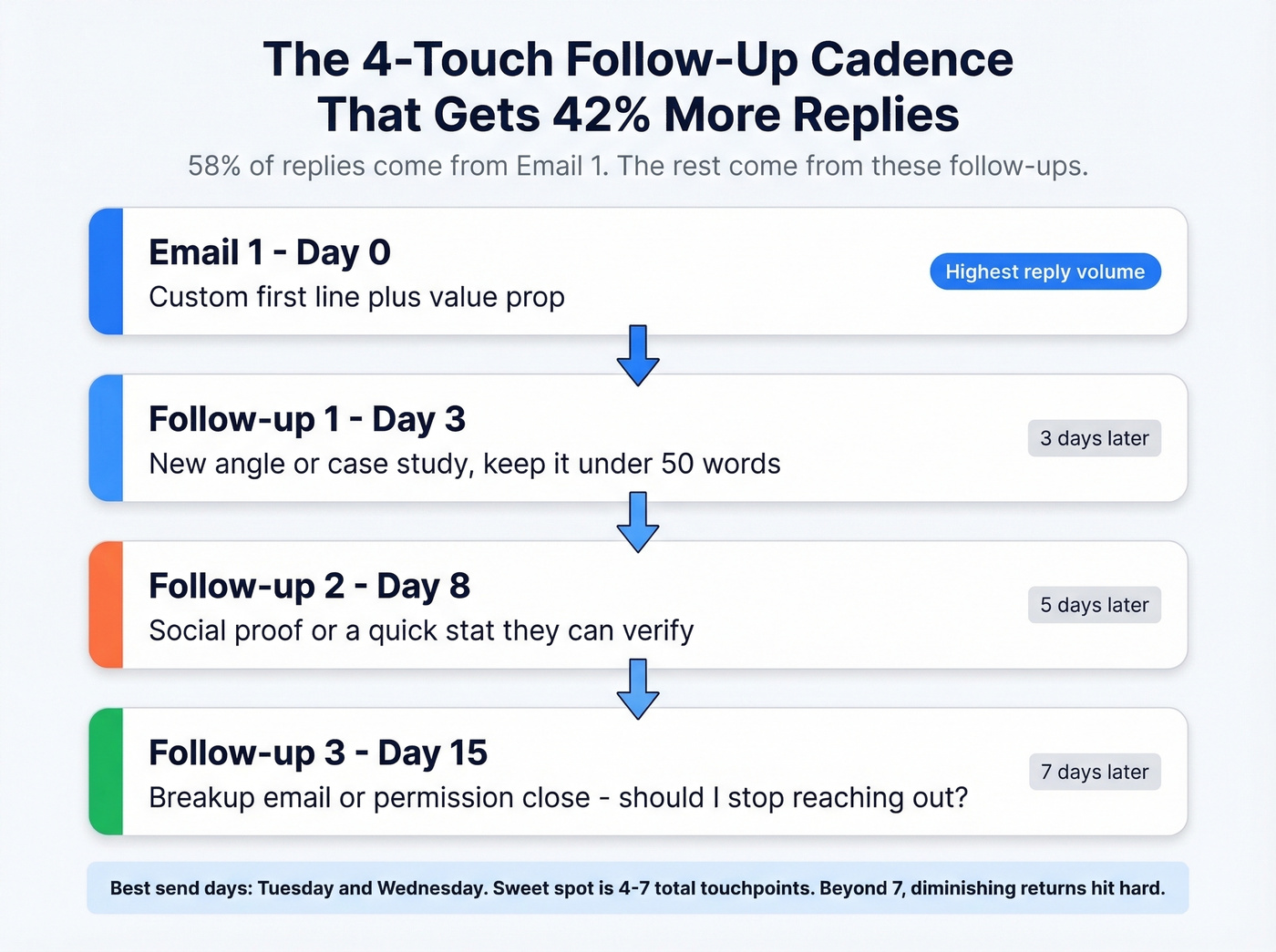
The sweet spot is 4-7 touchpoints. Beyond 7, diminishing returns kick in hard unless each touch adds genuinely new value. Tuesday and Wednesday are the best-performing send days, with Wednesday edging out slightly in most datasets.
To improve follow-ups without bloating your sequence, borrow from these cold email follow-up templates and sanity-check timing against the best time to send cold emails data.
Legal Compliance for VAs
Look, you remain personally liable for compliance even when a tool sends on your behalf. Don't learn this the expensive way.
CAN-SPAM (US): Accurate From/Reply-To and domain. No deceptive subject lines. Working unsubscribe link. Honor opt-outs within 10 business days. Valid physical mailing address in every email.
GDPR (EU): Cold B2B email is permissible under legitimate interest, but you must identify yourself, explain how you got their info, and include an opt-out.
Fines run up to $50,120 per email under CAN-SPAM, EUR 20M under GDPR, and $7,500 per violation under CCPA. These aren't theoretical - the FTC has pursued enforcement actions against small senders, not just enterprise companies.
If you're unsure where the line is, read up on cold email marketing and whether is it illegal to buy email lists applies to your sourcing method.
What Cold Email VA Work Costs
| Role/Item | Cost Range |
|---|---|
| VA (global avg) | $31.48/hr |
| VA (Philippines) | $11.33/hr |
| VA (US-based) | $35.61/hr |
| Specialist premium | +$3.67/hr |
| Done-for-you retainer | $500-$2,500/mo |
| Tool stack | $150-$600/mo |
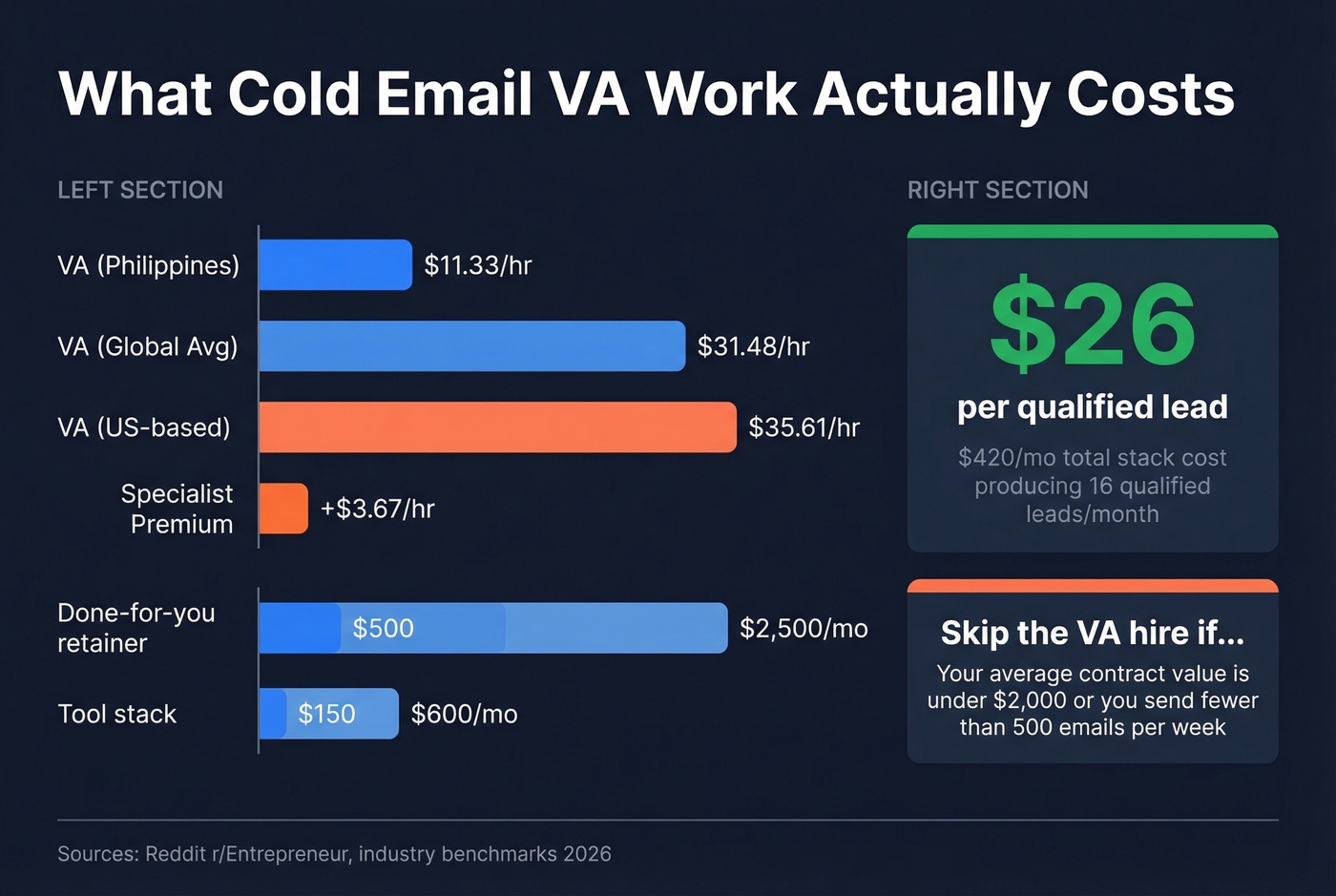
One practitioner shared their full stack cost: $420/month producing 16 qualified leads/month from email alone. That's roughly $26 per qualified lead - competitive with most paid channels.
Here's the thing: if your average contract value is under $2,000, you probably don't need a dedicated cold email VA. A founder spending 3 hours a week with the right tool stack will outperform a VA who doesn't understand the product. VAs earn their keep when volume and complexity justify the delegation - typically 500+ sends per week across multiple client campaigns. Skip the VA hire until you're there.
If you're building a repeatable outbound motion, map this into a simple B2B cold email sequence and track the right lead generation metrics from day one.
Mistakes That Kill Campaigns
We've seen every one of these in the wild. One poster on r/coldemail burned 145 email accounts in a single week after launching on insufficiently warmed domains. Months of setup, destroyed in days.
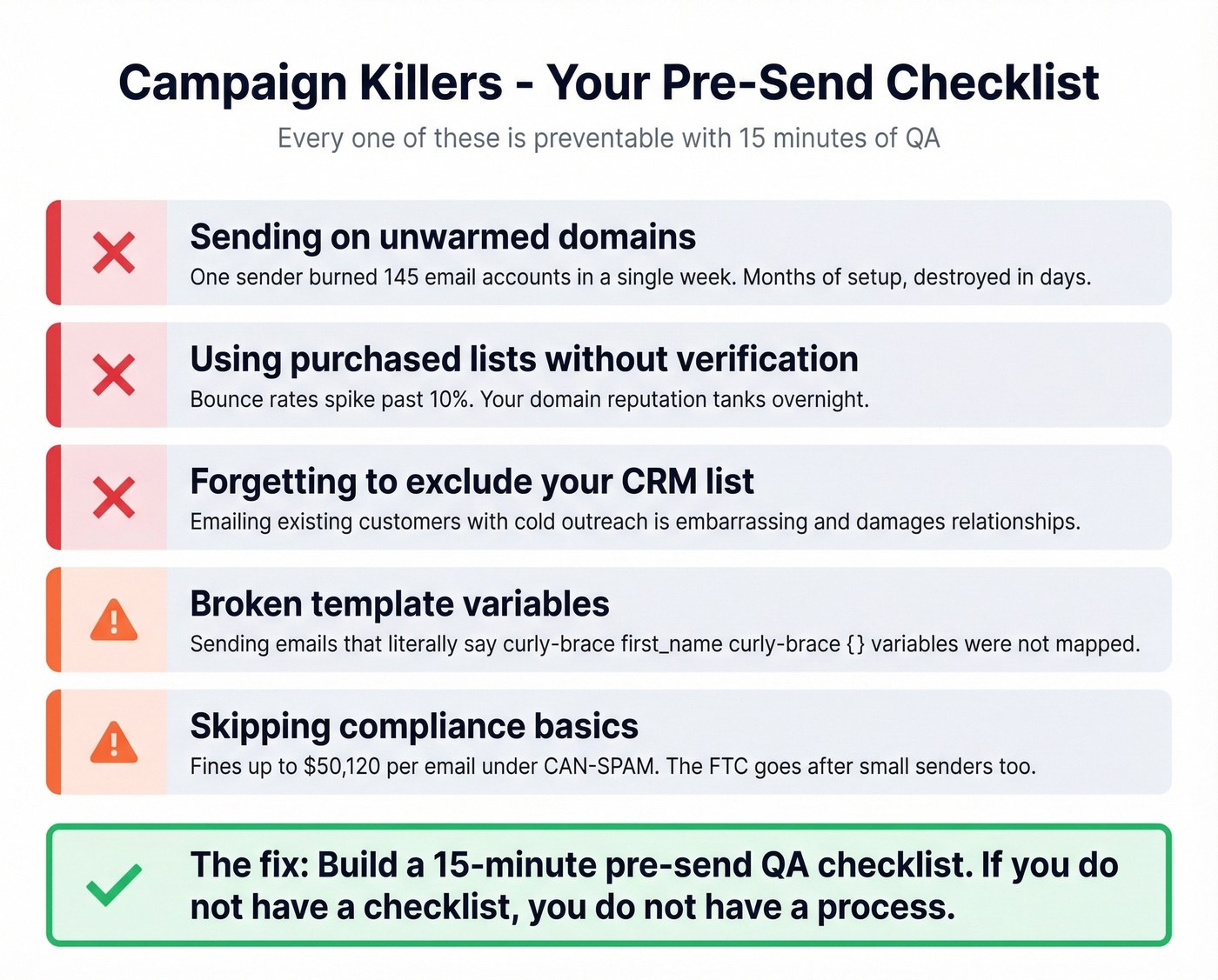
Other campaign killers: emailing existing customers because nobody excluded the CRM list, sending emails with {first_name} as literal text because template variables weren't mapped, and loading a purchased list without verification while watching bounce rates spike past 10%. Every one of these is preventable with a 15-minute QA checklist before launch. Let's be honest - if you don't have a pre-send checklist, you don't have a process.
If you're troubleshooting deliverability, start with an email deliverability guide and then audit your email velocity before you touch the copy.
FAQ
How many cold emails should a VA send per day?
Cap at 50 emails per inbox per day, including warmup volume. To scale beyond that, use multiple dedicated domains with inbox rotation - three domains with two inboxes each gives you 300 emails per day without damaging any single domain's reputation.
What reply rate should a virtual assistant expect?
The average is 3.43%. Top-quartile campaigns hit 5.5%+, and elite campaigns exceed 10.7%. If you're consistently below 2%, check your deliverability setup and list quality before rewriting copy. The problem is almost always infrastructure, not messaging.
Do I need a separate domain for cold email?
Yes. Never send cold outreach from your primary business domain. Buy dedicated sending domains, configure SPF/DKIM/DMARC on each, and warm them for 4-6 weeks before sending any prospecting emails.
What's a good free tool for building VA cold email lists?
Prospeo's free tier includes 75 email credits per month with full 5-step verification and 98% accuracy - enough to validate a weekly prospecting batch. Hunter offers 25 free searches per month but caps enrichment features. For sending, Instantly's starter plan begins at ~$37/month.