

What Is a Subject Line? Definition, Data, and Best Practices
A subject line is the single line of text that decides whether your email gets read or buried. Most advice on the topic is vague - "keep it short," "be creative," "add urgency." That's not helpful. A 5.5-million-email study tells a more specific story, and the numbers challenge a lot of conventional wisdom.
The Short Answer
A subject line is the text recipients see in their inbox before they open an email. It determines whether your message gets opened, ignored, or flagged as spam.
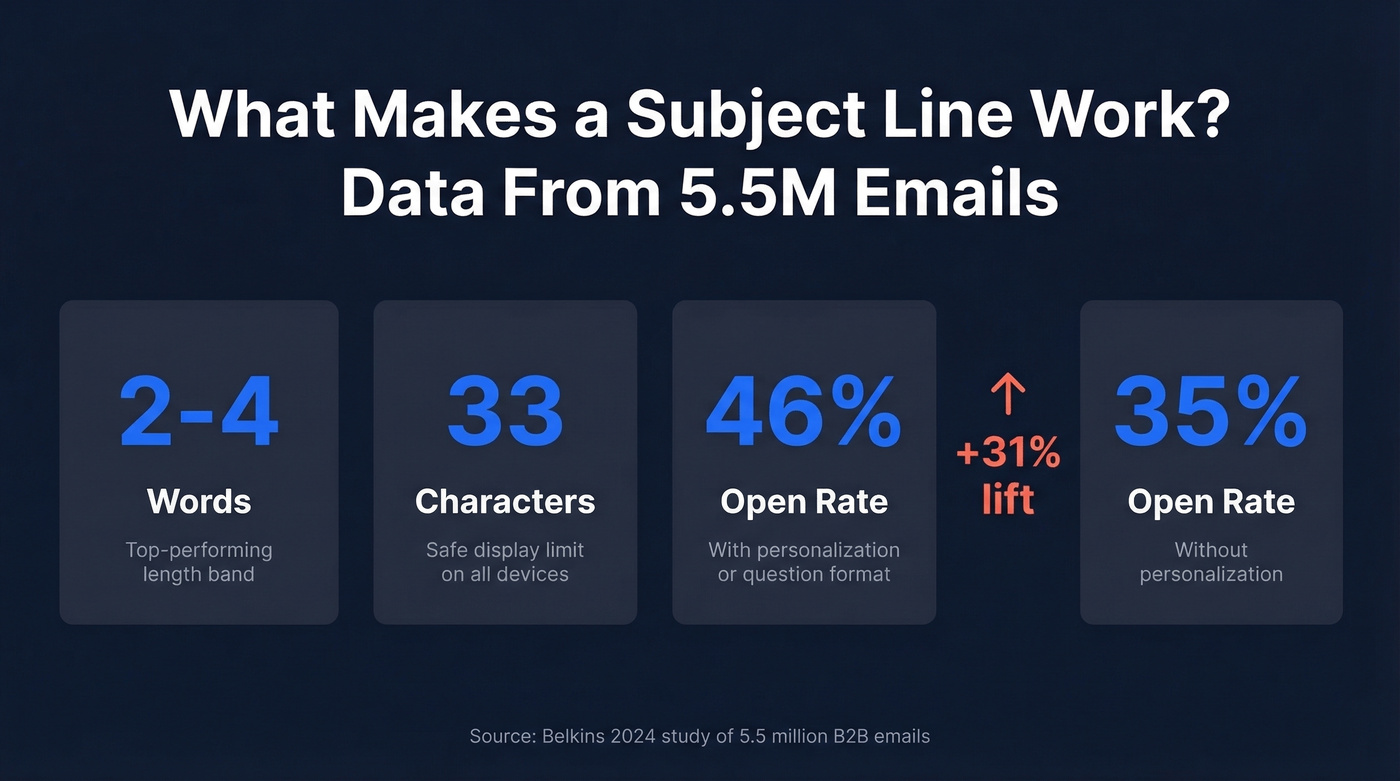
Here's what the data actually says:
- Length: 2-4 words is the top-performing band.
- Visibility: 33 characters is the safest "displays everywhere" limit across major mobile setups.
- Format: Question-style subject lines are top performers.
- Personalization: Personalized lines outperform non-personalized ones by a wide margin.
In Belkins' 5.5M-email dataset, each of the top-performing patterns - 2-4 words, personalization, and question format - hits around a 46% open rate.
Definition and Context
At its simplest, a subject line is the text that appears in the inbox preview alongside the sender name and preview text. It's the first - and often only - thing a recipient reads before deciding to open, delete, or report your email.
This isn't just a marketing concept, though. In corporate environments, IT departments prepend tags like [EXTERNAL] to flag messages originating outside the organization's email system. Some jurisdictions require specific labels like "ADV" for advertising disclosures. The subject line is real estate, and not all of it belongs to you.
For the rest of this guide, we're focused on the part you control: the words you choose to get someone to open your email. (If you want more swipeable ideas, see these email subject line examples.)
Why It Matters More Than You Think
Most people treat subject lines as copywriting. They're also an engagement signal that affects deliverability over time.
Email providers track how recipients interact with your emails - opens, deletes-without-reading, spam complaints - and those engagement signals feed into future inbox placement. A line that consistently gets ignored trains the system that your emails aren't wanted. Over time, that pushes more of your mail toward Promotions or spam even if the body copy is excellent. If you're troubleshooting this, start with an email deliverability guide and then work on how to improve sender reputation.
Gartner research cited by Salesforce found that 30.4% of recipients will unsubscribe if the subject doesn't match the email's content. That's nearly a third of your list gone from a misalignment problem, not a quality problem.
And personalization? Only 31% of brands personalize their subject lines. The ones that do see a 46% open rate versus 35% without it. That gap is enormous, and most teams are leaving it on the table.
How Many Characters Display?
"Keep it under 50 characters" is the standard advice. It's incomplete. What recipients actually see depends entirely on their device and email client.
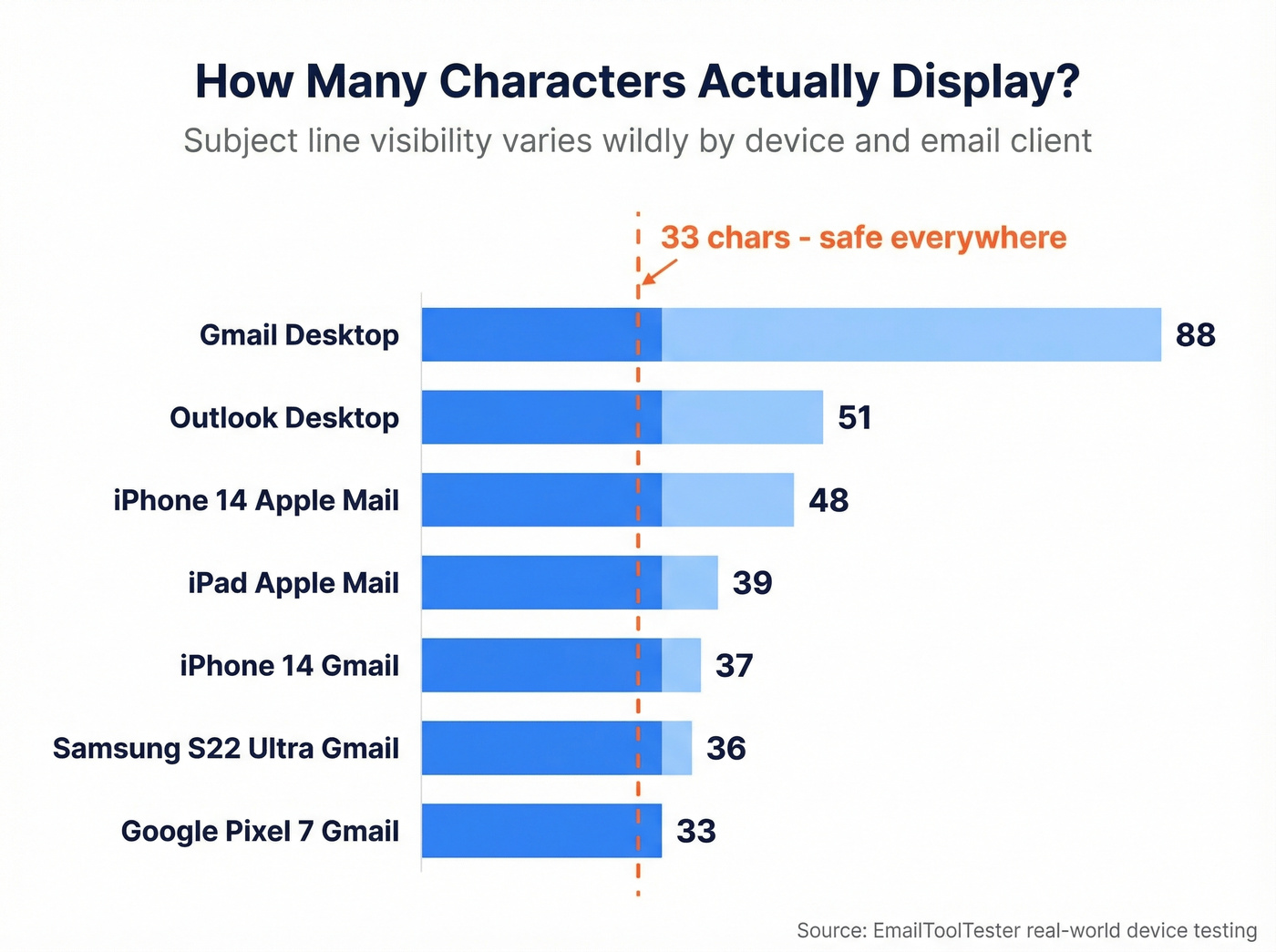
EmailToolTester ran real-world tests across major devices:
| Device / Client | Subject Line | Preheader |
|---|---|---|
| iPhone 14 Apple Mail | 48 chars | 99 chars |
| iPhone 14 Gmail | 37 chars | 39 chars |
| Google Pixel 7 Gmail | 33 chars | 37 chars |
| Samsung S22 Ultra Gmail | 36 chars | 40 chars |
| iPad Apple Mail | 39 chars | 75 chars |
| Outlook Desktop | ~51 chars | Varies |
| Gmail Desktop | ~88 chars | Varies |
The safe-everywhere number is 33 characters for subject lines and 37 for preheaders. That's the Pixel 7 Gmail app - the tightest constraint in the set. Anything beyond 33 characters risks truncation on at least one major device.
One nuance most guides skip: character count isn't the whole story. A line full of wide characters like "M" and "W" takes up more visual space than one with "i" and "l." Think in visual width, not just count. (You can also test preheaders alongside the subject line - see email preview text A/B testing.)

Personalized subject lines boost open rates from 35% to 46% - but only if your contact data is clean. Broken merge tags like "Hi {First_Name}" kill trust instantly. Prospeo's 5-step verification delivers 98% email accuracy with 50+ data points per contact, so every personalized subject line lands exactly as intended.
Stop torpedoing campaigns with bad data. Start with emails you can trust.
Best Practices From 5.5M Emails
A Belkins study analyzed 5.5 million emails sent from Jan 1 to Dec 31, 2024. Here's what the data shows - and where it contradicts popular advice.
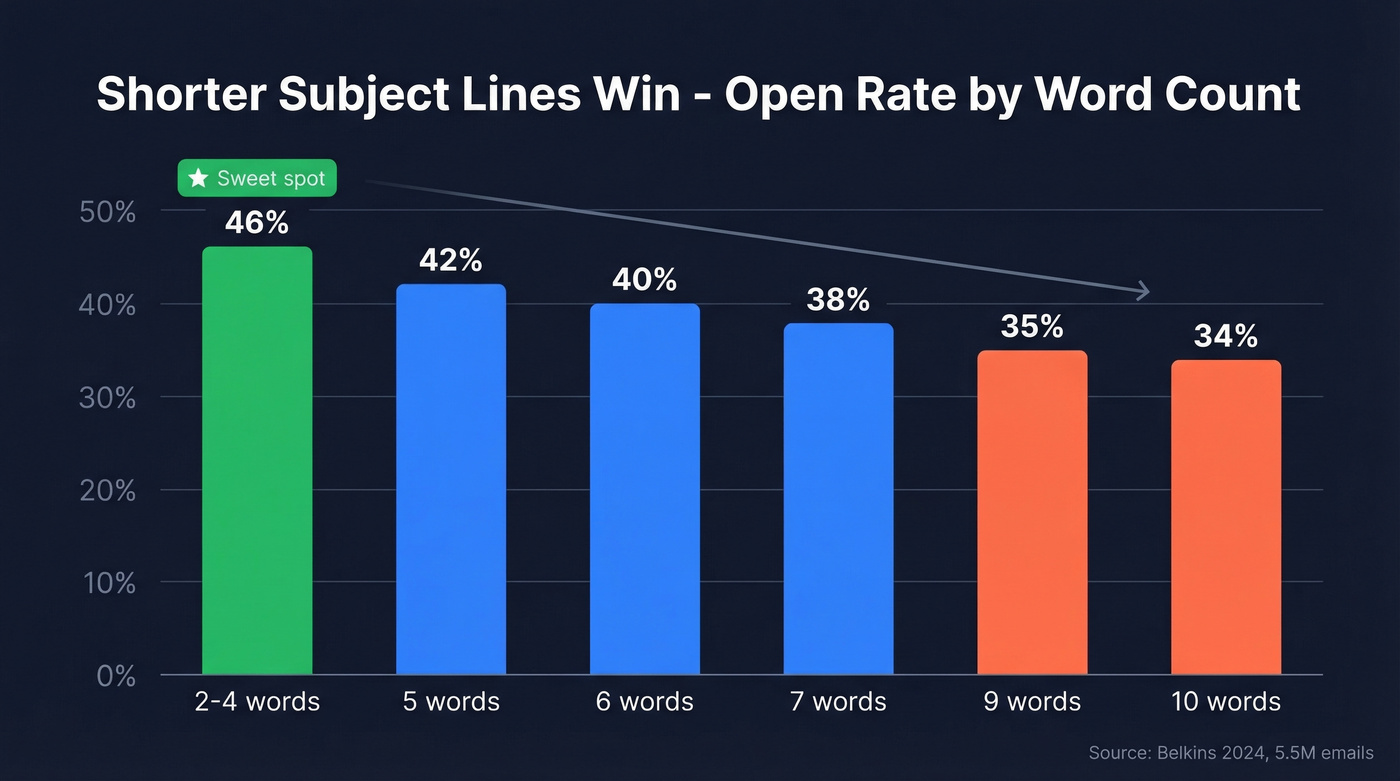
Keep It to 2-4 Words
The highest-performing length band was 2-4 words, hitting a 46% open rate. Beyond 7 words, open rates decline steadily - 9 words drops to ~35%, 10 words to ~34%. Twilio SendGrid's Cyber Week data confirms the pattern: the average was 6 words, but the best performers were shorter.
This is counterintuitive. Most marketers try to pack information into subject lines. The data says the opposite: brevity wins. If you're writing for outbound, these prospecting email subject lines are a good reference set.
Personalize With Clean Data
Personalized subject lines hit 46% open rates versus 35% without - a 31% boost. Reply rates jumped even harder: 3% to 7%, a 133% increase.
Here's the thing: broken personalization is worse than no personalization. A line reading "Hi {First_Name}, quick question" destroys trust instantly. If your contact data isn't clean enough to personalize reliably, skip the merge tag entirely. We've seen teams torpedo entire campaigns with a single broken token - it's not worth the risk. (If you're scaling this, personalized outreach and personalized drip campaigns cover the operational side.)
Ask a Question
Question-based subject lines averaged a 46% open rate, tying as a top-performing format in the dataset. Questions create an open loop - the recipient wants the answer, and opening the email is the fastest way to get it.
Combine this with the length data and you get a simple formula: a 2-4 word question. That's it.
Numbers and Casing
Subject lines with numbers performed slightly worse - 27% versus 28% without. Casing differences were similarly marginal: ALL CAPS hit 30%, title case 29%, sentence case 25%. The lift from casing optimization is negligible compared to length and personalization. Don't waste A/B test cycles here.
Emojis: Test First
Emojis are the most audience-dependent variable in subject line optimization. CodeCrew's agency casework shows up to 10% open rate lift for some brands, particularly in promotional emails. MailerLite's internal testing is more nuanced - emojis underperformed in their early tests but became consistently effective as their audience adapted. Twilio noted that the fire emoji was the most popular in 2023 Black Friday emails. There's no universal answer. A/B test with your list before committing.
Spam Triggers and Rewrites
No single word guarantees your email lands in spam. Modern filters use machine learning and evaluate clusters of signals, not isolated keywords. But certain patterns consistently raise red flags.
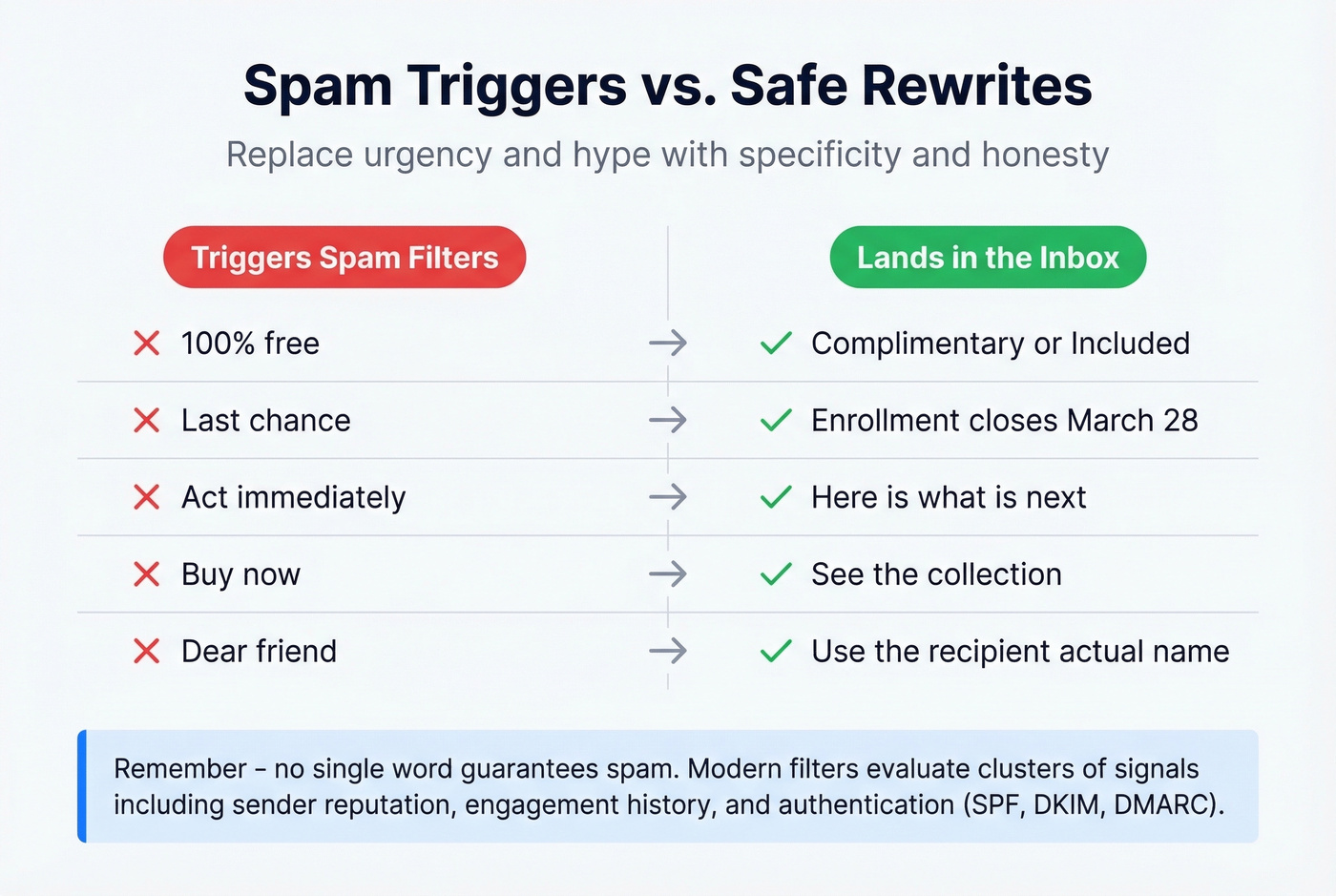
Mailmeteor breaks spam filtering into five layers: content filtering, reputation filtering, engagement filtering, blacklists, and authentication checks like SPF, DKIM, and DMARC. Your subject feeds into the content layer, but it's evaluated alongside sender reputation, recipient engagement history, and technical setup. For a deeper dive, use an email spam checker and review spam trap removal basics.
Folderly identifies eight high-risk categories that commonly trigger content filters when combined with other signals. Here are practical rewrites:
| Instead of This | Write This |
|---|---|
| "100% free" | "Complimentary" or "Included" |
| "Last chance" | "Enrollment closes [date]" |
| "Act immediately" | "Here's what's next" |
| "Buy now" | "See the collection" |
| "Dear friend" | Recipient's actual name |
The pattern: replace urgency and hype with specificity and honesty.
Examples by Email Type
Let's put the data into practice. Each example targets the 2-4 word sweet spot while demonstrating a specific format.
Cold Outreach
Cold emails live or die on whether the subject feels like a real message from a real person. "Quick question" fatigue is real - the consensus on r/sales is that it's been burned out for at least two years now. Go specific instead. (For full sequences, see a B2B cold email sequence.)
- "Scaling your SDR team?" (question format, 4 words)
- "Saw the Series B" (personalized reference, 4 words)
- "Quick ops question" (direct, 3 words)
Newsletters
Newsletter subject lines compete with dozens of other subscriptions. Specificity signals value; vagueness signals "skip."
- "March revenue trends" (specific, 3 words)
- "What changed in Q1" (question-adjacent, 4 words)
- "Three pipeline lessons" (value-forward, 3 words)
Transactional
Transactional emails typically have the highest open rates because recipients expect them. Keep the subject purely functional.
- "Your invoice #4821" (specific, 3 words)
- "Order shipped today" (clear, 3 words)
- "Password reset link" (functional, 3 words)
Promotional
- "New collection dropped" (curiosity, 3 words)
- "Your early access" (emoji test candidate, 3 words)
- "Ends Friday at noon" (specific deadline vs. vague urgency, 5 words)
Mistakes That Kill Deliverability
Subject line mistakes don't just hurt open rates - they damage your sender reputation, which compounds over time. In our experience, these are the ones we see most often.
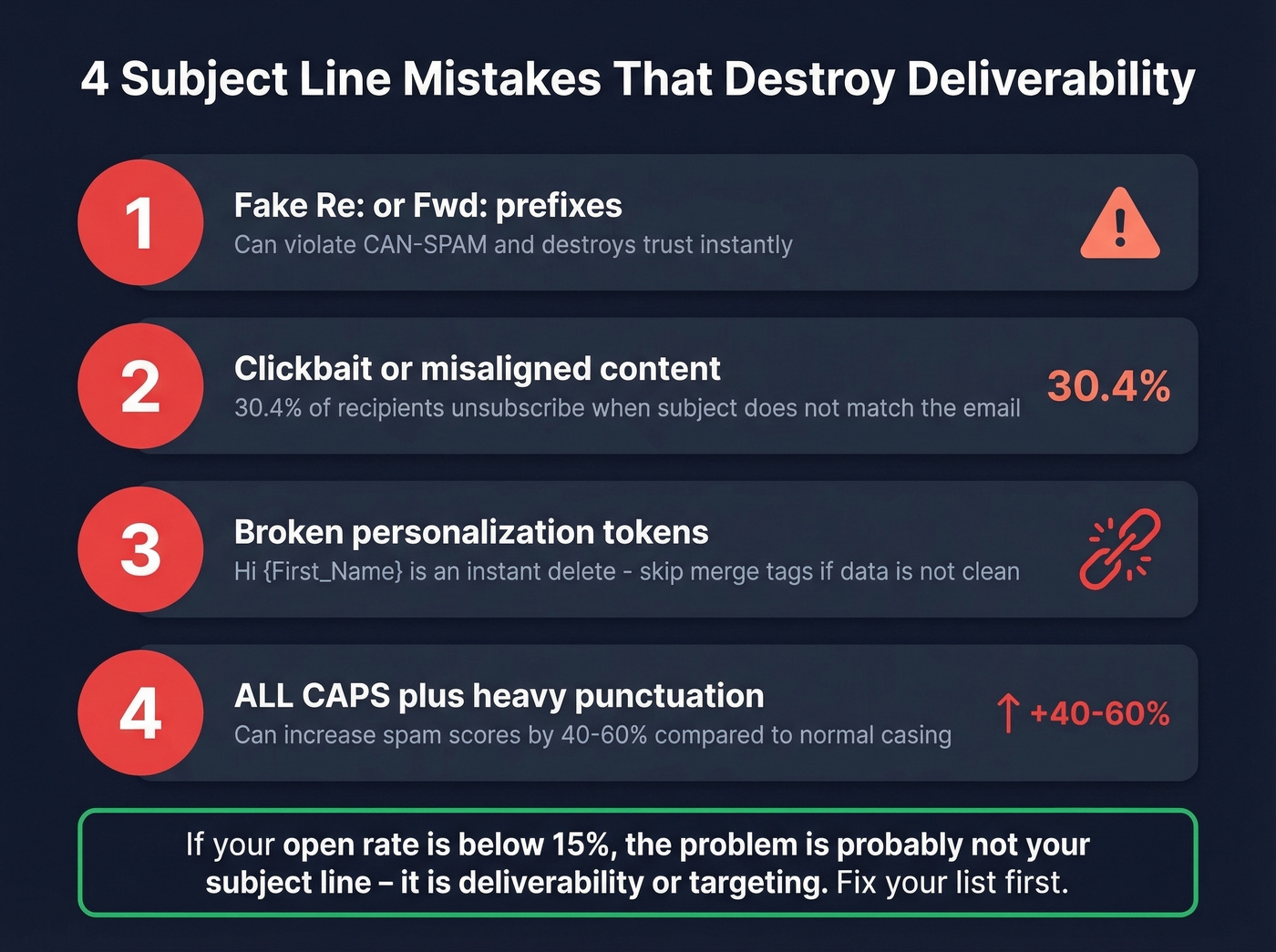
Fake Re:/Fwd: prefixes. Adding "Re:" to a cold email to simulate a prior conversation can violate CAN-SPAM and destroys trust the moment the recipient realizes there was no prior thread. Drop them entirely.
Clickbait or misaligned content. That 30.4% unsubscribe rate from the Gartner/Salesforce research is driven by this exact problem. Match the subject to the email body, every time.
Broken personalization tokens. A line reading "Hi {First_Name}, quick question" is an instant delete. If your data isn't clean, don't personalize.
ALL CAPS combined with heavy punctuation can increase spam scores by 40-60%. There's no scenario where "HUGE SAVINGS!!!" outperforms "This week's deals."
Beyond CAN-SPAM, GDPR Article 5 requires transparency in communications. Misleading subject lines aren't just bad practice - they're a compliance risk in European markets.
Look, if your open rate is below 15%, the problem probably isn't your subject line copy - it's deliverability or targeting. The average cold email open rate has dropped from 36% to 27.7%. When your bounce rate climbs above 2%, the fix is upstream: verify your contact list before you send a single email. Prospeo runs a 5-step verification process with catch-all handling, spam-trap removal, and honeypot filtering, delivering 98% email accuracy. Clean data means your subject lines actually reach the inbox. (Benchmarks and fixes: email bounce rate.)
You just learned that 31% of recipients unsubscribe when subject lines don't match reality. The same principle applies to your prospecting list - stale data means bounces, spam flags, and destroyed sender reputation. Prospeo refreshes every record on a 7-day cycle, so your outreach hits real inboxes at $0.01 per email.
Protect your deliverability with data that's never more than a week old.
How to A/B Test Subject Lines
Testing doesn't require sophisticated infrastructure. Here's the process that works:
- Create two variants that isolate one variable - length, personalization, question vs. statement, or emoji vs. none.
- Send each variant to ~20% of your list so 40% total gets a test version.
- Wait 1-2 hours before selecting a winner.
- Auto-send the winner to the remaining 60%. Most ESPs - MailerLite, Klaviyo, Campaign Monitor - support this natively.
Expected lift ranges from real-world testing: emoji inclusion can swing open rates up to 10%, length changes up to 5%, and personalization 1-5%. These aren't huge individually, but they compound over dozens of sends and thousands of emails. For teams running outbound at scale, that compounding effect turns a 2% lift per test into a meaningful revenue difference over a quarter. (If you want tools for this, start with a subject line tester.)
One important caveat: what works changes over time. MailerLite's own emoji tests evolved from underperforming to consistently effective as their audience adapted. Test continuously, not once.
FAQ
What should a subject line include?
A specific, honest preview of the email's content in 2-4 words. Personalization delivers a 31% boost in opens. Specificity beats cleverness - name the topic, not a teaser.
How long should it be?
Under 33 characters to display fully on every major mobile setup tested. That's roughly 2-4 words - the highest-performing length band at 46% open rate.
Do emojis help open rates?
Sometimes. Testing shows up to 10% lift for some audiences and zero for others. A/B test with your own list before committing.
What words trigger spam filters?
No single word guarantees spam placement. High-risk clusters include urgency language ("Act now"), financial promises ("100% free"), and aggressive sales phrases ("Buy now"). Replace hype with specificity - see the rewrite table above.
How do I make sure emails reach the inbox?
Start with clean contact data - keep your bounce rate under 2%. Set up SPF, DKIM, and DMARC authentication. Tools like Prospeo verify emails with a 5-step process and 98% accuracy, keeping bounce rates low and your sender reputation intact.