

How to Turn Buyer Personas Into Email Segments That Actually Convert
You built six personas. Marketing spent weeks on the slide decks - names, stock photos, fictional backstories. Then you opened your ESP and realized half your list matches two personas simultaneously, a quarter matches none, and your "CFO Claire" segment has 47 contacts in it. Buyer persona email segmentation only works when the persona connects to your email platform. Otherwise, they're creative writing exercises.
Here's the disconnect: 24% of marketers rank segmentation as the most effective tactic for boosting email performance, yet 20% say securing the right data is the biggest obstacle. We hear the same thing in email marketing communities constantly - the complaint isn't "I don't have personas," it's "my personas don't connect to anything." The personas exist. The data doesn't. Let's fix that.
What You Need Before You Automate
Three priorities before you touch a single automation:
- Build a computed persona field - one persona per contact, recomputed automatically when underlying data changes. Not a tag. Not a slide. A field.
- Layer persona x lifecycle stage to decide what email to send, when, and with what CTA. Persona alone isn't enough. A "User" persona in awareness needs a different email than a "User" persona in decision.
- Add exclusion segments before you send anything. They protect revenue and deliverability equally. Sending a promo to someone with an open support ticket isn't segmentation - it's negligence.
You don't need 8 personas. You need 2-4 and a lifecycle layer. Everything else is decoration.
Persona vs. Segment vs. Personalization
These three terms get used interchangeably, and that's where the confusion starts. Litmus defines them cleanly: segmentation groups contacts by shared criteria like behavior, demographics, and firmographics. Personalization customizes content for individuals. They work best together - segmentation decides which email, personalization decides what's inside it.
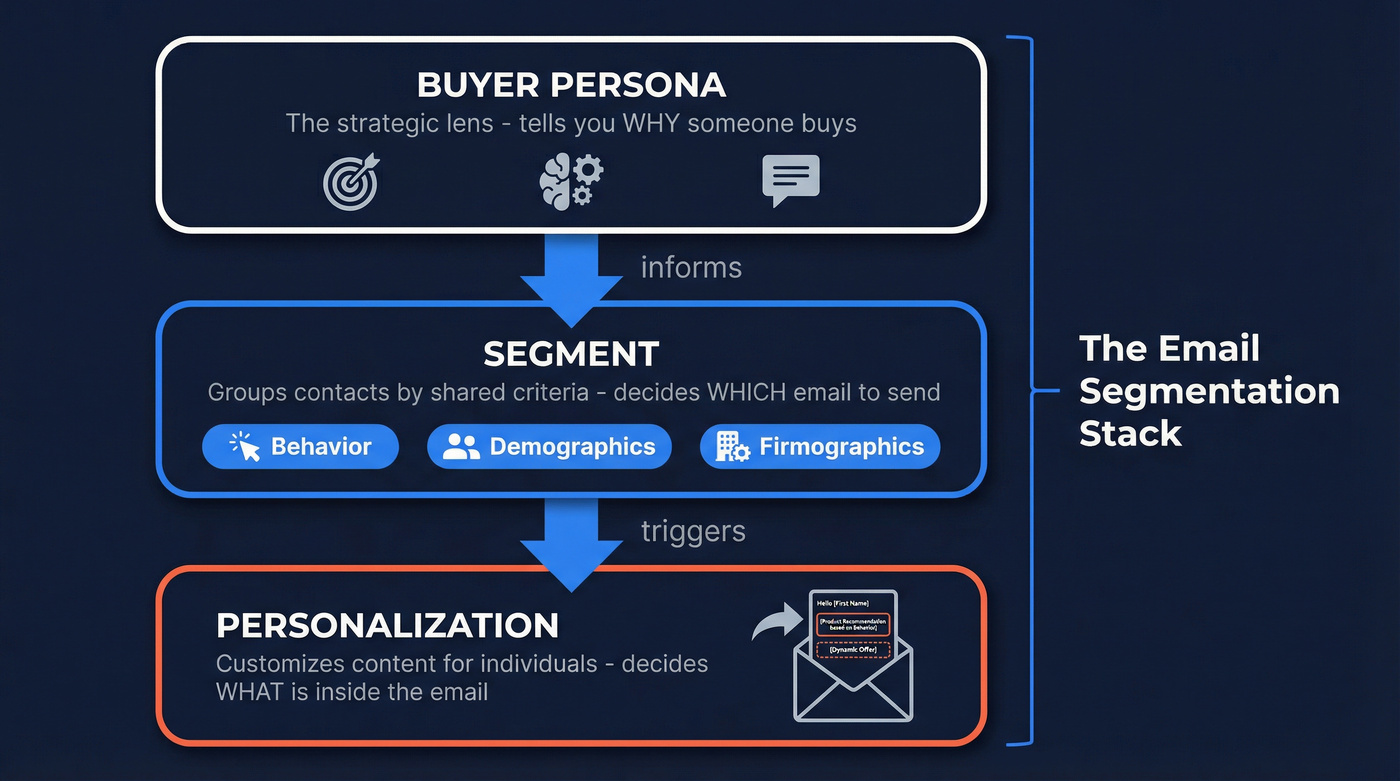
Personas sit one layer above both. They're the strategic lens that tells you why someone buys.
| Target Audience | Buyer Persona | |
|---|---|---|
| Scope | Broad "who might buy" | Detailed "why/how they decide" |
| Data | Demographics, firmographics | Goals, pain points, objections |
| Use | Channel targeting, ad spend | Message framing, content type |
| Granularity | Market-level | Individual-level archetype |
The persona informs the segment. The segment triggers the automation. The automation delivers the personalized content. That's the stack.
Build Your Persona Template
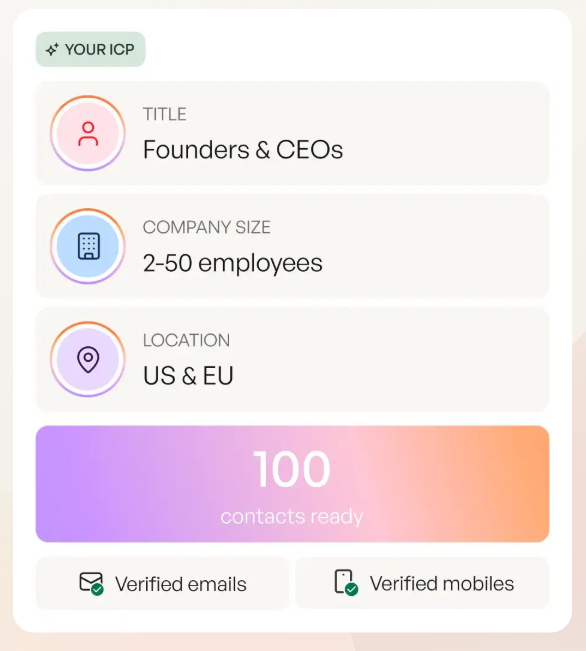
A persona template for email segmentation needs different fields than one for product marketing. You're not writing a character study - you're building a decision tree.
Start with these fields:
- Goals - what does this person need to accomplish in the next 90 days?
- Pain points - what's blocking them right now?
- Buying triggers - what event makes them start looking for a solution?
- Objections - what will they say when they push back? (If you need a tighter taxonomy, see types of objections.)
- Preferred channels - do they read email at all, or is everything in Slack?
- Decision criteria - price? Speed to implement? Peer validation?
- Firmographics for B2B - company size, industry, tech stack, funding stage
For B2B specifically, the t2d3 three-persona model is the cleanest framework we've found. Three personas, mapped to the buying committee:
P1 - User. The day-to-day operator. They care about features, UX, and time savings. Send them product content, tutorials, and peer case studies.
P2 - Supervisor. The manager who signs off. They care about ROI and team productivity. Send them ROI calculators, buyer's guides, and comparison content.
P3 - Executive. The budget holder or blocker. They care about risk, compliance, and strategic alignment. Send them business case templates and security documentation. (If you're specifically targeting execs, this pairs well with how to market to CEOs.)
This maps directly to your email content calendar. P1 gets the "how to" email. P2 gets the "why it's worth it" email. P3 gets the "here's why it's safe" email. Simple, repeatable, and it actually ships.
The Persona Assignment System
Here's where most teams stall. The personas exist in a Google Doc. The ESP has segments based on tags someone applied manually three years ago. Nothing connects.
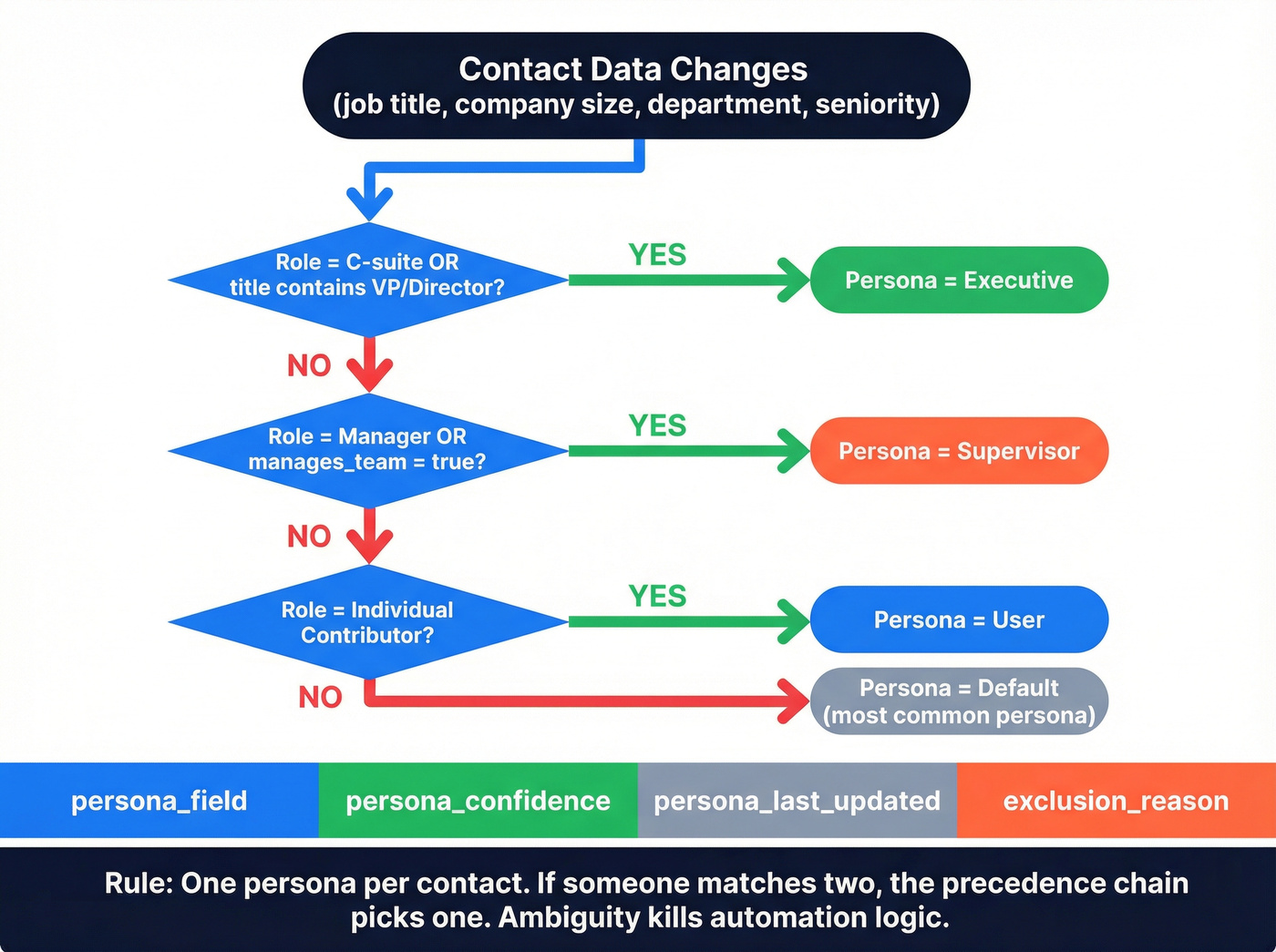
The Create & Sell methodology nails the fix: a persona is the sum of segmentation fields. Not a self-reported label. Not a guess. A computed output.
If your persona lives in a slide deck, it's not a persona - it's a story.
Create a function automation that fires whenever an underlying field changes - job title, company size, department, seniority. The automation runs an if/else precedence chain:
IF role = "C-suite" OR title contains "VP/Director" → persona = "Executive"
ELSE IF role = "Manager" OR manages_team = true → persona = "Supervisor"
ELSE IF role = "Individual Contributor" → persona = "User"
ELSE → persona = "Default" (your most common persona)
Non-negotiable rule: one persona per contact. If someone matches two, the precedence chain picks one. Ambiguity kills automation logic.
Your field schema should include four fields: persona_field (the assignment), persona_confidence (high/medium/low based on data completeness), persona_last_updated (timestamp), and exclusion_reason (if they're suppressed from persona-based sends). (If your CRM is messy, fix the foundation with CRM hygiene.)


Your persona assignment logic needs accurate job titles, seniority levels, and firmographics to compute correctly. Prospeo enriches every contact with 50+ data points - role, department, company size, tech stack, funding stage - at a 92% match rate. Stop guessing personas. Compute them from verified data.
Feed your persona engine real data starting at $0.01 per contact.
The Persona Segmentation Matrix
Persona alone doesn't tell you what to send. You need the intersection of persona, lifecycle stage, and intent signal. Print this matrix and tape it next to your campaign builder - every email you send should map to one cell.
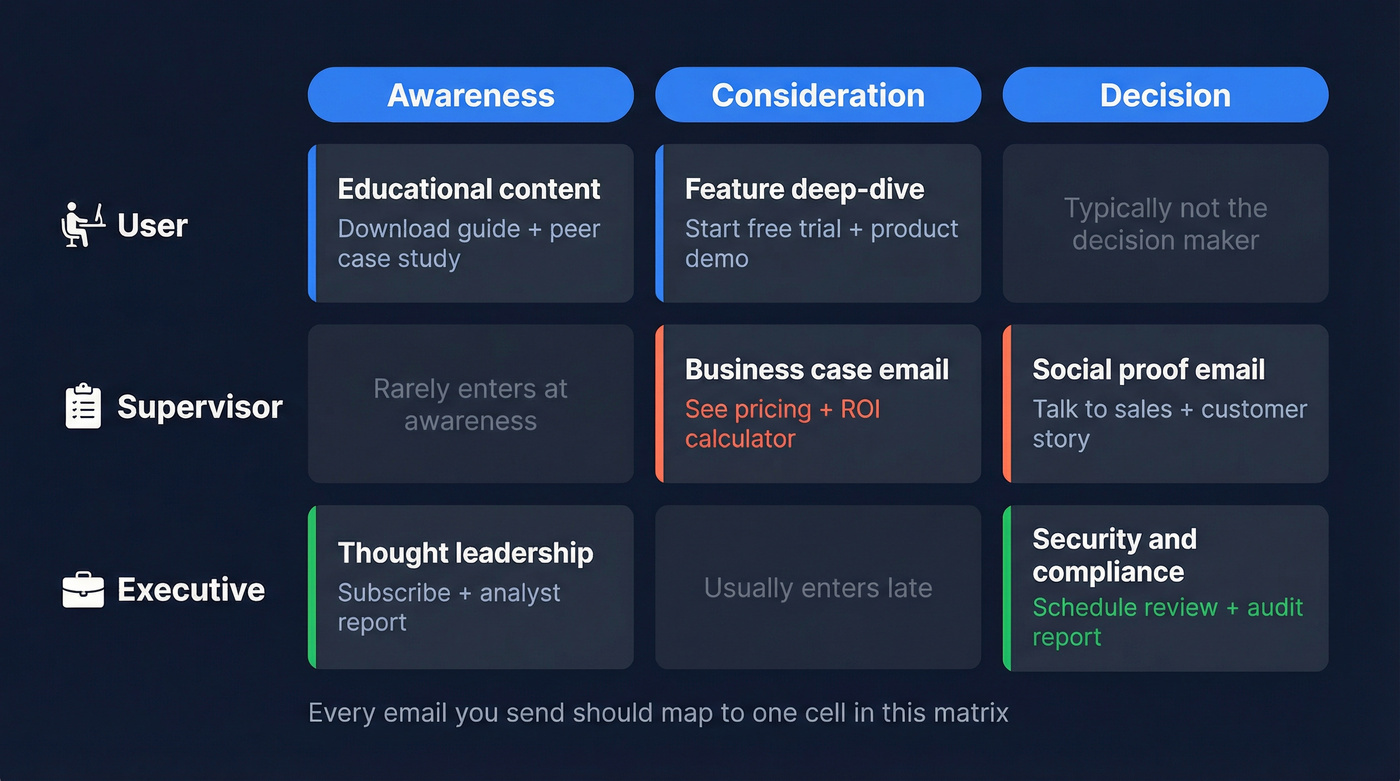
| Persona | Lifecycle Stage | Intent Signal | Email Type | CTA + Proof Asset |
|---|---|---|---|---|
| User | Awareness | Research | Educational | Download guide + peer case study |
| User | Consideration | Comparison | Feature deep-dive | Start free trial + product demo |
| Supervisor | Consideration | ROI | Business case | See pricing + ROI calculator |
| Supervisor | Decision | Validation | Social proof | Talk to sales + customer story |
| Executive | Decision | Risk/ROI | Security & compliance | Schedule review + audit report |
| Executive | Awareness | Industry trend | Thought leadership | Subscribe + analyst report |
This isn't theoretical. Each row is a specific email you can build today. The LA Growth Machine segmentation playbook adds optional dimensions - attributes, interest signals, tool stack, and competition - that make each cell sharper. A "Supervisor" using a competitor's tool gets a different comparison email than one using nothing at all. That competitive context is where the real conversion lift hides. (To go deeper on signals, see intent signals.)
Map Personas to Email Automations
Five core flows handle 80% of persona-based email. In our experience, the welcome flow drives more persona-level insight than any other automation - start there.
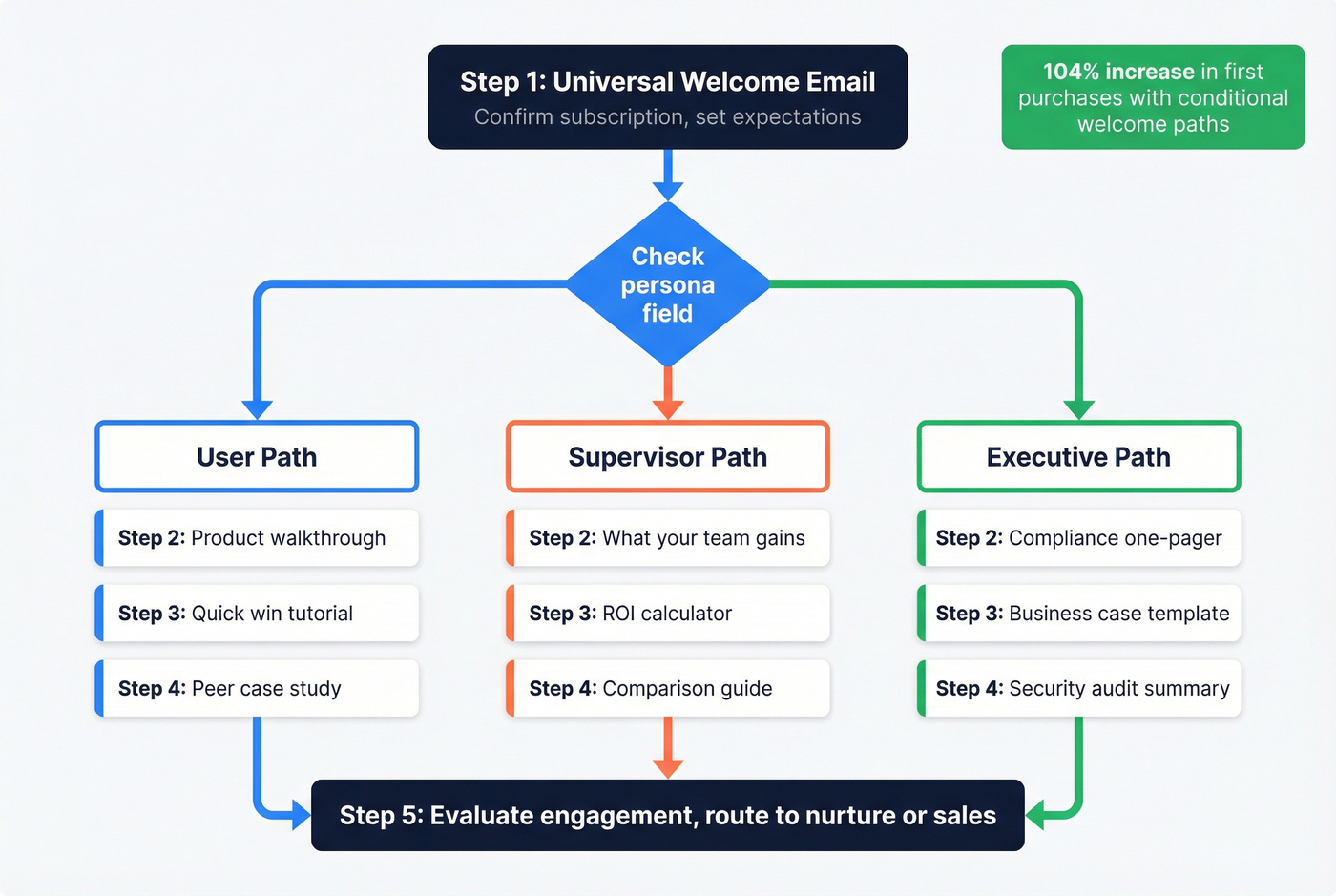
Welcome flow - use this for every new contact. Branch by persona at step 2. Step 1 is universal: confirm subscription, set expectations. Steps 2-4 diverge - Users get a product walkthrough, Supervisors get a "what your team gains" email, Executives get a one-pager on compliance and ROI. 3-5 step welcome journeys with conditional paths drove a 104% increase in first purchases in one documented case. That's not a marginal lift.
Nurture flow - use this when contacts aren't ready to buy. Persona determines content type: tutorials for Users, business cases for Supervisors, risk assessments for Executives. Lifecycle stage determines cadence. Don't send weekly to Executives - they'll unsubscribe. Bi-weekly or monthly is the ceiling for P3. (If you want a tighter structure, use these lead nurturing emails as a baseline.)
Promo flow - use this for launches and offers. Skip contacts who purchased in the last 14 days or have open support tickets. Use Liquid-style dynamic content to swap the CTA and proof asset by persona field, so you're sending one campaign with three persona variants instead of building three separate emails. (For copy patterns, see product promotion email template.)
Abandoned cart flow - use this for e-commerce. Show the exact items left behind. Skip the discount on the first reminder - test timing instead. An email within the first hour often outperforms the standard 24-hour delay. Persona still matters here: a User responds to "pick up where you left off," while a Supervisor responds better to "your team's order is waiting."
Re-engagement flow - how long should you wait? That depends on your sales cycle. For e-commerce, 30 days of inactivity is a common starting point. For B2B with longer cycles, 60-90 days makes more sense. Test the window aggressively - sometimes a re-engagement email within the first week of inactivity outperforms the 30-day standard. (Need ideas? Use these re-engagement email subject lines.)
Exclusions and Deliverability
Here's the thing: a Klaviyo audit of 65 email accounts found the same mistakes everywhere. Over-segmenting into tiny groups. Ignoring exclusion logic. Collecting zero-party data and never using it. Blasting promos to recent buyers.
Exclusion logic is segmentation. If you don't exclude, you're not segmenting - you're spamming politely. (If deliverability is slipping, start with an email deliverability checklist.)
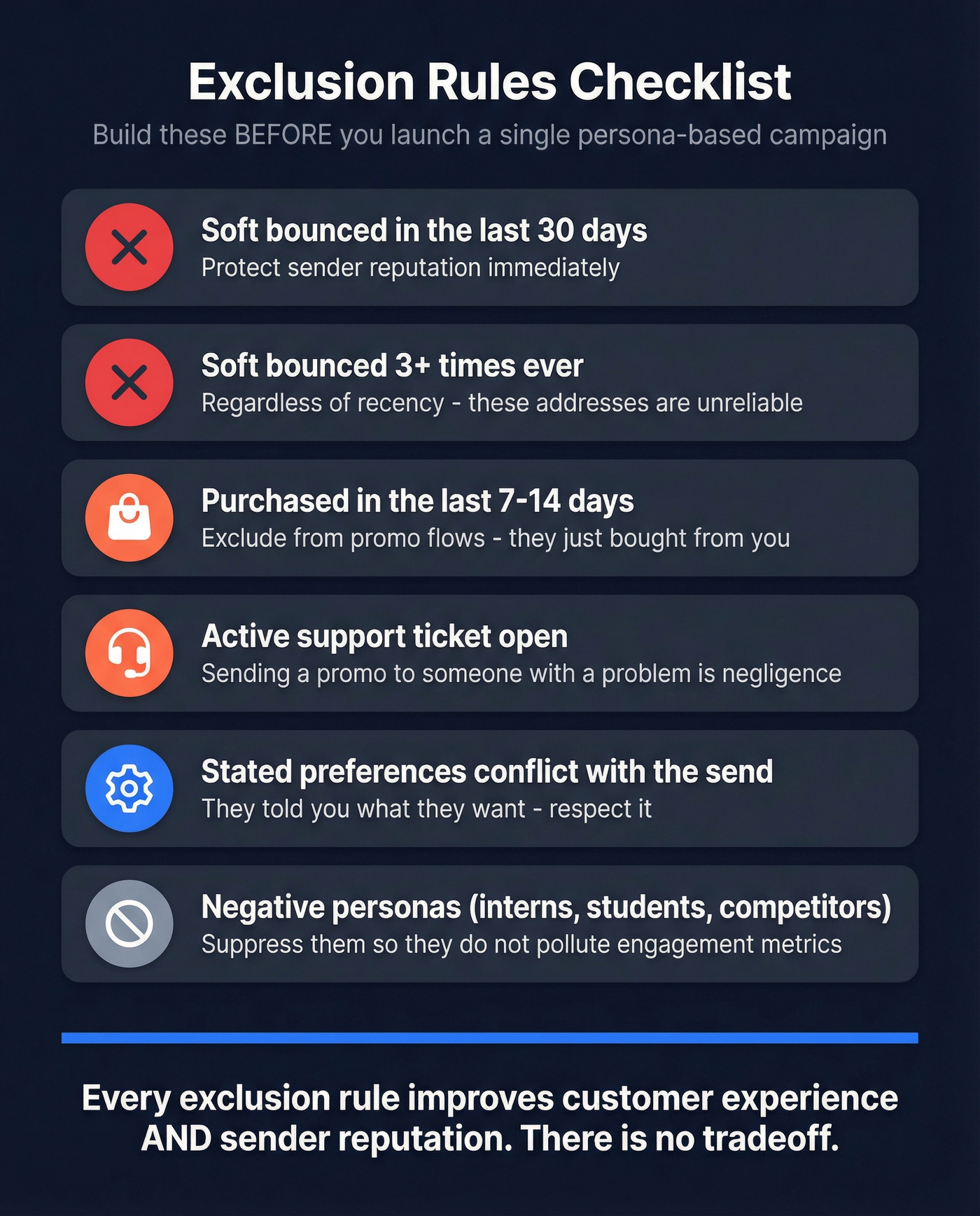
Build these exclusion rules before you launch a single persona-based campaign:
- Soft bounced in the last 30 days (If you're unsure what to classify, see hard bounce.)
- Soft bounced more than 3 times ever, regardless of recency
- Purchased in the last 7-14 days - exclude from promo flows
- Active customer service ticket open
- Stated channel or category preferences that conflict with the send
- Negative personas - roles and contexts that waste cycles, like interns who keep filling out your demo form. Suppress that segment rather than letting them pollute your engagement metrics.
Every exclusion rule you add improves customer experience and sender reputation simultaneously. There's no tradeoff.
Measure Without Trusting Opens
The MailerLite 2026 benchmarks, drawn from 3.6M+ campaigns across 181K accounts, put the overall medians at: open rate 43.46%, click rate 2.09%, click-to-open rate 6.81%, unsubscribe rate 0.22%.
That open rate is inflated. Apple Mail Privacy Protection pre-fetches images, which registers as an "open" even when nobody read your email. If your reporting still celebrates open rate, you're celebrating a metric your subscribers' devices fabricated. (If you want the clean comparison, see open rate vs click rate.)
| Metric | What It Tells You | Persona Relevance |
|---|---|---|
| CTOR | Content resonance | Which persona variant gets clicks |
| Reply rate | Message-market fit | Which persona engages in B2B |
| Conversion rate | Revenue impact | Which persona buys |
| Unsub rate | Fatigue signal | Which persona you're over-sending |
| Spam complaints | Reputation risk | Which segment needs exclusion |
CTOR is the steadiest KPI for persona optimization. It strips out the open-rate noise and tells you whether the people who actually saw your email found it worth clicking. Compare CTOR across persona segments quarterly - that's where you'll find the signal.
If your deals close under $15k, you probably don't need six personas and a 12-step nurture sequence. Two personas, a lifecycle layer, and tight exclusion logic will outperform the elaborate setup every time. Complexity isn't sophistication - it's overhead.
Every cell in your persona segmentation matrix depends on having the right contact in the right segment. Prospeo's 300M+ profiles with 30+ search filters - buyer intent, job change, headcount growth, technographics - let you build segments that match your matrix exactly. 7-day data refresh means your persona fields never go stale.
Build persona segments from live data, not last quarter's CRM dump.
FAQ
How many buyer personas do I need for email segmentation?
Two to four plus a lifecycle layer. More than that fragments your list into segments too small to A/B test or draw statistical conclusions from. Start with two, add a third only when data proves a distinct buying pattern exists.
What's the difference between persona and behavioral segmentation?
Persona segmentation groups contacts by who they are - role, goals, pain points. Behavioral segmentation groups by what they do - clicks, purchases, page views. Combine both: persona sets the message, behavior sets the timing and urgency.
How do I assign personas when contact data is incomplete?
Use progressive profiling - one question per interaction - and enrich missing fields with a B2B data platform like Prospeo, which returns 50+ data points at an 83% match rate. Always assign a default persona so no contact falls through your automation logic.
Should B2B and B2C use the same approach?
The system is identical: computed persona field, exclusion logic, automation branching. B2B adds buying committee roles and firmographic layers. B2C leans heavier on purchase behavior, preference data, and recency signals.
How often should I update persona assignments?
Recompute automatically whenever an underlying field changes - job title update, new purchase, survey response. Audit persona distribution quarterly. If 80% of your list lands in one persona, your logic is too broad or your data is too thin.