

How to Send a Video Follow-Up After a Cold Call That Actually Gets Replies
You just had a decent cold call. The prospect didn't hang up, asked a couple of real questions, and ended with "send me some info." That's your cue - not to fire off a PDF, but to record a short video follow-up that puts your face and voice back in front of them while the conversation's still warm.
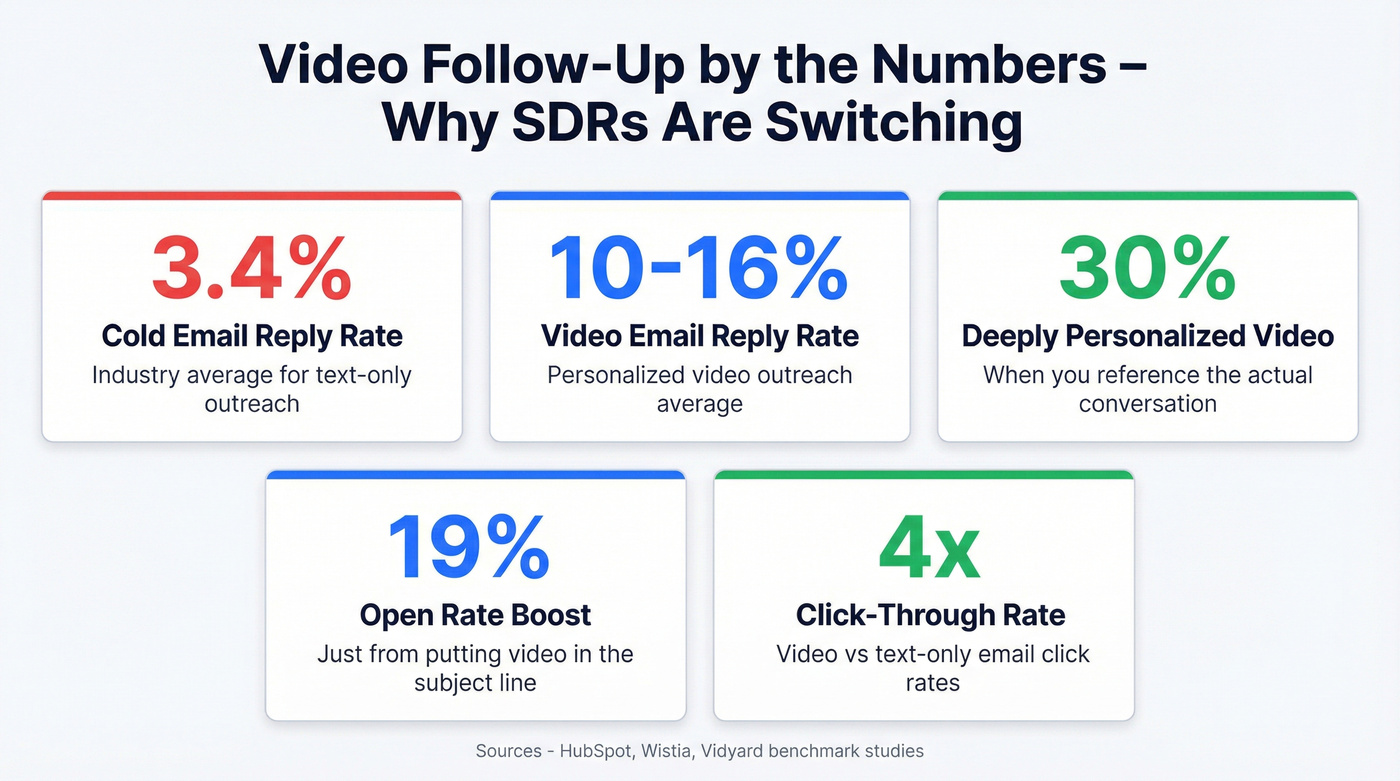
Cold email reply rates average around 3.4% in common industry benchmarks. Teams using personalized video see 10-16%, and deeply personalized videos push that to 30%. Video in email also drives roughly 16% higher open rates, 26% more replies, and 4x click-through rates versus text-only. A 45-second video does what a three-paragraph email can't: it rebuilds the human connection you just created on the phone.
Here's the thing - most SDRs overthink this. The bar is absurdly low. A short, specific video referencing the actual conversation beats 95% of the "just following up" emails your competitors are sending.
What You Need (Quick Version)
The full workflow fits in four steps:
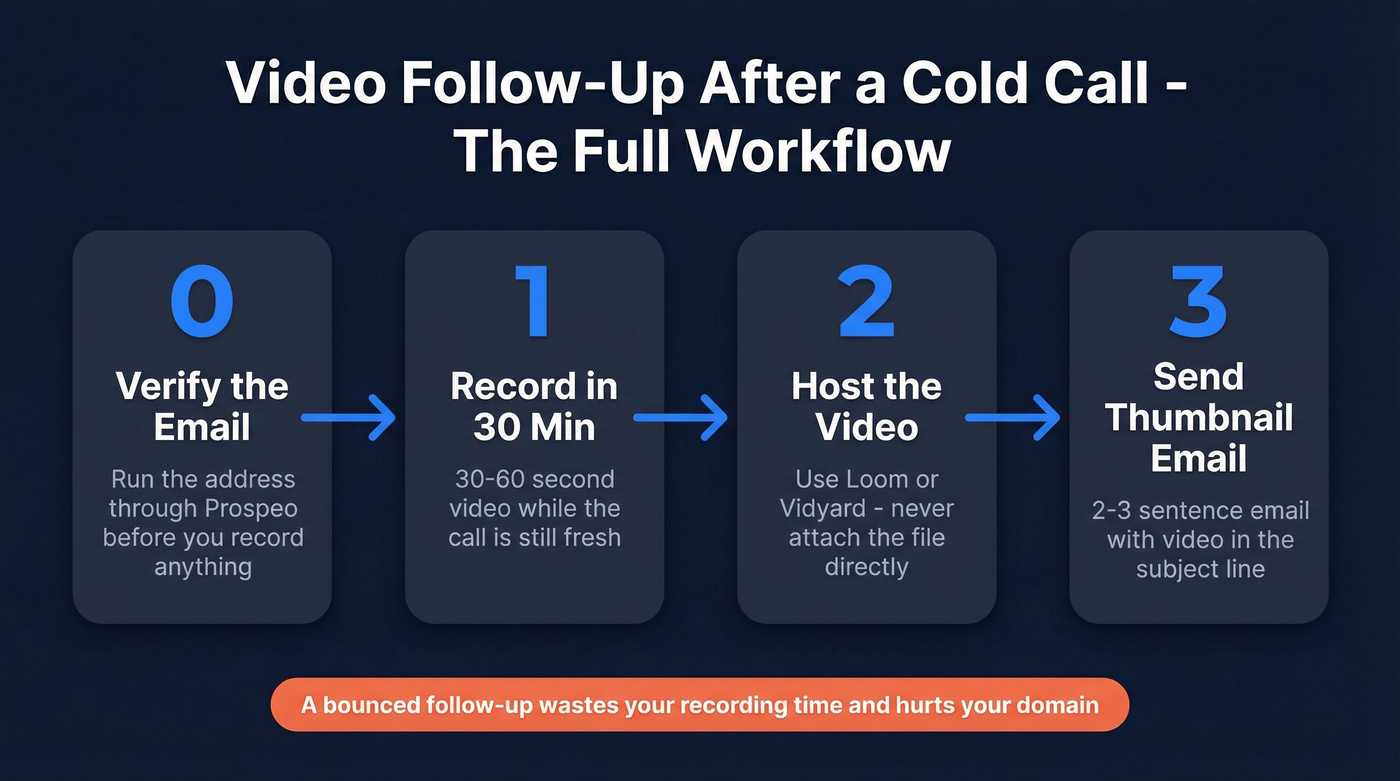
- Step 0: Verify the prospect's email before you do anything else. A bounced follow-up wastes your recording time and hurts your domain. (If you need a tool shortlist, start with an email validator.)
- Step 1: Record a 30-60 second video within 30 minutes of the call.
- Step 2: Host the video on your platform - never attach the file directly.
- Step 3: Drop a thumbnail link into a 2-3 sentence email with "video" in the subject line. Hit send.
That's it. Everything below is the detail.
When to Send
A HubSpot analysis of 450,000+ cold calls found that 10-11 AM on Tuesdays produced 30% higher connection rates, with Tuesday through Thursday being the strongest overall window. The 12-2 PM slot? A 35% drop. People are eating lunch, not watching your video.
Send your follow-up within 30-60 minutes of the call. If you called during the lunch dead zone, schedule the email for 2-3 PM when inboxes get attention again. And if you already have the prospect on a social DM channel, consider sending the same video link there as a secondary touchpoint.
Outbound teams average 4.81 touches before getting a response. Your video follow-up is touch two or three - not the only one. (For a full cadence, use a proven SDR follow-up strategy.)
What to Say in Your Video
Personalization drives roughly 10% higher open rates and double the reply rates versus generic outreach. That's why referencing the actual call matters - it proves you listened. Here's the framework we've found works best:
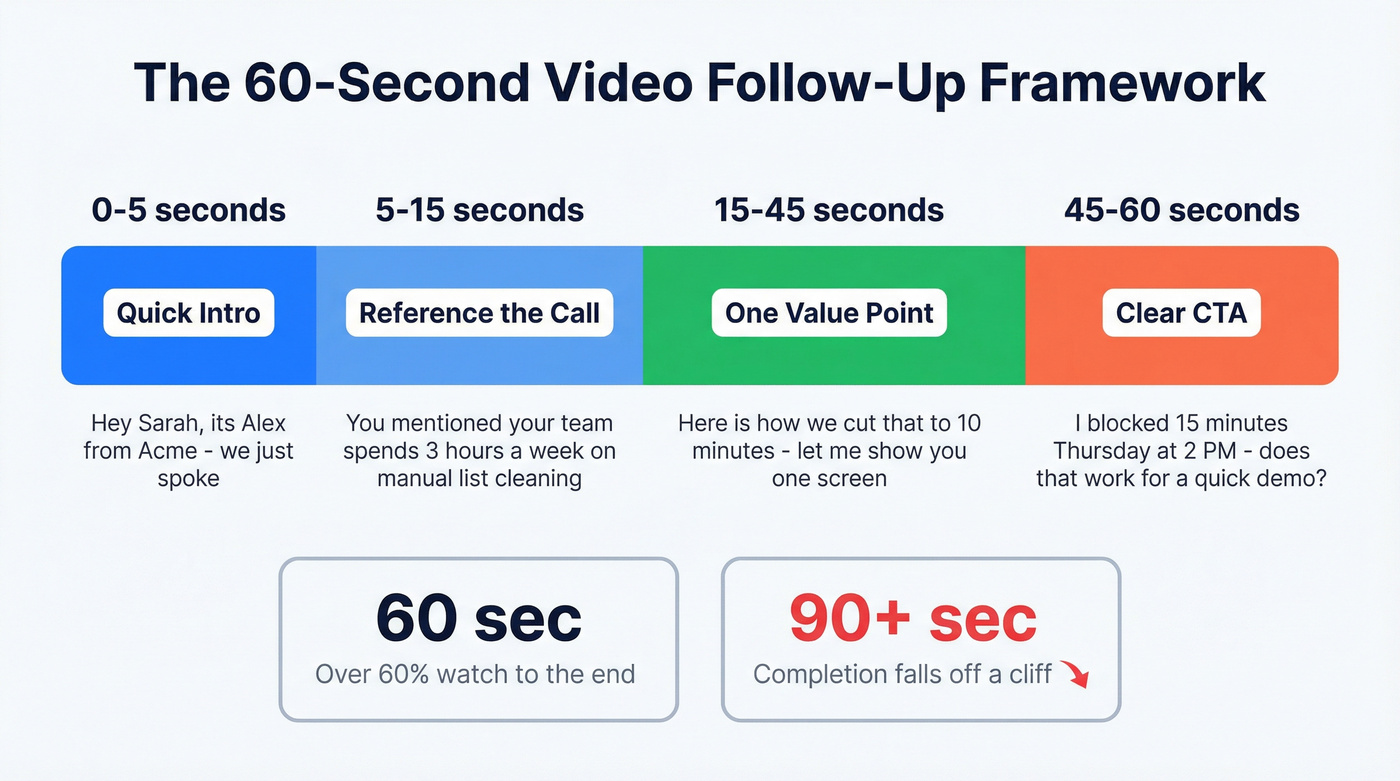
- Quick intro (5 seconds): "Hey [Name], it's [You] from [Company] - we just spoke."
- Reference the call (10 seconds): Mention one specific thing they said. Not a summary. One thing.
- One value point (20-30 seconds): Focus on the feature or outcome most relevant to what they told you. Not a product tour.
- CTA (10 seconds): "I blocked 15 minutes Thursday at 2 PM - does that work for a quick demo?"
Under 60 seconds is the rule. Under 30 is the sweet spot for maximum completion rates. At 60 seconds, over 60% of viewers still watch to the end. Past 90 seconds, completion falls off a cliff. (If you want more copy-paste options, start with a video prospecting script.)

Your 45-second video is worthless if it bounces. Prospeo verifies emails at 98% accuracy with a 7-day refresh cycle - so you're never recording a personalized follow-up for someone who left the company last quarter.
Verify before you record. Every bounce kills your domain.
The Email That Wraps the Video
The email isn't the message - the video is. Your email exists to get the click. Using "video" in the subject line boosts open rates by 19% according to Wistia's research. (If you want more subject ideas, see these subject lines for follow-up emails.)
Template 1: Good call, warm prospect
Subject: Quick video from our call, [Name]
Hey [Name] - recorded a 40-second video recapping what we discussed and one idea I think you'll find useful. [VIDEO THUMBNAIL]
Worth 45 seconds. Let me know if Thursday works for a deeper look.
Template 2: Recovery - you blew the call
Subject: Better version of what I tried to say, [Name]
[Name] - I fumbled that last point on our call. Recorded a quick video that says it properly. [VIDEO THUMBNAIL]
40 seconds. I promise it's better than the live version.
If your video tool supports it, use a GIF thumbnail instead of a static image. GIF thumbnails consistently outperform static images in click-through tests, and platforms like Loom and Vidyard generate them automatically.
Sending Video Without Killing Deliverability
Look - a personalized video message is worthless if the email bounces. Gmail caps attachments at 25MB, Outlook at 20MB, and most spam filters flag anything heavy. Never attach a video file. Host it on your platform and send a clickable thumbnail link.
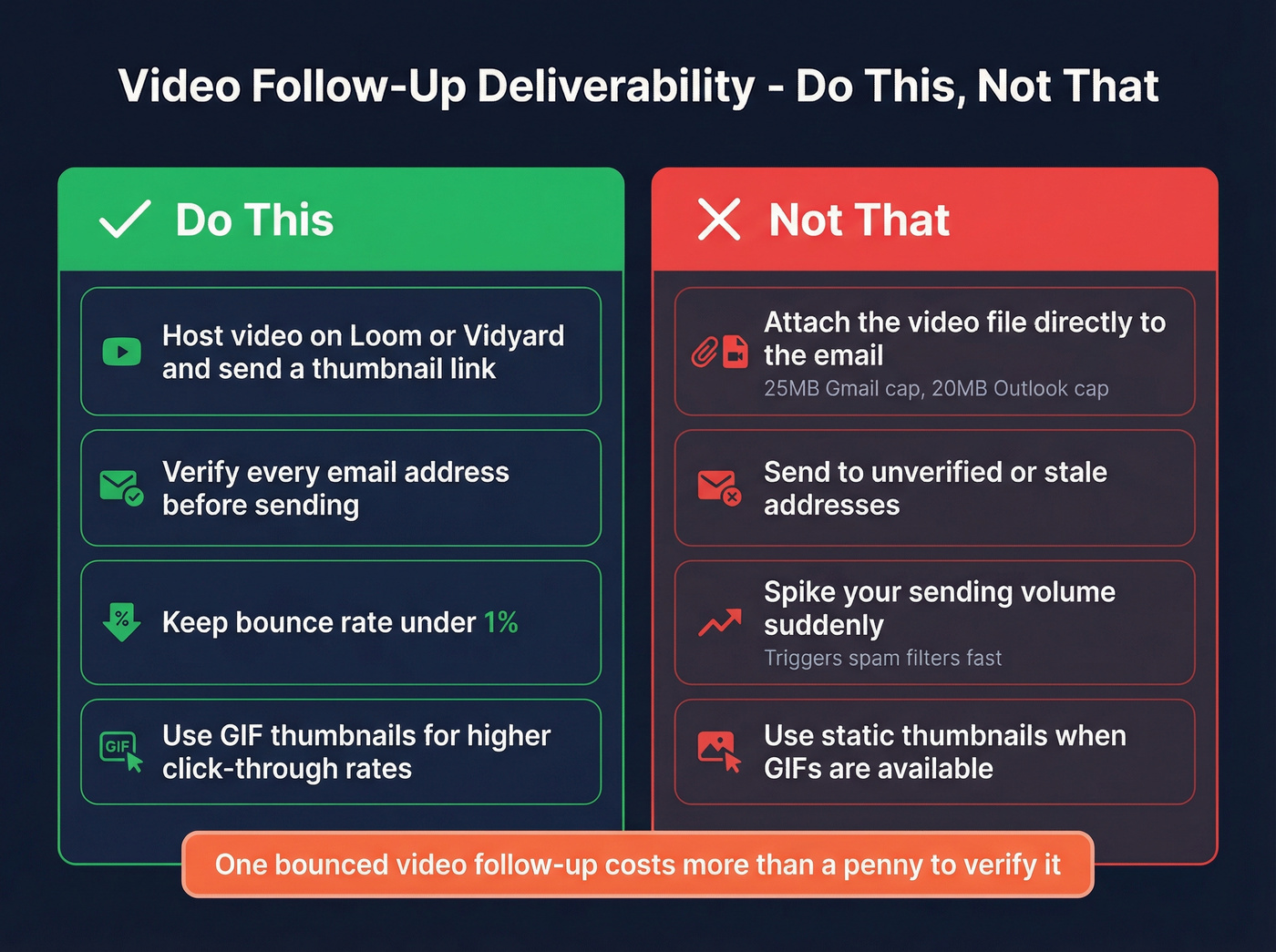
Keep your bounce rate under 1%. That's the threshold where deliverability starts degrading. A bounced follow-up doesn't just waste your recording time; it damages your domain reputation for every future email you send. (If you want the full playbook, use this email deliverability checklist.)
We've seen teams burn weeks of outreach because they skipped email verification before a campaign. Run your list through Prospeo before you record - with 98% email accuracy and a 7-day data refresh cycle, you're not sending videos to people who left the company last quarter. (More on email verification for outreach.)
Best Tools for Video Follow-Ups
Start with Loom. Most SDRs don't need engagement heatmaps - they need to record, share, and move on. If you want CRM-level analytics, step up to Vidyard. Their benchmark study of nearly one million videos found that more than a third of teams using video reported higher win rates and 27% shorter deal cycles. (If you're comparing platforms, see Dubb vs Loom.)
| Tool | Starting Price | Best For |
|---|---|---|
| Loom | $15/user/mo | Most SDRs - fast, simple |
| Vidyard | $59/user/mo | CRM analytics + tracking |
| Sendspark | $39/seat/mo | Personalized video at scale |
| BombBomb | $33-49/mo | Email-native video |
| Covideo | $69/mo | High-touch sales |
| Hippo Video | $20/user/mo | Lower-cost option |
| HeyGen | $24/mo | AI avatars (use carefully) |

A note on HeyGen and AI avatars: they can feel uncanny valley fast. For cold outreach where trust is everything, record yourself. AI-generated faces undercut the entire point of video - proving you're a real human who paid attention. Skip AI avatars for first-touch follow-ups; save them for internal content or nurture sequences where the stakes are lower.
5 Mistakes That Kill Your Follow-Up Video
Writing a novel in the email body. The video IS the message. Two to three sentences max in the email itself - anything more competes with your own video and gives the prospect a reason to skip the click entirely. (If you need more examples, pull from these outreach email templates.)
Rambling without a script. Prepare your four-part framework before you hit record. Winging it adds filler, and filler kills credibility. In our experience, reps who write three bullet points on a sticky note before recording cut their take count in half.
Bad lighting or audio. Face a window. Use earbuds. A dark room with laptop-mic echo screams "I didn't care enough to try." This is the easiest fix on the list and the one most people ignore.
Sending to unverified addresses. Every bounce hurts your domain. Verify every address before you send - Prospeo's free tier gives you 75 verifications per month, no card required. (If you're troubleshooting, start with what invalid emails actually are.)
Ignoring analytics. If nobody watches past the 10-second mark, your hook is broken. Reps who track watch percentage and iterate on their opening line see measurably better engagement within two to three weeks. The data's right there in Loom or Vidyard - use it.
You spent 30 minutes on that cold call and 60 seconds recording the perfect follow-up. Don't let bad data waste both. Prospeo's 143M+ verified emails and 5-step verification keep your bounce rate under 1% - exactly where it needs to be to protect your sender reputation.
One bounced video follow-up costs more than a penny to verify it.
FAQ
Is sending a video follow-up after a cold call creepy?
No. A 30-second video referencing your actual conversation feels professional, not invasive. You're proving you listened and delivering one specific insight. Show attentiveness, offer value, and close with a clear meeting ask. The consensus on r/sales is that short, relevant videos land well - it's the generic "just checking in" emails that feel intrusive.
How long should a follow-up video be?
Under 60 seconds. Over 60% of viewers watch to the end at that length, while completion drops sharply past 90 seconds. Save two-to-three-minute demos for later in the cycle when the prospect has agreed to evaluate.
What if I completely blew the cold call?
Record a calm 45-second video that says what you wish you'd said. A well-crafted video follow-up gives you a mulligan even when the live conversation went sideways. Use the recovery template above and lead with honesty - prospects respect the self-awareness, and it's a surprisingly effective way to reopen a door that felt closed.
How do I make sure my video email actually lands in the inbox?
Verify every recipient address before sending - bounces above 1% degrade your domain reputation. Use a hosted thumbnail link instead of attaching the file. And keep your sending volume consistent; sudden spikes trigger spam filters faster than almost anything else.