

How to Check Email for Spam - and Actually Fix What's Wrong
You spent two hours crafting the perfect cold email sequence. The copy's sharp, the offer's relevant, the list looks solid. Then you check the analytics: 14% bounce rate, 0.4% complaint rate, and half your emails never reached the inbox. The spam folder ate your pipeline.
Roughly 84% of emails globally reach the inbox. That means one in six never arrives. Here's the thing: most spam problems are diagnosable and fixable if you know where to look and check email for spam issues before you hit send.
What You Need (Quick Version)
If you're short on time, here's the fastest path to answers:
Quick free test: Send your email to Mail-Tester.com - you'll get a spam score on a 1-10 scale in under a minute. No account needed.
Full diagnostic: Use MailGenius for a checklist covering authentication records, blacklist status, content issues, and HTML best practices. The basic version is free and works without creating an account.
How Spam Filters Actually Work
Most people think spam filters scan for words like "FREE" and "ACT NOW." That's about 20% of the story. In our experience, roughly 80% of deliverability is driven by engagement and sender behavior - complaints, opens, deletes, replies, and how recipients interact with your messages over time. Content matters, but it's the last thing filters check, not the first.
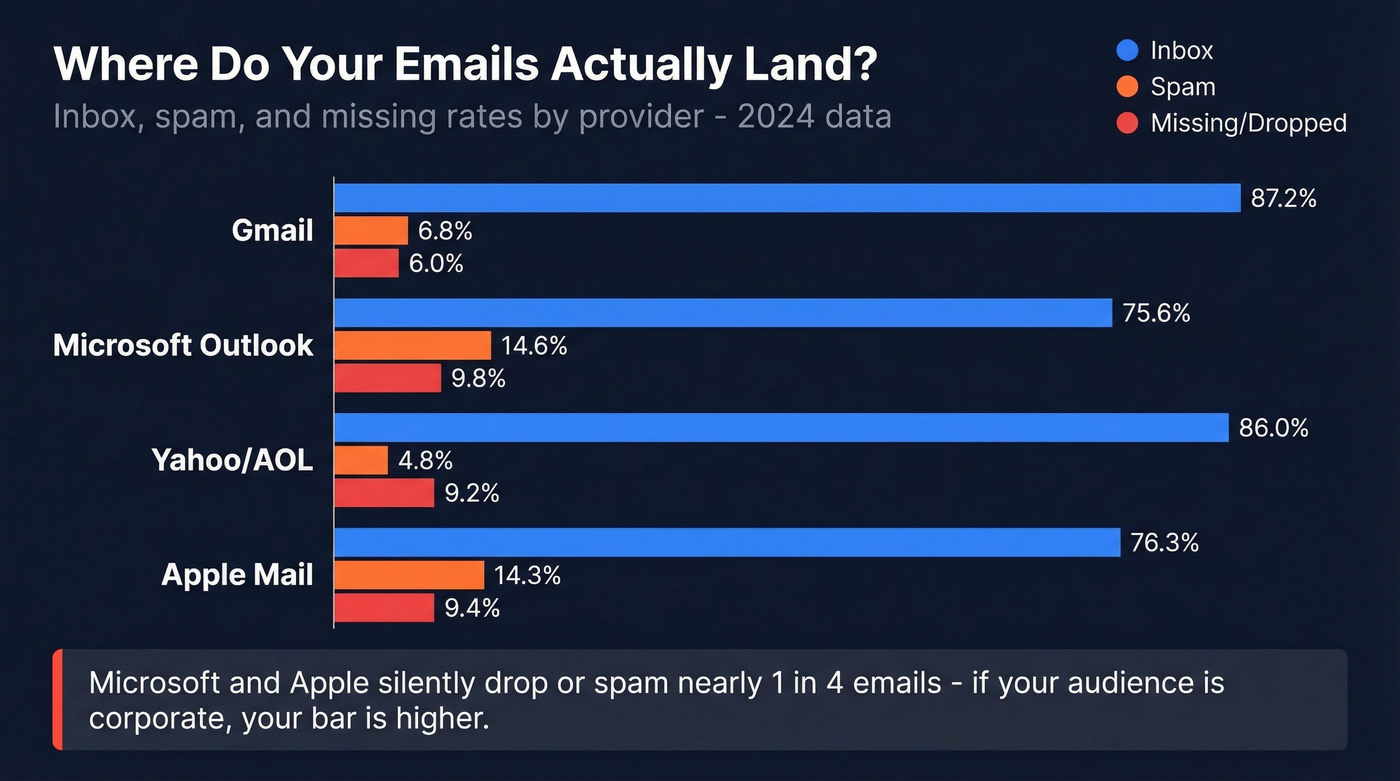
With 160 billion spam emails sent daily, filters are aggressive and getting more so. The major providers differ significantly in how they handle incoming mail:
| Provider | Inbox Rate | Spam Rate | Missing / Undelivered |
|---|---|---|---|
| Gmail | 87.2% | 6.8% | 6.0% |
| Microsoft | 75.6% | 14.6% | 9.8% |
| Yahoo/AOL | 86.0% | 4.8% | 9.2% |
| Apple Mail | 76.3% | 14.3% | 9.4% |
"Missing" means emails that neither reached the inbox nor spam folder - they were silently dropped by the receiving server.
Those numbers tell a clear story: Microsoft and Apple are significantly harder to land in than Gmail or Yahoo. If your audience skews corporate and Outlook-heavy, you need to be more careful than someone emailing mostly Gmail addresses.
Gmail
Gmail's filtering is AI-driven and personalized per recipient. Two people at the same company can receive the same email - one sees it in Primary, the other in Spam - based entirely on their individual interaction history with the sender. Gmail emphasizes domain reputation over IP reputation, which makes sense given how many senders share IPs through ESPs. SPF, DKIM, and DMARC all passing and aligned is the entry ticket. After that, engagement signals dominate: replies, starring, searching for the sender, and even dragging emails out of spam all build trust.
Microsoft Outlook
Outlook is the strictest gatekeeper for new domains and IPs. Microsoft leans heavily on junk feedback loops and sender reputation scoring. If you're warming up a fresh domain, expect Outlook to be the last provider where you achieve consistent inbox placement. That 75.6% inbox rate isn't a fluke - it reflects genuinely stricter initial filtering. The safe sender list matters here more than anywhere else, which is why getting early recipients to whitelist you is critical for Outlook-heavy audiences.
Yahoo
Yahoo combines legacy filtering with modern engagement signals. It's particularly sensitive to spam traps - old, recycled email addresses that exist solely to catch senders with dirty lists. Yahoo also uses greylisting, temporarily rejecting emails from unknown senders to see if the sending server retries (legitimate servers do; spam servers often don't). Link scrutiny is high: URL shorteners, mismatched domains, and anything that looks like a redirect chain will raise flags.
Apple Mail
Apple's Mail Privacy Protection makes engagement signals less reliable by pre-loading tracking pixels. This means Apple leans more heavily on technical validation - authentication records, sending infrastructure, and domain reputation. If your open-rate tracking looks suspiciously high, it's probably Apple inflating the numbers, not your copy performing miracles. Don't use Apple Mail open rates to gauge campaign health. Focus on reply rates and click-throughs instead.
Full Spam Test Checklist
Before you run any tool, it helps to know what you're checking for.
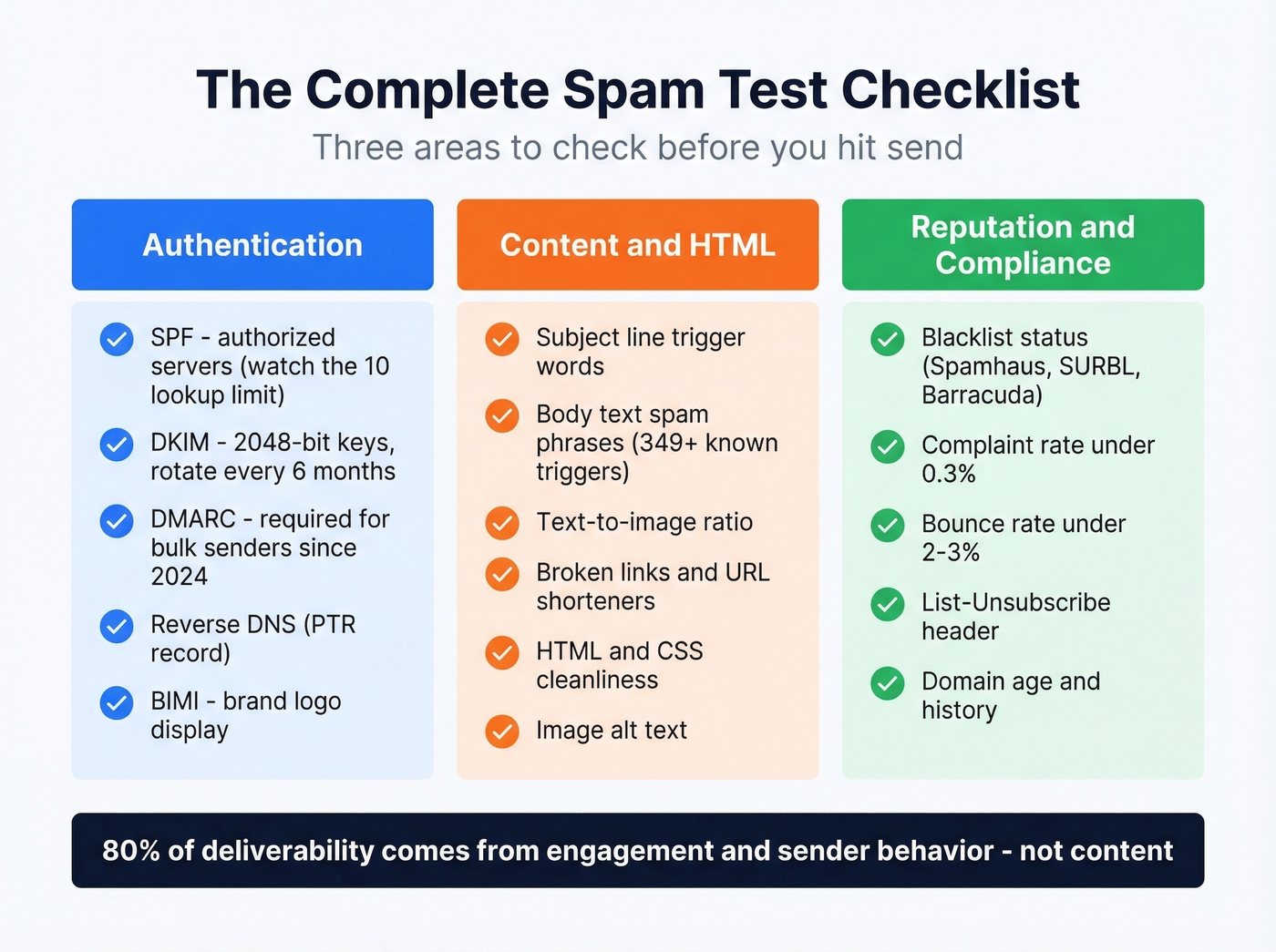
Authentication Checks
SPF (Sender Policy Framework) validates that your sending server is authorized to send on behalf of your domain. The critical gotcha: SPF has a 10 DNS lookup limit. Exceed it - easy to do if you use multiple ESPs, CRMs, and marketing tools - and SPF fails silently. Your record looks correct, but it doesn't work.
DKIM (DomainKeys Identified Mail) cryptographically signs your messages to prove they haven't been tampered with in transit. Use 2048-bit keys rather than 1024-bit, and rotate them every six months.
DMARC (Domain-based Message Authentication, Reporting & Conformance) ties SPF and DKIM together with a policy that tells receiving servers what to do when authentication fails. DMARC adoption hit 53.8% in 2024, up from 42.6% the year before - and Gmail and Yahoo now require it for bulk senders.
Reverse DNS (PTR record) confirms your sending IP resolves back to your domain. Missing PTR records are a red flag for most filters.
BIMI (Brand Indicators for Message Identification) displays your brand logo next to authenticated emails. Not required, but it builds visual trust and signals a mature sending setup.
Content & HTML Checks
Spam trigger words don't just live in the body text. Filters scan subject lines, header info, anchor text in hyperlinks, image alt text, HTML/CSS, footer content, and even attachment file names. There are 349+ documented trigger phrases across categories like urgency, financial promises, and scam language. One or two won't kill you - overuse in context will.
Check your text-to-image ratio. Emails that are mostly images with minimal text look like spam to filters. Broken links and URL shorteners also trigger scrutiny, especially at Yahoo.
Reputation & Compliance
Blacklist status: Check whether your domain or sending IP appears on any of the major blacklists (Spamhaus, SURBL, Barracuda, etc.). If you do get listed, follow a proper Spamhaus blacklist removal process instead of guessing.
Complaint rate: Stay below 0.3%. Exceed it and bulk-sender traffic can get throttled or rejected, not just routed to spam.
Bounce rate: Keep it under 2-3%. Anything above 5% signals to providers that you're sending to unverified or purchased lists. If you’re unsure what “good” looks like, use these email bounce rate benchmarks and fixes.
List-Unsubscribe header: Required for bulk senders under Gmail/Yahoo guidelines. Missing it can hurt placement even if your content is clean.

You just read that bounce rates above 5% signal dirty lists to spam filters. That's exactly the problem bad data creates. Prospeo's 5-step email verification - with catch-all handling, spam-trap removal, and honeypot filtering - delivers 98% accuracy. Teams using Prospeo cut bounce rates from 35%+ to under 4%.
Stop fixing spam problems caused by your data provider.
How to Check Email for Spam Step by Step
Send-to-Address Spam Test
The simplest method. Mail-Tester generates a unique email address - you send your email to it exactly as you'd send it to a prospect, then check the results page. You'll get a score from 1 to 10 covering SpamAssassin analysis, authentication, blacklists, and content.
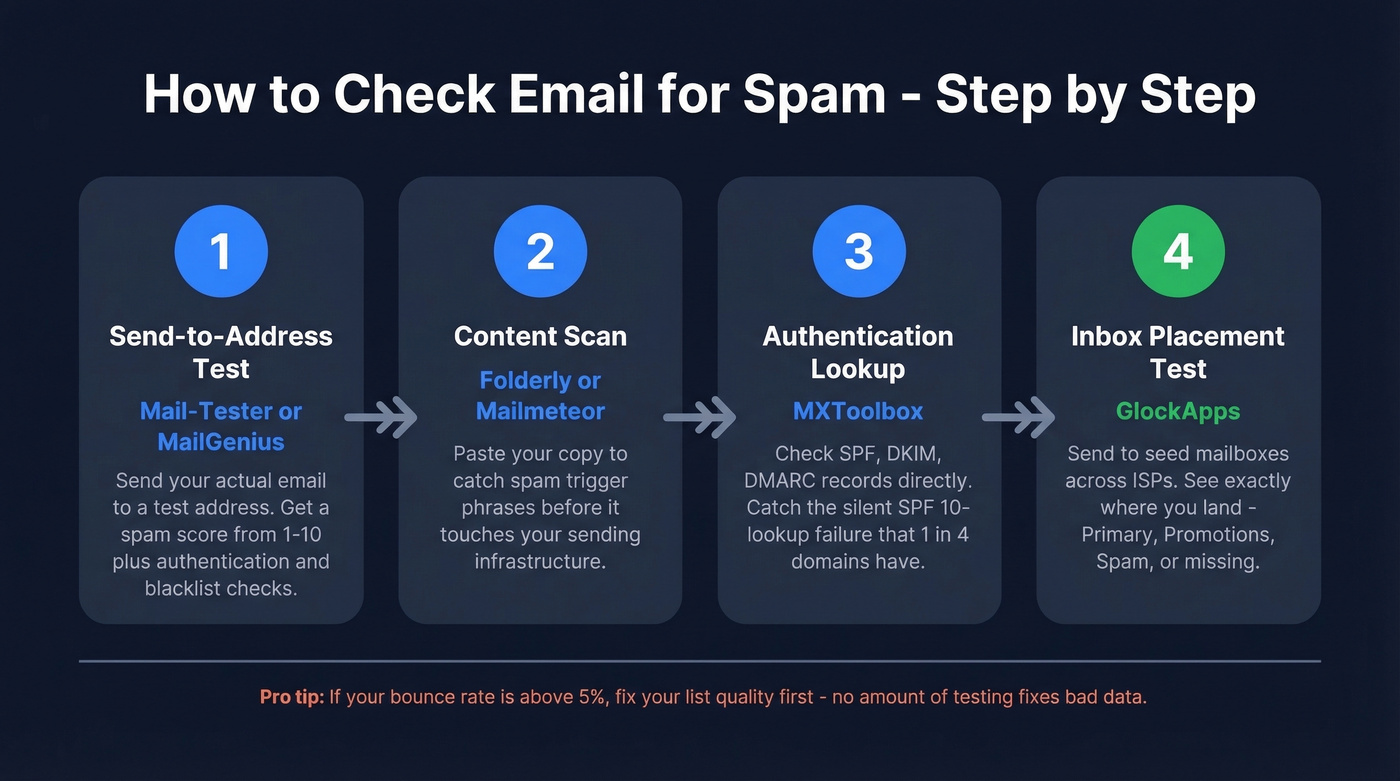
MailGenius works similarly but produces a more detailed diagnostic checklist covering SPF/DKIM/DMARC, reverse DNS/HELO alignment, domain age, broken links, short URLs, List-Unsubscribe checks, and HTML best practices. Both are free for basic use.
Content Scan
Tools like Folderly and Mailmeteor let you paste your email content directly and get a content-level analysis without actually sending anything. This is useful for pre-screening copy before it touches your sending infrastructure - essentially a spam test before sending that catches problems early. If you want a deeper system for writing copy that avoids deliverability landmines, see our email copywriting guide.
Authentication Lookup
MXToolbox is the go-to for checking SPF, DKIM, and DMARC records directly. Paste your domain, and you'll see every DNS lookup in your SPF chain, which records are configured, which are missing, and which are misconfigured. This is where you'll catch the SPF 10-lookup problem. In our testing, about one in four domains we audit has a broken SPF record that the owner doesn't know about - the record looks correct in their DNS panel, but MXToolbox reveals it's exceeding the lookup limit. For a more technical breakdown, use our SPF record examples and DMARC alignment walkthroughs.
Inbox Placement Test
GlockApps sends your email to a seed list of roughly 100 mailboxes across major ISPs and shows you exactly where each one landed - Primary, Promotions, Spam, or missing entirely. This is the closest you can get to knowing real-world placement without sending to your actual list. The free plan includes 2 monthly spam check credits.
Best Spam Checker Tools Compared
Start here: Mail-Tester for a quick spam score, GlockApps for placement data, Prospeo if your bounce rate is the root cause. If you want a broader framework, our email spam checker guide breaks down what these tools can and can’t tell you.
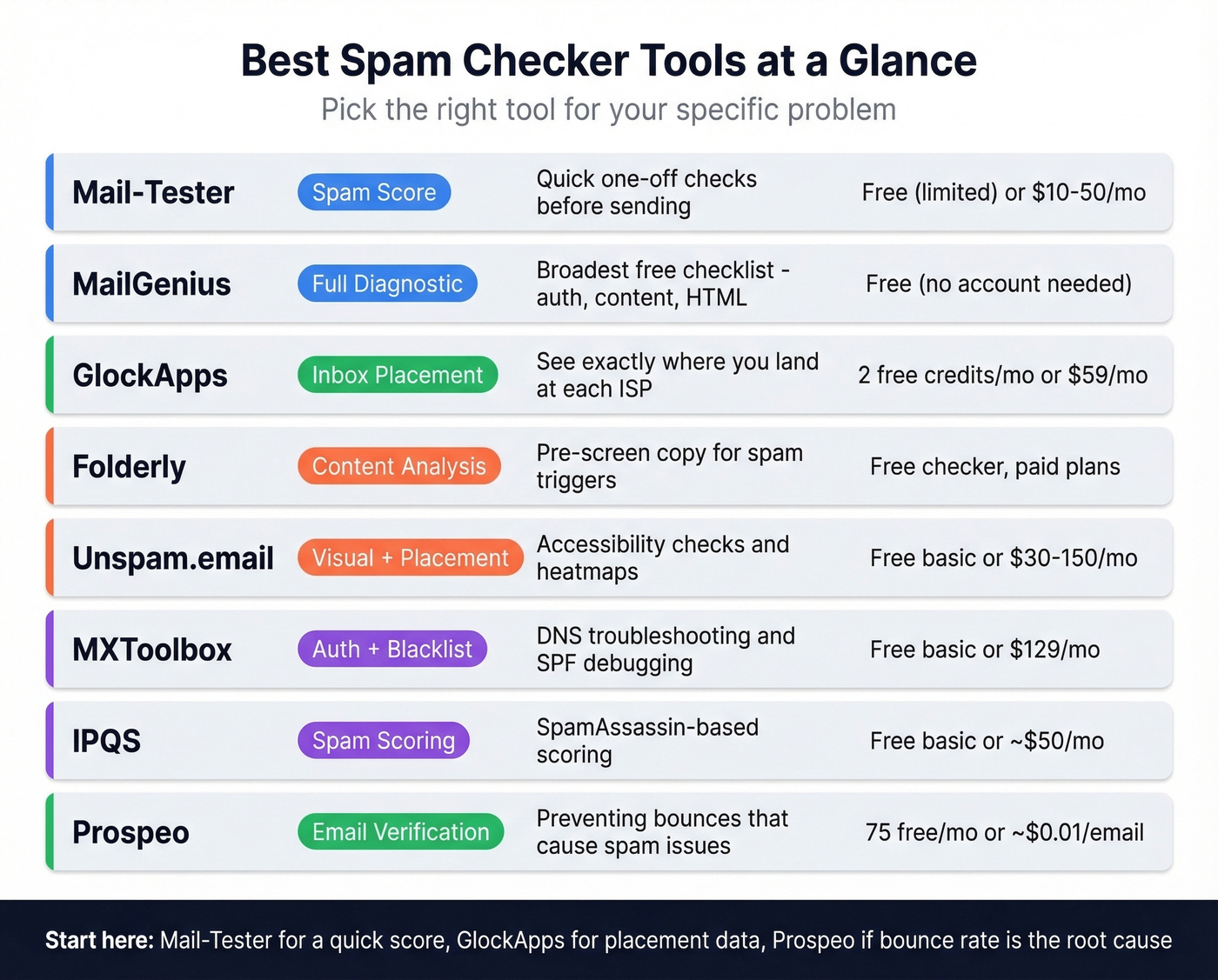
| Tool | Type | Free Tier | Paid From | Best For |
|---|---|---|---|---|
| Mail-Tester | Spam score | Yes (limited) | $10-$50/mo | Quick one-off checks |
| MailGenius | Full diagnostic | Yes (no account) | $20-$100/mo | Broadest free checklist |
| GlockApps | Inbox placement | 2 credits/mo | $59/mo | ISP-level placement |
| Folderly | Content analysis | Spam word checker | Paid plans available | Quick content scanning |
| Unspam.email | Visual + placement | Yes (basic) | $30-$150/mo | Accessibility + heatmap |
| MXToolbox | Auth/blacklist | Yes (basic) | $129/mo | DNS troubleshooting |
| IPQS | Spam test + scoring | Yes (basic) | ~$50/mo | SpamAssassin scoring |
| Prospeo | Email verification | 75 emails/mo | ~$0.01/email | Preventing bounces |
Mail-Tester
Mail-Tester is the tool you reach for when you need a quick gut check. Send an email to the generated address, wait a moment, and you've got a score from 1 to 10. It runs your message through SpamAssassin, checks SPF/DKIM/DMARC alignment, scans against major blacklists, and flags content issues. The interface is clean and the results are immediately actionable.
The limitation: Mail-Tester doesn't test inbox placement. It tells you whether your email looks spammy, not whether it actually lands in the inbox at Gmail vs. Outlook vs. Yahoo. For that, you need a seed-list tool like GlockApps. But for a pre-send sanity check? Hard to beat.
MailGenius
Skip MailGenius if you only need a spam score - Mail-Tester is faster for that. Where MailGenius earns its place is the sheer breadth of its free diagnostic: SPF, DKIM, DMARC, reverse DNS/HELO alignment, domain suffix risk, blacklist status across domain/IP/body, domain age, broken links, short URLs, subject line analysis, List-Unsubscribe header presence, and HTML best practices including text-to-image ratio. No account required. Over 1M emails are tested through the platform each year.
One thing to know: MailGenius hosts results on public links. If you're testing sensitive or confidential campaigns, that's worth considering.
GlockApps
Let's say you've got a 9/10 on Mail-Tester but your reply rates have cratered. You run GlockApps and discover that 45% of your Outlook seed mailboxes are showing spam placement. That's the insight you can't get anywhere else.
GlockApps sends to seed mailboxes across Gmail, Outlook, Yahoo, Apple, and country-specific providers, then reports Primary vs. Promotions vs. Spam vs. Missing breakdowns. It checks against 50+ blacklists and includes DMARC monitoring. The free plan includes 2 monthly spam test credits plus up to 10,000 DMARC checks. The Essential plan at $59/mo unlocks 360 spam test credits and 600,000 DMARC checks.
The seed list is roughly 100 mailboxes, so treat results as directional, not statistically precise. On r/coldemail, GlockApps is often recommended in this category, though some users note results can feel inconsistent between tests - which makes sense given that filters are dynamic and personalized.
Folderly
Skip Folderly if your authentication isn't set up yet. You'd be optimizing content when the foundation is broken. Folderly's real value kicks in after you've nailed authentication and data quality. The spam word checker is useful for quick checks, and the broader deliverability tooling adds ongoing analysis and optimization.
Unspam.email
Unspam stands out with features you won't find elsewhere: email accessibility testing, an AI eye-tracking heatmap that predicts where recipients will look first, and cross-device previews. It also covers the basics - spam score, blacklist checks, authentication, BIMI, and broken link detection. For marketers who care about design and accessibility alongside deliverability, Unspam fills a gap that pure spam checkers ignore. Paid plans run $30-$150/mo depending on volume.
MXToolbox
The go-to for DNS record troubleshooting. Free lookups for SPF, DKIM, and DMARC records, plus blacklist checks. The Delivery Center at $129/month adds ongoing monitoring - but that's overkill if you only need occasional DNS checks. The free tier handles 90% of use cases.
IPQS
IPQS offers a free SpamAssassin-based spam test with warm-up guidance and list hygiene recommendations. Basic but useful for getting a quick SpamAssassin score. Target as close to 1 as possible. Paid plans start around $50/mo for higher API volume and additional fraud-detection features.
Why Spam Checker Results Disagree
If you've ever run the same email through three different tools and gotten three different verdicts, you're not alone. One r/coldemail user called deliverability tool results "laughable" - and noted the tools often push warm-up upsells instead of giving actionable answers.
The disagreement comes down to methodology. Seed-list tests like GlockApps are essentially cold emails sent to mailboxes that never interact with you. Real recipients open, reply, click, and forward - all signals that improve your placement. So seed-test results are almost always worse than your actual deliverability. They're a floor, not a ceiling.
Content-only tools like Mail-Tester's SpamAssassin check can't account for your sender reputation at all. Two identical emails from different domains will get the same content score but wildly different inbox placement.
The practical move: use 2-3 tools and focus on trends, not absolute numbers. If Mail-Tester gives you a 9/10 but GlockApps shows 60% spam placement at Outlook, your content is fine - your reputation or authentication at Microsoft is the problem. We've seen teams waste weeks optimizing copy when the real issue was a broken SPF record or a 12% bounce rate. For a step-by-step remediation plan, see our email deliverability guide.
How to Fix a Bad Spam Score
The fix order matters. Most people start with content because it feels actionable - swapping out "free" for "complimentary" and hoping for the best. That's backwards.
If your deals typically close under five figures, you probably don't need enterprise-grade deliverability tools. Fix authentication, clean your list, and use the free tiers of Mail-Tester and GlockApps. That combination solves 90% of spam problems without spending a dollar on software.
Fix Authentication First
This takes 30-60 minutes and has the highest impact-per-minute of anything on this list. Set up SPF, DKIM, and DMARC if you haven't already. Check your SPF record for the 10-lookup limit - this is the most common silent failure we encounter. Use 2048-bit DKIM keys and rotate them every six months. Set DMARC to at least p=none initially so you can monitor alignment reports before moving to p=quarantine or p=reject. If you want to confirm your setup end-to-end, follow our guide on how to verify DKIM is working.
In our testing, fixing SPF alignment alone moved emails from Spam to Primary at Outlook for three different client domains. DMARC adoption is climbing fast, but nearly half of sending domains still don't have it configured. If you're in that half, fixing it is the single highest-impact thing you can do today.
Clean Your Data
Real talk: if your bounce rate is above 5%, no amount of authentication or content optimization will save you. Every bounce tells the receiving provider that you're sending to addresses that don't exist - which is exactly what spammers do. The reputation damage compounds with every send.
Prospeo's 5-step verification process handles catch-all domains, removes spam traps and honeypots, and delivers 98% email accuracy. Beyond verification, the platform's 300M+ professional profiles mean you can source and verify contacts in one workflow rather than finding emails in one tool and verifying them in another. Data refreshes every 7 days versus the 6-week industry average, so addresses you verified last month are still valid this month. If you’re evaluating vendors, compare options in our data enrichment services roundup.
The proof is in the numbers. Meritt went from a 35% bounce rate to under 4% after switching their data source - and their pipeline tripled from $100K to $300K per week. Stack Optimize maintains 94%+ deliverability, under 3% bounce rate, and zero domain flags across all their clients.
If you haven't verified your list in the last 90 days, do it before your next campaign. Email addresses decay faster than most teams realize - people change jobs, companies shut down mailboxes, and domains expire. If you need a quick pre-check, use our guide on how to check if an email exists.
Rebuild Reputation
If your reputation is already damaged, you need to warm up gradually. Start at 50 emails per day and double every 3-5 days. Send to your most engaged contacts first - people who've opened or replied recently. Re-validate your full list every 3-6 months to catch deactivated accounts and new spam traps. Monitor your complaint rate obsessively and stay below 0.3%. One bad send to a purchased list can set you back months. For a practical playbook, see how to improve sender reputation and keep an eye on email velocity.
Fix Your Content Last
Spam trigger words matter less than you think. Modern filters evaluate context and overuse patterns, not individual words. "Free trial" in a legitimate SaaS email won't trigger spam. "FREE!!! ACT NOW!!! LIMITED TIME!!!" in an email with no authentication and a 15% bounce rate absolutely will.
That said, check everywhere - subject line, body, alt text, anchor text, footer, and attachment file names. Target a SpamAssassin score as close to 1 as possible. And remember: content is the last 20% of the deliverability equation. If you've fixed authentication, data quality, and reputation, your content would have to be genuinely terrible to land in spam. If you want higher-performing copy without guesswork, pull from these email subject line examples.
Running a quick spam test before every new campaign is the simplest habit that separates teams with reliable deliverability from those constantly firefighting inbox issues. Check email for spam early, fix what the tools flag, and clean your list. That's the whole playbook.
Every spam test tool checks your content and authentication. None of them fix the root cause: sending to bad addresses that tank your reputation. Prospeo refreshes 300M+ profiles every 7 days - not every 6 weeks like competitors - so you're never emailing stale, recycled, or trap-laden contacts.
Clean data at $0.01 per email beats fixing deliverability after the damage is done.
FAQ
What's a good spam score?
On Mail-Tester, aim for 9/10 or higher. On SpamAssassin, target as close to 1 as possible - anything under 3 is generally safe. A perfect score doesn't guarantee inbox placement since engagement history and sender reputation carry more weight than content scores alone.
How often should I run a spam test?
Before every major campaign, and monthly for ongoing sends. Re-validate your email list every 3-6 months to catch deactivated accounts and role changes. For daily outbound sequences, run a GlockApps placement test at least bi-weekly to catch reputation drift early.
Can a spam checker guarantee inbox placement?
No. Spam checkers test content and authentication - they can't measure your sender reputation or individual recipients' engagement history with your domain. A clean spam score with a dirty list will still land you in junk. Use them as diagnostics, not guarantees.
What free tools can I use to check email for spam?
Mail-Tester (spam score, no account needed), MailGenius (full diagnostic checklist), and MXToolbox (authentication records) are all free for basic use. For list verification, Prospeo offers 75 free email verifications per month - useful for catching the bad addresses that cause bounces and reputation damage in the first place.
Email Verification vs. Spam Testing - What's the Difference?
Spam testing checks whether your email content and setup will trigger filters. Email verification checks whether the addresses you're sending to are real, valid, and safe to email. They're complementary: verify your list first to prevent bounces, then run your spam diagnostic to confirm everything looks clean before you hit send.