

How to Build Customer Profiles That Don't Collect Dust
A RevOps lead we know rebuilt her company's customer profiles in early 2026. Six weeks of interviews, data pulls, beautiful Notion docs. Three months later, not a single rep had opened them. The profiles were thorough, well-designed, and completely useless - because nobody validated them with the people who actually sell.
That's the gap this guide closes. Not "what is a customer profile" in the abstract, but how to create one your sales team references before every call and your marketing team uses to target campaigns that convert.
Quick version: A customer profile is a data-backed document describing who buys from you - not a fictional character sketch. The profiles that drive revenue include firmographics, buying committee roles, technographics, and a scoring rubric. Ground every field in real customer data, validate with sales, and review quarterly.
What Is a Customer Profile?
A customer profile is a structured document capturing the traits, behaviors, and characteristics of the customers most likely to buy from you and stay.
Simple definition, but most companies get it wrong. They build profiles on gut instinct, stuff them with demographic fluff, and wonder why the output doesn't move pipeline. The data tells a clear story: 61% of consumers now expect AI-driven personalization from brands they interact with, 84% of customer service leaders consider data and analytics critical to achieving organizational goals, and 33% of customers who abandoned a business relationship did so because the experience wasn't personalized enough.
Those numbers point to the same conclusion: knowing your customer isn't a nice-to-have. It's the infrastructure that personalization, targeting, and sales enablement all sit on.
Profiles vs. ICP vs. Buyer Persona
These three terms get used interchangeably, and the confusion costs teams real time.
| Customer Profile | ICP | Buyer Persona | |
|---|---|---|---|
| Scope | Individual or account | Account/company type | Individual role |
| Purpose | Describe who buys | Qualify target accounts | Guide messaging |
| Key fields | Demographics, behavior, history | Firmographics, technographics | Goals, pain points, objections |
| Owner | Marketing + Sales | RevOps / Demand Gen | PMM / Content |
| Output | Segmentation, personalization | Target account lists, tiers | Content, sales enablement |
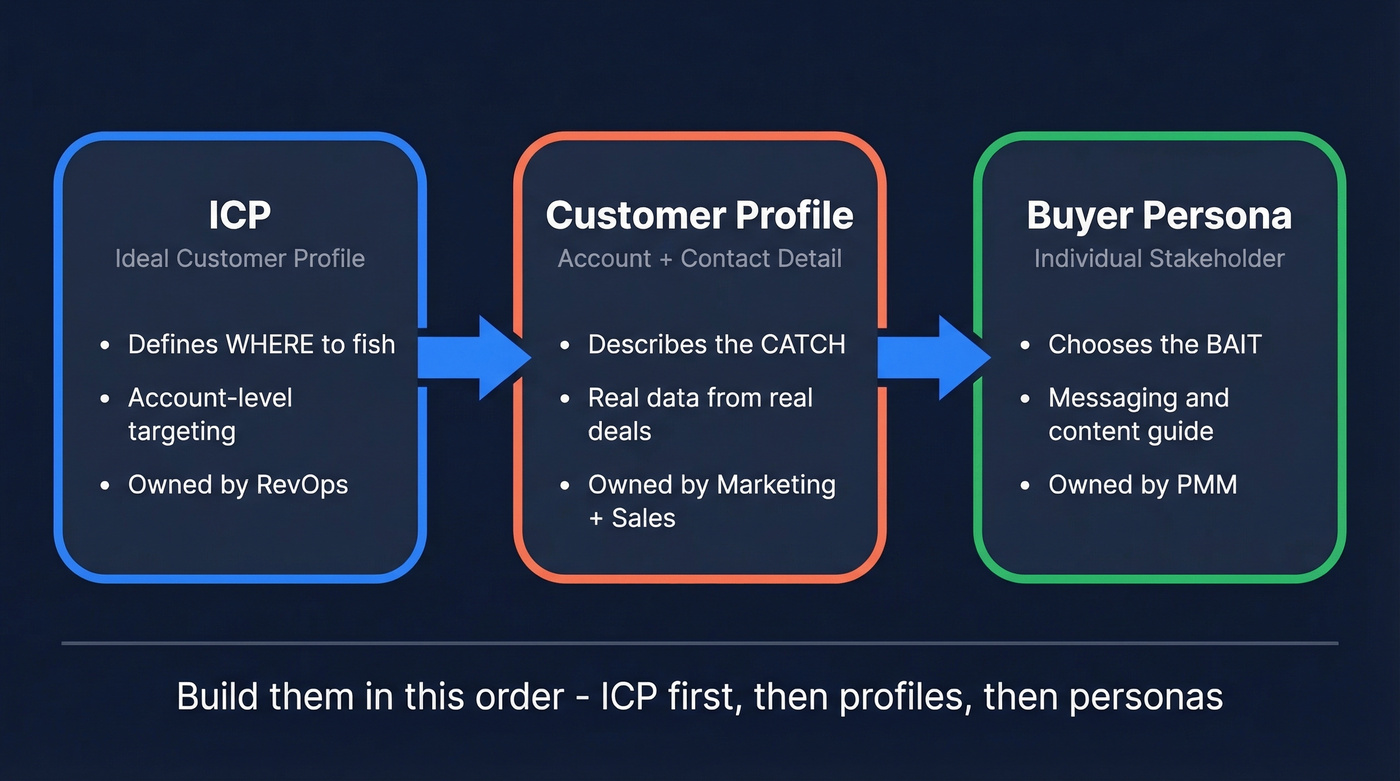
The Pedowitz Group frames it well: your ICP chooses where to fish; your personas choose what bait to use. The customer profile is the catch record - what you actually know about the fish you've landed.
Here's the thing: the reason this distinction matters is entirely practical. These work as a hierarchy. Your ICP defines the type of company you're targeting. Your profile fills in the details about real accounts that match (or don't). Your buyer personas describe the 3-4 stakeholders inside those accounts who influence the deal.
Where teams go wrong: they build buyer personas without an ICP, crafting messaging for roles at companies they haven't qualified. Or they build an ICP without profiling actual accounts, targeting company types without understanding real buying behavior. You need all three, built in order - ICP first, then profiles, then personas.
What to Include in Your Profiles
The difference between a useful profile and a decorative one is field selection. Most templates stop at demographics. The profiles that drive revenue go deeper.
Company Info (Firmographics)
Industry and sub-industry, company size by employees, annual revenue, geography, funding stage, growth trajectory, and annual budget for your solution category.
Technology (Technographics)
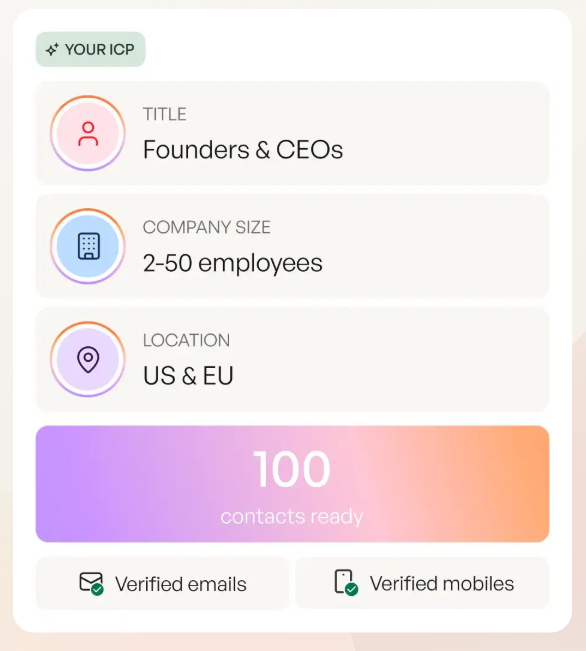
Current tech stack - CRM, marketing automation, analytics tools - plus technology maturity level and infrastructure dependencies. This matters more than most teams realize. A company's stack and tooling choices often correlate with how they evaluate vendors, how procurement works, and what integrations are non-negotiable. Technographic data is harder to source manually, but tools like Prospeo let you filter by technographics, buyer intent across 15,000 topics, headcount growth, and funding signals - turning a generic profile into a targeting engine.
People (Buying Committee)
Map the roles, not just the titles. Every B2B deal has a cast:
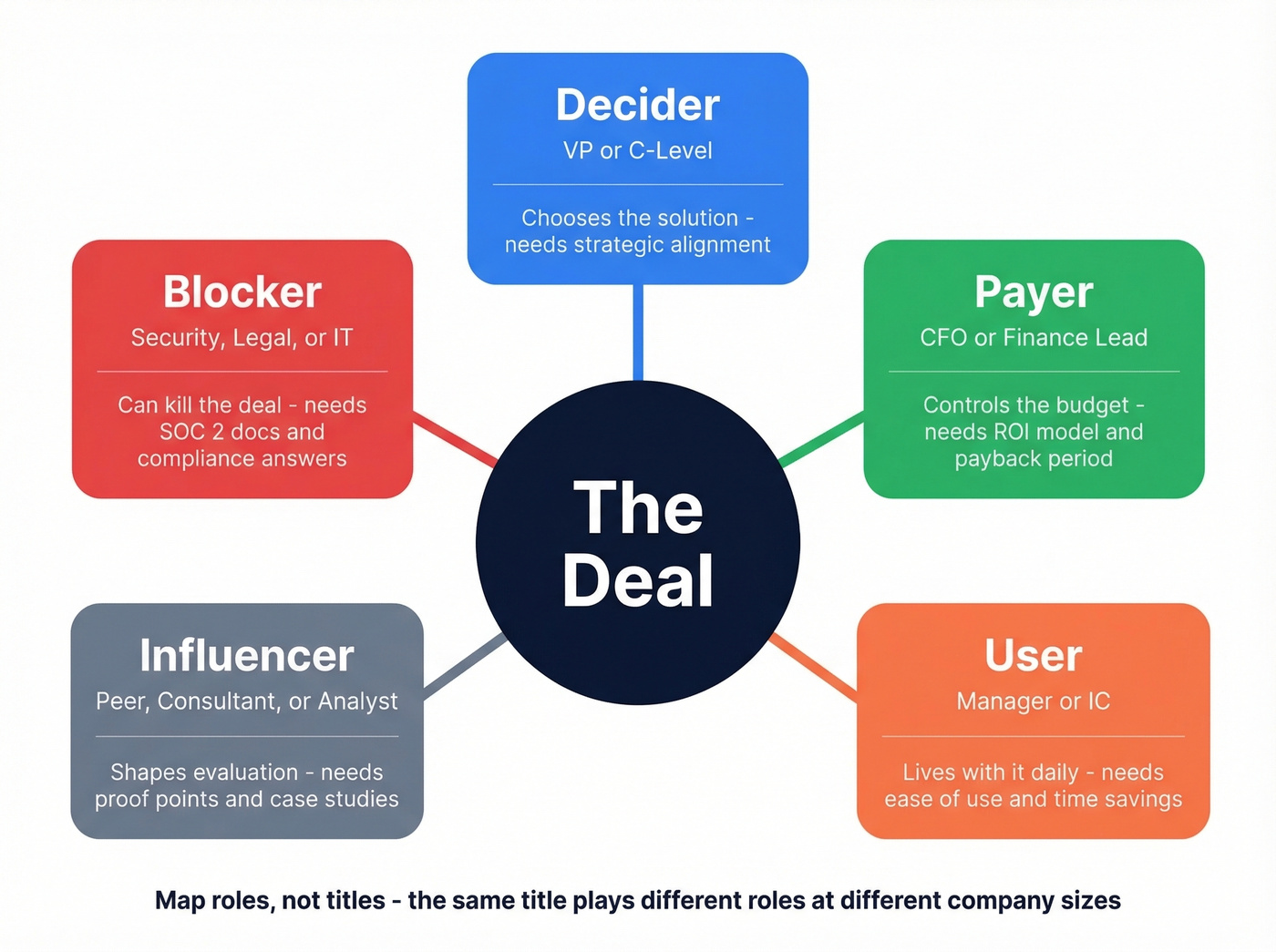
- Decider - chooses the solution, typically a VP or C-level executive
- Payer - controls the budget, usually CFO or finance leadership
- User - lives with the product daily, often a manager
- Influencer - shapes the evaluation, sometimes a peer or consultant
- Blocker - can kill the deal on compliance, security, or process grounds
These are frequently different people. The decider loves your product; the payer needs an ROI model; the blocker needs SOC 2 documentation. Your profile should name these roles and their typical concerns.
Behavior
Jobs-to-be-done, key responsibilities, goals, common objections, and the channels where they spend time. If your profile doesn't help a rep anticipate pushback, it won't get used. Include objections and channel preferences alongside standard firmographic fields.
Signals and Triggers
What events indicate buying intent? New CRM implementation, leadership change, funding round, headcount growth above 20%, expansion into new markets. These fields make profiles actionable for outbound teams (and pair well with identifying buying signals in your scoring model).
| Category | B2B Fields | B2C Fields |
|---|---|---|
| Demographics | Title, department, seniority | Age, gender, income, education |
| Firmographics | Industry, revenue, headcount | N/A |
| Technographics | Tech stack, maturity | Device, platform preferences |
| Behavioral | Jobs-to-be-done, objections | Shopping habits, brand affinity |
| Signals | Funding, hiring, intent data | Life events, seasonal patterns, app engagement |
How to Create a Customer Profile
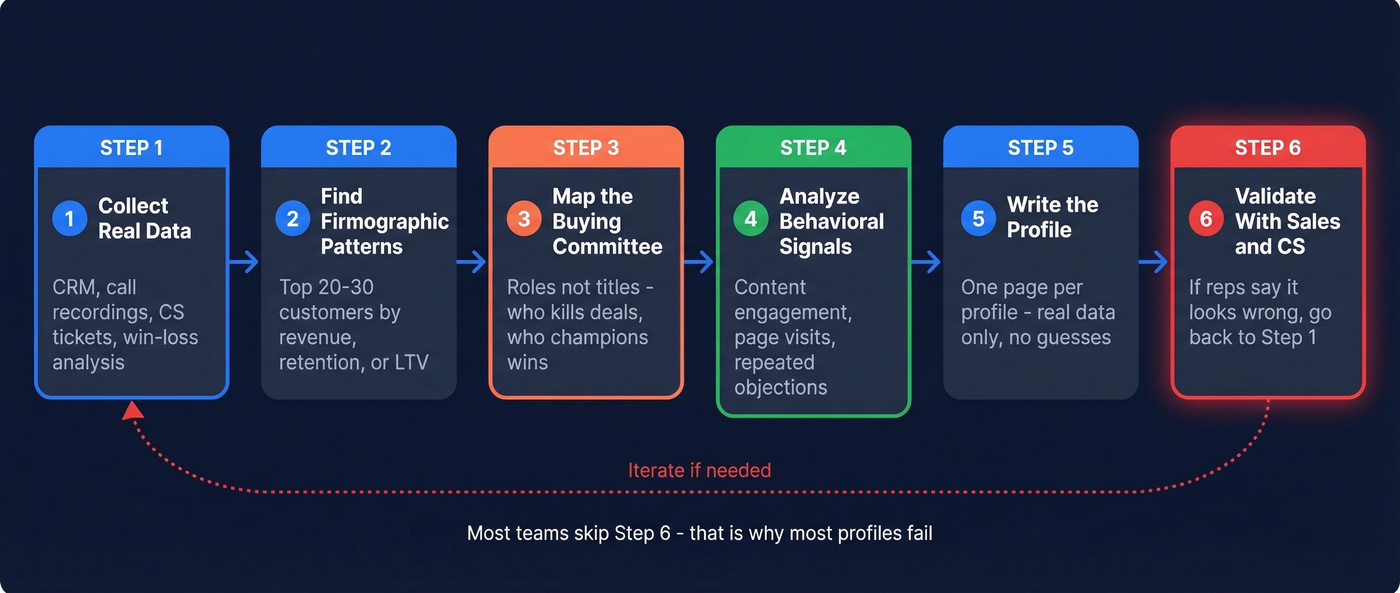
Step 1: Collect Real Data
Start with what you already have. Your CRM contains closed-won accounts with firmographic data. Sales call recordings reveal objections, buying triggers, and committee dynamics. CS tickets show what customers struggle with post-sale. Win/loss analyses tell you why deals closed or died. Then fill the gaps with a B2B data platform to populate firmographic and contact fields with verified, current data (often via lead enrichment).

The cardinal sin is building profiles from assumptions. "Fairytale personas" - fiction dressed up as strategy - collect dust fast. Sales can smell the BS immediately.
Step 2: Identify Firmographic Patterns
Pull your top 20-30 customers by revenue, retention, or LTV. Look for clusters in industry, company size, funding stage, or growth rate. Don't force patterns that aren't there - if your best customers span five industries, that's useful information. Focus on attributes that actually correlate with closed-won deals (a quick refresher on firmographic filters helps here).
Step 3: Map the Buying Committee
For every profile, document who's involved in the purchase decision - roles, not just titles. The VP of Sales might be the decider at a 200-person company but just an influencer at a 2,000-person company. Interview your sales team and ask: "Who killed the last three deals? Who championed the last three wins?"
Step 4: Analyze Behavioral Signals
What content do your best customers engage with before buying? Which pages do they visit? What objections come up repeatedly? This is where CRM data, marketing automation data, and sales call notes converge. Look for patterns that distinguish customers who close fast from those who stall.
Step 5: Write the Profile Document
Take everything from Steps 1-4 and fill in the fields from the checklist above. Every field should contain real data, not aspirational guesses. Keep it to one page per profile. If it's longer, nobody will read it. One page, accessible in the CRM or a shared doc linked from your sales playbook (and supported by marketing enablement so it actually gets used).
Step 6: Validate With Sales and CS
This is the step everyone skips, and it's the reason most profiles fail. Before you publish, sit down with 3-5 reps and 2-3 CS managers. Walk through the profile. If sales says "this doesn't look like anyone I've sold to," you've got a fairytale persona. Go back to Step 1.
Customer Profile Examples
B2B Example: Mid-Market SaaS
| Field | Details |
|---|---|
| Industry | B2B SaaS |
| Company size | 200-500 employees |
| Revenue | $20-50M ARR |
| Tech stack | Salesforce, HubSpot, Slack, Outreach |
| Annual budget | $50k-$100k for sales tools |
| Geography | North America, expanding to EMEA |
| Buying committee | VP Sales (decider), CFO (payer), SDR Manager (user), IT Director (blocker) |
| Triggers | New CRM implementation, headcount growth >20%, Series B+ funding |
| Pain points | Low outbound reply rates, stale contact data, rep ramp time too long |
| Goals | Increase lead conversion by 20%, reduce bounce rate below 5% |
| Objections | "We already have ZoomInfo," "How is your data different?" |
| Channels | LinkedIn, SaaStr, Pavilion community, sales podcasts |
This isn't a template - it's a profile you could hand to a rep tomorrow. The buying committee section tells your SDR who to multi-thread and what each stakeholder cares about. The triggers tell marketing when to run targeted campaigns. The objections tell enablement what battle cards to build (use a simple sales battle cards format so reps can find it fast).
B2C Example: Health-Conscious Professional
The B2C profile shifts emphasis from firmographics to psychographics and purchase behavior, but the underlying structure holds.
| Field | Details |
|---|---|
| Age | 25-40 |
| Location | Urban, tier-1 cities |
| Income | Middle to upper-middle ($60k-$120k) |
| Psychographics | Values convenience, health-conscious, sustainability-minded |
| Channels | Instagram, YouTube, fitness podcasts |
| Purchase behavior | Researches online, buys via mobile, influenced by reviews |
| Triggers | New Year, fitness goals, life transitions (new job, move) |
| Price sensitivity | Moderate - will pay premium for quality but compares options |
| Pain points | Time-constrained, overwhelmed by options, skeptical of marketing claims |
| Goals | Maintain health without sacrificing convenience |

Customer profiles without real data are fiction. Prospeo gives you 30+ filters - technographics, buyer intent across 15,000 topics, headcount growth, and funding signals - so every profile field maps to verified, current information refreshed every 7 days.
Turn your customer profiles into a targeting engine for $0.01 per lead.
How to Score and Prioritize Profiles
Your sales team just lost a deal they thought was perfect-fit, and nobody can explain why. The profile said the company matched on size and industry, but it missed that the buying committee included a CFO who blocks any tool without SOC 2 compliance. A scoring rubric prevents this (if you want a plug-and-play starting point, use an ideal customer profile template).
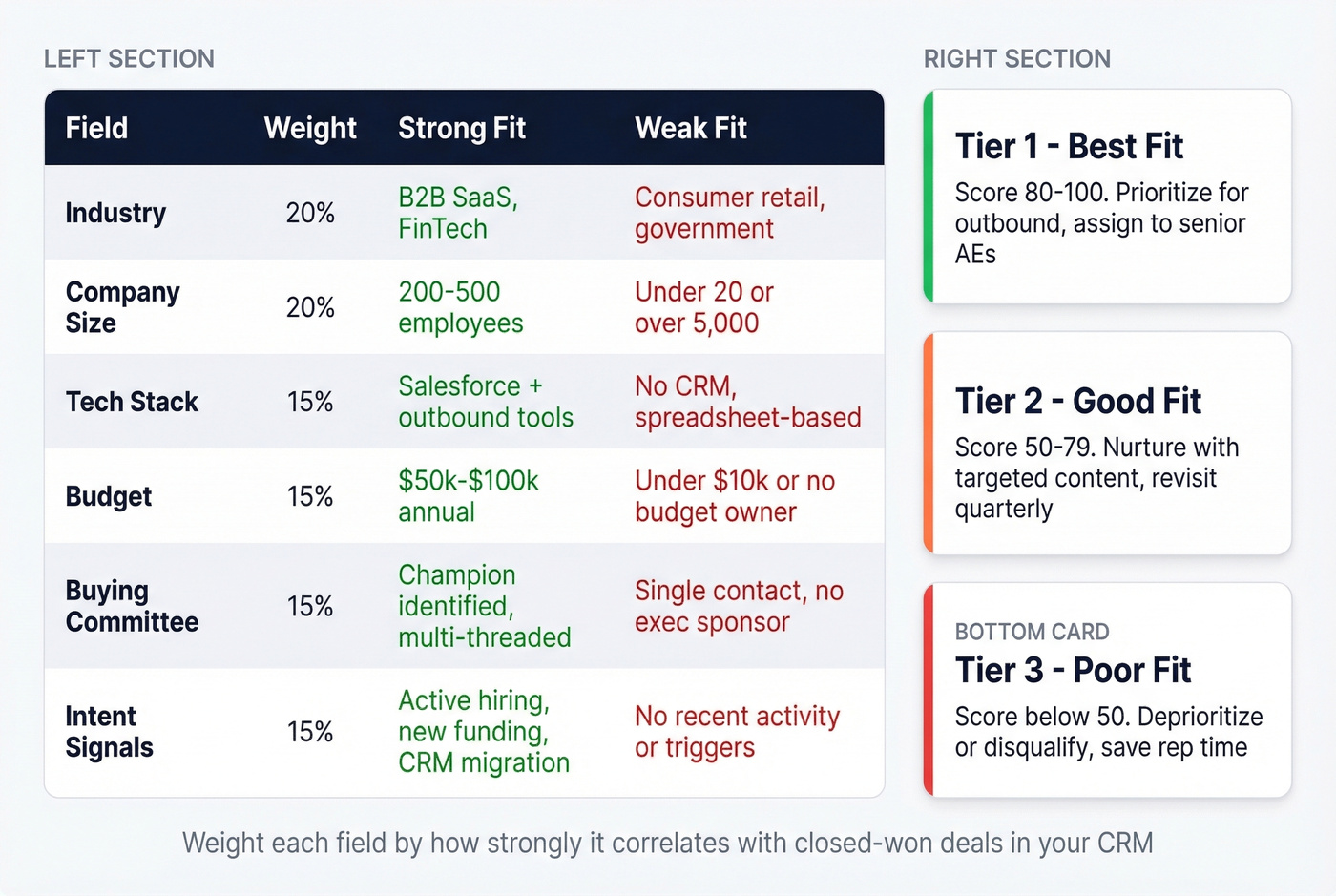
ICP scoring assigns point values to account attributes, producing a single fit score that ranks accounts into tiers. It's different from lead scoring, which tracks individual engagement. ICP scoring answers "is this company a fit?" Lead scoring answers "is this person interested right now?" (More on the mechanics in our lead scoring guide.)
Here's a 100-point rubric:
| Category | Attribute | Points |
|---|---|---|
| Firmographics | Target industry | 0-20 |
| Company size (sweet spot) | 0-15 | |
| Geography | 0-10 | |
| Technographics | Uses complementary CRM | 0-15 |
| Tech stack maturity | 0-10 | |
| Behavioral | Intent signals (pricing page, competitor research) | 0-15 |
| Triggers | Recent funding, hiring surge, leadership change | 0-15 |
Tier A (80-100): Top priority. Route to senior AEs. Personalized outreach. Tier B (50-79): Qualified. Standard sequences. Worth pursuing. Tier C (0-49): Low fit. Nurture only. Don't waste rep time.
In our experience, teams that implement tiered scoring see Tier A win rates running 1.5-2x higher than Tier B, with 15-20% shorter sales cycles. That's not because Tier A accounts are magically better - it's because reps spend their time on accounts that actually match the profile, with messaging tailored to the right buying committee.
Skip the elaborate 100-point model if your deals typically close under $15k. A simple three-question checklist - right industry? right size? right tech stack? - gets you 80% of the value. Save the rubric for deals where the math justifies the overhead.
7 Mistakes That Kill Your Profiles
1. Building on assumptions, not real accounts. The "fairytale persona" problem. If your profiles were built in a brainstorm without CRM data, customer interviews, or sales input, they're fiction. Fix: start with your top 20 closed-won accounts and work backward.
2. Over-indexing on demographics, ignoring firmographics. Age and job title don't predict B2B buying behavior. Industry, company size, tech stack, and growth stage do.
3. Not involving sales and CS. Marketing builds the profile. Sales ignores it. CS never sees it. Fix: co-create with sales from day one. If reps don't recognize the profile as their actual customers, it's wrong.
4. Failing to update. Markets shift. Buying committees change. Tech stacks evolve. A profile built 18 months ago is a historical document, not a targeting tool. Review quarterly at minimum, monthly if you're in a fast-moving market.
5. Ignoring profitability. You can build a profile of customers who respond to every campaign and still lose money. Some segments are responsive but unprofitable - high churn, high support cost, low expansion. Weight your profiles toward customers who drive sustainable revenue, not just engagement.
6. Creating too many personas. Seven personas means seven sets of messaging, content, and sales plays that nobody can maintain. Start with 2-4 ICP segments. Only add more when you can sustain distinct execution for each.
7. Building profiles nobody uses. This is the frustrating one, because it means all the work was wasted. If your sales team has never seen your profiles, they're not profiles - they're marketing homework. Embed them in the CRM, reference them in pipeline reviews, and tie them to lead routing rules.
Tools for Building Customer Profiles
CDP vs. CRM vs. DMP
| Feature | CDP | CRM | DMP |
|---|---|---|---|
| Use case | Unify all customer data | Manage relationships | Audience targeting (ads) |
| Data types | First + third party | First party | Third party (anonymous) |
| Identity resolution | Yes | Limited | No (cookie-based) |
| Examples | Segment, Tealium, Adobe | Salesforce, HubSpot | Oracle BlueKai, Lotame |
| Typical pricing | $1K-$200K+/yr | $0-$300/user/mo | $10K-$100K+/yr |
Let's be honest: CDPs are overkill for 80% of companies building customer profiles. Most teams need a CRM plus a good data source, not a six-figure platform that takes months to implement.
Recommended Tools by Category
B2B Data (to populate profiles):
Your CRM stores the profile; a B2B data platform ensures the data in it is accurate. Prospeo covers this with 300M+ profiles, 98% email accuracy, and a 92% API match rate. The 30+ search filters span technographics, buyer intent across 15,000 topics, headcount growth, and funding signals - exactly the fields that separate actionable profiles from decorative ones. CRM enrichment workflows return 50+ data points per contact, and everything refreshes every 7 days. We've seen teams go from "we think our ICP is mid-market SaaS" to "we know our ICP is 200-500 employee B2B SaaS companies running Salesforce, with Series B+ funding" in an afternoon. Unlike CDPs that cost $50K+/year, Prospeo starts free with 75 emails/month and scales at roughly $0.01 per verified email. (If you're comparing vendors, start with this overview of data enrichment services.)

Mapping buying committees requires verified contact data for every role - decider, payer, blocker. Prospeo's 300M+ profiles with 98% email accuracy and 125M+ verified mobiles mean you can attach real people to every profile, not placeholder titles.
Stop profiling roles. Start reaching the actual people who buy.
CRMs:
HubSpot CRM offers a genuinely useful free tier for storing and organizing profiles. Paid marketing automation plans start around $20/month when you need more than basic CRM functionality. If you're building profiles for the first time, HubSpot gets you there fast. (If you want a broader shortlist, see these examples of a CRM.)
Salesforce typically runs $25-$330/user/month depending on the edition. It's the enterprise standard, but the complexity tax is real - it makes sense when you need custom objects, advanced reporting, or you're already in the ecosystem.
CDPs (if you actually need one):
Segment starts around $120/month and is one of the more accessible CDPs for mid-market teams. Tealium targets enterprise at $1,000-$5,000+/month. Adobe Real-Time CDP runs $50K-$200K+/year and makes the most sense if you're already deep in the Adobe ecosystem.
Customer Intelligence:
Qualtrics runs around $1,500-$5,000+/month and excels at survey-driven customer research - useful for the qualitative side of profile building. ActiveCampaign starts at $15/month and combines email automation with basic customer intelligence, a solid budget option for smaller teams.
Privacy and Compliance
GDPR fines can reach EUR 20M or 4% of global turnover - whichever is higher. CCPA penalties hit $7,500 per intentional violation. And 81% of people believe how an organization treats personal data reflects how it respects them as customers.
GDPR requirements for customer profiling:
- Establish a lawful basis for each data processing purpose - consent, legitimate interest, or contractual necessity
- Consent must be freely given, specific, informed, and unambiguous (no pre-checked boxes, no cookie walls that block access)
- Provide granular consent options by purpose
- Practice data minimization - collect only what's necessary
- Maintain consent records and audit trails
- Honor all eight data subject rights, including access, erasure, and portability
CCPA/CPRA requirements:
- Honor Global Privacy Control browser signals and "Do Not Sell or Share" requirements
- Disclose specific data retention timeframes
- Provide clear opt-out mechanisms for sensitive personal information
Real talk: if you're building B2B customer profiles using a GDPR-compliant data platform and storing them in a major CRM, you're already ahead of most companies. The risk concentrates in teams that scrape data from unvetted sources, buy lists from shady brokers, or collect first-party data without proper consent infrastructure.
How to Operationalize Your Profiles
Building the profile is 30% of the work. Getting your team to use it is the other 70%.
| Asset | Owner | Input From |
|---|---|---|
| ICP / Account profiles | RevOps / Demand Gen | Sales, CS, Finance |
| Buyer personas | PMM / Content | Sales, CS |
| Scoring rubric | RevOps | Sales leadership |
The KPIs that matter: win rate in target segments, average contract value by tier, stage conversion rates, and outbound reply rates. If Tier A accounts aren't converting better than Tier B, your scoring rubric needs recalibration - or your profiles don't reflect reality (track it like a pipeline health problem, not a vibes problem).
Review quarterly at minimum, monthly for fast-moving markets. Each review should ask three questions: Are our best new customers still matching the profile? Have any new patterns emerged in closed-lost deals? Has the competitive landscape shifted our buyers' priorities?
The single most effective operationalization move we've seen? Link your customer profiles directly to lead routing rules in your CRM. When a new inbound lead matches a Tier A profile, it routes to a senior AE with the relevant battle card attached. That's a profile doing work - not collecting dust.
FAQ
How often should you update customer profiles?
Quarterly at minimum, monthly in fast-moving markets like SaaS or fintech. Set a calendar reminder and assign a specific owner - profiles without governance decay within one or two quarters.
What's the difference between a customer profile and a buyer persona?
A customer profile describes real accounts or customer types based on actual purchase data and firmographics. A buyer persona is a semi-fictional representation of a specific role within that profile, used to guide messaging. Multiple personas typically map to a single profile.
How many profiles should a company maintain?
Start with 2-4 ICP segments. Only add more when you can sustain distinct messaging, targeting, and sales plays for each. Seven profiles with identical execution just creates confusion and dilutes focus.
What's the best free tool for building B2B customer profiles?
HubSpot CRM's free tier handles storage and organization. For populating profiles with accurate data, Prospeo's free plan includes 75 verified emails per month with 30+ search filters - enough to validate your first two or three segments without spending a dollar.
Do small businesses need customer profiles?
Yes. Even a one-page document capturing your best customers' industry, company size, pain points, and buying triggers will sharpen every marketing and sales decision. A spreadsheet and honest conversations with your first 10 customers gets you 80% of the way there.