

Email Blasts in 2026: The Practitioner's Guide to Sending Mass Email Without Destroying Your Domain
You hit send on a 15,000-person blast. Two hours later, the dashboard shows an 8% open rate, 347 bounces, and your ESP is flagging your account. The campaign you spent a week building just torched your sender reputation - and you won't fully recover for months.
That's not a hypothetical. The global average inbox placement rate sits at 83.5%, according to the Validity Benchmark Report. Roughly 1 in 6 legitimate marketing emails never reaches the inbox. For senders who skip authentication and list hygiene, the number is far worse. Email blasts still work - but only if you respect the infrastructure that delivers them.
What You Need (Quick Version)
Mass email still produces some of the highest ROI in marketing. But the rules changed hard in 2024, and most senders haven't caught up. Three things determine whether your blast lands in inboxes or spam:
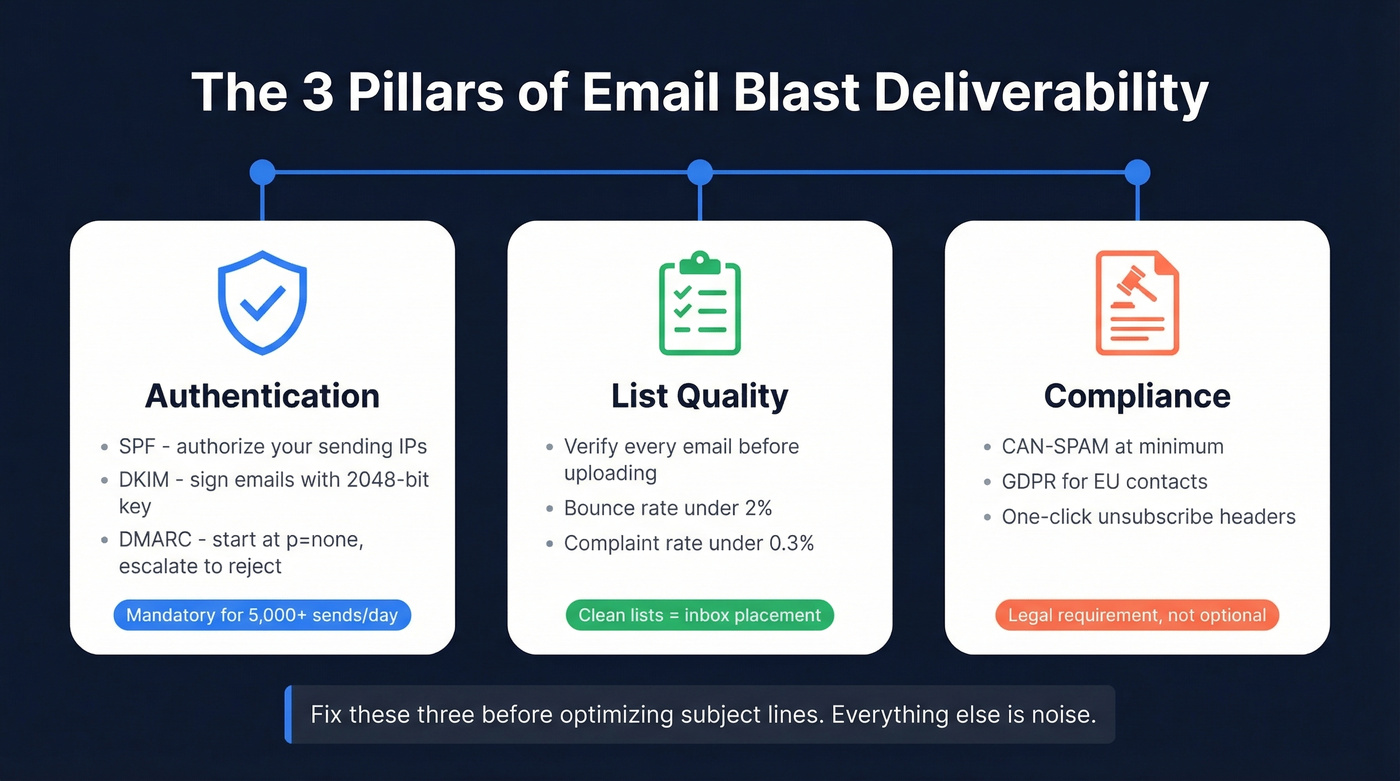
- Authentication - SPF, DKIM, and DMARC are mandatory for bulk senders (5,000+ emails/day). Gmail, Yahoo, and Microsoft enforce this.
- List quality - verified emails, bounce rates under 2%, complaint rates under 0.3%. (If you need a deeper breakdown, start with bounce rates.)
- Compliance - CAN-SPAM at minimum, GDPR if you're touching EU contacts.
Skip the subject-line optimization advice until you've nailed those three. Everything below is the full playbook.
What Is an Email Blast?
An email blast - also called a broadcast email, e-blast, blanket email, or bulk send - is a single message sent to your entire list or a large segment at once. Everyone gets the same content at the same time. Think product launch announcements, flash sale promotions, monthly newsletters, or company updates.
The term carries baggage. "Blast" sounds aggressive, and marketers have spent years trying to rebrand it as "broadcast" or "campaign send." But if you're sending the same email to 10,000 people at once, it's a blast. The word isn't the problem - lazy execution is.
Blasts are distinct from drip campaigns, which are automated sequences triggered over time, and behavioral automations, which fire based on specific user actions. The key distinction: a blast is a one-time, one-to-many send, not a personalized sequence. If you're wondering how an email campaign differs, it's a broader term that can encompass blasts, drips, and automations under one strategic umbrella.
Here's our editorial position: blasts aren't dead. The senders getting 8% open rates are the ones uploading unverified lists, skipping authentication, and sending generic content to everyone. The senders getting 35%+ open rates are doing the work outlined below.
Why They Still Work
The ROI numbers for email marketing are almost absurdly good. Litmus's 2025 State of Email data shows that 35% of companies see a $10-$36 return for every $1 spent on email. Another 30% see $36-$50 per dollar. And 5% report returns exceeding $50 per dollar spent.
What's telling is that 21% of companies still don't measure email ROI at all, down from 36% in 2023. The channel is so reliable that a fifth of businesses just send and assume it's working.
The legitimate use cases for mass emails haven't changed: product launches, time-sensitive promotions, company announcements, event invitations, and newsletters. These are moments where you need to reach your entire audience simultaneously. No drip campaign replaces a flash sale announcement that expires in 48 hours.
Blasts vs. Drip Campaigns vs. Automations
These three get conflated constantly. Let's break it down.
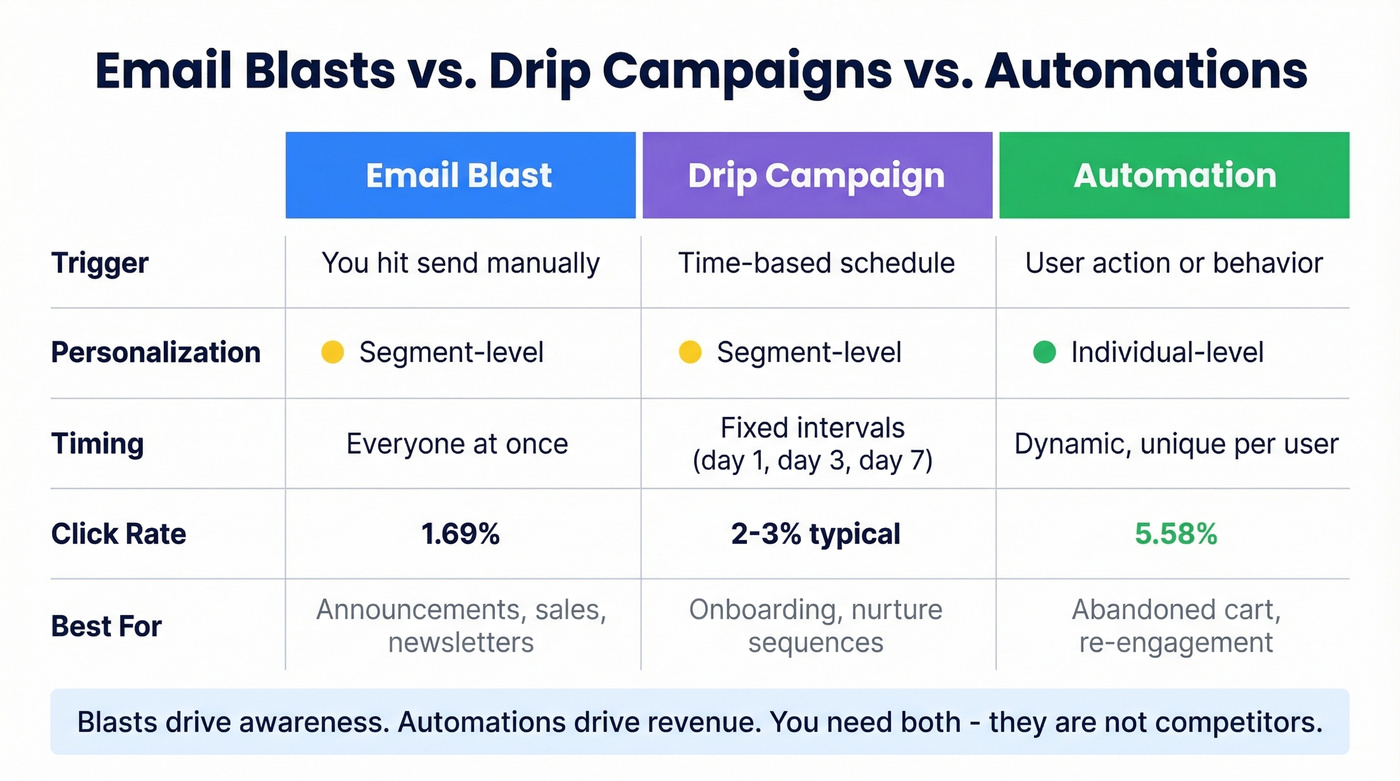
| Email Blast | Drip Campaign | Automation | |
|---|---|---|---|
| Trigger | Manual (you hit send) | Time-based schedule | Behavior/action-based |
| Personalization | Segment-level | Segment-level | Individual-level |
| Timing | Everyone at once | Fixed intervals | Dynamic, per user |
| Best for | Announcements, sales, newsletters | Onboarding, nurture | Abandoned cart, re-engagement |
The performance gap between blasts and automations is real. Klaviyo's benchmark data from 183,000+ ecommerce customers shows that automated flows generate roughly 41% of email revenue from just 5.3% of total sends. Flows also deliver click rates of 5.58% versus 1.69% for campaigns - about 3x higher.
The takeaway isn't that blasts are bad. Blasts drive awareness and automations drive revenue. You need both. A blast announces your Black Friday sale. An automation recovers the cart someone abandoned during it. Treating them as competitors misses the point entirely.
A practical segmentation rule for blasts: include anyone who opened or clicked in the last 30 days, plus subscribers added in the last 15 days who haven't had a chance to engage yet. If your open rate drops below 20%, tighten the segment. (For more on targeting, see targeted email campaigns.)

You just read that bounce rates above 2% destroy sender reputation. Prospeo's 5-step verification catches spam traps, honeypots, and catch-all domains before they torch your domain - at 98% accuracy and roughly $0.01 per email.
Clean your blast list in 10 minutes. Keep your domain off the blacklist.
How to Send a Mass Email Blast
Seven steps, in order. Skip any of them and you're gambling with your domain reputation.
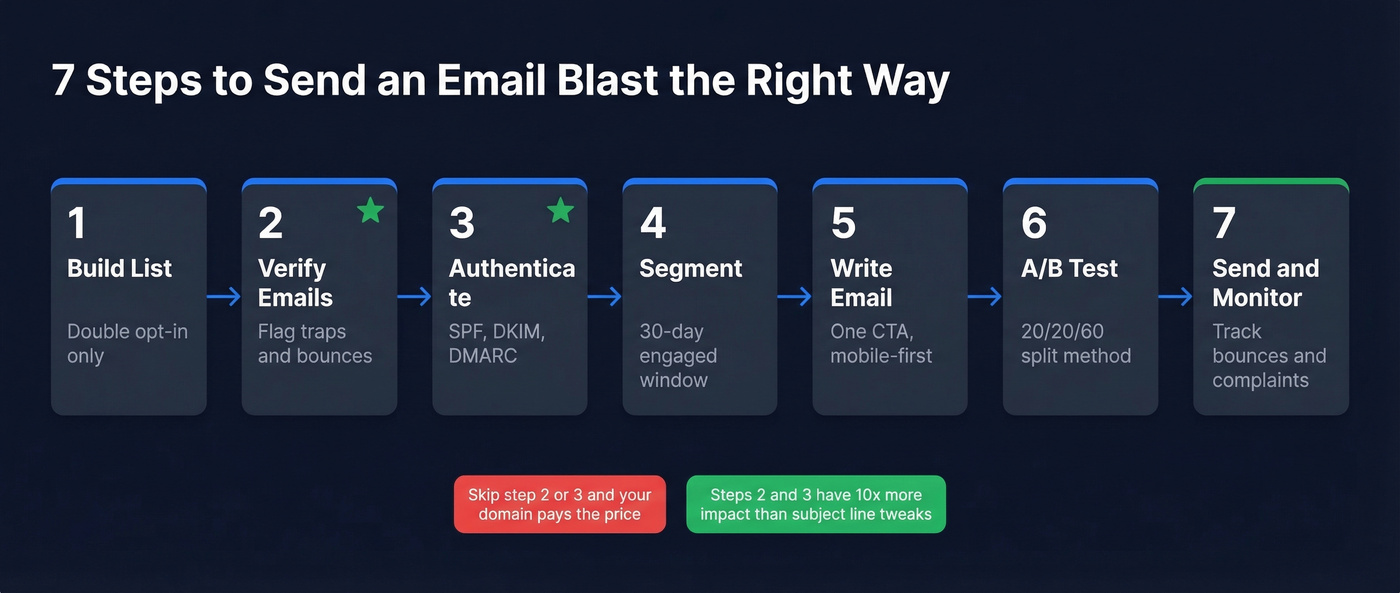
Step 1: Build a Permission-Based List
Every successful blast starts with a list of people who actually agreed to hear from you. Double opt-in is the gold standard - the subscriber enters their email, then confirms via a link in a verification email. It adds friction, but it eliminates typos, bots, and people who'll mark you as spam on the first send.
Purchased lists are domain-reputation time bombs. We've seen teams import bought lists with bounce rates high enough to get blacklisted on the first send. That trade-show list you scanned at a booth last month? It's better than a purchased list, but it still needs verification before it goes anywhere near your ESP.
Step 2: Clean and Verify Every Email
This is the step most senders skip, and it's the one that matters most. Before you upload any list to an ESP, verify every address. Prospeo checks emails in real time with 98% accuracy and flags catch-all domains, spam traps, and honeypots through a proprietary 5-step verification process. A 10-minute verification step is the difference between a 2% bounce rate and a 20% bounce rate. (If you're comparing tools, start with email reputation tools.)
The proof is in the numbers: Meritt, an outbound agency, dropped their bounce rate from 35% to under 4% after switching to Prospeo for list verification. List cleaning typically costs $0.003-$0.01 per email - a rounding error compared to the cost of a blacklisted domain.
Step 3: Set Up Authentication
SPF, DKIM, and DMARC aren't optional anymore. Gmail and Yahoo began enforcing these for anyone sending 5,000+ emails per day in February 2024. Microsoft followed with similar requirements for Outlook.com, Hotmail, and Live in May 2025.
The technical checklist:
- SPF: Publish a DNS record listing your authorized sending IPs. Stay under 10 DNS lookups - that's a hard limit.
- DKIM: Sign outgoing emails with a 2048-bit RSA key. Your ESP handles key generation, but you need to add the DNS record. (If you want to validate setup, see how to verify DKIM is working.)
- DMARC: Start with
p=noneand aruareporting address so you can see who's sending as your domain. Once you've confirmed all legitimate sources pass, escalate toquarantine, thenreject. (More detail: DMARC alignment.) - BIMI (bonus): Once you're at DMARC
p=quarantineorp=reject, you can implement BIMI to display your brand logo next to emails in supported inboxes. It requires a Verified Mark Certificate at roughly $1,500/year - overkill for most small senders, but worth it for enterprise brands sending millions monthly.
Also on the checklist: RFC 5322 compliance, PTR/rDNS records for your sending IPs, and TLS encryption for email transmission. Mailbox providers expect all of this from bulk senders.
Step 4: Segment Your Audience
Even a broadcast benefits from basic segmentation. At minimum, separate engaged subscribers from dormant ones using the 30-day open/click window mentioned above. Sending to your full list including people who haven't opened in a year is a fast track to spam complaints.
Other useful segments: customers vs. prospects, geography for timezone-optimized sends, and engagement tiers separating VIPs from casual subscribers. You don't need 47 segments. Three or four meaningful ones will improve your open and click rates noticeably. (If you're building a system, use an ideal customer profile to guide segmentation.)
Build exclusion rules too: remove contacts who soft-bounced recently and anyone who purchased in the last couple of days. They don't need a promo email the day after buying.
Step 5: Write and Design the Email
Keep it focused. One clear subject line at 40-60 characters, a preheader that complements rather than repeats the subject, and a single primary CTA. Mobile-responsive design is mandatory - include a plain-text fallback for email clients that strip HTML. (If you do want examples later, use these email subject line examples.)
Look, every competitor article over-invests in subject line advice. Authentication and list quality have 10x more impact on whether your email gets seen than whether you used an emoji in the subject line.
Step 6: Test Before You Send
A/B test before you send to the full list. A clean, proven setup: send version A to 20% of recipients, version B to 20%, then after 6 hours send the remaining 60% to the winner.
Send seed tests to Gmail, Outlook, and Yahoo accounts to check rendering and inbox placement. Preview across devices - what looks great on desktop can break on a 5-inch screen. This step takes 30 minutes. Skipping it to save time is how you discover rendering issues after 15,000 people have already seen the broken version.
Step 7: Send, Monitor, Iterate
If you're sending from a new domain or IP, warm it up first. Start at 5-10 emails per day and ramp over 4-6 weeks. Jumping straight to 10,000 sends on a fresh domain is how you end up on a blacklist before your first real campaign. (More on safe ramping: email velocity.)
Once you're sending at volume, track three numbers closely: bounce rate (keep under 2%), spam complaint rate (keep under 0.3%, target under 0.1%), and unsubscribe rate. Implement one-click unsubscribe headers per RFC 8058 and honor requests within 2 days - this is a mailbox-provider requirement, not a suggestion.
Use a custom tracking domain via CNAME to avoid sharing reputation with other senders on your ESP's default domain. (Setup details: tracking domain.)
Benchmarks by Industry
Knowing what "good" looks like prevents you from panicking over a perfectly normal 31% open rate. Here are the Mailchimp benchmarks based on billions of emails sent to campaigns with 1,000+ subscribers:
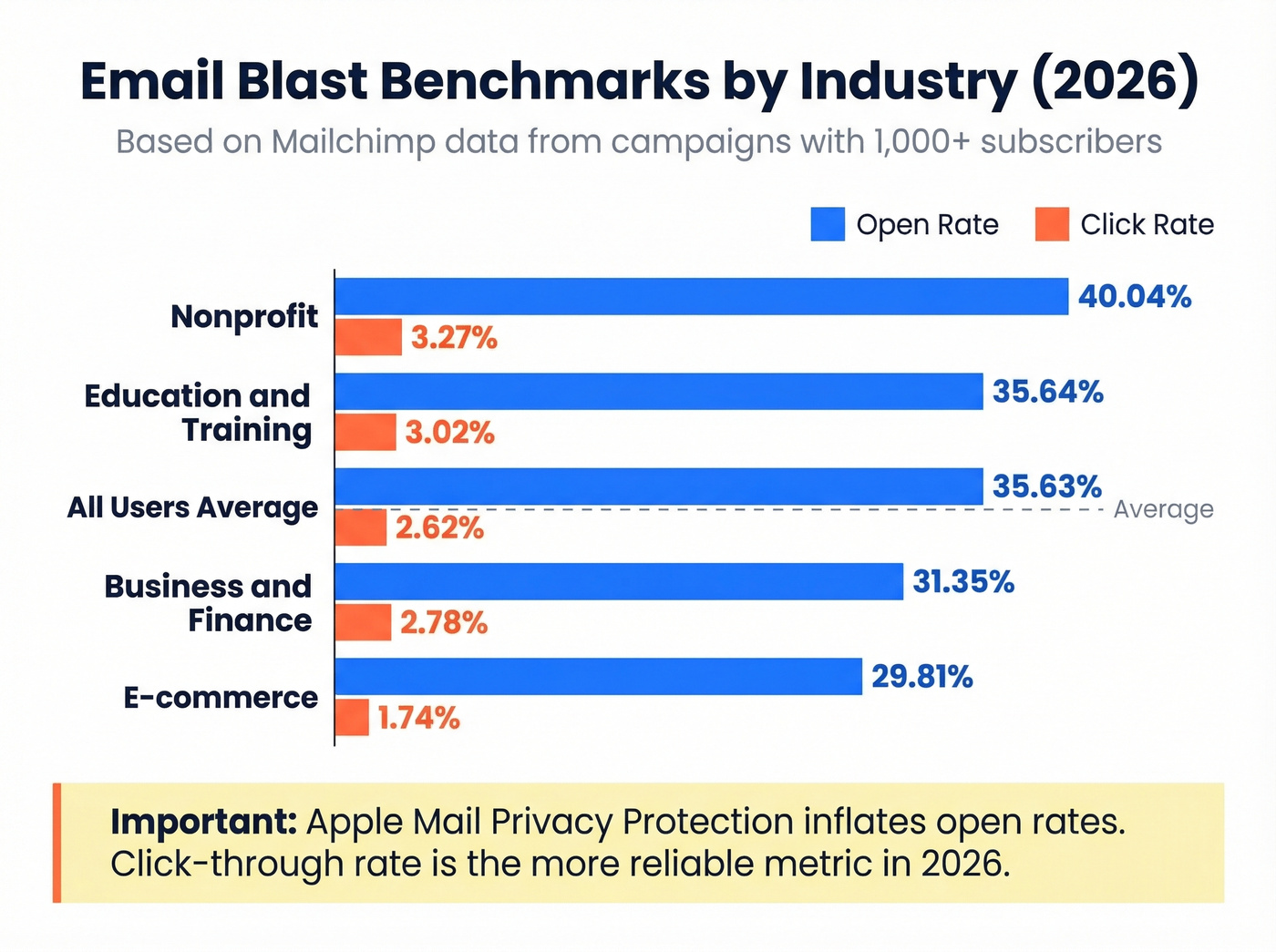
| Industry | Open Rate | Click Rate | Unsubscribe |
|---|---|---|---|
| Business & Finance | 31.35% | 2.78% | 0.15% |
| Nonprofit | 40.04% | 3.27% | 0.18% |
| Education & Training | 35.64% | 3.02% | 0.18% |
| E-commerce | 29.81% | 1.74% | 0.19% |
| All Users | 35.63% | 2.62% | 0.22% |
One important caveat: Apple Mail Privacy Protection pre-fetches tracking pixels, which inflates open rates for Apple Mail users. If a significant portion of your audience uses Apple devices, your real open rate is lower than what your dashboard shows. Click-through rate is a more reliable engagement metric in 2026. (If you want to calculate it precisely, use this click rate formula.)
Hot take: If your open rate is significantly below these benchmarks, the problem is almost certainly deliverability - not your subject lines. I've watched teams spend weeks A/B testing subject line copy when a single afternoon fixing their DMARC record would have moved the needle 10x. Fix the infrastructure before you start optimizing creative.
Mistakes That Kill Your Blasts
These are the patterns we see repeatedly in teams with deliverability problems. Most are preventable in under an hour.
Sending to unverified lists. If you imported a trade-show list, scraped contacts, or haven't cleaned your database in 6+ months, verify before you send. A 10-minute verification run catches the spam traps and dead addresses that would otherwise tank your sender score. (If you're already in trouble, start with spam trap removal.)

No SPF/DKIM/DMARC authentication. This was optional before 2024. It's not anymore. Gmail, Yahoo, and Microsoft will throttle or reject unauthenticated bulk messages.
Using Gmail or Outlook for bulk sends. Your personal inbox isn't a mass email platform. You're one send away from getting your domain blacklisted - and that affects every email your company sends, including sales outreach and customer support. Mass mailing requires dedicated infrastructure, not a consumer inbox.
Ignoring complaint rates. The 0.3% threshold isn't a guideline. It's a hard line. Exceed it consistently and mailbox providers will route your emails to spam automatically. In our experience, most deliverability disasters trace back to complaint rates, not content.
Buying email lists. There's no shortcut here. Purchased lists contain spam traps, dead addresses, and people who'll report you on sight. The $500 you spent on 50,000 "verified" contacts will cost you $5,000+ in domain recovery. The consensus on r/coldoutreach is unanimous: bought lists are the fastest way to destroy a domain. (If you're considering it anyway, read is it illegal to buy email lists.)
No unsubscribe mechanism. Beyond being a legal requirement under CAN-SPAM, GDPR, and CASL, a missing unsubscribe link forces frustrated recipients to hit the spam button instead. That's worse for your reputation than losing a subscriber.
Meritt cut their bounce rate from 35% to under 4% and tripled their pipeline to $300K/week - all by verifying every email before sending. Prospeo's proprietary infrastructure refreshes data every 7 days, so your blast list is never stale.
Stop gambling your domain reputation on unverified lists.
Legal Compliance: CAN-SPAM, GDPR, CASL
Here's the thing most marketers get wrong about compliance: CAN-SPAM applies to B2B email too. It covers all commercial messages, not just consumer marketing. Each non-compliant email can cost you up to $53,088 in FTC penalties.
| CAN-SPAM (US) | GDPR (EU) | CASL (Canada) | |
|---|---|---|---|
| Consent | Opt-out | Explicit opt-in | Express opt-in (or implied in limited cases) |
| Max Penalty | $53,088/email | EUR 20M or 4% turnover | $10M CAD |
| Unsubscribe | 10 business days | Without delay | 10 business days |
| Scope | All commercial email | EU residents' data | Messages to/from Canada |
CAN-SPAM's seven core requirements: no false or misleading header information; no deceptive subject lines; identify the message as an advertisement; include your valid physical postal address; provide a clear opt-out mechanism that works for 30 days after sending; honor opt-out requests within 10 business days; and monitor what third parties do on your behalf - you're liable for their sends.
If you're sending internationally, GDPR is the stricter standard. It requires prior explicit consent, not just an unsubscribe link, and pre-checked opt-in boxes don't count. You must also log when and how each subscriber consented - timestamp, source, and the specific language they agreed to. If you can't produce this record on request, the consent is legally worthless. The safest approach for global senders: build to GDPR standards and you'll be compliant everywhere. The FTC's CAN-SPAM compliance guide, GDPR official text, and CASL guidelines from the CRTC are worth bookmarking if you're building compliance processes from scratch.
Best Email Blast Services
Quick picks: Best value overall - MailerLite. Best free tier for blast-heavy senders - Brevo. Best for ecommerce - Klaviyo.
| Tool | Free Tier | ~1,000 Subs | ~10,000 Subs | Best For |
|---|---|---|---|---|
| Brevo | 300 emails/day | ~$17/mo | ~$29/mo | High-volume blasts (send-based) |
| MailerLite | 1,000 subs | ~$15/mo | ~$73/mo | Small business value (contact-based) |
| Klaviyo | Yes | ~$30-$60/mo | ~$100+/mo | Ecommerce (contact-based) |
| Mailchimp | Free up to 500 contacts / 1,000 sends | ~$13-$26/mo | ~$80-$120/mo | Brand recognition (contact-based) |
| Constant Contact | Trial (30 days) | ~$12-$35/mo | ~$80-$150/mo | Beginners (contact-based) |
| SendGrid | Start for free | ~$20/mo | ~$40+/mo | Developers (send-based) |
Brevo stands out for blast-heavy senders because you pay for email volume, not list size. A 50,000-person list costs the same as a 5,000-person list if you're sending the same number of emails. The free tier gives you 300 emails per day, which is genuinely usable for small operations. The platform isn't as polished as Klaviyo for ecommerce automations, but for pure broadcast sending, it's the most predictable pricing in the category. If you're running a large newsletter and only blasting twice a month, Brevo's send-based model saves you hundreds compared to contact-based alternatives that charge you for every dormant subscriber sitting in your database.
MailerLite is the best overall value for small businesses that need a clean, capable ESP without enterprise complexity. At $15/mo for 1,000 subscribers, it's hard to beat. The editor is intuitive, deliverability is solid, and the free tier covers up to 1,000 subscribers with 12,000 monthly sends. The jump to $73/mo at 10,000 subscribers is where contact-based pricing starts to sting.
Klaviyo dominates ecommerce for good reason - its flow builder and Shopify integration are best-in-class. But it's expensive, and if you're not running an ecommerce store, you're paying for features you'll never use. Skip this one unless you're selling products online.
Mailchimp has name recognition going for it. The free plan caps at 500 contacts and 1,000 sends per month - that's a trial, not a free tier. Paid plans are often more expensive than MailerLite and Brevo for comparable features. (If you're troubleshooting, see Mailchimp deliverability issues.)
Constant Contact is fine for absolute beginners who want phone support. It's overpriced for what you get.
SendGrid is the pick for developers who want API-first email sending without a drag-and-drop editor. Send-based pricing keeps costs predictable for teams sending bulk mail at scale.
Budget picks: Even cheaper options exist. Zoho Campaigns starts at $7/mo, Sender at $10/mo, and EmailOctopus at $13.50/mo for 1,000 subscribers - all capable for basic broadcasts.
Hidden costs to budget for: Plan on 20-30% on top of platform fees for list cleaning ($0.003-$0.01 per email), template design, and compliance tooling. A $50/mo ESP bill is really a $65/mo email marketing bill once you account for the ecosystem around it.
Contact-based pricing punishes list growth - every new subscriber costs you money whether they engage or not. Send-based pricing from Brevo and SendGrid is more predictable for blast-heavy senders who maintain large lists but send periodically.
FAQ
How often should you send email blasts?
Most brands send 1-4 blasts per month. More than weekly risks subscriber fatigue and rising unsubscribe rates. Monitor your unsubscribe rate - if it exceeds 0.3%, reduce frequency or tighten segmentation before the next send.
Is sending email blasts legal?
Yes, in most jurisdictions - with strict rules. CAN-SPAM requires an unsubscribe mechanism and physical postal address. GDPR requires prior explicit opt-in consent. Violations carry penalties up to $53,088 per email (US) or EUR 20M (EU). B2B email is covered under CAN-SPAM too.
What's a good open rate for a blast?
The all-industry average is roughly 35.6% based on Mailchimp's benchmark data. Apple Mail Privacy Protection inflates this by pre-fetching tracking pixels. Click-through rate - averaging 2.62% across industries - is a more reliable engagement metric in 2026.
How do you keep bulk email out of spam?
Authenticate your domain with SPF, DKIM, and DMARC. Verify your list before sending to keep bounces under 2%. Maintain complaint rates under 0.3%. Run every list through a verification tool before uploading to your ESP - it's the single highest-leverage step you can take.
What's the difference between a blast and a drip campaign?
A blast sends one message to your entire list simultaneously - ideal for announcements and promotions. A drip campaign delivers a pre-built sequence of messages over days or weeks, triggered by a signup or action. Blasts drive broad awareness; drips nurture individual prospects through a journey.
Email blasts work when the infrastructure behind them is solid. Get authentication, list quality, and compliance right, and the creative side takes care of itself. The senders who treat every broadcast as a deliverability exercise - not just a content exercise - are the ones consistently landing in inboxes.