

Email Introduction Templates That Actually Get Replies
You send 200 emails. You get 3 replies. Two are unsubscribes.
The template felt good when you wrote it - punchy, personalized, even had a clever subject line. But the results say otherwise, and staring at a 1.5% reply rate after a week of careful writing is genuinely demoralizing.
Cold email isn't dead. Your targeting might be. One outbound operator on r/coldemail reported a 0.3% reply rate with a subject line pulling 68% opens. Same copy, same subject lines - after rebuilding their targeting around intent signals (SDR job postings, founder comments about sales challenges, competitor churn), replies jumped to 17%. The template didn't change. The audience did.
That's the uncomfortable truth about email introduction templates: the copy is a smaller part of your reply rate than most people want to admit. The bigger drivers are reaching the right person, at the right time, with a verified address that actually lands in their inbox. This article focuses on first-touch introductory emails - the hardest to get right and the ones that determine whether a conversation starts at all. You'll get 15+ copy-paste templates and the strategic infrastructure that makes them work.
The Three-Move Playbook
If you're short on time:
- Keep emails under 80 words. Large-scale benchmarks show shorter emails outperform longer ones.
- Verify every address before sending. Keep bounces under 2%. (Also see our email bounce rate benchmarks and fixes.)
- Send Tuesday-Wednesday. Wednesday shows the highest engagement in 2026 benchmark data. (More data in our guide to the best time to send cold emails.)
Templates matter, but they're the last mile. Targeting, data quality, and deliverability are the first 26.
2026 Introduction Email Benchmarks
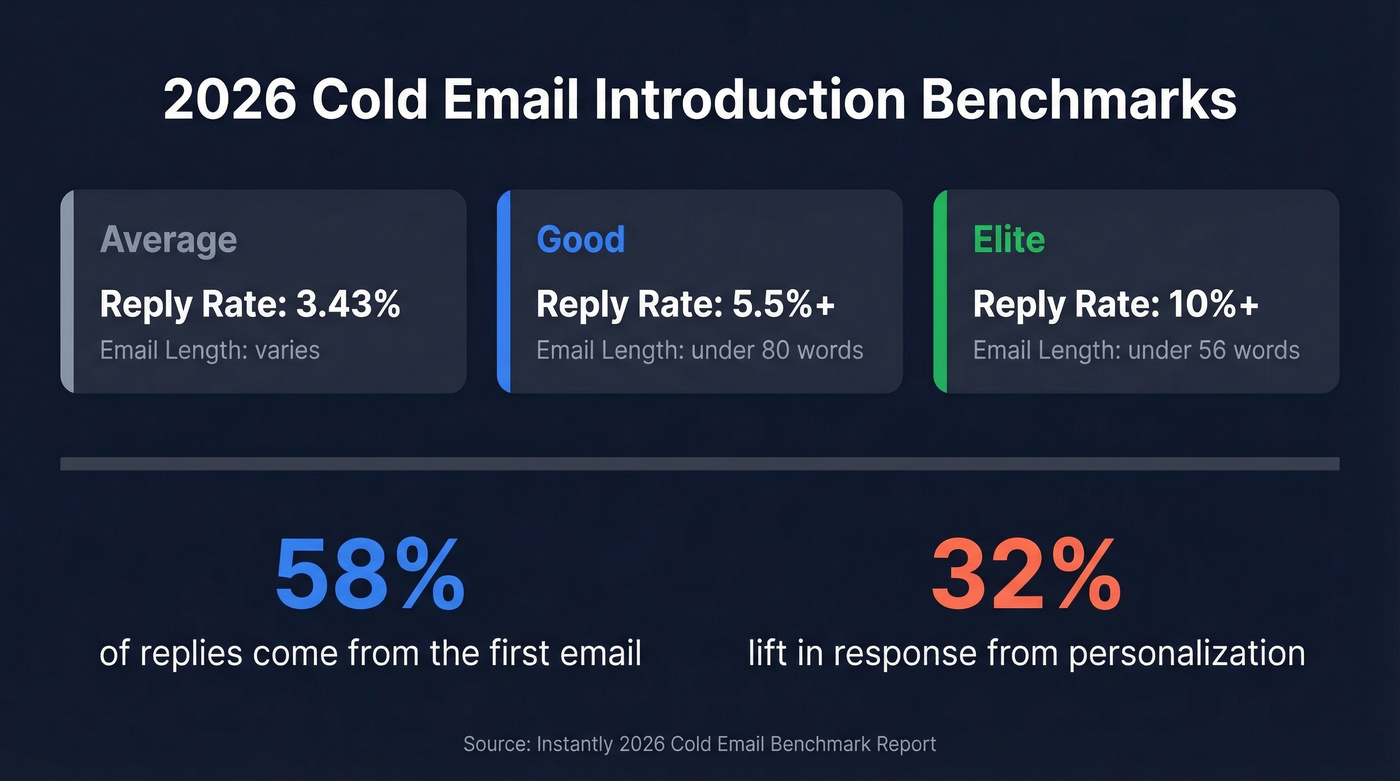
The [Instantly 2026 Cold Email Benchmark Report](https://instantly.ai/cold-email-benchmark-report-2026) aggregated platform-wide data and broke reply rates into tiers:
| Metric | Average | Good | Elite |
|---|---|---|---|
| Reply rate | 3.43% | 5.5%+ | 10%+ |
| Email length | Varies | <80 words | <56 words |
58% of replies come from the first email in a sequence. Follow-ups contribute the remaining 42%. If you're only sending one email and moving on, you're leaving almost half your potential replies on the table (use these sales follow-up templates to round out your sequence).
Reply rates also vary by industry - legal services average around 10%, while IT and SaaS hover closer to 3.5%. Calibrate your expectations accordingly.
Best-performing campaigns keep emails under 80 words and A/B test messaging weekly. The sweet spot for sequence length is 4-7 touchpoints - under 4 quits too early, beyond 7 hits diminishing returns unless each touch adds genuine value. Personalization drives a ~32% lift in response rates, and smaller campaigns (under 50 recipients) average 5.8% response versus 2.1% for blasts over 1,000. Precision beats volume every time.
Anatomy of a Strong Introduction Email
Every introductory email that pulls replies follows the same four-part structure. This pattern showed up across practitioner examples on r/sales and matches what we've seen in our own outreach (especially in AI cold email outreach workflows):
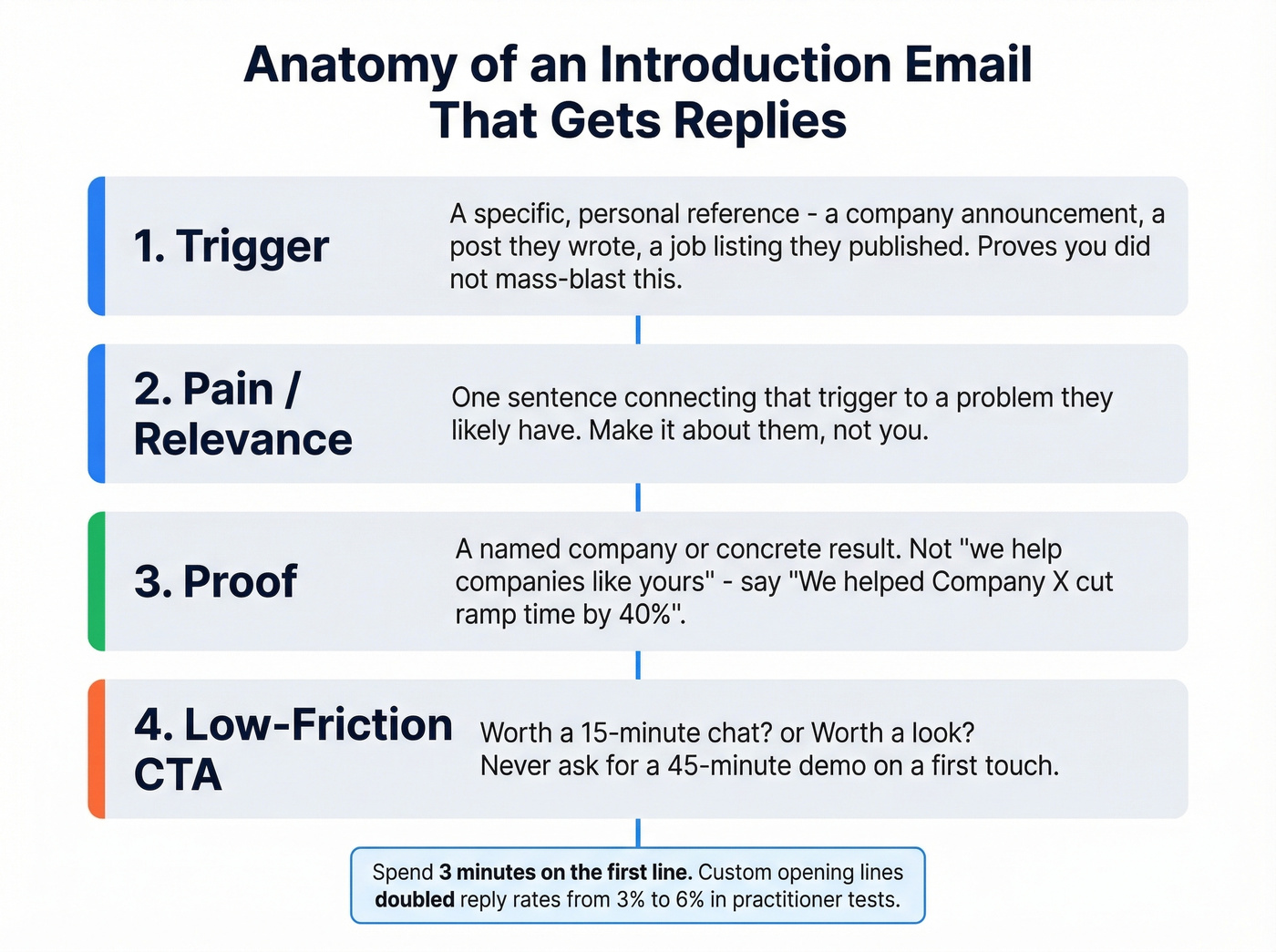
- Trigger - A specific, personal reference that proves you didn't mass-blast this. A company announcement, a post they wrote, a job listing they just published. (If you need a system for this, see how to track sales triggers.)
- Pain/Relevance - One sentence connecting that trigger to a problem they likely have.
- Proof - A named company or concrete result. Not "we help companies like yours" - that's meaningless. "We helped [Company X] cut their ramp time by 40%" is real.
- Low-friction CTA - "Up for a 15-minute chat?" or "Worth a look?" Not "Let me know when you're free for a 45-minute demo." (More examples in our email call to action guide.)
Here's that structure assembled:
Saw you just posted an SDR role - congrats on scaling the team. Most teams we work with hit a wall around month 3 when new reps can't find verified contacts fast enough. We helped [Company] cut rep ramp time from 10 weeks to 4. Worth a quick look?
Spend 3 minutes on that first line. One practitioner who doubled their reply rate (3% to 6%) attributed the biggest gains to writing a custom opening line for every single email - referencing a specific post, announcement, or company detail. That single habit is the difference between a forgettable blast and an introductory email that earns a response.
Subject Lines That Get Opened
Analysis of 85M+ cold emails (citing Gong data) surfaced a few rules that hold up:
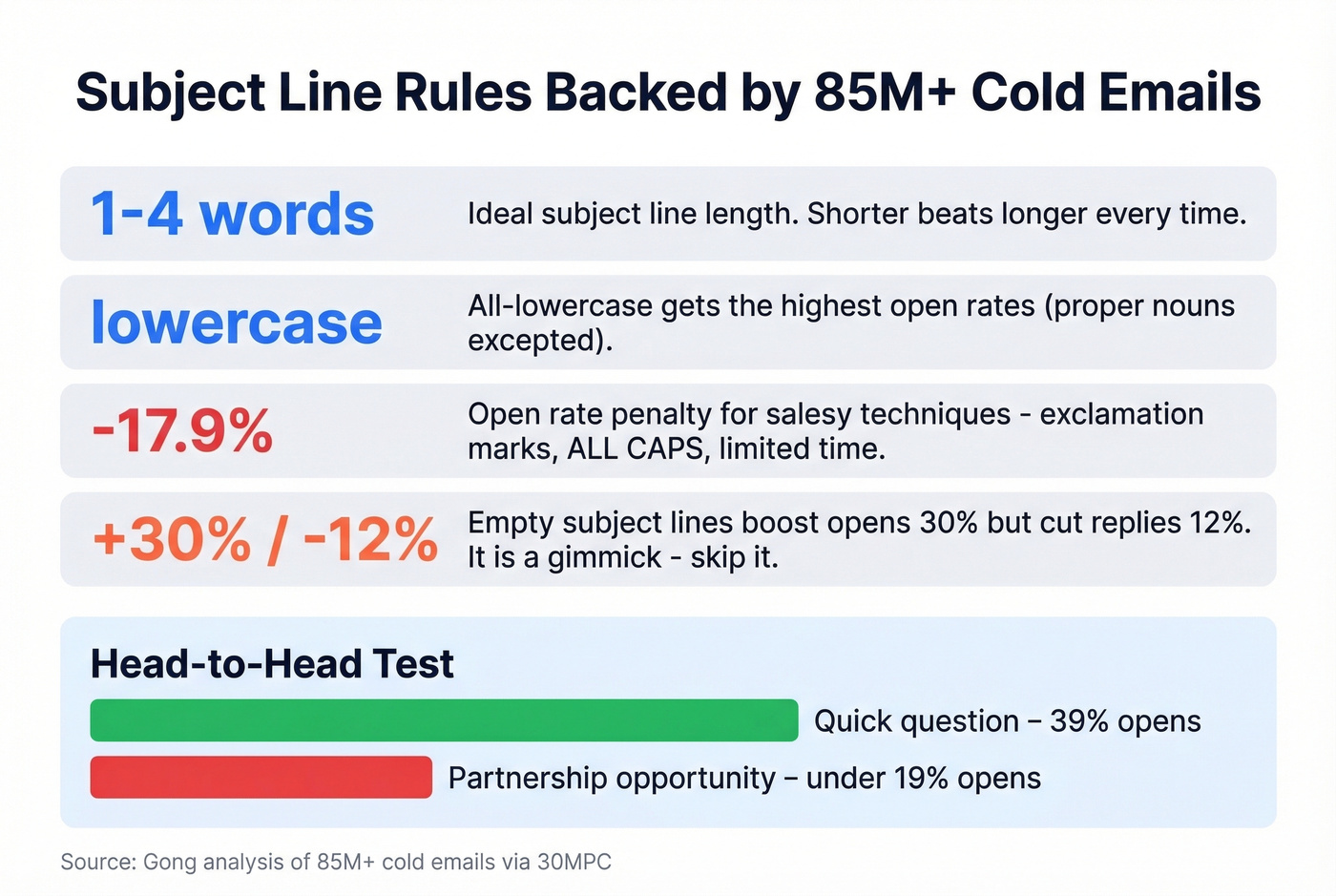
- 1-4 words is the ideal length.
- All-lowercase gets the highest open rates (proper nouns excepted).
- Salesy techniques reduce open rates by up to 17.9%. Exclamation marks, ALL CAPS, "limited time" - all penalties.
- Empty subject lines increase opens by 30% but reduce replies by 12%. It's a gimmick. Skip it.
One practitioner found "Quick question" pulled 39% opens, while "Partnership opportunity" got under 19%. Subject lines that sound like a colleague wrote them outperform ones that sound like a marketer did. If you want more options, pull from these cold email subject line examples.
Subject lines worth testing:
- Quick question
- {{first_name}} - quick thought
- saw your post
- {{company}} + scaling
- idea for {{company}}
- congrats on the round
- re: your SDR hire
- one thing about {{pain point}}
- {{mutual connection}} suggested I reach out
- worth a look?
Don't overthink this. Pick 2-3, A/B test them for a week, and move on. Subject lines are a small part of the outcome. Targeting and relevance do the heavy lifting.
Mistakes That Kill Reply Rates
These come straight from sales practitioners on Reddit, and we've seen every one of them tank campaigns firsthand:
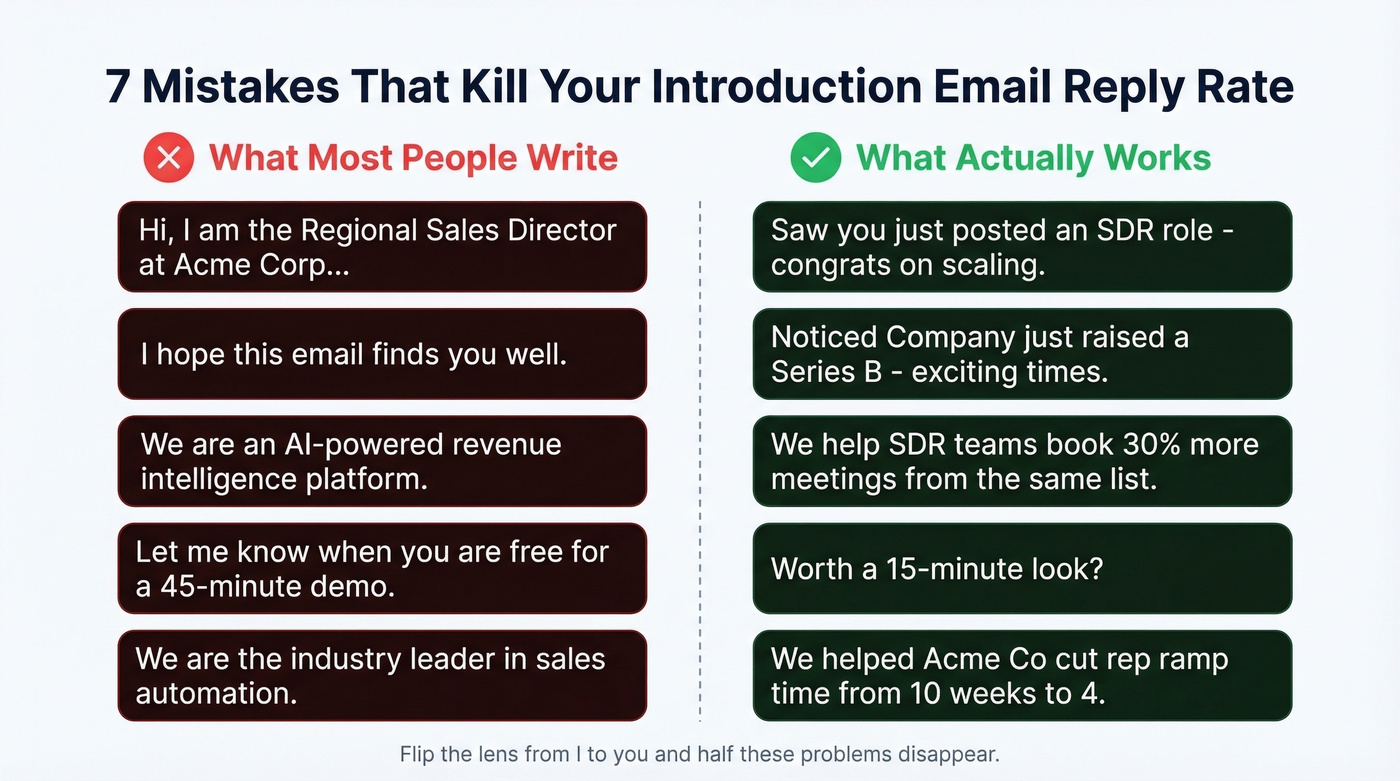
- Saying "I" more than "you." Count the pronouns in your draft. If "I" outnumbers "you," rewrite it.
- Leading with who you are. Nobody cares that you're the Regional Sales Director at Acme Corp. They care about their problem.
- "I hope this email finds you well." It finds them annoyed. Delete this line forever.
- No context for why you're reaching out. If the recipient can't figure out why they specifically got this email within 5 seconds, it's getting archived.
- Describing what you do instead of how you help. "We're an AI-powered revenue intelligence platform" means nothing. "We help SDR teams book 30% more meetings from the same list" means everything.
- No clear CTA. If you don't ask for something specific, you won't get anything.
- Unjustified "we're the best" claims. Saying "we're the industry leader" without proof is the fastest way to sound like spam.
Most of these mistakes come from writing the email about yourself instead of about the recipient. Flip the lens and half these problems disappear.

The article said it clearly: targeting and data quality matter more than copy. Prospeo gives you 300M+ profiles with 98% email accuracy and a 7-day refresh cycle - so your perfectly crafted introduction actually reaches a real inbox. Keep bounces under 2% without the manual verification grind.
Stop writing great emails to dead addresses.
Cold Sales Introduction Templates
Trigger-Based Outreach
Subject: saw your {{trigger}}
Hi {{first_name}},
Noticed {{company}} just {{specific trigger - new hire, funding round, product launch}}. When that happens, most teams run into {{specific pain}}.
We helped {{proof company}} solve that - {{concrete result}}.
Worth a 15-minute look?
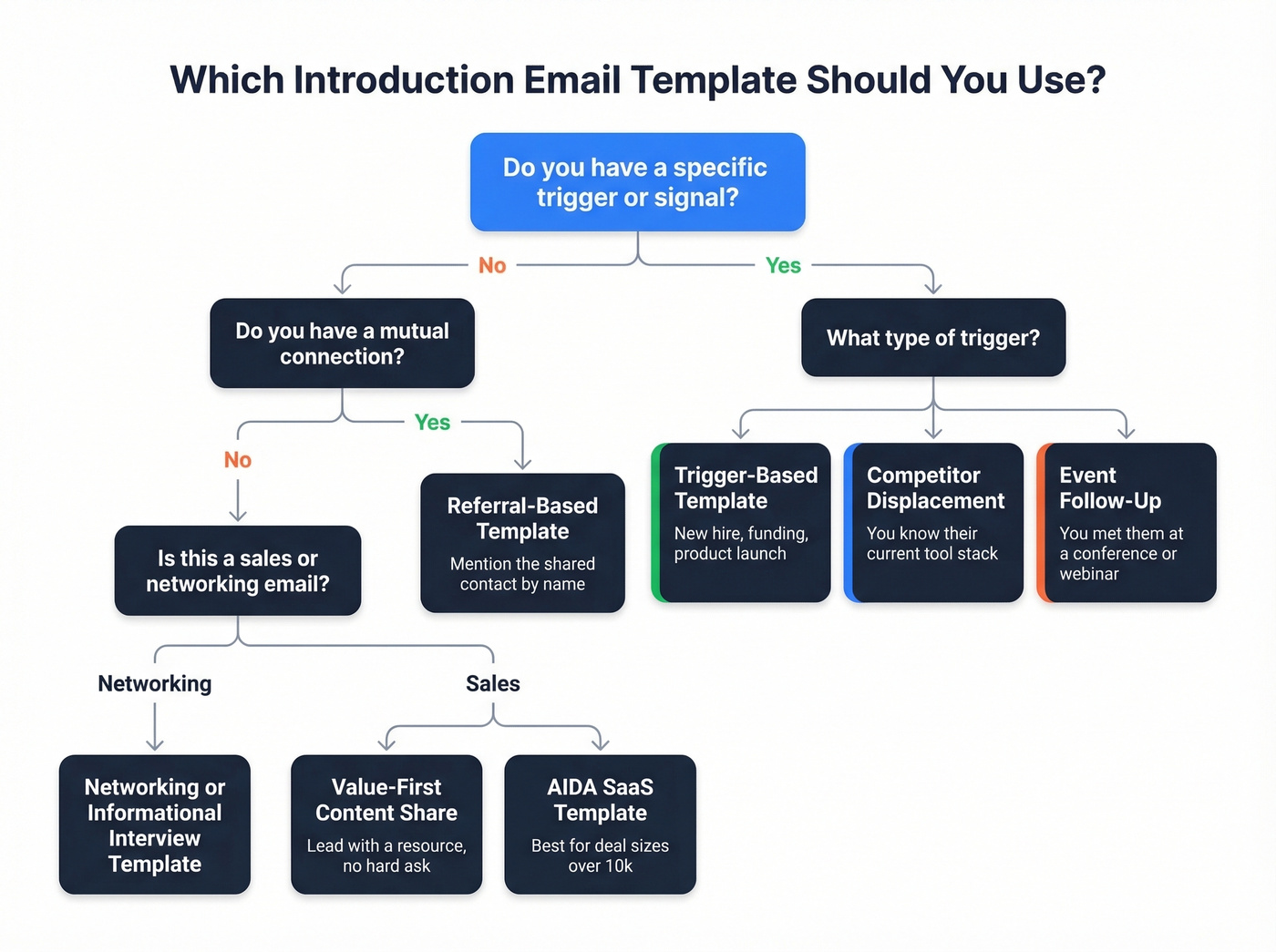
This is your workhorse template. The trigger proves relevance; the proof makes it credible.
Referral-Based Introduction
Subject: {{mutual connection}} suggested I reach out
Hi {{first_name}},
{{Mutual connection}} mentioned you're working on {{initiative}}. We helped their team {{result}} - thought it'd be relevant for {{company}} too.
Open to a quick chat this week?
Referral intros typically outperform cold outreach. Even a loose connection beats no connection.
Competitor Displacement
Subject: quick thought on {{competitor tool}}
Hi {{first_name}},
Saw {{company}} is using {{competitor}}. A few teams have switched to us recently because {{specific pain with competitor - cost, data quality, contract lock-in}}.
{{Proof company}} made the switch and saw {{result}}.
Worth comparing?
Use this sparingly and only when you have genuine intel on their current stack. Job postings and technographic data are gold here (and pair well with firmographic and technographic data filters).
Event Follow-Up
Subject: good meeting you at {{event}}
Hi {{first_name}},
Enjoyed our conversation at {{event}} about {{topic}}. You mentioned {{specific pain or goal}} - that's exactly what we help with.
{{Proof company}} saw {{result}} after working with us. Happy to share how.
Free for 15 minutes next week?
Value-First / Content Share
Subject: thought you'd find this useful
Hi {{first_name}},
We just published {{resource - case study, benchmark, template}} on {{topic relevant to their role}}. Given what {{company}} is doing with {{initiative}}, figured it'd be worth a look.
{{Link}}
Happy to walk through the highlights if useful.
No ask, just value. This works well as a first touch in a multi-step sequence (see a full B2B cold email sequence build).
SaaS-Specific (AIDA Framework)
Subject: {{company}}'s outbound pipeline
Hi {{first_name}},
Most SaaS teams scaling from 5 to 20 reps hit the same wall: outbound pipeline doesn't scale linearly with headcount.
{{Proof company}} increased booked meetings by 22% just by restructuring their outreach sequences - no extra reps, no extra tools.
Want to see what their cold email flow looked like? Happy to send over the breakdown.
The AIDA framework (Attention, Interest, Desire, Action) drives strong engagement for SaaS outreach - some teams report 79% open rates and 13% reply rates with AIDA-style cold email. (If you want the full funnel view, see the AIDA sales funnel.)
Let's be honest: if your deal size is under $10k, you probably don't need a 7-touch sequence with custom video thumbnails. A tight 4-email sequence with a strong trigger line will outperform an elaborate campaign with weak targeting every single time.
Professional Self-Introduction Templates
New Role / Team Introduction
Subject: new {{role}} on your team
Hi {{first_name}},
I just joined {{company}} as {{role}} and wanted to introduce myself. I'll be working closely with {{their team/department}} on {{initiative}}.
Would love to set up a quick intro call to learn about your priorities. How's your calendar next week?
Networking Request
Subject: fellow {{industry/role}} - quick intro
Hi {{first_name}},
I've been following your work on {{specific project or content}}. I'm in a similar space at {{company}} and would love to swap notes on {{topic}}.
Any interest in a 20-minute coffee chat (virtual works too)?
Informational Interview Ask
Subject: learning about {{their field}}
Hi {{first_name}},
I'm exploring a move into {{field/role}} and your background at {{company}} is exactly the kind of path I'd love to learn from. Would you be open to a 15-minute conversation about your experience?
Completely understand if the timing doesn't work - appreciate you reading this either way.
Warm Introduction Templates
Warm intros have different rules than cold outreach. The biggest one: always use double opt-in. Ask each party separately if they want the intro before connecting them. Surprising someone with an unwanted introduction damages trust with both parties.
Double Opt-In Request
Subject: intro to {{name}} at {{company}}?
Hi {{first_name}},
A colleague of mine, {{name}} ({{role}} at {{company}}), is working on {{initiative}} and I think you two would have a great conversation about {{topic}}.
Here's their profile: {{URL}}
Would you be open to an intro? Totally fine if the timing isn't right.
Connector Email (After Both Parties Opt In)
Subject: Intro: {{Name A}} ({{Company A}}) <> {{Name B}} ({{Company B}}) - {{topic}}
{{Name A}}, meet {{Name B}}. {{Name B}}, meet {{Name A}}.
{{Name A}} is {{one-line context}}. {{Name B}} is {{one-line context}}. You're both working on {{shared interest}} and I think a conversation would be valuable.
I'll drop to bcc - take it from here!
Put yourself on bcc so the scheduling thread doesn't clog your inbox. This is standard etiquette that most people forget.
Post-Intro Thank You
Subject: re: intro to {{Name B}}
Hi {{connector name}},
Just wanted to close the loop - {{Name B}} and I connected and had a great conversation about {{topic}}. Really appreciate you making the intro. I'll keep you posted on how things develop.
Always close the loop with the person who made the introduction. It takes 30 seconds and ensures they'll make intros for you again.
Follow-Up Templates
48% of reps never send a second email. That's staggering when 42% of all replies come from follow-ups. If you're only sending one email, you're doing half the work and expecting full results. (If you want more options, use these cold email follow-up templates.)
The key insight from the 2026 benchmark data: follow-ups that feel like replies outperform formal follow-ups by ~30%. Don't restart the pitch. Continue the conversation.
The Casual Bump (Day 3-4)
Subject: re: {{original subject}}
Hi {{first_name}},
Wanted to bump this up - did the timing work for a quick chat?
The Value-Add Follow-Up (Day 7-10)
Subject: re: {{original subject}}
Hi {{first_name}},
Since my last note, we just published {{relevant resource}} that's directly relevant to {{their challenge}}. Thought it'd be useful regardless.
{{Link}}
Still happy to chat if the timing works better now.
The Breakup Email (Day 14-21)
Subject: should I close the loop?
Hi {{first_name}},
I've reached out a few times and don't want to be a pest. If {{pain/initiative}} isn't a priority right now, totally understand.
If it becomes one down the road, I'm here. Closing the loop for now.
In our testing, breakup emails often pull the highest reply rate in a sequence. Something about the finality makes people respond.
Clean Data Beats Perfect Copy
Here's the thing: 17% of cold emails never reach the inbox. Not "get ignored" - never arrive. Your beautifully crafted template is worthless if it bounces or lands in spam. (If you need the full checklist, start with our email deliverability guide.)

One practitioner rebuilt their entire outreach operation and dropped their bounce rate from 11% to under 2% by switching from purchased lists to manually verified contacts. Their reply rate doubled. Same templates, same subject lines - just cleaner data.
The math is simple: keep bounces under 2%. You need SPF, DKIM, and DMARC configured correctly. You need spam complaints under 0.3%. And you need to warm up new domains at 5-10 emails per day, ramping over 4-6 weeks (see email velocity for safe sending limits).
Verify every address before you send. Tools like Prospeo run a 5-step verification process with catch-all handling and spam-trap removal, which is the kind of infrastructure that keeps your domain clean while you scale. Stack Optimize built from $0 to $1M ARR using Prospeo for email verification - deliverability stayed above 94%, bounce rates under 3%, zero domain flags across all clients.
A $2,000 lead list that bounces 11% will cost you far more than $2,000 when your domain reputation tanks. Fix the data first. Then worry about the templates.
Trigger-based intros need real-time data - job changes, funding rounds, hiring signals. Prospeo tracks 15,000 intent topics and refreshes every 7 days, so your opening line references something that actually happened this week, not last quarter. At $0.01 per email, precision targeting doesn't require an enterprise budget.
Send fewer emails, get more replies - start with better data.
FAQ
How long should an introduction email be?
Under 80 words. Elite campaigns in 2026 average under 56 words - enough for a trigger, pain point, proof, and CTA without padding. Anything over 120 words sees measurable drops in reply rate.
What's the best template format for cold outreach?
The trigger-based template consistently outperforms other formats. It opens with a specific, timely reference to the recipient's company, connects that to a pain point, and closes with proof and a low-friction CTA - all in under 80 words.
What day and time works best for sending?
Tuesday through Wednesday is the peak window in 2026 benchmark data, with Wednesday highest. Many operators send Tue-Thu, 8-11 AM in the recipient's timezone. Avoid Mondays and Fridays - inbox competition and end-of-week disengagement hurt open rates.
How many follow-ups should I send?
Three to six, for 4-7 total touchpoints. 42% of replies come from follow-ups, but beyond 7 touches you hit diminishing returns. Each follow-up should add new value - a resource, a case study, a different angle - not just "bumping this up."
Do I need to verify email addresses before sending?
Yes. Non-negotiable. Keep bounces under 2% to protect domain reputation. Bad data doesn't just waste your time - it actively damages your sender score, which means even your good emails stop landing in inboxes.