

Follow-Up Email Examples That Actually Get Replies
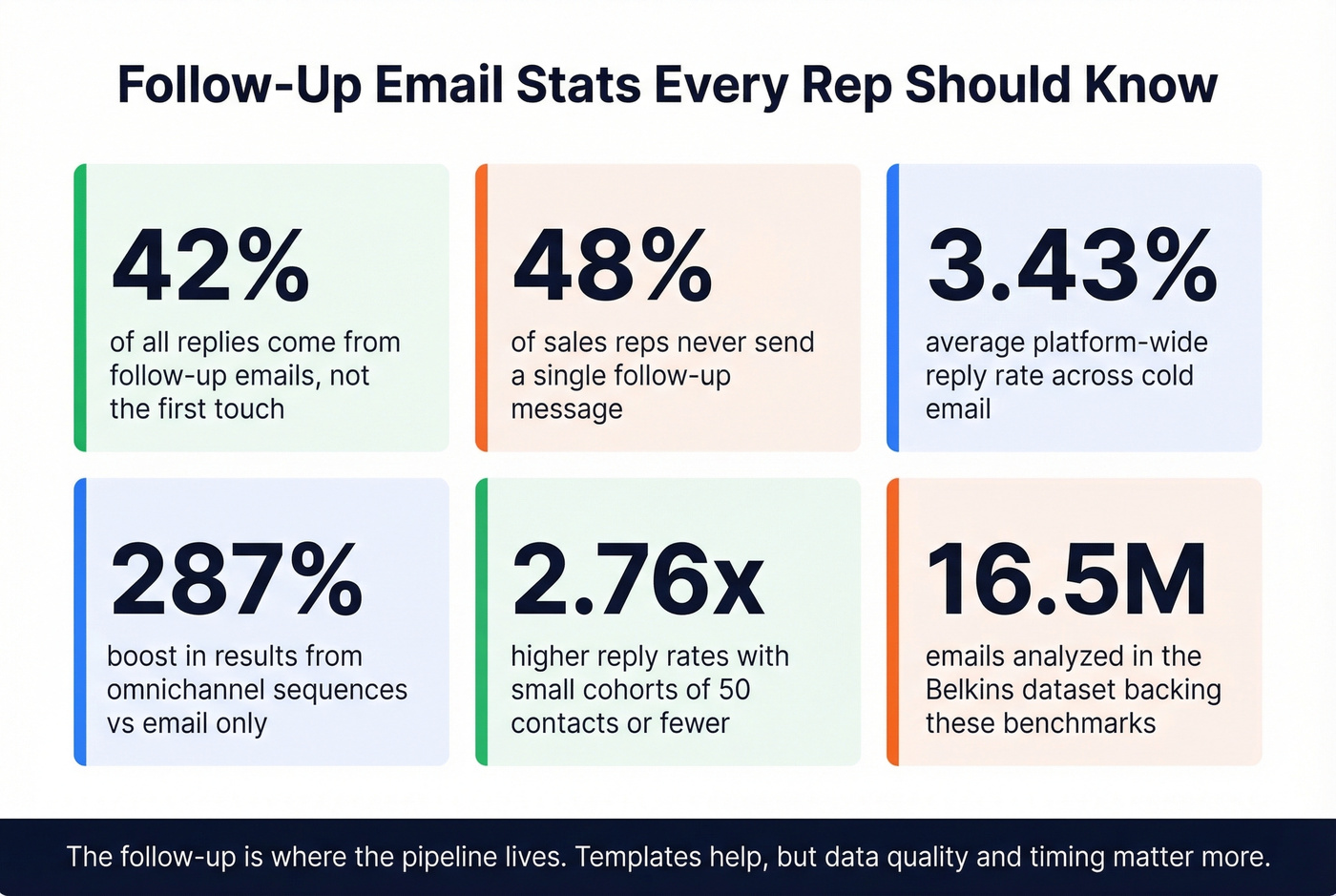
Forty-two percent of replies come from follow-ups. Nearly half your pipeline is hiding behind emails you haven't sent yet. Meanwhile, 48% of reps never send a second message. With platform-wide reply rates averaging just 3.43%, follow-ups aren't optional - they're where the real numbers live. The follow-up email examples below cover every scenario you'll face in 2026, from cold outreach to post-interview thank-yous.
The templates will help, but templates alone won't fix the three things that actually determine whether your follow-up gets a reply: timing, hook type, and whether your email reaches the inbox at all.
What Actually Moves Reply Rates
Before you copy a single template, internalize these three levers. They matter more than word choice.
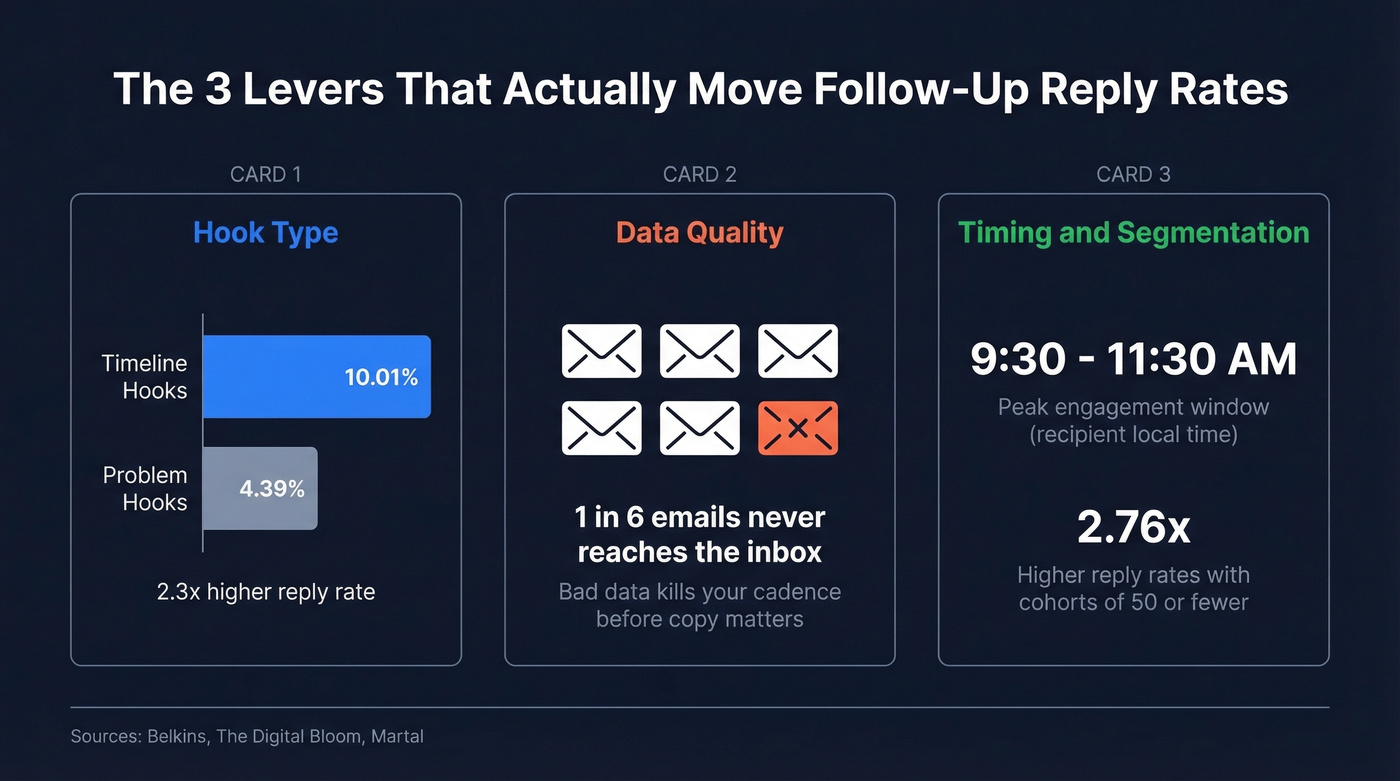
Hook type: Timeline-based hooks ("I'm finalizing my calendar for next week") pull a 10.01% reply rate vs. 4.39% for problem-based hooks. That's a 2.3x gap. Deadlines create urgency without being pushy.
Data quality: One in six cold emails never reaches the inbox. If your prospect list has bad addresses, your beautifully written follow-up bounces into nothing. This is the lever most template roundups ignore entirely, and in our experience, it's the one that makes or breaks entire outbound programs. (If you want the deeper mechanics, start with an email deliverability audit.)
How to Structure a Follow-Up Email
Every effective follow-up follows the same skeleton. Salesforce's formula nails it in four steps:
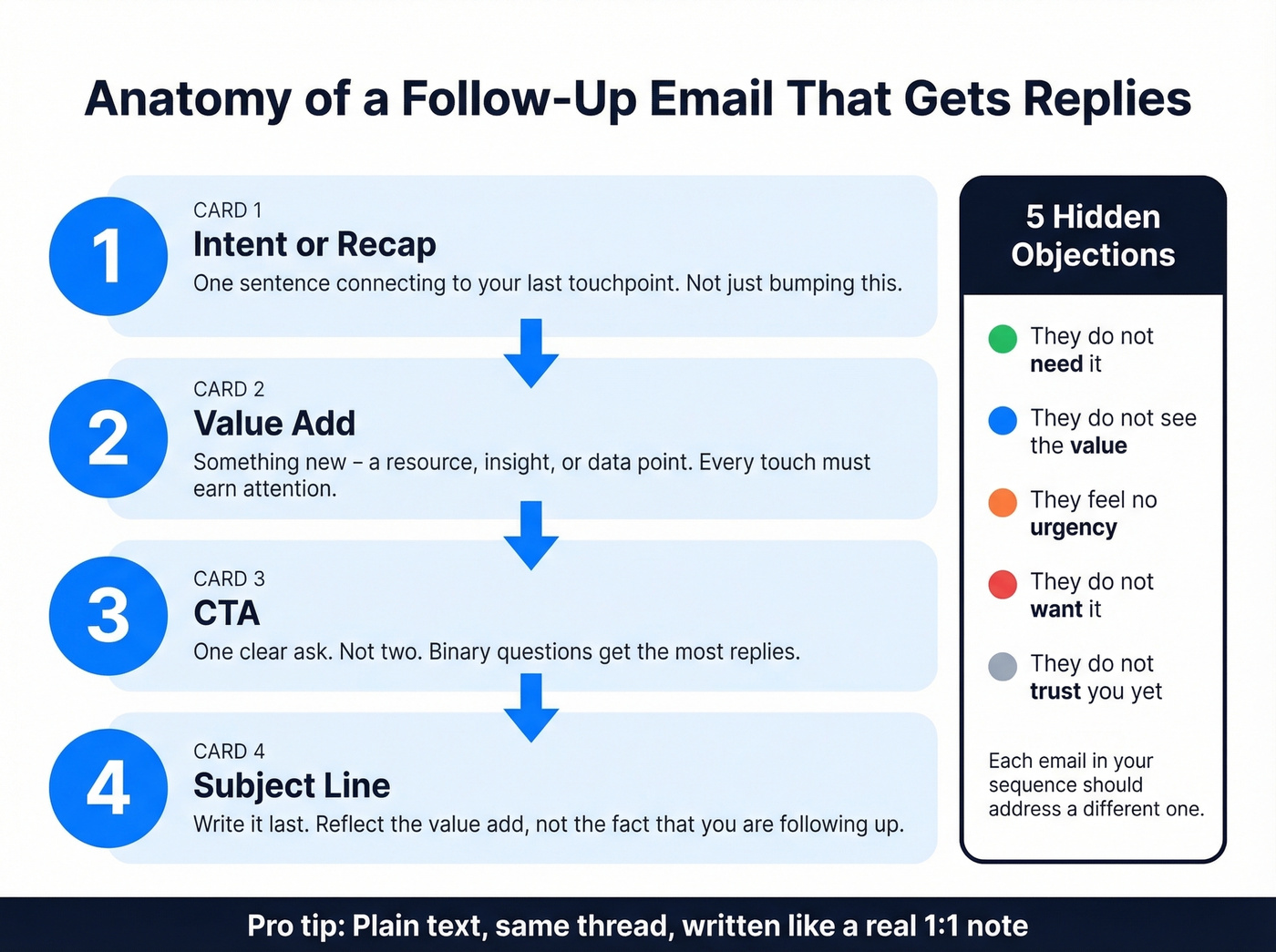
- Intent or recap - One sentence connecting to the previous touchpoint.
- Value add - Something new. A resource, an insight, a data point. Never just "bumping this." (More on what “value add” actually means in practice: How to Add Value in Sales.)
- CTA - One clear ask. Not two. One. (If you need examples, use this email call to action guide.)
- Subject line - Write it last. It should reflect the value add, not announce that you're following up. (See more email subject line examples.)
Every follow-up also needs to overcome one of five unspoken objections: they don't need it, they don't see the value, they feel no urgency, they don't want it, or they don't trust you yet. Each email in your sequence should address a different one - not repeat the same pitch louder.
Plain text, sent as a reply in the same thread, written like a real 1:1 note. If your follow-up looks like a marketing email, it'll be treated like one.
The Cadence Blueprint
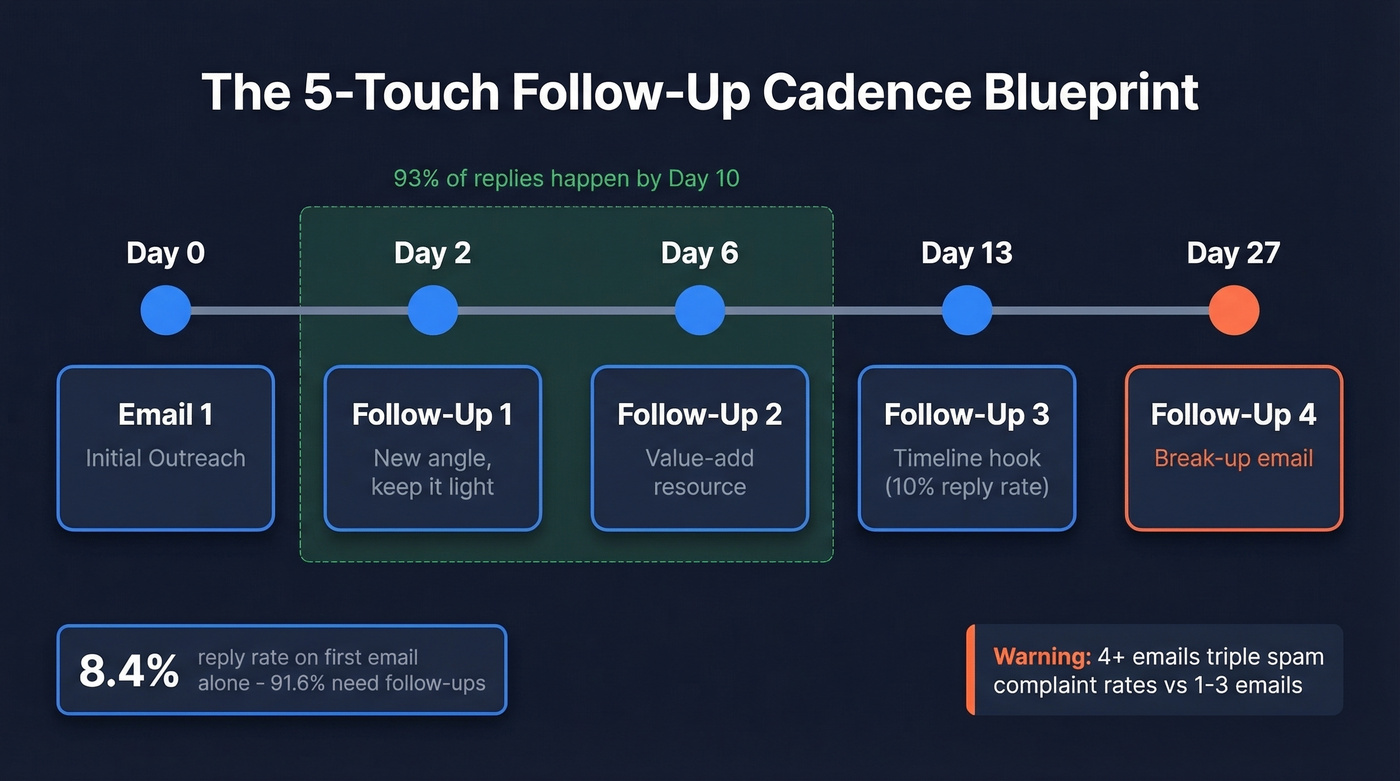
The Belkins dataset of 16.5M emails shows an 8.4% reply rate on the first email - meaning 91.6% didn't reply to the first message. The sweet spot is 3-5 total emails with graduated spacing:
| Touch | Day | Purpose |
|---|---|---|
| Email 1 | Day 0 | Initial outreach |
| Follow-up 1 | Day 2 | New angle, light |
| Follow-up 2 | Day 6 | Value-add resource |
| Follow-up 3 | Day 13 | Timeline hook |
| Follow-up 4 | Day 27 | Break-up email |
A 3-7-7 cadence captures 93% of replies by Day 10. After five emails, you hit diminishing returns - and 4+ emails more than triple spam complaint rates relative to 1-3 email sequences. Know when to stop. (If you want a full sequencing playbook, build it like a B2B cold email sequence.)
Launch sequences on Monday. Expect peak engagement on follow-ups sent Wednesday, between 9:30-11:30 AM in the recipient's local time zone. (If you want the data behind that, see the best time to send cold emails.) Keep cohorts small - segments of 50 contacts or fewer produce 2.76x higher reply rates than larger cohorts.
If email alone isn't working, layer in phone and social touches. Omnichannel sequences boost results by 287%+ compared to email-only outreach. A cadence isn't just a series of emails - it's a structured schedule of actions across channels.
Before launching, verify every address. We've seen teams lose sender reputation after a single campaign with a 10%+ bounce rate, and at that point no amount of clever copy saves you. (If you're troubleshooting bounces, start with email bounce rate.)

You just read that 1 in 6 cold emails never reaches the inbox. Your follow-up cadence is only as good as the data behind it. Prospeo's 5-step email verification delivers 98% accuracy - teams using it cut bounce rates from 35%+ to under 4%.
Stop writing perfect follow-ups to addresses that don't exist.
18 Templates by Scenario
After No Response
Template 1 - The Timeline Hook
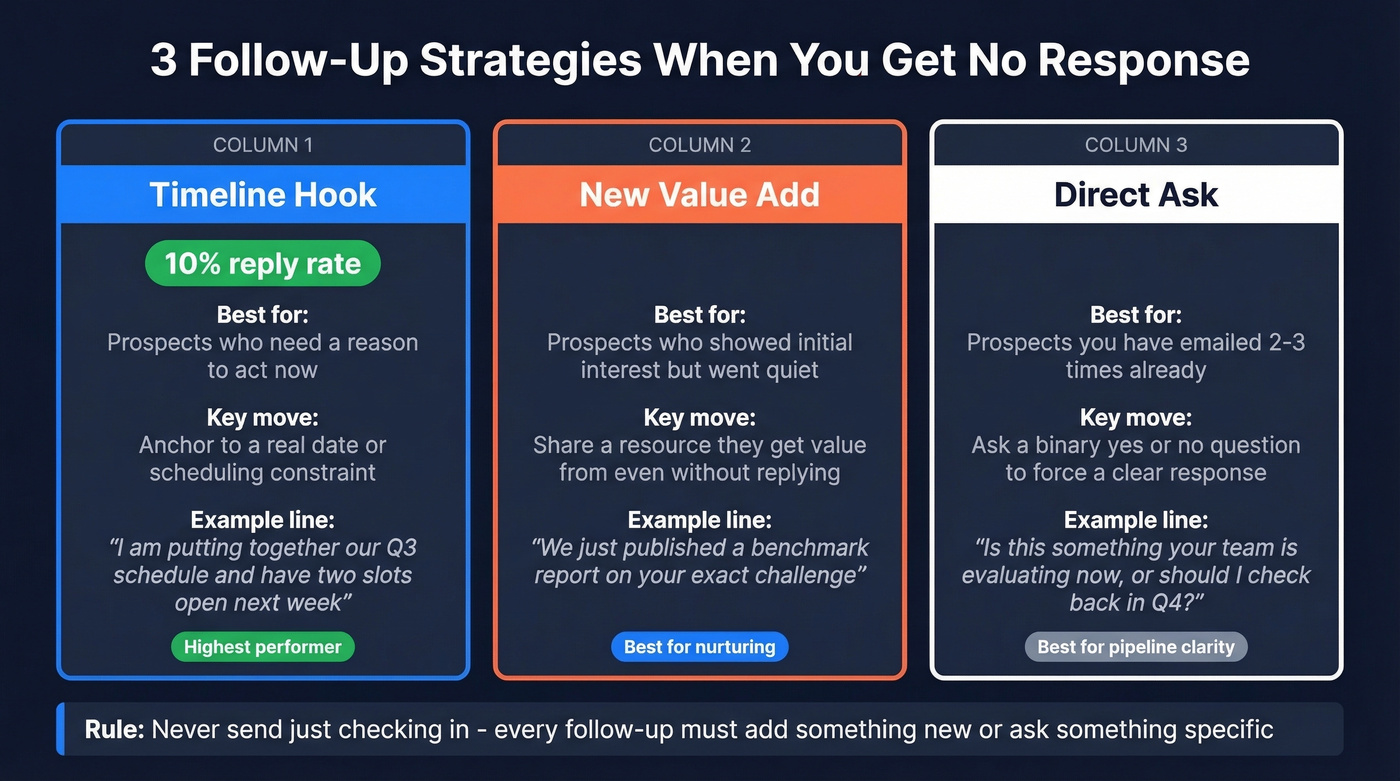
Timeline hooks pull 10% reply rates - 2.3x higher than problem-based hooks. The soft opt-out reduces friction.
Subject: Re: [Original subject]
Hi Sarah,
I'm putting together our Q3 onboarding schedule and have two slots open the week of the 14th. Would Tuesday at 2 PM or Thursday at 10 AM work for a 20-minute walkthrough?
If the timing's off, no worries - just let me know and I'll circle back next quarter.
Template 2 - The New Value Add
Subject: Re: [Original subject]
Hi [Name],
Since we last connected, we published a benchmark report on [relevant topic] - thought it might be useful given what you mentioned about [specific challenge]. Here's the link: [URL]
Worth a quick chat to see if any of this applies to your team?
The prospect gets value whether they reply or not. That's the whole point - every touch adds something new.
Template 3 - The Direct Ask
Subject: Re: [Original subject]
Hi [Name],
I want to be respectful of your time. Is [solution] something your team is evaluating right now, or should I check back in a few months?
Either answer helps me - appreciate it.
Binary questions are the easiest to answer. You'll get more "not now, try Q4" replies than silence - and those replies are useful pipeline data.
Post-Demo / Post-Meeting
Template 4 - The Recap + Resource
Subject: Re: [Meeting topic]
Hi [Name],
Great conversation today. You mentioned [specific pain point] is costing your team roughly [X hours/dollars] per month. I've attached a one-pager showing how [solution] addresses that specifically.
Can we get 15 minutes with [stakeholder name] next week to walk through the business case?
Recapping their words back to them proves you listened. The attachment gives them ammunition for internal conversations.
Template 5 - The Next-Step Nudge
Subject: Re: [Demo topic]
Hi [Name],
You mentioned wanting to loop in your VP of Ops before moving forward - happy to send a tailored deck for that conversation. Want me to put one together?
You're removing friction from their next step, not just asking for a decision.
Post-Cold-Call
Template 6 - The Schedule Lock
This scenario - sending a follow-up after asking for an email on a cold call - comes up constantly in r/sales. Here's what works:
Subject: Following up from our call
Hi [Name],
Thanks for taking my call earlier. As promised, here's a quick overview of [solution]: [one-liner + link].
I'm finalizing my schedule for next week - would Wednesday or Thursday afternoon work for a deeper dive?
The "finalize my schedule" framing creates natural urgency without manufactured pressure.
Proposal / Quote Follow-Up
Template 7 - The Timeline Anchor
Subject: Re: [Proposal name]
Hi [Name],
Wanted to flag that the pricing in our proposal is locked through [date]. After that, we'd need to re-scope based on current capacity.
Any questions I can answer to help move this forward?
Real deadlines beat fake ones. If your pricing genuinely expires, say so.
Template 8 - The "No Urgency" Breaker
Here's what a weak version looks like vs. the version that works:
"Just checking in on the proposal - any updates?" - Skip this. It adds zero value.
Subject: Re: [Proposal name]
Hi [Name],
Totally understand if this isn't top priority right now. Teams that implement [solution] before [seasonal event/quarter end] typically see [specific benefit] within the first 60 days.
Happy to adjust the timeline if a later start makes more sense.
The good version connects timing to outcomes.
Break-Up / Final Follow-Up
Template 9 - The Permission Close
Subject: Re: [Original subject]
Hi [Name],
I've reached out a few times and haven't heard back - totally fine. Should I close your file for now, or is there a better time to reconnect?
Either way, no hard feelings.
"Should I close your file?" triggers loss aversion without guilt-tripping. This kind of permission-close email often prompts a response from people who stayed silent through earlier touches.
Interview Follow-Up
Template 10 - The Same-Day Thank You
The Yale CDO formula is Gratitude + Specificity + Brevity. Send it the same day - interviewers often submit ATS feedback within hours.
Subject: Thank you - [Role] interview
Hi [Name],
Thank you for meeting today. I especially enjoyed our conversation about [specific topic] - your approach to [specific detail] resonated with how I've tackled similar challenges at [previous company].
Excited about the opportunity and happy to provide any additional information.
Template 11 - The Post-Panel Follow-Up
Subject: Great meeting the team - [Role]
Hi [Name],
Thank you for coordinating today's panel. Meeting [interviewer names] gave me a clearer picture of how the [team] operates. [One specific insight] stood out - it aligns closely with work I did on [relevant project].
Looking forward to next steps.
Reference specific panelists by name. Keep it under 100 words.
Networking / Event Follow-Up
Template 12 - The Conversation Callback
Subject: Great meeting you at [Event]
Hi [Name],
Really enjoyed our conversation about [specific topic] at [event]. Your point about [specific detail] stuck with me - I found [article/resource] that digs into that exact issue.
Would love to continue the conversation over coffee. No agenda, just good to connect.
Send within 24-48 hours while the conversation is fresh. Reference something specific. Don't pitch.
Template 13 - The Mutual Value Exchange
Subject: [Event name] - quick follow-up
Hi [Name],
You mentioned you're exploring [topic] - I've been working on something similar and would love to swap notes. Free for 15 minutes next week?
"Swap notes" positions the follow-up as mutual, not extractive.
Client / Internal Follow-Up
Template 14 - The Firm but Professional Chase
Inspired by a common struggle in r/Accounting - clients who delay for months sending missing info. Name the consequence, set a deadline, offer help.
Subject: Re: [Document/info needed]
Hi [Name],
I still need [specific document] to move forward on [project]. Without it, we'll miss the [date] deadline, which pushes [downstream consequence].
Can you send this by [specific date]? If there's a blocker, let me know and we'll figure out a workaround.
Template 15 - The Escalation Preview
Subject: Re: [Project name] - need your input
Hi [Name],
Following up for the third time on [specific item]. I want to keep this between us, but if I don't receive [item] by [date], I'll need to loop in [manager/stakeholder] to keep the project on track.
The escalation preview isn't a threat - it's a professional reality. "I want to keep this between us" makes it collaborative rather than punitive.
Quick-Fire Bonus Templates
Template 16 - The Referral Ask: "Sounds like the timing isn't right. Is there someone else on your team who handles [specific function]? Happy to reach out directly so I'm not clogging your inbox." This works because it gives them an easy out while keeping the door open.
Template 17 - The Trigger Event: "Saw that [company] just [raised funding / launched product]. Teams at this stage usually run into [specific challenge]. Worth a quick chat?" Timely relevance is the strongest hook you can use. (If you want a system for this, use sales triggers.)
Template 18 - The Mutual Connection: "[Mutual connection] mentioned you're working on [specific initiative]. We've helped [similar company] with [specific result]. Worth 15 minutes this week?" Social proof from a shared contact cuts through noise faster than any cold opener.
Subject Lines That Work
| Scenario | Subject Line | Why It Works |
|---|---|---|
| Sales (no reply) | Re: [original subject] | Thread reply = context |
| Sales (new angle) | Quick question about [specific] | Short, curiosity gap |
| Sales (timeline) | Finalizing Q3 schedule | Urgency without hype |
| Post-demo | Re: [meeting topic] | Continuity |
| Proposal | Re: [proposal name] | Same thread |
| Break-up | Should I close your file? | Loss aversion trigger |
| Interview | Thank you - [Role] interview | Clear, professional |
| Networking | Great meeting you at [Event] | Context anchor |
| Client chase | Re: [Document needed] | Direct, no fluff |
| Referral | [Name] suggested I reach out | Social proof |
| Trigger event | Congrats on [event] | Positive, timely |
Short and specific beats clever. "Re: [original subject]" often outperforms creative subject lines because it looks like a real conversation, not a campaign. Avoid "Just checking in" and "Following up" as standalone subject lines - they signal zero value. (If you need more options, see cold email subject line examples.)
Here's the thing: if your deal sizes are under five figures, you probably don't need a fancy subject line tool. Just reply in the same thread and write like a human. The companies obsessing over A/B testing subject lines are usually the ones neglecting the far bigger lever - whether the email arrives at all.
Mistakes That Kill Reply Rates
"Bumping" without new information. "Just wanted to make sure you saw my last email" adds nothing. Every follow-up needs a new value add - a resource, a data point, a different angle. If you can't think of something new to say, you're not ready to send.
Following up too soon. The instinct to follow up the next day feels proactive. The data says otherwise - next-day follow-ups reduce replies by 11%. Give it at least three days. Your prospect isn't ignoring you; they're busy.
Sending HTML-heavy emails. Formatted templates with images, buttons, and fancy signatures trigger spam filters and look like marketing blasts. Plain text, same thread, written like you'd write to a colleague. We've tested this across hundreds of campaigns and the difference is stark.
Giving up after one follow-up. One follow-up boosts reply rates from 9% to 13%. A full 3-5 email sequence captures the 42% of replies that come from follow-ups. Build the full cadence before you send email one, and use the templates above to plan each touch in advance. (For more variations, see these cold email follow-up templates.)
Ignoring deliverability. A Snov.io analysis of 44M emails found that turning off open tracking alone increased replies from 1.08% to 2.36% - more than doubling them. Verify your data, kill open tracking, and send plain text in the same thread. (If you want the technical why, see email tracking pixels.)
Not knowing when to stop. Don't follow up after a clear "no," after someone asks you to stop, or when the relationship is too cold for another touch. Persistence is a virtue. Harassment is a deliverability risk.
The Deliverability Checklist
Let's be honest - templates are irrelevant if your emails bounce. 17% of cold emails never reach the inbox. That's not a copy problem. It's a data and infrastructure problem.
Before sending follow-up #1:
- Verify every email address. Bounce rate above 5% means you have a data problem, not a messaging problem. Prospeo's 5-step verification catches invalid addresses, spam traps, and honeypots before they tank your sender reputation.
- Turn off open tracking. Tracking pixels add HTML that spam filters flag. Disabling tracking more than doubled reply rates in the 44M-email study mentioned above.
- Send plain text. No images, no HTML templates, no embedded logos.
- Reply in the same thread. New messages from unknown senders get more scrutiny from spam filters.
- Warm your domain. New domain or dormant outbound? Ramp up gradually over 2-3 weeks. (Use this guide on how to improve sender reputation.)
Skip the deliverability step and none of the templates in this article matter. I've watched teams spend weeks perfecting their copy only to discover 15% of their list was bouncing. Fix the foundation first.
Segments of 50 contacts produce 2.76x higher reply rates. Prospeo's 30+ filters - buyer intent, job changes, headcount growth - let you build hyper-targeted lists of verified contacts for every follow-up sequence you run. At $0.01 per email, a 50-contact cohort costs less than a coffee.
Build the list your follow-up templates actually deserve.
FAQ
How many follow-up emails should I send?
Three to five total. The Belkins 16.5M-email dataset shows diminishing returns after five touches, and 4+ emails more than triple spam complaint rates. A simple spacing pattern is 2, 4, 7, and 14 days after initial outreach.
How long should I wait before following up?
At least three days. Next-day follow-ups reduce reply rates by 11%, while a three-day gap increases replies by 31%. Exception: interview and networking follow-ups should go out within 24-48 hours while you're still fresh in the person's mind.
What's the best day and time to send a follow-up?
Launch sequences Monday. Peak engagement hits on Wednesday follow-ups, between 9:30-11:30 AM in the recipient's local time zone. Avoid Friday afternoons - open rates drop significantly heading into the weekend.
Should I follow up in the same email thread?
Always. Threading provides context, looks like a real conversation, and avoids triggering spam filters with a brand-new message from an unfamiliar sender. Most of the follow-up email examples above use "Re: [Original subject]" for exactly this reason.
How do I stop follow-ups from bouncing?
Verify every email address before sending. Keep bounce rate under 5%, turn off open tracking, send plain text, and warm your domain if it's new. One bad campaign with a high bounce rate can damage your sender reputation for weeks.