

Follow Up Emails: The 2026 Data-Backed Playbook
You sent a proposal three days ago. Radio silence. Your cursor hovers over the compose button, and the best your brain can produce is "Hey, just checking in on this." You already know that email won't work.
What you might not know is why most follow up emails fail - and it's rarely the copy. Deliverability, data quality, and sequence architecture determine whether your message lands in an inbox or a spam folder. The best-written email in the world doesn't matter if it bounces off a dead address and tanks your sender score in the process.
Here's the thing: most teams obsess over subject lines and templates while ignoring the fact that a quarter of their list is invalid. Fix the plumbing first, then worry about the prose. Let's break down what actually moves the needle, backed by benchmarks from large-scale email datasets analyzed in the last 18 months.
The Numbers at a Glance
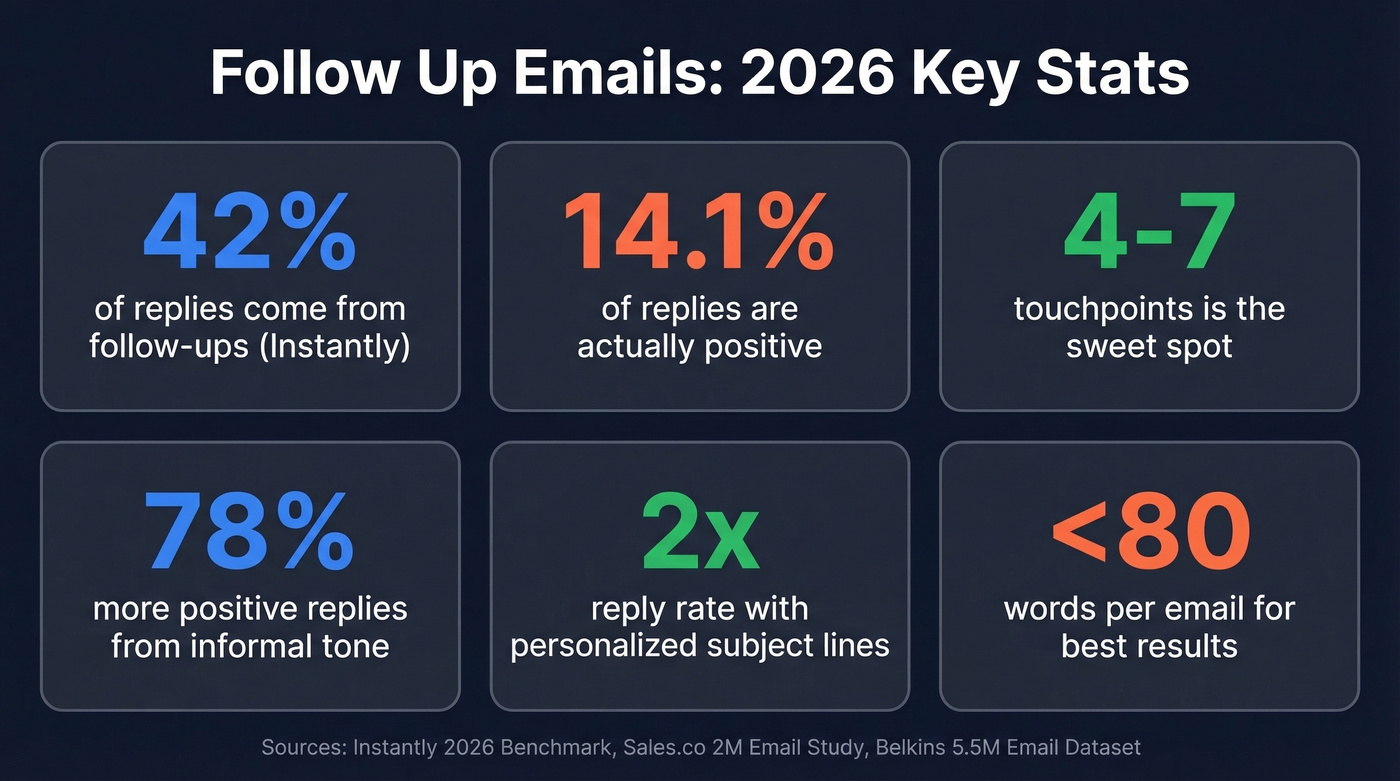
- Follow-ups generate a significant share of all replies - Instantly's platform data puts it at 42%; Sales.co's 2M-email study says 20.6%. Either way, stopping after one email leaves replies on the table.
- Only 14.1% of replies are positive. The rest are auto-replies, objections, or unsubscribes. Set expectations accordingly.
- Your emails need to arrive first. Deliverability beats copywriting every single time.
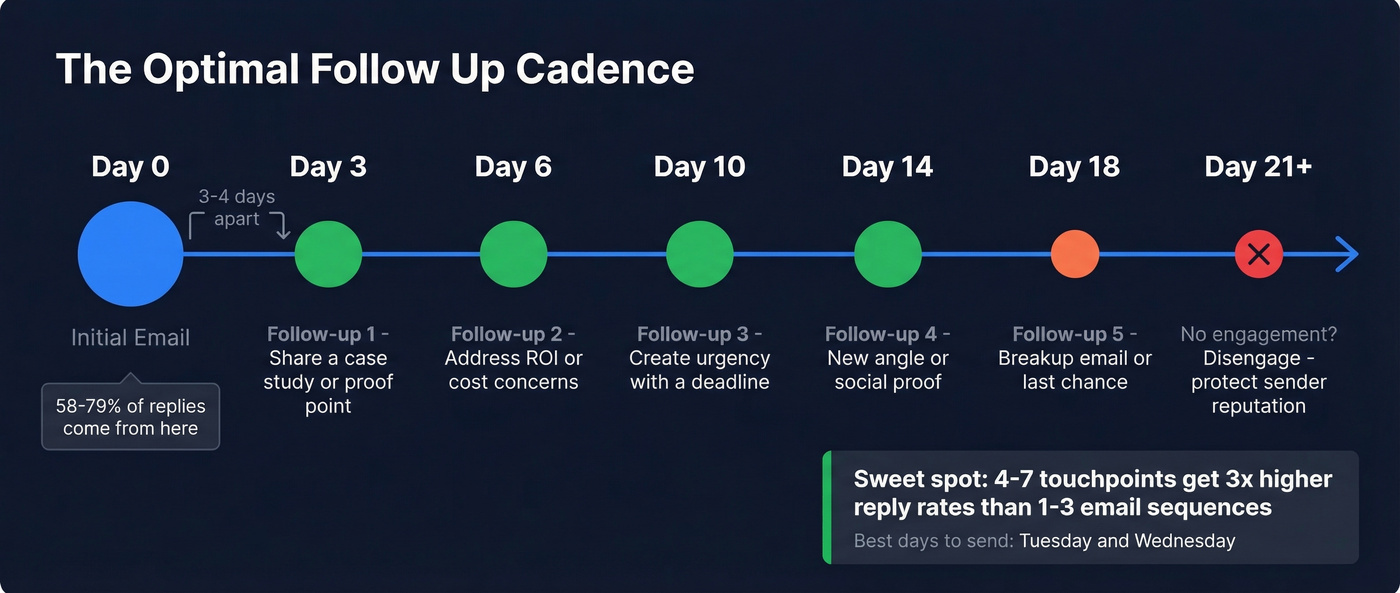
- The sweet spot is 4-7 touchpoints, spaced 3-4 days apart, each under 80 words.
- Personalized subject lines more than double reply rates - 7% vs 3% in a 5.5M email dataset.
- Informal tone produces 78% more positive replies than formal writing.
That's the skeleton. Now let's put muscle on it.
2026 Benchmarks That Matter
Most "follow-up statistics" articles recycle the same 2018 data. Here's what recent, large-scale datasets actually show.
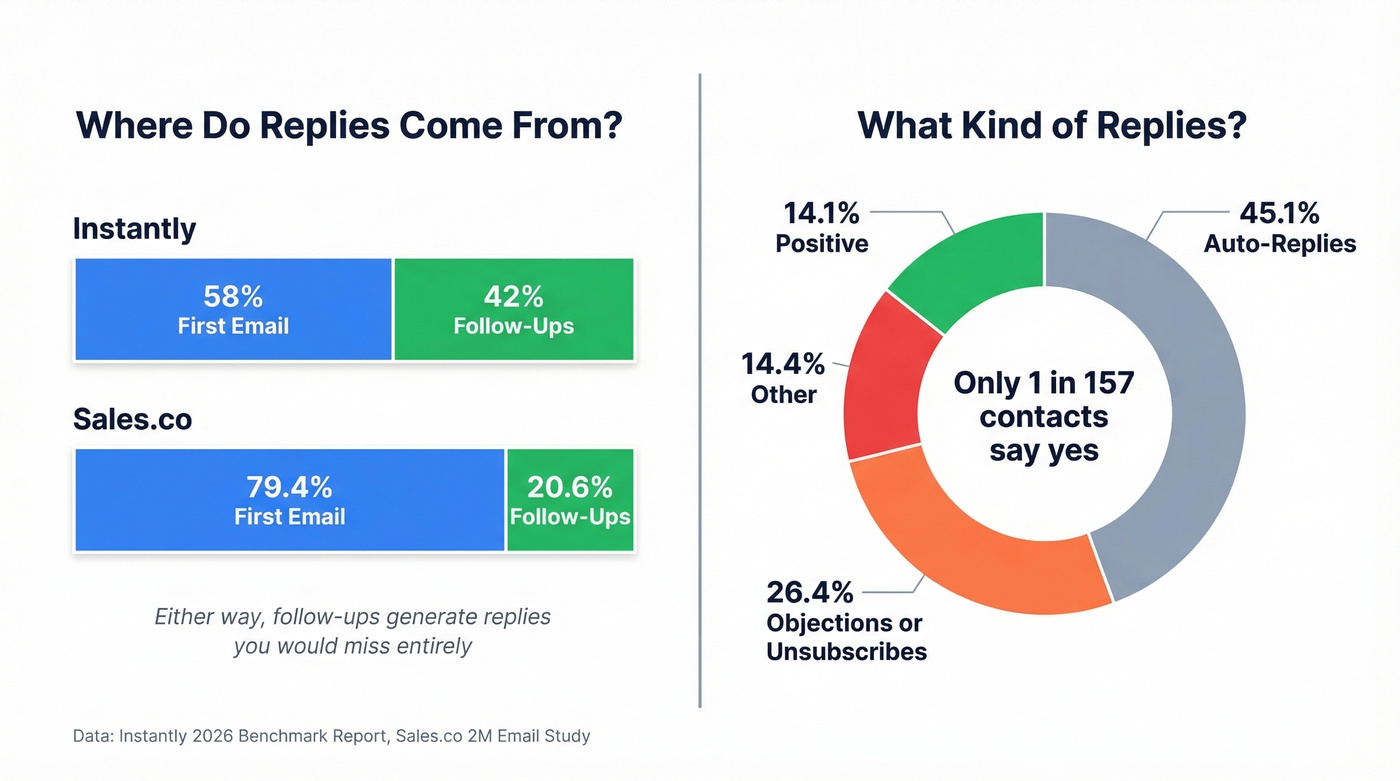
Instantly's 2026 benchmark report analyzed platform-wide sending data and found an average reply rate of 3.43%. Elite users - top-quartile senders with clean lists and tight copy - exceed 5.5%, with some hitting 10%+. The critical finding: 58% of replies come from the first email in a sequence, and follow-ups generate the remaining 42%.
Now here's where those numbers need context. Sales.co published a study of 2M+ emails spanning 2024 through early 2026, classifying every reply by type. Their average reply rate was 2.09%, with 79.4% of replies coming from the initial message - attributing only about 20.6% to follow-ups. The gap between Instantly's 42% and Sales.co's 20.6% likely reflects differences in sequence design and audience quality, but either way, subsequent touches generate responses you'd miss entirely by sending once and giving up.
The more sobering finding: only 14.1% of replies were actually positive. A staggering 45.1% were auto-replies. The effective "interested" rate? Roughly 0.64%, or about 1 in 157 contacts emailed.
That's not a reason to quit. It's a reason to be strategic about which 157 contacts you're emailing and whether those addresses are even valid.
Day-of-week patterns are worth noting. Monday drives the highest overall reply rate (1.96%), but Thursday produces the highest positive reply rate - 10.5% of replies received that day are positive. Tone matters more than most people think, too. Informal emails yield a 78% higher positive reply rate than formal ones (10.36% vs 5.83%). Drop the corporate voice. Write like a human.
Why Most Follow-Ups Fail (It's Not Your Writing)
Here's a pattern we've seen play out repeatedly. An SDR team loads 1,000 contacts into a sequence. They spent hours on the copy. The cadence is tight. They launch - and get a 0.8% reply rate. When they dig in, nearly a third of the list bounced. Their sender score cratered. Every email they send for the next month lands in promotions or spam.
The message didn't fail because the writing was bad. The oven doesn't work, and they're blaming the recipe.
Bad data creates a cascade. Invalid addresses bounce. Bounces tank your sender reputation. A damaged reputation means all your emails - including the perfectly crafted ones - get filtered. SPF, DKIM, and DMARC authentication are non-negotiable table stakes, but they can't save you from a list full of dead addresses.

Before launching any sequence, verify every address. Meritt tripled pipeline from $100K to $300K/week after cleaning data - and cut bounce rate from 35% to under 4% in the process. Prospeo's 5-step verification catches invalid addresses, spam traps, and honeypots with 98% accuracy and refreshes data every 7 days, so contacts who changed jobs last month don't become bounces this month. The free tier covers 75 verifications per month, enough to test the difference on your next campaign.
How to Write Follow Up Emails That Get Replies
Once your infrastructure is solid, the writing matters. Here's a five-step framework that holds up across the data.
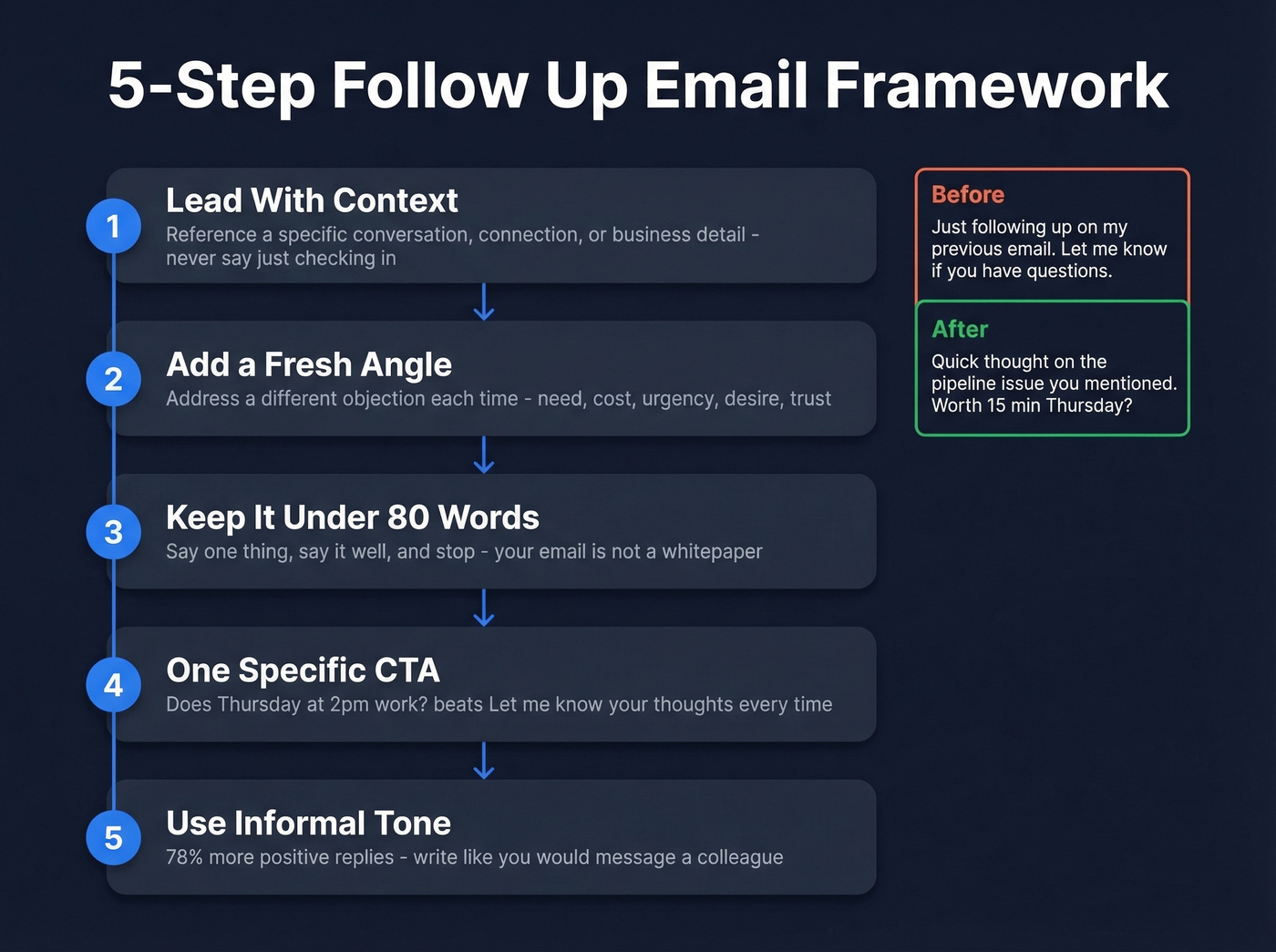
1. Lead with context, not "just following up." Your opening line should remind the recipient why you're in their inbox without sounding like a broken record. Reference a specific conversation, a shared connection, or something relevant to their business. "Following up on our call about your Q3 pipeline targets" beats "Just checking in" every time. (If you need alternatives, see how to say just checking in professionally.)
2. Add a fresh angle with every touch. This is the mistake that kills most sequences. GMass identifies five objections prospects raise: no need, cost concerns, no urgency, don't want it, and don't trust you. Each subsequent message should address a different one. First touch might share a relevant case study. Second might address ROI. Third might create urgency with a deadline. If you're saying the same thing five times, you're not following up - you're nagging.
3. Keep it under 80 words. Instantly's data is clear on this. Short emails get more replies. Your message isn't a whitepaper. Say one thing, say it well, and stop.
4. Include a single, specific CTA. "Let me know your thoughts" isn't a CTA. "Does Thursday at 2pm work for a 15-minute call?" is. The consensus on r/sales backs this up - the scheduling-constraint framing ("I'm finalizing my schedule for next week - does Tuesday work?") consistently outperforms open-ended asks. If you want more examples, use these email call to action patterns.
5. Use an informal tone. The Sales.co data is unambiguous: informal emails generate 78% more positive replies than formal ones. Contractions, short sentences, conversational phrasing. Write the way you'd message a colleague, not the way you'd draft a legal brief.
Here's what a rewrite looks like in practice:
Before: "Hi Sarah, I'm just following up on my previous email. Please let me know if you have any questions."
After: "Sarah - quick thought on the pipeline issue you mentioned. [Company X] cut their ramp time by 40% using a similar approach. Worth 15 minutes Thursday to see if it fits?"
Subject Lines That Get Opens
HubSpot's often-cited subject line study is from 2014. Here's what 5.5 million emails sent in 2024-2025 actually show.
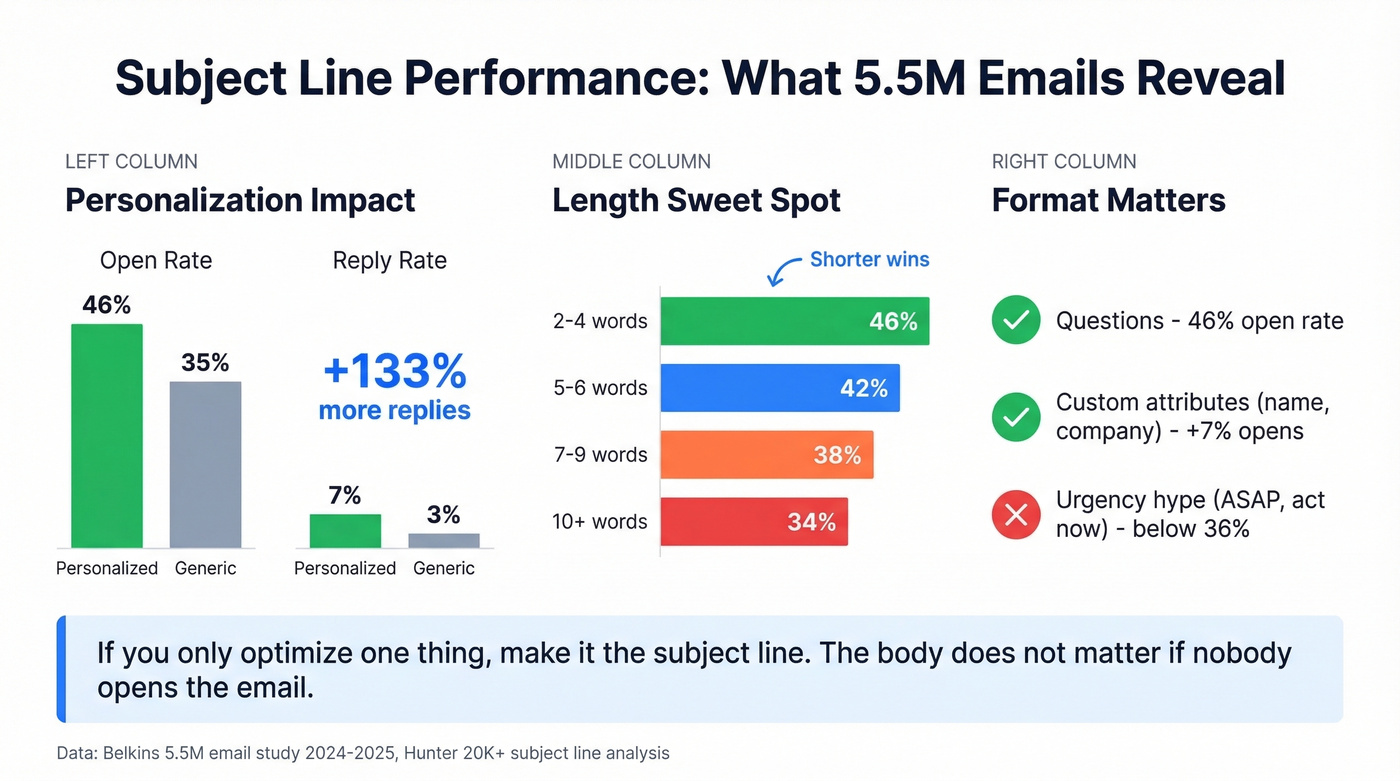
Personalized subject lines hit a 46% open rate versus 35% without personalization - a 31% lift. The reply rate gap is even wider: 7% with personalization versus 3% without. That's not a marginal improvement. That's the difference between a sequence that works and one that doesn't.
Length matters too. The sweet spot is 2-4 words, which delivers a 46% open rate. Performance drops steadily after 7 words, and 10-word subject lines average around 34%. Hunter's analysis of 20K+ subject lines confirms this - including at least one custom attribute like first name, company, or role boosts opens by 7%+, and staying under 60 characters prevents truncation on mobile. For more ideas, pull from these email subject line examples.
Question-format subject lines match the 46% open rate of personalized ones. Urgency and hype phrasing ("ASAP," "act now," "exclusive") drag opens below 36%. Readers have been trained to ignore anything that smells like marketing.
| Factor | Open Rate | Reply Rate |
|---|---|---|
| Personalized | 46% | 7% |
| Not personalized | 35% | 3% |
| 2-4 words | 46% | - |
| 7+ words | <40% | - |
| 10 words | ~34% | - |
| Urgency phrasing | <36% | - |
| Question format | 46% | - |
If you're only going to optimize one thing, make it the subject line. The body doesn't matter if nobody opens the email.

The article says it plainly: a third of your list bouncing will crater your sender score and kill every follow-up in the sequence. Prospeo's 5-step verification delivers 98% email accuracy with a 7-day refresh cycle, so contacts who changed jobs last week don't become bounces today.
Fix your deliverability before you rewrite a single subject line.
When and How Often to Follow Up
Timing by Scenario
Timing depends on context. A cold outreach sequence and a post-interview thank-you operate on completely different clocks.
| Scenario | First Follow-Up | Second Follow-Up | Notes |
|---|---|---|---|
| Cold outreach | 48-72 hrs | 3-4 days later | Different angle each touch |
| Post-meeting | Same day / next AM | 5-7 days | Reference specifics |
| Post-demo | Within 24 hrs | 3-5 days later | Include next steps |
| Job interview | Within 24 hrs | 5-7 business days | Thank-you first |
| Proposal/quote | 3-5 business days | 7 days later | Lead with value, not status |
| Networking event | 24-48 hrs | 7-10 days | Reference the conversation |
| Invoice/payment | 3 days past due | 7 days past due | Professional, include details |
The Cadence Framework
The data converges on 4-7 touchpoints as the sweet spot for cold outreach. Instantly's benchmarks show campaigns in this range achieve reply rates 3x higher than 1-3 email sequences. Space them 3-4 days apart - tight enough to stay top of mind, loose enough to not feel aggressive.
For enterprise deals with longer sales cycles, Riva Engine's cadence guide recommends 8-12 total touches across channels - email, phone, and social. That's not 12 emails. That's a multi-channel sequence where email does the heavy lifting and phone/social fill the gaps.
When to stop: if two weeks pass with zero engagement - no opens, no clicks, no replies - disengage. After 7 emails with nothing, you're burning sender reputation for no return.
Tuesday and Wednesday produce the peak reply rates in Instantly's weekday analysis, with Wednesday the highest. If you're scheduling sends, start there. (More timing data: best time to send cold emails.)
Templates That Actually Work
Every template below follows the rules: under 80 words, informal tone, specific CTA, something the recipient hasn't seen before. Adapt them to your voice - templates that sound like templates don't work. If you want more plug-and-play options, use these sales follow-up templates.
After No Response (Sales)
This is the most common scenario and the one most people botch by repeating themselves.
What most people send: "Hi, just following up on my last email. Please let me know if you have any questions."
What works:
Subject: re: [original subject]
Hey [Name] - wanted to share something relevant. [Company in their space] was dealing with [specific problem you solve] and cut [metric] by [X%] in [timeframe].
Not sure if that's on your radar right now, but happy to walk through how it'd apply to [their company] if it is.
Does [specific day] work for 15 minutes?
The difference comes down to one thing: the second email gives the recipient a reason to care.
After a Meeting
Send this the same day while the conversation is fresh. Reference something specific they said - it proves you were listening.
Subject: Next steps from today
[Name] - great conversation today. The point you raised about [specific topic] stuck with me.
I'm pulling together [resource/proposal/next step] based on what we discussed. Should have it to you by [day].
Anything I missed that you'd want included?
After Sending a Proposal
This scenario causes the most anxiety on r/sales - and for good reason. "Did you get our quote? Let me know if you have questions!" sounds desperate. The scheduling-constraint framing works better because it shifts the conversation from "please respond" to "here's a timeline that benefits you."
Subject: Quick timing question
[Name] - I'm mapping out implementation timelines for [month]. If you're moving forward, starting by [date] would let us hit [specific milestone] by [target date].
Worth a quick call this week to see if the numbers work on your end?
After a Job Interview
Send within 24 hours. Keep it genuine, not formulaic. Hiring managers read dozens of "thank you for your time" emails - specificity is what makes yours memorable.
Subject: Thanks for today
[Name] - really enjoyed our conversation about [specific topic from interview]. The way your team approaches [challenge] is exactly the kind of environment I want to contribute to.
Looking forward to next steps. Happy to provide anything else that'd be helpful.
After a Networking Event
Subject: [Topic you discussed] - following up
[Name] - enjoyed talking about [specific topic] at [event]. Your point about [detail] got me thinking.
I put together [resource/intro/idea] that might be useful. Worth a quick call to dig in?
The Breakup Email
We've tested dozens of breakup email variations - the "permission to close" framing consistently gets the highest reply rates in a sequence because it creates a natural decision point. No guilt trip, no passive aggression. Just a clean exit ramp.
Subject: Should I close this out?
[Name] - I've reached out a few times and haven't heard back, which is totally fine. I don't want to keep cluttering your inbox.
If [problem you solve] becomes a priority, I'm here. Otherwise, I'll close this out on my end.
Either way - no hard feelings.
The Deliverability Checklist
Your templates and cadence are set. None of it matters if your messages don't reach the inbox. Run through this before launching any sequence.
- SPF, DKIM, and DMARC. Non-negotiable authentication protocols. Without them, inbox providers have no reason to trust your domain. Set up once and forget it.
- Separate sending domain. Never send cold outreach from your main business domain. If your cold domain gets flagged, your company email stays clean. Use a variation like "tryacme.com" instead of "acme.com."
- 3 inboxes max per sending domain. More than that concentrates risk. Need higher volume? Add domains.
- Cap at 20 emails per day per inbox after ramp-up. Scale by adding inboxes, not by cranking volume on a single one. This is the consensus threshold across deliverability experts.
- Warm up for at least 3 weeks. New domains need time to build reputation. Continue warmup at 10-20% of daily volume even after launching campaigns. (Tooling matters here - see unlimited email warmup tools.)
- Plain text, not HTML. For cold outreach, plain text emails look like real 1:1 messages. HTML templates with images and buttons scream "marketing email."
- Skip tracking pixels. Open tracking is increasingly flagged by spam filters. Reply rates are a better signal anyway. (Deep dive: email tracking pixels.)
- Avoid spam trigger words. "Free," "guaranteed," "act now," excessive caps, and exclamation marks all raise flags. Write like a person, not a billboard.
- Include an easy unsubscribe. CAN-SPAM requires it. Beyond compliance, it reduces spam complaints - which matter more than unsubscribes for your sender score.
- Optional: set up BIMI to display your brand logo in supported inboxes. A small trust signal that adds up over thousands of sends.
- Verify your list before sending. This is the single highest-leverage item on this list. A tool like Prospeo can process a CSV in minutes and catch bad addresses before they tank your deliverability. For a full system view, use this email deliverability guide.
Common Mistakes (and How to Fix Them)
Mistake 1: "Just checking in" with no new value. Your recipient's inbox is a war zone. A message with no fresh angle gives them zero reason to engage. Bring something they haven't seen - a relevant stat, a case study, a perspective on their industry.
Mistake 2: Sending the same message on repeat. Each touch should address a different objection. If your second email sounds like your first, you're wasting a touch. Try: "Totally understand if timing isn't right. Quick context - [customer name] was in a similar spot and saw [specific result] within [timeframe]. Happy to share the details."
Mistake 3: Writing like a press release. Informal tone produces 78% more positive replies than formal tone. That's not a small gap. "I would like to respectfully inquire as to whether you have had the opportunity to review our proposal" becomes "Hey - any thoughts on the proposal? Happy to jump on a quick call if it'd be easier to talk through."
Mistake 4: No clear CTA. "Let me know" isn't an ask. "Please don't hesitate to reach out" is even worse - it puts the entire burden on the recipient. Give them something specific: "Does Wednesday at 3pm work for 15 minutes?"
Manual vs. Automated Sequences
Automate when you're running high-volume outbound, your sequence has 4+ touches, and consistent spacing matters more than bespoke messaging. Instantly and Saleshandy handle this well for SMB teams at $30-100/mo. Outreach is the enterprise play at $100+/user/month, with more workflow complexity. (If you're comparing options, start with follow up email software.)
Stay manual when you're working high-value deals where a generic sequence would feel tone-deaf, nurturing warm relationships, or following up after a meeting where specific details matter. A six-figure deal deserves a handwritten message, not a drip sequence.
In our experience, the answer for most teams is both. Automate the first 3-4 touches in a cold sequence, then switch to manual for anyone who engages. After 2-3 email touches with no response, layer in phone and social - multi-channel sequences consistently outperform email-only cadences, especially for enterprise prospects where 8-12 total touches across channels is the norm.
FAQ
How many follow-up emails should I send?
Four to seven touchpoints is the sweet spot for cold outreach. Follow-ups generate between 20% and 42% of all replies depending on the dataset, so stopping after one email leaves real responses on the table. Beyond seven touches, diminishing returns set in unless each message introduces genuinely fresh value.
How long should I wait before following up?
For cold outreach, wait 48-72 hours before your first follow-up, then space subsequent touches 3-4 days apart. Post-meeting and post-interview messages should go out within 24 hours while the conversation is still fresh.
What should I say instead of "just following up"?
Lead with something new every time - a relevant case study, a recent industry development, or a specific meeting proposal. Use the constraint framing: "I'm locking in my calendar for next week - does Thursday at 2pm work?" This shifts the dynamic from begging for a reply to offering a concrete next step.
How do I stop follow-ups from landing in spam?
Verify every address before sending - invalid contacts and spam traps destroy sender reputation fastest. Set up SPF, DKIM, and DMARC, use a separate domain for cold outreach, and keep volume under 20 sends per inbox per day. Prospeo's 5-step verification (98% accuracy) catches bad addresses, spam traps, and honeypots before they tank your deliverability.
Sending 4-7 follow-ups to the right 157 contacts beats blasting thousands of unverified addresses. Prospeo's database gives you 300M+ profiles with 30+ filters - buyer intent, job changes, headcount growth - so every slot in your sequence goes to someone worth following up with.
Stop following up with dead leads. Start with verified contacts at $0.01 each.