

How to Set Up Your Google Workspace SPF Record (And Keep It Working)
Google's own SPF documentation gives you one line and stops. It doesn't tell you what happens when you add Mailchimp, HubSpot, and Salesforce - or that include:_spf.google.com eats 4 of your 10 allowed DNS lookups once you account for the nested includes. We've watched teams debug deliverability problems for days before realizing their SPF record was silently broken the whole time.
This guide covers the full setup, including multi-sender configs, lookup budgeting, and the DMARC alignment issues that trip up even experienced admins.
Quick version - the record you need:
v=spf1 include:_spf.google.com ~allWhere: DNS TXT record, host =
@Verify:dig yourdomain.com txtor MXToolbox SPF Check Propagation: Up to 48 hours (usually 1-4)If you use other senders (Mailchimp, HubSpot, Salesforce), keep reading - the 10-lookup limit will bite you.
The SPF Record for Google Workspace
Add a single TXT record to your domain's DNS:
Type:  TXT

Host:  @

Value: v=spf1 include:_spf.google.com ~all

TTL:   3600 (or your registrar's default)
That's it for Google-only setups. If a TXT record starting with v=spf1 already exists, edit it - don't create a second one. Two SPF records cause a PermError and everything breaks (here’s a step-by-step on how to merge SPF records).
What SPF Actually Does
SPF (Sender Policy Framework) tells receiving mail servers which IP addresses can send email on behalf of your domain. When a message arrives, the receiver checks the sending IP against your SPF record. Match? Passes. No match? Fails - and the message gets flagged or rejected.
SPF alone is roughly a third of the job. Google requires SPF, DKIM, and DMARC for bulk senders (5,000+ emails/day to Gmail), and that enforcement is active in 2026. But SPF is the foundation (if you want the full picture, see our SPF, DKIM, DMARC guide).
Here's the thing: SPF doesn't protect the "From" header your recipients see. It validates the envelope sender (Return-Path). That distinction matters, and we'll get to it in the alignment section below (more on Return Path email if you need a refresher).
Setup Steps by Registrar
The process is nearly identical across providers. Log into your DNS management console, navigate to DNS records, and follow these steps:
- Look for an existing TXT record containing
v=spf1. If one exists, you'll edit it - not create a new one. - If no SPF record exists, create a new TXT record.
- Set the host/name field to
@(represents your root domain). - Set the value to
v=spf1 include:_spf.google.com ~all. - Leave TTL at the default (3600 is fine).
- Save.
Cloudflare: DNS > Records > Add Record > Type: TXT, Name: @, Content: the SPF string. Proxy status doesn't apply to TXT records (if you’re also doing DKIM there, follow our Cloudflare DKIM setup).
GoDaddy: My Products > DNS > Add > TXT. Name = @. GoDaddy sometimes auto-appends your domain, so double-check the saved record (related: SPF Record GoDaddy).
Namecheap: Domain List > Manage > Advanced DNS > Add New Record > TXT. Host = @, Value = the SPF string (related: SPF Record Namecheap).
Google Domains (now Squarespace Domains): Some migrated accounts have an auto-created SPF record that can't be edited in the UI. If you hit this, transfer DNS management to Cloudflare or another provider where you have full control.
~all vs -all
Use ~all (softfail). Don't jump to -all (hardfail) until you're confident every legitimate sender is accounted for.
With -all, any email from an IP not listed in your SPF record can be rejected outright. That sounds secure, but it also means a marketing tool you forgot to include or a transactional service your dev team spun up will have its messages blocked. The exact behavior - reject, spam folder, bounce - depends on the receiver.
Start with ~all, turn on DMARC aggregate reports, monitor for 2-4 weeks, then switch to -all once you've confirmed every sender shows up clean (use a DMARC checker to validate your rollout).
SPF for Multiple Senders
Most domains don't just send through Google. Here are the common multi-sender configurations:
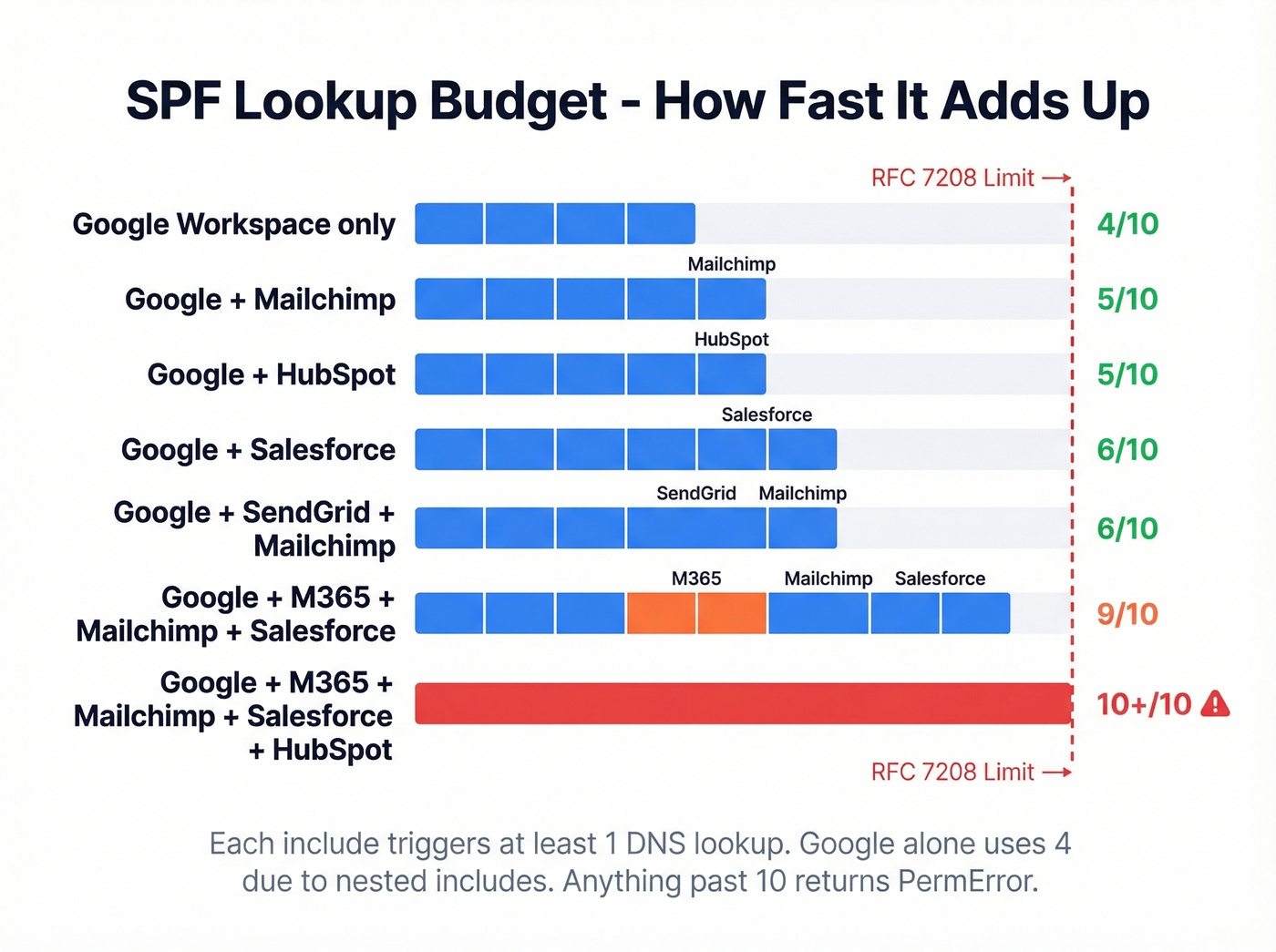
| Configuration | SPF Record |
|---|---|
| Google only | v=spf1 include:_spf.google.com ~all |
| Google + Mailchimp | v=spf1 include:_spf.google.com include:servers.mcsv.net ~all |
| Google + HubSpot | v=spf1 include:_spf.google.com include:[YOUR_HUBSPOT_ID].spfXX.hubspotemail.net ~all |
| Google + Salesforce | v=spf1 include:_spf.google.com include:_spf.salesforce.com ~all |
| Google + SendGrid | v=spf1 include:_spf.google.com include:[your SendGrid SPF include] ~all |
| Google + M365 + Mailchimp | v=spf1 include:_spf.google.com include:spf.protection.outlook.com include:servers.mcsv.net ~all |
Notice how fast those lookups stack up. The "kitchen sink" approach - throwing in five or six includes - will push you past the 10-lookup limit and break SPF entirely (if you’re troubleshooting sender stack issues, this email authentication checker can help you spot what’s failing).

You're configuring SPF records so your emails actually land. But even perfect authentication can't save you if you're sending to bad addresses. Prospeo's 5-step email verification delivers 98% accuracy - teams using it cut bounce rates from 35% to under 4%.
Fix your SPF, then fix your data. Start with 75 free verified emails.
The 10-Lookup Limit
RFC 7208 caps SPF evaluation at 10 DNS lookups. Exceed it, and receivers return a PermError - which most treat as an SPF failure. Your emails get rejected or land in spam, inconsistently, across different providers.
What Counts (And What Doesn't)
| Counts as a lookup | Doesn't count |
|---|---|
include |
ip4 |
a |
ip6 |
mx |
all |
redirect |
|
exists |
|
ptr (deprecated) |
What _spf.google.com Actually Expands To
Look, the fact that include:_spf.google.com silently consumes 4 of your 10 lookups - and Google's docs don't mention lookup budgeting at all - is genuinely frustrating.
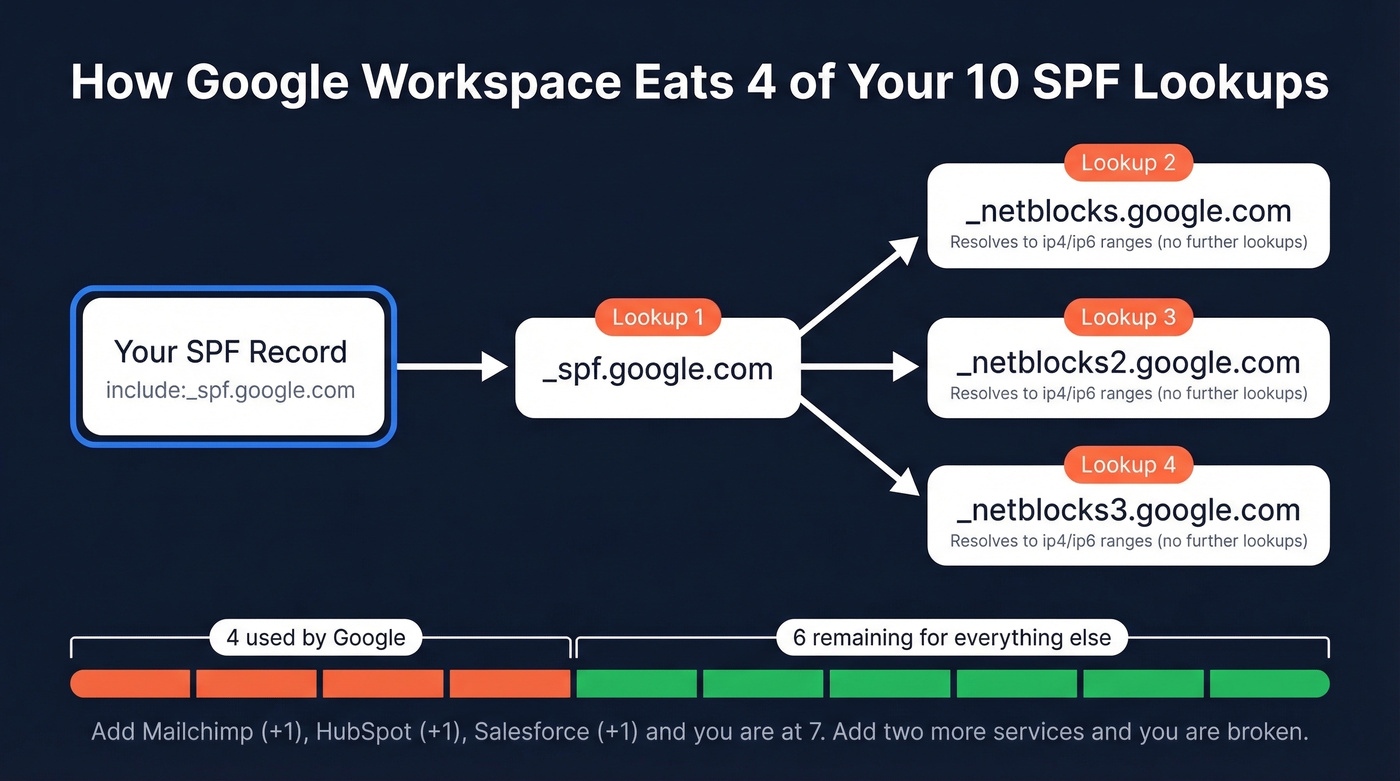
Here's the chain: _spf.google.com resolves to three nested includes - _netblocks.google.com, _netblocks2.google.com, and _netblocks3.google.com. That's 1 lookup for the initial include plus 3 for the nested records. Four lookups gone before you've added anything else. You've got 6 remaining for every other service your domain sends through.
Flag anything at 8+ total lookups as at-risk. At 10, you're on the edge. At 11, you're broken.
Four Ways to Reduce Lookups
1. Remove unused senders. The easiest win. Audit your SPF record against the services actually sending email today. That Mandrill include from 2022? The old ticketing system nobody uses? Cut them.
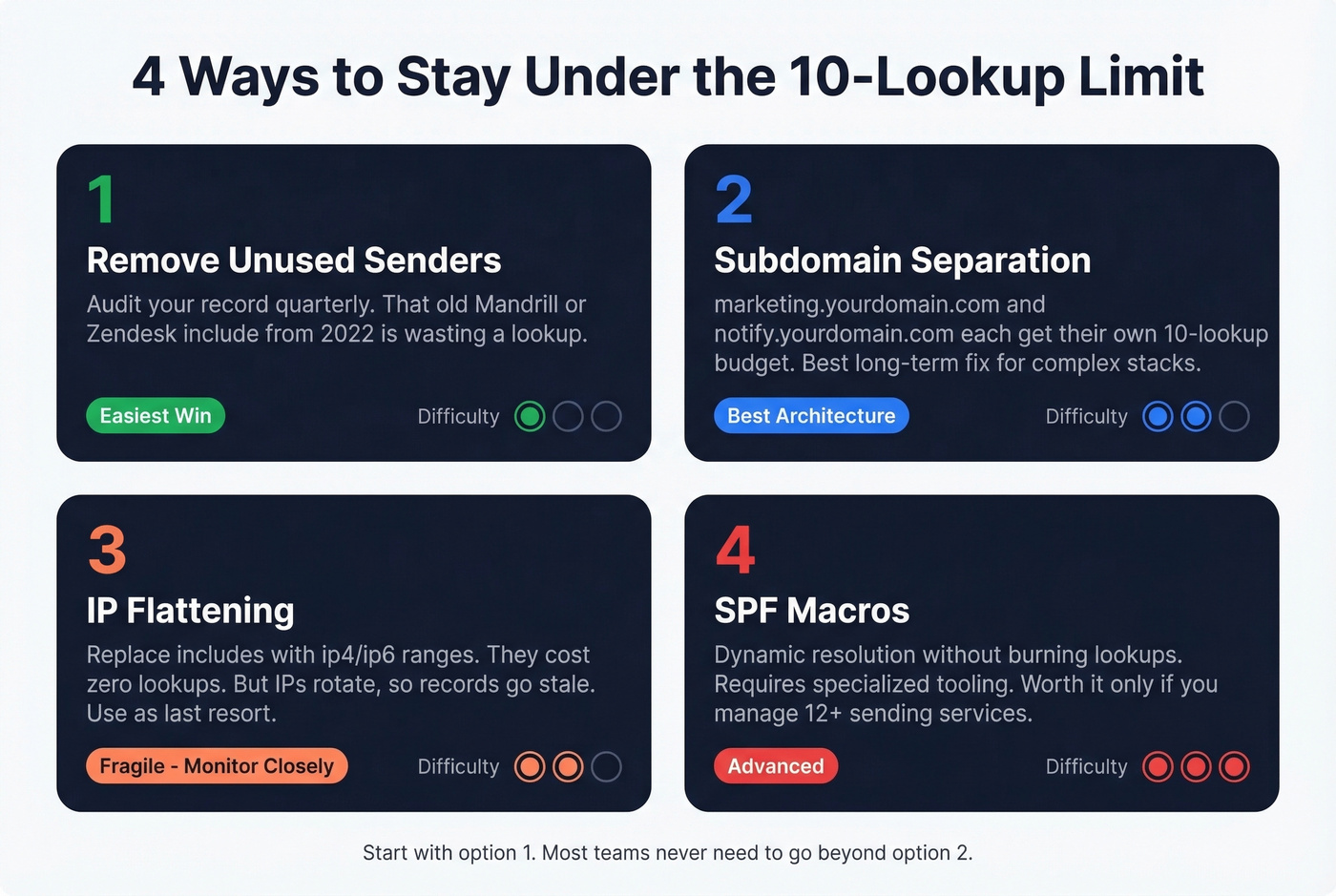
2. Subdomain separation. Put marketing email on marketing.yourdomain.com, transactional on notify.yourdomain.com. Each subdomain gets its own 10-lookup budget. This requires configuring those services to send from the subdomain, but it's the cleanest long-term architecture for complex sender stacks. One critical detail: SPF records don't inherit to subdomains - each one needs its own SPF TXT record. Forget this and your subdomain emails will fail SPF entirely.
3. IP flattening. Replace include mechanisms with explicit ip4/ip6 ranges, which don't count as lookups. The catch: Google, Microsoft, and most major providers rotate their sending IPs regularly, so a flattened record can go stale and silently break your SPF. Use this as a last resort, not a default strategy.
4. SPF macros. A fourth option exists - SPF macros can dynamically resolve sender authorization without consuming multiple lookups. They require specialized tooling and are beyond most admins' needs, but worth knowing about if you're managing a dozen-plus sending services.
SPF vs DMARC Alignment
This is where most admins get confused. SPF passes, but DMARC reports show alignment failures. What's going on?
Why SPF "Passes" But DMARC "Fails"
SPF validates the Return-Path (envelope sender), not the visible From header your recipients see. DMARC alignment requires the authenticated domain to match the From header domain. When they don't match - SPF passes on one domain, but the From header shows a different domain - DMARC alignment fails (deep dive: DMARC alignment check).
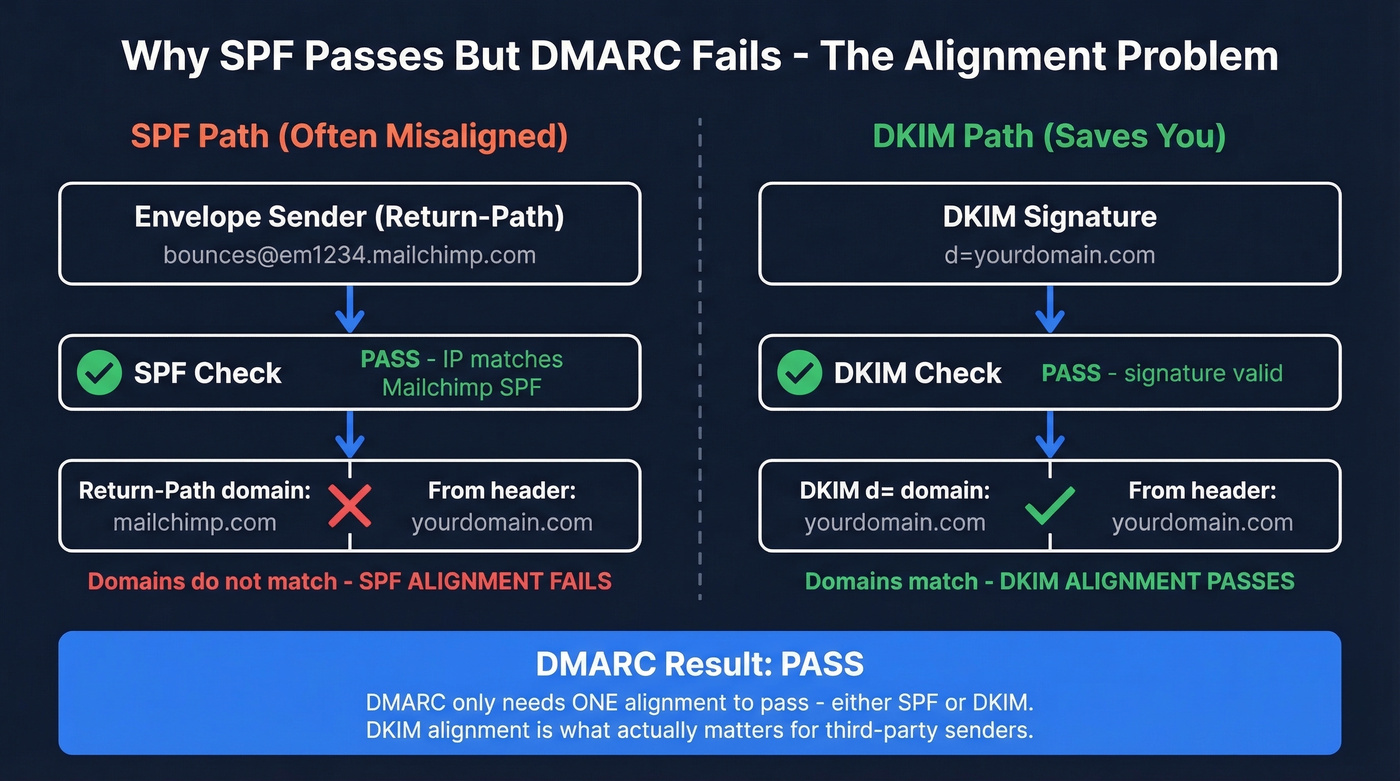
The fix: rely on DKIM for alignment. DKIM signs the message cryptographically and ties to the From header domain. As long as DKIM passes and aligns, your DMARC policy is satisfied even if SPF alignment doesn't match (see our DKIM explained guide).
Gmail "Send As" Caveat
When using Gmail's "Send mail as" feature with a custom domain, the Return-Path is often gmail.com. SPF passes for Gmail's domain, not yours. Your SPF record for yourdomain.com is irrelevant in this scenario - DKIM must carry the alignment load. This trips up a lot of people. The r/DMARC subreddit is full of threads about it.
Salesforce Return-Path Caveat
Salesforce uses its own Return-Path domain (something like *.bnc.salesforce.com), so SPF alignment with your From domain fails for Salesforce-sent emails. Even if you add include:_spf.salesforce.com to your record, the envelope domain won't match your From header. Make sure Salesforce DKIM signing is configured for your domain - that's what handles alignment here (more: email deliverability Salesforce).
Alias Domains in Google Workspace
If you've set up alias domains in Google Workspace, you'll see SPF alignment failures in your DMARC reports. Don't panic - this is expected behavior, not a bug.
Google's envelope sender for alias domains doesn't match the alias From header. As Al Iverson at Spam Resource explains, lack of SPF alignment on alias domains isn't a deliverability failure - DKIM handles it. Reddit threads on r/DMARC consistently confirm this. If you specifically need SPF alignment for a domain, configure it as a secondary domain in Google Workspace rather than an alias.
Let's be honest: most teams obsess over SPF alignment when DKIM alignment is what actually matters for DMARC. If your DKIM is properly configured and passing, SPF alignment failures on alias domains and third-party senders are noise, not signal. Stop chasing green checkmarks on every SPF alignment row in your DMARC reports and focus on whether DKIM is doing its job.
How to Verify Your SPF Record
Command-Line Verification
Linux/macOS:
dig yourdomain.com txt +short
Windows (Command Prompt):
nslookup -q=txt yourdomain.com
PowerShell:
Resolve-DnsName -Type TXT yourdomain.com
Look for the line starting with v=spf1. If you see two lines starting with v=spf1, you've got the duplicate-record problem - merge them immediately.

Online Tools
MXToolbox SPF Record Check retrieves your record and runs diagnostic validation, highlighting errors that can tank delivery. Free, no account required. This is the tool we recommend for a quick sanity check after setup.
Google Admin Toolbox CheckMX confirms MX/SPF records are visible from Google's side. Pair it with MXToolbox when you need lookup counting and deeper diagnostics.
Gmail "Show Original" - send a test email to a Gmail account, click the three-dot menu on the received message, select "Show original." You'll see SPF/DKIM/DMARC authentication results right there. This is the ground-truth test - it shows you exactly what Gmail's servers evaluated.
Common SPF Mistakes
Multiple SPF records. The most common mistake by far. You must have exactly one TXT record starting with
v=spf1. Two records = PermError = total SPF failure. Merge all includes into a single record.Missing
v=spf1prefix. Without it, the record is ignored entirely.Using
+all. This tells receivers that literally anyone can send as your domain. Never use+all. Ever.Exceeding 10 lookups. Produces a PermError. Audit your includes, remove dead services, consider subdomain separation.
Using deprecated
ptrmechanism. Wastes a lookup and is unreliable. RFC 7208 explicitly discourages it. Remove anyptrentries you find.Typos and extra spaces. SPF syntax is unforgiving. An extra space before
~allor a misspelled include domain will silently break things. We've seen a team lose two weeks of deliverability because of a missing dot in_spf.google.com.Hitting the 255-character TXT string limit. RFC 1035 caps each TXT string at 255 characters. Most registrars handle string splitting automatically, but if you're editing raw zone files, you'll need to split long SPF records into quoted 255-byte chunks.
Forgetting to update after adding a new sender. Every new email service needs its include added. Build SPF updates into your vendor onboarding checklist - skip this and your shiny new marketing tool sends straight to spam.
The Full Authentication Stack
SPF is one layer. DKIM cryptographically signs your messages so receivers can verify they weren't tampered with. DMARC tells receivers what to do when both SPF and DKIM fail - and sends you reports so you can monitor. All three are required for Google's bulk sender compliance in 2026 (if you’re implementing the whole stack, follow our how to set up SPF, DKIM, and DMARC guide).
But there's a step most teams miss entirely: authentication tells receiving servers your emails are legitimate, but if you're sending to invalid addresses, your bounce rate will undo all that work. Bounce rates above ~5% trigger spam filters even when your SPF/DKIM/DMARC setup is perfect (benchmarks: average email bounce rate). Prospeo verifies emails with 98% accuracy before you send, keeping your bounce rate well under that threshold. If you've just locked down your sending infrastructure, making sure your contact list is equally clean is the logical next step.
Managing SPF for multiple senders gets complicated fast. If you're running outbound through Salesforce, HubSpot, or dedicated cold email tools, bad contact data burns your domain reputation regardless of DNS config. Prospeo refreshes every 7 days - not 6 weeks - so stale emails don't wreck the deliverability you just spent hours protecting.
Stop debugging bounces caused by outdated data. Pay $0.01 per verified email.
FAQ
Can I have two SPF records on one domain?
No. Multiple SPF TXT records cause a PermError, and SPF fails entirely for every message your domain sends. Combine all include mechanisms into a single TXT record - one record, one v=spf1 prefix.
How long does SPF propagation take?
Most providers propagate DNS changes within 1-4 hours, though full global propagation can take up to 48 hours. Run dig yourdomain.com txt +short or use MXToolbox to confirm your new record is live before assuming it's working.
Does SPF alone satisfy Google's sender requirements?
No. Google requires SPF, DKIM, and DMARC for bulk senders (5,000+ emails/day to Gmail). SPF is the starting point, but all three must be configured and passing for full compliance.
What happens if I exceed the 10-lookup limit?
Receivers return a PermError, and most treat it as an SPF failure - your emails get rejected or routed to spam unpredictably across providers. Remove unused includes and use subdomain separation to stay under 10.
How do I keep my bounce rate low after setting up authentication?
Even with a perfect Google Workspace SPF record, sending to invalid addresses spikes your bounce rate and damages domain reputation. Prospeo's email finder verifies addresses at 98% accuracy with catch-all handling and spam-trap removal - 75 free credits per month, no contract required.