

How to Build a Sales Pipeline That Actually Produces Revenue
It's Monday morning. You open your CRM and see 87 deals. You scroll through them, and maybe 15 are real - the rest are ghosts, stale conversations, and wishful thinking. That's not a pipeline. That's a graveyard with a forecast attached.
The median B2B conversion rate sits at 2.9% (typical range: 2-5%), the average deal now involves 13 decision-makers, and 80% of buyer interactions happen digitally. Learning how to build a sales pipeline that actually produces revenue isn't about stuffing more leads into the top. It's about engineering every stage so real opportunities move forward and dead weight gets cut.
What You Need (Quick Version)
- Define your ICP and build a verified prospect list before you touch your CRM. Bad data at the top poisons everything downstream. (If you need a starting point, use an Ideal Customer Profile template.)
- Map 5-7 pipeline stages with explicit exit criteria. Deals move on actions, not hunches.
- Pick a qualification framework that matches your deal complexity - BANT for simpler SMB deals, MEDDPICC for $50K+. (If you're rolling out MEDDPICC, these MEDDIC discovery questions help standardize calls.)
- Size your pipeline at 3x coverage of your quota target. Below 20% win rate? Push to 4x-5x.
- Review weekly. Teams that track pipeline weekly see 34% revenue growth and 87% forecast accuracy. Ad-hoc reviewers? 11% and 52%.
What a Sales Pipeline Actually Is
People use "pipeline," "funnel," and "sales process" interchangeably. They're not the same thing, and confusing them leads to messy reporting and misaligned teams.
| Concept | What It Is | How You Use It |
|---|---|---|
| Pipeline | Live deal tracker by stage | "We have $1.2M at Proposal stage" |
| Funnel | Drop-off diagnostic, awareness to close | "Our MQL-to-SQL conversion is 38%" |
| Sales process | Repeatable actions powering the pipeline | "After discovery, reps send a recap within 24 hours" |
Your pipeline is the live inventory of deals your team is working right now. The funnel is a diagnostic lens - it tells you where deals leak. The sales process is the engine underneath, the repeatable actions that move deals from one stage to the next. Get the definitions right and your reporting gets cleaner immediately. (If you want a KPI list, track core funnel metrics alongside pipeline stages.)
The 7 Pipeline Stages (With Exit Criteria)
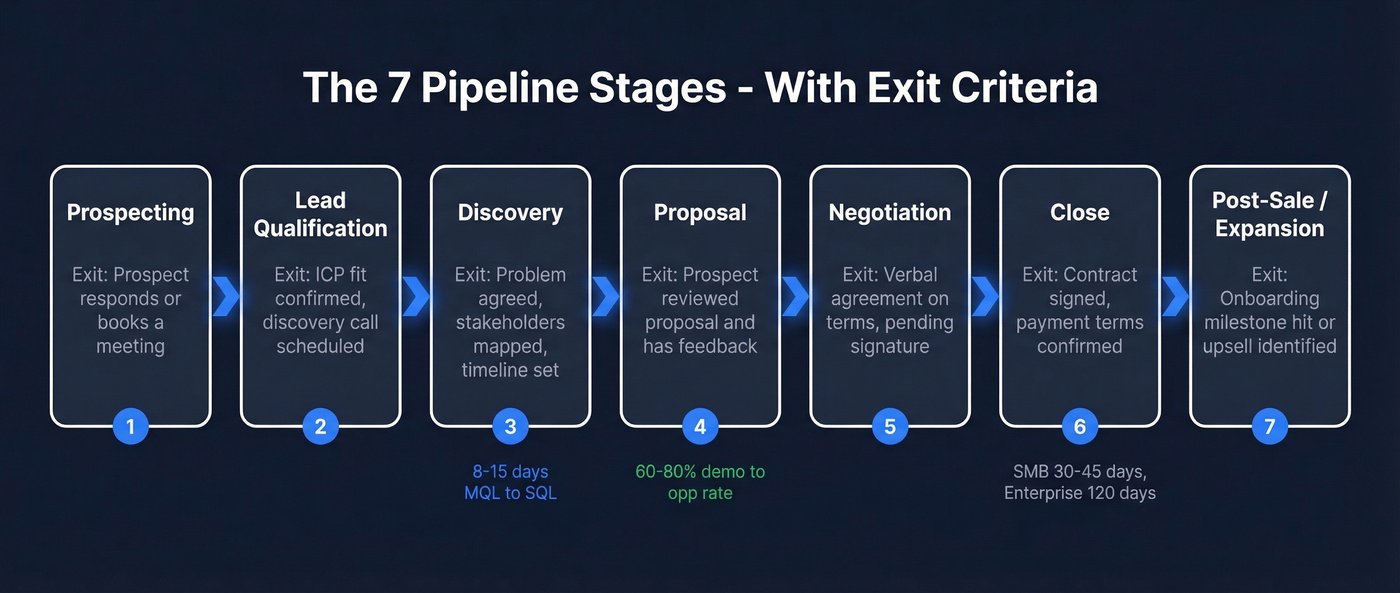
Every pipeline needs stages, and every stage needs a clear exit trigger - a specific action or event that proves a deal belongs in the next bucket. If reps are moving deals forward based on "it felt like a good call," your pipeline data is fiction. Whether you're constructing your first deal flow or overhauling an existing one, these stages give you a proven starting structure.
Prospecting
You're identifying potential buyers who match your ICP. Exit trigger: prospect responds to outreach or engages with content - books a meeting, replies to an email, fills out a form. (Need fresh ideas? Use these sales prospecting techniques.)
Lead Qualification
Initial fit check. Do they have a plausible need, and are they in your target market? Exit trigger: confirmed ICP fit and a scheduled discovery call. (This is also where a simple lead scoring model can prevent junk from entering Discovery.)
Discovery
Deep-dive conversation to understand their problem, buying process, and stakeholders. Exit trigger: mutual agreement on the problem to solve, key stakeholders identified, and timeline discussed. MQL-to-SQL progression typically takes 8-15 days. (If your calls are inconsistent, standardize with a discovery call script.)
Proposal
You've presented a solution and pricing. If you run product demos, expect a 60-80% demo-to-opportunity conversion rate - top performers hit 90%+. Exit trigger: prospect confirms they've reviewed the proposal and have feedback or questions. (Use a repeatable product demo checklist to keep win rates stable.)
Negotiation
Terms, pricing, legal, procurement - the messy middle. Exit trigger: verbal agreement on terms, pending contract signature. (If discounting is chaotic, set a clear walk away point before you negotiate.)
Close
Contract signed, deal won. Exit trigger: signed agreement and payment terms confirmed. For SMB deals, expect 30-45 days from opportunity to close. Enterprise? Closer to 120 days.
Post-Sale / Expansion
Onboarding, adoption, and upsell. Most teams ignore this stage entirely, which is a mistake - expansion revenue is cheaper than new logo acquisition. Exit trigger: successful onboarding milestone hit, or expansion opportunity identified and moved to a new pipeline. (To structure expansion, align on upsell vs cross-sell motions early.)
Customize these to your buyer journey. A PLG SaaS company might collapse Proposal and Negotiation into one stage. An enterprise services firm might split Discovery into Technical Evaluation and Business Case. The number of stages matters less than having clear, action-based exit criteria for each one.
Choose a Qualification Framework
Not every deal deserves the same rigor. A small inbound deal doesn't need MEDDPICC - that's like bringing a legal team to a coffee meeting. But a $50K+ enterprise opportunity with 6-10 stakeholders absolutely does.
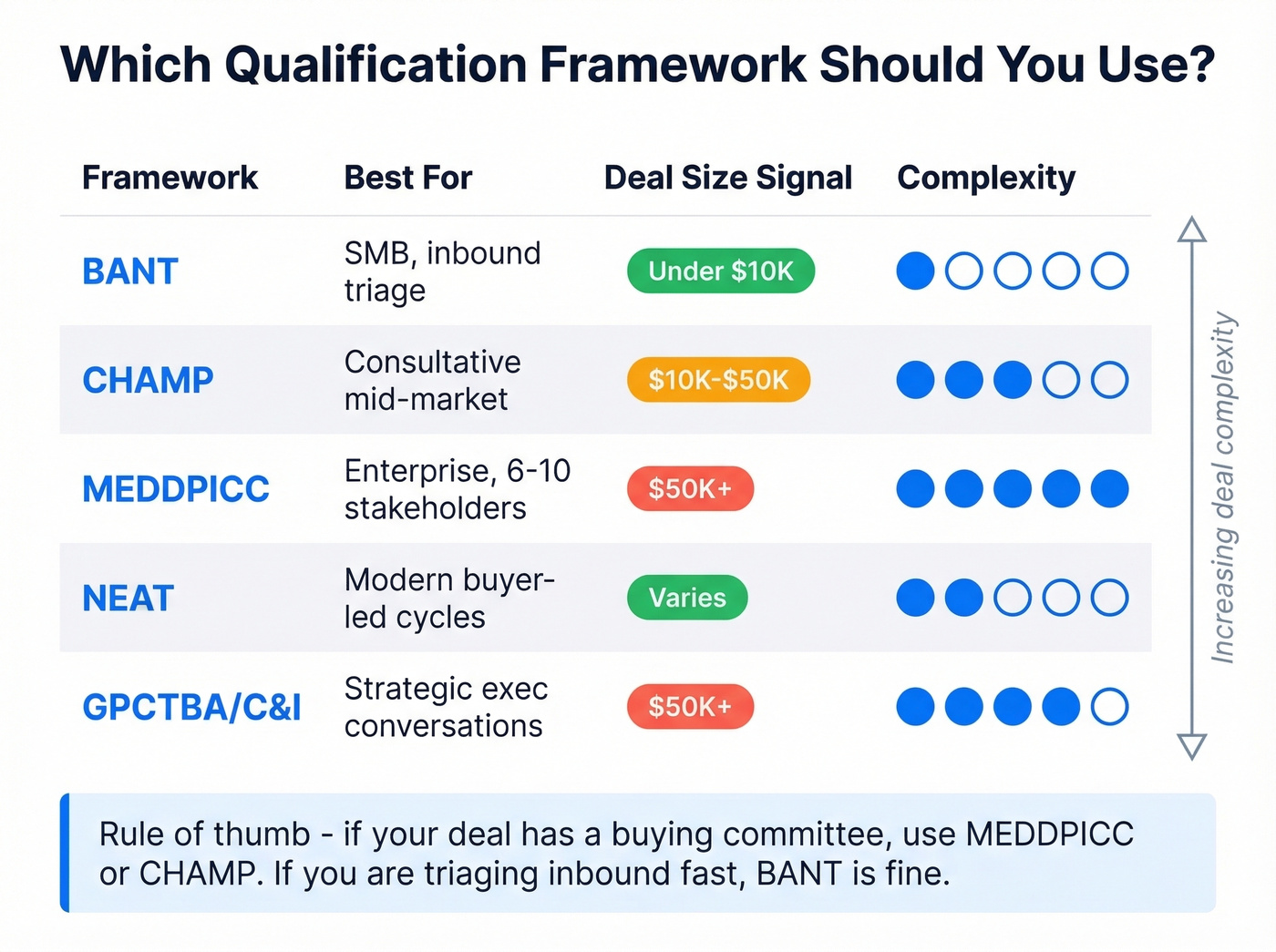
| Framework | Best For | Weakness |
|---|---|---|
| BANT | SMB, inbound triage | Too shallow for complex deals |
| CHAMP | Consultative mid-market | Less structured for buying committees |
| MEDDPICC | Enterprise, $50K+ deals | Overkill for transactional sales |
| NEAT | Modern buyer-led cycles | Less proven in field sales |
| GPCTBA/C&I | Strategic exec conversations | Complex to train, slow to adopt |
BANT is fine for high-velocity inbound where you're triaging fast. For anything with a real buying committee, CHAMP or MEDDPICC forces reps to map the decision process before they waste cycles on a deal that was never going to close. We've seen teams cut their average cycle length by 20% just by implementing MEDDPICC consistently - not because the acronym has special powers, but because it forces reps to kill bad deals earlier.
5 Steps to Build Your Pipeline
Step 1: Define Your ICP and Build a Verified Prospect List
The first step isn't opening your CRM. It's assembling a database of people who actually match your ideal customer profile and whose contact data is real. If 30%+ of your emails bounce on the first sequence, your conversion metrics are meaningless and your domain reputation takes a hit. (If bounces are a recurring issue, fix the root causes in this email bounce rate guide.)
Prospeo covers 300M+ professional profiles with 98% email accuracy and a 7-day refresh cycle, so you can filter by buyer intent, technographics, headcount growth, funding, revenue, and 30+ criteria, then export a verified list in minutes. Snyk's 50 AEs cut their bounce rate from 35-40% to under 5% after switching to verified data - the result was 200+ new opportunities per month.
Step 2: Map Stages to Your Buyer Journey
Don't copy a textbook pipeline. Interview your top reps and ask: "What actually happens between first contact and signed contract?" Map those real events to stages. If your buyers always do a technical evaluation before seeing pricing, that's a stage. If they don't, don't invent one.
Step 3: Set Exit Criteria and Assign Activities
For each stage, define the specific action that proves a deal should advance. Then assign the activities that make that action happen - emails to send, calls to make, materials to share. This is where your sales process meets your pipeline structure. (If you need a menu of what to assign, start with these sales activities examples.)
Here's the thing most guides skip: exit criteria need to be binary. "Prospect seems interested" isn't a criterion. "Prospect confirmed budget range and introduced us to their VP of Engineering" is. The difference between those two sentences is the difference between a pipeline you can forecast from and one you can't.
Step 4: Size Your Pipeline - Coverage Ratio Math
If your quarterly target is $500K and your win rate is 25%, you need $2M in pipeline, giving you 4x coverage. Win rate of 33%? $1.5M gets you to 3x. The formula is simple: Pipeline needed = Quota / Win rate.
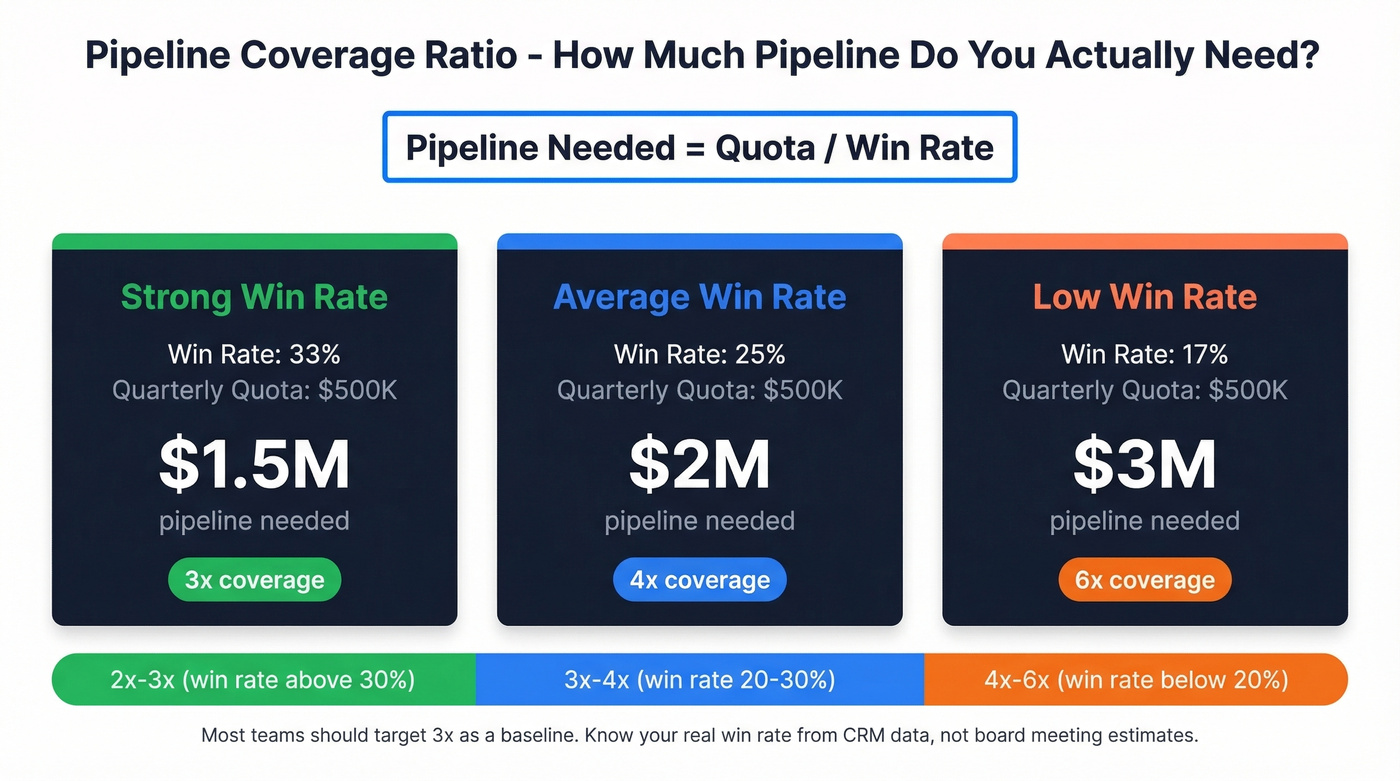
Most teams should target 3x coverage as a baseline. Below 20% win rate, push to 4x-5x. Above 30%, 2x-2.5x is usually enough. The key is knowing your actual win rate - not the one your VP quotes in board meetings, but the one your CRM data shows when you filter out the deals that were marked "closed-won" retroactively. (To benchmark your numbers, compare against sales pipeline benchmarks.)
Step 5: Choose Your Pipeline Tools
If you're managing fewer than 10 active deals, a spreadsheet works fine. More than 10, and you need a CRM - not because spreadsheets are bad, but because they don't enforce process or give you pipeline analytics.
HubSpot's free CRM tier handles the basics and works well for early-stage teams. Pipedrive runs about $14-$100/user/month depending on plan. Salesforce starts around $25/user/month and scales to $150+ depending on edition and add-ons. Freshsales and Zoho both offer free tiers, with paid plans landing in the $15-$70/user/month range.
One trend worth noting: conversation intelligence tools like Gong and Clari can help teams spot at-risk deals faster than manual reviews. They won't replace your pipeline structure - they just make it easier to enforce. (If you’re evaluating stacks, start with these sales forecasting solutions.)

A healthy pipeline starts with verified prospects, not guesswork. Prospeo gives you 300M+ profiles filtered by buyer intent, technographics, funding, and 30+ criteria - with 98% email accuracy and a 7-day refresh cycle. Snyk's 50 AEs dropped their bounce rate from 35% to under 5% and generated 200+ new opportunities per month.
Stop filling your pipeline with ghosts. Start with data that connects.
Benchmarks - What Good Looks Like
Benchmarks are useless if they're generic. These are stage-to-stage conversion rates by industry based on data collected through 2025, so you can compare against your actual vertical.
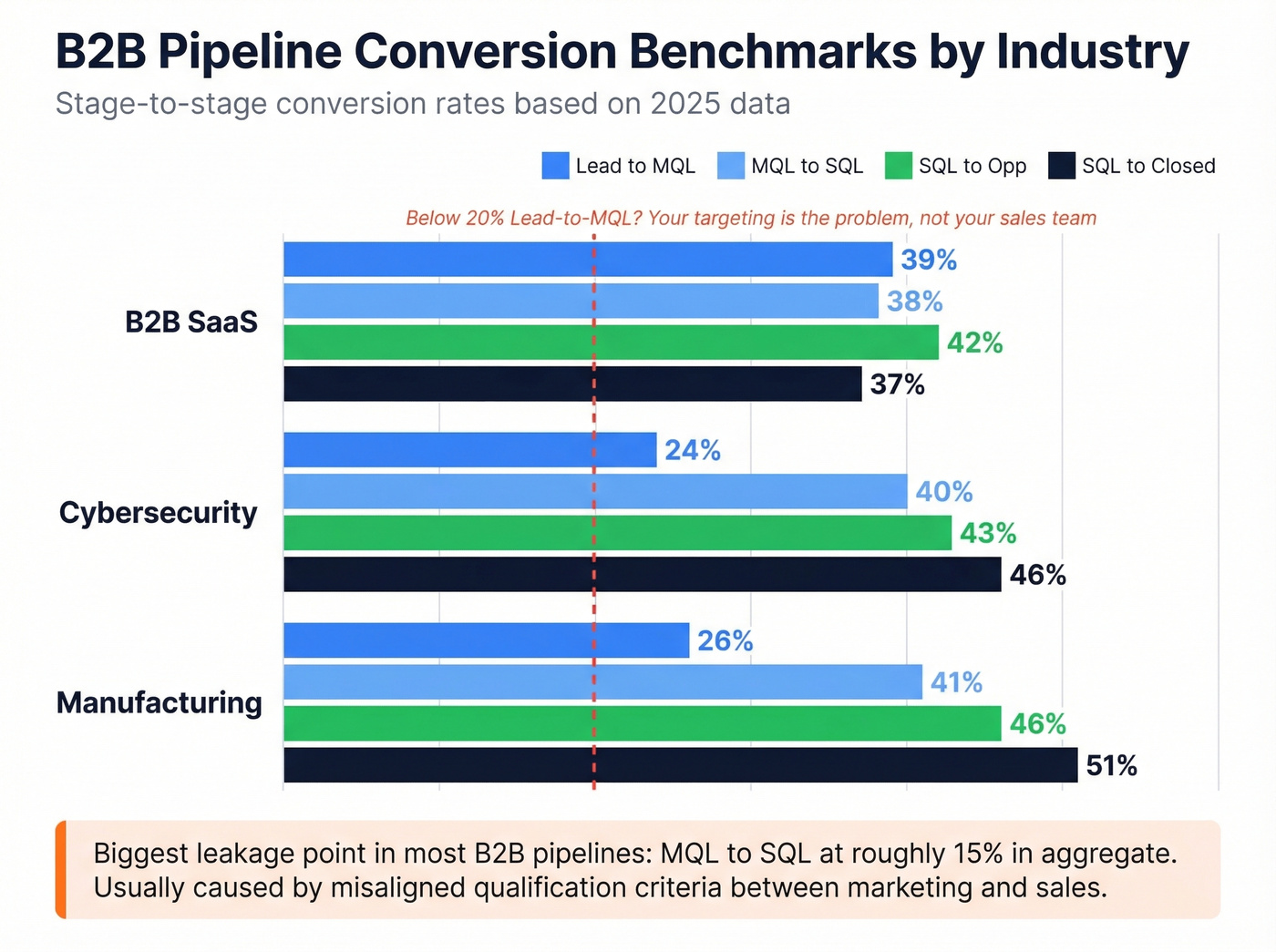
| Industry | Lead to MQL | MQL to SQL | SQL to Opp | SQL to Closed |
|---|---|---|---|---|
| B2B SaaS | 39% | 38% | 42% | 37% |
| Cybersecurity | 24% | 40% | 43% | 46% |
| Manufacturing | 26% | 41% | 46% | 51% |
Lead-to-MQL is often the lowest-converting stage across industries. That's where most of your volume dies - unqualified leads that never had real intent. If your Lead-to-MQL rate is below 20%, the problem isn't your sales team. It's your targeting.
For SaaS specifically, the numbers break down further. Visitor-to-Lead averages 1.5-2.5%, but top 10% performers hit 8-15%. MQL-to-SQL runs 32-40%. SQL-to-Close lands at 20-25%, with top performers pushing above 30%.
The biggest leakage point in most B2B pipelines? MQL-to-SQL, at roughly 15% in aggregate data. That gap is almost always caused by misaligned qualification criteria between marketing and sales. Marketing calls it qualified because they downloaded a whitepaper. Sales calls it unqualified because there's no budget and no timeline. Fix the definition, fix the leak.
Pipeline Velocity Formula
Pipeline velocity tells you how much revenue moves through your pipeline per day. It's the single best health metric because it captures all four levers at once.
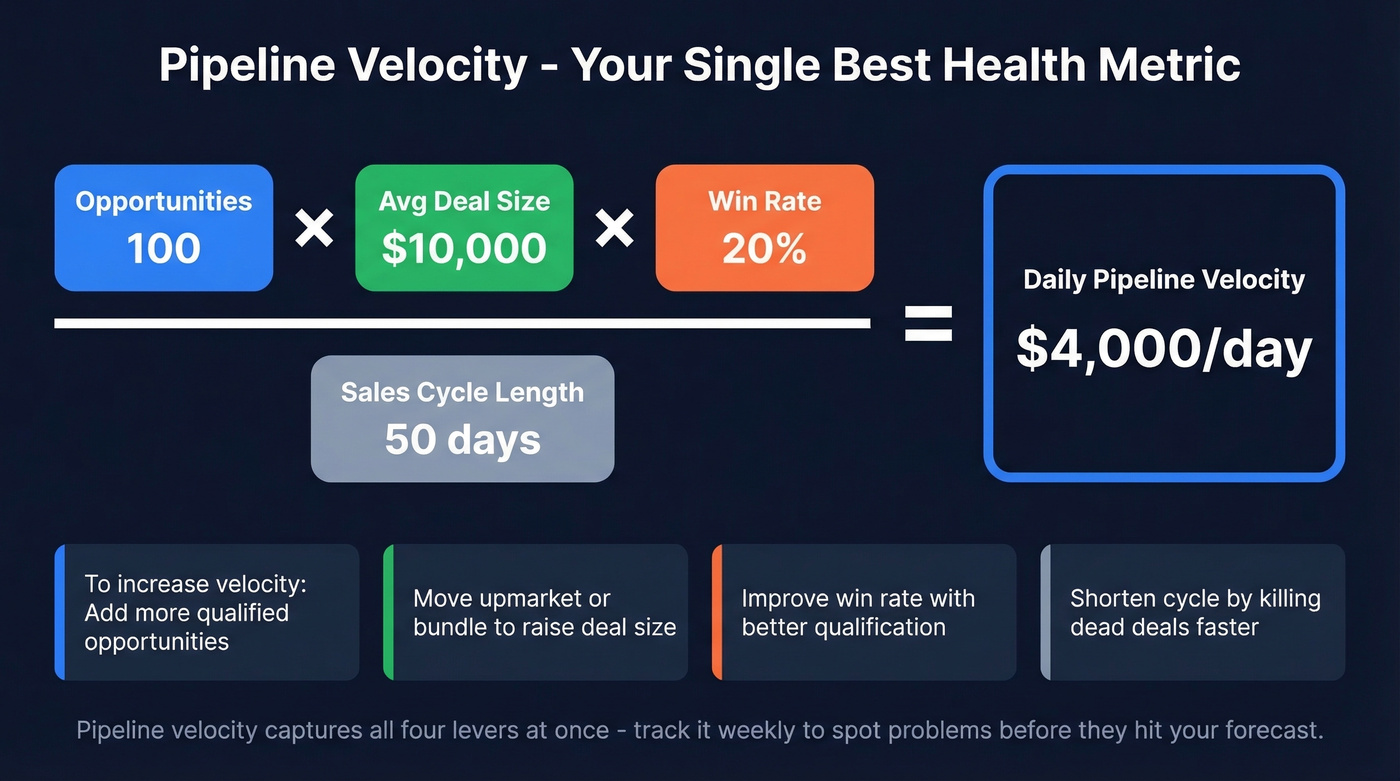
The formula:
(Number of Opportunities x Average Deal Size x Win Rate) / Sales Cycle Length = Daily Pipeline Velocity
Worked example: 100 opportunities x $10,000 average deal x 20% win rate / 50-day cycle = $4,000/day.
To improve velocity, you only have four levers: more opportunities, bigger deals, higher win rate, or shorter cycles. Most teams default to "more opportunities" because it feels easiest. But shortening your cycle by 10 days or improving win rate by 5 points often delivers a bigger impact with less effort.
One stat that should change how you think about lost deals: 40-60% of pipeline deals are lost to customer indecision, not to competitors. Your biggest competitor is inertia. If you're losing more deals to "no decision" than to a named competitor, your problem isn't positioning - it's urgency.
Velocity benchmarks break down by industry based on a study of 247 B2B organizations:
| Industry | Median Deal | Win Rate | Cycle | Velocity/Day |
|---|---|---|---|---|
| SaaS & Tech | $12,400 | 22% | 67 days | $1,847 |
| Financial Services | $31,200 | 18% | 89 days | $2,134 |
| Manufacturing | $47,800 | 19% | 124 days | $1,289 |
| Real Estate | $89,300 | 16% | 147 days | $2,456 |
And by company revenue:
| Company Revenue | Velocity/Day |
|---|---|
| $1M-$5M | $687 |
| $5M-$25M | $1,303 |
| $25M-$100M | $3,484 |
| $100M-$500M | $6,919 |
| $500M+ | $12,945 |
Your Weekly Pipeline Review
Teams that track pipeline weekly see 34% revenue growth and 87% forecast accuracy. Teams that review ad-hoc? 11% growth and 52% accuracy. That's not a marginal difference - it's the gap between hitting quota and missing it by a mile.
Here's the five-item agenda we've found works best for a 30-minute weekly review:
- Stale deals to kill. Any deal that hasn't had a next step in 14+ days gets challenged. If the rep can't articulate why it's still alive, it's dead. Remove it.
- Deals missing next steps. Every deal in your pipeline should have a concrete next action with a date. No next step = no deal.
- Stage conversion vs. benchmarks. Compare your actual Lead-to-MQL, MQL-to-SQL, and SQL-to-Close rates against the industry benchmarks above. Spot the leaks.
- Velocity trend. Is your daily velocity going up or down week over week? This is your early warning system.
- Rep capacity check. The sweet spot is 20-40 active deals per rep. One thread on r/sales captured an enterprise AE drowning in ~40 deals and feeling completely reactive. That's the ceiling - beyond it, deal quality drops because reps can't give each opportunity the attention it needs.
Diagnose Your Pipeline Shape
During your review, pay attention to where deals cluster. A top-heavy pipeline - lots of early-stage deals, few at Proposal or Negotiation - means your team is generating leads but failing to qualify or advance them. Tighten discovery and disqualify faster. A bottom-heavy pipeline - plenty of late-stage deals but nothing behind them - means you're about to hit a revenue cliff. The fix is immediate prospecting investment.
A healthy pipeline looks like a gentle taper, not a lopsided blob.
Start With a Spreadsheet, Then Graduate
You don't need Salesforce to get started. If you're running fewer than 10 active deals, a spreadsheet is faster to set up and easier to maintain. Copy this column structure into a new Google Sheet and you're ready to go:
| Column | What Goes Here |
|---|---|
| Deal Name | Company + opportunity description |
| Contact Person | Primary buyer or champion |
| Assignee | Rep who owns the deal |
| Deal Size | Estimated contract value |
| Win Probability (%) | Stage-based probability |
| Deal Status | In Progress, On Hold, Complete, Overdue |
| Priority | High / Medium / Low |
| Stage | Current pipeline stage |
| Next Step | Specific next action + date |
| Comments | Context, blockers, notes |
Add a Quarter Total row at the bottom that sums Deal Size x Win Probability for a weighted forecast. This gives you a rough revenue projection without any software.
When you consistently have more than 10 active deals, graduate to a CRM. The free tiers from HubSpot, Freshsales, and Zoho are genuinely usable for small teams - HubSpot in particular works well as a free CRM for startups that aren't ready to invest in paid tooling. Salesforce makes sense once you need custom objects, complex reporting, or integrations with a larger tech stack. Skip it if you're a five-person team running $5K deals - you'll spend more time configuring it than selling.
7 Pipeline Mistakes That Kill Revenue
Companies with strong pipeline management see 28% higher revenue growth than those that wing it. Here are the seven mistakes we see most often.
1. No defined stages or exit criteria. If reps can't tell you exactly what needs to happen for a deal to move from Discovery to Proposal, your pipeline stages are decorative. Define action-based exit triggers for every stage.
2. Feeding your pipeline with unverified data. If 30%+ of your emails bounce, your conversion metrics are fiction and your domain reputation suffers. Verify every contact before it enters your pipeline. Meritt tripled their pipeline from $100K to $300K/week after switching to verified contact data - bounce rate dropped from 35% to under 4%. (If you’re evaluating vendors, compare data enrichment services before you commit.)
3. Letting stale deals rot. A deal that hasn't moved in three weeks isn't "warming up." It's dead. Set a 14-day inactivity rule and enforce it. Killing stale deals hurts in the moment but makes your forecast honest.
4. No weekly review cadence. Ad-hoc pipeline reviews produce 52% forecast accuracy. Weekly reviews produce 87%. The math is clear.
5. Overloading reps beyond 40 deals. More deals per rep doesn't mean more revenue. It means more deals getting neglected. Cap active deals at 20-40 depending on deal complexity, and redistribute when reps hit the ceiling.
6. No qualification framework. Without a framework, every deal looks promising until it doesn't. Pick BANT, CHAMP, or MEDDPICC based on your deal size and enforce it. The framework itself matters less than having one at all.
7. Ignoring post-sale expansion. Your pipeline shouldn't end at Close-Won. Expansion and upsell opportunities are the highest-converting deals in your entire pipeline because the trust is already built. Track them.
Let's be honest: if your average contract value is under $15K, you probably don't need a 7-stage pipeline, MEDDPICC, or Salesforce. A 4-stage pipeline in a spreadsheet with verified contact data and a weekly review will outperform a bloated CRM setup that nobody updates. Complexity is the enemy of execution at lower ACVs, and in our experience, simplicity wins over sophistication every time for early-stage teams.
Pipeline coverage means nothing if your prospect data is stale. Prospeo refreshes every 7 days - 6x faster than the industry average - so the contacts entering Stage 1 are real, reachable, and current. At $0.01 per email, building 3x pipeline coverage doesn't require a ZoomInfo budget.
Build 3x pipeline coverage without 3x the spend.
FAQ
How many stages should a sales pipeline have?
Five to seven stages works best for most B2B teams. Fewer than five and you lose visibility into where deals stall; more than seven and reps stop updating because distinctions feel arbitrary. Match stages to your actual buyer journey and make sure each has a clear, action-based exit trigger.
What's a healthy pipeline coverage ratio?
Three times your quota is the standard target. If your win rate is below 20%, aim for 4x-5x coverage. Above 30%, 2x-2.5x is usually sufficient. Calculate it by dividing total weighted pipeline value by your revenue target for the period.
What's the fastest way to build a pipeline from scratch?
Start with your ICP definition and a verified prospect list of 200-500 contacts. Set up a 4-5 stage pipeline in a spreadsheet or free CRM, launch outreach sequences, and within two weeks you'll have enough early-stage deals to track conversion rates. Don't wait for perfect infrastructure - a simple pipeline you actually use beats a sophisticated one you don't.
How often should I review my pipeline?
Weekly, without exception. Teams reviewing pipeline weekly achieve 34% revenue growth and 87% forecast accuracy versus 11% growth and 52% accuracy for ad-hoc reviewers. Block 30 minutes, run the five-item agenda above, and don't skip it.
How do I keep pipeline data accurate?
Start with verified contact data so your foundation isn't rotting from day one. Then enforce weekly reviews to kill deals inactive for 14+ days, update stages based on actual buyer actions, and flag any deal missing a concrete next step. The discipline matters more than the tool.