

How to Create an Email Marketing Campaign That Actually Lands in the Inbox
You spent two weeks crafting the perfect email sequence, hit send to 5,000 subscribers, and woke up to a 4% open rate. Not because your copy was bad - because 800 of those addresses were invalid, your domain reputation took a hit, and Gmail quietly routed the rest to spam.
Most guides on how to create an email marketing campaign jump straight to subject line hacks. The step that actually determines success happens before you write a single word: making sure your emails reach the inbox. Email marketing still delivers $36-$40 for every $1 spent, and 93% of e-commerce orders come from email campaigns. But that ROI assumes deliverability. We've watched teams burn months of work because they skipped list verification - and we've seen the fix take less than ten minutes.
What You Need (Quick Version)
- Segment by behavior and engagement - not just demographics.
- Verify your list before sending. Invalid emails destroy domain reputation. Non-negotiable.
- Set up SPF, DKIM, and DMARC. Skip authentication, and mailbox providers skip your emails.
- Write short subject lines. Under 50 characters. Higher opens, higher clicks.
- Measure clicks - not opens. Apple Mail Privacy Protection inflates open rates. Click-through rate and conversions tell the real story.
Fix deliverability before you obsess over subject lines. That's the angle most guides miss, and it's the one that matters most.
10 Steps to Build a Campaign That Converts
1. Define Your Audience and Segments
Blasting your entire list with the same message is the fastest way to tank a campaign. The consensus in email marketing communities is blunt: sending unsegmented blasts is using email "like it's still 2010."
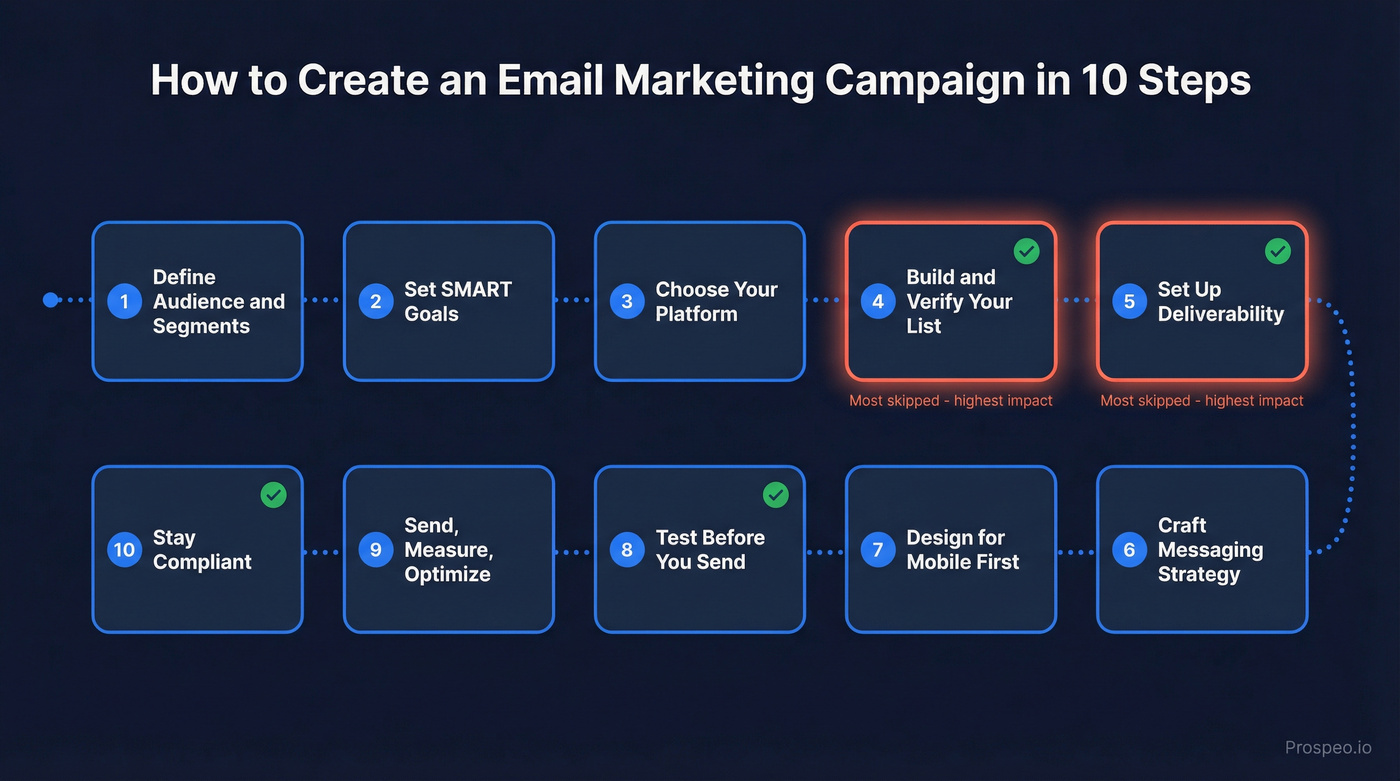
Start with behavioral segments - pages visited, links clicked - then layer in purchase history, engagement level (active in 90 days vs. dormant), and lifecycle stage. Even two or three segments will outperform a single-list send. You don't need a complex data model. You need to stop treating every subscriber the same. Audience definition is the first real step in email campaign planning, and it shapes every decision that follows.
2. Set SMART Campaign Goals
"Get more opens" isn't a goal. "Increase CTR on product launch emails from 1.7% to 2.5% by Q3" is.
Klaviyo's data shows automated flows generate up to 30x more revenue per recipient than one-off campaigns, so know when a campaign is the right tool and when a flow is better. Use campaigns for announcements, promotions, and time-sensitive content. Use flows for welcome sequences, abandoned carts, and re-engagement. If you're using "placed order rate" as your conversion proxy, campaign benchmarks put the average around 0.16%, with top 10% performers around 0.36%. Set targets between average and top-decile, then work backward.
3. Choose Your Email Platform
Mailchimp or MailerLite work well for simplicity and generous free plans - paid tiers typically start around $10-$20/month and scale with list size. Klaviyo is the go-to for e-commerce with deep Shopify/WooCommerce integration, free up to 250 contacts, then roughly $20/month and up. ActiveCampaign suits teams that need advanced automation: conditional logic, lead scoring, CRM-lite features, starting around $15-$30/month.
Skip any platform that doesn't let you authenticate your sending domain with SPF, DKIM, and DMARC. That's a dealbreaker.
4. Build and Verify Your Email List
Organic list building is the only sustainable path. Lead magnets, gated content, webinar signups, checkout opt-ins - these work because the subscriber actually wanted to hear from you. Purchased lists are a fast track to spam complaints and blacklists. (If you're tempted anyway, read Is It Illegal to Buy Email Lists?.)
But even organic lists decay fast. Expect roughly 20-30% annual decay, which means after six months, around 10-15% of addresses have gone stale.
Every bounce chips away at your sender reputation. For bulk senders, crossing the 0.3% spam complaint threshold can trigger filtering and inbox placement issues for everyone on your list, not just the bad addresses. One agency, Stack Optimize, built to $1M ARR by keeping client deliverability above 94%, bounce rates under 3%, and zero domain flags - clean data was a huge lever. (If you need bounce benchmarks and fixes, see Email Bounce Rate.)
Here's the thing: before any major send, run your list through a verification tool that handles catch-all domains, spam traps, and honeypots. Prospeo's email finder runs a 5-step verification process and delivers 98% email accuracy - the free tier gives you 75 emails per month to test the workflow. It takes minutes and saves your domain reputation. For deeper remediation, use a dedicated spam trap removal process.

5. Set Up Deliverability
Authentication is the foundation. Without it, mailbox providers have no reason to trust you. (If you want the full technical breakdown, use our email deliverability guide.)
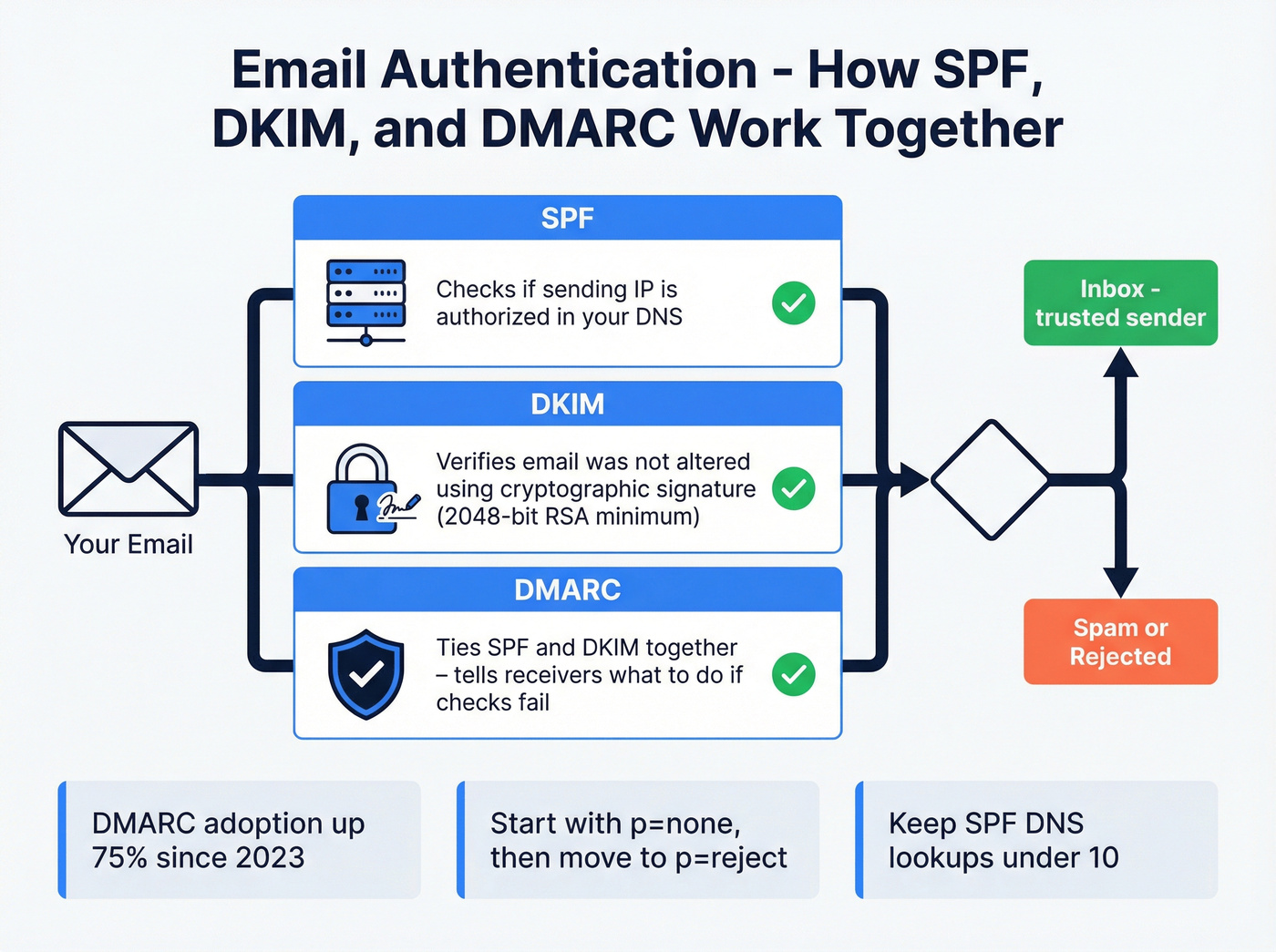
SPF tells receiving servers which IPs can send on your behalf - keep DNS lookups under 10. DKIM cryptographically signs your emails; use 2048-bit RSA keys minimum and rotate every six months. (If you're troubleshooting, see How to Verify DKIM Is Working.) DMARC ties SPF and DKIM together; start with p=none to monitor, then move to p=quarantine or p=reject. Beyond authentication, you'll also want a List-Unsubscribe header (a practical deliverability lever and a requirement for bulk sending), a domain warm-up plan starting with low daily volume over 2-4 weeks, and pre-send verification to catch new invalids and spam traps before every major campaign. (For sending limits and safe ramp-up, see Email Velocity.)
DMARC adoption surged 75% - from 27.2% to 47.7% among top domains between 2023 and 2025. If you haven't set it up, you're behind. And if your emails score above 4 on SpamAssassin's scale, deliverability drops hard even with perfect authentication. (Run a preflight with an email spam checker.)
6. Craft Your Messaging Strategy
Subject lines do most of the work. A Mailchimp study cited by WordStream found that subject lines under 50 characters see 12% higher open rates and 75% higher click-through rates. The sweet spot is 30-50 characters - enough to communicate value, short enough to display fully on mobile. If you want swipeable ideas, use these email subject line examples.
Avoid spam trigger words ("100% free," "earn extra cash," excessive caps). For the body, follow the single-CTA principle: one clear action per email. If you're torn between two CTAs, that's two emails. (More conversion-focused guidance: Email Copywriting.)
One example we keep coming back to: the Hyggekrog welcome email hit a 90% open rate and 32.94% click rate - not because of clever copy, but because it arrived immediately after signup when intent was highest. Timing and relevance beat wordsmithing every time. For deals under $15k, a well-timed automated welcome flow will outperform any hand-crafted campaign.
A caveat on measurement: Apple Mail Privacy Protection pre-loads tracking pixels, inflating open rates. A/B test using click rate as your primary signal.
7. Design for Mobile First
A large share of recipients read email on a phone. Design around a ~600px email width, use a single-column layout, and make CTAs tap-friendly with ~44x44px touch targets. Keep body text at 16px minimum. The Reddit complaint about "tiny text that requires pinch-zooming" is real, and it kills engagement.
If your email looks broken on an iPhone, nothing else you did matters.
8. Test Before You Send
Send a test to yourself and at least one colleague. Verify all links work, the unsubscribe link is visible and functional, the email renders correctly in Gmail, Outlook, and Apple Mail on mobile, and your preheader text is intentional - not auto-pulled from body copy. (If you want a framework for testing preheaders, see Email Preview Text A/B Testing.)
For A/B testing, Litmus recommends changing one variable at a time with a randomized sample of at least 10,000 recipients. The most common mistake we see: calling a winner after two hours. Let the data settle for 24-48 hours before drawing conclusions, especially if your audience spans multiple time zones.
9. Send, Measure, and Optimize
Click-through rate measures how many recipients clicked a link - this is your primary optimization metric. Conversion rate tracks the action that actually matters: purchases, signups, demo requests. Click-to-open rate signals content relevance. Bounce rate and unsubscribe rate are health metrics - watch them for spikes. (If you want the math and benchmarks, see Click Rate Formula in Email Marketing.)
Open rate? It's a vanity metric in 2026. Apple MPP inflates it. If you're only tracking opens, you're flying blind.
Most platforms now offer AI-powered send-time optimization that analyzes when individual subscribers are most likely to engage. Turn it on if your platform supports it - it's free performance.
10. Stay Compliant
| Regulation | Consent Model | Max Penalty | Unsub Deadline |
|---|---|---|---|
| CAN-SPAM | Opt-out | $53,088/email | 10 business days |
| CASL | Opt-in | CAD $10M | 10 business days |
| GDPR | Opt-in | €20M / 4% revenue | Data access: 1 month |
| Australia Spam Act | Opt-in | AUD $2.2M | 5 working days |
If you're sending to recipients in multiple countries, follow the strictest standard. For EU recipients, use double opt-in - it produces cleaner lists and keeps you safe. Every email needs a valid physical address and a working unsubscribe mechanism. The FTC's CAN-SPAM guide is worth bookmarking.

You read it above: 20-30% of your list decays every year, and crossing the 0.3% spam complaint threshold tanks deliverability for your entire domain. Prospeo's 5-step email verification - with catch-all handling, spam-trap removal, and honeypot filtering - delivers 98% accuracy. Start with 75 free verifications.
Clean your list in minutes. Protect your domain reputation permanently.
2026 Email Marketing Benchmarks
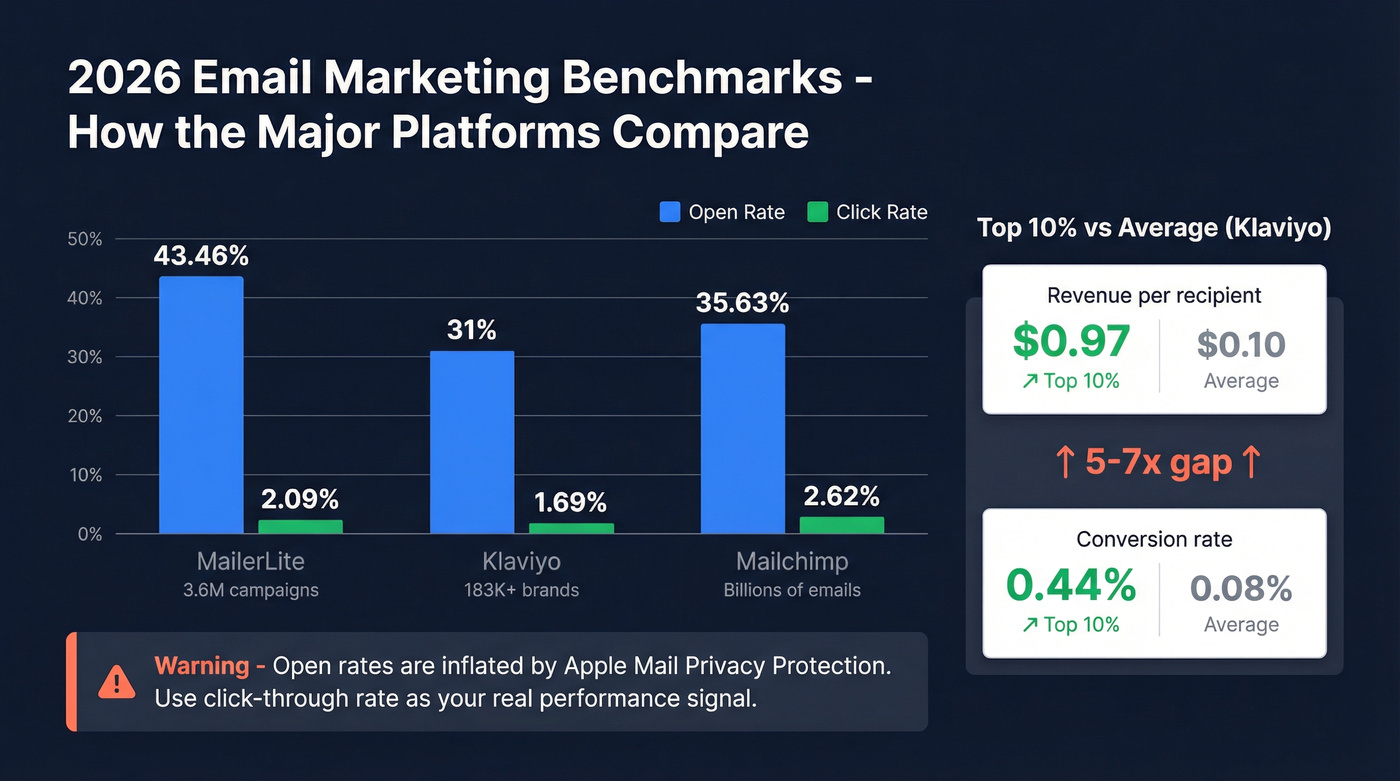
Benchmarks are directional signals, not absolute targets.
| Source | Dataset | Open Rate | Click Rate | CTOR | Unsub Rate |
|---|---|---|---|---|---|
| MailerLite (2025) | 3.6M campaigns | 43.46% | 2.09% | 6.81% | 0.22% |
| Klaviyo (2026) | 183K+ brands | 31% | 1.69% | - | - |
| Mailchimp (2023) | Billions of emails | 35.63% | 2.62% | - | 0.22% |
The spread in open rates (31%-43%) reflects methodology differences and Apple MPP inflation, not skill gaps. Real open rates are lower than any of these numbers suggest.
The more interesting data: Klaviyo's top 10% of campaigns convert at 0.44% with $0.97 revenue per recipient, compared to 0.08% and $0.10 for the average. That's a 5-7x multiplier driven by segmentation, list hygiene, and relevance. Industry matters too - non-profits see open rates around 52%, e-commerce sits at 33%, and software/web apps land near 39%. Compare yourself to your vertical, not to cross-industry averages.
Common Mistakes That Kill Campaigns
Frequency creep starts innocently. One email per week becomes four, and unsubscribes spike. Automation without personalization means slapping a first name merge tag on a generic blast and calling it "personalized" - if your recommendations have nothing to do with what the recipient actually bought, you're sending spam with a merge tag.
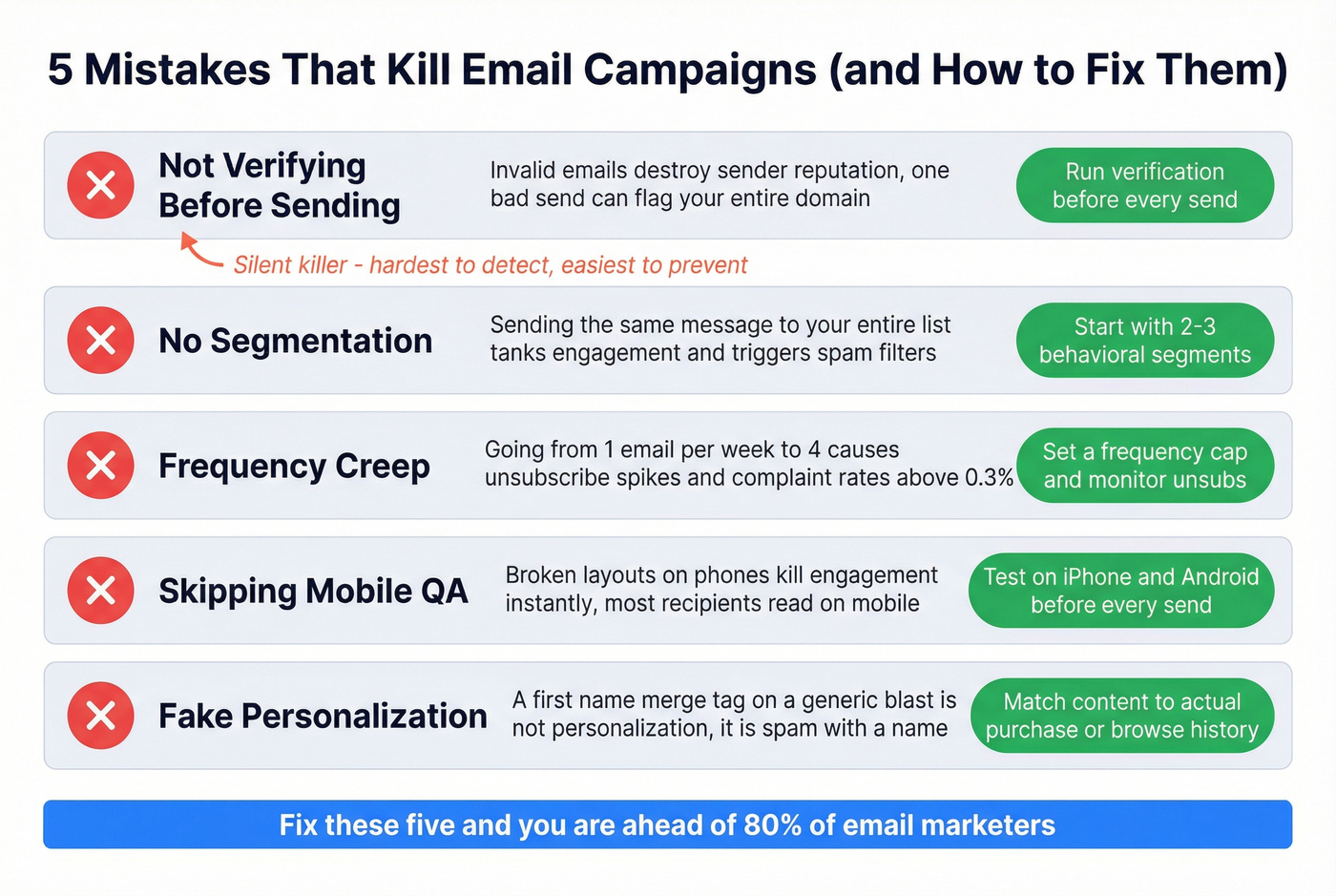
Skipping mobile QA and no segmentation are the easiest to fix and the most commonly ignored. And the silent killer: not verifying before sending. Every invalid email you send damages your reputation with mailbox providers, and the damage compounds over time. I've seen a single campaign with a 12% bounce rate tank a domain's reputation for weeks. (If you're actively repairing damage, see How to Improve Sender Reputation.)
Pre-Send Checklist
- All links tested and pointing to correct destinations
- Unsubscribe link visible and functional
- Mobile rendering checked on iOS and Android
- SPF, DKIM, and DMARC verified for sending domain
- Email list verified and cleaned (remove invalids, spam traps, role-based)
- Test send reviewed by at least one other person
- Subject line under 50 characters
- Stakeholder sign-off complete
Let's be honest about the throughline here: deliverability determines whether your campaign lives or dies. Get your list clean, get your authentication right, and the subject line hacks will actually have a chance to work. That's the real secret to building an email marketing campaign that performs - infrastructure before inspiration.
The best email marketing campaign in the world fails if addresses bounce. Prospeo refreshes 300M+ professional profiles every 7 days - not every 6 weeks like competitors - so your list stays current between sends. At $0.01 per email, verification costs less than a single wasted impression.
Stop sending campaigns to dead inboxes. Verify before you hit send.
FAQ
How often should I send campaigns?
One to three times per week works for most lists. Monitor unsubscribe rates after any frequency increase - if unsubscribes spike above 0.5% or complaints approach 0.3%, pull back. Segment by engagement level so active subscribers get more and dormant ones get less.
What's a good click-through rate in 2026?
Aim for 2%+ click-through rate on campaigns and 6%+ click-to-open rate. Open rates range from 31%-43% across platforms, but Apple MPP inflates all of them. Clicks and conversions are the only reliable performance signals this year.
How do I stop emails going to spam?
Authenticate your domain (SPF, DKIM, DMARC), verify your list before every major send, and stay under the 0.3% spam complaint threshold. Warm up new domains over 2-4 weeks and avoid trigger words like "100% free" in subject lines.
What's the best free tool for email list verification?
Prospeo's free tier includes 75 email verifications per month with 98% accuracy and catch-all domain handling - enough to test your workflow before a campaign. Other options include ZeroBounce (100 free/month) and Hunter (25 free searches/month), though neither offers the same 5-step verification depth at the free level.