

How to Find a Hiring Manager's Email (and Actually Get a Reply)
You applied nine days ago. The portal says "under review." You know what that means - your resume is sitting in a pile with 250+ others, and only four to six of those people will get an interview. The candidates who skip the pile are the ones who find the hiring manager's email and reach out directly.
Here's exactly how to do that in about 10 minutes.
Does Direct Outreach Actually Work?
One job seeker on r/jobsearchhacks shared their results: 35 targeted emails, 12 phone screens, 2 offers. They reported "nothing but positive interactions" and capped outreach at two to three emails per person. That's a 34% screen rate - wildly better than the portal black hole.
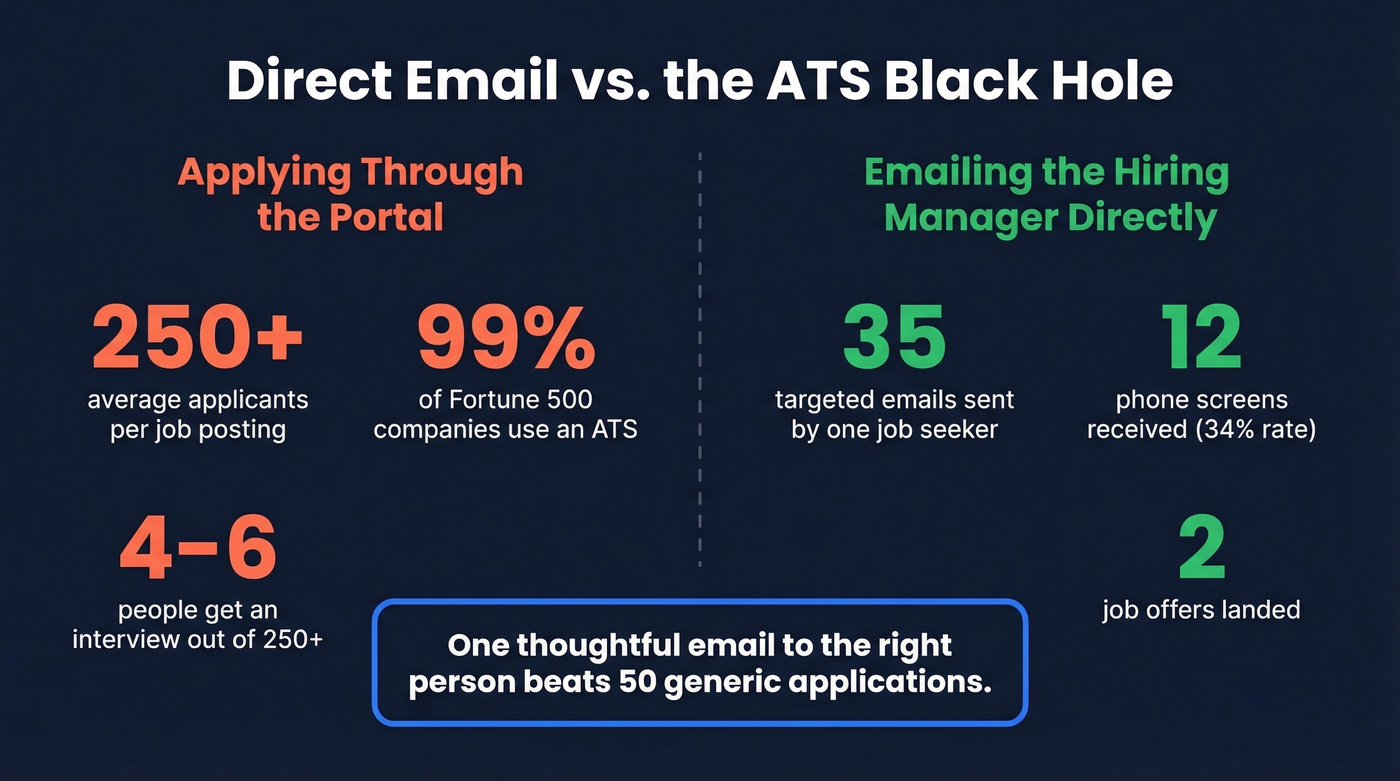
You've probably seen the stat that "75% of resumes are rejected by ATS before a human sees them." That number traces back to a defunct recruiting company with no disclosed methodology, and the reality is more nuanced: 99% of Fortune 500 companies use an ATS, but those systems rank and score resumes rather than flatly rejecting them. Your resume isn't getting "rejected." It's getting buried. A direct email sidesteps the ranking entirely.
Here's our take: if your target company has fewer than 500 employees, emailing the hiring manager directly is more effective than applying through the portal at all. One thoughtful email to the right person beats 50 generic applications. It only backfires if you spam.
Identify the Right Person First
The person who posted the job listing is usually a recruiter, not the hiring manager. You need the department head - the person who'll actually manage you.
Check who shared the job. People love announcing they're hiring. If someone from the engineering team shared the listing on their profile, that's your lead. Next, search the company plus the department title - look for "VP of Marketing at [Company]" or "Engineering Manager at [Company]" on team pages and professional profiles. Always prioritize the department head over HR. A recruiter can forward your email; a hiring manager can fast-track your candidacy.
If you can't find any contact info for a posting and the company has no web presence, treat it as a red flag. Some listings are outright scams.
7 Methods to Find Their Email
Start with method one. Use the rest as fallbacks.
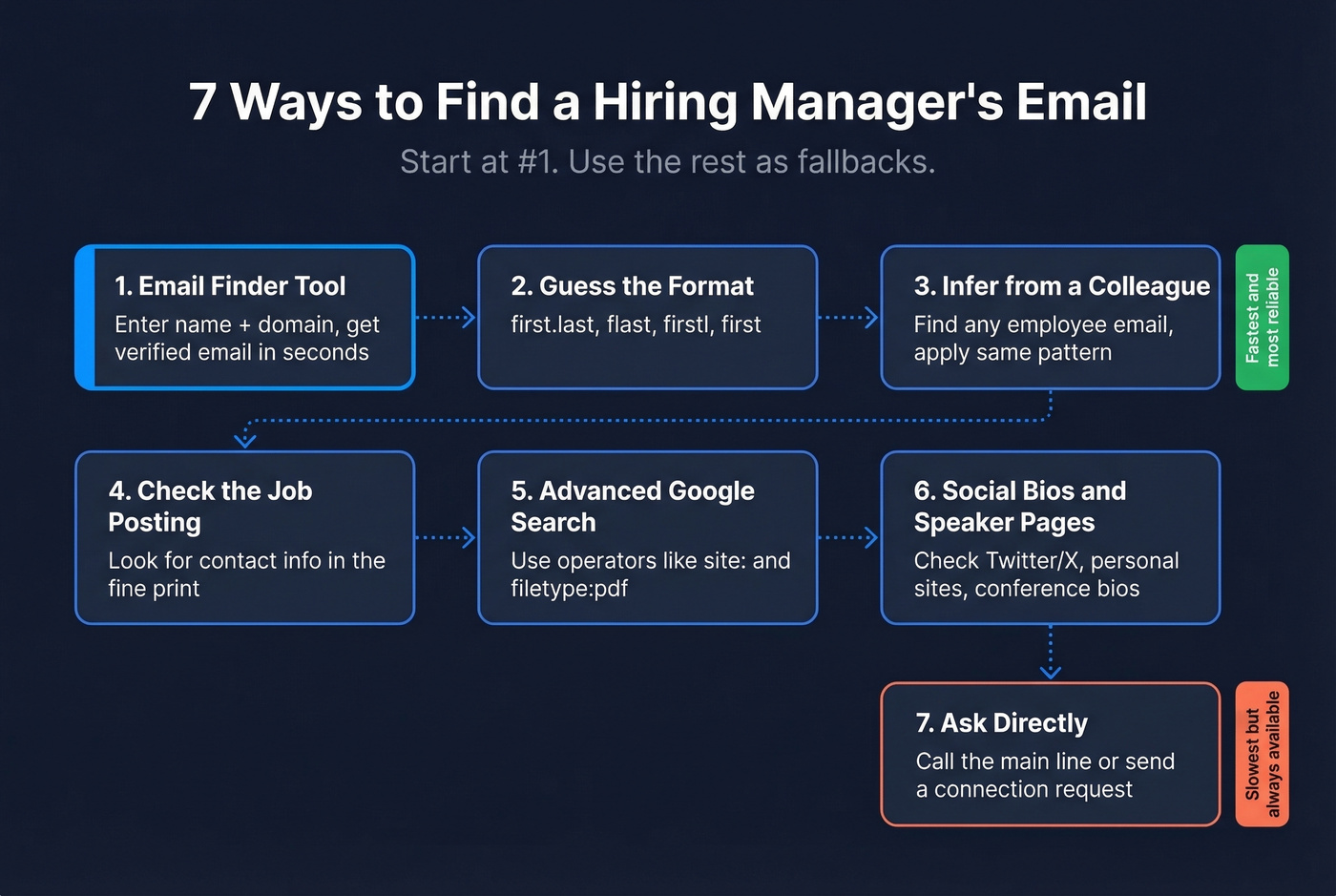
1. Use an Email Finder Tool
The fastest path by far. Enter the person's name and company domain into an email finder, and you'll get a verified address in seconds. Prospeo's database spans 300M+ professional profiles with 143M+ verified emails at 98% accuracy, refreshed on a 7-day cycle so you're not hitting stale addresses. The free tier gives you 75 lookups per month - more than enough for a job search - and verification is built in, so there's no separate step.
If you want to compare options, start with these email finding tools and the broader list of email finder tools.

Hunter works well as a backup, especially for discovering a company's email pattern across employees. Apollo has one of the biggest databases (275M+ contacts), but bounces on older Apollo contacts are a common complaint on r/agency - always verify separately if you go that route.
If you're using Hunter specifically, these Hunter.io use cases can help you pick the right workflow.

2. Guess the Email Format
Most companies use a small set of patterns. If you know the convention, you can construct the address yourself:
| Pattern | Example |
|---|---|
| first.last | jane.smith@co.com |
| flast | jsmith@co.com |
| firstl | janes@co.com |
| first | jane@co.com |
This guess-and-check approach is one of the simplest ways to surface a hiring manager's contact info when you already know the company's domain convention. If you want a safer workflow, follow this guide to guess email address format.
3. Infer from a Colleague's Email
This is the underrated hack from The Muse: find any employee's email at the company - often easier for public-facing roles like PR or sales - then apply the same format to your target. If the marketing coordinator is mking@starbucks.com, the VP of Engineering is probably jschmo@starbucks.com. This fails when companies use inconsistent formats or have recently migrated domains, but it works more often than you'd expect.
If you're doing this often, it helps to understand common email address patterns and email address formats.
4. Check the Job Posting Itself
Don't skip this 30-second check. Some job postings include a direct contact email in the fine print. Company "About" or "Team" pages sometimes list addresses for department leads. It's the lowest-effort method and occasionally the only one you need.
5. Advanced Google Searches
These queries surface emails that other methods miss. Copy, paste, and swap in your target's details:
"Jane Smith" "@company.com"
Searches for the person's name alongside their company email domain.
site:company.com ("team" OR "about") ("email" OR "@")
Surfaces team and about pages that list contact info.
filetype:pdf "@company.com"
Finds emails buried in PDFs like brochures, press releases, or speaker bios.
"hiring manager" "@company.com" -jobs -apply
The negation operators filter out job board noise and surface actual contact pages.
If you want more queries like this, use this Google dorks email search guide.
6. Check Social Bios and Speaker Pages
Some people list their work email in their profile contact info or personal website link. Check bios on Twitter/X, personal sites, and speaker pages from conferences. Hit or miss - but when it hits, you've got a confirmed address with zero tools required.
7. Ask Directly
Call the company's main line. Receptionists hand out emails routinely. Two sentences: "Hi, I'm applying for the [Role] position and wanted to send a note to the hiring manager. Could you share their email?" You can also send a connection request with a note, or ask a mutual connection for an intro.
If you’re unsure how to phrase it, here’s a guide on how to ask someone for their email.

Stop guessing email formats and hoping they land. Prospeo's email finder covers 300M+ professional profiles with 98% accuracy, refreshed every 7 days so you're never hitting a stale address. Enter a name and company domain - get a verified email in seconds. The free tier gives you 75 lookups per month, more than enough to land your next role.
Skip the ATS black hole. Find the hiring manager's real email now.
Verify Before You Send
Look, every email you send falls into one of three buckets:
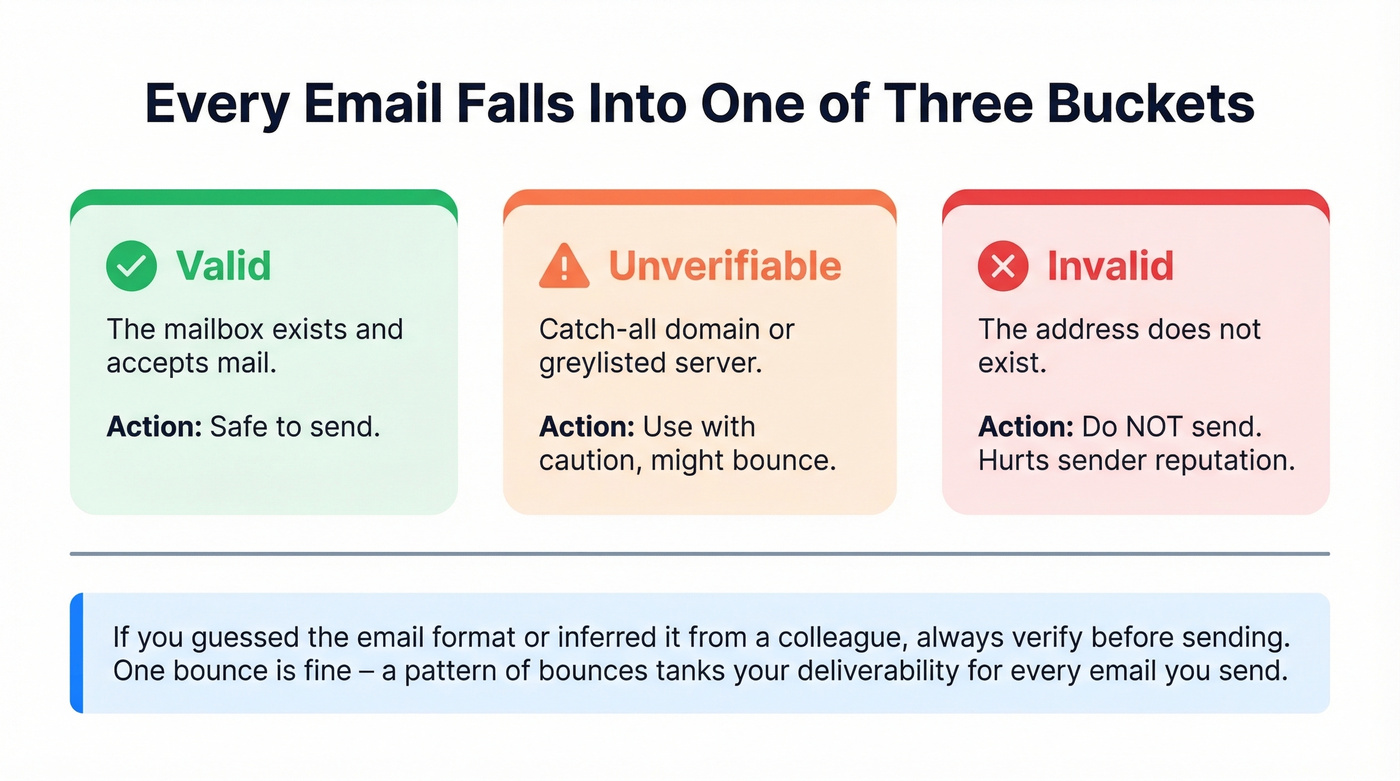
- Valid - safe to send. The mailbox exists and accepts mail.
- Unverifiable - catch-all domain or greylisted. Use with caution; it might bounce.
- Invalid - the address doesn't exist. Sending here hurts your sender reputation.
If you used an email finder with built-in verification, you're already covered. If you guessed the format or inferred it from a colleague, run it through a verification tool first. One bounce won't ruin your domain, but a pattern of bounces will tank your deliverability for every email you send - including the ones that matter.
For a deeper breakdown, see how does email verification work and the practical benefits of email verification.

Stick to publicly available business emails and respect opt-out requests. This is professional outreach, not spam.
Write the Email
Here's a template you can copy and adapt. Keep it short - hiring managers are busy.
Subject: Quick question about [Role Title] at [Company]
Hi [First Name],
I saw the [Role Title] opening and wanted to reach out directly. Two reasons this role stood out:
[One specific thing about the company - a product you use, a recent launch, a mission you care about.]
[One sentence about your relevant experience or a quantified win.]
Would you be open to a quick conversation, or could you point me to the right person? Happy to share more context.
Best, [Your Name] [LinkedIn/Portfolio URL]
Send timing matters. Early morning or around lunch outperforms late afternoon. And whatever you do: don't attach your resume unsolicited, keep your message to three sentences max, and don't send the same template to 10 people at the same company. We've seen candidates torpedo their chances by blasting the entire leadership team with identical copy. One person, one message.
Follow Up and Track Results
Follow up once after five to seven days if you don't hear back. Keep it short: "Just bumping this up - still very interested." Cap total emails at two or three per person. After that, move on.
Go dual-channel: send the email and a connection request on the same day with consistent messaging. It's harder to miss. Track everything in a simple Google Sheet - company, contact name, email, date sent, response. You'll spot patterns in what works fast.
If you want follow-up wording that doesn’t feel awkward, use these bump email templates.
Best Email Finder Tools for Job Seekers
| Tool | Accuracy | Free Tier | Paid From | Best For |
|---|---|---|---|---|
| Prospeo | 98% | 75 emails/mo | ~$0.01/email | Best accuracy + free tier for job seekers |
| Hunter | ~78% | ~25 searches/mo | ~$49/mo | Company email pattern discovery |
| Apollo | ~81% | Free tier available | ~$79/mo | Large database (verify separately) |
| RocketReach | ~74% | Limited | ~$53/mo | Contact discovery across roles |
| Snov.io | ~75% | Free tier available | ~$39/mo | International leads + automation |
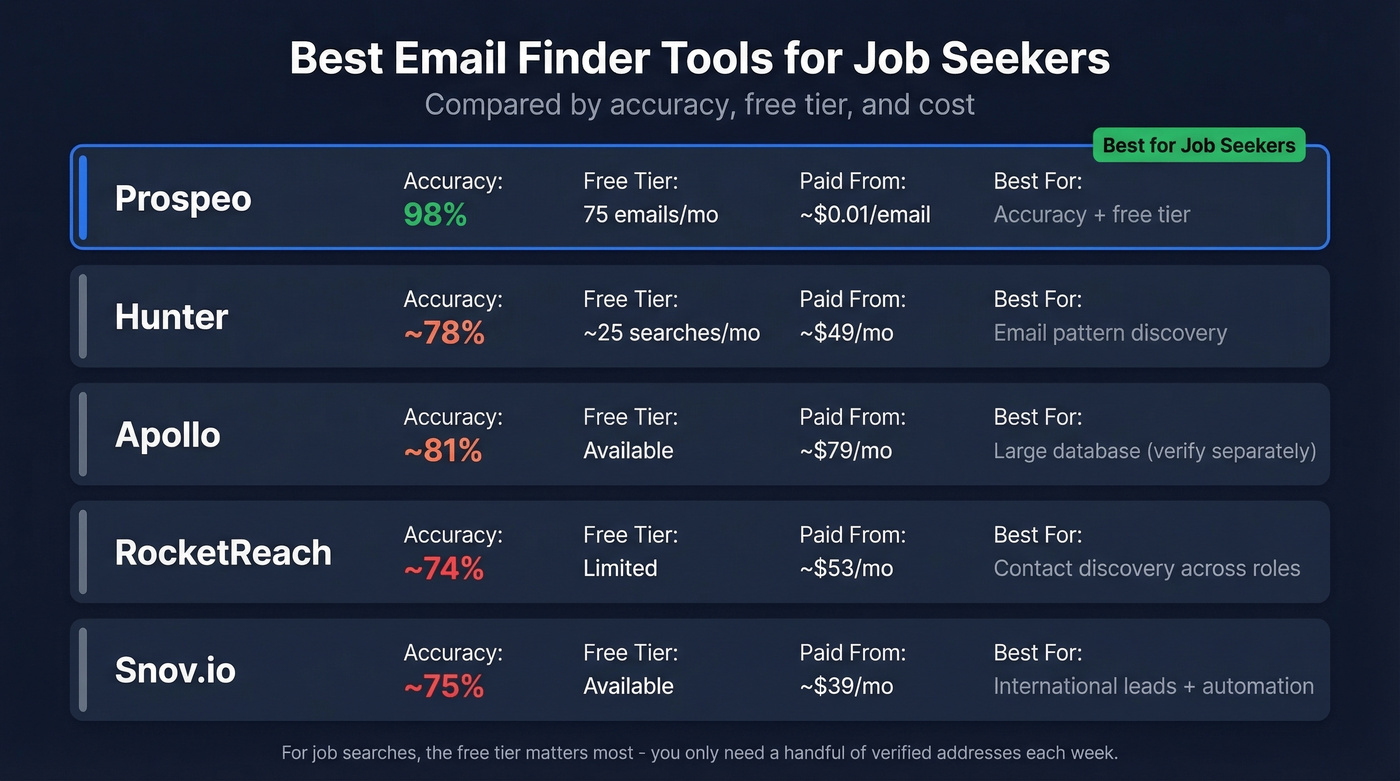
For a job search specifically, the free tier matters more than anything else - you're not running thousands of lookups, you just need a handful of verified addresses each week. Prospeo's 75 free lookups with built-in verification covers most active searches without spending a dime. Hunter's your backup for discovering the email pattern when you want to guess-and-check manually.
If you’re focused on verification, compare the best options in these email verifier websites.
One bounced email to a hiring manager kills your first impression. Prospeo's 5-step verification catches invalid addresses, spam traps, and catch-all domains before you hit send - so your outreach actually reaches a human inbox. No separate verification step needed. Built in, every time.
Verify before you send. Your sender reputation depends on it.
FAQ
Is it appropriate to email a hiring manager directly?
Yes. Hiring managers routinely receive outreach from proactive candidates, and a short, personalized email signals initiative. Keep it relevant to the open role, limit yourself to two or three follow-ups, and don't attach your resume unless asked.
How do I find a hiring manager's email if the posting doesn't list one?
Start with an email finder tool, which can surface a verified address from just a name and company domain. If that doesn't work, infer the format from a colleague's publicly listed address, run an advanced Google search, or call the company's main line and ask the receptionist.
What should I do if my email bounces?
Try an alternate format (first.last vs. flast), or run the address through a verification tool before resending. If you still can't land a valid address, fall back to a connection request with a personalized note explaining your interest in the role.
Should I also send a connection request?
Absolutely. Dual-channel outreach - email plus a connection request on the same day - is harder to miss and signals genuine interest. Keep messaging consistent across both so the hiring manager sees your name twice without feeling spammed.