

How to Scale Outbound Lead Generation Without Destroying Your Domain
Your SDRs aren't lazy. They're sending 200+ emails a day, working 600-700 accounts a month, and still missing quota. The problem isn't effort - it's infrastructure. RAIN Group research shows 82% of buyers will accept a meeting if the outreach is relevant, and 71% want to hear from sellers early in the buying journey. Email still returns $44 for every $1 spent according to Campaign Monitor. The channel works. Your system is broken.
If you're figuring out how to scale outbound lead generation, the answer isn't more emails. Reply rates dropped 15% year-over-year, and the industry response was to send more. That's insane. Automation amplifies whatever you feed it - including garbage data, burned domains, and spray-and-pray targeting.
Here's the system that actually scales without self-destructing.
Prerequisites Before Adding Volume
Scaling outbound is an infrastructure problem. Before you add a single send, fix three things:
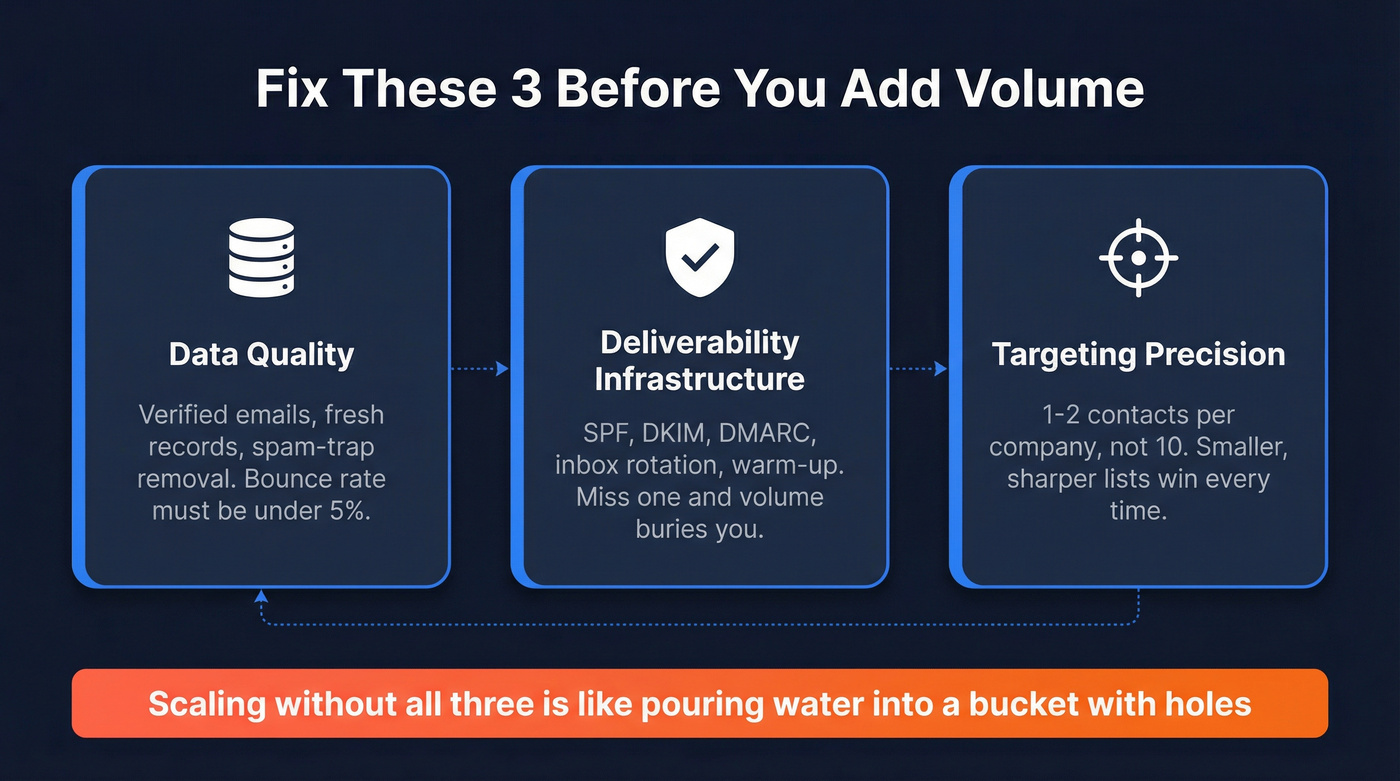
- Data quality. Verified emails, fresh records, spam-trap removal. If your bounce rate is above 5%, you're not ready to scale. (If you want a deeper benchmark framework, start with data quality.)
- Deliverability infrastructure. SPF, DKIM, DMARC, inbox rotation, warm-up. Miss any of these and volume will bury you. Use a proper email sending infrastructure checklist, not guesswork.
- Targeting precision. 1-2 contacts per company, not 10. Smaller, sharper lists beat massive blasts every time. This is the core of account-based prospecting.
The teams winning in 2026 send fewer, better emails to fewer, better-targeted prospects - and supplement with phone and social.
Fix Your Data First
There's a concept we call the "bad data tax." At 100 emails a day, a 15% bounce rate is annoying. At 1,000 emails a day, that same 15% bounce rate is domain-killing. You're generating 150 hard bounces daily, inbox providers notice fast, your domain reputation craters, and suddenly even your good emails land in spam. (If you’re diagnosing root causes, see hard bounce.)
Here's the thing: anyone who's spent time in outbound communities on Reddit knows this story. The teams that scaled too fast on dirty data spent months recovering their sender reputation. We've seen this pattern destroy outbound programs that looked great on paper.
Meritt was running a 35% bounce rate before switching their data layer. After moving to verified data, bounces dropped under 4% and pipeline tripled from $100K to $300K per week. Snyk saw similar results across 50 AEs: bounce rates fell from 35-40% to under 5%, and AE-sourced pipeline jumped 180%.


You just read that 1-2 contacts per company yields 7.8% reply rates. Prospeo's 30+ search filters - buyer intent, technographics, headcount growth, job changes - let you build those razor-sharp lists in minutes, not hours. Layer in 15,000 intent topics to find companies actively researching what you sell. Every email is verified through a 5-step process with catch-all handling and spam-trap removal.
Build lists that convert at 7.8% instead of lists that burn your domain.
Deliverability That Won't Break
Even with perfect data, your emails won't land if your sending infrastructure isn't built for volume. Yahoo and Google both enforce hard requirements for bulk senders now, and the thresholds are lower than most teams realize.
The non-negotiable checklist per Yahoo's sender requirements:
- SPF or DKIM at a minimum for all senders - and both SPF + DKIM for bulk senders
- DMARC published with at least p=none for bulk senders, and it must pass
- Spam complaint rate below 0.3% - that's 3 complaints per 1,000 inbox deliveries
- One-click unsubscribe via List-Unsubscribe header (RFC 8058 Post method recommended)
- Honor unsubscribes within 2 days
Google enforces similar requirements. SPF, DKIM, DMARC, and easy unsubscribe are non-negotiable across all major inbox providers. Miss any of these and you're fighting uphill before your first sequence fires. (For a full runbook, use an email deliverability checklist.)
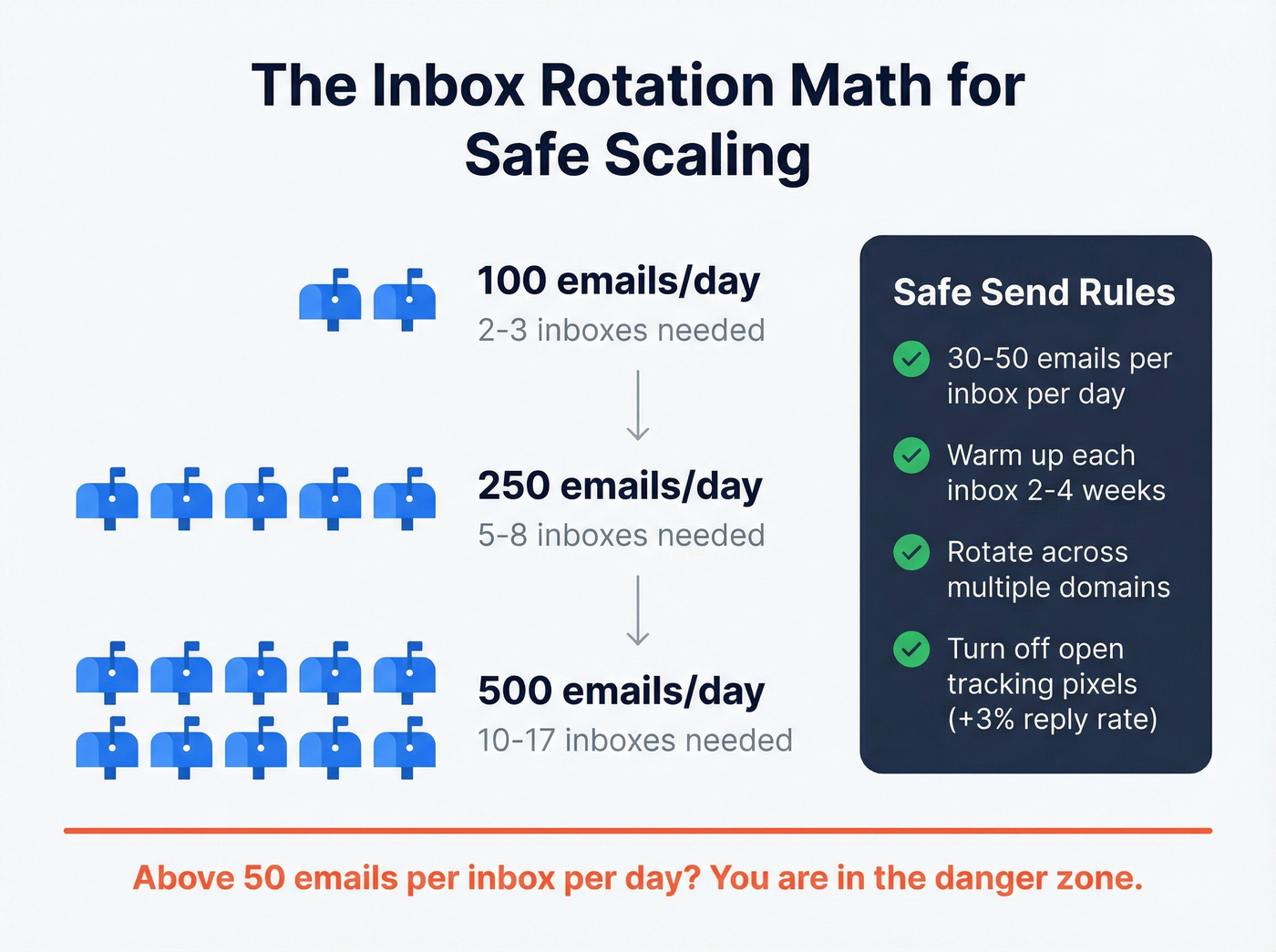
Beyond authentication, inbox rotation is the scaling mechanic that works. The safe operating range is 30-50 emails per inbox per day. Want to send 500 emails daily? You need 10-17 inboxes rotating across multiple domains. Tools like Instantly and Smartlead handle this automatically, but the math starts with how many inboxes you're willing to warm up and maintain. If you need a deeper playbook, follow cold email volume best practices.
One underrated move: turn off open tracking pixels. Belkins found that disabling open tracking produced 3% higher response rates. Tracking pixels are a known spam trigger, and at scale, that 3% compounds fast. (More detail: does open tracking hurt cold email.)
Build Lists That Convert
Most teams scale by making lists bigger. The data says the opposite works better.
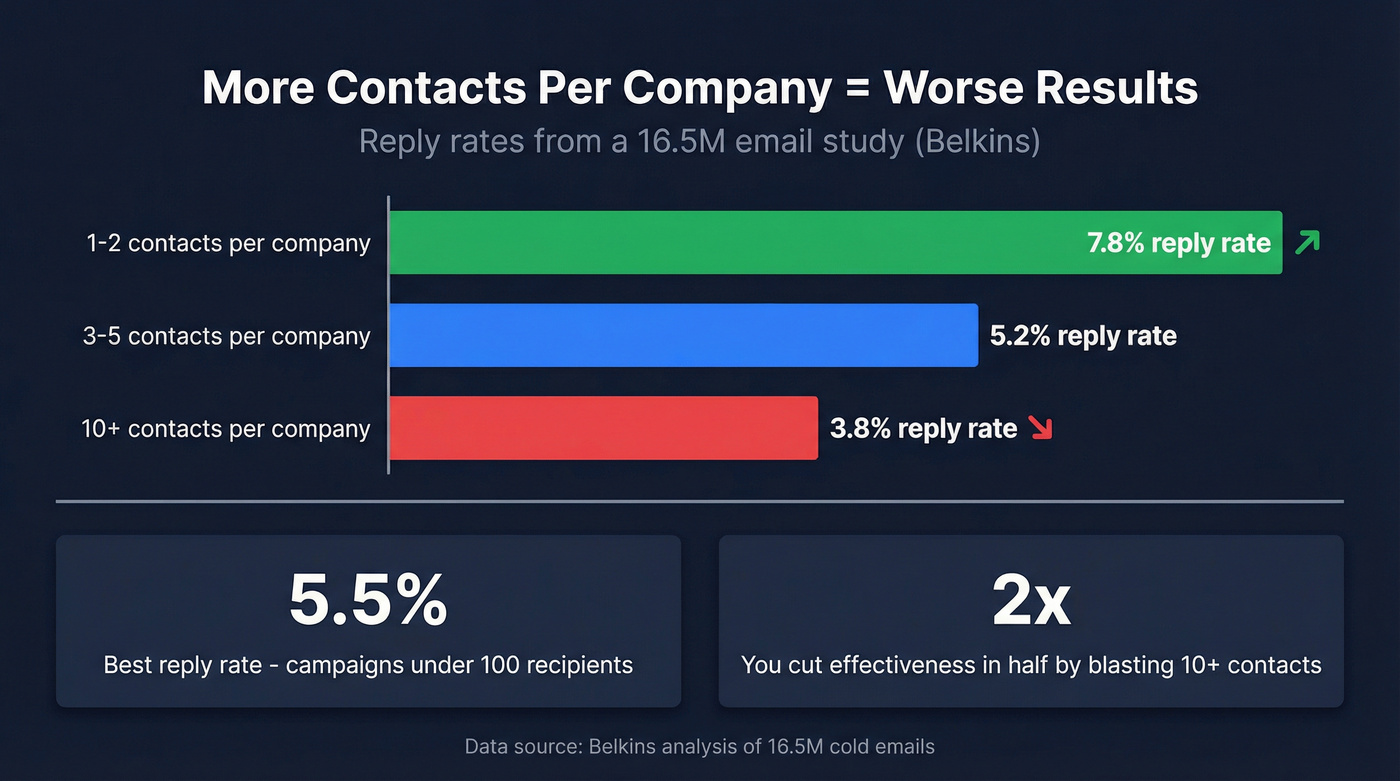
A 16.5M-email study from Belkins found that contacting 1-2 people per company yields a 7.8% reply rate. Blast 10+ contacts at the same company and that drops to 3.8% - you literally cut effectiveness in half by casting a wider net within accounts. Campaign size matters too: campaigns targeting under 100 recipients hit the best reply rates at 5.5%.
Clearbit (now part of HubSpot) documented a scaling model that still holds up: for every inbound lead, they'd identify 10 similar companies using firmographic and technographic attributes, then run targeted outbound to those lookalikes. The result was a 61% open rate and 150% business growth in nine months. The principle is straightforward - use your best customers as a template, then find more companies that look like them. (If you want the mechanics, start with firmographic and technographic data.)
Scaling to 500+ emails a day means every bounce compounds. Prospeo's proprietary email infrastructure delivers 98% accuracy with a 7-day data refresh cycle - while competitors serve you 6-week-old records. At ~$0.01 per verified email, you can run 10-17 inboxes at full volume without the bad data tax destroying your sender reputation.
Stop feeding stale data into your scaling machine. Verify every contact before it sends.
Sequence Design That Doesn't Burn
Your first email is your best email. The same Belkins dataset shows the first touch gets an 8.4% reply rate - the highest of any email in a sequence. Every subsequent email performs worse. Adding a third email drops reply rates by up to 20%.
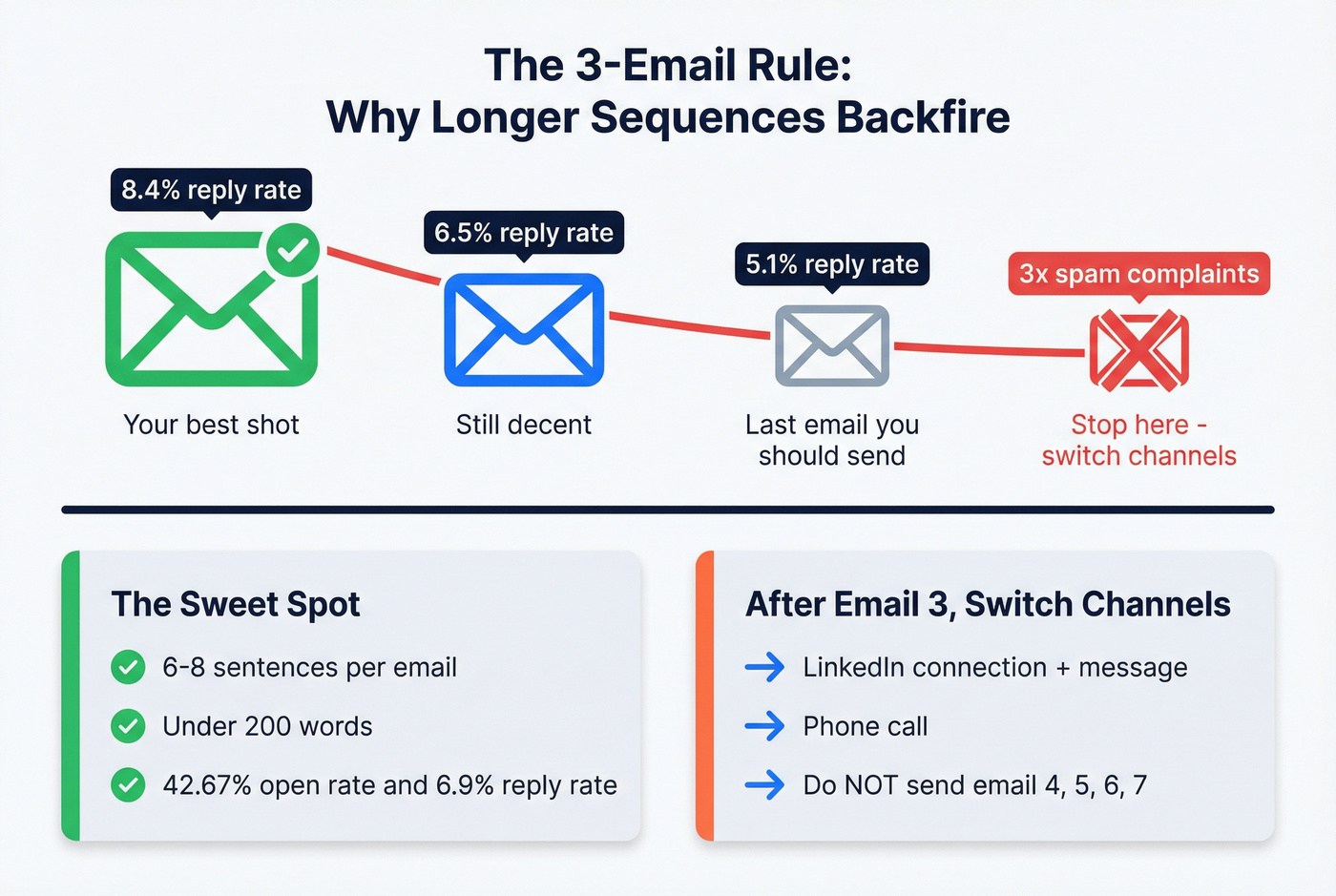
And here's the number that should change your sequencing strategy: sending 4+ emails in a sequence more than triples spam complaints and unsubscribe rates.
The optimal email is shorter than most teams write. Six to eight sentences, under 200 words, produces a 42.67% open rate and 6.9% reply rate. That's the sweet spot - enough to establish relevance and make an ask, not so much that you lose the reader. (If you need structure, use a proven sales email structure.)
Let's be honest about something the industry doesn't want to admit: cap email sequences at three touches, period. The average cold email reply rate dropped to 5.8% in Belkins' 2024 dataset, down from 6.8% in 2023. Longer sequences won't reverse that trend - they'll accelerate the decline by training inbox providers to flag your domain. The teams hitting above 6% are doing it with tight targeting and short sequences, not seven-step drip campaigns.
If your third email isn't getting replies, a fourth email won't either. Switch to phone or social.
Go Multi-Channel
Email is the backbone of outbound, but it can't carry the load alone.
An analysis of 20M+ outreach attempts on LinkedIn from 2024 found a 26.4% connection acceptance rate. Reply rates hit 9.36% when a personalized message accompanied the request, versus 5.44% without. Combining a direct message with a profile visit pushed reply rates to 11.87% - higher than any email-only sequence in the dataset. (To operationalize this, see social selling strategy.)
Industry variance is significant. Legal and professional services see 10.42% response rates on LinkedIn; SaaS sits at 4.77%. If you're selling into industries where LinkedIn engagement runs high, layering it in is a no-brainer.
For phone, expect cold call connect rates in the 3-5% range. Not glamorous, but those conversations convert at a much higher rate than any email or message. (If you want the data-backed case, read the benefits of cold calling.)
The scaling play isn't longer email sequences - it's channel-switching after email 3. Email, then LinkedIn connection plus message, then phone call. Each channel reinforces the others, and you avoid the spam complaint spiral that comes from hammering the same inbox.
The Tech Stack for Scaling Outbound
You need 3-4 tools, not 10. Here's what matters:
| Category | Tool | Starting Price | Best For |
|---|---|---|---|
| Data | Prospeo | Free; ~$0.01/email | Accuracy-first teams; agencies scaling without burning domains |
| Data | Apollo | Free; ~$49/mo paid | All-in-one on a budget |
| Data | ZoomInfo | ~$15-40K/yr | Enterprise budgets |
| Enrichment | Clay | $149-$800/mo | Waterfall enrichment |
| Sending | Instantly | ~$30-100/mo | Inbox rotation + warm-up |
| Sending | Smartlead | ~$39-100/mo | Multi-inbox management |
| CRM | HubSpot | Free; Sales Hub ~$20/mo+ | SMB to mid-market |
| CRM | Salesforce | ~$25-150/user/mo | Enterprise with complex workflows |
| Engagement | Outreach / Salesloft | ~$100-200/user/mo | Enterprise sequencing |
Clay is powerful for waterfall enrichment - chaining multiple data sources to maximize coverage. Credits burn fast, though. It's common to exhaust monthly allocations within the first week or two if you're running multi-step enrichment workflows. Budget accordingly.
Instantly has become the default for teams scaling inbox rotation. The warm-up feature and multi-inbox management make it straightforward to go from 5 inboxes to 50. At ~$30-100/mo, it's one of the cheapest scaling levers in the stack.
Apollo works well as an all-in-one for teams that don't want to stitch together multiple tools, though data accuracy doesn't match dedicated verification platforms. Skip ZoomInfo unless you're enterprise - mid-market contracts with intent often land around $40-60K/year, and that budget goes a lot further spread across specialized tools.
Your 90-Day Scaling Timeline
The sections above cover the what. Here's the when.
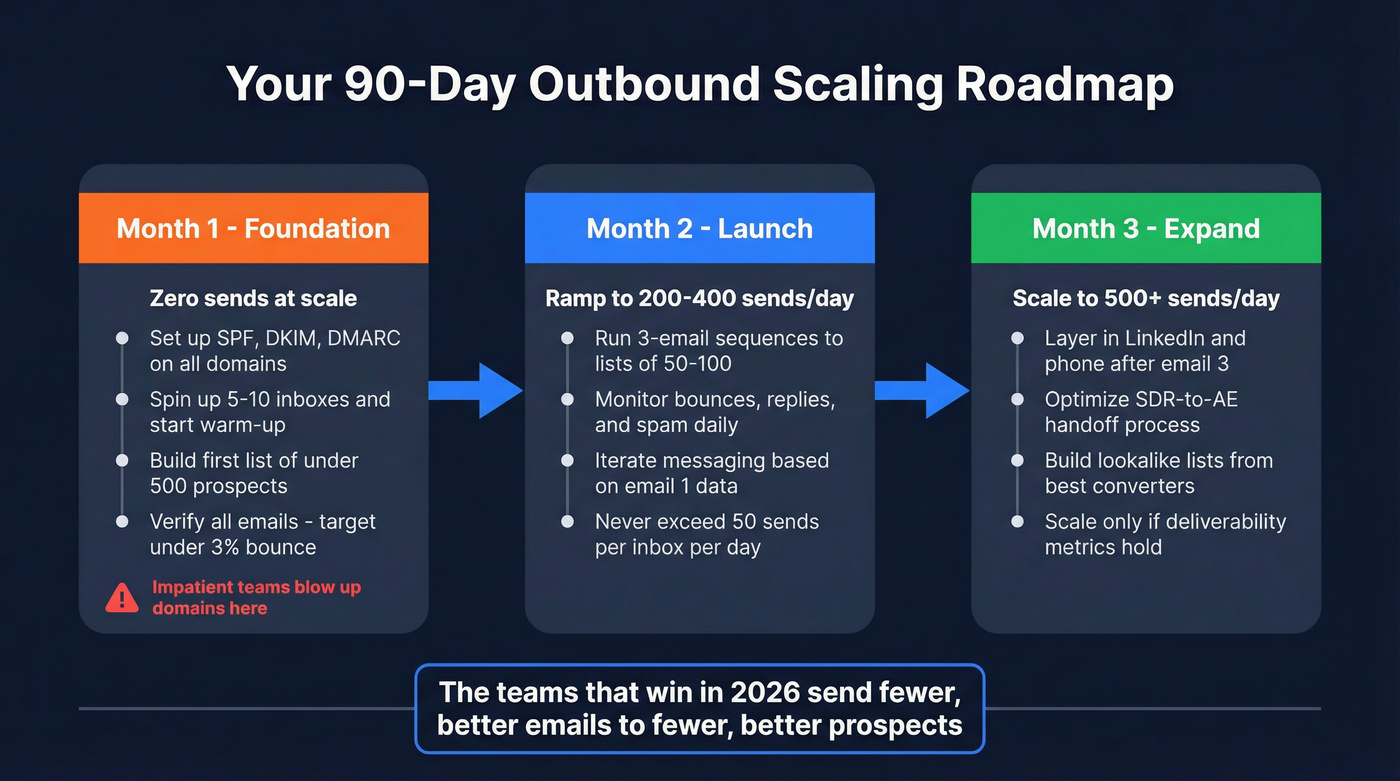
Month 1 - Foundation. Fix your data layer and email authentication. Set up SPF, DKIM, and DMARC on all sending domains. Spin up 5-10 inboxes and start warming them. Build your first targeted list of under 500 prospects using firmographic and intent filters. Send nothing at scale yet. This is the month where impatient teams blow up their domains, and patient teams build the infrastructure that carries them for the next year.
Month 2 - Launch. Start 3-email sequences to tight lists of 50-100 prospects per campaign. Monitor bounce rates (target under 3%, never above 5%), reply rates, and spam complaints daily. Iterate on messaging based on first-email performance. Ramp to 200-400 sends per day across your warmed inboxes.
Month 3 - Expand. Layer in LinkedIn and phone touches after email 3. Optimize the SDR-to-AE handoff. Scale to 500+ daily sends if deliverability metrics hold. Start building lookalike lists from your best-converting accounts. By the end of month three, you should have a repeatable system that grows pipeline without sacrificing deliverability or reply rates.
The consensus on r/sales and r/coldemail is consistent with this timeline - the teams that rush to volume in month one are the ones posting about domain recovery in month four.
What Breaks at Scale
Scaling volume exposes every crack in your process. The most common failure point isn't data or deliverability - it's the SDR-to-AE handoff.
When an SDR books a meeting, the AE needs full context immediately. That means a standardized handoff package in your CRM: business problem, why now, stakeholders involved, and what success looks like. Without this, AEs waste the first 10 minutes of every call re-qualifying, and conversion rates tank.
The Chili Piper team ended 2025 at 118% of their closed-won goal after redesigning their handoff and enablement systems. They didn't hire more SDRs or buy more data. They fixed the plumbing between the SDR motion and the AE close.
Pick one shared qualification framework - MEDDICC or SPICED both work - and enforce it across the team. That's the unglamorous work that makes scaling stick.
FAQ
How many emails per day can I send per inbox without hurting deliverability?
Stick to 30-50 emails per inbox per day. Scale by adding inboxes and rotating across multiple domains, not by increasing volume per inbox. Ten inboxes at 40 sends each gives you 400 daily emails with clean sender reputation.
What's a good cold email reply rate in 2026?
The most recent large-scale data (Belkins' 16.5M-email study) showed 5.8% average in 2024, down from 6.8% in 2023. Anything above 6% with clean targeting is strong performance. Below 4% means your data or targeting needs work before you scale.
How do I know if my data is good enough to scale?
If your bounce rate exceeds 5%, stop scaling and fix your data first. You need a verification layer that catches invalid addresses, spam traps, honeypots, and catch-all domains. Prospeo's free tier (75 emails/month) lets you benchmark accuracy before committing - look for sub-3% bounce rates.
Should I use AI to write cold emails?
Data from the same LinkedIn outreach study shows AI-assisted first messages get a 4.19% reply rate versus 2.60% without. Use AI for drafting structure and variations, but personalize the opening hook manually. Generic AI copy at scale is just faster spam.