

How to Write the Subject of an Email - For Any Situation
You've written the perfect email. The body copy is tight, the CTA is clear, the offer is genuinely useful. And now you're staring at the subject line field, cursor blinking, wondering why figuring out how to write the subject of an email feels harder than the entire message beneath it.
There's a formula that works across every context - marketing, cold outreach, job applications, internal memos - and it takes about five seconds to apply.
The One Formula That Works
[What] + [Why it matters to them].
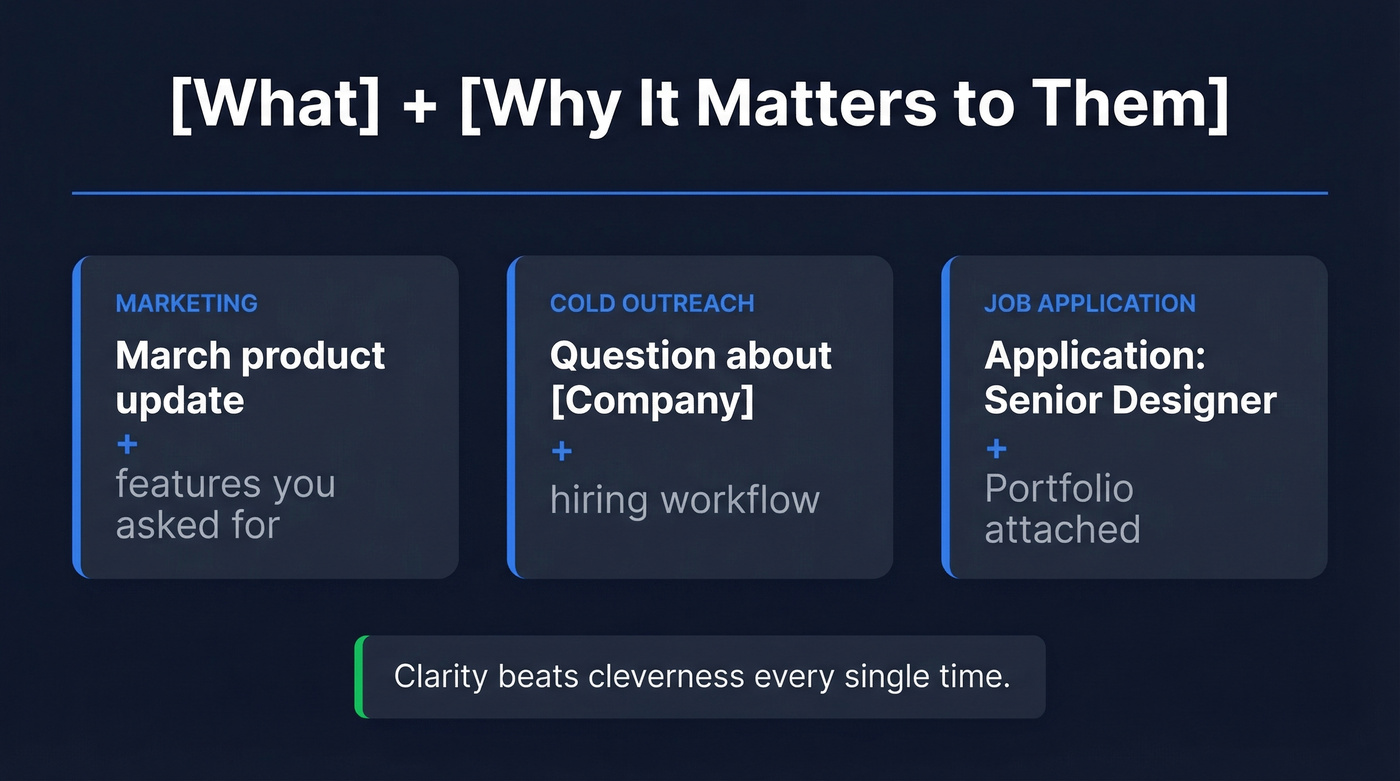
That's it. Name the thing, then connect it to the reader's self-interest. Three quick examples:
- Marketing: "March product update - 3 features you asked for"
- Cold outreach: "Question about [Company]'s hiring workflow"
- Job application: "Application: Senior Designer - Portfolio attached"
If you remember nothing else from this article, use this formula. Clarity beats cleverness every single time. "Your invoice for March" will outperform "You won't believe what's inside!" in every professional context.
The rest of this guide refines the edges - length, device limits, spam filters, testing - but the core principle doesn't change. If you want more swipeable ideas, see these Email Subject Line Examples.
Why Subject Lines Matter More Than You Think
69% of recipients mark emails as spam based solely on the subject line. Not the sender name, not the preview text - the subject line alone.
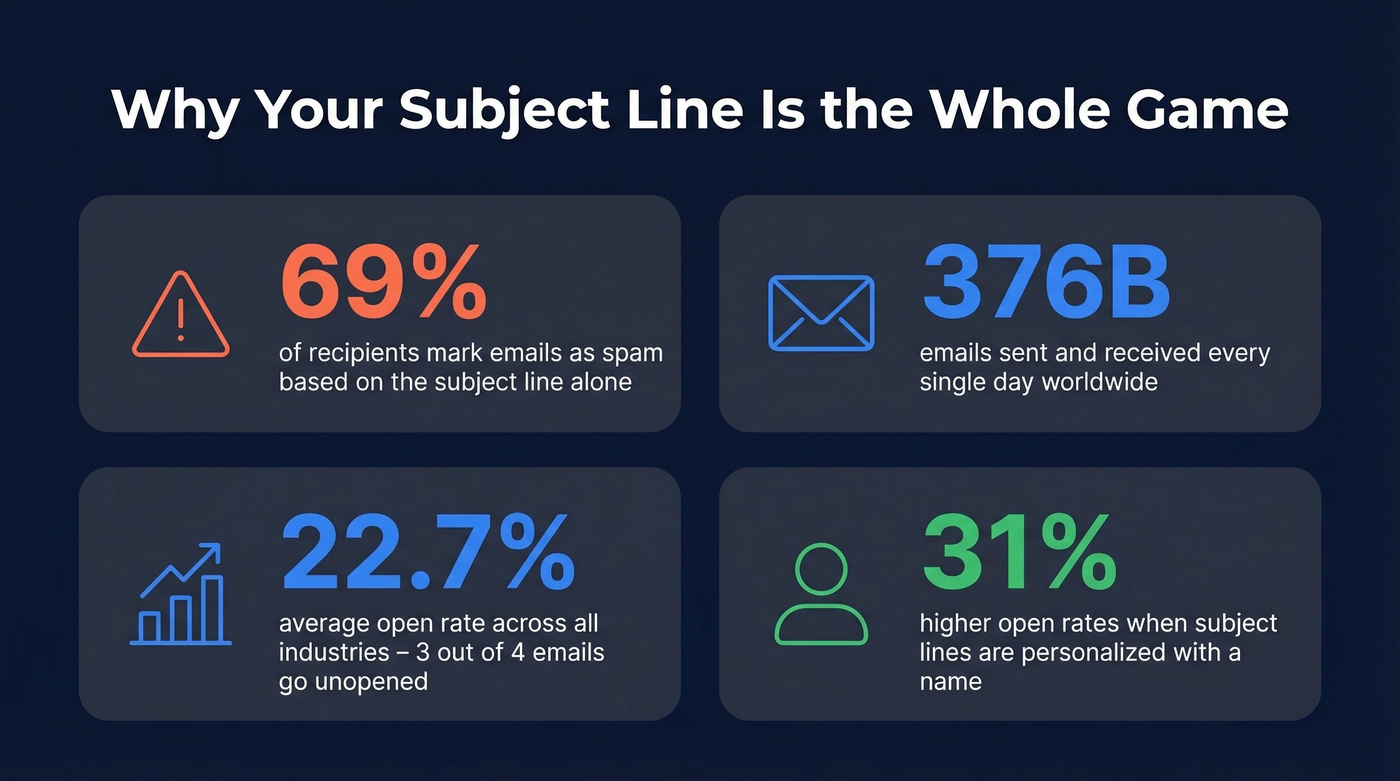
Roughly 376 billion emails are sent and received every day, and the average professional gets about 121 of them. Campaign Monitor benchmarks put the average open rate across industries at around 22.7%, meaning about 3 out of 4 emails go unopened. Your subject line is the only thing standing between "opened" and "archived."
Misleading subject lines make things worse. Gartner found that 30.4% of recipients would unsubscribe when the subject line doesn't match the email content. And only 31% of brands use personalized subject lines - a massive gap between what works and what people actually do. (If you're benchmarking, compare against a good email open rate and the standard email open rate for your industry.)
Email Subject Lines by Use Case
Marketing and Newsletters
Marketing subject lines live or die on specificity. "Our latest newsletter" tells the reader nothing. "3 cold email templates that booked 14 meetings last week" tells them exactly what they'll get and why they should care.
Personalized marketing subject lines achieve roughly 46% open rates compared to 35% without - a 31% improvement. Even something as simple as adding a first name moves the needle. Here are patterns we've seen work consistently:
- "[Name], your Q1 pipeline report is ready"
- "We tested 5 subject line formulas - here's what won"
- "New pricing tier - saves mid-market teams ~$400/mo"
- "The template our top AE used to book 22 meetings"
Subject lines with numbers consistently outperform those without, particularly in B2B and SaaS where specificity signals substance. If you can quantify the value, do it. (For the rest of the email, these email copywriting principles help keep the body as sharp as the subject.)
Cold Outreach and Sales
Cold email open rates have dropped to around 27.7%, and fake "Re:" or "Fwd:" prefixes are a big reason why. They trick someone into opening once, but they destroy trust - and they violate CAN-SPAM, which explicitly prohibits misleading subject headings.
I've tested hundreds of cold subject lines across different industries, and the pattern is always the same: the ones that work are short, specific, and about the prospect - not about you. Start with the prospect's company name and a specific observation. For more data-backed patterns, use these prospecting email subject lines.
- "Question about [Company]'s onboarding workflow"
- "[Mutual connection] suggested I reach out"
- "Saw [Company]'s Series B - congrats"
- "Quick idea for [specific pain point]"
Skip these entirely: "Exciting opportunity!" / "Quick question" / "Following up." Generic openers are getting easier and easier to ignore because they don't signal any real relevance. Here's the thing - if your subject line could apply to literally any company, it's not specific enough. If you're building a full sequence, pair this with cold email follow-up templates.
Job Applications and Internships
With internship postings down over 30% year-over-year, your subject line is doing more heavy lifting than ever. Valeriia Samoilova, Head of Recruitment at Stripo, recommends matching your tone to the industry. A design studio expects something different than a law firm.
The key is immediate scannability. Aim for 5-7 words. If the employer specifies a format like "Intern_YourName_PositionName," follow it exactly - deviating signals you can't follow instructions.
- "Application: Marketing Intern - [Your Name]"
- "Senior Product Designer - 6 years, SaaS background"
- "Referred by [Name] - UX Research role"
Professional Networking
A finance professional on Reddit shared a networking template that nails the formula: "Interested in learning from your success in [industry or specific role]." It's specific, flattering without being sycophantic, and immediately clear about intent.
Other patterns that work well: referencing a shared connection, anchoring to a specific event ("[Name], nice meeting you at [Event]"), or leading with a shared affiliation ("Fellow [University] alum - quick question"). The key is making the recipient feel like this email was written for them, not batch-sent to 200 people. If you need a structure, start with a proven connection email.
Internal and Team Emails
Internal emails get skimmed faster than anything else. Lead with the action, not the context.
- "[Action Required] Budget approval needed by Friday"
- "Q2 hiring plan - review before Thursday standup"
- "Parking lot closure March 15 - alternate routes attached"
- "[FYI] New expense policy effective April 1"
The "[Action Required]" prefix works because it sets expectations before the recipient even finishes reading the line. When you're CC'ing multiple stakeholders, keep the subject neutral and action-oriented - "Budget review: Q2 projections" works better than "[Name], thoughts on this?" when six people are on the thread.
Follow-Up Emails
The best follow-up strategy is replying in the original thread. It bumps your email in their inbox and provides context without repeating yourself. Send the first follow-up about 3 days after the initial email, and avoid Fridays and weekends - mornings or right after lunch tend to perform best. (If you want a deeper timing breakdown, see the best time to send cold emails.)
If you need a fresh thread, make sure the subject line adds something new:
- "Following up on [specific topic] - any thoughts?"
- "Still interested in connecting re: [topic]"
- "Circling back - [one-line value prop]"
What never works: "Just checking in" or "Bumping this to the top of your inbox." Both signal that you have nothing new to add. If you need alternatives, use this guide on how to say just checking in professionally.
Character Limits by Device
Here's the uncomfortable truth about subject line length: the "ideal length" depends entirely on where your recipient reads their email. A subject line that looks perfect on Gmail desktop gets butchered on a Pixel phone.
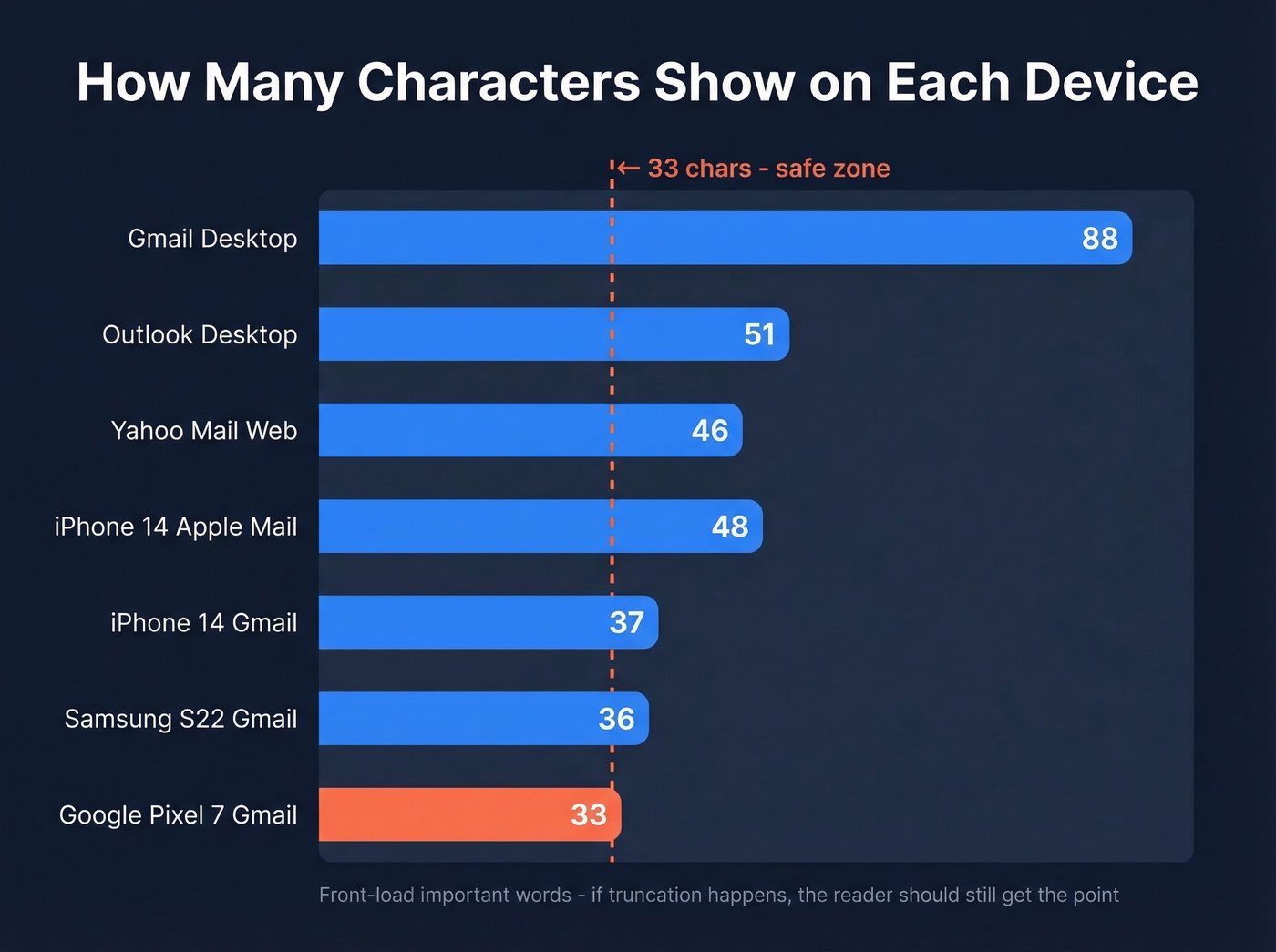
If you remember one number, make it 33. That's the character count that displays fully on the narrowest major mobile client.
| Device / Client | Visible Characters |
|---|---|
| Gmail (desktop) | ~88 |
| Outlook (desktop) | ~51 |
| Yahoo Mail (web) | ~46 |
| iPhone 14 Apple Mail | 48 |
| iPhone 14 Gmail | 37 |
| Samsung S22 Gmail | 36 |
| Google Pixel 7 Gmail | 33 |
Data from EmailToolTester's device testing and Martech Zone's client comparison.
One nuance: character width varies. An "M" takes more horizontal space than an "i," so two 33-character subject lines can display differently. Front-load the important words regardless of total length - if truncation happens, the reader should still understand the point.

Your cold outreach subject line is dialed in - but is the email even reaching a real inbox? Prospeo delivers 98% verified email accuracy across 300M+ professional profiles, so every carefully crafted subject line actually lands.
Stop perfecting subject lines for emails that bounce.
Preheader Text - The Hidden Lever
The preheader is the grey text that appears next to or below your subject line in most email clients. Think of it as a subtitle. Together, the subject line and preheader form a one-two punch - the subject hooks attention, the preheader closes the sale on the open. (If you want to test this properly, use an email preview text A/B testing framework.)
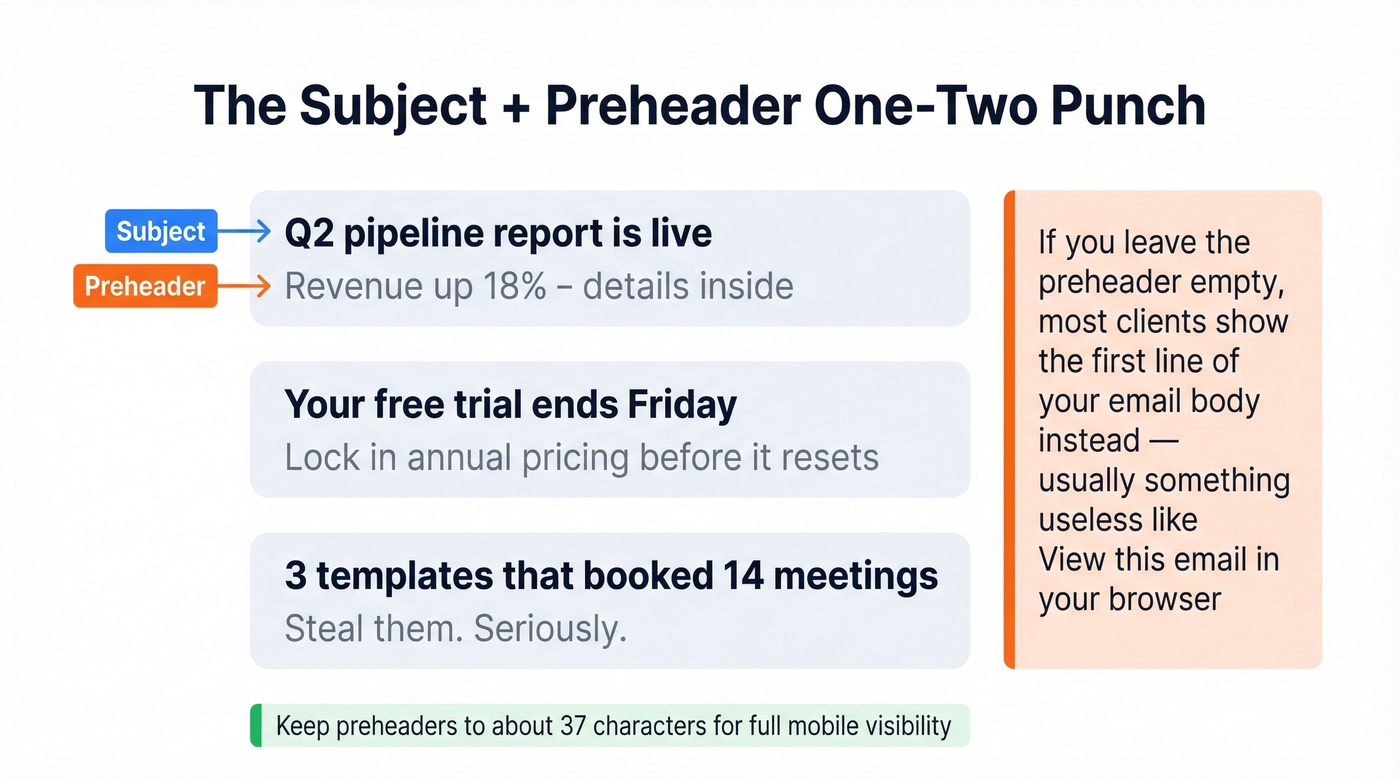
Keep preheaders to about 37 characters for full mobile visibility. If you leave the preheader empty, most clients pull the first line of your email body instead - which usually means "View this email in your browser" or some other useless default.
- Subject: "Q2 pipeline report is live" → Preheader: "Revenue up 18% - details inside"
- Subject: "Your free trial ends Friday" → Preheader: "Lock in annual pricing before it resets"
- Subject: "3 templates that booked 14 meetings" → Preheader: "Steal them. Seriously."
Spam Filters: Patterns, Not Words
Let's kill a myth. Modern spam filters don't rely on a simple blacklist of forbidden words. They use machine learning to evaluate patterns and context. The word "free" in a subject line won't automatically land you in spam. But "FREE!!!" combined with ALL CAPS, multiple exclamation marks, and a sender domain with no authentication? That's a pattern that gets flagged.
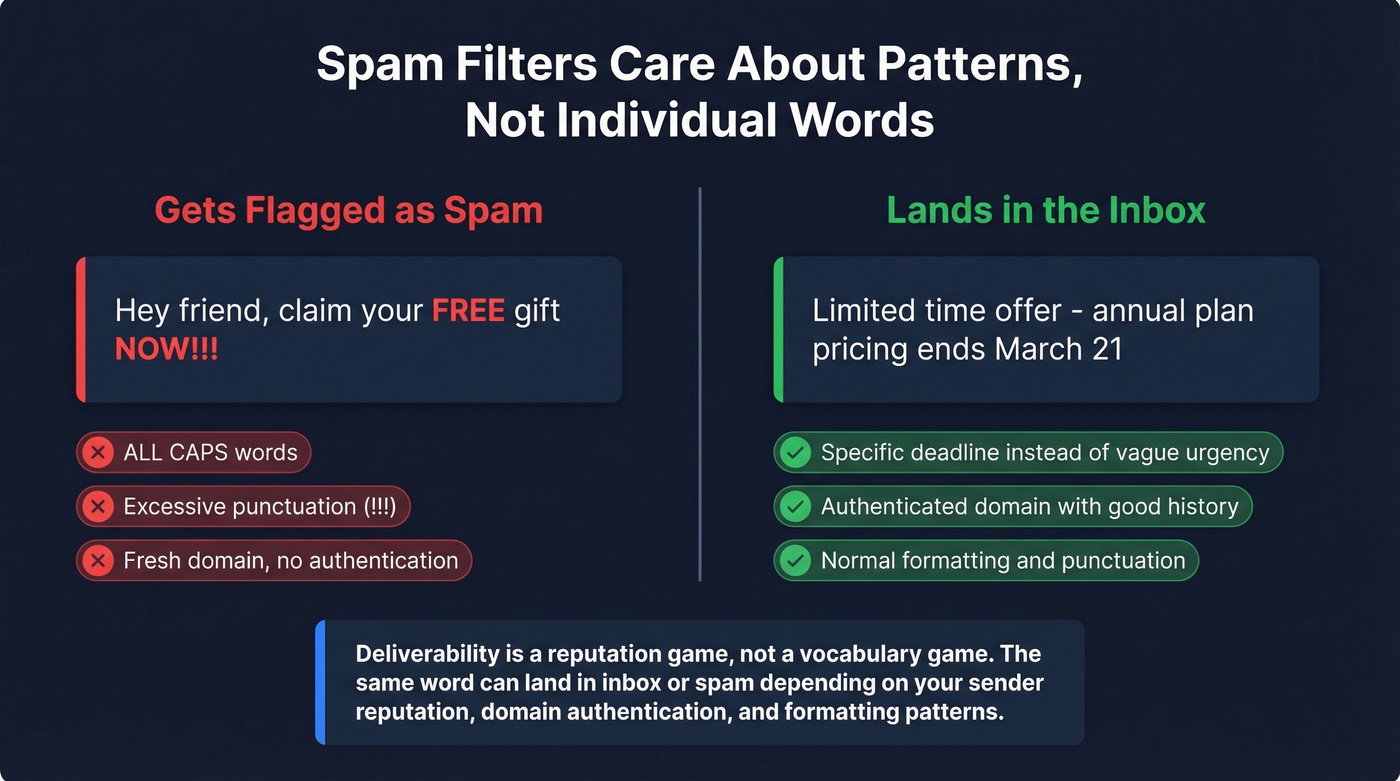
Folderly's 2026 analysis identifies 8 high-risk categories: financial terms, urgency/pressure language, exaggerated promises, aggressive sales language, scammy greetings, health claims, tech/opportunity scam terms, and formatting triggers. The formatting triggers are the most dangerous because they're the easiest to accidentally use - ALL CAPS and excessive punctuation can increase spam scores by 40-60%. If you want a more systematic approach, run a quick check with an email spam checker.
Here's my hot take: stop worrying about individual words and start worrying about the pattern. "Limited time offer" in a well-authenticated email from a domain with good engagement history will land in the inbox. "Hey friend, claim your FREE gift NOW!!!" from a fresh domain will land in spam even if you swap every "trigger word" for a synonym. Deliverability is a reputation game, not a vocabulary game.
Safer Alternatives to Risky Patterns
| Risky Pattern | Safer Alternative |
|---|---|
| 100% free | Complimentary / included |
| Act now!!! | Available through [date] |
| LIMITED TIME ONLY | Offer ends March 21 |
| You've been selected | Based on your [criteria] |
| Make money fast | Revenue growth strategy |
| Click here immediately | See the full breakdown |
| Don't miss out!!! | Spots are filling up |
| URGENT: Open now | Time-sensitive: [topic] |
The rewrite pattern is consistent: replace vague urgency with specific deadlines, swap hype with substance, and never let formatting do the persuading.
Before and After Rewrites
This is where the formula earns its keep. Every rewrite below follows the same principle: replace vague or self-serving language with specific, recipient-focused clarity.
| Context | Before | After |
|---|---|---|
| Cold outreach | Re: Following up | Question about [Company]'s workflow |
| Cold outreach | Exciting opportunity for you | Idea for cutting [Company]'s ramp time |
| Marketing | Our latest newsletter | 3 templates that booked 14 meetings |
| Marketing | Big announcement inside! | New API - ships March 18 |
| Job application | Resume attached | Application: Sr. Designer - [Name] |
| Job application | I'd love to work for you | Referred by [Name] - UX role |
| Networking | Can I pick your brain? | Learning from your work in [field] |
| Internal | Meeting update | Standup moved to 2 PM Thursday |
| Follow-up | Just checking in | Still interested in the pilot? |
| Follow-up | Bumping this up | Quick update on [specific topic] |
Look at the pattern. Every "after" version names something specific. The reader knows exactly what the email is about before they open it. That's the entire game.
How to A/B Test Subject Lines
A/B testing subject lines isn't complicated, but most teams do it wrong. They test too many variables at once, use tiny sample sizes, or pick winners based on gut feeling after 30 minutes.
Test one variable at a time - personalized vs. generic, short vs. long, question vs. statement. If you change three things, you won't know which one moved the needle. Use a 20% sample size, split into two groups of 10% each, and send each a different subject line. Wait 1-2 hours before picking a winner. MailerLite's data shows open rates peak between 8-11 AM, so send your test at 9 AM, pick the winner at 10-11 AM, then blast the remaining 80%.
Most importantly, look beyond open rate. Click-through rate, click-to-open rate, and unsubscribes tell you whether the subject line attracted the right people - not just any people. In our experience, the biggest open rate gains come from cleaning your list, not rewriting your subject line. Personalization A/B tests typically yield a 5-15% open rate lift, which is meaningful at scale, but that lift disappears if 20% of your list is bouncing.
Fix the Data First
Here's the insight most subject line guides skip entirely: none of this matters if your emails aren't reaching inboxes. ESPs evaluate engagement signals - opens, delete-without-open, spam complaints - and use them to decide where your future emails land. Bounces from invalid addresses are the fastest way to crater your sender reputation, and once that reputation is damaged, even perfect subject lines end up in spam. If you're troubleshooting, start with an email deliverability guide and track your email bounce rate.
We've seen teams obsess over A/B testing subject lines while 20% of their list was dead addresses. That's optimizing the paint job on a car with no engine. Prospeo's 5-step email verification - including catch-all handling, spam-trap removal, and honeypot filtering - delivers 98% email accuracy. The free tier covers 75 email verifications per month, enough to clean a test segment and see the difference in your bounce rate immediately.
Personalized subject lines get 46% open rates - but personalization starts with accurate prospect data. Prospeo gives you 50+ data points per contact, from job title to company size, so you can write subject lines that feel written for one person.
Better data means better subject lines. Start free with 75 emails.
FAQ
How long should an email subject line be?
Aim for 33 characters for full visibility on every major mobile device. Up to 50 characters works on most desktop clients. Shorter is almost always better - 2-4 word subject lines often outperform longer ones in A/B tests.
Should I use emojis in subject lines?
Emojis can lift open rates in marketing emails when used sparingly - one emoji, placed at the start or end. Avoid them entirely in job applications, formal networking, and internal business emails. They signal casualness, which isn't always appropriate.
What words trigger spam filters?
Modern spam filters evaluate patterns, not individual words. Combining aggressive language ("Act now!!!"), ALL CAPS, and excessive punctuation raises your spam score by 40-60%. Focus on formatting discipline and sender reputation rather than memorizing a blacklist.
What should I write in the subject for a first-time email?
Lead with relevance, not a generic greeting. Name the reason you're reaching out and connect it to something the recipient cares about - a mutual connection, a specific problem, or a timely observation. "Question about [Company]'s onboarding process" outperforms "Introduction" every time.
Does personalizing the subject line actually help?
Yes. Personalized subject lines achieve roughly 46% open rates compared to 35% without - a 31% improvement. Even adding the recipient's first name or company name makes a measurable difference, but only if you're sending to verified addresses. Tools like Prospeo can enrich your contact list with accurate names and emails so personalization actually lands.