

6 Inbound Sales Email Templates That Actually Get Replies
Your prospect fills out a demo form at 10:14 AM. Your SDR replies at 2:47 PM - the next day. By then, a competitor already had a 15-minute call and sent a proposal.
The average B2B sales team takes 42 hours to respond to a new lead, and 38% of those leads never reply. Responding in the first minute increases conversions by 391%. You're also 21x more likely to qualify a lead when you respond fast versus waiting more than 30 minutes. Threads on r/sales show the same pattern over and over: inbound leads book a demo, then vanish before anyone follows up.
The right inbound sales email templates fix this - but only if you pair them with speed. Here are 6 trigger-specific templates you can deploy in under 60 seconds.
Why Inbound Emails Are Different
The prospect came to you. Your email isn't interrupting - it's answering. That changes tone, urgency, and CTA entirely.
77% of customers [expect immediate interaction](https://www.salesforce.com/resources/research-reports/state-of-the-connected-customer/) when they contact a company. Most "sales email template" articles dump cold-email frameworks and slap "inbound" in the title. Every template here is built for someone who already raised their hand - making each one a warm email template by design, since the recipient already knows who you are.
The Under-50-Word Framework
Emails under 50 words get 2x more replies than 100-word emails. Each extra sentence drops reply rates by roughly 17%. And 47% of recipients decide to open based on the [subject line alone](https://blog.superhuman.com/email-subject-line-statistics/) . Hitting 12%+ reply rates is a realistic benchmark for tight, relevant emails.
Every template below follows three rules:
- Reference what they did. Downloaded X, requested Y, attended Z. This proves you're not blasting a list.
- One sentence on how you help. Not your company history. Not your feature list. One line.
- One question as a CTA. No scheduling link in the first email - it's presumptuous. Ask a question that's easy to answer. (If you need help tightening CTAs, see email CTA examples.)
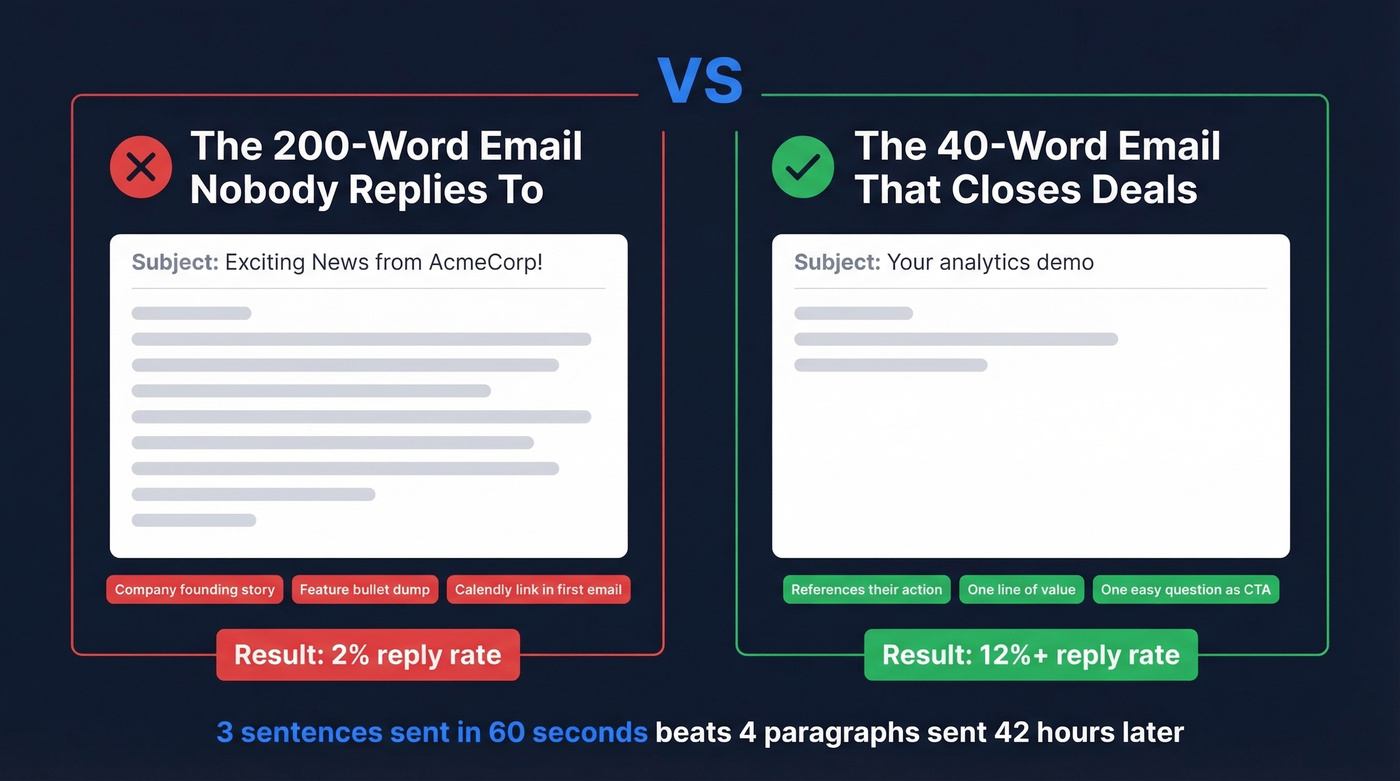
Here's the anti-example: a 200-word email with your company's founding story, three bullet points of features, and a Calendly link. No reply. Your competitor sends a 40-word email asking one question. They close the deal.
A 3-sentence email sent in 60 seconds beats a beautifully crafted 4-paragraph email sent 42 hours later. Every time.
6 Templates Organized by Trigger
You don't need 55 templates. You need 6. One per trigger type, each following the framework above. Moving from zero personalization to genuine personalization can lift reply rates by 300% - so customize sentence one based on what the lead actually did, not what your CRM guessed about them. (If you're building a system around this, start with lead scoring and lead status.)
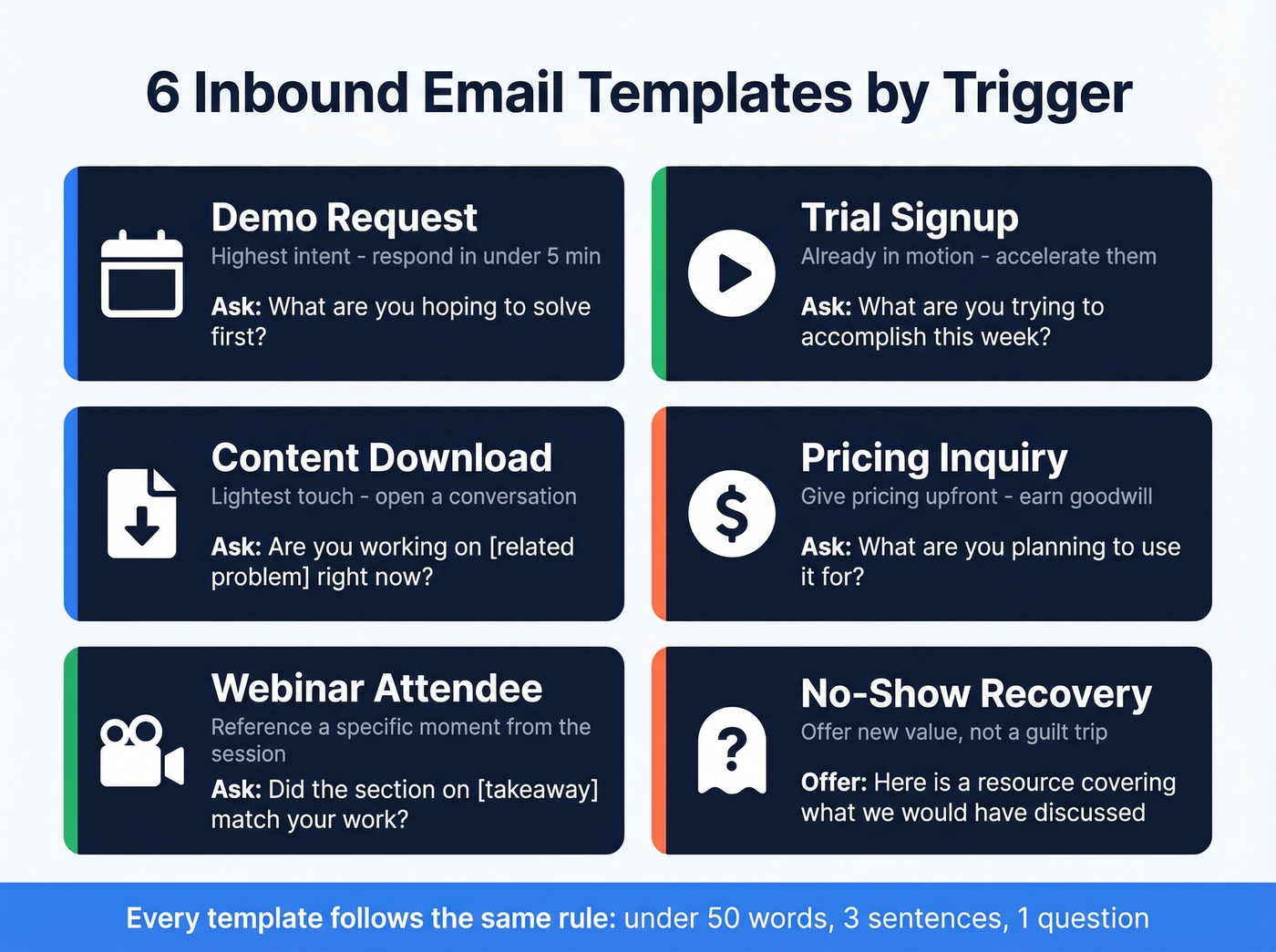
Demo Request
Subject: Your {{product/feature}} demo
Body: Hi {{first name}} - saw you requested a demo of {{specific product/feature}}. What are you hoping to solve first?
References the exact thing they asked about. The question is low-friction and gives you intel for the actual demo. (Pair this with a product demo checklist so the call converts.)
Trial Signup
Subject: Quick question about your trial
Body: Hi {{first name}} - quick one: what are you trying to accomplish in {{product}} this week? I can point you to the fastest path.
Acknowledges they're already in motion. Doesn't over-explain - just offers to accelerate.
Content Download
Subject: The {{asset topic}} piece
Body: Hi {{first name}} - you grabbed our {{asset name}}. Are you working on {{related problem}} right now?
This is the lightest touch of the six. You're not pushing a meeting - you're opening a conversation. If they reply with even a one-line answer, you've earned the right to go deeper in email two. (For more angles, borrow from these sales follow-up templates.)
Pricing Inquiry
Subject: Pricing for {{product}}
Body: Hi {{first name}} - quick context: {{product}} starts at {{price/tier}}. What are you planning to use it for?
Answers the pricing question directly, then pivots to discovery. Don't make people chase pricing info - give it to them and use the goodwill to start a real conversation.
Webinar Attendee
Subject: From the {{webinar title}} session
Body: Hi {{first name}} - thanks for joining {{webinar title}}. Did the section on {{specific takeaway}} match what you're working on at {{company}}?
References a specific moment from the session. Proves you were there too, not just blasting the attendee list.
No-Show / Ghosting Recovery
Subject: Something better than "just checking in"
Body: Hi {{first name}} - looks like we missed each other. Here's a {{relevant resource/case study}} that covers what we would've discussed. Worth a look?
The "just checking in" follow-up is the sales equivalent of a shrug. This offers a new reason to re-engage instead of a guilt trip. Pro tip: Attach a case study featuring a company in their industry. It takes 30 seconds and gives them a concrete reason to reply. (More options: how to say just checking in professionally.)
Personalization rule: Customize sentence one based on observable behavior - what they downloaded, which page they visited, which webinar section they stayed for. Pitching enterprise plans to a solo founder because your CRM tagged them as "high intent" is how you lose deals. (If you want a deeper system, use intent based segmentation.)

You just built a sub-50-word template and hit send in under 5 minutes. Then it bounced. 15% of inbound leads have stale emails - and every hard bounce chips away at your domain reputation. Prospeo verifies emails in real time with 98% accuracy on a 7-day refresh cycle, so your perfectly crafted inbound reply actually lands in an inbox.
Stop losing inbound deals to dead email addresses.
Follow-Up Cadence by Trigger
Not every inbound lead deserves the same follow-up intensity. A demo request is high intent - push harder. A content download is early-stage - give them room. (If you're operationalizing this, see sequence management.)
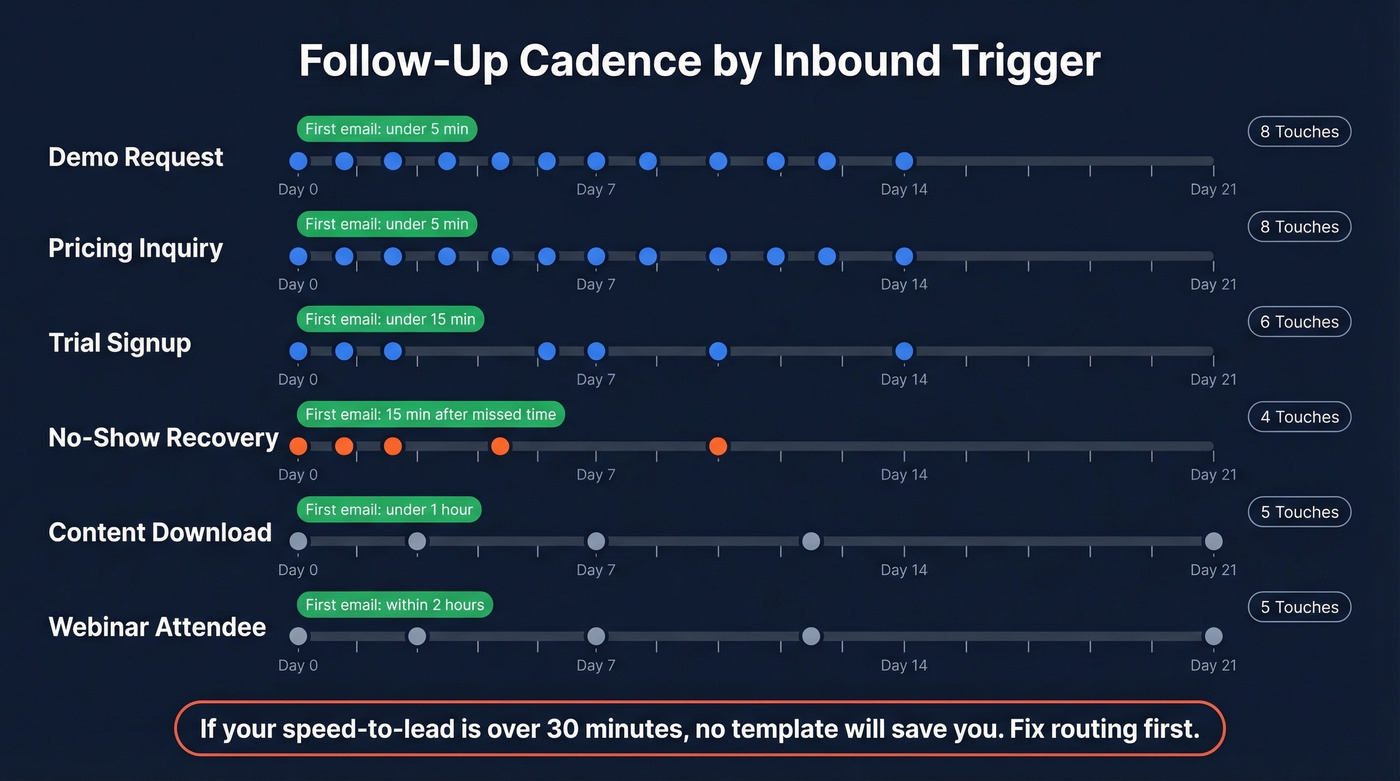
| Trigger | Touches | Timeframe | Spacing | First Email |
|---|---|---|---|---|
| Demo request | 8 | 14 days | 2 days | Under 5 min |
| Trial signup | 6 | 14 days | 2-3 days | Under 15 min |
| Content download | 5 | 21 days | 3-4 days | Under 1 hour |
| Pricing inquiry | 8 | 14 days | 2 days | Under 5 min |
| Webinar attendee | 5 | 21 days | 3-4 days | Within 2 hours |
| No-show | 4 | 10 days | 2-3 days | 15 min after missed time |
If you take one thing from this article: respond in under 5 minutes. That makes you 100x more likely to connect. Everything else is optimization.
Here's the thing - if your average speed-to-lead is over 30 minutes, no template will save you. Fix your routing and notification workflow before you optimize email copy. Speed beats polish every single time. (If you're diagnosing the bigger funnel, start with lead generation workflow.)
Verify Before You Send
Your templates are dialed. Your speed-to-lead is under 5 minutes. But if the email bounces, none of it matters.
Hard bounces hurt deliverability and drag down your domain reputation over time. We've seen teams nail every other part of their inbound workflow and still watch reply rates crater because 15% of their list was stale. Prospeo verifies emails in real time with 98% accuracy and refreshes data every 7 days, so you're not sending to addresses that went dead last month. Upload your list, verify in bulk, and push clean contacts to your sequencer. (If you want the mechanics, read our email deliverability guide and email bounce rate breakdown.) Snyk cut bounce rates from 35-40% to under 5% after switching - that's the difference between templates that land and templates that disappear into the void.

Snyk's 50 AEs were responding fast with tight templates - and still watching bounce rates hit 35-40%. After switching to Prospeo, bounces dropped below 5% and AE-sourced pipeline jumped 180%. Your inbound workflow is only as good as the data behind it. Verify emails at $0.01 each before a single template goes out.
Clean data is the difference between replies and the void.
Stop Tracking Opens
Open rates are unreliable after Apple Mail Privacy Protection. Apple inflated open rates by 18 points across 80,000+ accounts, and Apple Mail represents 46% of email clients. Your "62% open rate" might be fiction. (If you're rebuilding your measurement stack, start with funnel metrics.)
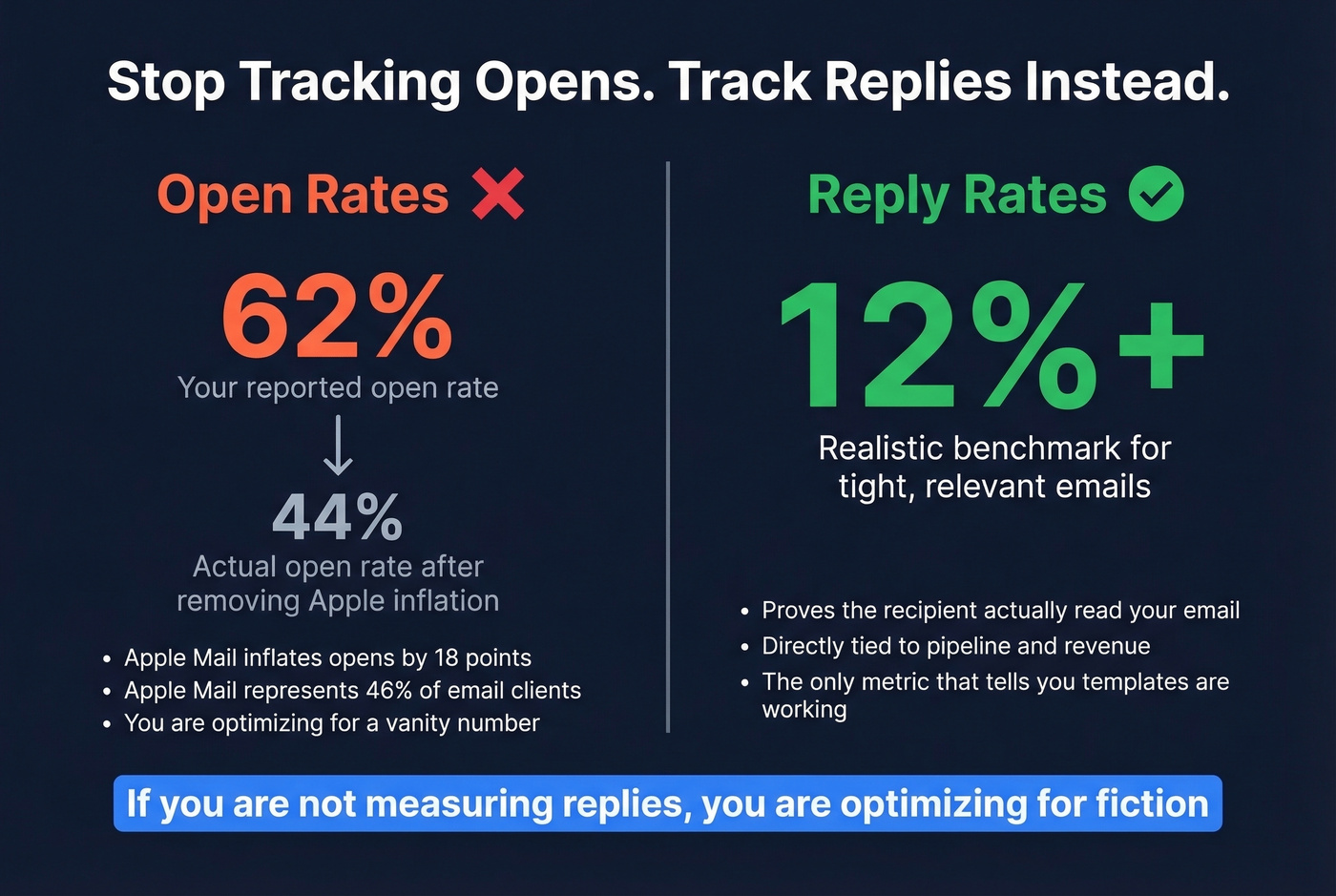
Track reply rates instead. That's the metric that tells you whether your inbound sales email templates are actually working. If you're not measuring replies, you're optimizing for a vanity number.
FAQ
How fast should I respond to an inbound lead?
Under 5 minutes. First-minute responses increase conversions by 391%, and you're 21x more likely to qualify the lead versus waiting 30+ minutes. The average B2B team takes 42 hours - don't be average.
How long should an inbound sales email be?
Under 50 words. Three sentences: reference their action, state your value, ask one question. Emails at this length get 2x more replies than 100-word messages. Save the detail for the call.
What's the difference between warm and cold email templates?
A warm email template targets someone who already engaged - they downloaded content, attended a webinar, or requested a demo. You skip the introduction and reference what they did. Cold outreach earns attention from scratch, requiring a completely different structure and value proposition upfront.
How do I stop inbound emails from bouncing?
Verify contact data before loading templates into your sequence. Hard bounces hurt deliverability for your entire domain, not just one campaign. Tools like Prospeo catch stale addresses on a 7-day refresh cycle with 98% accuracy.
Do I need separate reply templates for each follow-up?
Yes. Each follow-up should add new value - a case study, a relevant stat, or a different angle on their original problem. Resending the same message with "bumping this to the top" signals you have nothing new to offer.