

How to Increase Sales Pipeline With Cold Email in 2026
Cold email isn't dead.
Bad data and sloppy deliverability are.
If you want to increase sales pipeline with cold email, stop treating outbound like a copywriting contest. Treat it like an ops system: list quality -> inbox placement -> reply handling -> meetings -> qualified pipeline. You'll leave with a pipeline calculator, stop rules, and 5 templates that won't torch deliverability.
What you need (quick version)
Use this as your "don't overthink it" checklist. Cold email works in 2026 when you run it like a system, not a template hunt - and when you treat pipeline outcomes (meetings and qualified opps) as the goal, not "activity."
Order of operations (don't skip the boring parts):
- Authenticate domains and remove deliverability landmines.
- Build a tight list around one ICP + one "why now."
- Verify right before launch.
- Send a short sequence at sane volume.
- Work replies fast and qualify before you calendar-dump.
Stop doing this: judging performance by opens, sending 6-8 step sequences, and "scaling" by cranking one inbox to 100/day. That's how you end up buying new domains every quarter.
Fix first (these move pipeline fastest)
- SPF/DKIM/DMARC are set up correctly on every sending domain/subdomain
- Remove open-tracking pixels (they're a deliverability tax now) - if you still want to measure it, use a safer framework from our open tracking guide
- Verify your list so bounces stay <3% (target <2%) (see how to verify an email address)
- Run a 2-3 email sequence total (not 6-8) (see B2B cold email sequence)
- Target 1-2 contacts per company (multi-thread lightly)
- Cap volume at 30-35 emails/day/inbox and ramp slowly (see email pacing and sending limits)
- Add one-click unsubscribe and honor opt-outs fast
- Track pipeline KPIs (meetings held -> qualified opp -> revenue), not "emails sent" (see B2B sales pipeline management)
The "verify before you send" move (one change that pays back immediately)
If you do one thing this week: verify and refresh your prospect list the day you launch.
Here's why it pays back so fast: at 10,000 sends/month, moving inbox placement from 84% -> 90% gives you 600 more inboxed emails. Using the planning anchor of 1 meeting per 344 inboxed emails, that's ~1.7 extra meetings/month - without touching copy, volume, or headcount.
Prospeo is built for exactly this moment: fast list building plus real-time verification so you don't burn reputation on stale addresses. It's "The B2B data platform built for accuracy" with 300M+ professional profiles, 143M+ verified emails, 125M+ verified mobile numbers, 30+ search filters, GDPR compliance, and a 7-day data refresh cycle (the industry average is about 6 weeks). It delivers 98% verified email accuracy with catch-all handling, spam-trap removal, and honeypot filtering, so your outbound doesn't start with a bounce spike.

Why "sent" isn't pipeline (and what to measure instead)
Cold email teams love bragging about volume. "We sent 20,000 emails last month." Cool. How many landed in the inbox?
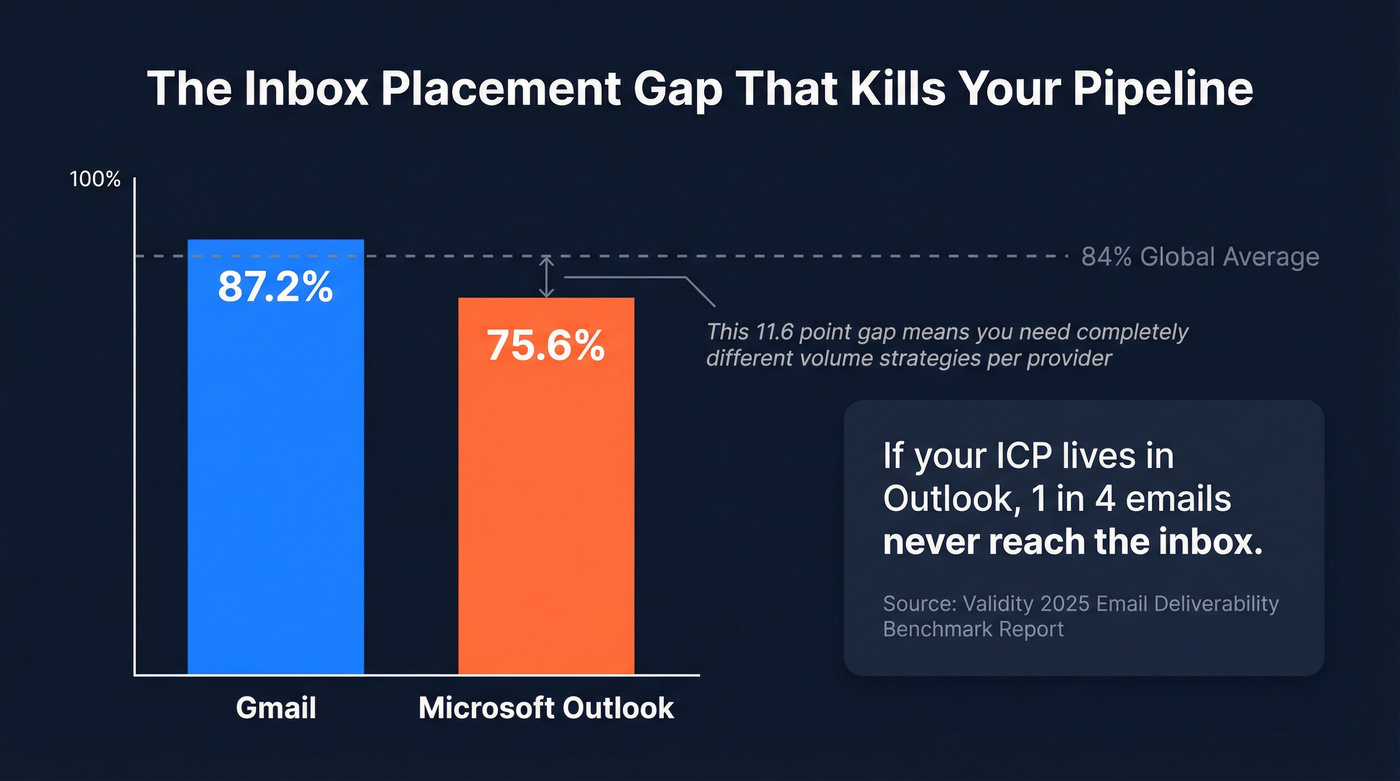
A realistic baseline is 84% global inbox placement. That means about 1 in 6 messages never makes it to the inbox (spam or missing). And the provider gap is brutal: Gmail averages 87.2% inbox, while Microsoft is 75.6%. If your ICP lives in Outlook, your "sent" number's basically fiction.
Deliverability isn't a vanity metric. It's the top of your revenue funnel. If inbox placement drops from 84% to 70%, you didn't lose "a bit of performance." You lost 16.7% of your entire pipeline model before copy even had a chance.
What to measure instead (the KPI stack that predicts pipeline):
- Inbox placement rate (not open rate)
- Bounce rate (hard + soft; treat this as a stoplight)
- Reply rate (total replies / delivered)
- Positive rate (positives / delivered)
- Reply -> meeting booked rate
- Meeting held rate
- Meeting -> qualified opportunity rate
- Opportunity -> closed-won rate
- Revenue per 1,000 delivered emails
If you're only tracking reply rate, you're missing the two conversion steps that matter most: reply handling and meeting quality.
If Microsoft is your ICP: play on hard mode (and win anyway)
Outlook-heavy audiences punish sloppy outbound. Do these four things and you'll stop the "everything goes to spam" spiral:
- Lower your caps: start at 15-25 emails/day/inbox (not 35) and ramp slower.
- Be stricter on verification: treat catch-alls as "maybe" and only send when you have high confidence.
- Spread risk: scale by adding inboxes/domains, not by pushing one domain harder.
- Watch reputation signals: Microsoft SNDS (Smart Network Data Services) and Google Postmaster Tools won't fix deliverability, but they'll tell you when you're drifting into trouble.
2026 benchmarks you can plan around (replies, meetings, timing)
Benchmarks won't run your campaign for you, but they'll stop you from building fantasy pipeline models.
The best directional dataset for modern outbound is Belkins' 2026 benchmark study: 16.5M cold emails sent across 93 domains, covering Jan-Dec 2026 (updated July 2026). Their headline number: 5.8% average reply rate, down from 6.8% in 2026 - about a 15% YoY decline. Translation: you don't win in 2026 by "finding better templates." You win by protecting inbox placement and tightening targeting.
For meetings, the cleanest anchor we've seen across SMB/mid-market motions is 344 inboxed emails per meeting (about 0.29% meetings per inboxed email). It's not glamorous. It's real.
Planning benchmarks table (use these as defaults)
| Metric / lever | Planning default | "Good" looks like | Notes |
|---|---|---|---|
| Inbox placement | 84% | 90%+ | Provider-dependent |
| Reply rate | 5.8% | 8-12% | Belkins avg vs strong |
| Positive rate (of delivered) | 2-4% | 4-7% | Varies by ICP/offer |
| Meetings per delivered email | 0.29% | 0.5-1.0% | 1 meeting / 344 inboxed emails |
| Emails per meeting | 344 | 100-200 | Top teams compress this |
| Best length | 6-8 sentences | 3-6 sentences | Keep it <200 words |
| Best day | Thursday 6.87% | Tue-Thu | Monday lags (5.29%) |
| Timing windows | 7-11 AM + 8-11 PM | Test 2 windows | Evenings (8-11 PM) peaked at 6.52% replies |
| Follow-up impact | 1 bump helps | 2-3 total emails | A third email (2nd follow-up) produced ~20% fewer responses |

A few opinions from running outbound programs:
- Timing's a multiplier, not a fix. Thursday beats Monday, but bad targeting still loses.
- Meeting rate's the truth serum. Replies include "stop emailing me." Meetings don't.
- Short sequences are the grown-up move. If you need 7 touches to get attention, your list or offer's wrong.
The open-tracking reality (and why "opens" are a trap now)
Belkins tracked open rates early in 2026 and saw them rise up to about 46%, then fall to roughly 31-32%, then stopped tracking opens mid-year as pixel backlash and privacy changes made open data unreliable and riskier for deliverability. That matches what we've seen: open tracking creates more problems than it solves.
They also saw response rates improve by ~3% when teams turned off open-tracking pixels.
Here's the thing: if your team still optimizes for open rate, you're optimizing for the wrong decade.
Instantly also publishes a practical ROI calculator and funnel model you can use to sanity-check your assumptions: https://instantly.ai/blog/cold-email-reply-rate-roi-calculator/
Pipeline math: a calculator you can actually use
Most cold email programs fail because the math was never written down. So when results dip, everyone argues about subject lines instead of fixing the real bottleneck.
Use this funnel model (it matches the structure used in common outbound ROI calculators). It's the simplest way we know to plan cold email pipeline growth without guessing, and it forces you to be honest about where you're leaking conversions: deliverability, replies, qualification, show rate, or closing.
Step-by-step funnel formulas
Let:
- S = emails sent
- I = inbox placement rate (planning default: 84%)
- R = reply rate (default: 5.8%)
- P = positive rate of delivered (default: 2-4%)
- M = meeting rate of delivered (anchor: 0.29% = 1/344)
- H = meeting held rate (use 80% as a planning default)
- Q = meeting -> qualified opp rate (use 70% as a planning default)
- W = win rate (use your CRM; if you don't have it, start with 15-25%)
- A = average deal size
Now calculate:
Delivered (inboxed) Delivered = S x I
Replies Replies = Delivered x R
Positive replies (two ways to model it)
- Option A (simple): Positive = Delivered x P
- Option B (if you track positive share of replies): Positive = Replies x PositiveShare
- Meetings booked
- If you use the anchor: MeetingsBooked = Delivered x 0.29%
- Or: MeetingsBooked = Positive x (meeting rate from positives)
Meetings held MeetingsHeld = MeetingsBooked x H
Qualified opportunities Opps = MeetingsHeld x Q
Closed-won deals ClosedWon = Opps x W
Revenue Revenue = ClosedWon x A
Worked example (realistic, not heroic)
Assume:
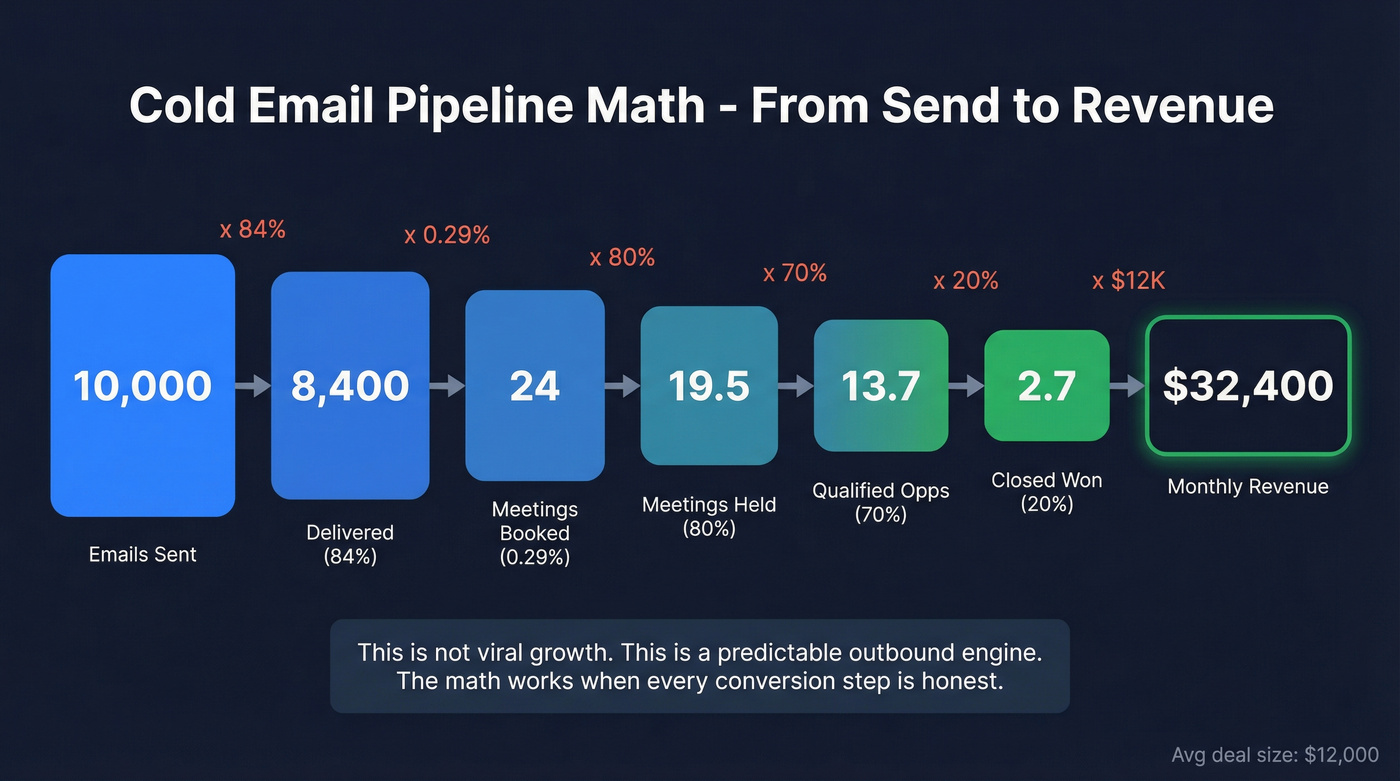
- Sent 10,000 emails/month
- Inbox placement 84% -> Delivered = 8,400
- Meeting rate anchor 0.29% -> MeetingsBooked ~= 24.4
- Held rate 80% -> MeetingsHeld ~= 19.5
- Meeting -> qualified opp 70% -> Opps ~= 13.7
- Win rate 20% -> ClosedWon ~= 2.7
- Avg deal $12,000
Revenue ~= 2.7 x $12,000 = $32,400/month influenced by cold email.
That's not "viral growth." It's a predictable outbound engine.
Sensitivity check (so you stop arguing about subject lines)
If you want to increase pipeline fast, improve the levers that compound:
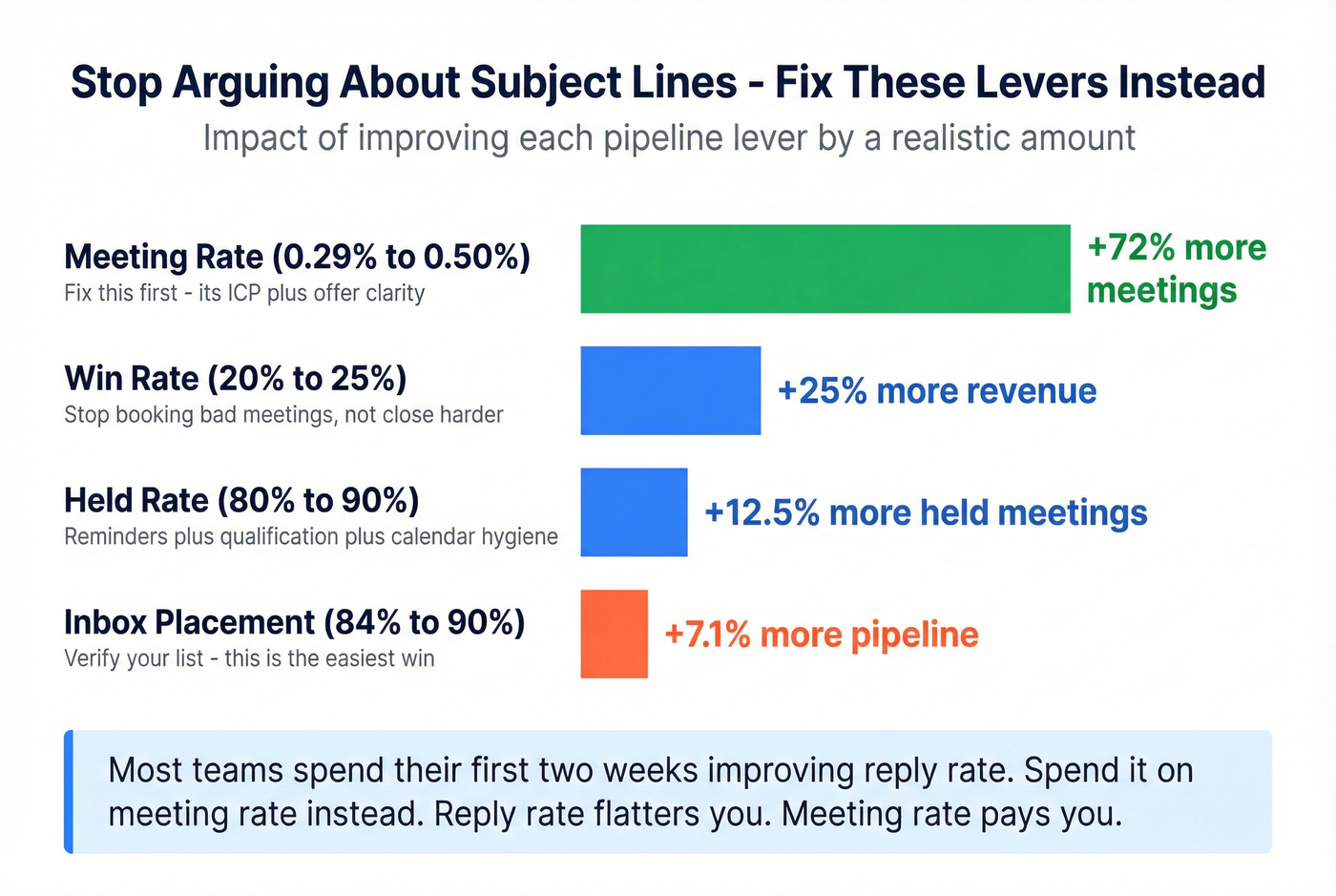
- Inbox placement: 84% -> 90% = +7.1% more delivered = +7.1% more meetings/opps at the same conversion rates.
- Meeting rate: 0.29% -> 0.50% is a 72% lift in meetings. This is almost always ICP + offer clarity.
- Held rate: 80% -> 90% is a 12.5% lift in held meetings. This is reminders + qualification + calendar hygiene.
- Win rate: 20% -> 25% is a 25% lift in revenue. This is "stop booking bad meetings" more than "close harder."
We've tested this across enough programs that it's basically a rule: most teams should spend their first two weeks improving meeting rate, not reply rate. Reply rate flatters you. Meeting rate pays you.

You just saw the math: moving inbox placement from 84% to 90% adds ~1.7 extra meetings per 10K sends. That shift starts with verified data. Prospeo's 143M+ verified emails hit 98% accuracy with catch-all handling and spam-trap removal - so your bounce rate stays under 2% and your domains stay alive.
Stop feeding your pipeline model with fictional "sent" numbers.
Build a list that can actually inbox (ICP, targeting, hygiene)
Real talk: most "cold email doesn't work" complaints are actually "our list is trash" complaints.
Belkins' data makes this painfully clear: emailing 1-2 contacts per company drives 7.8% replies, while blasting 10+ contacts drops to 3.8%. That's not just diminishing returns - it's a signal you're triggering internal spam reports and hurting sender reputation.
List-building checklist (the stuff that prevents silent failure)
- One ICP per campaign (don't mix personas)
- One "reason to care" per ICP (pain + outcome)
- 1-2 contacts per company (start with the most likely champion)
- Exclude: generic inboxes, role accounts, obvious scraped junk
- Verify every email before sequencing (see email verification list SOP)
- Handle catch-all domains intentionally (don't treat them as "safe")
- Enrich for personalization fields you'll actually use (don't hoard data)
- Set bounce stop rules:
- >2% bounces: pause that inbox and investigate
- >3% bounces: cut the list source immediately
Do / avoid callouts
Do: build lists around a single "why now" trigger (new role, hiring, funding, tech change). Avoid: "any VP in SaaS" targeting. That's how you get replies like "unsubscribe" and "stop spamming."
Do: rotate list sources and keep volumes stable. Avoid: doubling volume because "last week was good." That's how domains decay without obvious blacklisting.
Verification before sequencing (fastest pipeline win)
Bounces are the silent killer because they hit you twice: you waste sends and you train mailbox providers that you're low quality.
Your operating rules:
- Target <2% bounces.
- At >2% bounces, pause the inbox and diagnose (list source, enrichment, catch-all handling).
- At >3% bounces, cut the list source. No debate.
Catch-alls are the trap. A catch-all domain will accept mail at SMTP but still bounce later or route you to spam. Treat catch-alls as "maybe," not "valid."
Practical workflow:
- Build your ICP list (company + persona filters).
- Verify + enrich right before launch.
- Export only verified contacts to your sequencer.
- Re-verify any list older than 7-14 days before sending.

Tooling note (keep it light)
You don't need a complicated stack:
- Sequencers: Instantly (~$97/mo entry; higher tiers up to ~$358/mo), Smartlead (~$33-$99/mo), Lemlist (~$50-$99/mo). Pick one and get good at it. (If you're comparing options, start with cold email outreach tools.)
- Verification: NeverBounce (~$0.003-$0.008 per email, volume-based) or MillionVerifier (~$0.001-$0.004 per email) are common second opinions for edge cases.
Deliverability non-negotiables (provider rules + setup)
Deliverability advice online is full of superstition. Provider requirements aren't.
Yahoo's bulk sender rules are the clearest "do this or suffer" checklist we have, and everyone else is moving the same way. Yahoo began enforcement in Feb 2026, and Gmail followed with similar expectations.
Provider requirements checklist (Yahoo/Gmail directionally)
From Yahoo's official sender guidance:
- SPF + DKIM + DMARC (bulk senders need all three)
- DMARC must pass (alignment matters)
- One-click unsubscribe via List-Unsubscribe header (RFC 8058)
- Honor unsubscribes within 2 days
- Keep spam complaint rate <0.3%
Microsoft tightened enforcement too: starting May 5, 2026, DMARC enforcement applies for senders doing 5,000+/day into consumer Microsoft mailboxes. Even if you're below that threshold, the direction's obvious: authentication and complaint control are table stakes.
For the official Yahoo checklist, keep this bookmarked: https://senders.yahooinc.com/best-practices/
SPF pitfalls (the stuff that breaks "good" setups)
- Single SPF record only. Multiple SPF records = invalid SPF.
- 10 DNS lookup limit. Exceed it and SPF effectively fails.
- Don't keep stacking tools that add SPF includes forever. Consolidate.
DMARC progression that won't brick your mail
DMARC is a dial, not a switch:
- Start with p=none for 2-4 weeks (monitor)
- Move to p=quarantine for 2-4 weeks
- Then p=reject once you're confident
If you jump straight to reject without monitoring, you'll break legitimate mail streams and spend a weekend in DNS hell.
Monitoring (lightweight, but worth it)
You don't need a deliverability engineer, but you do need basic instrumentation:
- Google Postmaster Tools: domain reputation, spam rate, authentication pass/fail trends.
- Microsoft SNDS: complaint and traffic signals for Microsoft ecosystems.
- DMARC reports: confirm alignment and catch unexpected senders.
Check these weekly when you're ramping, then monthly once stable. Most teams never look - until the week everything tanks. (If you want a workflow, see DMARC monitoring.)
Manual first vs automation (the early-stage decision most teams get wrong)
If you're early-stage (new ICP, new offer, or no proven reply-to-meeting motion), run manual sends for 2 weeks:
- 20-40 highly targeted emails/day total
- personalized hooks based on real triggers
- tight reply handling and notes in CRM
Once you can consistently turn replies into meetings, automate. Automation before signal just lets you fail faster at a larger scale.
Cadence to increase sales pipeline with cold email (without burning domains)
Cold email cadence is where "more activity" turns into "we killed deliverability."
Belkins' follow-up data shows the risk clearly: 4+ emails in a sequence more than triples unsubscribes and spam complaints. Spam complaints climb from 0.5% on email 1 to 1.6% by email 4. That's how you get throttled.
Use this if / skip this if (cadence rules)
Use this if you want stable inboxing:
- 2-3 emails total per prospect
- Space sends 3-5 days apart
- Cap at 30-35 emails/day/inbox (15-25 if Outlook-heavy)
- Warmup for 4-5 weeks (see how to warm up an email address)
- Ramp volume +5 emails/day/week per inbox
- Stop conditions:
- Complaints rising? Cut volume 50% immediately.
- Bounces >2%? Pause that inbox.
- Bounces >3%? Kill the list source.
Skip this if you like buying new domains:
- 6-8 step sequences "because persistence"
- Doubling daily volume after a good week
- Turning warmup off once you "graduate"
- Sending the same copy to 10+ people at the same company
I've watched teams "scale" from 25/day to 100/day per inbox in a week, then spend the next month wondering why everything goes to spam. The math always looks good until the mailbox providers disagree.
What practitioners complain about in 2026 (and the fix)
This is the operator reality you see in the trenches:
- "Our domain decayed overnight." Fix: stop volume spikes, tighten verification, and scale by adding inboxes - not pushing one domain harder.
- "Gmail is fine, Outlook is a graveyard." Fix: lower caps, stricter list hygiene, and treat Microsoft audiences as a separate motion.
- "We did everything right and still hit spam." Fix: simplify - short sequences, no pixels, fewer links, and a cleaner list. Complexity's usually the culprit.
Copy that converts (without "pitching")
Copy matters, but it's not the first lever. Once your list and deliverability are stable, copy's how you turn delivered emails into meetings.
Two data points worth remembering:
- "Pitching" can reduce replies by up to 57% (Gong analysis as summarized by 30MPC/Outbound Squad).
- Belkins saw response improvements of ~3% when teams stopped using open-tracking, which lines up with the pixel backlash and the decision to stop relying on open rates mid-2026.
Format for scanning (F-pattern friendly)
Most prospects read cold email like they read a cluttered web page: fast, left-to-right, then they bail.
Use this formatting checklist:
- 1-2 sentences per paragraph
- One blank line between paragraphs
- One idea per line
- Keep sentences clean: no more than ~2 commas
- No walls of text, no bolding, no "marketing voice"
- Avoid links in early tests (links add friction and risk)
In our experience, the best cold emails look almost too simple. That's the point.
The structure that works in 2026
Keep it simple:
- Personalized hook (prove it's not a blast)
- Outcome/value (one clear result, not a feature dump)
- Low-friction CTA (question, not a calendar link) (see sales CTA)
Annotated snippet (what "not pitching" looks like):
- Hook: "Noticed you're hiring 3 SDRs in Austin - usually that's a sign outbound volume's about to jump."
- Outcome: "Teams in that phase tend to see deliverability dip and meeting rates flatten unless list hygiene tightens."
- CTA: "Worth comparing notes on what you're using for list verification + sequencing?"
No deck. No pricing. No "15 minutes this week?" right out of the gate. You're starting a conversation.
Micro testing protocol (so you stop thrashing)
Cold email improves when you run it like product experimentation:
- Test one variable per week (subject or hook or CTA - never all three).
- 20/80 rollout rule: send 20% of volume to the test, 80% to the current winner.
- Minimum sample: aim for at least 300-500 delivered emails per variant before you declare a winner.
- Pick the winner by meetings booked, not replies.
Subject lines are overrated once you've fixed list quality. Your hook and offer do the heavy lifting.
The 50/50 elimination loop (debug ICP fast)
When a campaign underperforms, most teams add steps, add personalization, and add tools. That's backwards. The fastest way to find signal is to remove half the variables.
Run this 7-day loop:
Day 1: Cut the list in half (targeting).
Keep only the cleanest slice: one persona, one segment, one trigger. If you can't explain "why these 500 companies" in one sentence, your list's too broad.
Day 2: Cut the email in half (copy). Take your best-performing email and delete 50% of it. Keep hook -> outcome -> question. Nothing else.
Day 3: Cut the sequence in half (cadence). Run only 2 emails for this test: initial + one bump 4 days later.
Day 4: Cut volume in half (deliverability). Reduce daily sends per inbox by 50% for 72 hours. If performance improves, you were throttled or reputation-limited.
Day 5: Cut personalization fields in half. Use only one trigger and one role-specific pain. Over-personalization often reads creepier, not smarter.
Day 6: Cut the CTA friction. Replace "book time" with a binary question: "Worth a quick look?" or "Should I send the checklist?"
Day 7: Decide with one metric. Pick meetings booked per 1,000 delivered. If it's not moving, your offer's wrong for that ICP. Don't keep polishing.
Opinion: this loop feels aggressive because it is. It forces clarity - and clarity creates pipeline.
Mini template pack (5 templates mapped to pipeline stages)
Constraints (don't ignore these):
- <200 words
- 6-8 sentences
- Sequence: 2-3 emails total, spaced 3-5 days
- For early-stage testing: no links, no images, no tracking pixels
Personalization checklist (use this box every time)
- 1 company-specific fact (trigger, initiative, hiring, product change)
- 1 role-specific pain (not generic "drive revenue")
- 1 credible "why you" sentence (who you help, in what scenario)
- 1 question CTA that's easy to answer in 10 seconds
The "problem -> insight -> question" opener (primary email)
Subject: Quick question about {{trigger}}
Hi {{first_name}} - saw {{company}} is {{trigger_event}}.
When teams hit that moment, {{common_problem}} tends to show up fast (usually before anyone notices in the dashboard). We've been helping {{peer_group}} prevent it by {{one_sentence_outcome}}.
Curious: is {{problem_area}} already on your radar for this quarter, or is it more of a "we'll fix it later" thing?
- {{your_name}}
The "permission-based bump" follow-up (follow-up #1; mention "up to 49% lift")
Subject: Re: {{trigger}}
Hi {{first_name}} - quick bump.
If this isn't a priority, tell me and I'll close the loop. If it is, I can send a 3-bullet checklist we use to improve {{metric}} without increasing volume.
Belkins' follow-up data shows the first bump can lift replies up to 49%, so I try once before I move on. Should I send the checklist?
- {{your_name}}
The "breakup with value asset" close (follow-up #2; stop rule)
Subject: Closing the loop
Hi {{first_name}} - last note from me.
Either I missed the mark, timing's off, or you've already got {{problem}} handled. If helpful, here's the simple rule set we use to keep bounces under control and protect inbox placement: {{3_bullets_no_link}}.
If you want, reply "later" and I'll circle back in {{timeframe}}. Otherwise I'll stop here.
- {{your_name}}
Stop rule: if no response after this, stop the sequence for 60-90 days.
The "trigger event" email (job change/headcount growth/funding)
Subject: Congrats on {{trigger}}
Hi {{first_name}} - congrats on {{trigger_event}}.
When {{trigger_event_type}} happens, outbound usually changes in two ways: more volume, and more stakeholders pulled into decisions. We help teams use that window to {{outcome}} (without torching deliverability).
Are you the right person to sanity-check a quick outbound plan, or is that owned by someone else?
- {{your_name}}
The "right person?" reroute (internal forward ask)
Subject: Who owns {{topic}} at {{company}}?
Hi {{first_name}} - quick one.
Who's the best person at {{company}} to talk to about {{topic}}? I'm trying to avoid spamming the org, so a point in the right direction would help.
If it's you, happy to send a 2-sentence summary of why I reached out.
- {{your_name}}
Turn replies into meetings into pipeline (reply handling SOP)
Most teams under-convert replies because they treat inbox management like an afterthought. Don't.
We've seen the same pattern over and over: a campaign "works" on paper (replies look fine), but pipeline stays flat because replies sit for hours, positives get a calendar link with zero qualification, and the team ends up booking meetings that were never going to become opportunities anyway.
Reply handling checklist (simple, strict)
- Respond within 10-60 minutes during business hours (speed wins)
- Tag reply type: positive / neutral / objection / not now / wrong person / unsubscribe
- For positives: ask one qualifying question before dropping a calendar
- For neutrals/objections: reply with one sentence + one question
- For wrong person: ask for a forward or the owner's name
- For "not now": set a task to re-engage in 30-90 days with a new trigger
- For unsub: confirm removal (and actually remove them)
Planning lever: coach your team to convert 35-45% of replies into meetings. That's realistic when your list's tight and your CTA's low-friction.
Then use the downstream planning defaults to forecast pipeline quality:
- Meetings held: 80%
- Meeting -> qualified opp: 70%
Reply examples (copy-paste ready)
Positive reply -> qualify in one question "Good timing. Before I send times - are you trying to improve {{metric_a}} or {{metric_b}} this quarter?"
Neutral reply ("maybe") -> narrow the conversation "Totally fair. Is the bigger issue {{pain_1}} or {{pain_2}} right now?"
Objection ("we already have a tool") -> shift to outcome "Makes sense - most teams do. Are you happy with {{outcome_metric}} or is it still a recurring cleanup project?"
Wrong person -> get routed without spamming "Got it - who owns {{topic}}? I'll reach out once and stop."
Speed matters more than cleverness here. A fast, clean reply beats a perfect reply tomorrow.
When cold email alone is enough (and when to add calls/other channels)
Cold email alone is enough when:
- your ICP's clear and reachable by email
- your offer's simple and easy to evaluate
- your ACV is low-to-mid and the buying committee's small
Add calls and social touches when:
- your ICP lives in Microsoft-heavy enterprises
- your deal needs multi-threading across 3-6 stakeholders
- your offer requires education or change management
- you've validated email performance and want to layer in calling for accounts that show intent but don't reply
Hot take: for smaller deal sizes, you probably don't need an "omnichannel machine." You need clean data, tight targeting, and ruthless follow-up discipline.
Compliance in plain English (US + UK)
You can be aggressive without being sloppy. Compliance is part of deliverability anyway.
US vs UK checklist (two-column)
| Area | US (CAN-SPAM) | UK (PECR + UK GDPR) |
|---|---|---|
| Applies to B2B? | Yes, explicitly | Corporate ok; sole traders = individuals |
| Identity required | Yes | Yes (don't conceal identity) |
| Opt-out required | Yes | Yes (valid contact address) |
| Opt-out timing | Within 10 biz days | Promptly; honor objections |
| Penalty | $53,088 per email | ICO enforcement varies |
Key US point: CAN-SPAM applies to B2B emails, and penalties can reach $53,088 per email. Official guide: https://www.ftc.gov/business-guidance/resources/can-spam-act-compliance-guide-business
Key UK point: under PECR, you can email corporate subscribers (companies, LLPs, etc.). But sole traders and some partnerships are treated as individuals, which changes the consent rules. ICO guidance: https://ico.org.uk/for-organisations/direct-marketing-and-privacy-and-electronic-communications/business-to-business-marketing/
Don't do this (common "we'll be fine" mistakes)
- Hiding who you are or using misleading subject lines
- No physical address (US requirement)
- Making opt-out hard (or ignoring it)
- Emailing sole traders in the UK like they're corporate subscribers
- Buying scraped lists and blasting without verification
FAQ
How many cold emails do I need to book one meeting?
A solid planning anchor is about 344 delivered (inboxed) cold emails per meeting, which equals roughly a 0.29% meeting rate. If your inbox placement's 84%, that's about 410 sent emails per meeting. Tight targeting and better reply handling can cut that to ~200-250.
What reply rate should I expect from cold email in 2026?
Plan around ~5.8% average reply rate as a baseline, with strong campaigns landing in the 8-12% range. The biggest drivers aren't clever subject lines - they're inbox placement, list quality, and sending to 1-2 contacts per company instead of blasting 10+.
How many follow-ups is too many for deliverability?
More than 3 total emails (initial + 1-2 follow-ups) is usually where deliverability risk starts compounding. Belkins' data shows 4+ emails can triple unsubscribes and complaints, and complaint rates rise from 0.5% on email 1 to 1.6% by email 4.
What's a good free tool to verify emails before I send?
Prospeo's free tier includes 75 verified emails/month plus 100 extension credits, and it delivers 98% verified email accuracy with real-time verification and a 7-day refresh cycle.
Summary: increase sales pipeline with cold email (the 48-hour reset)
Do these three things in the next 48 hours and your next campaign will behave like a pipeline system (not a lottery):
- Kill pixels + fix auth: SPF/DKIM/DMARC + one-click unsubscribe, then remove open tracking.
- Rebuild the list: one ICP, 1-2 contacts/company, verify the day you launch, and enforce the <2% bounce rule.
- Run the 50/50 loop: short sequence, low volume, one metric (meetings per 1,000 delivered) until you find signal.
That's how you increase sales pipeline with cold email in 2026: treat it like operations, not art.
At 344 inboxed emails per meeting, every bounced or spam-foldered message is pipeline you'll never see. Prospeo refreshes 300M+ profiles every 7 days - not 6 weeks - so you're never launching sequences on stale addresses. Real-time verification at $0.01/email means clean lists cost less than one bad domain replacement.
Compress your emails-per-meeting ratio with data that actually lands.