

Introduction Email to Client: 7 Templates & Data (2026)
Most advice about introduction emails obsesses over word choice. The real problem is different: 70% of emails show at least one spam-related issue before they even reach the inbox. Your introduction email to a client is the bridge between "closed-won" and "actually working together" - and it's worthless if it bounces. Across 16.5M cold emails analyzed by Belkins, the average reply rate sits at just 5.8%. Fix the plumbing first. Then worry about the copy.
What You Need (Quick Version)
- Under 200 words, one CTA, send on Thursday. Thursday pulls a 6.87% reply rate - Monday lags at 5.29%. For cold outreach, 8-11 PM outperforms mornings. For post-sale intros, send immediately after the deal closes. (If you want the deeper breakdown, see our best time to send cold emails.)
- Five non-negotiables: your role, what happens next (timeline), one ask, the next action you'll take, and how to reach you. That's the entire email.
- Verify the address before you hit send. A bounced intro email damages your domain reputation and the client never sees it. (More on the mechanics in our email deliverability guide.)
Anatomy of a Client Intro Email
Every client introduction email has three parts that matter: the subject line, the body, and the CTA. Let's break each one down.
Subject Line
47% of recipients decide whether to open based on the subject line alone, and 69% mark emails as spam from the subject line alone. Personalized subject lines can deliver 50% higher open rates - not "Hi [First Name]," but referencing the project name, the company, or the deal they just signed. (If you need options, pull from these email subject line examples.)
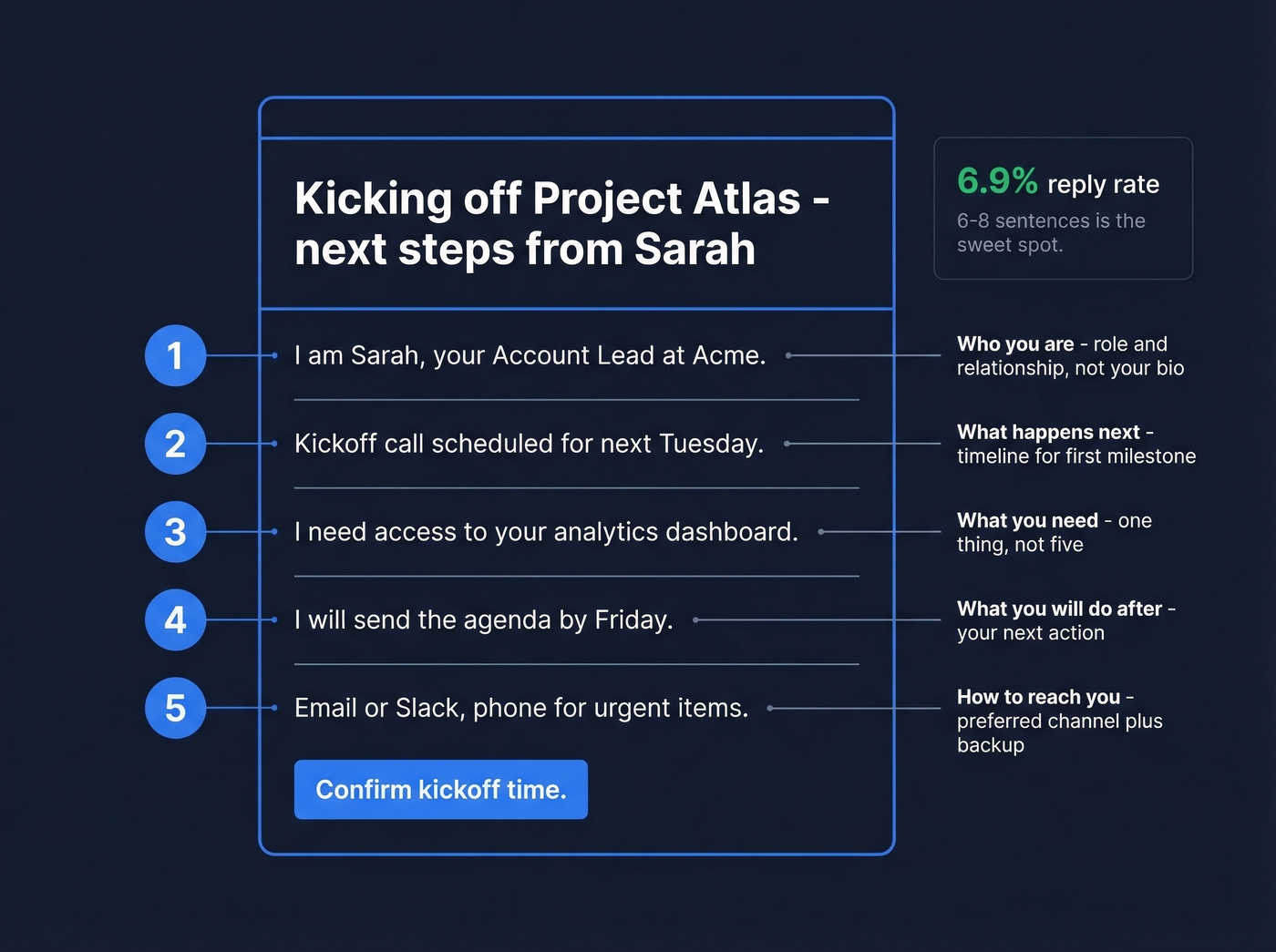
Keep it between 61-70 characters. Never use the word "newsletter" - it drops open rates by 18.7%. A strong intro subject line looks like this: "Kicking off [Project Name] - next steps from [Your Name]."
Body Structure
The five non-negotiables keep your introductory email tight:
- Who you are - role and relationship, not your biography
- What happens next - timeline for the first milestone
- What you need - one thing, not five
- What you'll do after - the next action you're taking
- How to reach you - preferred channel and backup
Emails with 6-8 sentences hit a 6.9% reply rate - the sweet spot. If it doesn't fit on a phone screen, cut it. (For structure and phrasing, see our guide to emails that get responses.)
One CTA, No Exceptions
Don't ask the client to schedule a call AND review a document AND confirm their timezone. Pick the single most important next step. Multiple CTAs create decision paralysis, and paralysis means no reply. (More examples in our email call to action guide.)
7 Client Introduction Email Templates
Each template follows the five non-negotiables. Bracketed placeholders are yours to fill - copy/paste ready in under 60 seconds. Mirror the client's tone from the sales process: if they were casual, be casual.
1. New Client Onboarding
Subject: Kicking off [Project/Account Name] - next steps
Hi [First Name],
I'm [Your Name], your [role] at [Company]. I'll be your main point of contact from here.
Here's what happens next: I'm setting up our kickoff for [timeframe]. Before that, I need one thing - [specific access/document/intro]. Once I have that, I'll send the agenda and calendar invite.
Best way to reach me: [email/Slack/phone].
CC the client's IT or security approver now if you need system access. Missing the right stakeholder is the number one reason access requests get delayed, and this first onboarding message sets the tone for the entire engagement.
2. Account Manager / CSM Handoff
Subject: Your new point of contact at [Company]
Hi [First Name],
I'm [Your Name], taking over as your [CSM/AM] from [Previous Contact]. [Previous Contact] briefed me on [one specific detail about their account].
My priority for the next 30 days is [specific goal]. I'd love 20 minutes this week - are you free [Day] or [Day]?
[Your Name] | [Phone/Slack]
Skip the personal background. Lead with your role and what happens next. A clean handoff prevents the "who is this person?" confusion that stalls projects for weeks. (If you need more variations, use these handoff email templates.)
3. Cold Outreach to a Prospect
Subject: [Specific challenge] at [Their Company]
Hi [First Name],
I noticed [Company] recently [specific trigger - hiring, funding, launch]. Teams in that phase usually run into [specific problem you solve].
We helped [similar company] [specific result] in [timeframe]. Worth a 15-minute call?
Here's the thing: research the recipient first. Reference something real. Generic "I'd love to connect" emails get deleted instantly. And target 1-2 contacts per company, not the entire org chart - reply rates drop from 7.8% to 3.8% when you blast 10+ contacts at the same company. (For a full system, see our AI cold email outreach playbook.)
4. Referral-Based Introduction
Subject: [Mutual Contact] suggested we connect
Hi [First Name],
[Mutual Contact] mentioned you're working on [specific initiative] and thought we should talk. We've helped teams like [similar company] with [relevant outcome].
Would [Day] or [Day] work for a quick call?
Name-drop the mutual connection in the first sentence, not the third. It's the only reason this email gets opened.
5. Post-Meeting Follow-Up
Subject: Next steps from our [Day] conversation
Hi [First Name],
Great speaking today. Quick recap: [one-sentence summary]. As discussed, I'll [your next action] by [date].
On your end, [their one action item]. Let me know if anything changes.
Send this within 24 hours. The longer you wait, the less the meeting matters. (If you want more options, grab these sales follow up templates.)
6. Warm Introduction (Connector Email)
Subject: Intro - [Person A] <> [Person B]
[Person A], meet [Person B]. [One sentence on Person B's relevance].
[Person B], [Person A] is [one sentence on why they matter].
I'll let you two take it from here.
Hot take: don't just send this. Draft it and send it to the introducer so they can forward it. Removing the "what do I even write?" barrier is the difference between an intro that actually happens and one that dies in someone's mental to-do list.
7. Re-Engagement After Going Dark
Subject: Still on your radar?
Hi [First Name],
I know things get busy. Is [project/initiative] still a priority this quarter?
No pressure either way. A one-line reply works.
Skip this template if the client explicitly said "not interested." Re-engagement is for silence, not rejection.

You just read that 70% of emails have spam-related issues before reaching the inbox. A bounced introduction email kills your client relationship before it starts. Prospeo's 5-step email verification catches bad addresses, spam traps, and catch-all domains - delivering 98% accuracy at $0.01 per email.
Verify your client's email before you send that first impression.
Why Your Intro Email Is Email #1
Don't treat the introduction email as a standalone message. It's the first touch in a sequence.
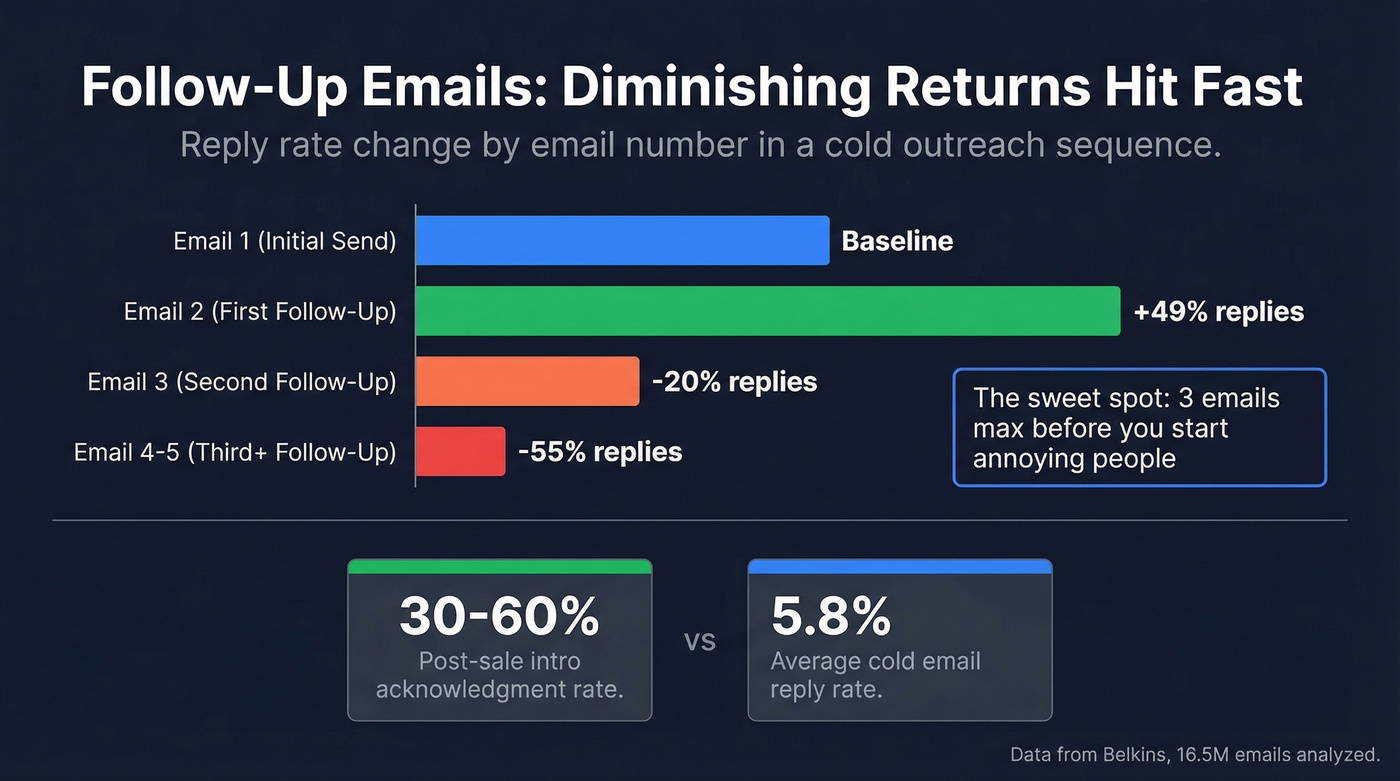
Post-sale intro emails to engaged buyers typically see 30-60% acknowledgment rates - about 5-10x higher than cold outreach. But only if the email actually reaches the inbox. For cold sequences, a first follow-up can boost replies by up to 49% when the initial touch got no response. Diminishing returns hit fast, though. The third email reduces replies by 20%, and by the fifth, replies drop 55%. In our experience, three emails is the ceiling before you start annoying people. (If you're building sequences, use this sequence management guide.)
For post-sale onboarding, 74% of people expect that first email immediately. Don't wait until Monday. Send it the moment the deal closes.
Pre-Send Checklist
The best-written intro email is worthless if it lands in spam.
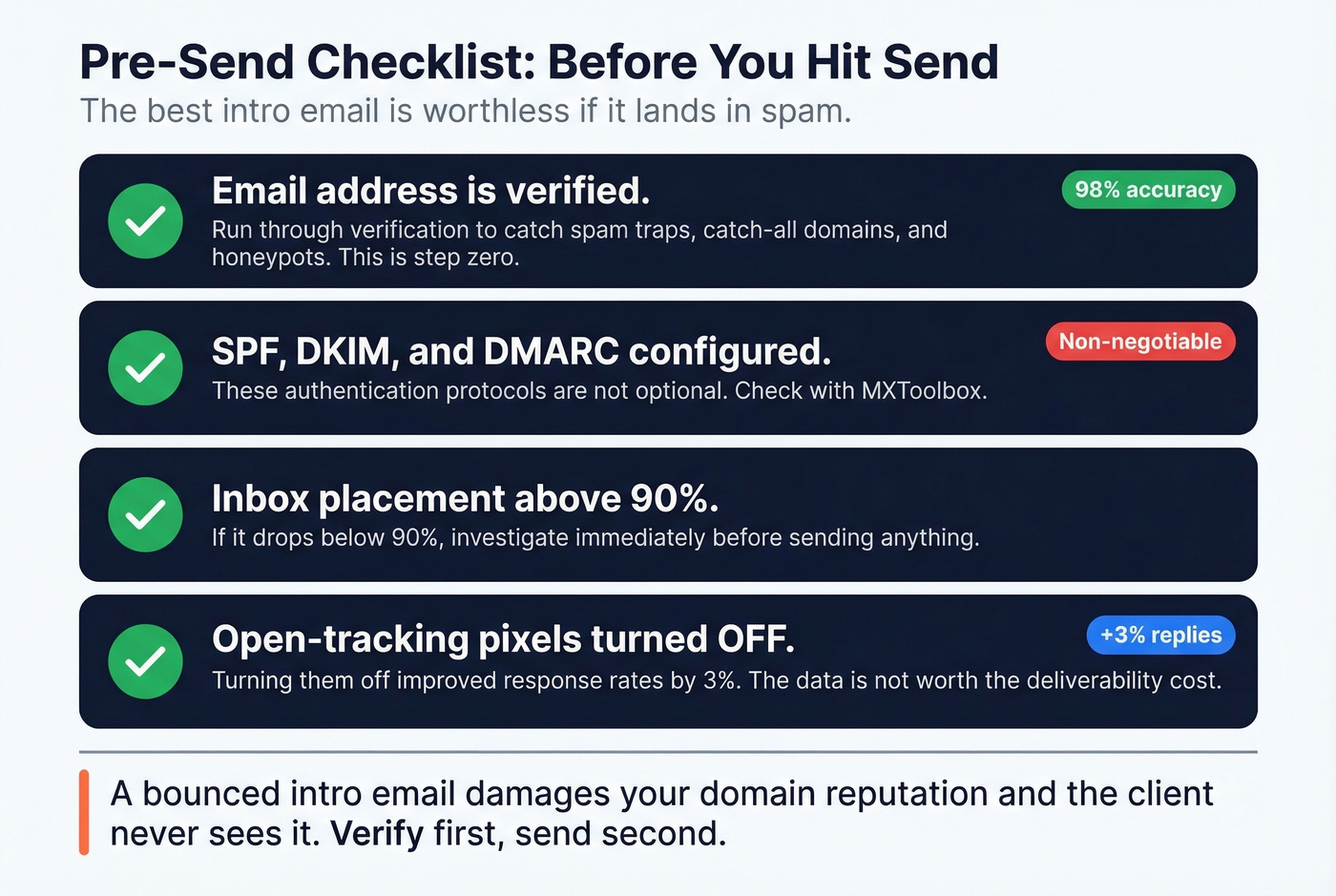
SPF, DKIM, and DMARC are configured. These authentication protocols aren't optional. If your domain doesn't have them, every email you send is at risk. Use MXToolbox to verify. (If you need to troubleshoot, see how to verify DKIM is working.)
Inbox placement is above 90%. If it drops below that, investigate immediately. (Tools and checks: email reputation tools.)
Open-tracking pixels are off. Turning them off improved response rates by 3%. The marginal data isn't worth the deliverability cost. (Deep dive: email tracking pixels.)
The email address is verified. This is step zero. We've seen teams lose entire client relationships over a bounced intro mail that never got seen. Run addresses through Prospeo's email verification before sending - the 5-step verification process catches catch-all domains, spam traps, and honeypots with 98% accuracy, and the free tier gives you 75 verifications per month. (Related: email bounce rate.)

5 Mistakes That Kill Intro Emails
Writing too much. As emails get longer, reply rates decline. Under 200 words performs best. If the reader has to scroll, you've already lost. (If you want to tighten copy, use this email copywriting guide.)
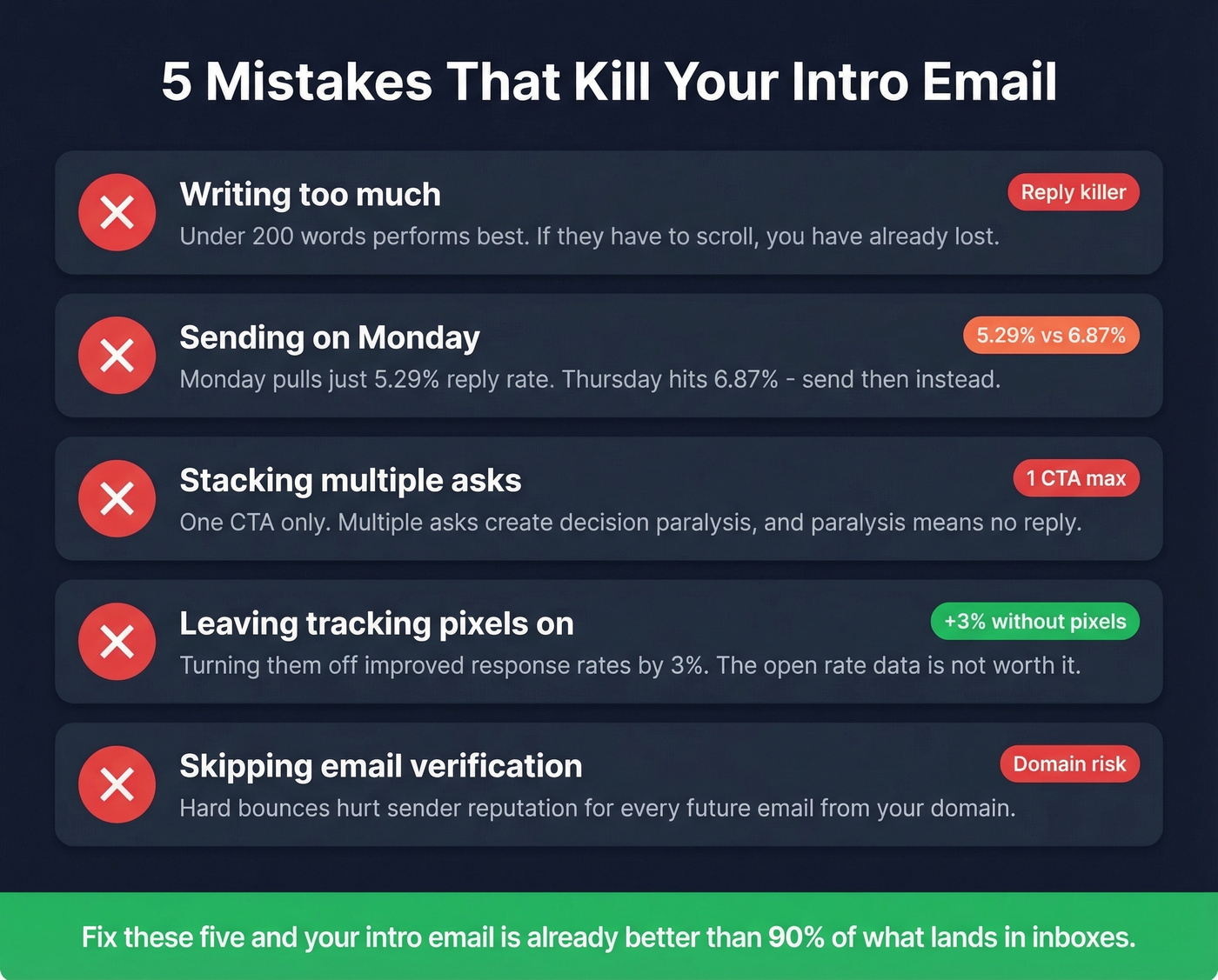
Sending on Monday. Monday is the worst send day at 5.29%. Thursday and Tuesday consistently outperform. For cold outreach, evening sends between 8-11 PM beat mornings.
Stacking multiple asks. If the reader has to guess what you want them to do, they'll do nothing. Every client-facing intro needs exactly one clear ask.
Leaving tracking pixels on. Turning them off improved response rates by 3%. The open-rate data you get from them isn't worth the deliverability hit.
Skipping verification entirely. This is the biggest one. Hard bounces hurt sender reputation and can reduce inbox placement for every future email from your domain. I've watched a sales team burn through three domains in a quarter because nobody verified a single address before launching their intro sequences.
Great templates mean nothing without the right contact data. Prospeo gives you verified emails and direct dials for 300M+ professionals - refreshed every 7 days, not every 6 weeks. Find the exact decision-maker, confirm the address is live, and send your introduction email knowing it will land.
Stop guessing email addresses. Find and verify them in one click.
FAQ
How long should an introduction email to a client be?
Under 200 words. In a study of 16.5M emails, messages with 6-8 sentences hit a 6.9% reply rate - the highest of any length bracket. If it requires scrolling on a phone, cut it down.
What's the best day to send a client intro email?
Thursday, with a 6.87% reply rate. Monday is the worst at 5.29%. Evening sends between 8-11 PM outperform mornings for cold outreach, though post-sale intros should go out immediately after the deal closes.
Should I include personal background in my intro email?
No. Lead with your role and what happens next. The best intro reads like a clear action plan, not a LinkedIn summary. Stick to the five non-negotiables and cut everything else.
How do I verify a client's email before sending?
Use a verification tool with catch-all detection and spam-trap removal. Hard bounces hurt sender reputation and can reduce inbox placement for every future send from your domain. The free tier on most verification tools - including Prospeo - is enough to cover your intro emails without spending a dime.