

Lead Routing: The Operational Guide That Actually Helps You Build It
A RevOps lead we know spent three months building what she called "the perfect routing system." Twelve territories, four product lines, round-robin with weighted distribution. It worked beautifully - until a rep quit, a territory split, and a new product launched in the same quarter. The whole thing collapsed in a week.
Lead routing isn't a project you finish. It's infrastructure you maintain. And most teams build it wrong because they're solving the wrong problem entirely.
What Is Lead Routing?
Lead routing is the process of assigning inbound leads to the right sales rep based on predefined rules - territory, account ownership, product interest, lead score, or some combination. Simple concept. Brutal execution.
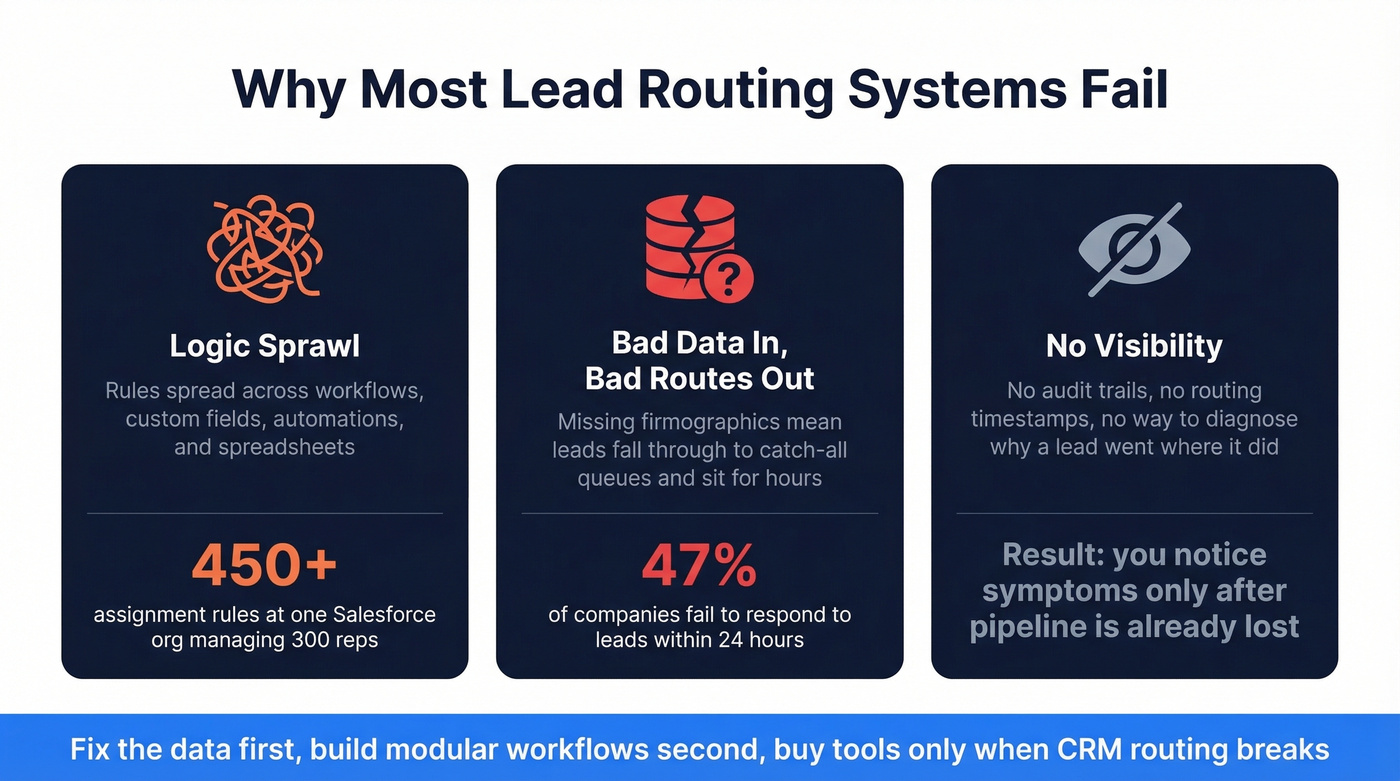
The real problem isn't the logic. It's that 47% of companies fail to respond to leads within 24 hours. Not because reps are lazy - because leads land in the wrong queue, sit unassigned, or get routed based on stale data that no longer reflects reality. This is a data quality problem disguised as a workflow problem. Fix the data, and half your routing issues disappear before you touch a single automation.
What You Actually Need First
Before getting into architectures and tools, here's the priority order that saves most teams from wasting months:
- Fix your data first. Enrich every lead at entry with verified contact info and firmographics. Routing rules can't work with incomplete records. (If you’re comparing vendors, start with data enrichment services.)
- Build modular workflows in your CRM. Don't create one mega-workflow. Split classification, assignment, and SLA enforcement into separate, testable pieces.
- Only buy a dedicated routing tool when your CRM routing breaks. You'll know when it does - and we'll cover the exact symptoms below.
The Real Cost of Slow Assignment
The research here is unambiguous. Dr. James Oldroyd's Lead Response Management Study found that contacting a lead within 5 minutes makes you 21x more likely to enter the sales process than waiting 30 minutes. That's not a marginal improvement. It's a different outcome entirely.
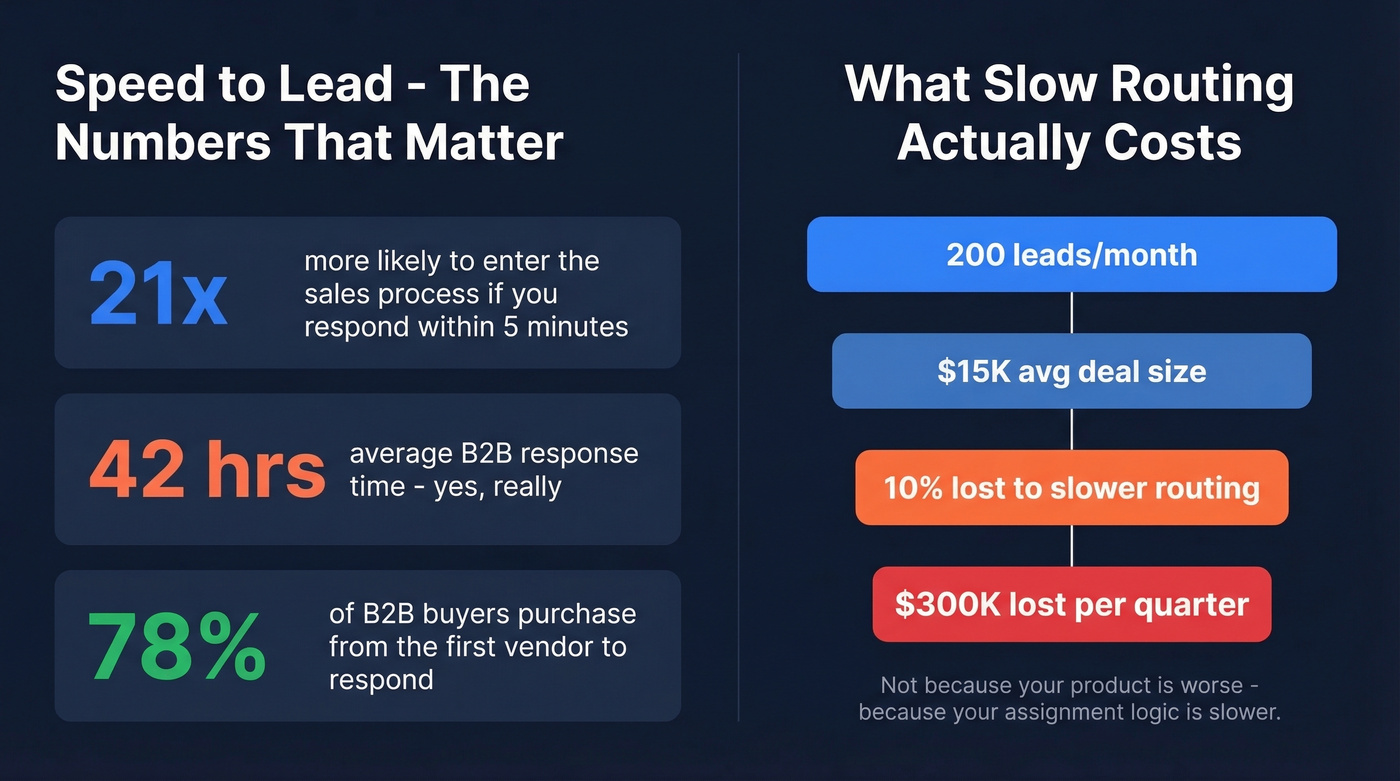
The average B2B company responds in 42 hours. Forty-two. And 78% of B2B buyers purchase from the first vendor to respond. Let's put that in pipeline terms: if your team generates 200 inbound leads per month at a $15K average deal size, and slow routing causes you to lose even 10% of those to a faster competitor, that's $300K in quarterly pipeline walking out the door. Not because your product is worse. Because your assignment logic is slower.
Speed-to-lead isn't just about having fast reps. It's about leads arriving in the right rep's queue instantly, with enough context to act. That requires clean data and tight assignment logic working together.
Why Most Routing Systems Fail
We've evaluated dozens of setups across different CRM environments. Three failure modes account for nearly every routing disaster.
Logic Sprawl
Routing logic starts clean. One workflow, a few rules, maybe a territory map. Then someone adds a geo filter. Then a product-line split. Then a named-account override. Then a capacity cap. Before long, your logic is spread across workflows, custom fields, automation rules, and maybe a spreadsheet that only one person understands.
One Salesforce team managing 300-400 reps across 12 products ended up with 450+ individual lead assignment rules that required weekly updates. They described it as a house of cards. The consensus on r/salesforce and r/CRM is consistent: routing logic spread across multiple automations becomes hard to change safely or keep consistent, especially with multiple teams owning different pieces.
Bad Data In, Bad Routes Out
Incomplete enrichment is the silent killer. A lead comes in with just an email and a company name. No industry, no employee count, no title normalization. Your territory rule says "route enterprise to AE team" - but without company size data, the lead falls through to a catch-all queue and sits for hours.
Before routing logic fires, every lead needs verified firmographic and contact data. Prospeo's CRM enrichment returns 50+ data points per record at an 83% match rate - verified emails, verified mobile numbers, company size, and industry - with a 7-day refresh cycle so routing rules work with current information, not stale records from six weeks ago. When your enrichment layer is solid, routing rules actually have the inputs they need to make correct decisions. (For the underlying fields, see firmographic and technographic data.)
No Visibility
The third failure mode is the black box. Leads route somewhere, but nobody can tell you why a specific lead went to a specific rep, how long it took, or what happened after assignment. Without audit trails, SLA enforcement, and routing timestamps, you can't diagnose problems - you can only notice symptoms after pipeline is already lost.
This is especially painful for RevOps teams accountable for pipeline velocity but unable to inspect the decisions driving it.

Routing rules fail when leads arrive incomplete. Prospeo enriches every record with 50+ data points - verified emails, mobiles, company size, industry - at an 83% match rate. Data refreshes every 7 days, not 6 weeks.
Fix the data and your routing fixes itself. Start free.
Strategies: When Each One Works
Not every team needs the same model. Matching the strategy to your sales motion is what separates functional routing from pipeline-killing chaos.
| Strategy | Best For | Watch Out For |
|---|---|---|
| Round-robin | Equal distribution, small teams | Ignores rep expertise |
| Territory-based | Geo-focused sales orgs | Uneven territory volume |
| Account-based | ABM, enterprise sales | Matching accuracy critical |
| Skill/product-based | Multi-product orgs | Needs product-interest data |
| Availability-based | High-volume inbound | Real-time calendar required |
| Lead-score priority | Mature scoring models | Bad scores = bad routing |
| Trigger-based (PLG) | Product-led growth | Needs usage data in CRM |
| Fallback/catch-all | Every routing system | Must exist or leads vanish |
Round-robin is the default, and it's fine for teams under 10 reps selling one product. But it ignores expertise entirely - your best enterprise closer gets the same random distribution as the new hire.
Territory-based routing improves local relevance but creates distribution problems when territories generate wildly different volumes. If your West Coast territory produces 3x the inbound of your Midwest territory, reps aren't equally loaded no matter what your map says.
Account-based routing is essential for ABM but depends entirely on lead-to-account matching. Fuzzy matching challenges are real - "Zoom Inc." vs. "Zoom Video Communications" vs. "zoom.us" can all be the same account, and your matching logic needs to handle that without creating duplicates or misroutes. (If you’re building this motion, use account-based selling best practices as your baseline.)
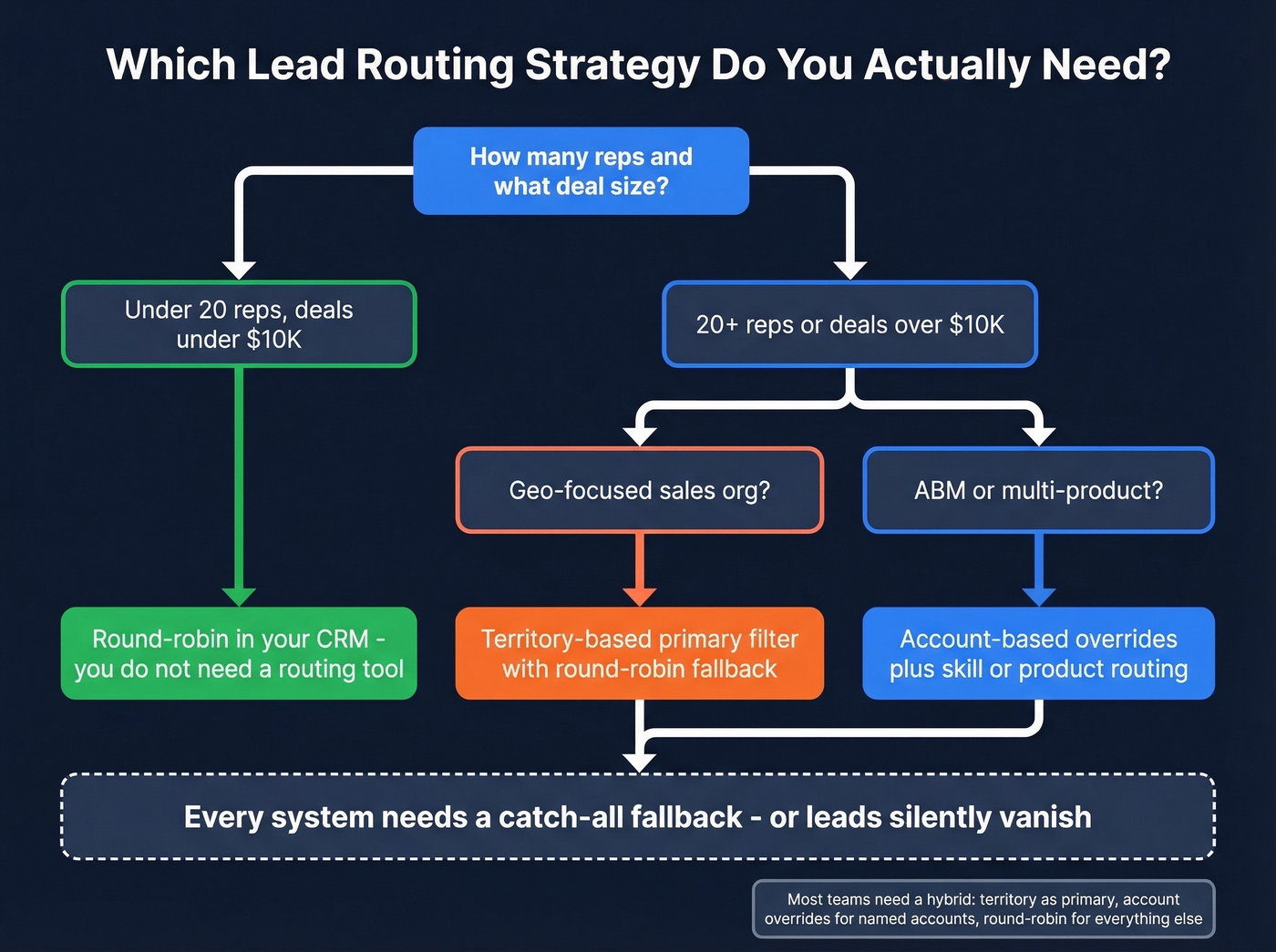
Here's the thing: most teams need a hybrid. Territory as the primary filter, with account-based overrides for named accounts and a round-robin fallback for everything that doesn't match. The catch-all is non-negotiable - every system needs one, or leads silently vanish.
If your average deal is under $10K and you have fewer than 20 reps, you don't need a routing tool. You need a clean CRM and a round-robin workflow. The teams that obsess over routing sophistication at that stage are solving a problem they don't have yet. (If you’re still standardizing your stack, start with examples of a CRM.)
Every lead that falls to a catch-all queue because it's missing firmographic data is pipeline lost to a faster competitor. Prospeo's CRM enrichment fills in the fields your routing rules depend on - 98% email accuracy, 92% API match rate, $0.01 per lead.
Stop routing blind. Enrich leads at entry - 75 emails free, no card required.
B2B Routing: Enterprise vs. SMB
If you're routing enterprise and SMB leads through the same logic, you're doing both poorly. These are fundamentally different buying motions that need separate scoring and assignment models.
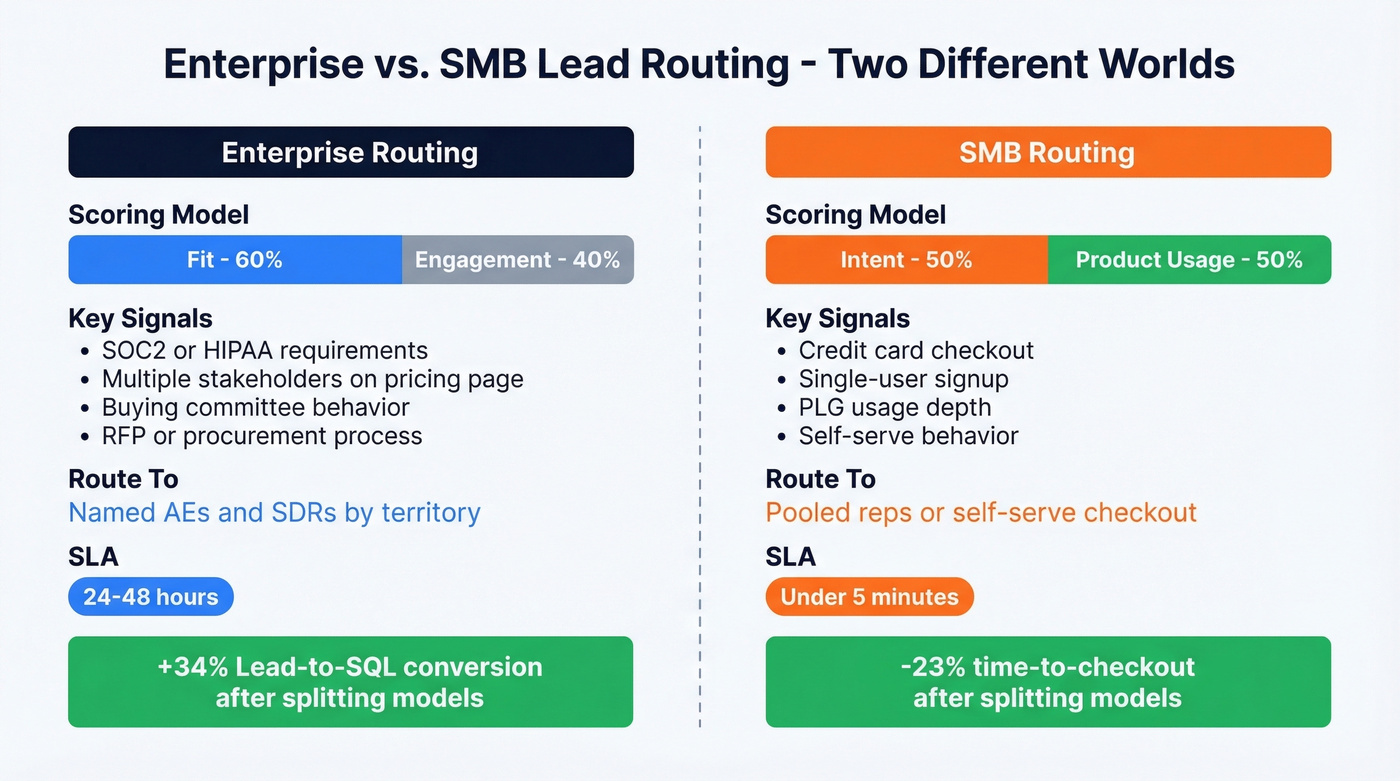
Enterprise scoring should weight Fit at roughly 60% and Engagement at 40%. You're looking for buying committee signals - compliance needs, procurement behavior, multiple stakeholders visiting your pricing page. Route these to AEs and SDRs by territory, with longer SLAs that reflect the slower buying cycle.
SMB scoring flips the model: Intent at 50% and Product usage at 50%. These buyers move fast, often self-serve, and respond to speed above all else. Route to pooled reps with aggressive SLAs (under 5 minutes) or directly to self-serve checkout.
Teams that split these models see meaningful results. One consultancy reported +34% Lead-to-SQL conversion in Enterprise and -23% time-to-checkout in SMB after separating the motions and adding in-product signals. The differentiation signals are clear: SOC2/HIPAA requirements, buying committee size, and RFP behavior point to enterprise. Credit-card checkout, single-user signups, and PLG usage depth point to SMB. (For benchmarks, compare against the average B2B lead conversion rate.)
Platform-Specific Architectures
Salesforce at Scale
Salesforce's native assignment rules work fine for simple routing - a few territories, straightforward criteria, under 50 reps. Beyond that, things deteriorate fast.
Flow Builder can handle more complex logic, but teams consistently report that it struggles with deeply conditional routing. The progression is predictable: native rules, then Flow Builder, then APEX development, then a specialized platform. That 450+ rules example? They were spending meaningful admin hours on weekly maintenance and still couldn't justify the $6-8K/month for tools like Leadspace.
In our experience, if you're under 50 reps with 3-4 territories, native assignment rules plus solid enrichment data will carry you. Once you're managing multiple products, named accounts, and territory splits that change quarterly, you'll need either custom APEX work or a platform like LeanData. There's no clean middle ground in Salesforce. (If you’re budgeting the stack, see Salesforce pricing.)
HubSpot 3-Workflow Architecture
HubSpot's routing breaks silently. The common pattern: one mega-workflow handles everything, works until about 10 reps and 3 territories, then starts misrouting without throwing errors. The fix is a modular three-workflow architecture.
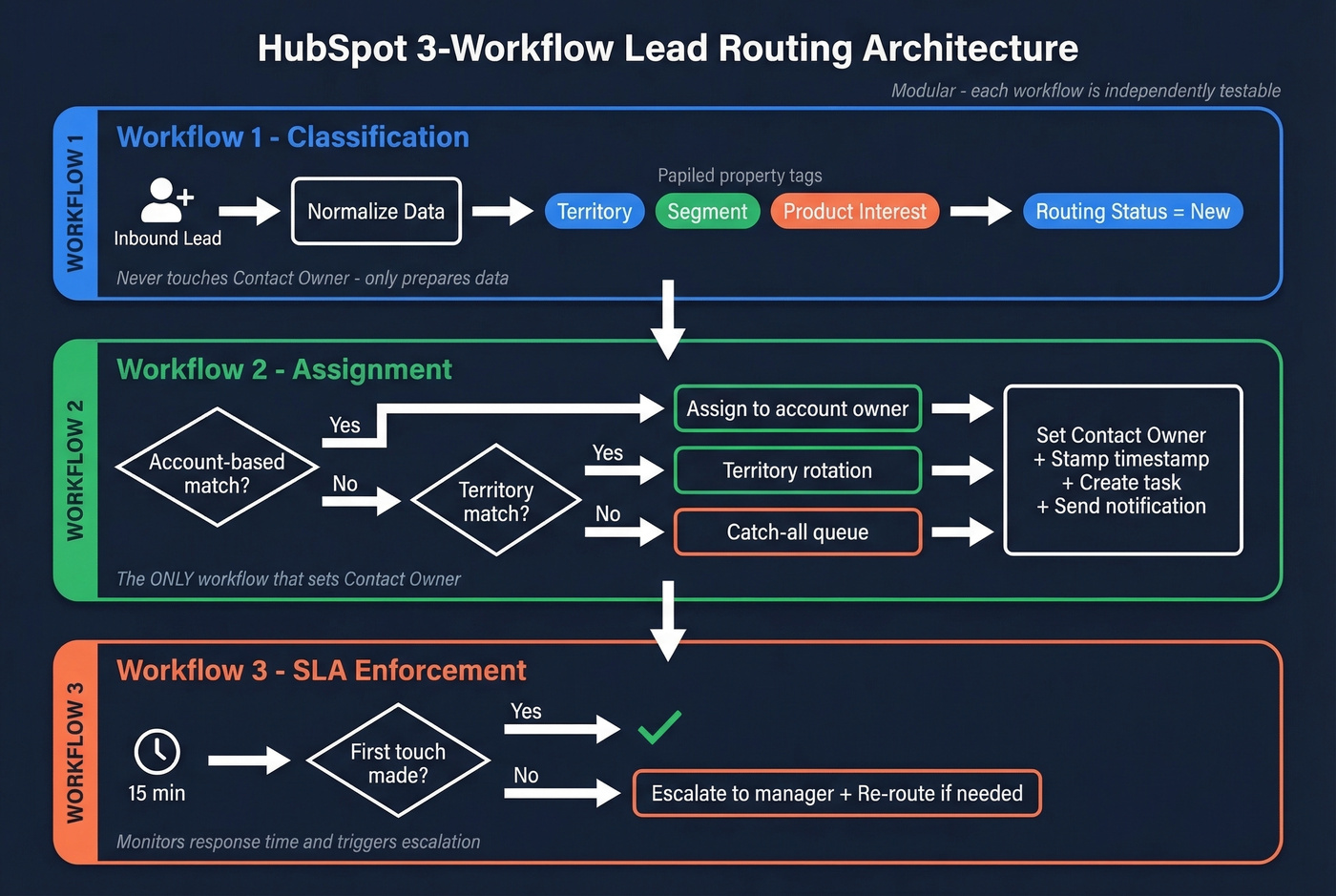
Workflow 1 - Classification. Normalize inbound data. Set territory, segment, and product interest properties. Set "routing status = new." This workflow never touches Contact Owner - it only prepares the data.
Workflow 2 - Assignment. This is the only workflow that sets Contact Owner. It checks for account-based routing first (does the associated company already have an owner?), then falls to territory-based rotation, then catch-all. It stamps a routing timestamp, creates a "first-touch within 15 minutes" task, and fires a Slack or email notification.
Workflow 3 - SLA Enforcement. Waits 15 minutes. Checks a custom property - "Contact unworked?" If the lead hasn't been touched, it escalates to the manager and optionally reassigns to a backup rep.
One critical technical caveat: HubSpot property validation rules aren't enforced when values are set via workflows. Your defensive checks need to live inside the workflow logic itself, not in property settings. We've seen this trip up experienced HubSpot admins - common failure categories include duplicates, messy properties, lifecycle stage inconsistency, and broken UTM tracking. (If you’re standardizing stages, use a defined lead status model.)
Tools Compared
We've tested or evaluated all of these. Here's what actually matters for each one.
| Tool | Best For | Pricing | CRM | Key Strength |
|---|---|---|---|---|
| Prospeo | Pre-routing enrichment | From $0/mo | Salesforce, HubSpot | 98% email accuracy, 83% match rate |
| LeanData | Complex SF routing | ~$2K-5K/mo | Salesforce | Simulation + audit logs |
| Chili Piper | Instant scheduling | From $30/user/mo | Salesforce, HubSpot | Form concierge |
| LeadAngel | Mid-market routing | From $99/company/mo | Multi-CRM | Affordable dedicated tool |
| Default | RevOps workflows | ~$500-2K/mo | Multi-CRM | All-in-one platform |
| Calendly Routing | Lightweight routing | Teams plan+ | Salesforce, HubSpot | Low-friction scheduling |
| RevenueHero | Inbound scheduling | ~$500-1.5K/mo | Multi-CRM | Scheduling-first |
| Native CRM | Simple setups | Included | SF/HubSpot | Free (you pay in time) |
LeanData
Use this if you're running complex Salesforce routing across 50+ reps, multiple products, and named accounts. LeanData is the gold standard - testing and simulation before deployment, version control, audit logs, and retry logic with alerts. It's the tool that makes the 450-rule nightmare manageable.
Users consistently cite the visual flow builder as the reason they stay. The flip side: implementation complexity is real, and teams should budget 3-6 months to get it fully dialed in. Mid-market contracts typically run $2,000-5,000/month, and enterprise deployments can exceed $50K/year. That's justified when routing complexity is genuinely costing you pipeline.
Skip this if you're under 50 reps or not on Salesforce. For most growing teams, it's overkill.

Chili Piper
Your demo request form gets 50 submissions a day, and reps are fighting over who books the meeting. Half the leads never hear back because the handoff between form submission and calendar invite takes too long. This is the exact problem Chili Piper was built to solve.
Their form concierge is best-in-class - a lead fills out your demo request form and immediately sees available time slots for the right rep, based on territory, availability, and routing rules. Assignment and scheduling happen in one step, which is why it's so effective at collapsing speed-to-lead times for high-volume inbound teams.
Where it falls short: Chili Piper excels at the "form submit to meeting booked" motion but isn't designed for the deep conditional routing that LeanData handles. Pricing starts at $30/user/month plus a platform fee; mid-market teams typically land at $500-1,500/month total.

LeadAngel
Starting at $99/company/month, LeadAngel is one of the most affordable dedicated routing tools on the market. Strong fit for mid-market teams that've outgrown native CRM routing but don't need LeanData's enterprise feature set. Solid lead-to-account matching at a price point that's easy to justify.
Default, Calendly Routing, and RevenueHero
Default positions itself as an all-in-one RevOps workflow platform - routing, scheduling, enrichment, and qualification in a single tool. Expect $500-2,000/month. Worth evaluating if you want to consolidate rather than bolt on another point solution.
Calendly's routing features kick in on the Teams plan and above, though full Salesforce routing requires Enterprise tier. If your team already lives in Calendly, it's the path of least resistance for basic round-robin and territory-based scheduling. Don't expect the depth of a dedicated routing tool.
RevenueHero offers scheduling-first inbound routing in the $500-1,500/month range. Worth a look if Chili Piper's pricing doesn't fit or you need tighter integration with a multi-CRM environment.
AI-Driven Routing in 2026
AI routing is real but early. The promise: replacing static rules with predictive models that learn from your closed-won data, factor in rep capacity and specialization, and route based on likelihood to convert - not just territory or round-robin position.
The predictive inputs that matter are third-party intent signals, first-party engagement data, rep context like capacity and specialization, and historical closed-won patterns. Salesforce Einstein, HubSpot AI, 6sense, and Conversica are all building these capabilities into their platforms. (If you’re operationalizing signals, start with identifying buying signals.)
Implementation follows a roughly 10-week timeline: assessment in weeks 1-2, integration in 3-4, modeling in 5-6, pilot in 7-8, and scale in 9-10. Early-adopter results include 95% routing accuracy, 80% response time improvement, and 40% conversion lift - but treat these as directional, not guaranteed.
The guardrails matter more than the model. Encode your territory and partner rules as hard constraints the AI can't override. Require human sign-off for exceptions. Log every decision with its inputs and reasoning - when AI misroutes a $200K opportunity, you need to know why and fix it fast.
Best Practices That Hold Everywhere
Across every platform and team size, these principles hold:
- Own the routing logic explicitly. Assign one person - typically in RevOps - who documents every rule, tests edge cases, and approves changes. Routing without ownership drifts into chaos within a quarter.
- Audit quarterly, at minimum. Review routing logs for misroutes, unassigned leads, and SLA breaches. Any time reps join, leave, or territories shift, re-test your workflows before going live.
- Enrich before you route. Every lead should have verified firmographic and contact data before routing logic fires. Incomplete records are the top cause of misroutes. (See lead enrichment for a practical implementation.)
- Build a catch-all for every path. If no rule matches, the lead must go somewhere visible - not into a void. A catch-all queue with daily review is non-negotiable.
- Separate classification from assignment. Don't let one workflow do everything. Modular design makes debugging possible and changes safe.
- Enforce SLAs with automation, not trust. If a lead sits unworked for 15 minutes, escalate automatically. Reps are busy - systems should compensate.
These principles apply whether you're running native CRM workflows or a dedicated platform. The teams that follow them consistently outperform those chasing the latest tool.
Routing as Sales Strategy
Lead routing isn't just an ops task - it's a core part of how your sales team wins. The way you assign leads determines which reps engage which buyers, how fast those conversations start, and ultimately how much pipeline converts. When assignment logic aligns with your go-to-market motion - matching rep expertise to buyer segment, enforcing speed-to-lead SLAs, and adapting to territory changes in real time - it becomes a competitive advantage rather than administrative overhead. (To connect routing to outcomes, track lead generation metrics alongside SLA performance.)
FAQ
What's the difference between lead routing and lead scoring?
Lead scoring ranks leads by likelihood to convert; lead routing assigns them to the right rep. Scoring is an input to routing - a lead's score determines whether it goes to an AE, an SDR, or a self-serve flow. You need both, but scoring without routing just gives you a ranked list nobody acts on.
Can I route leads without a dedicated tool?
Yes. Native CRM workflows plus good enrichment data handle routing for teams under ~50 reps and 3 territories. Buy a dedicated tool only when native routing breaks and leads start misrouting silently.
How often should I update routing rules?
Quarterly at minimum, and immediately whenever territories change, reps join or leave, or new products launch. Assign explicit ownership to one person who documents logic and tests edge cases before updates go live.
What's the best routing tool for Salesforce?
LeanData for complex setups with 50+ reps - it offers simulation, versioning, and audit logs. For simpler environments, native assignment rules plus a solid enrichment layer handle most use cases without the $2K-5K/month enterprise price tag.
Why do leads keep going to the wrong rep?
Almost always a data problem - missing company size, wrong industry, no title normalization. Duplicate records send the same lead to multiple reps. Fix the data input first with CRM enrichment; assignment logic can only work with what it's given.