

The 9 Best Lead Tracking Software Tools in 2026
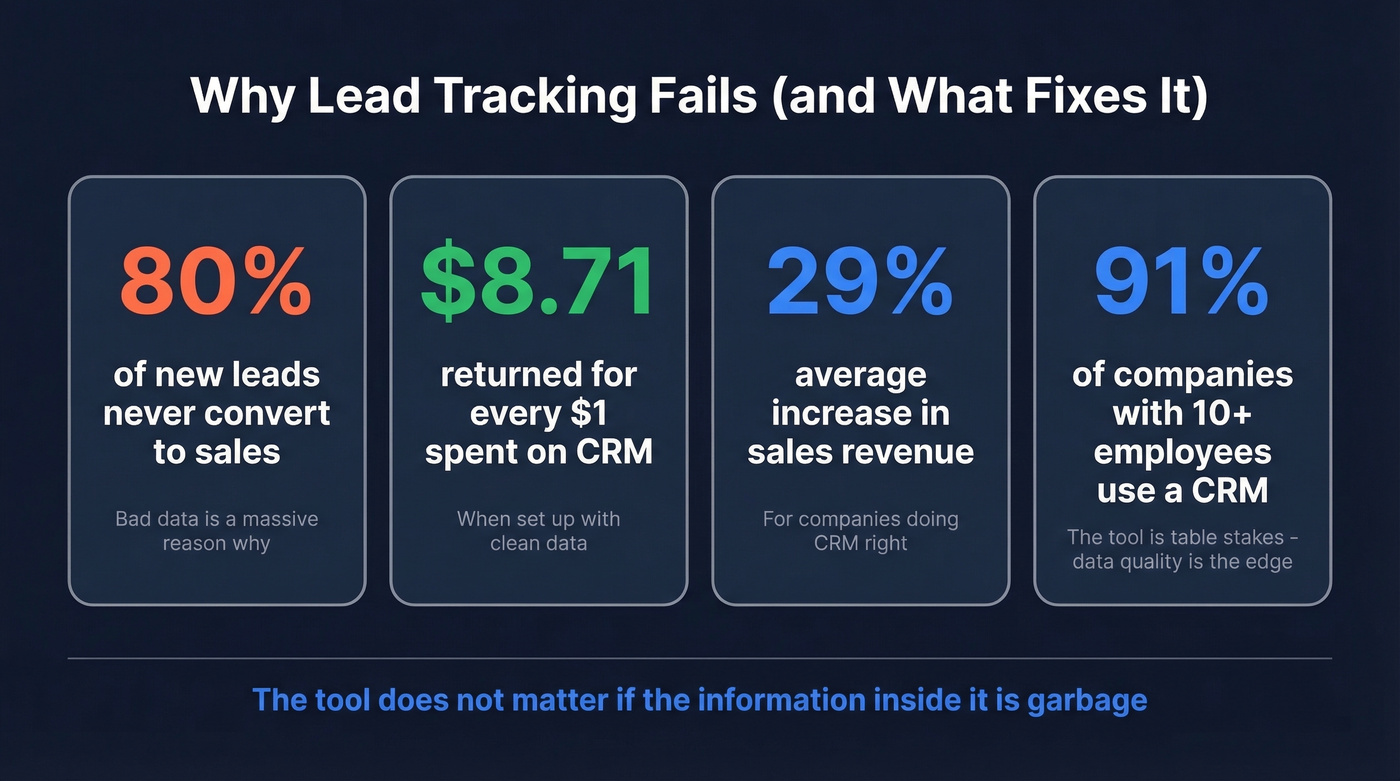
A RevOps lead we know ran a pipeline audit last quarter and found that 40% of the "leads" in their CRM had disconnected phone numbers or invalid emails. The reps weren't lazy - the data was rotten from day one. That's the dirty secret of lead tracking software: the tool doesn't matter if the information inside it is garbage. 80% of new leads never convert to sales, and bad data is a massive reason why.
Here's what makes this worth fixing: 91% of companies with 10+ employees already use a CRM, and the ones doing it right see a 29% average increase in sales revenue. CRM technology returns $8.71 for every $1 spent - when it's set up with clean data flowing through it. The tools below range from free CRMs to specialized data platforms, and we've ranked them by what actually moves pipeline, not feature count.
Our Picks (TL;DR)
Prospeo - Best for data accuracy and lead enrichment. 98% email accuracy, 7-day data refresh, free tier available. ~$0.01/email. Try it free.
HubSpot CRM - Best free lead tracking tool for getting started. Generous free tier covers contacts, deals, and email tracking. Automation and scoring jump to ~$890/mo, though.
Pipedrive - Best for sales-first simplicity. Visual pipeline that reps actually use. Starts at $14/seat/month on annual billing.
What Lead Tracking Actually Does
Lead tracking isn't a single tool - it's a system. Zapier frames it well: you need a stack, not a silver bullet. The workflow that matters has five stages:
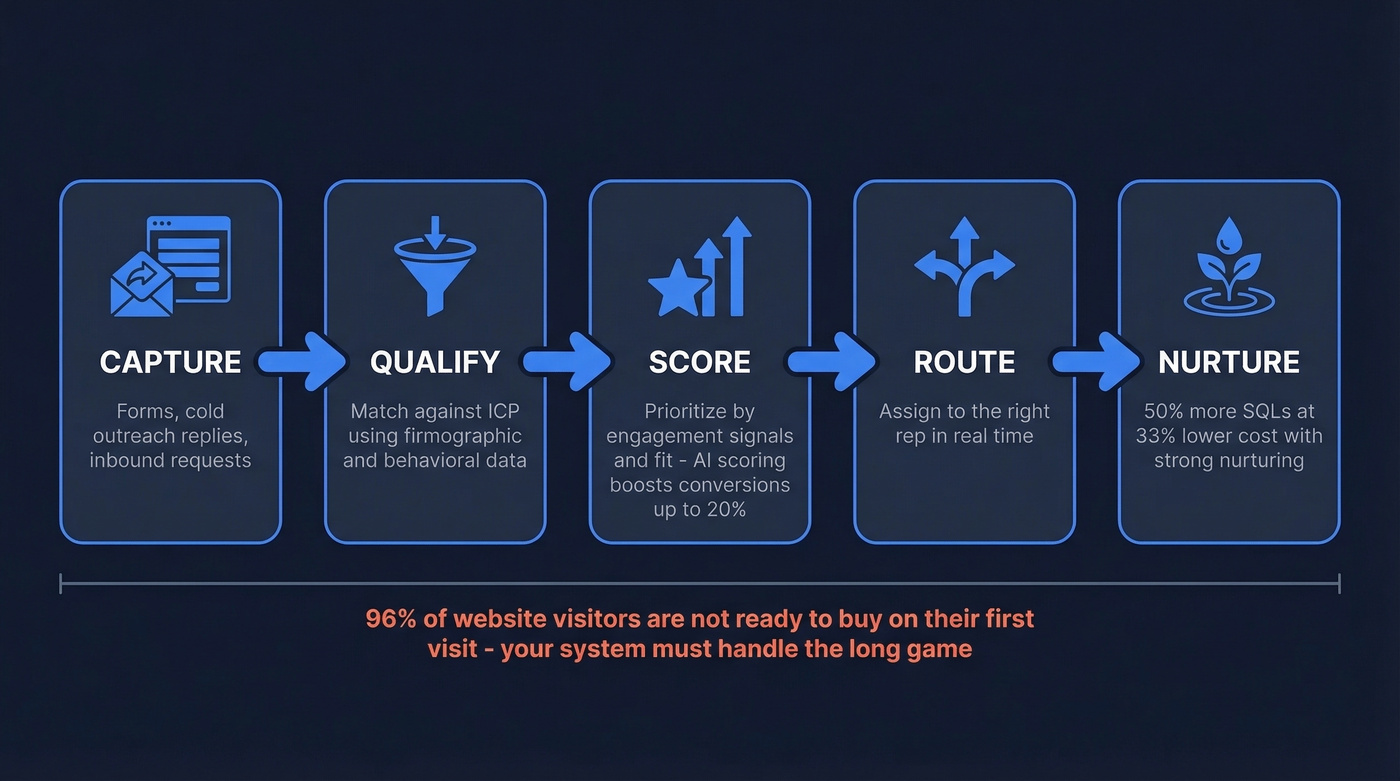
- Capture - a lead enters your system through a form, cold outreach reply, or inbound request.
- Qualify - you determine whether they match your ICP using firmographic and behavioral data.
- Score - you assign a priority based on engagement signals and fit. AI-powered scoring alone can increase conversion rates up to 20%. (If you want a deeper setup guide, see our Lead Scoring playbook.)
- Route - the lead gets assigned to the right rep, ideally in real time.
- Nurture - leads that aren't ready get dripped until they are. Companies with strong nurturing strategies generate 50% more sales-qualified leads at 33% lower cost.
96% of website visitors aren't ready to buy on their first visit. Your tracking platform needs to handle the long game - not just the hot leads that close this week.
The tools below handle different parts of this workflow. Some cover the whole thing. Others do one piece exceptionally well.
9 Tools Ranked and Reviewed
Prospeo
Verdict: The data quality layer that makes every CRM in this list actually work.
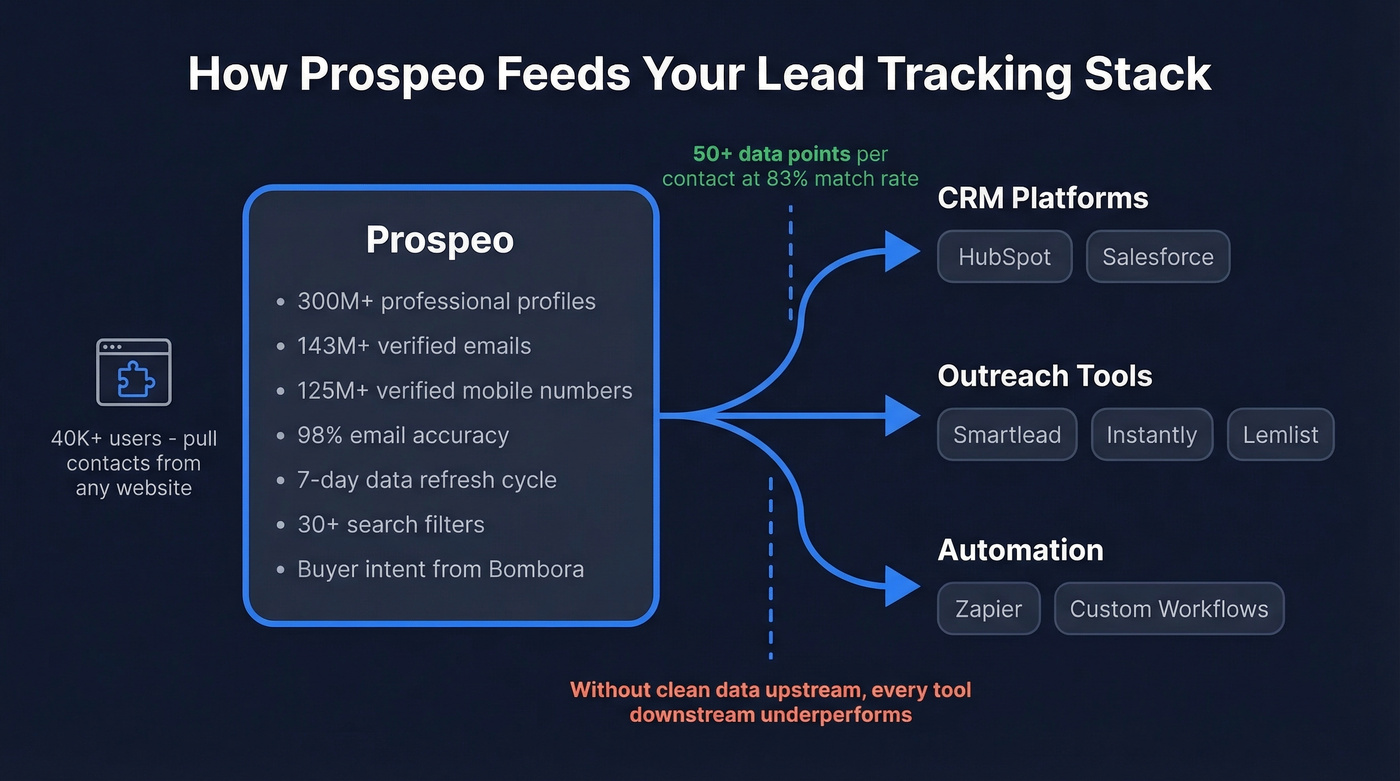
Your pipeline is only as good as the data feeding it. Prospeo's database covers 300M+ professional profiles, 143M+ verified emails, and 125M+ verified mobile numbers - all refreshed on a 7-day cycle while the industry average sits at six weeks. The 98% email accuracy isn't marketing fluff: Snyk cut their bounce rate from 35% to under 5% after switching, and Meritt tripled their pipeline from $100K to $300K per week. (If bounce is a recurring issue, use our Email Bounce Rate guide to diagnose it.)
The platform gives you 30+ search filters including buyer intent powered by Bombora across 15,000 topics, technographics, job changes, and headcount growth. The Chrome extension (40K+ users) pulls verified contacts from any website or CRM in one click. CRM enrichment returns 50+ data points per contact at an 83% match rate, with native integrations into HubSpot, Salesforce, Zapier, Smartlead, Instantly, and Lemlist.

Pricing: Free tier includes 75 emails and 100 Chrome extension credits per month. Paid plans run ~$0.01/email. No contracts, no sales calls required.
Use this if: You need verified contact data before you track anything. Clean emails and direct dials are the foundation - everything else is downstream. (More options: data enrichment services.)
Skip this if: You already have a pristine database and just need pipeline management.
HubSpot CRM
Verdict: The best free starting point - until you need the features that actually cost money.
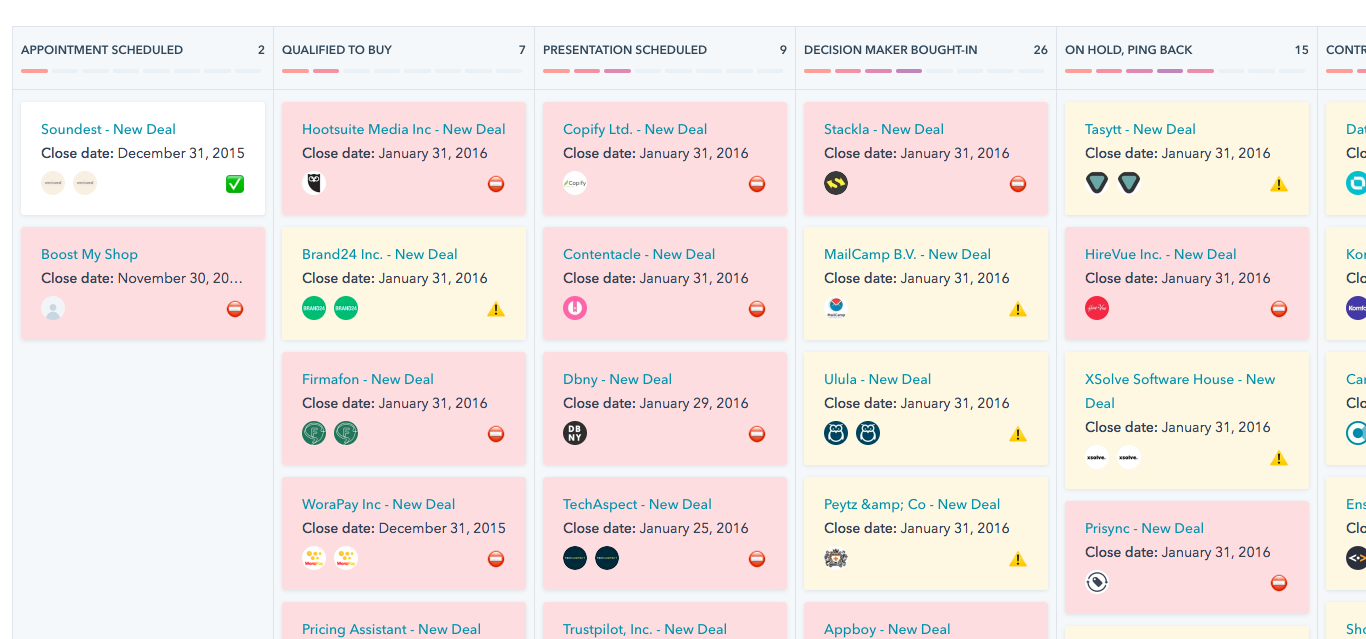
HubSpot's free CRM is genuinely generous. You get contact management, a deal pipeline, email tracking, forms, and basic reporting without paying a dime. For a team of 2-5 reps managing a few hundred leads per month, it's hard to beat as an online tracking tool that requires zero upfront investment. (If you're comparing options, see our roundup of examples of a CRM.)
Here's the thing: the moment you need lead scoring and workflow automation, you're looking at the Professional tier at ~$890/month. That's not per seat - that's the platform fee. It's a cliff, not a slope. We've watched teams start on HubSpot Free, fall in love with the UX, and then hit a wall when they try to scale. Budget for that jump early or you'll be scrambling.
Pricing: Free forever (unlimited users with limitations). Starter from $20/user/month. Professional ~$890/month for automation and scoring.
Use this if: You want a free CRM that your reps will actually adopt, and you're okay growing into paid tiers later.
Skip this if: You need automation and scoring now but can't stomach $890/month.
Pipedrive
Forget the verdict for a second - here's a scenario. Your team just hired three SDRs. They need to see their pipeline, drag deals between stages, and start selling by Friday. Pipedrive is the answer. Setup takes hours, not weeks. (If you're building an SDR stack, start with our guide to the best SDR tools.)
Pipedrive does one thing brilliantly: visual pipeline management. You drag deals between stages, see your entire funnel at a glance, and the interface stays out of your way. For sales-first teams that don't need marketing automation baked in, it's the obvious pick.

The tradeoff? Marketing alignment is weak. Pipedrive's web forms don't capture UTM data, and its email marketing tools are basic. Data quality isn't its strength either - you'll want to pair it with an enrichment tool to keep contact records clean. (Related: Lead Enrichment.)
Pricing: Lite $14, Growth $39, Premium $59, Ultimate $79 - all per seat/month on annual billing. LeadBooster add-on starts at $32.50/month extra. 14-day free trial, no credit card.
Use this if: Your team lives in the pipeline view and you want fast setup with minimal training.
Skip this if: You need tight marketing-sales alignment or built-in data enrichment.
Salesforce
If you don't have a dedicated admin or a consultant budget, stop reading this section and skip to Freshsales.
Still here? Good. Salesforce can do everything - and that's the problem. The customization depth is nearly unlimited: workflows, custom objects, AppExchange integrations that number in the thousands. But it requires a dedicated admin to get right. We've watched small teams buy Salesforce because it's the "safe" choice, then spend months configuring it instead of selling. (If you're weighing it against other CRMs, our Salesforce Pricing, Reviews, Pros & Cons breakdown helps.)
Pricing: Free Suite ($0/user/month) includes up to 2 users. Starter $25/user/month, Pro Suite $100, Enterprise $175. Add implementation costs of $5-50K+ depending on complexity. AI features live at higher tiers.
Use this if: You have 50+ reps, a RevOps team, and a consultant budget. Salesforce rewards investment.
Skip this if: You don't have a dedicated admin. Seriously.
Freshsales
Let's start with the math. Freshsales markets a $9/user/month starting price, and technically that's real. But the Growth tier lacks AI scoring, sequences, territory management, and custom reports. Most teams doing real outbound end up on Pro at $39/user/month. A 10-person team on Pro pays about $4,680/year - reasonable for what you get.
That includes Freddy AI for contact scoring, multi-pipeline management, and built-in sequences. The free tier for 3 users is solid for micro-teams testing the waters, and the 21-day trial is one of the longest in the category.
Pricing: Free for 3 users. Growth $9, Pro $39, Enterprise $59 per user/month on annual billing. Monthly billing runs 20-30% higher.
Use this if: You want AI-powered lead scoring without enterprise pricing.
Skip this if: You only need basic pipeline tracking - the $9 tier will frustrate you into upgrading.
Zoho CRM
Zoho's strength is the ecosystem. If you're already running Zoho Books, Zoho Desk, or Zoho Projects, the CRM integrates cleanly without extra configuration. The free tier covers 3 users. Paid plans vary by region and currency, but Standard typically lands around $14/user/month, and higher tiers sit around $40/user/month.
Zoho gates key limits by edition - mass email limits scale from 250/day up to 2,000/day as you move up tiers. The learning curve is steeper than Pipedrive or Freshsales, and the UI feels dated in spots. But for teams that want one vendor for everything, Zoho's breadth is hard to match. (If your main need is organizing records, compare with contact management software.)
Pricing: Free for 3 users. Standard ~$14/user/month. Higher tiers around ~$40/user/month (varies by region/currency).
Salesflare
Salesflare auto-populates contact records from your inbox and calendar, which means less manual data entry for small B2B teams. At $49/user/month on annual billing or $64 monthly, it's pricier than Freshsales or Pipedrive but earns its keep if your team lives in email. The 30-day trial is generous.
One caveat: Salesflare publishes a comparison ranking themselves 9.8/10 while scoring Salesforce 6.1 and Pipedrive 6.3. Take that with a grain of salt.
OnePageCRM
OnePageCRM is built around a "Next Action" methodology - every contact has a required next step, so nothing falls through the cracks. Pricing typically lands around $15-$30/user/month. The 21-day trial is a great fit for solo founders or micro-teams who need follow-up discipline more than pipeline analytics. (If you need copy for those next steps, use these sales follow-up templates.)
Zapier
Zapier isn't a CRM - it's the glue that connects your lead tracking stack. Free plan available, paid from $19.99/month. Use it to route form submissions to your CRM, trigger enrichment workflows, or sync data between tools that don't natively integrate. Most teams need this eventually, and the free tier handles basic automations. (More on setup: connect outreach tool to CRM.)

40% of CRM leads have invalid emails or disconnected numbers. Prospeo's 5-step verification and 7-day data refresh eliminate rotten data before it enters your pipeline. 98% email accuracy, 125M+ verified mobiles, and 50+ data points per enriched contact.
Stop tracking leads you'll never reach. Start with data that connects.
Pricing Comparison
The advertised price and the price you'll actually pay are rarely the same. Here's the honest breakdown:
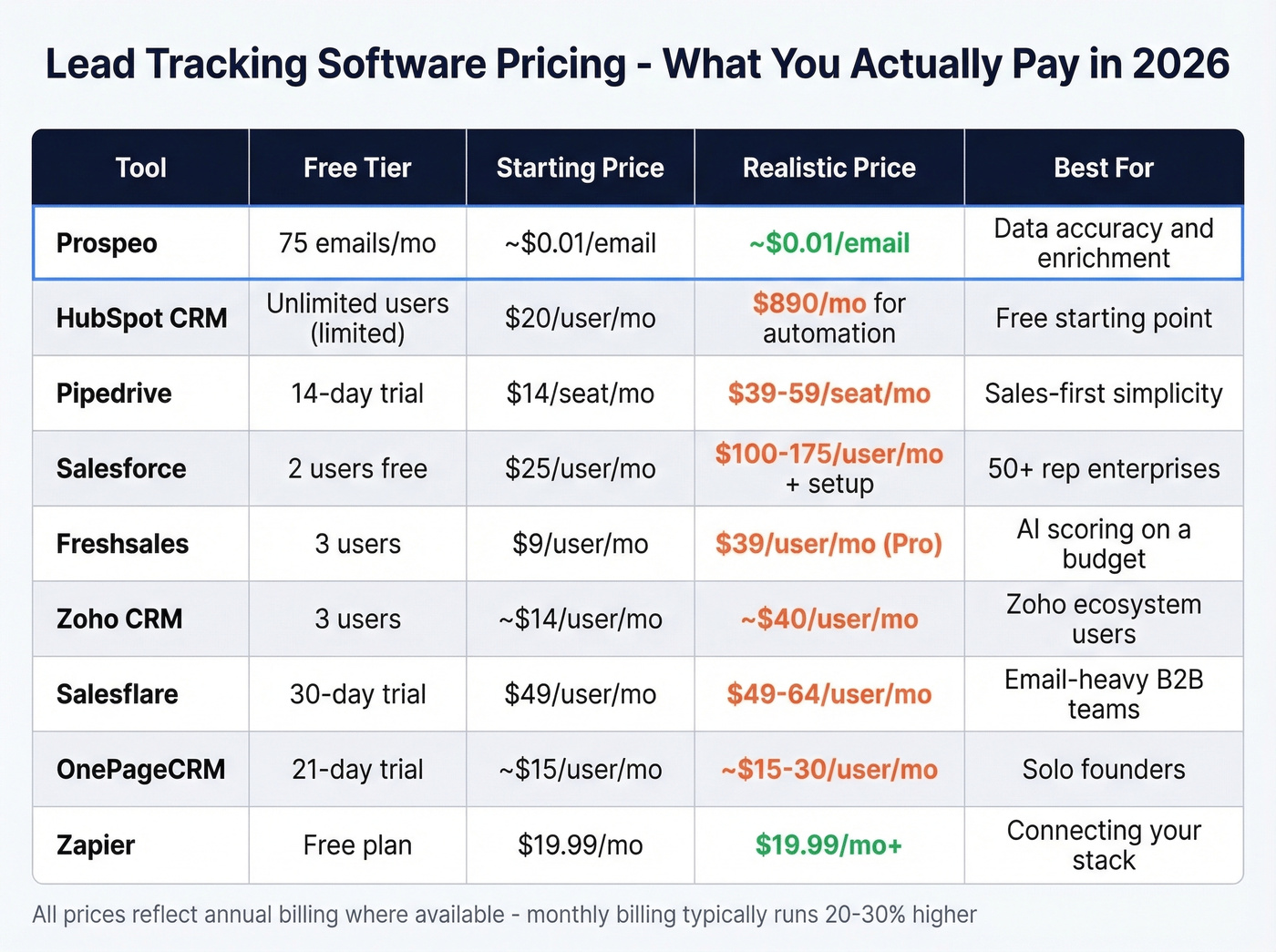
| Tool | Free Tier | Starting Price | Realistic Price | Best For | Free Trial |
|---|---|---|---|---|---|
| Prospeo | 75 emails/mo | ~$0.01/email | Same | Data accuracy | Free tier |
| HubSpot | Yes (generous) | $20/user/mo | $890/mo for automation | Free CRM | Free tier |
| Pipedrive | No | $14/seat/mo | $39+/seat w/ add-ons | Visual pipeline | 14 days |
| Salesforce | Up to 2 users | $25/user/mo | $100+/user + impl. | Enterprise scale | 30 days |
| Freshsales | 3 users | $9/user/mo | $39/user (Pro) | AI scoring on a budget | 21 days |
| Zoho CRM | 3 users | ~$14/user/mo | ~$40/user (higher tiers) | All-in-one ecosystem | 15 days |
| Salesflare | No | $49/user/mo | Same | Auto data entry | 30 days |
| OnePageCRM | No | ~$15-$30/user/mo | Same | Follow-up discipline | 21 days |
| Zapier | Yes | $19.99/mo | $49+/mo for volume | Connecting tools | Free tier |
5 Mistakes That Kill Your Pipeline
1. Creating leads too early. Every website visitor isn't a lead. If you're dumping raw traffic into your CRM, you're drowning reps in noise. Define a minimum qualification threshold before anything enters the pipeline.
2. Treating leads like contacts. Leads and contacts serve different purposes in your CRM. A lead is someone you're qualifying. A contact is someone you've qualified. Mixing them up destroys your reporting and makes pipeline metrics meaningless. (If you need a clean setup, start with Lead Status.)
3. Unclear ownership. If two reps think they own the same lead, neither one follows up. If nobody owns it, it dies. Set assignment rules and enforce them - ideally with automated routing, not manual spreadsheets.
4. Too many pipeline stages. We've seen CRMs with 12 stages. Reps stop updating after stage 3. Keep it to 5-7 stages max, each with clear exit criteria.
5. Slow response times. This is the mistake that costs the most money and gets the least attention. Speed-to-lead isn't a nice-to-have - it's a revenue lever. If your routing rules take hours to assign a lead, you're burning pipeline before a rep even opens the record.

How to Choose the Right Tool
Use this checklist to narrow your options before you demo anything:
Team size - Under 10 reps? Start with HubSpot Free or Pipedrive. Over 50? Salesforce earns its complexity at scale.
Budget - $0/month? HubSpot Free plus a free enrichment tier gets you started. $15-40/user/month covers most SMB needs with Pipedrive or Freshsales. $100+/user? You're in Salesforce territory. For teams evaluating lead tracking software for small business specifically, the free tiers from HubSpot and Freshsales are the smartest entry points.
Sales vs. marketing focus - Sales-first teams that live in pipeline view should pick Pipedrive. Teams that need marketing automation and lead nurturing baked in should lean HubSpot Professional or Salesforce.
Data quality needs - If your bounce rate is above 5%, fix your data before you buy another CRM seat. A verification layer with a 7-day refresh cycle catches bad emails before they enter your pipeline - Snyk went from 35% bounces to under 5% by fixing this one problem. (Related: Email Deliverability Guide.)
Integration depth - Prioritize tools that sync cleanly with your existing stack over raw feature count. A CRM that integrates with your enrichment tool and sequencer beats an all-in-one that does everything at 70%.
You don't need one tool that does everything. You need 2-3 tools maximum that work together: a CRM for pipeline management, a data platform for accurate contacts, and an automation layer like Zapier to connect anything that doesn't natively integrate.
Look, here's our hot take: if your average deal size is under $10K, you probably don't need Salesforce-level infrastructure. A free CRM paired with verified contact data will outperform an expensive, half-configured enterprise platform every time. We've seen it happen over and over.
Your lead tracking software is only as good as the data inside it. Prospeo enriches your CRM with 300M+ verified profiles at ~$0.01/email - 90% cheaper than ZoomInfo. Teams using Prospeo book 26% more meetings because reps reach real buyers, not dead ends.
Fix the data layer and every tool downstream performs better.
FAQ
Lead tracking vs. CRM: what's the difference?
Lead tracking monitors where each prospect sits in your pipeline, what actions they've taken, and who owns follow-up. CRM is the broader system covering contacts, deals, reporting, and customer management. Every CRM includes tracking capabilities, but not every tracking workflow requires a full CRM - spreadsheets work fine under 50 leads per month.
Do small teams need dedicated tracking tools?
Teams managing fewer than 50 leads per month can get by with a spreadsheet. Beyond that, leads start falling through the cracks. A free CRM like HubSpot or Freshsales gives you pipeline visibility without upfront cost, and setup takes hours, not weeks. Open-source options like SuiteCRM also exist for teams wanting full control.
What's the best lead tracking app for mobile teams?
Pipedrive and Freshsales have the strongest mobile experiences. Pipedrive's app mirrors its desktop drag-and-drop pipeline, while Freshsales gives you Freddy AI scoring on the go. Prioritize offline access and push notifications for new assignments if your reps spend most of their day in the field.
How much does this category cost?
Free tiers exist from HubSpot, Freshsales, and Zoho. Paid plans range from $9 to $175/user/month depending on features. Budget $15-40/user/month for most SMB teams. Enterprise tools like Salesforce run $175+/user plus implementation costs of $5-50K.
What's a good free stack for getting started?
Prospeo's free tier gives you 75 verified emails and 100 Chrome extension credits per month - enough to test data accuracy before committing. HubSpot Free handles pipeline management, and Zapier's free plan connects basic automations. Together, these three cover capture, enrichment, and tracking at zero cost.