
LeadSwift Pricing (2026): Plans, What "Searches/Day" Means, and Billing Rules
LeadSwift looks cheap right up until you hit the real limiter: searches per day.
That's the whole story behind leadswift pricing. The features are basically the same across tiers; throughput is what changes. If your workflow matches their definition of a "search," it's a bargain for local prospecting. If it doesn't, you'll feel throttled fast.
I've seen teams buy the $24.99 plan, run one "Roofers in Phoenix" pull, get excited by the huge list count, and then realize they can't also run "Emergency roof repair in Phoenix" until tomorrow without upgrading.
LeadSwift pricing at a glance (monthly vs annual)
LeadSwift keeps pricing simple: all features are included on every plan, and the only difference is searches/day.
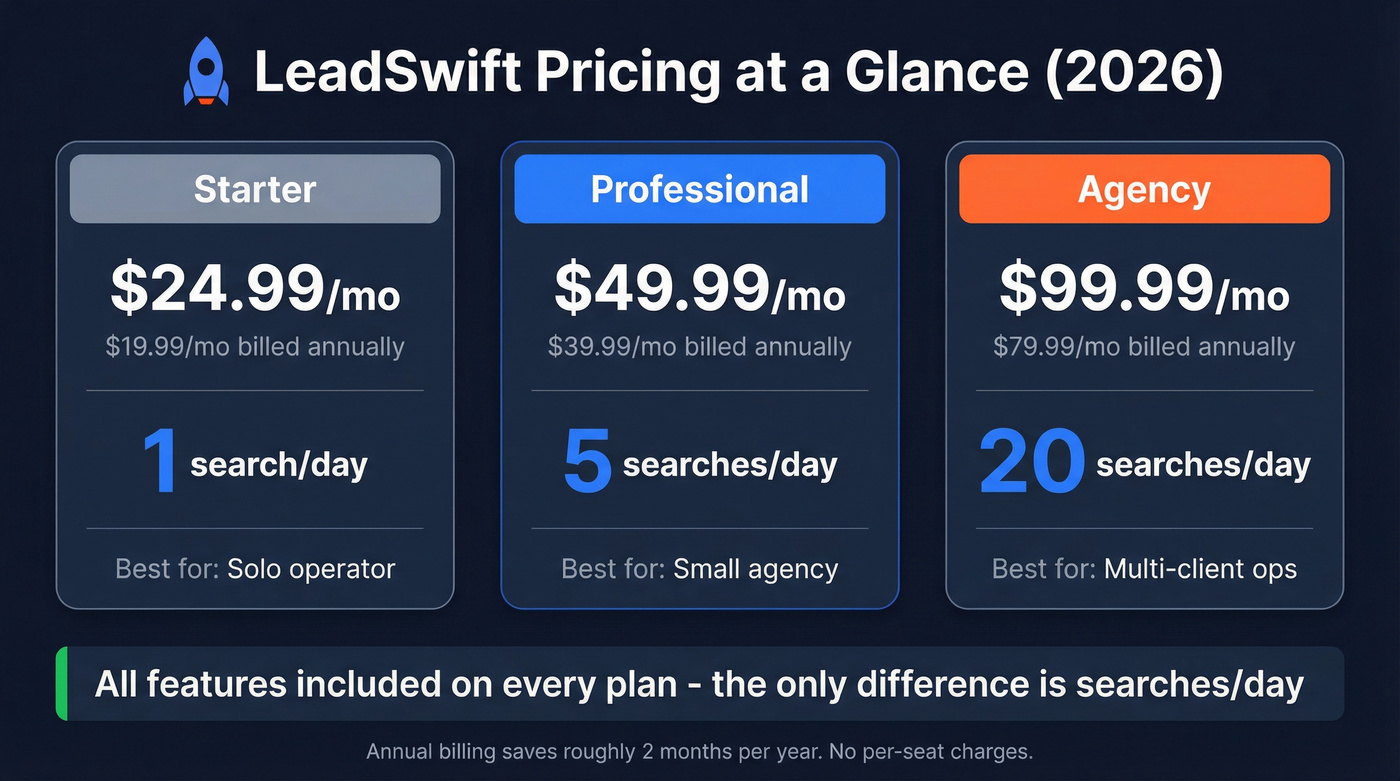
| Plan | Monthly price | Searches/day | Annual mo.-equiv. | Annual total/yr | Best for |
|---|---|---|---|---|---|
| Starter | $24.99 | 1 | $19.99 | $239.88 | Solo operator |
| Professional | $49.99 | 5 | $39.99 | $479.88 | Small agency |
| Agency | $99.99 | 20 | $79.99 | $959.88 | Multi-client |
Three blunt takeaways:
- Annual is the real deal. LeadSwift frames annual billing as 2+ months free, and the totals above are what you'll actually pay.
- It's flat-rate, not per-seat. That's rare, and it's why agencies treat it like a bundle.
- "Unlimited leads" doesn't mean unlimited throughput. Searches/day is the governor on your operation.
Billing fine print: refunds, renewals, cancellation
LeadSwift's billing rules are strict. Treat this like a pre-flight checklist:
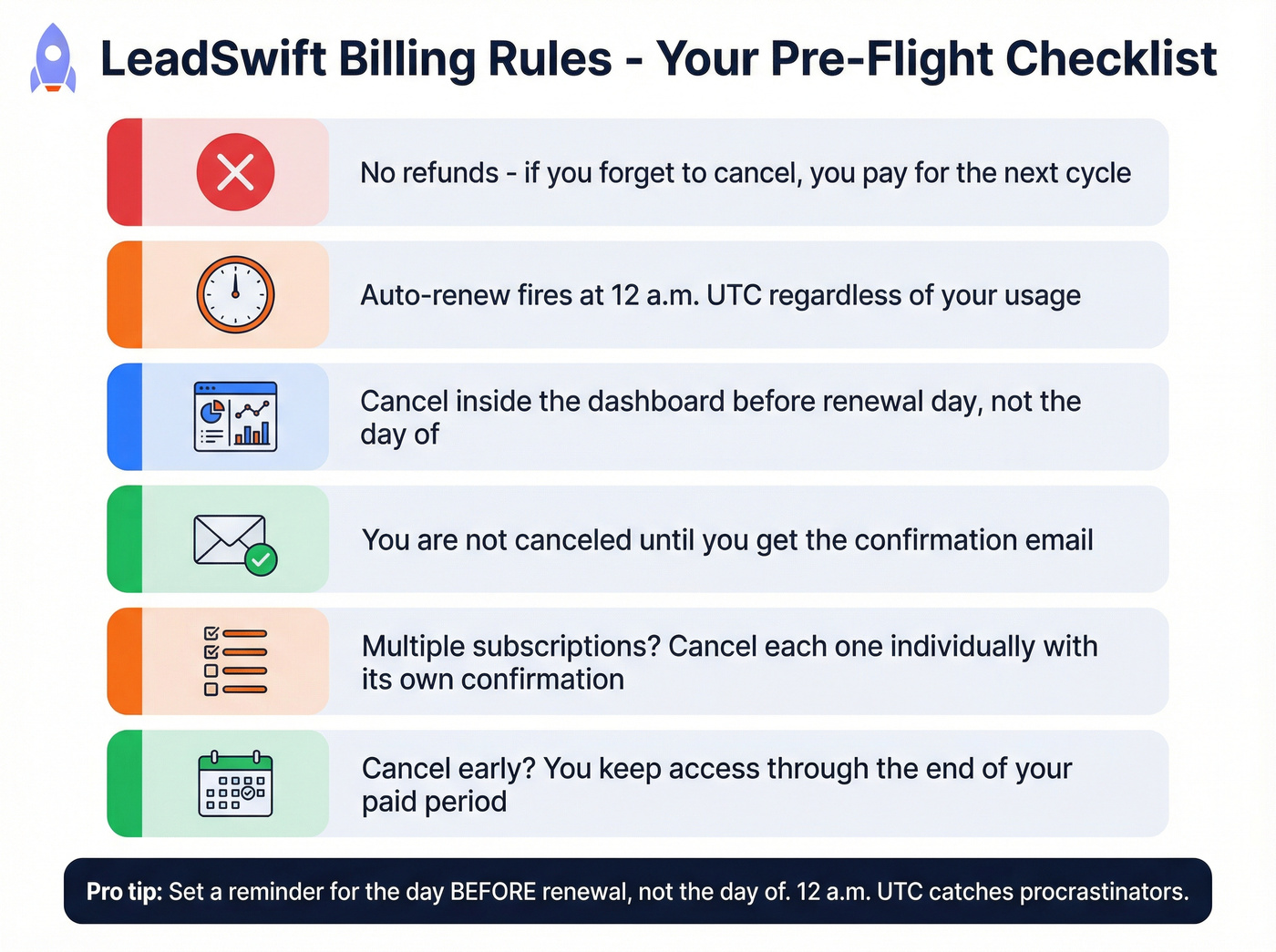
- No refunds. If you forget to cancel, you pay for the next cycle.
- Auto-renew happens at 12 a.m. UTC, regardless of your actual usage.
- Cancel inside the dashboard before renewal. Don't wait until "later tonight."
- You're not canceled until you get the confirmation email. That email's the receipt.
- If you've got multiple subscriptions, cancel each one individually. Each cancellation needs its own confirmation email.
- Canceling early doesn't cut access. You keep access through the end of the paid period.
"No refunds" plus "12 a.m. UTC renewal" punishes procrastination.
Set a reminder for the day before, not the day of.
Upgrades, downgrades, and proration (the part most pricing pages ignore)
LeadSwift handles plan changes in a way that's actually fair, and it matters if you're scaling campaigns week to week.
- Upgrades are prorated. The unused value of your current plan is credited toward the higher plan.
- Downgrades are prorated into time. The unused value of your current plan converts into extended time on the lower plan.
Two quick examples (rounded for clarity):
- Upgrade mid-cycle: You're 15 days into a $49.99 month and move to $99.99. The remaining value of your $49.99 plan is credited, so you pay roughly the difference for the rest of the cycle, not a full new month on top.
- Downgrade mid-cycle: You're partway through Agency and drop to Professional. You don't lose the remaining value; it rolls into extra days on Professional.
We've tested a lot of tools that say "proration" and then do something weird with credits, seats, or immediate cutoffs. This setup's refreshingly straightforward, which makes it easier to run client sprints without playing billing roulette.

LeadSwift caps your throughput at searches/day. Prospeo doesn't. With 300M+ profiles, 30+ filters, and 98% email accuracy, you can pull unlimited lists by industry, geo, intent signals, and more - no daily search quotas throttling your pipeline.
Stop rationing searches. Build every list you need, today.
What counts as a "search" (and what's unlimited)
A search is a query like "Restaurants in Toronto" - a keyword/category plus a location. One search can return thousands of businesses, and LeadSwift doesn't charge more for bigger result sets, even if a search finds tens of thousands of businesses/contacts.

What's effectively unlimited on every plan:
- Unlimited leads/contacts returned from your searches
- Unlimited exports and list uploads
- Unlimited data points/enrichment fields (see lead enrichment tools if you need a separate enrichment layer)
- Unlimited outreach features (sequences, sending controls, inbox management, etc.)
The simplicity is the point: searches/day is the only plan difference. No feature gating. No "exports are Pro-only" nonsense.
Known vs not stated (and the rules that keep you out of trouble)
LeadSwift's clear about the big levers, but vague on edge cases. Here's the clean breakdown.
Known (explicitly stated/consistent in product messaging):
- Searches/day is the limiter across plans
- Contacts/results can be large per search without extra cost
- Billing is strict: no refunds, auto-renew at 12 a.m. UTC
- Annual plans can be paused up to 3 months, and unused time doesn't expire
Not stated (you won't see this spelled out cleanly on the pricing page):
- Exact daily quota reset time
- Whether rerunning the same query burns another search
- What happens when a search fails mid-run
- Whether unused searches roll over
Practical operating assumption (plan your workflow this way):
- Treat the reset as UTC-based until you confirm the exact reset time in-app
- Assume reruns count as new searches
- Assume no rollover of unused searches
- If a search fails, rerun it only after you've checked whether it consumed quota
Real-world math: Run "Plumbers in Dallas" and get 3,200 businesses: 1 search. Run "Emergency plumber in Dallas" next: another search, even if most results overlap.

Operational nuance worth checking (duplicates, exports, and speed)
Here's the thing: deduplication is where these tools quietly waste your time.
- Plenty of local lead tools look clean in the UI because they de-dupe visually, but exports still contain duplicates (same business pulled from multiple sources, or repeated across similar searches).
- Your trial should answer: does LeadSwift de-dupe in the UI only, or also in exports? And if it de-dupes, what's the key field (phone, domain, business name + address, etc.)?
Also measure time-to-complete. A search that returns 5,000 results is only "unlimited" if it finishes fast enough to be usable, and if the export doesn't choke when you try to pull it into Sheets, a CRM, or your enrichment workflow (see how to import leads for a clean handoff).
Trial checklist (measure this, don't guess):
- Results count per search for your niche + city
- Email/phone hit rate on the exported list
- Time to complete a large search
- Duplicate rate in exports (spot-check 200 rows)
- Bounce rate after you run verification on a sample (use an email verifier website or follow a full email verification list SOP)
Choosing the right plan (based on searches/day throughput)
Real talk: searches/day is throughput, not contacts. Pick a plan based on how many distinct list pulls you need to run daily.
Use this if / Skip this if
Starter (1 search/day) Use this if you're a solo founder doing tight ICP testing: one niche, one city, one offer, and you're fine building lists slowly. Skip this if you're running multiple niches or multiple metros - you'll feel bottlenecked by day two.
Professional (5 searches/day) Use this if you're running 1-3 campaigns and you need daily list replenishment without babysitting it. Skip this if you do heavy segmentation (category variations, keyword variations, neighborhood splits). Segmentation burns searches quickly.
Agency (20 searches/day) Use this if you're multi-client, multi-geo, or you run lots of micro-tests to find pockets that convert. Skip this if you don't need built-in outreach, because then you're paying for a suite when you might just need verified contact data.
Mini decision table (throughput lens)
| If your day looks like... | Searches/day you need | Plan |
|---|---|---|
| 1 niche + 1 geo | 1 | Starter |
| 3-10 list pulls/day | 5 | Professional |
| Multi-client ops | 20 | Agency |
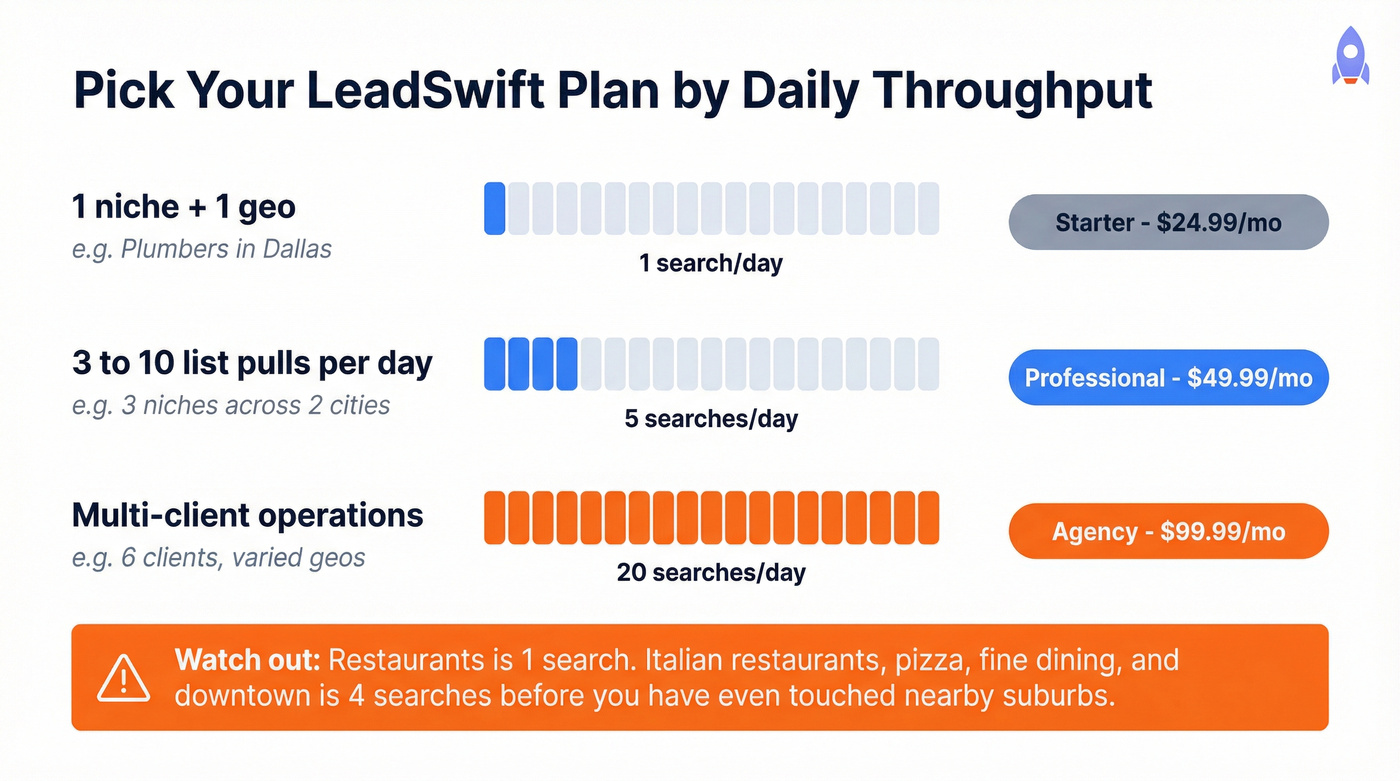
Most teams underestimate how many searches segmentation requires. "Restaurants" is one search. "Italian restaurants," "pizza," "fine dining," and "downtown" becomes four, before you've even touched nearby suburbs.
Need more than 20 searches/day? Custom packages (what to expect)
LeadSwift offers custom packages if you need more than 20 searches/day.
They don't publish the numbers publicly, so here's the practical expectation: custom tiers usually start around $149-$299/month and scale with daily volume. If you're already paying $99.99 for 20 searches/day, that's the realistic next step for higher throughput.
Annual vs monthly (true cost, "locked forever," pause policy)
LeadSwift pushes a promo line like "50% OFF - Lock In Now" and: "Your rate is locked forever - even when we double prices for new customers."
My take: the discount's real; the "locked forever" line is marketing. Treat it as locked while you stay subscribed. If you cancel (or your payment fails), expect to come back to whatever pricing exists then.
The genuinely useful perk is operational: annual plans can be paused up to 3 months, and unused time never expires. If you run seasonal campaigns or client bursts, that pause policy can beat monthly even if you don't use the tool every single month.
Free trial (7 days): how to use it without wasting it
LeadSwift offers a 7-day free trial with no credit card.
Expect the trial to be set up to prevent abuse, which usually means something like ~1 search/day and limited sending. That's fine. It's enough to answer the only question that matters: does searches/day throttle your workflow?
Use the trial like a real production week:
- Pick one niche + one city you can sell to
- Run a search every day (don't "save" them)
- Export, de-dupe, and verify a sample (see how to verify an email address)
- Send a small, controlled outreach test (even if sending's capped)
- Track: time-to-results, hit rate, duplicates, and bounce rate after verification
Skip the trial if you're just browsing. LeadSwift only makes sense once you're repeating the workflow daily.
Hidden costs & limitations that change your real budget
LeadSwift's sticker price is low. Your real cost depends on what you need around it, and what annoys you enough to buy extra tools.
The pro side (why people pay anyway)
- All-in-one convenience: lead capture + outreach in one login replaces a messy stack.
- Flat-rate "unlimited" usage: if you pull big local lists, per-lead tools get expensive fast.
- Agency-friendly economics: $99.99/mo for 20 searches/day can support multiple client pipelines.
The con side (what changes your budget)
The most common complaint themes on G2 are consistent:
- Limited search features (15)
- Outdated UI (13)
- Email limitations / no warmup (9)
- Inaccuracy (6)
- Slow performance (6)
That list matters because it points to the same budget reality: you'll still spend money on deliverability and data hygiene, and you might end up paying for a separate verification step anyway if you're doing cold email at any real volume (see email deliverability for the current rules of the road).
The true cost stack (what you'll still pay for)
Even with "unlimited outreach," serious teams still budget for:
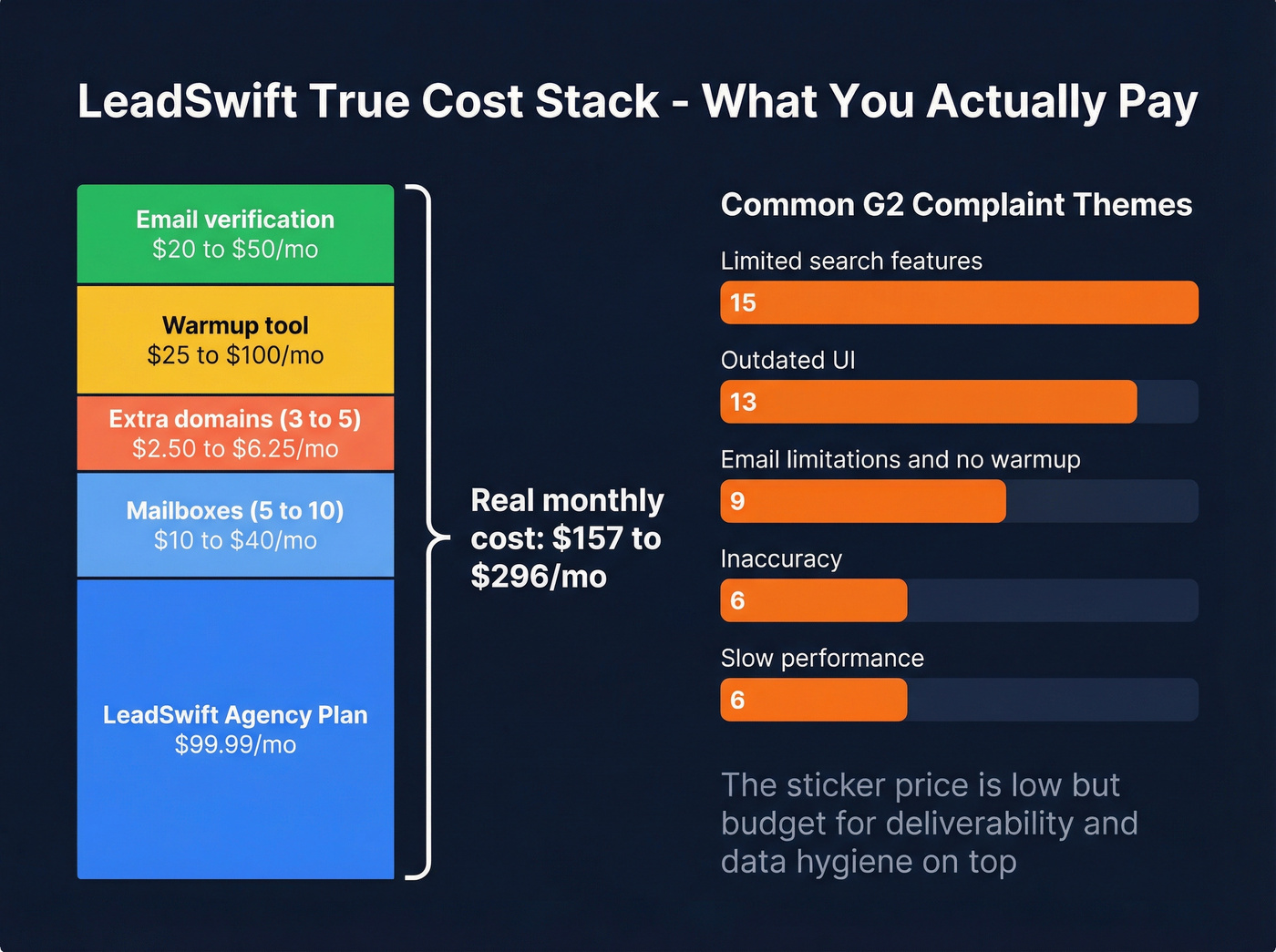
- Mailboxes: ~$2-$4/mailbox/month
- Domains: ~$10-$15/domain/year (you'll want multiple)
- Warmup tool: ~$25-$100/month (depends on volume and mailbox count)
- Verification add-on: options include ZeroBounce, NeverBounce, Hunter, DeBounce, or MailTester; pricing varies by volume, but it's rarely $0 if you care about deliverability
Hot take: if your offer's low-ticket and you're blasting cold email without verification, you're not saving money. You're just paying later in burned domains and dead inbox placement.
What you're paying for: lead sources and coverage
LeadSwift's value is tied to local business coverage. Its sources include:
- Google Maps/Places
- YellowPages
- Yelp
- Bing
In practice, Google Maps is usually the best source for local SMB coverage. The smartest move is to validate your keyword manually in Google Maps first; if it's thin there, it'll be thin everywhere.
This is also why searches/day matters: each search behaves like a real aggregation job across sources, not a simple database lookup.
If the price looks great but you mainly need verified contact data
If you've already got a sequencer/CRM and you don't need "unlimited outreach" inside LeadSwift, don't pay for a suite out of habit. Pay for what moves the needle: clean, verified emails and mobiles (compare options in our roundup of B2B data providers).
Tools like Prospeo ("The B2B data platform built for accuracy") are built for that job: 300M+ professional profiles, 143M+ verified emails, 125M+ verified mobile numbers, and 98% email accuracy, with a 7-day data refresh cycle. If you're running enrichment workflows, Prospeo also returns 50+ data points per contact and hits a 92% API match rate, which is exactly what you want when you're trying to keep a CRM clean instead of constantly re-importing CSVs (see how to keep CRM data clean).
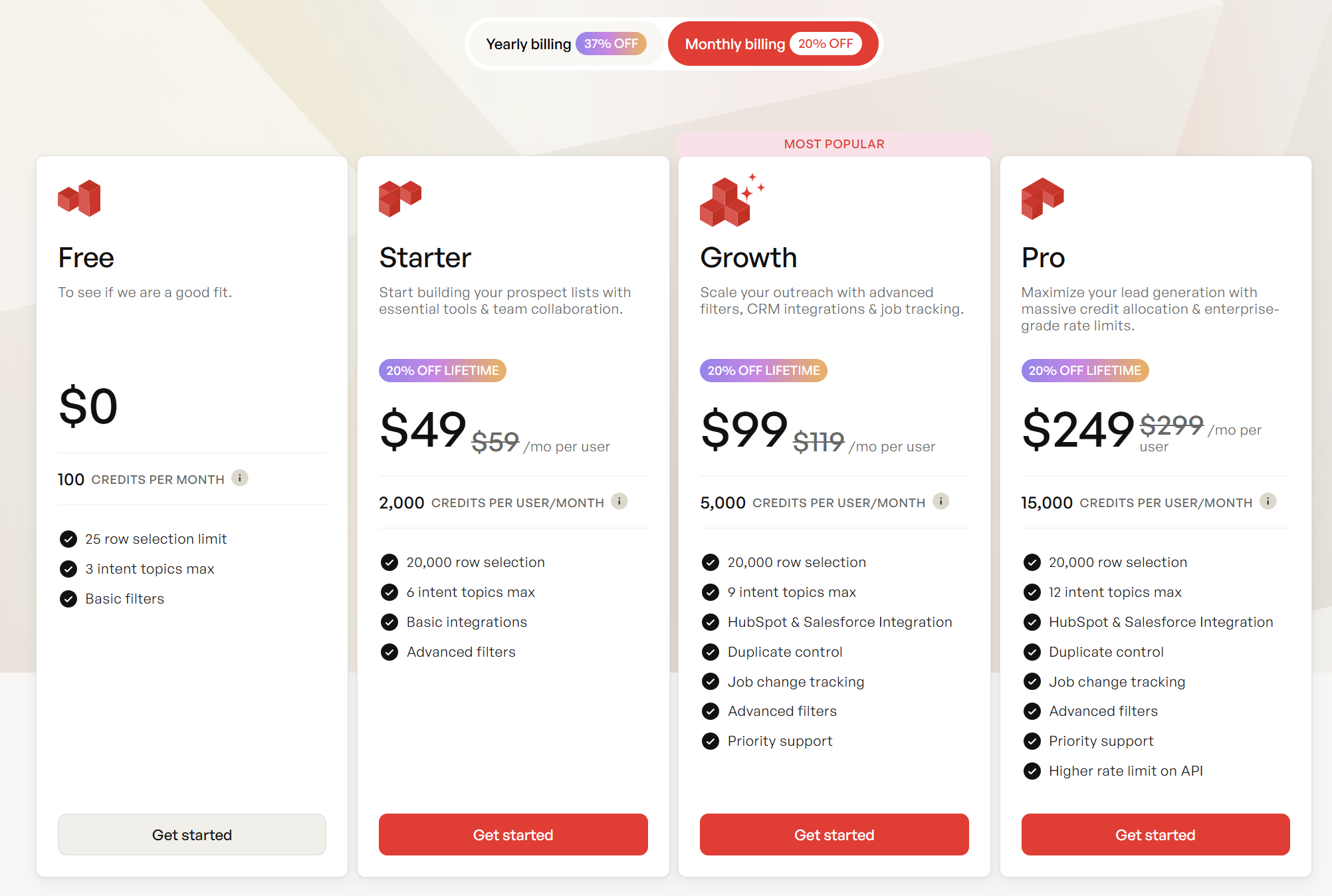
Pricing's straightforward and self-serve: about $0.01 per verified email and 10 credits per mobile, plus a free tier with 75 emails + 100 extension credits per month so you can sanity-check quality before you spend real money (full breakdown: Prospeo pricing).
LeadSwift returns local leads but leaves you guessing on email accuracy and duplicate rates. Prospeo's 5-step verification delivers 98% accurate emails at $0.01 each - with automatic deduplication and a 7-day data refresh cycle.
Verified contacts, zero duplicates, no daily search limits.
Final take: what to buy (and what to watch)
- Pick LeadSwift based on searches/day throughput, not "unlimited leads."
- Annual's the better deal, and the pause up to 3 months policy is genuinely useful.
- The billing rules are strict: no refunds and 12 a.m. UTC auto-renewal. Cancel early and wait for the confirmation email.
- Plan changes are sane: upgrades credit unused time, and downgrades convert unused value into extra time.
Bottom line on leadswift pricing: it's excellent value when your list-building strategy fits the searches/day model, but it can feel restrictive if you rely on heavy segmentation or frequent reruns. If your real goal is verified emails/mobiles (not another all-in-one suite), go data-first with Prospeo and keep outreach in the tools you already like.