

Managing Email Lists: The 2026 Playbook for Hygiene, Segmentation, and Deliverability
79% of consumers ignore or delete marketing emails from brands they've subscribed to at least half the time. Email lists decay about 28% per year. So managing email lists isn't about growing them - it's about stopping the bleeding.
A 5,000-person list with 40% open rates will outperform a 50,000-person list sitting at 8% opens, and it costs a fraction to maintain.
What Email List Management Actually Means
If you take nothing else from this article, nail these three pillars:
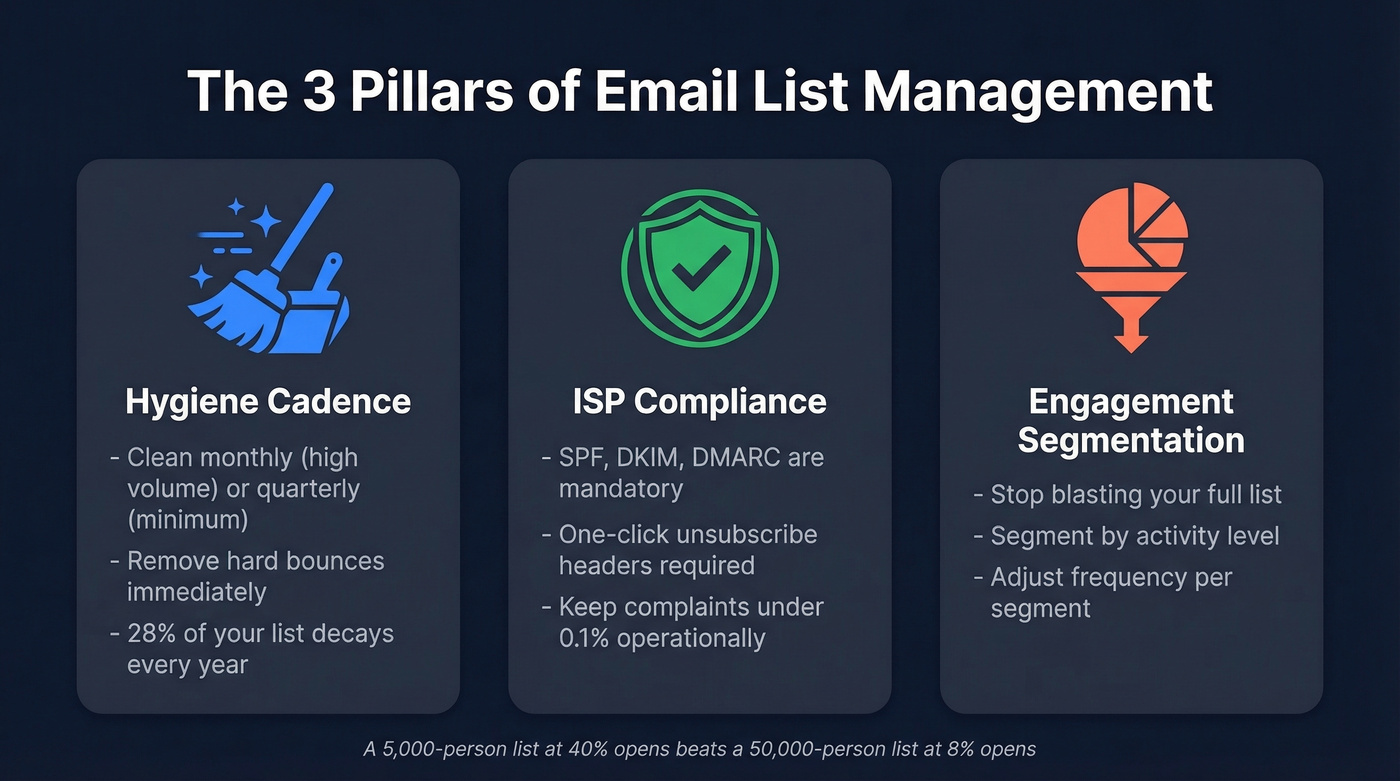
- Hygiene cadence. Clean your list monthly if you're a high-volume sender, quarterly at minimum. Hard bounces get removed immediately - no exceptions.
- ISP compliance. SPF, DKIM, DMARC are table stakes. One-click unsubscribe headers are mandatory. Keep complaint rates under 0.1% operationally, even though the hard ceiling is 0.3%. (If you need a deeper checklist, use an email deliverability guide to audit the full stack.)
- Segmentation by engagement. Stop blasting your full list. Segment by activity level and adjust frequency accordingly.
At its core, this is the ongoing work of keeping your subscriber data accurate, your segments meaningful, and your sending reputation intact so every email you send actually reaches someone who wants it.
The Rules That Changed Everything
Email deliverability rules shifted permanently in 2024, and most marketers still haven't caught up. Google and Yahoo rolled out bulk sender requirements in February 2024 that turned best practices into hard requirements. Microsoft followed with its own enforcement in May 2025. By November 2025, Gmail tightened things further - non-compliant emails now face temporary or permanent rejections.
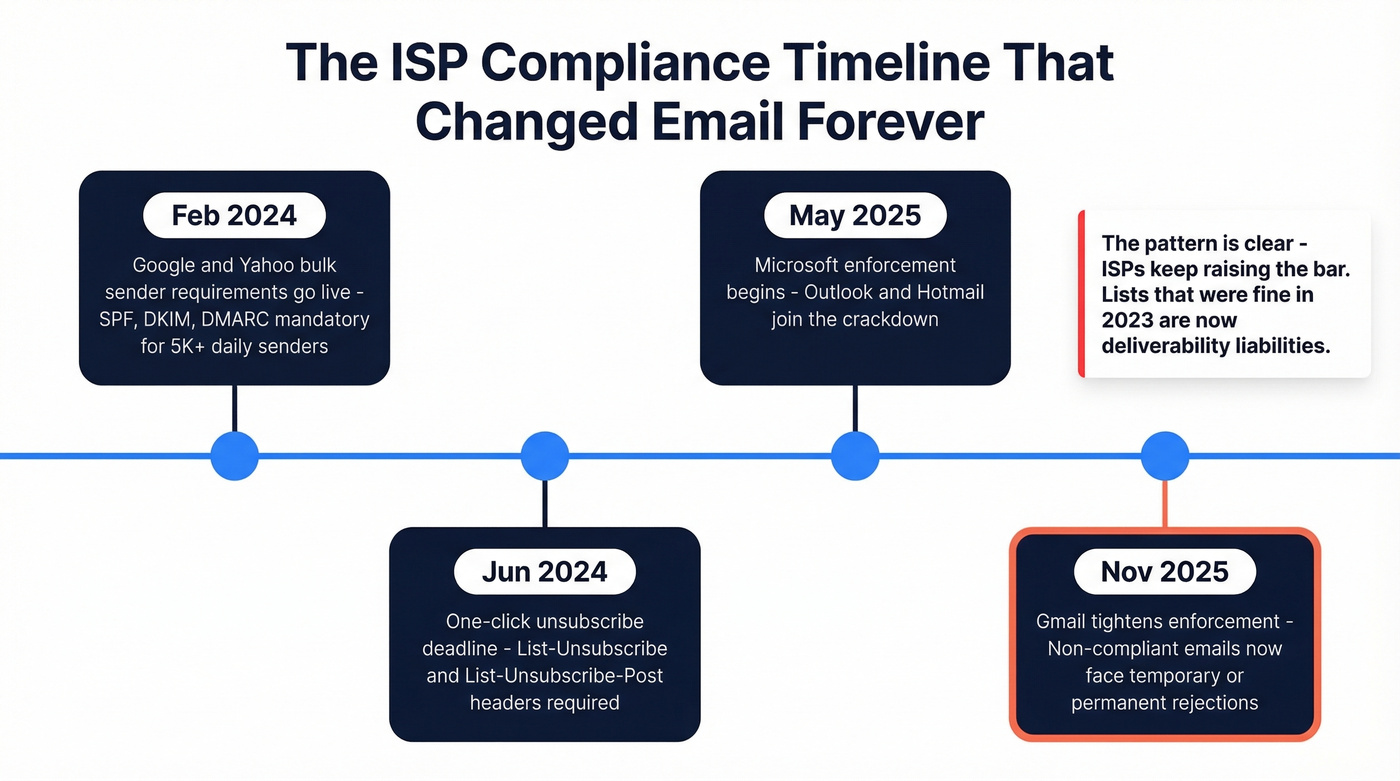
For anyone sending more than 5,000 emails per day, three things are non-negotiable:
Authentication - SPF, DKIM, and DMARC (at minimum p=none) across all sending domains. For bulk senders, Google emphasizes SPF and DKIM alignment; setups that rely on DMARC + SPF but skip DKIM can fail requirements. (If you’re troubleshooting alignment, see DMARC alignment and these SPF record examples.) ISPs also recommend ARC headers for forwarded messages.
Complaint rate ceiling - Stay under 0.3% per Gmail and Yahoo's published threshold. But 0.3% is the danger zone, not the target. Your operational goal should be 0.1% or lower. (If you’re trying to stabilize reputation, follow a step-by-step plan to improve sender reputation.)
One-click unsubscribe - Include both List-Unsubscribe and List-Unsubscribe-Post headers. Honor every unsubscribe within two days. The June 2024 deadline for this has long passed. (For the technical spec, see List-Unsubscribe-Post.)
| Milestone | What Happened |
|---|---|
| Feb 2024 | Google/Yahoo requirements go live |
| Jun 2024 | One-click unsubscribe deadline |
| May 2025 | Microsoft enforcement begins |
| Nov 2025 | Gmail tightens enforcement |
The pattern is clear: ISPs keep raising the bar. Lists that were "fine" in 2023 are now deliverability liabilities. And if you're tempted to buy a list to shortcut growth, CAN-SPAM penalties can reach tens of thousands of dollars per email. (If you’re weighing that risk, read Is It Illegal to Buy Email Lists?.)
List Health Benchmarks
Before you can fix your list, you need to know what healthy looks like. The average person receives 100-120 emails per day, which means your message is fighting for attention in a brutally crowded inbox.
| Provider | Inbox Rate | Spam Rate | Missing |
|---|---|---|---|
| Gmail | 87.2% | 6.8% | 6.0% |
| Microsoft | 75.6% | 14.6% | 9.8% |
| Yahoo/AOL | 86.0% | 4.8% | 9.2% |
| Apple Mail | 76.3% | 14.3% | 9.4% |
Global inbox placement averages around 84% - roughly one in six emails never reaches the inbox. Microsoft and Apple Mail show the highest spam-folder rates at around 14-15%.

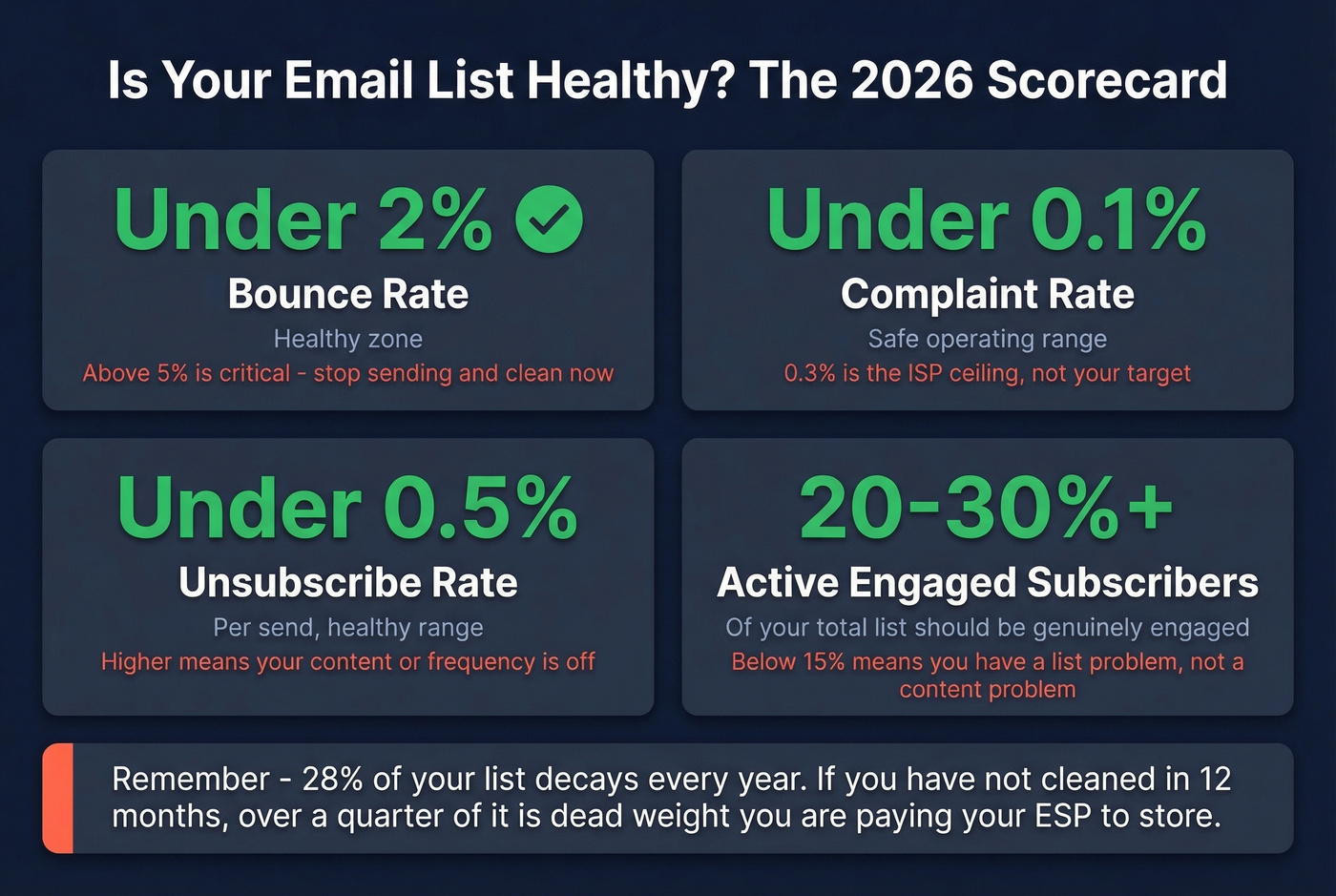
Here's your health scorecard: bounce rate under 2% is healthy, above 5% is critical - stop sending and clean immediately. Complaint rate under 0.1% to stay safe. Unsubscribe rate under 0.5% per send. And at least 20-30% of your total list should be genuinely engaged. (For bounce diagnostics and SMTP code context, use these email bounce rate benchmarks.)
Expect roughly 28% annual list decay. That means if you haven't cleaned your list in a year, more than a quarter of it is dead weight - and you're paying your ESP to store and send to those addresses.
Email List Hygiene: What to Clean and When
Not every bounce is the same, and not every inactive subscriber deserves the same treatment.
Hard bounces - permanent failures indicated by 5xx SMTP codes - mean the address doesn't exist, the domain is dead, or the server has explicitly rejected you. Remove these immediately after every send. There's zero reason to retry a 550 error.
Soft bounces - temporary issues flagged by 4xx codes - include full inboxes, busy servers, or oversized messages. Track these across sends. Three soft bounces to the same address? Treat it as a hard bounce and remove it.
Cleaning cadence matters. Microsoft recommends cleaning lists monthly or quarterly. For high-volume senders with daily or near-daily sends, monthly is the right call. For everyone else, quarterly is the minimum. We've seen teams run annual cleanups and wonder why their deliverability cratered - by then, they've accumulated months of dead addresses dragging down their sender reputation.
Here's the math most people miss: ESPs charge by subscriber count or contact volume. A 50,000-person list with 30% dead contacts means you're paying for 15,000 addresses that will never open an email. That's not just a deliverability problem. It's a budget leak.
For B2B prospecting lists, ESP-level hygiene isn't enough. 70.8% of business contacts change within 12 months. Running contacts through a dedicated verification tool before sending - one with catch-all handling, spam-trap removal, and honeypot filtering - catches stale addresses before they become bounces. (If you need a process, start with how to check if an email exists and then operationalize spam trap removal.)

70.8% of B2B contacts go stale within 12 months. Prospeo's 5-step verification - with catch-all handling, spam-trap removal, and honeypot filtering - catches dead addresses before they tank your sender reputation. 98% email accuracy at $0.01 per verified address.
Stop paying your ESP to store contacts that will never open an email.
Segmentation That Moves Revenue
Segmented campaigns drive 760% more revenue than one-size-fits-all blasts. That's not a typo.
Engagement tiers are the most impactful and the most overlooked. Define "inactive" as no engagement for 3+ months, then build your sending strategy around activity levels. Your most engaged subscribers can handle daily emails. Your least engaged should get a monthly digest at most - or nothing until you run a re-engagement sequence.
Behavioral segmentation based on what people actually do - pages visited, links clicked, products viewed - delivers 14.31% more opens and 101% more clicks than demographic segmentation alone. If your ESP supports event tracking, use it. Purchase history and demographics are table stakes; activity data tells you who's actually paying attention. (To tighten the copy and offers inside each segment, use proven email copywriting frameworks.)
Lifecycle stage matters for B2B especially. A new trial user and a 2-year customer shouldn't get the same nurture cadence. Neither should a cold prospect and a warm inbound lead. Collecting zero-party data through preference centers - letting subscribers tell you what they want - sharpens every other segmentation layer you build.
Let's be honest: most teams segment by "subscribed" and "unsubscribed" and call it a day. That's not segmentation. That's a binary.
The Re-Engagement Playbook
79% of consumers ignore or delete marketing emails at least half the time. Re-engagement campaigns recover 5-15% of inactive subscribers and can generate 5-10% of total email revenue.
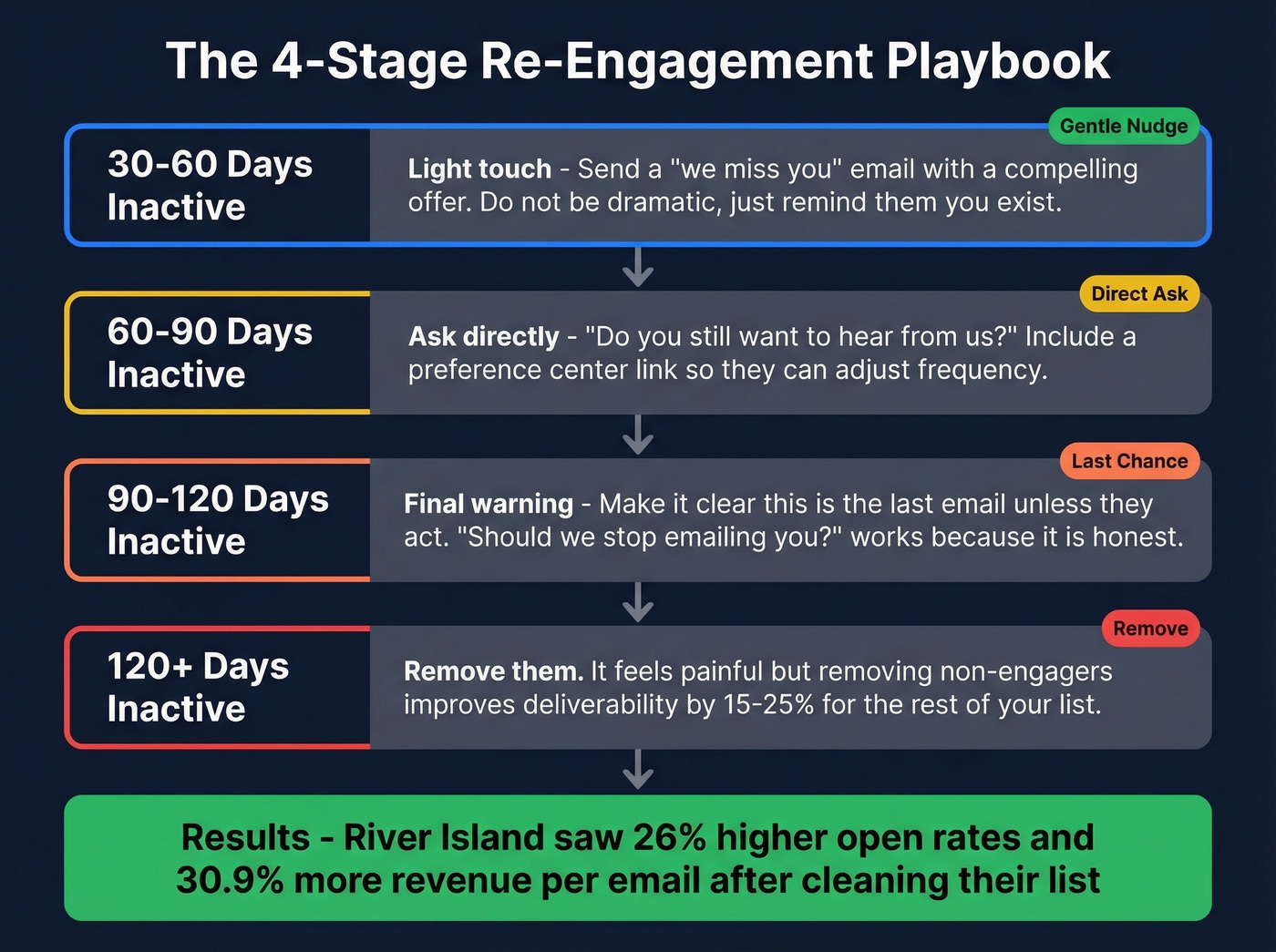
The four-stage framework:
30-60 days inactive. Light touch - a "we miss you" email with a compelling offer. Don't be dramatic. Just remind them you exist.
60-90 days inactive. Ask directly: "Do you still want to hear from us?" Include a preference center link so they can adjust frequency instead of unsubscribing entirely.
90-120 days inactive. Make it clear this is the final email unless they take action. "Should we stop emailing you?" works because it's honest.
120+ days inactive. Remove them. It feels painful, but removing non-engagers improves deliverability by 15-25% for the rest of your list.
The results back this up. River Island cleaned their list and saw a 26% increase in open rates and 30.9% increase in revenue per email. Proffsmagasinet doubled their conversion rate while sending 33% fewer emails. Less volume, better targeting, more revenue. That's the whole game.
If your active engagement rate is below 15%, you don't have a content problem - you have a list problem. No amount of subject line testing fixes a list full of ghosts. (If you want a faster lever, pull from these email subject line examples to lift opens without increasing volume.)
Monitoring: Daily, Weekly, Monthly
You can't manage what you don't measure.
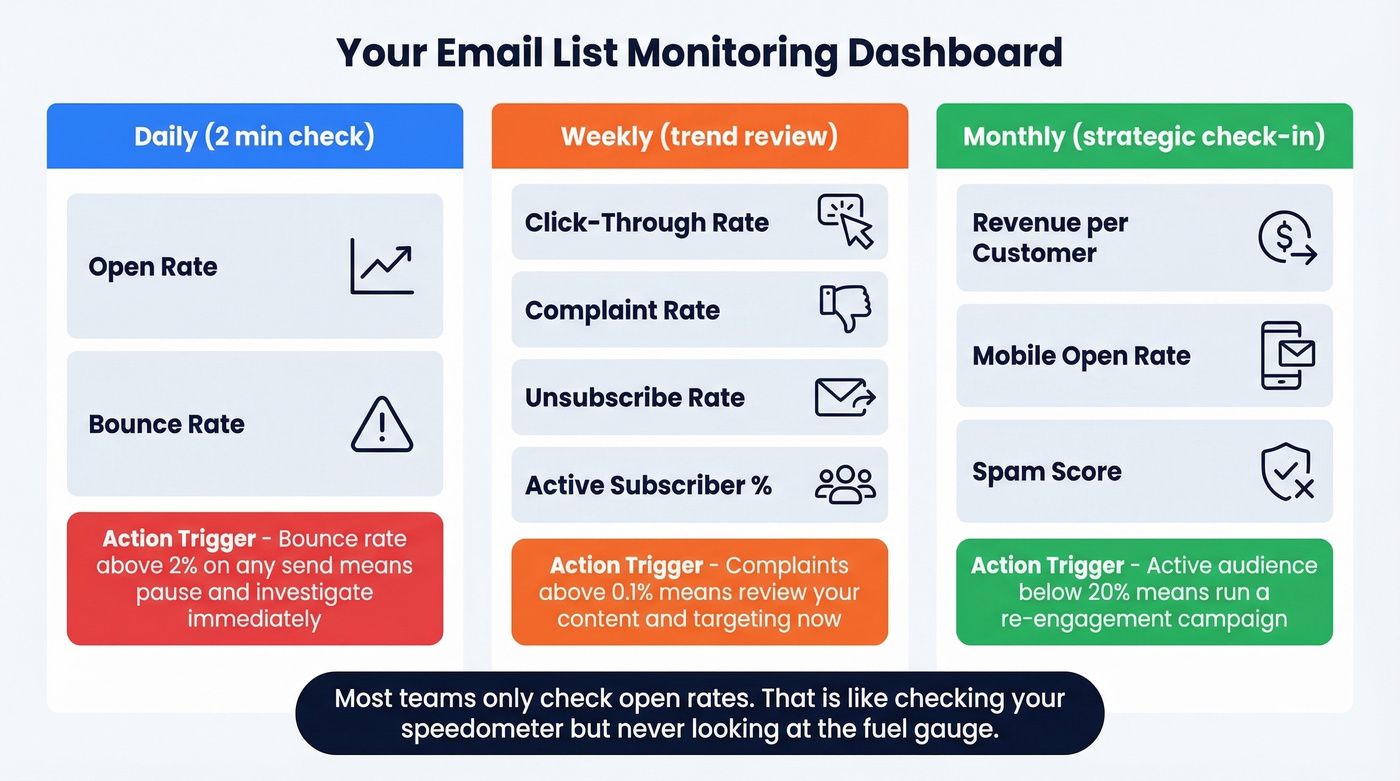
| Cadence | Metrics | Action Trigger |
|---|---|---|
| Daily | Open rate, bounce rate | Bounce >2% on any send - pause and investigate |
| Weekly | CTR, complaints, unsubs, active % | Complaints >0.1% - review content and targeting |
| Monthly | Revenue/customer, mobile opens, spam score | Active audience <20% - run re-engagement |
The daily check takes two minutes - glance at bounces and opens. If bounces spike above 2% on any single send, stop and investigate before your next campaign. The weekly review catches trends before they become crises. Monthly is your strategic check-in: are you actually making money from this list, or just maintaining it?
Most teams only look at open rates. That's like checking your car's speedometer but never looking at the fuel gauge. Complaint rates and active audience percentage are the metrics that predict whether your deliverability is about to fall off a cliff. (If you’re standardizing reporting, use a consistent click rate formula in email marketing and track it by segment.)
Best Tools for Managing Email Lists in 2026
ESPs handle sending and basic list management, but they don't verify data before it enters your system. You need both categories working together.
| Tool | Free Tier | Starting Price | Best For |
|---|---|---|---|
| Prospeo | 75 emails/mo | ~$0.01/email | B2B list verification |
| Brevo | 300 emails/day | $9/mo | Budget-conscious small teams |
| ActiveCampaign | Trial only | $19/mo | B2B automation |
| Mailchimp | 500 contacts | $13/mo | Simple newsletters |
| EmailListVerify | 100 verifications | $16/mo (5K) | Occasional list cleaning |
| Bouncer | 100 credits | $6/1K emails | One-off marketing cleanups |
Prospeo
Prospeo is the verification layer your ESP doesn't provide. Where ESPs handle bounces reactively - after you've already damaged your sender reputation - Prospeo verifies emails before you send. Its 5-step verification process checks every address with catch-all handling, spam-trap removal, and honeypot filtering, delivering 98% email accuracy on 143M+ verified emails with data refreshed every 7 days. It also handles deduplication, flagging and merging duplicate contacts so you're not inflating your subscriber count or sending the same person multiple messages. The free tier gives you 75 email verifications per month - enough to audit whether your current list is as clean as you think. Paid plans run about $0.01 per email. (If you’re comparing options, start with AI email checker workflows and then evaluate email reputation tools for monitoring.)
Brevo
Brevo's free tier - 300 emails per day with unlimited contacts - makes it the obvious starting point for small teams watching their budget. The r/MarketingAutomation consensus is that deliverability is solid and the platform punches above its weight. Advanced automation and segmentation features are locked behind paid plans starting around $9/mo. Skip it if you need deep behavioral automation - that's ActiveCampaign's territory.
ActiveCampaign
Use this if you're a mid-size B2B or service business that needs email tightly integrated with CRM workflows and behavioral triggers. The automation builder is genuinely best-in-class for the price point. Skip it if you don't have someone willing to invest time learning the platform. Reddit users consistently flag the learning curve as steep, and pricing ramps quickly with contact count - what starts at $19/mo can easily triple as your list grows.
Mailchimp
Best for beginners and simple newsletter senders. Free up to 500 contacts, $13/mo after that. Skip if you need serious engagement tiering or behavioral segmentation. Automations on the free tier are limited, and costs scale faster than competitors. Everyone's used Mailchimp. Most teams eventually outgrow it. (If you’re already seeing inboxing issues, troubleshoot Mailchimp deliverability issues.)
EmailListVerify and Bouncer
EmailListVerify is a solid budget option for occasional list cleaning - 100 free verifications to test, then $16/mo for 5,000 credits. Handles syntax checks, domain validation, and mailbox verification well enough for smaller marketing lists.
Bouncer is pay-as-you-go at $6 per 1,000 emails. Clean interface, fast processing. We haven't tested it deeply enough to recommend it for ongoing B2B hygiene, but for a quick scrub of a marketing list before a big campaign, it does the job.
Segmentation only works when the data underneath it is accurate. Prospeo refreshes 300M+ profiles every 7 days - not the 6-week industry average - so your engagement tiers reflect reality, not last quarter's org chart.
Start every campaign with contacts verified this week, not this quarter.
FAQ
How often should I clean my email list?
Monthly for daily senders, quarterly at minimum for everyone else. Hard bounces get removed immediately after every send - don't wait for a scheduled cleanup. Teams sending 5,000+ emails per day should audit bounce and complaint rates after every campaign.
What's a healthy bounce rate?
Under 2% is healthy; above 5% is critical - pause sending and clean before the next campaign. Well-maintained opt-in lists typically run 0.2-1%. If you're consistently above 3%, run your contacts through a verification tool to catch invalid addresses before they tank your sender reputation.
Is double opt-in legally required?
Not universally. GDPR requires demonstrable consent, and double opt-in is the easiest way to prove it for EU subscribers. CAN-SPAM doesn't mandate it, but double opt-in lists show 30-40% higher engagement and significantly lower complaint rates across the board.
What's the difference between hard and soft bounces?
Hard bounces are permanent - 5xx SMTP codes meaning the address is invalid or the domain is dead. Remove immediately. Soft bounces are temporary - 4xx codes for full inboxes or server issues. Remove after three consecutive soft-bounce failures to the same address.
Do I need a verification tool if I already use an ESP?
Yes, especially for B2B. ESPs handle bounces after you've already sent, meaning the damage to your sender reputation is done. Prevention beats cleanup every time. A dedicated verification tool also catches duplicates, spam traps, and honeypots that ESPs miss entirely.