

How to Run a Mass Email Campaign That Actually Lands in the Inbox
Most mass email campaigns fail before they're sent. Someone loads a few thousand contacts into Brevo from a purchased CSV, hits send from a brand-new domain, and watches their bounce rate torch sender reputation in an afternoon. Then they blame the platform.
Email marketing still delivers roughly $36 for every $1 spent. That ROI only materializes when emails reach the inbox - and that's what this entire guide is about.
What Counts as a Mass Email Campaign?
A mass email campaign sends a single message to a large audience - hundreds, thousands, sometimes tens of thousands of recipients. But "mass" doesn't mean "mindless." A real campaign uses segmentation, personalization, and consent-based lists. A blast is the spray-and-pray version that lands in spam and gets your domain flagged. The difference between the two is usually about 30 minutes of prep work.
What You Need Before You Start
Three things, in this order:
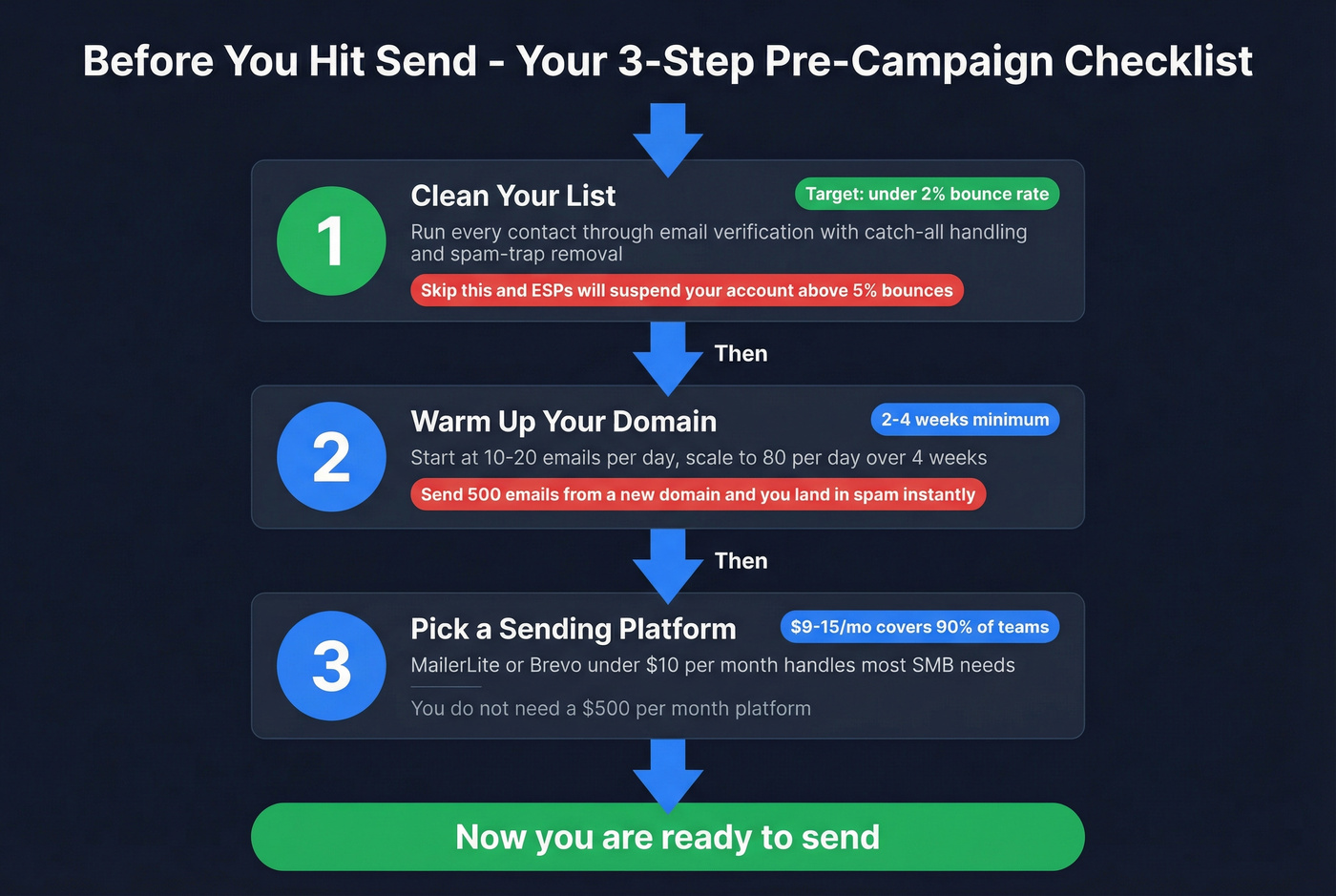
- Clean your list first. Unverified emails destroy sender reputation before you send a single campaign. Run your list through a verification tool with catch-all handling and spam-trap removal to get bounce rates under 2%.
- Warm up your domain. Start at 10-20 emails/day in Week 1, scale to 80/day by Week 4. Skip this and you land in spam. If you want a deeper playbook, follow our Automated Email Warmup guide.
- Pick a sending platform that fits your volume. MailerLite or Brevo under $10/mo handles most SMB needs. You don't need a $500/mo platform.
Fix Your List Before Anything Else
This is the step everyone skips, and it's the one that matters most.
Data quality matters more than which ESP you choose. Every undelivered email costs roughly $0.11 in wasted spend. Multiply that across a 5,000-contact list with a 15% bounce rate and you've burned $82.50 before anyone reads a word - plus you've told Gmail and Microsoft you're a spammer. Your target is a bounce rate under 2%. Anything above 5% and most ESPs will suspend your account.
Purchased lists are the fastest way to destroy a domain. They're full of dead addresses, recycled spam traps, and honeypots that inbox providers use to catch senders who don't verify. We've seen teams burn through three domains in a month because they skipped verification entirely. Prospeo's 5-step process - syntax validation, domain verification, catch-all handling, spam-trap removal, and honeypot filtering on a 7-day refresh cycle - is what we use internally. One customer, Meritt, went from a 35% bounce rate to under 4% after switching. That's the difference between a campaign that builds pipeline and one that gets your domain blacklisted. If you're comparing tools, see our breakdown of the best email ID validators and this practical guide on invalid emails.

Warm Up Your Domain
Sending 500 emails from a domain that's never sent anything is like walking into a bank with a ski mask. Technically legal, but everyone's going to treat you like a threat.
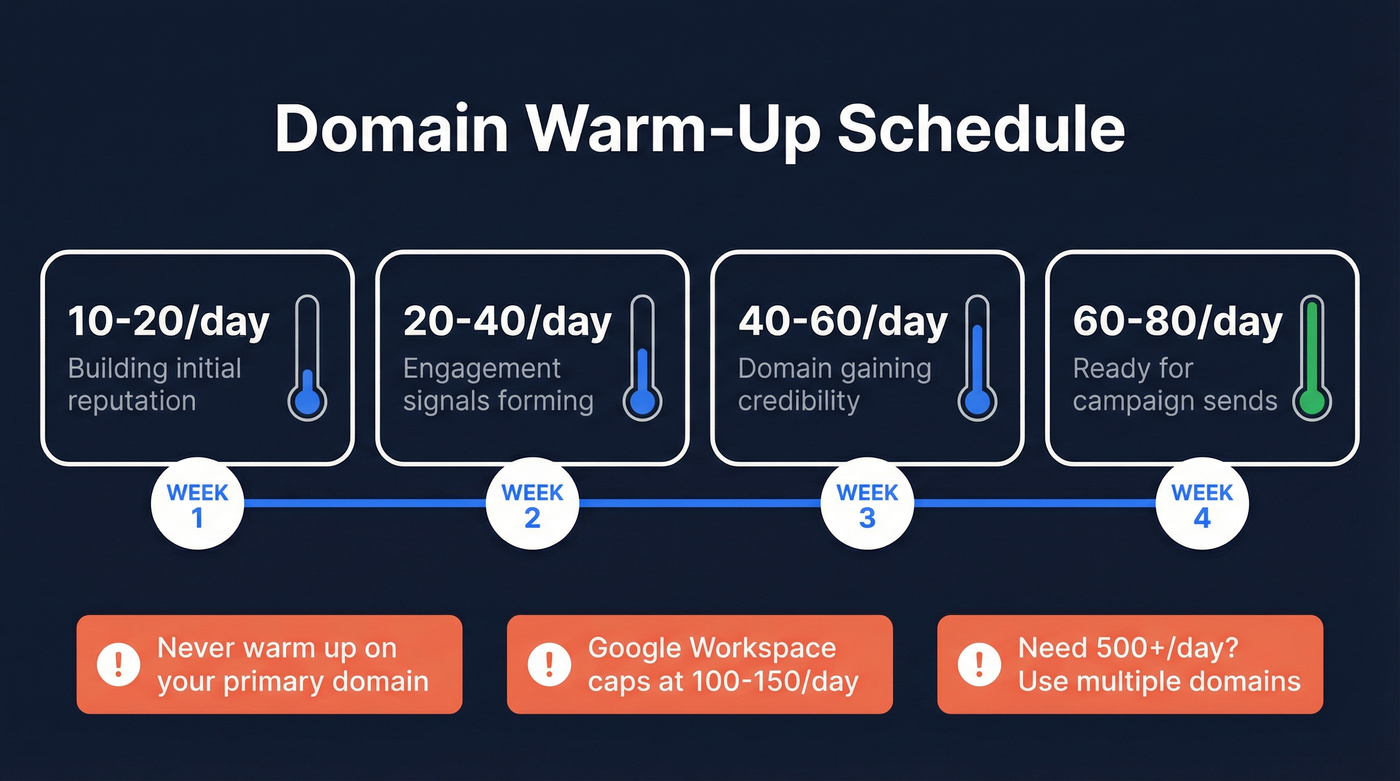
A proper warm-up takes 2-4 weeks minimum, with full domain maturity sometimes requiring up to 12 weeks. Here's the ramp:
| Week | Daily Volume | What's Happening |
|---|---|---|
| 1 | 10-20 | Building initial reputation |
| 2 | 20-40 | Engagement signals forming |
| 3 | 40-60 | Domain gaining credibility |
| 4 | 60-80 | Ready for campaign sends |
Google Workspace and Microsoft 365 both top out around 100-150/day for cold outreach. GoDaddy caps at 50-75/day realistically. Never warm up on your primary corporate domain. Use dedicated sending domains, and if you need 500+ emails per day, spread volume across multiple domains instead of pushing one past its limits. For more on scaling safely, use this email deliverability checklist and our guide on how to prevent email blacklisting.

Every bounce chips away at your sender reputation. Prospeo's 5-step verification - syntax, domain, catch-all, spam-trap, and honeypot filtering - keeps bounce rates under 2%. Meritt dropped from 35% to under 4% and tripled their pipeline. At $0.01 per verified email, cleaning a 10,000-contact list costs less than a single wasted send.
Verify your entire list before your next mass email campaign.
Set Up Authentication
Non-negotiable before your first send:
- SPF - tells receiving servers which IPs can send on your behalf
- DKIM - cryptographically signs your emails to prove they haven't been tampered with
- DMARC - start at
p=noneto monitor, move toquarantine, thenreject
Google and Yahoo's bulk-sender rules now prioritize one-click unsubscribe and keeping complaint rates low. Keep complaints below 0.1% - that's 1 per 1,000 emails. Cross that line and deliverability craters fast. If you want the full setup walkthrough, see SPF, DKIM, DMARC Explained.
Pick a Sending Platform
For most SMB teams, a $9-15/mo tool handles everything. One distinction worth understanding: marketing platforms like MailerLite and Brevo give you templates, automation, and analytics out of the box. Sending infrastructure like Amazon SES and SendGrid gives you raw throughput at pennies per thousand - but you build everything yourself.
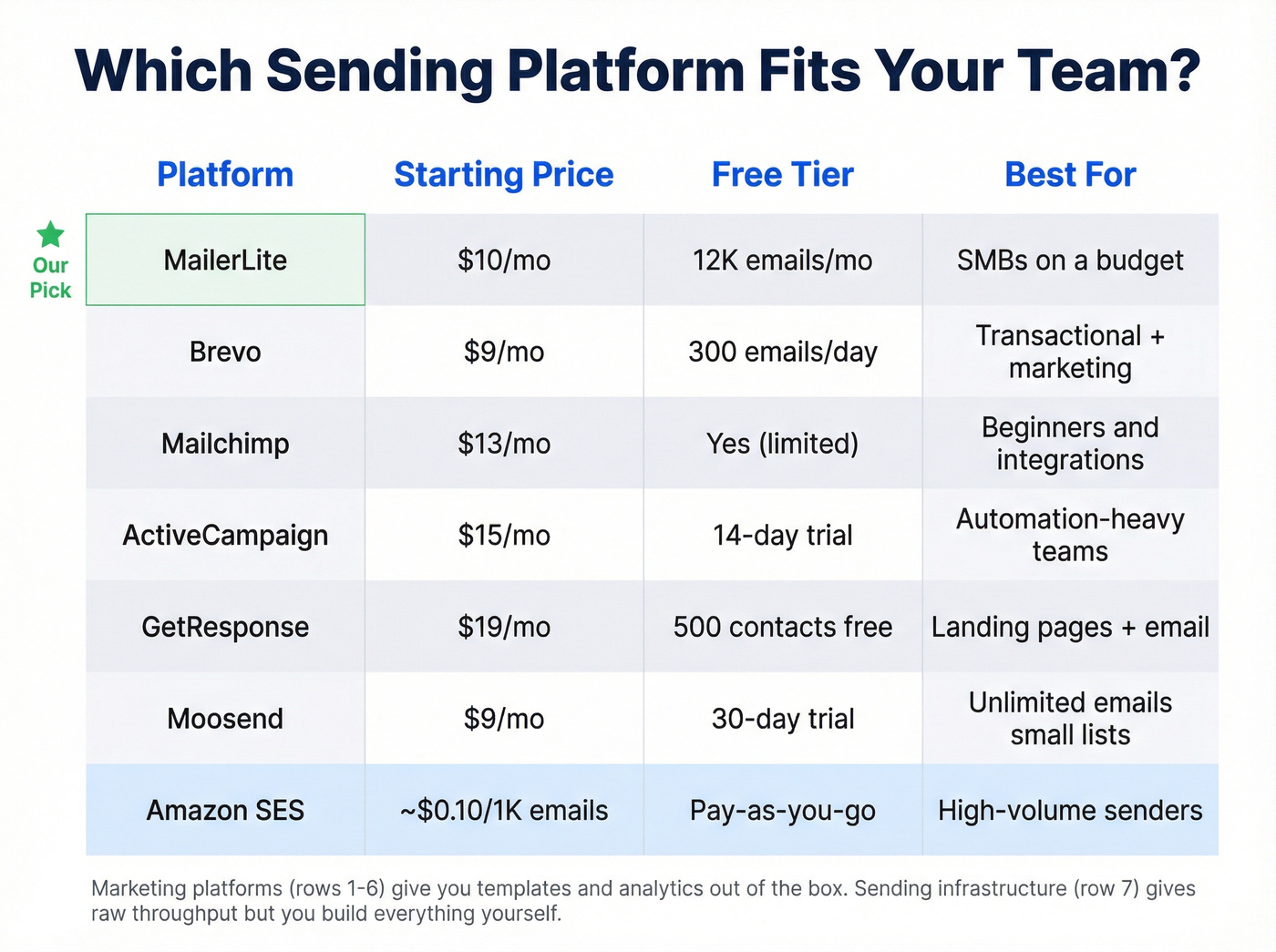
| Tool | Starting Price | Free Plan | Best For |
|---|---|---|---|
| MailerLite | $10/mo | 12K emails/mo | SMBs on a budget |
| Brevo | $9/mo | 300 emails/day | Transactional + marketing |
| Mailchimp | $13/mo | Yes (limited) | Beginners, integrations |
| ActiveCampaign | $15/mo | 14-day trial | Automation-heavy teams |
| GetResponse | $19/mo | 500 contacts free | Landing pages + email |
| Moosend | $9/mo | 30-day trial | Unlimited emails, small lists |
| Amazon SES | ~$0.10/1K emails | Pay-as-you-go | High-volume senders |
In our experience, MailerLite at $9/mo covers 90% of what a team under 10,000 contacts needs. If you're already in the Salesforce ecosystem, MassMailer plugs in natively. Skip ActiveCampaign if you don't need complex automation workflows - you're paying for features you won't touch. If you're evaluating options, compare against our list of best bulk email software.
Write, Test, Send
Subject lines under 50 characters generally perform well. A Higher Logic study found that subject lines under 9 characters had the highest open rates - a narrow sweet spot, but the principle holds: short, honest, and specific wins. If you want to avoid deliverability landmines, review words to avoid in email subject lines.
One CTA per email. Not two, not three. One.
The highest-performing bulk sends we've analyzed share a common trait: simplicity. Short, scannable content with a single clear action beats a beautifully designed newsletter with five competing links every time. Skip long-form promos, multiple CTAs, and clever-but-vague subject lines like "You won't believe this" - they trigger spam filters and annoy readers in equal measure.
A/B test subject lines on a 10-15% sample before sending to the full list. Test rendering on mobile before you hit send. And stick to one campaign per week as your baseline - consistent cadence beats sporadic blasts.
Campaign Benchmarks for 2026
Here's where your campaigns should land, based on all-industry averages from HubSpot:
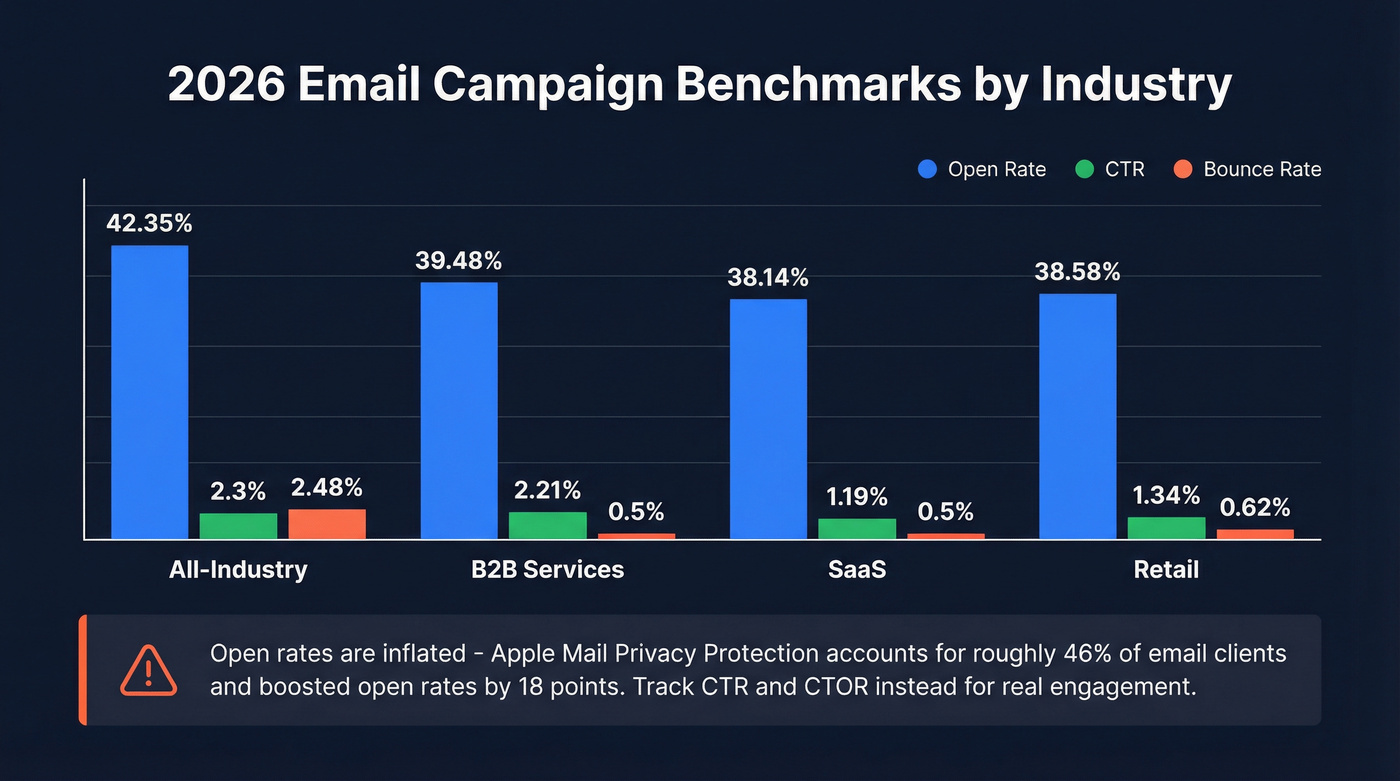
| Metric | All-Industry Avg | B2B Services | SaaS | Retail |
|---|---|---|---|---|
| Open Rate | 42.35% | 39.48% | 38.14% | 38.58% |
| CTR | 2.3% | 2.21% | 1.19% | 1.34% |
| CTOR | 5.3% | 5.63% | 6.81% | 4.62% |
| Bounce | 2.48% | 0.5% | 0.5% | 0.62% |
| Unsub | 0.22% | 0.3% | 0.14% | 0.4% |
Open rates are inflated. Apple Mail Privacy Protection accounts for roughly 46% of email clients and boosted open rates by 18 points in a study of 80,000+ accounts. Track click-through rate and CTOR instead - they reflect actual engagement, not Apple's privacy proxy pinging your tracking pixel. For a deeper breakdown, see open rate vs click rate.
Here's the thing: if your CTR is above 2.3% and your bounce rate is under 2%, stop obsessing over open rates entirely. You're already outperforming most of the market. The teams that fixate on open rates are optimizing a vanity metric inflated by Apple's privacy infrastructure.
Stay Legal
Email compliance isn't optional, and the fines aren't theoretical. Cumulative GDPR enforcement has hit roughly EUR 5.88B across 2,245 actions by early 2025.
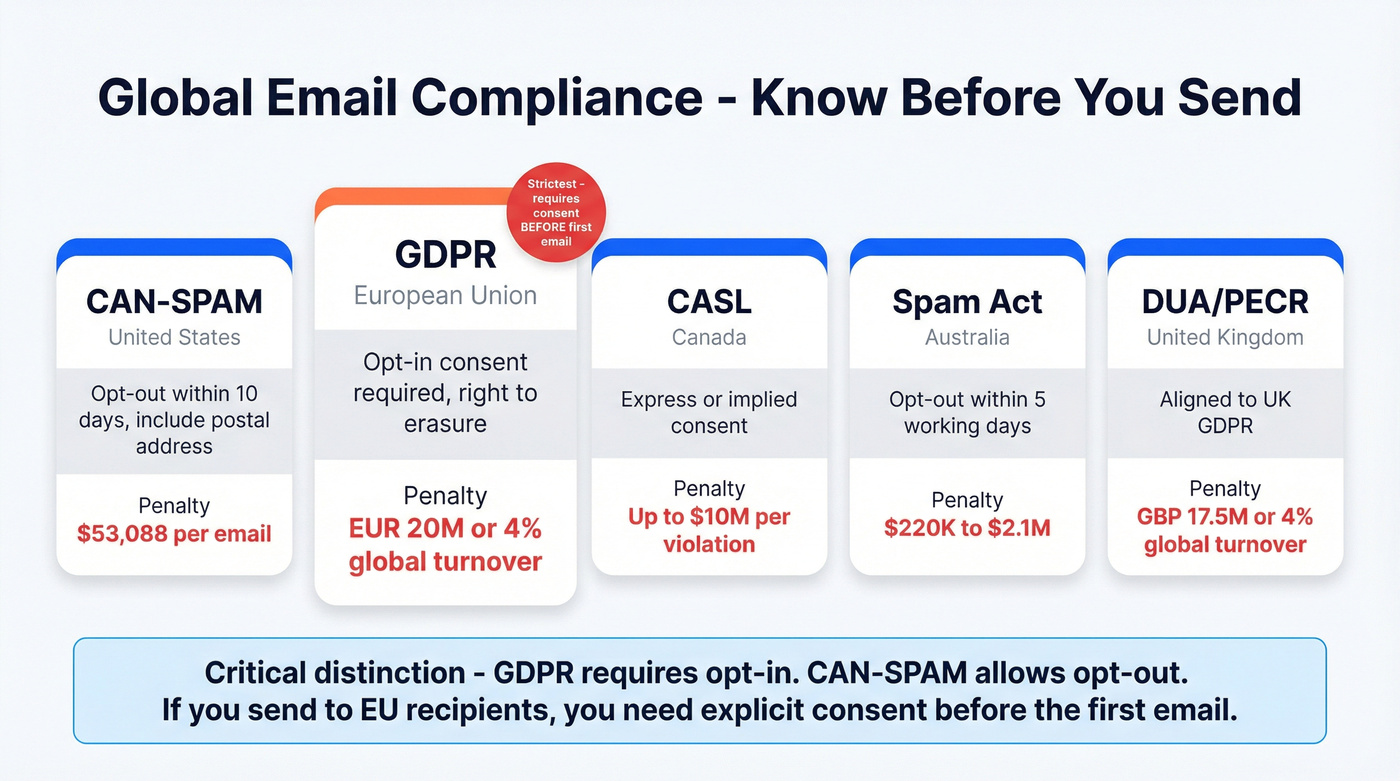
| Regulation | Region | Key Requirement | Penalty |
|---|---|---|---|
| CAN-SPAM | US | Opt-out in 10 days, postal address | Up to $53,088/email |
| GDPR | EU | Opt-in consent, right to erasure | EUR 20M or 4% global turnover |
| CASL | Canada | Express/implied consent | Up to $10M/violation |
| Spam Act | Australia | Opt-out in 5 working days | $220K-$2.1M |
| DUA/PECR | UK | Aligned to UK GDPR | GBP 17.5M or 4% global turnover |
The critical distinction: GDPR requires opt-in. CAN-SPAM allows opt-out. If you're sending to EU recipients, you need explicit consent before the first email. Don't assume your US-centric workflow covers you globally - it doesn't. For a practical outbound-focused view, use our GDPR for Sales and Marketing guide.
Benchmarks only matter when your emails actually reach the inbox. Prospeo refreshes 300M+ profiles every 7 days - not every 6 weeks like most providers. That means the list you built last Monday is still accurate this Monday. Stack Optimize built a $1M agency on Prospeo data with bounce rates under 3% and zero domain flags.
Stop sending campaigns on stale data that torches your domain.
FAQ
How many emails can I safely send per day?
From a new domain, start at 10-20/day and ramp to 80/day over four weeks. Google Workspace and Microsoft 365 cap around 100-150/day for cold outreach. For higher volumes, use multiple domains - five at 100/day each beats one at 500/day every time.
How do I stop mass emails from going to spam?
Set up SPF, DKIM, and DMARC before your first send. Warm up for 2-4 weeks. Keep spam complaints below 0.1%. Verify your list - bounces above 2% damage sender reputation faster than almost anything else.
Do I need to verify my email list before sending?
Yes. Unverified lists cause high bounce rates, which trigger ESP suspensions and domain blacklisting. Even a small verification pass on a test segment saves you from burning a domain you can't get back.
What's the best free tool for mass email list verification?
Prospeo offers 75 free verifications per month with its full 5-step process at 98% accuracy. Hunter gives 25 free searches but caps enrichment. For teams running real campaigns, catch-all handling and spam-trap removal are critical features most free tiers skip.