

Sales Automation: What Actually Works (and What Doesn't) in 2026
A RevOps lead we know launched a 500-contact outbound sequence last quarter. Within 48 hours, 180 emails bounced, the sending domain's reputation cratered, and the entire campaign was dead before a single reply came in. That's not a tool problem - it's a workflow problem. And it's happening at scale: 84% of sales reps missed quota last year, and most of them had automation tools sitting right there in their stack.
The gap isn't technology. It's how teams assemble and feed the machine.
What You Need (Quick Version)
If you're building or fixing an automated sales stack in 2026, you need exactly four layers working together:
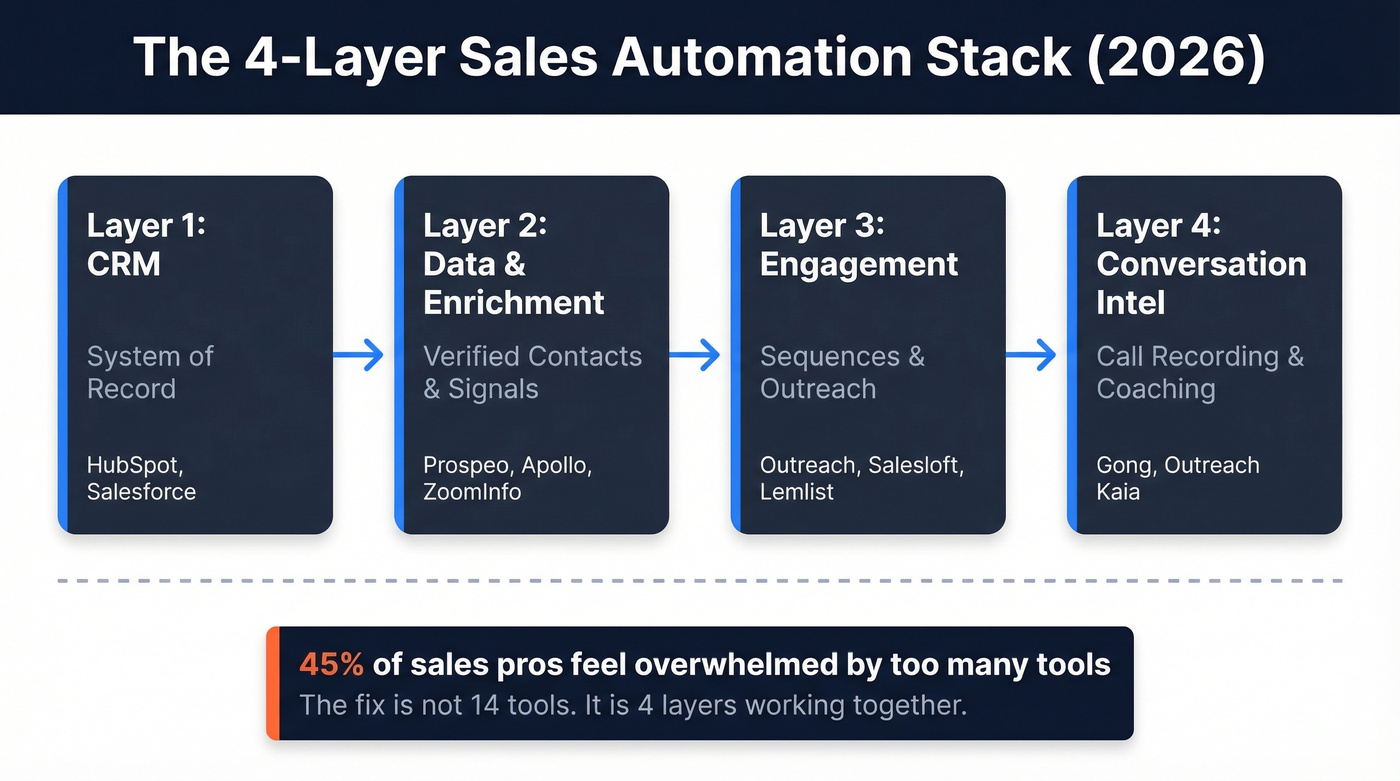
- CRM: Your system of record. HubSpot or Salesforce for most teams.
- Engagement Platform: Where sequences actually run. Outreach, Salesloft, or Lemlist depending on team size.
- Conversation Intelligence: Call recording and coaching. Gong or Outreach Kaia.
Four layers. Not fourteen tools. 45% of sales professionals say they're overwhelmed by the number of tools in their stack, and the fix isn't adding another one - it's making the right four work together.
What Is Sales Automation?
Sales automation is any technology that handles repetitive sales tasks - data entry, follow-up scheduling, lead routing, email sequencing, proposal generation - so reps can spend their time on conversations that close deals.
Outreach frames the evolution in three phases: data capture and workflow automation (2000s-2010s), predictive intelligence (2010s-2020), and generative AI plus autonomous action (2020-present). We're firmly in phase three, where AI doesn't just suggest next steps - it drafts emails, scores deals, and sometimes takes action without a human in the loop.
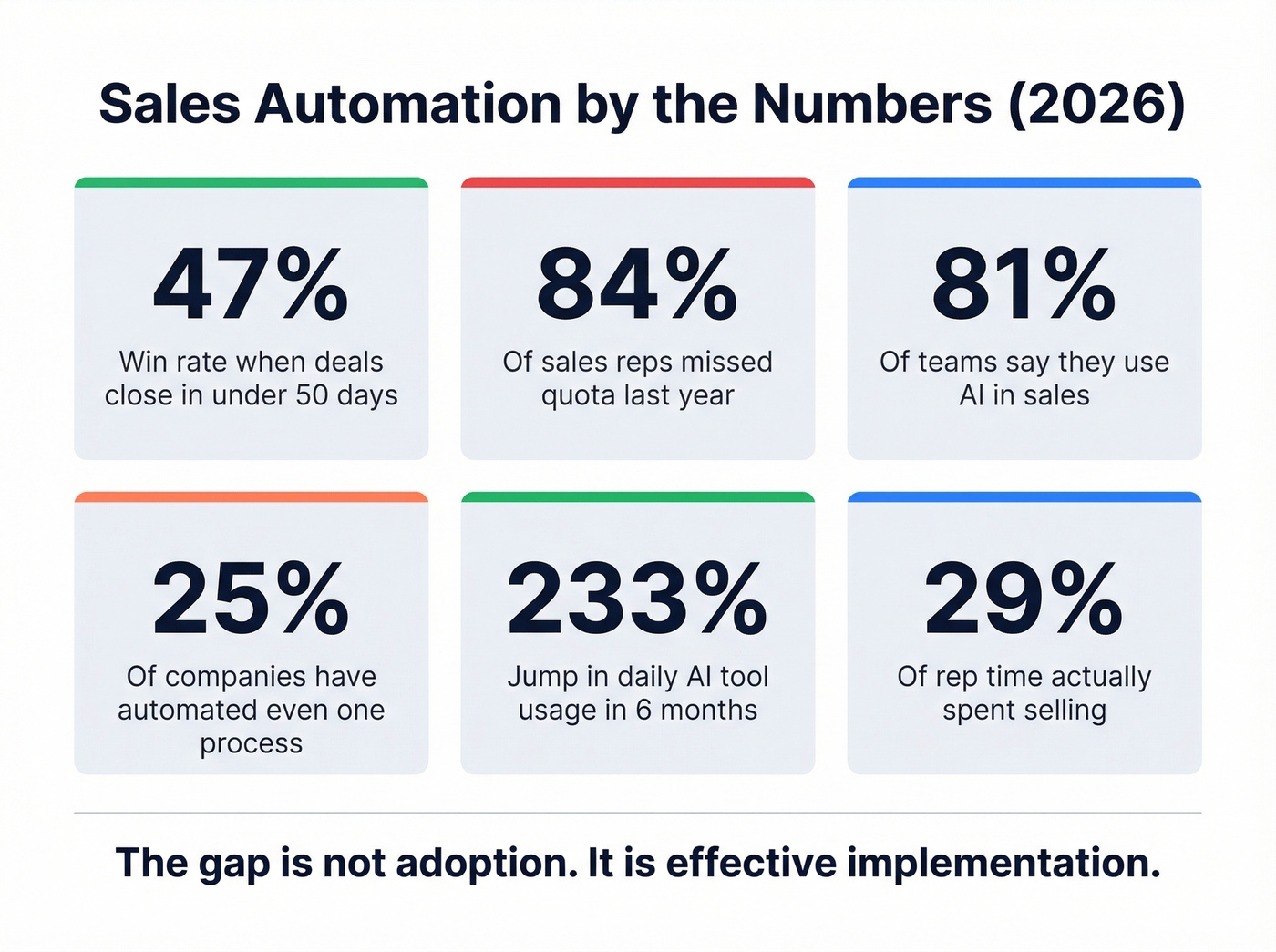
The fundamentals haven't changed, though. McKinsey's research found that roughly a third of all sales tasks can be automated with existing technology - yet only 1 in 4 companies has automated even a single process. Most sales teams spend about 29% of their time actually selling. Automation's job is to flip that ratio. The AI layer just makes the flip faster and smarter than rule-based workflows ever could.
The Numbers That Matter
Before you redesign your stack, ground yourself in what the data actually shows:
| Metric | Value | Source |
|---|---|---|
| Time reps spend selling | ~29% | Outreach |
| Tasks automatable today | ~33% | McKinsey |
| Efficiency gain (early adopters) | 10-15% | McKinsey |
| RFP/bid time reduction | 3 weeks to 2 hours | McKinsey case |
| Win rate (50-day cycle or less) | 47% | Outreach |
| AI coaching cycle reduction | 11 days faster | Outreach Kaia |
| Orgs investing in AI/genAI | 74% | Deloitte Tech Value Survey |
| Teams using AI in sales | 81% | Vena |
| Reps who missed quota | 84% | Vena |
| Companies with 1+ automated process | 25% | McKinsey |
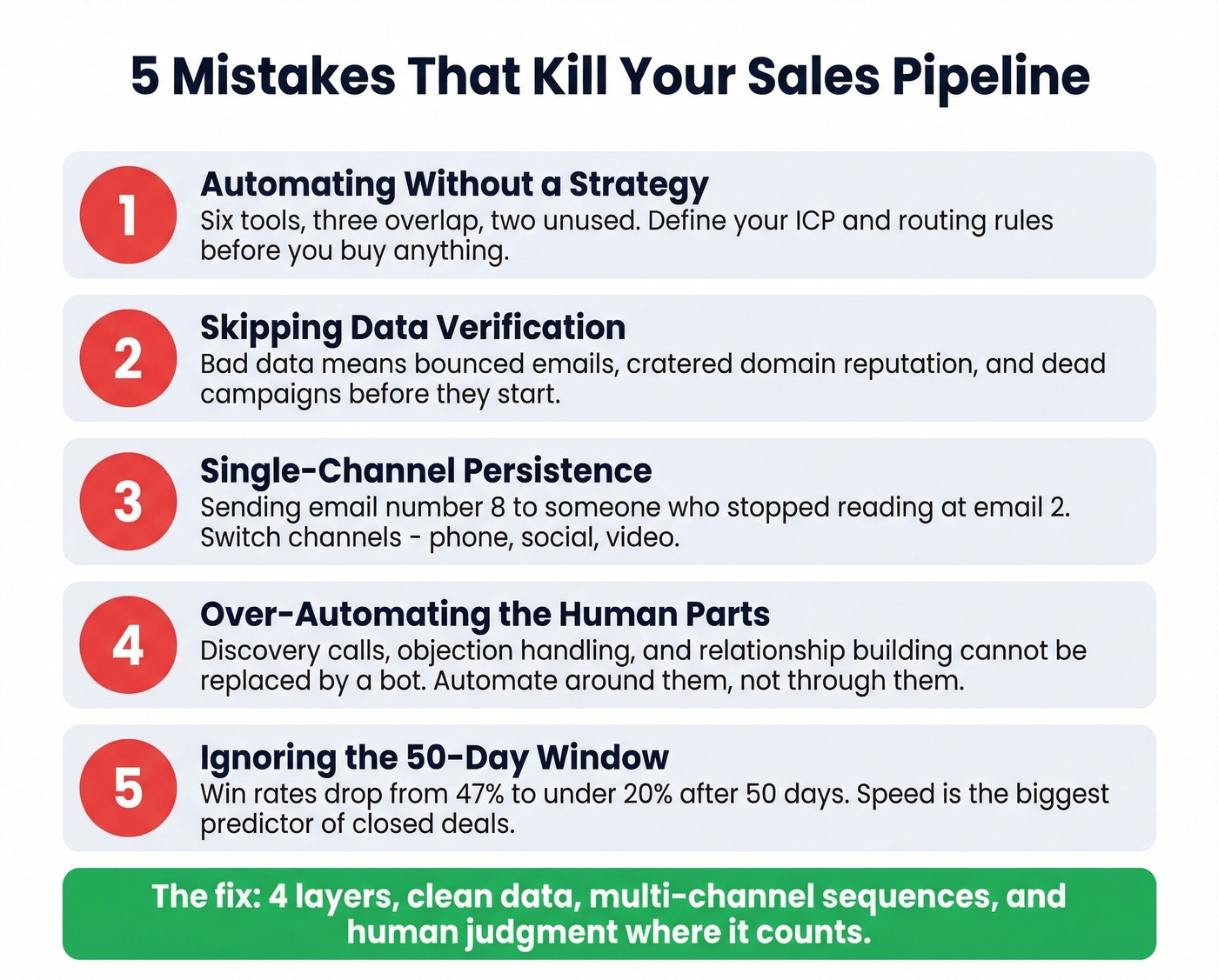
Two numbers jump out. First, opportunities that close within 50 days hit a 47% win rate - after that threshold, win rates drop to roughly 20% or lower. Speed isn't just nice to have; it's the single biggest predictor of whether a deal closes.
Second, 81% of teams say they're using AI, yet only 1 in 4 has actually automated a process end-to-end. Adoption isn't the problem. Effective implementation is.
Slack Workforce Index data shows daily AI tool usage jumped 233% in six months, with daily users reporting 64% higher productivity. The tools work for teams that deploy them correctly. The gap is in the "correctly" part.
Workflows You Can Actually Implement
Here's where we get practical. Understanding how automated selling works at the rep and manager level is the difference between a stack that generates revenue and one that generates noise.
Rep-Level Automations
Pricing page visits (3+ times): Tag the visitor, alert the account owner, auto-enroll in a high-intent sequence. This is the single highest-signal trigger most teams ignore.
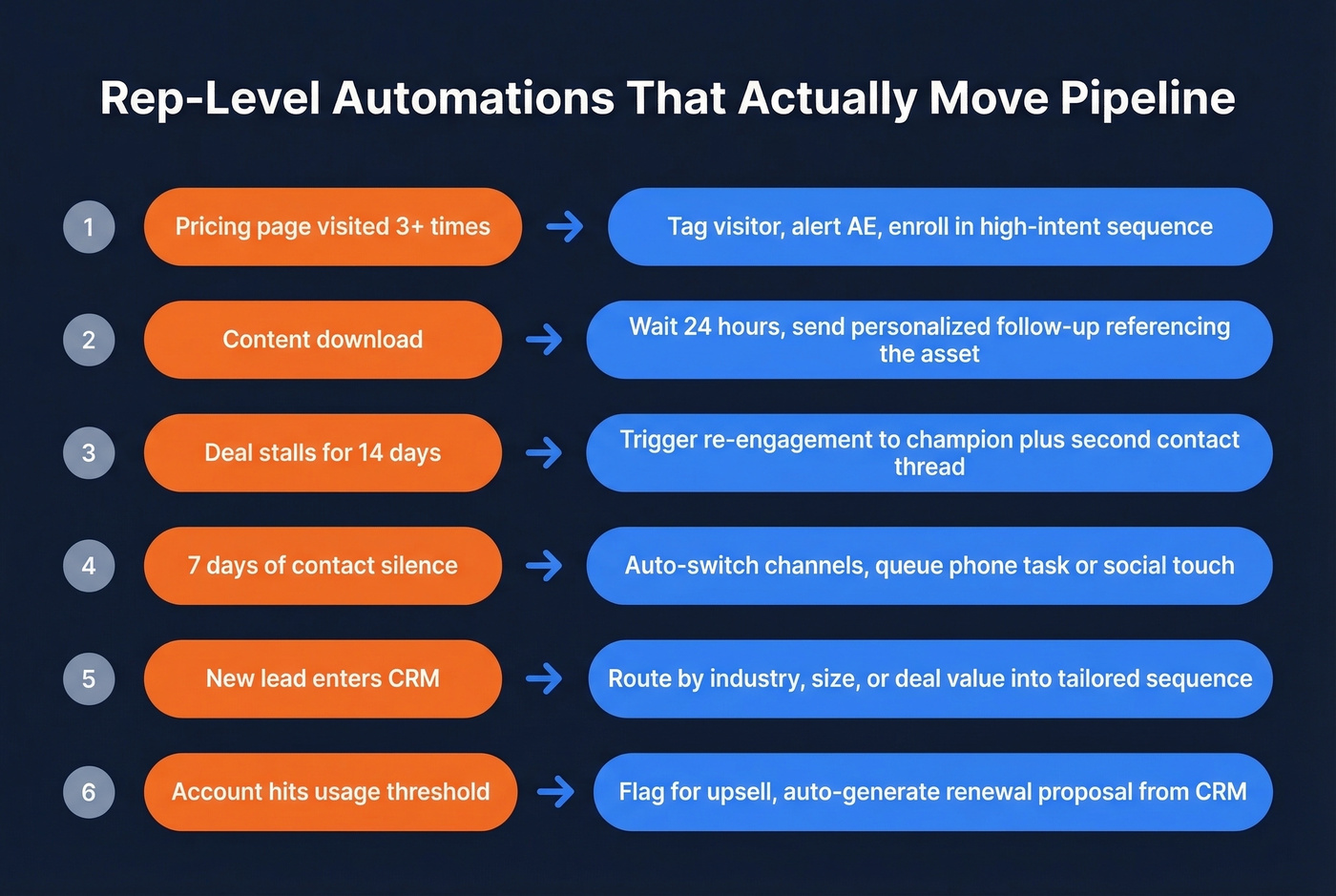
Content download follow-up: Prospect downloads a case study, wait 24 hours, then send a personalized follow-up referencing the specific asset. Don't blast a generic "thanks for downloading" - mention the topic and connect it to their company's situation. (If you need copy, start from proven sales follow-up patterns.)
14-day deal stall: Opportunity hasn't moved stages in two weeks? Trigger a re-engagement sequence to the champion and a separate thread to a second contact. We've seen this single automation rescue deals that would've died in silence.
7-day contact silence: No reply after a week means auto-switch channels. If email's gone cold, queue a phone task or social touch. Single-channel persistence is just annoying; multi-channel persistence shows you're serious.
Segment-based routing: Auto-route leads by industry, company size, or deal value into tailored sequences with messaging matched to the segment. A 10-person startup and a 5,000-person enterprise shouldn't get the same email. (This is basically intent based segmentation applied to outbound.)
Expansion signals: Usage data shows the account hitting capacity thresholds? Flag for upsell, auto-generate a renewal proposal from CRM data.
Manager-Level Automations
Auto-flag deals with no activity in 21+ days and move stale opportunities to a "needs attention" view. Pull real-time pipeline data into weekly forecast reports without anyone touching a spreadsheet. Use AI to flag calls where talk-to-listen ratio exceeds 70% or where pricing objections went unaddressed.
For SMBs, the survival-tier automations are simpler but equally critical: abandoned cart recovery, invoice-sent follow-ups, and renewal reminders. The consensus on r/smallbusiness is that automation isn't a growth hack anymore - it's about keeping up with follow-ups and staying sane.

That 500-contact campaign that cratered? It started with bad data. Prospeo's 5-step verification delivers 98% email accuracy and 30% mobile pickup rates - so your sequences actually reach real buyers instead of destroying your domain reputation.
Stop feeding your automation stack dead emails. Start with verified data.
Building the Right Tool Stack
Here's what belongs in each layer, with pricing and practitioner context.
CRM
HubSpot is the default for SMB and mid-market teams. Free CRM to start, paid plans from around $20-$150+/user/mo depending on tier. Salesforce owns enterprise - around $25-$500/user/mo, with many mid-market deployments landing around $75-$150/user/mo once you add the modules you actually need. For teams on a tight budget, monday CRM starts at $12/seat/mo and handles basic pipeline management without the complexity. (If you're comparing options, see examples of a CRM.)
Data & Enrichment

Prospeo is the top pick here. 300M+ professional profiles, 143M+ verified emails, 125M+ verified mobile numbers, all on a 7-day refresh cycle (industry average is six weeks). Email accuracy sits at 98%, mobile pickup rates hit 30% across all regions. Buyer intent powered by Bombora across 15,000 topics, plus technographics, job changes, headcount growth, and funding signals. Free tier gives you 75 verified emails per month, paid plans run about $0.01 per email with no annual contracts. Native integrations include Salesforce, HubSpot, Smartlead, Instantly, Lemlist, Clay, Zapier, and Make.
Apollo.io is the best all-in-one for SMBs that want data and outreach in a single platform. Free forever plan, paid from ~$49/user/mo. The database is large and the sequencing is solid, but email accuracy tends to run lower than dedicated verification tools for senior titles. Good starting point - verify before you send.
ZoomInfo remains the enterprise standard with unmatched North American depth. But a 10-seat contract with intent data and mobile numbers runs $40-60k/year, credits expire whether you use them or not, and you're locked into annual commitments. At roughly $1/lead, it's real money for any team under 50 reps.
Engagement
Outreach (~$100-150/user/mo) and Salesloft (~$100-150/user/mo) dominate mid-market and enterprise sequencing. Outreach's AI tools cut research and personalization time by 90%, which is a real number if your reps are spending hours on pre-call prep. The choice between the two usually comes down to which one your team already knows. (For rollout, use a structured sales engagement platform plan.)
For SMB multichannel, lemlist ($39/user/mo) is the sweet spot - multichannel sequences from a single interface. Watch the credit-based pricing; Reddit threads consistently flag that costs creep up as you scale.
Amplemarket is an all-in-one alternative gaining traction, though the learning curve is steeper than point solutions - plan for a longer ramp. Heyreach (~$79-$199/mo) is the pick for multi-account outreach at scale, though it's social-first with no native email. Skip it if email is your primary channel. For agencies managing multiple clients, Waalaxy handles multi-client workflows but runs as a Chrome extension, which creates reliability issues on shared machines. Dripify (~$59-$99/user/mo) works for solo founders, though Reddit threads flag occasional support and bug frustrations.
Conversation Intelligence
Gong (custom pricing, typically per user plus a platform fee) is the category leader. Outreach's Kaia is a solid embedded alternative if you're already on the platform - it shaves 11 days off sales cycles and boosts win rates by up to 10 points on deals over $50k.
Proposals & Scheduling
PandaDoc handles proposals and e-signatures - free eSign tier, paid plans typically start around $35/user/mo. For scheduling, Calendly (free tier, paid from ~$10/user/mo) or Chili Piper (~$30-$150/user/mo) eliminate the back-and-forth. Delays in getting a proposal out kill deals. Every day between "verbal yes" and "signed contract" is a day the deal can die.
Emerging & Composable
Clay (free tier, paid from ~$149/mo) and Trigify (~$50-$150/mo) are gaining traction in practitioner communities for API-first automation stacks. If you're the kind of team that builds workflows in Zapier or Make rather than buying monolithic platforms, these are worth testing. (For a costed workflow, see Clay list building.)
| Category | Top Pick | Alternative | Starting Price |
|---|---|---|---|
| CRM | HubSpot | Salesforce | Free / $25/user/mo |
| Data & Enrichment | Prospeo | Apollo.io | Free / $49/user/mo |
| Engagement | Outreach | lemlist | ~$100/user/mo / $39/user/mo |
| Conversation Intel | Gong | Outreach Kaia | Custom |
| Proposals | PandaDoc | Chili Piper | Free eSign / ~$30/user/mo |
| Emerging | Clay | Trigify | $149/mo / ~$50/mo |
Five Mistakes That Kill Pipeline
Automating Without a Strategy
You buy Outreach, connect it to your CRM, and start blasting sequences before defining your ICP, messaging framework, or lead routing rules. Six tools, three overlap, two unused. The team is busier than ever and pipeline is flat. (Use an ideal customer profile template before you automate anything.)
Map your sales process on paper first. Identify the three highest-friction points. Automate those. Leave everything else manual until you've proven the first three work.
Over-Automating the Human Touch
Here's the thing: a prospect gets promoted and your automation sends a generic "congrats on the new role!" message - to someone who got laid off and changed their title to "Open to Work." Tone-deaf automation doesn't just miss; it damages your brand. Any workflow that touches a life event or emotional moment needs a human review gate. Automate the trigger, but let a rep approve the message.
Feeding Sequences With Bad Data
You pull 2,000 contacts from a database that hasn't been refreshed in months. 30% bounce. Your sending domain takes a hit. The next three campaigns underperform because Gmail and Outlook now treat your domain as suspicious.

The fix is simple: verify before you automate. Teams using verified data routinely cut bounce rates from 30-40% to under 5%. The cost of verification is a rounding error compared to the cost of a burned domain. (If you're troubleshooting, start with email bounce rate basics.)
Single-Channel Dependency
Your entire outbound motion is email. Spam filters tighten, your open rates drop overnight, and you have no fallback. Build sequences that span at least two channels - email plus phone is the minimum, email plus phone plus social is better. Diversification isn't optional anymore.
Skipping Training
The #1 CRM rollout failure pattern on Reddit is lack of buy-in combined with insufficient training. You roll out a new platform and tell the team "it's intuitive enough." Six months later, half the team is still logging activities in spreadsheets. Budget 2-3 weeks for onboarding. Assign a power user per team. Run weekly office hours for the first month. "It's intuitive enough" is the most expensive assumption in sales ops.
Data Quality: The Part Nobody Wants to Talk About
Automation without verified data is expensive spam. Every workflow, every sequence, every AI-generated email is only as good as the contact record it's built on. Most teams treat data quality as an afterthought, and it shows.
The deliverability prerequisites are non-negotiable: SPF, DKIM, and DMARC configured correctly. List hygiene before every campaign. Segmentation by engagement level. GDPR and CAN-SPAM compliance on every send - it's not optional. The consensus on r/coldemail is blunt: don't email stale lists, don't buy lists, clean regularly, and never send from a no-reply address. (If you're auditing setup, use an email deliverability guide checklist.)
The numbers from real deployments tell the story. Meritt saw bounce rates drop from 35% to under 4% while tripling pipeline from $100K to $300K per week. Snyk's 50-person AE team cut bounce rates from 35-40% to under 5% and grew AE-sourced pipeline 180%. Stack Optimize built to $1M ARR with 94%+ client deliverability and zero domain flags. Salesforce's own research on agentic AI identifies trust in data as the #1 blocker for autonomous agent strategies. If you can't trust the email addresses in your CRM, you definitely can't trust an AI agent to act on them.
Speed kills deals - in a good way. With 300M+ profiles refreshed every 7 days, buyer intent across 15,000 topics, and technographic filters built in, Prospeo gives your automation workflows the fuel they need to hit that 50-day close window.
Build the data layer your sales automation actually deserves.
The Future: Agentic AI in Sales
Juniper Research forecasts AI-agent automated interactions growing from 3.3 billion in 2025 to over 34 billion by 2027. The direction is clear: we're moving from task-taking assistants to outcome-owning agents that can orchestrate multi-step workflows across tools. (If you're evaluating options, start with AI agents for sales.)
The emerging architecture is multi-agent orchestration - a central "orchestrator" agent directing specialist agents for research, outreach, scheduling, and follow-up, with humans setting guardrails and reviewing edge cases. One expert framework suggests a balanced architecture of roughly 90% deterministic workflows with 10% agent autonomy for complex, judgment-heavy scenarios. The growing adoption of Model Context Protocol (MCP) by communications platforms signals that agent infrastructure is maturing fast.
Let's be honest, though: most teams don't need autonomous agents yet. They need reliable triggers that fire consistently. The team running a well-built sequence with verified data will outperform the team experimenting with an AI agent that hallucinates contact details and sends emails to the wrong persona. Salesforce flags "workslop" - low-quality AI output that requires more auditing than it saves - as an emerging risk. Get the deterministic workflows right first. Layer in agent autonomy once your foundation is solid.
If your average deal size is under $10k, you almost certainly don't need agentic AI. You need clean data, a two-channel sequence, and a rep who picks up the phone. The basics, done consistently, beat bleeding-edge AI every time.
Implementation Tips That Won't Wreck Your Team
Audit your stack and kill redundancies. List every tool your team pays for. Identify overlap. We've seen teams running three tools that all do email sequencing - that's not a stack, it's a mess. Cut to one.
Fix data quality first. Before you automate a single workflow, verify your contact database. Clean your CRM. Deduplicate. This is the highest-ROI hour you'll spend this quarter. (If you need a process, use a data enrichment workflow.)
Start with three automations, not thirty. Pick the three triggers from the workflow examples above that match your biggest pipeline bottlenecks. Build those. Prove they work. Then expand.
Train the team. Budget real time for onboarding. Assign power users. Run office hours. I can't stress this enough - "it's intuitive enough" has killed more CRM rollouts than bad software ever has.
Measure and iterate monthly. Track bounce rates, reply rates, pipeline velocity, and rep adoption. If a workflow isn't moving numbers after 30 days, fix it or kill it. Winning at sales automation isn't about launching perfectly - it's about iterating until the numbers move. (For what to track, start with sales operations metrics.)
FAQ
What's the difference between sales and marketing automation?
Sales automation handles post-lead activities - sequencing, follow-ups, deal management, proposals, and CRM updates. Marketing automation covers pre-lead activities like nurture campaigns and scoring. The overlap is in lead handoff, where both systems need clean data integration.
How much does a small-team stack cost?
A five-person team can build a solid stack for $300-$600/month: HubSpot free CRM, Prospeo for verified data at ~$39-$99/mo, Lemlist for sequences ($39/user/mo), and Calendly free for scheduling.
Can automation replace SDRs?
Not yet. About 45% of teams run hybrid AI-SDR models where AI handles research, list building, and first-touch sequencing while humans handle replies and relationship building. Automation replaces SDR tasks, not SDR roles.
What should I automate first?
Lead follow-up timing. Automate the trigger that fires a sequence within five minutes of a form fill or intent signal. That single workflow moves more pipeline than anything else you'll build.
How do I keep automated emails out of spam?
Start with verified contact data to keep bounce rates under 4%. Configure SPF, DKIM, and DMARC on sending domains, warm up new inboxes gradually, segment by engagement, and clean lists before every campaign. A 7-day data refresh cycle prevents the stale-data bounces that tank deliverability.