

10 Sales Presentation Examples (With What to Steal From Each)
Your best sales deck is working a deal right now - at 9pm, forwarded to a VP who's never met you, opened on a phone in a taxi. That deck is your sales team when you're not in the room. And if it's a 40-slide feature dump with no narrative, it's losing the deal for you.
Here's the reality: 96% of prospects research before they ever talk to a rep, and three out of four B2B buyers prefer a completely rep-free experience. Your presentation has to sell on its own. The sales presentation examples below show you exactly how the best decks do it - and what to steal from each.
The Short Version
Most sales decks fail because they're too long, too feature-focused, and missing proof. Use Problem-Solution-Benefit for standard sales calls, Raskin's narrative for exec and category pitches. Keep it under 15 slides, lead with the prospect's world, and design for forwarding - your champion will share this without you in the room.
What Makes a Great Sales Deck Work
We've reviewed dozens of decks across deal stages, and the patterns are remarkably consistent. A practitioner review of 82 real pitch decks on Reddit found that 74 were too wordy, 66 had messy or complicated slides, and 62 didn't even include contact information. Those were pitch decks, not sales decks - but the mistakes are identical.
The fixes aren't complicated. They're just ignored.
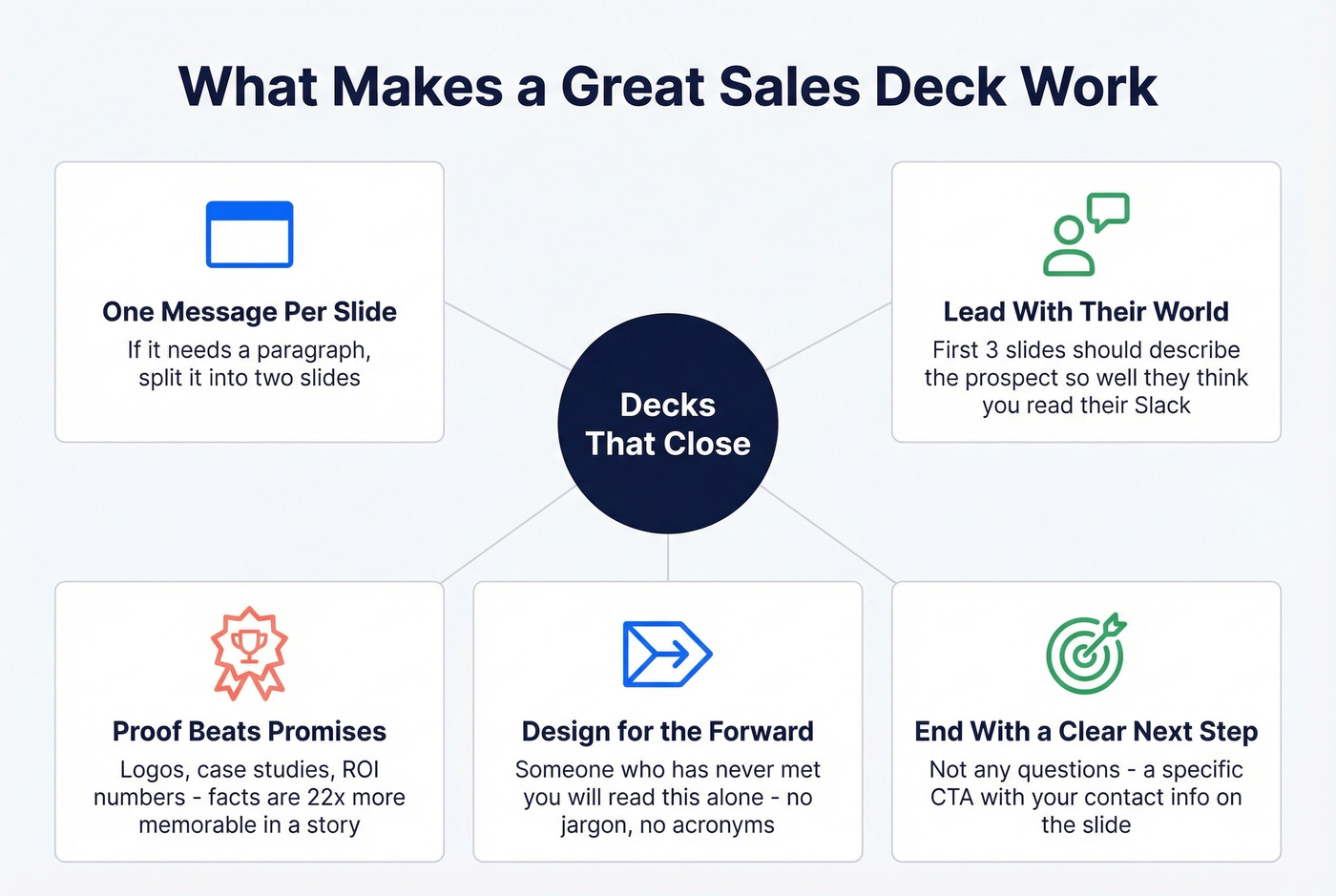
Here's what separates great presentations from decks that get politely closed after slide three:
- One message per slide. If a slide needs a paragraph to make sense, split it.
- Lead with their world, not yours. The first three slides should describe the prospect's reality so accurately they think you've been reading their Slack.
- Proof beats promises. Logos, case studies, ROI numbers. Facts are 22x more memorable when wrapped in a story.
- Design for the forward. Assume someone who's never met you will read this alone. No jargon, no acronyms, no "as we discussed." (If you're tightening the narrative, use these sales deck storytelling principles.)
- End with a clear next step. Not "questions?" - a specific CTA with your contact info on the slide. (Pair it with a strong sales meeting follow-up email so momentum doesn't die.)
3 Presentation Frameworks Compared
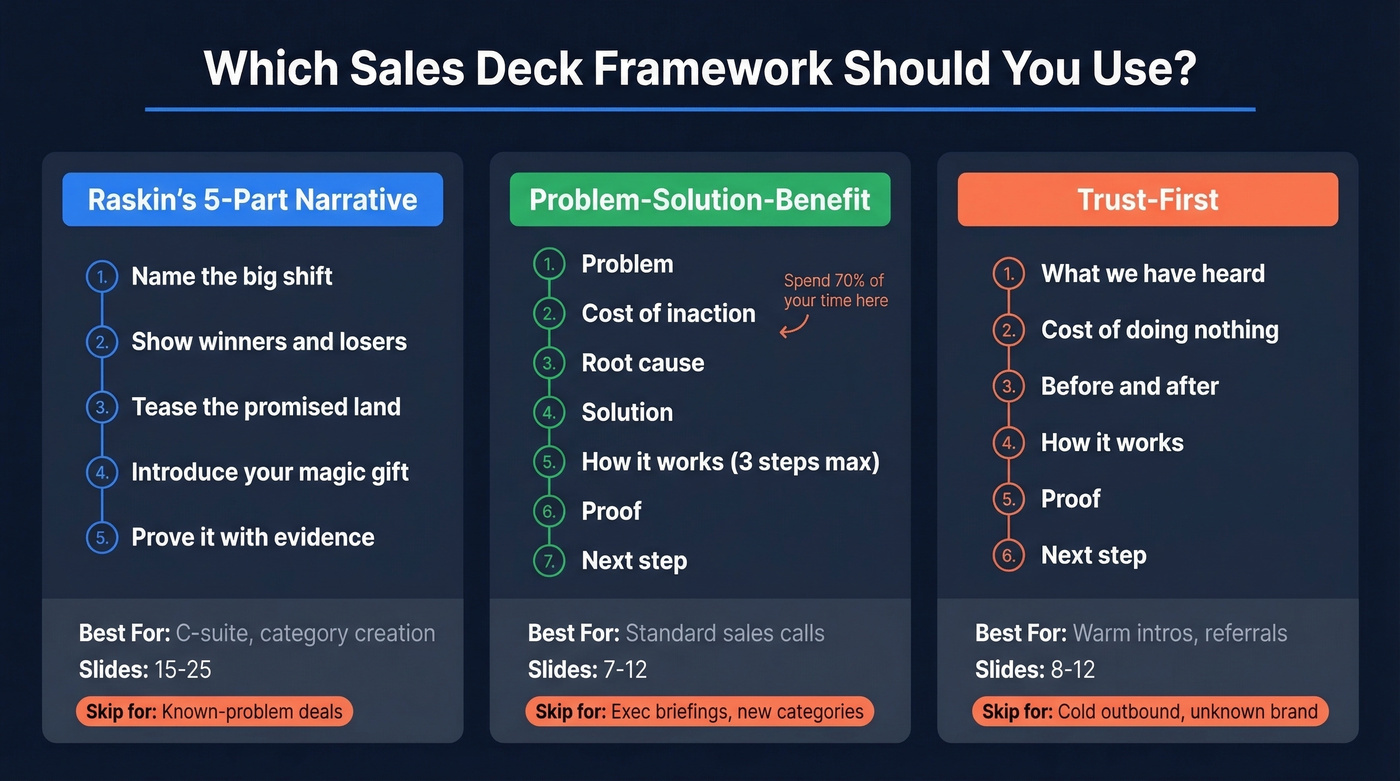
Stop copying the Zuora deck. Andy Raskin's framework is brilliant for category creation and C-suite narratives, but for a mid-market demo where the buyer already knows their problem, it's overkill. Here's when each framework actually fits.
| Framework | Best For | Slide Count | When to Skip It |
|---|---|---|---|
| Raskin's 5-Part | C-suite, category creation | 15-25 | Known-problem deals |
| Problem-Solution-Benefit | Standard sales calls | 7-12 | Exec briefings, new categories |
| Trust-First | Warm intros, referrals | 8-12 | Cold outbound, unknown brand |
Raskin's 5-Part Narrative follows a specific arc: name a big change in the world, show winners and losers, tease the promised land, introduce your product as the "magic gift," then prove it with evidence. Zuora used this to coin the "subscription economy" and define an entire category. It's powerful when you're selling a shift in thinking, not just a tool. (This is also where B2B brand positioning matters more than slide design.)
Problem-Solution-Benefit is the workhorse. Seven slides: Problem, Cost of inaction, Root cause, Solution, How it works (three steps max), Proof, Next step. You should spend about 70% of your time on the first three slides. If the prospect doesn't feel the pain, they won't care about the cure. (If you're running discovery, align this with your discovery questions.)
Trust-First opens with "What we've heard" - reflecting the prospect's own language back to them. It works when you've had a discovery call and want to prove you listened. The flow moves from their words to cost of doing nothing, before/after, how it works, proof, and next step. Less narrative drama, more de-risking the decision. (This pairs well with personalized outreach when you're following up.)
What Changed in 2026
AI-generated decks are flooding inboxes. Every team with a ChatGPT subscription can produce a polished-looking 15-slide deck in ten minutes. That means the bar for visual quality went up, but the bar for narrative quality went down - most AI decks are generic, interchangeable, and forgettable.
A human-crafted story that reflects the buyer's specific world is now a bigger competitive advantage than it was two years ago. The decks below were built by people who understood this.

Your sales presentation only closes deals if it reaches the right decision-maker. Prospeo gives you 98% accurate emails and verified direct dials for the VPs and C-suite buyers your deck was built for - so your best slides land in the right inbox, not a generic info@ address.
Build the prospect list your sales deck deserves.
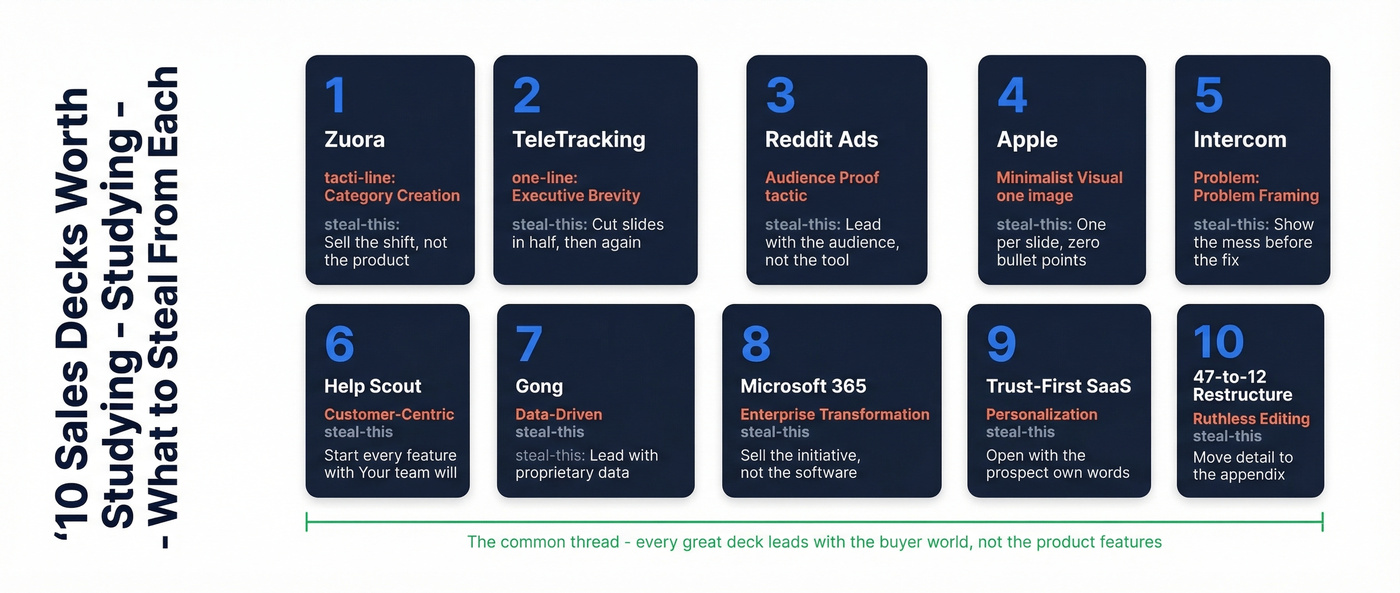
10 Real Sales Decks Worth Studying
1. Zuora - Category-Creation Narrative
Zuora's 24-slide deck is one of the most analyzed corporate presentations in B2B. The flow - trend, evidence, winners, gap, solution - doesn't lead with the product. They coined "subscription economy," used logos like Amazon and Netflix as social proof, and framed the entire market as "Old World vs New World." Steal this: Don't sell your product. Sell the shift that makes your product inevitable. (If you're building a category, borrow from go-to-market strategy thinking, not just deck tactics.)
2. TeleTracking - Executive Brevity
The entire story lives in six slides. TeleTracking built a deck for hospital executives who have eight minutes between meetings, not thirty. Heavy on ROI tables, light on everything else. No transitions, no build-up, just the numbers that matter. Steal this: For exec readouts, cut your slide count in half, then cut it again. (For enterprise cycles, see enterprise B2B sales.)
3. Reddit Ads - Leading With Audience Proof
Reddit's ad sales deck doesn't open with features. It opens with numbers: 70M monthly readers, 5B pageviews, 20-minute average sessions. The product pitch comes after the audience is already sold as valuable. Steal this: If your product serves a marketplace or platform, lead with the audience, not the tool.
4. Apple - Minimalist Visual Storytelling
Apple keynotes are sales presentations disguised as product launches. One image per slide, one number per claim, zero bullet points. The audience never has to choose between reading and listening - every slide reinforces the spoken word instead of competing with it. If your slide needs a paragraph to land, it's two slides.
5. Intercom - Product-Led Problem Framing
Intercom's deck starts with screenshots of broken customer experiences - actual chat windows, actual support tickets. The problem is visual before it's verbal. Steal this: Show the mess before you show the fix. Screenshots of the "before" state are more persuasive than any chart. (This is a great fit for a tighter product demo checklist.)
6. Help Scout - Customer-Centric Positioning
Help Scout positions every feature as a customer outcome. Not "shared inbox" but "never drop a conversation." The entire deck reads from the buyer's perspective. Steal this: Rewrite every feature slide as a sentence that starts with "Your team will..."
7. Gong - Data-Driven Credibility
Gong's deck is built on their own research data - call analysis stats, conversion benchmarks, talk-to-listen ratios, all from their platform. It positions them as the authority before they even pitch the product. Steal this: If you have proprietary data, lead with it. Nothing builds credibility faster than original research. (To operationalize this, lean on data-driven selling.)
8. Microsoft Office 365 - Enterprise Transformation
Microsoft's enterprise deck doesn't sell software. It sells digital transformation with Office 365 as the vehicle. The narrative moves from industry disruption to organizational risk to a modernization roadmap. (If you're selling transformation, this digital transformation sales playbook helps.)
Let's be honest though: this is the weakest example on this list. It works because Microsoft has infinite brand equity and an existing install base. Don't copy this approach unless you're already a household name. For everyone else, the lesson is narrower - in enterprise deals, sell the strategic initiative and position your product as the implementation detail.
9. The "Trust-First" SaaS Deck
We watched a mid-market SaaS team lose three consecutive deals with a feature-heavy deck. They rebuilt it around a simple idea: open with the prospect's own words. The new deck starts with "What we've heard from teams like yours" - three bullet points pulled directly from the discovery call. Then cost of doing nothing, a before/after comparison, three-step implementation, a case study with hard numbers, and a CTA with the champion's name on it. The first deal they ran it on closed in two meetings instead of four.
Personalization isn't a logo swap. It's proving you listened.
10. The 47-to-12 Restructure
A team brought us a 47-slide deck that had never closed in-room. Forty-seven slides. The reps were reading them like a script while buyers checked their phones. We stripped it to 12 slides using Problem-Solution-Benefit, moved all the technical detail to an appendix, and added a single ROI slide with three numbers: cost per incident, incidents per quarter, and projected savings.
It closed the next meeting.
Your appendix is where good slides go to be useful without being distracting. Every slide that doesn't earn its place in the main flow should live there - accessible if asked, invisible if not.
How Many Slides Do You Need?
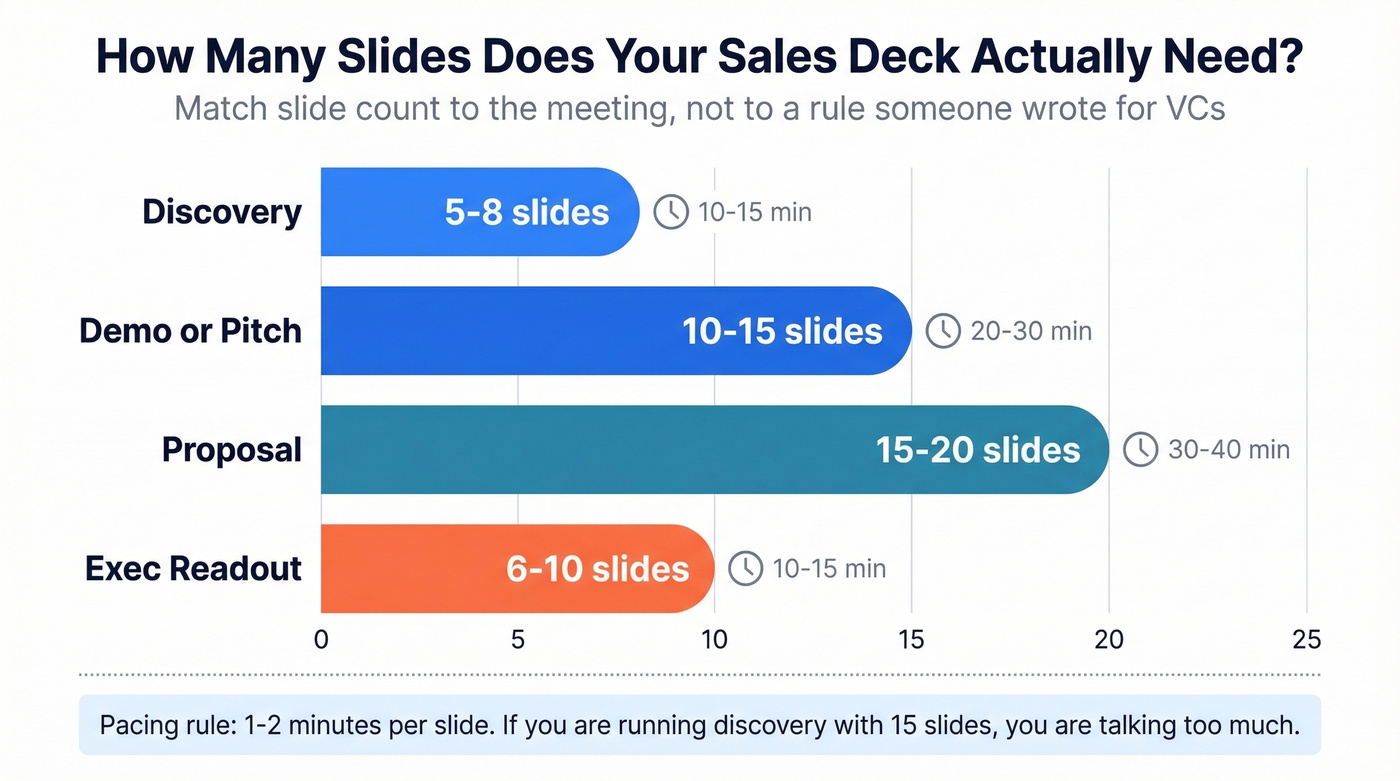
The pacing rule is simple: 1-2 minutes per slide. Everything else follows from that.
| Deal Stage | Slide Count | Time |
|---|---|---|
| Discovery | 5-8 | 10-15 min |
| Demo/pitch | 10-15 | 20-30 min |
| Proposal | 15-20 | 30-40 min |
| Exec readout | 6-10 | 10-15 min |
Guy Kawasaki's 10/20/30 rule is for investor pitches, not sales calls. A discovery deck and a proposal deck have completely different jobs. Match the slide count to the meeting, not to a rule someone wrote for VCs. And if you're running a discovery call with 15 slides, you're talking too much and listening too little.
7 Mistakes Killing Your Sales Deck
The data from those 82 real pitch decks tells the same story over and over - and the patterns mirror what we see in sales decks constantly.
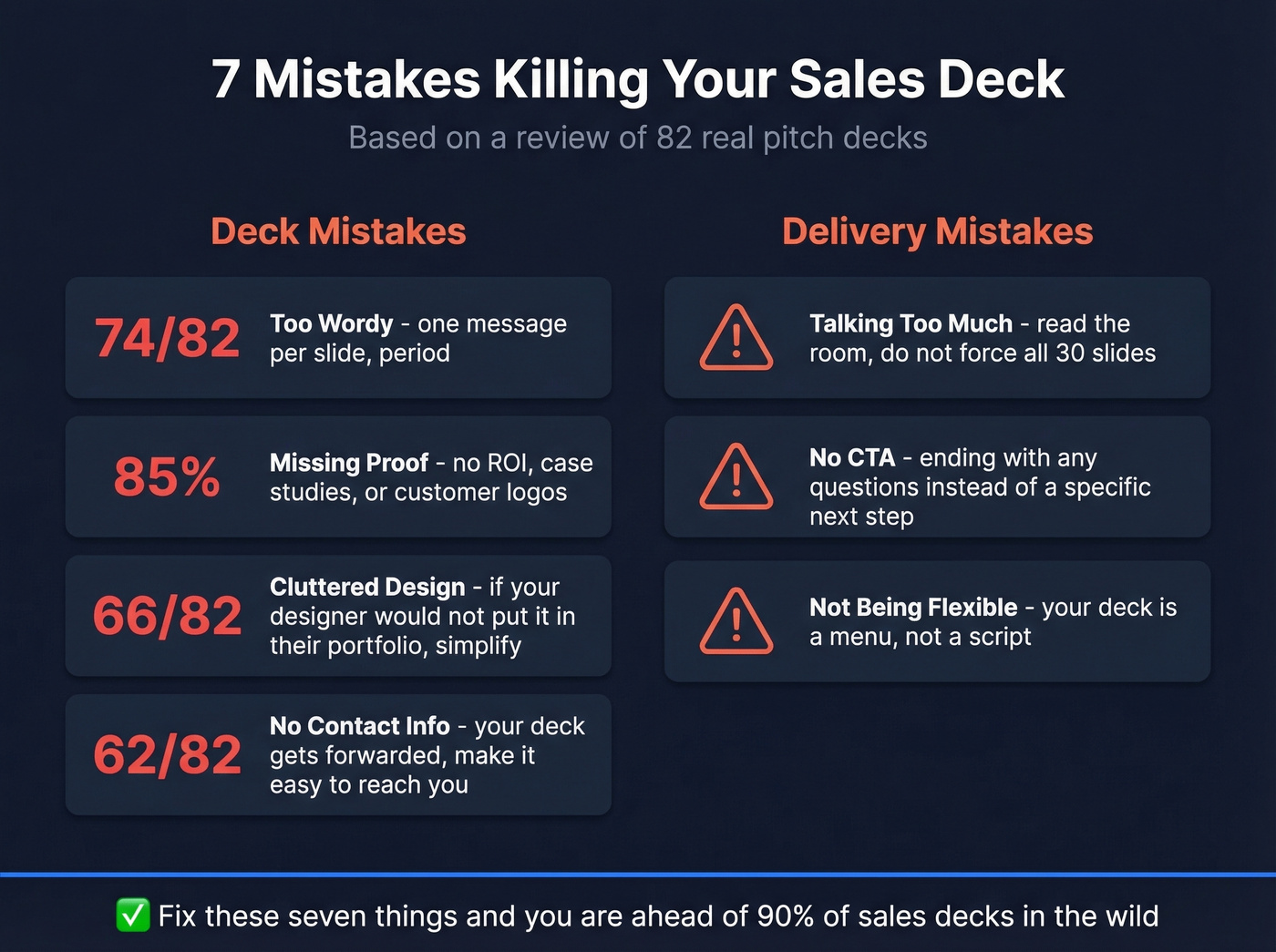
Deck mistakes:
- Too wordy. 74 out of 82 decks were too wordy. One message per slide. Period.
- Missing proof. 85% were missing financial projections (in a fundraising context). In sales decks, the parallel is missing ROI, case studies, and customer logos.
- Cluttered design. 66 out of 82 had messy slides. If your designer wouldn't put it in their portfolio, simplify.
- No contact info. 62 out of 82 forgot to include it. Your deck gets forwarded. Make it easy to reach you.
Delivery mistakes:
- Talking too much. I've watched reps force all 30 slides on a buyer who checked out at slide 8. Read the room.
- No CTA. Ending with "any questions?" instead of "here's the specific next step."
- Not being flexible. The best presenters skip slides based on the conversation. Your deck is a menu, not a script - whether it's an individual stakeholder meeting or a full buying committee, adaptability wins.
Pre-Send Checklist:
- One message per slide?
- Proof slide with real numbers?
- Contact info on the last slide?
- Clear CTA with specific next step?
- Consistent branding throughout?
- File size under 10MB (or sent as a trackable link)?
Designing Decks That Sell Without You
75% of B2B buyers prefer self-serve. Your deck needs to work when you're not presenting it. Personalized content boosts reading time by 41% and gets shared internally 2.3x more often. Link-based decks with behavioral analytics - did they open it, how long on each slide, did they forward it - give you intel that static PDFs never will.
But none of that matters if the deck bounces or lands in a departed employee's inbox. Before you obsess over slide design, verify you're sending to the right person. Prospeo covers 300M+ professional profiles with 98% email accuracy and a 7-day data refresh cycle, so the VP you're targeting actually works there and actually gets your email. (If you're building lists at scale, start with lead enrichment and data enrichment services.)
Tools to Build and Deliver Your Deck
Slide creation: Canva (free plan available) and Google Slides (free) are where most teams should start. PowerPoint if your org mandates it. Beautiful.ai is overpriced for what you get - skip it unless your team has zero design sense and needs guardrails.
Interactive demos: Walnut, Navattic - expect $2,000-$8,000/month for team plans. Worth it if your product is the demo.
Async video: Loom (free plan available). Record a personalized walkthrough over your deck. 82% of customers say video has convinced them to buy.
Enablement: Highspot ($30-100+/user/mo). Centralizes decks, tracks usage, tells you which slides reps actually use.
Proposals: PandaDoc. Turns your deck into a signable document.
None of these tools matter if your deck never reaches the buyer. That's the upstream problem - and it's the one most teams ignore while spending thousands on slide design. (If you're fixing the upstream, use these sales prospecting techniques to keep pipeline full.)
Here's our hot take: if your average deal size is under $15K, you don't need Highspot or interactive demo tools. A clean Google Slides deck, a Loom walkthrough, and verified contact data will outperform a $50K/year enablement stack every time.
You just spent hours crafting a deck that sells on its own. Now make sure it reaches someone who can actually sign. Prospeo's 300M+ profiles with 30+ filters - buyer intent, job changes, funding signals - let you target the exact decision-makers who need to see your presentation.
Stop sending perfect decks to the wrong people.
FAQ
What's the difference between a sales presentation and a pitch deck?
A pitch deck targets investors and covers market size, business model, and fundraising ask. A sales presentation targets buyers and focuses on their specific problem, your solution, proof it works, and a clear next step. The audience changes the entire structure - investor decks sell vision, sales decks sell outcomes.
What slides should every sales deck include?
Five at minimum: the prospect's problem in their language, the cost of inaction, your solution in three steps or fewer, a proof slide with real numbers, and a CTA with specific next steps and contact info. Everything else is optional and should earn its place or move to the appendix.
How do I make sure my deck reaches the right person?
Design for forwarding - standalone narrative, no jargon, proof-heavy. Then verify your contact data before sending. Tools like Prospeo, Hunter, and Apollo can help, though accuracy rates vary significantly across providers. The goal is zero bounces - every bounced email is a deal that never started.
Can I use these examples as templates?
Absolutely. Treat each example as a sample you can adapt to your deal stage and audience. The frameworks and slide structures translate across industries, but always customize the problem framing and proof points to your specific buyer. Start with Problem-Solution-Benefit for most deals; switch to Raskin's narrative only for category-creation or C-suite conversations.