

How to Build a Sales Workflow That Doesn't Break
You've built the sequences, bought the tools, hired the reps - and deals still stall in the middle of your pipeline like cars on a freeway with no exit signs. The problem isn't effort. It's that most teams design a sales workflow once, never maintain it, and feed it with data that's already stale by the time a rep hits "send."
Most guides list stages. None tell you when a deal is actually ready to move. That's the gap we're filling here: a stage framework with real exit criteria, workflow templates with branching logic you can steal, and a minimum viable stack you can start running for $0-$20/mo.
What Is a Sales Workflow?
A sales workflow is the repeatable, executable layer that turns your strategy into daily action - the triggers, tasks, handoffs, and automations that move a deal from "new lead" to "closed-won" without someone manually remembering what happens next. It's the operational bridge between strategy and execution.
| Term | What It Is | Example |
|---|---|---|
| Workflow | Automated execution layer | Lead opens email -> auto follow-up in 2 days |
| Process | Stage sequence a deal follows | Prospect -> Qualify -> Demo -> Close |
| Methodology | Tactics for advancing deals | MEDDICC, Challenger, SPIN |
| Cadence | Timed outreach sequence | Day 1: email, Day 3: call, Day 5: email |
| Pipeline | Visual snapshot of deal stages | 12 deals in Demo, 4 in Negotiation |
The process is the scaffolding, the methodology is how reps climb it, and the workflow is the machinery that keeps everything moving without manual intervention.
Why Workflow Automation Matters
Reps spend 71% of their time on non-selling tasks - data entry, CRM updates, scheduling, chasing approvals. That's roughly 12 hours per week per rep lost to work that automation should handle.
The business case is hard to argue with. Companies that automate their selling processes see an $8 return for every $1 invested. Teams adopting intelligent workflow automation achieve 32% faster lead-to-close cycles. And the global workflow automation market hit $20.3B in 2023, growing at 10.1% CAGR - this isn't a fad, it's infrastructure.
The gap between teams that have this dialed and teams that don't is widening fast. Achieving alignment between marketing, SDRs, and closers is often the single biggest lever for pipeline velocity, and a well-designed sales workflow is what makes that alignment operational instead of aspirational.
How to Build It in 7 Stages
Every sales workflow needs a backbone. Here are seven stages, each with a clear exit criterion so you know when a deal is ready to advance. No ambiguity, no "it feels ready."
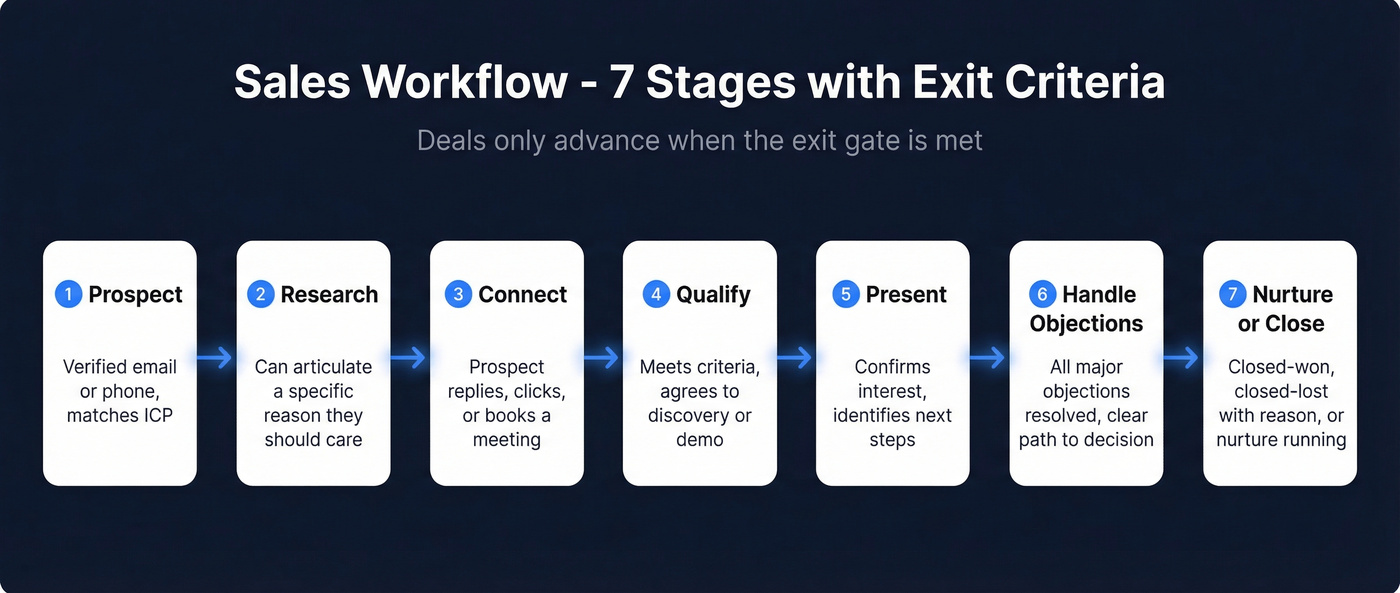
Prospect. Identify potential buyers using filters like industry, headcount, tech stack, and intent signals. Exit: contact has a verified email or phone number and matches your ICP. (If you need a tighter definition, use an ICP scoring rubric.)
Research. Dig into the prospect's company - recent funding, job postings, tech changes, competitive landscape. Exit: you can articulate a specific reason this person should care about your product. (This gets easier when you’re tracking sales triggers consistently.)
Connect. First meaningful outreach - email, call, or multi-channel touch. Exit: prospect responds or engages via reply, click, or booked meeting. If you need copy, keep a set of sales follow-up templates ready.
Qualify. Determine fit and buying authority. This is where frameworks like BANT or MEDDICC earn their keep. Exit: prospect meets qualification criteria and agrees to a discovery or demo call. Use a structured set of discovery questions to avoid “nice chat, no next step.”
Present. Deliver a tailored pitch or demo addressing the prospect's specific pain. Exit: prospect confirms interest and identifies next steps like pricing review, stakeholder intro, or trial. A simple product demo checklist prevents missed steps.
Handle Objections. Address concerns around pricing, timing, competition, or internal buy-in. Exit: all major objections resolved with a clear path to decision. (If objections are spiking, revisit how you add value in sales stage-by-stage.)
Nurture / Close. For ready deals, execute the close - contracts, signatures, handoff. For not-yet deals, move to a structured nurture cadence. Exit: closed-won, closed-lost with documented reason, or active nurture sequence running. If you want a clean framework, map it to your steps to close a sale.
The exit criteria are the part every other guide skips. Without them, deals pile up in "Presentation" for weeks because nobody defined what "done" looks like at that stage. We've seen this firsthand across dozens of team audits - the teams that enforce exit gates consistently close faster than those running on vibes. Start with these seven stages and resist the urge to add more until your data tells you to.
3 Templates You Can Steal
Outbound Lead Nurture
Trigger: New lead enters CRM matching ICP criteria -> Send personalized welcome email -> Wait 3 days -> Branch: Did they reply? Yes -> Reassign to "Negotiation" stage, notify AE in Slack. No -> Send follow-up email with case study -> Wait 3 days -> Branch: Reply? Yes -> Route to AE. No -> Add to long-term nurture drip, tag as "re-engage in 30 days."
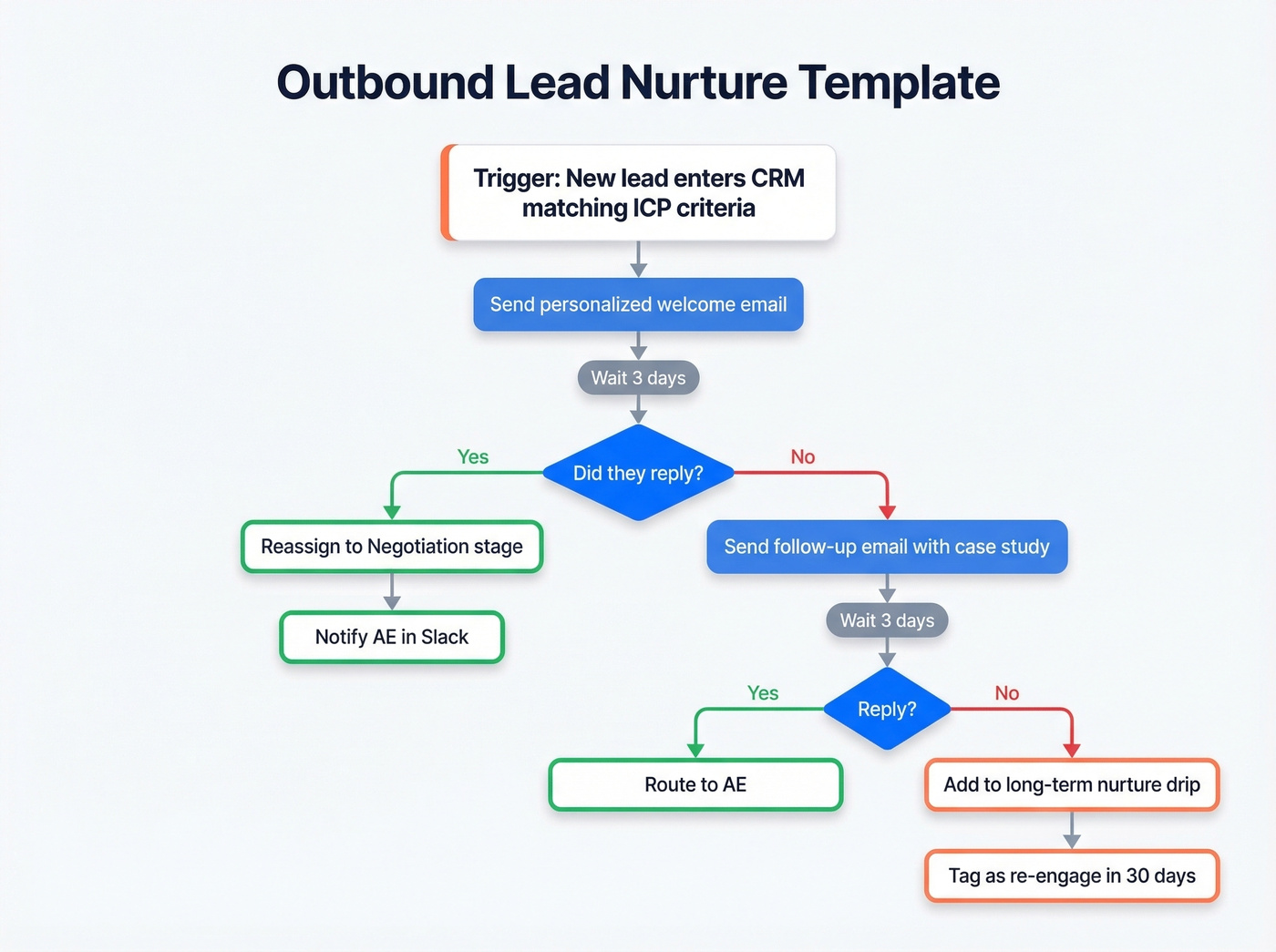
The branching is what separates this from a dumb email blast. Every non-response triggers a different path, and the workflow handles routing so reps don't have to remember.
Inbound Qualification & Routing
Trigger: Lead submits form or books a meeting -> Lead score calculated automatically using firmographic and behavioral signals -> Branch: Score above threshold? Yes -> Auto-assign by territory and deal size -> Qualification call scheduled within 24 hours -> Branch: Qualified? Yes -> Move to demo stage. No -> Drop into nurture drip with educational content. Score below threshold -> Auto-enroll in nurture sequence, flag for review in 14 days.
The 24-hour qualification call is non-negotiable. Here's the thing: we've watched teams lose inbound leads simply because routing took 48+ hours and the prospect went cold. Picture this - a VP of Sales downloads your ROI calculator at 9 AM, gets a competitor's demo invite by noon, and your team doesn't call until the next day. That deal was dead before your rep opened the CRM. Getting routing right from form submission to rep assignment is the difference between converting and losing the lead entirely.
Post-Sale Onboarding Handoff
Trigger: Deal marked closed-won -> Auto-notify CS team with deal context including pain points, stakeholders, and contract terms -> Day 1: Send login details and onboarding guide -> Day 3: Automated check-in email asking if they need help getting started -> Trial/onboarding end date: Follow-up asking about continued engagement or expansion.
Most workflow guides stop at the signature. This template covers the handoff from sales to CS, which is where churn actually starts - not three months later when the customer ghosts your renewal email.

Stage 1 of your workflow - prospecting - falls apart with bad data. Prospeo gives you 300M+ profiles with 30+ filters (intent, technographics, headcount growth, funding) and 98% verified email accuracy. At $0.01/email, your minimum viable stack just got a serious upgrade.
Stop feeding stale data into a workflow you spent weeks building.
Why Most Workflows Break
90% of automation projects fail. Not because the tools are bad - because the inputs are bad, the design is overcomplicated, or nobody owns the thing after launch.
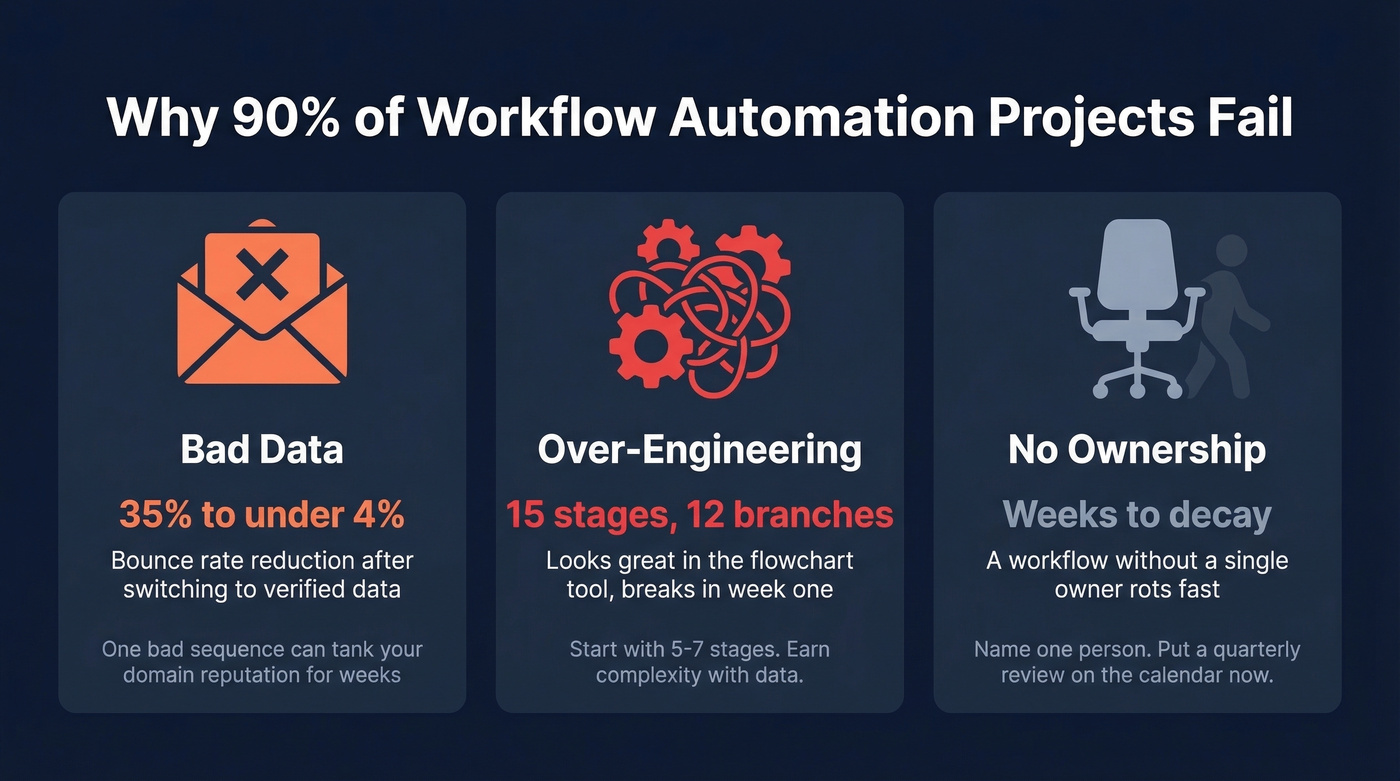
Bad data is the silent killer. Your SDR just ran a 500-contact sequence. 180 emails bounced. Your domain reputation tanks, deliverability craters, and the next three campaigns underperform even if the data is clean. This is entirely preventable. Prospeo's 98% email accuracy and 7-day data refresh cycle mean contacts are verified before they enter your workflow - not after they've already bounced. Meritt went from a 35% bounce rate to under 4% after switching their data layer. That's the difference between a workflow that compounds and one that self-destructs. (If you want benchmarks and fixes, track it like a real metric: email bounce rate.)
Over-engineering kills adoption. Fifteen stages, twelve branching conditions, four approval gates. The workflow looks beautiful in the flowchart tool and breaks the first week because reps can't follow it. Complexity is earned, not designed. Start with 5-7 stages and add branches only after you've got enough data to see patterns.
No ownership means slow decay. A workflow without a single owner - someone who reviews performance, updates exit criteria, and kills dead branches - decays within weeks. Name one person. Put a quarterly calendar hold in now.
Mapping & Process Configuration
Before you automate anything, map your sales workflow visually. This forces you to document every trigger, decision point, and handoff, exposing gaps that are invisible when the process lives only in people's heads.
Start by sketching the current state: how deals actually move today, not how you wish they moved. Interview reps, pull CRM data, and identify where deals stall or skip stages. Then design the future state with the exit criteria from the seven stages above. Let's be honest - most teams skip this step because it feels tedious, and then they wonder why their automation doesn't match reality.
Process configuration in your CRM should mirror this map exactly. If your CRM stages don't match your documented workflow, reps will default to whatever is easiest, which usually means skipping stages and entering garbage data. Map it first on paper, then configure it in the tool. The order matters. (If you’re rebuilding stages anyway, use a sales process optimization checklist.)
Tools & Pricing
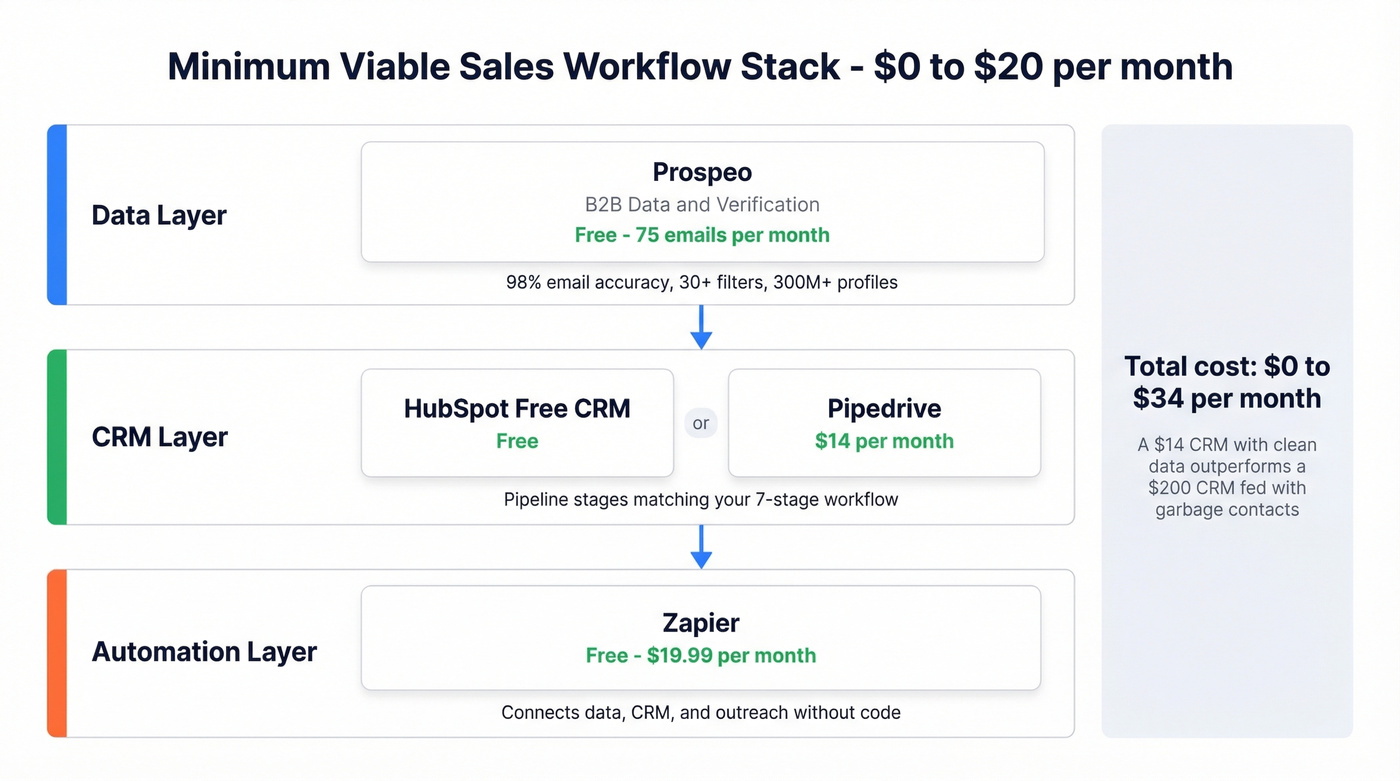
You don't need 15 tools. You need 3-4 that integrate cleanly. Almost two-thirds of reps report being overwhelmed by too many tools, and adding another login doesn't fix a broken process.
| Tool | Category | Starting Price | Best For |
|---|---|---|---|
| Prospeo | B2B Data & Verification | Free (75 emails/mo) | Verified contacts for workflows |
| HubSpot Sales Hub | CRM + Automation | Free; paid from ~$20/mo | SMB all-in-one CRM |
| Pipedrive | CRM | $14/mo | Simple pipeline management |
| Close | CRM + Calling | $25/mo | Inside sales teams |
| Apollo.io | Engagement + Data | Free; ~$49/mo/user | Outbound at scale |
| Salesforce | CRM | ~$75/mo/user | Enterprise pipelines |
| Reply.io | Sales Engagement | $49/mo | Multi-channel sequences |
| Outreach.io | Sales Engagement | ~$100+/mo/user | Enterprise engagement |
| Zapier | Automation Connector | Free; $19.99/mo | No-code tool bridging |
| Gumloop | AI Sales Agents | Free; $37/mo | AI-powered workflows |
Gumloop is worth watching if you want AI agents that handle prospect research and CRM updates autonomously - workflow execution without a human in the loop. Skip it if you're not comfortable with AI making decisions on your behalf yet; the tech is promising but still early.
If your average deal size is under $15k, you almost certainly don't need Salesforce or Outreach-level tooling. A $14/mo CRM with clean, verified data outperforms a $200/mo CRM fed with garbage contacts every single time. The data layer is the one place you can't afford to cheap out. (If you’re comparing providers, start with these data enrichment services.)
Stack by company size:
SMB ($0/mo): HubSpot free CRM + Prospeo free tier for 75 verified emails/month + Zapier free. A CRM, clean data, and basic automation for zero dollars. In our experience, this stack handles the first 6-12 months of outbound for most early-stage teams without any friction.
Mid-market (~$200-$600/mo per rep): Salesforce or HubSpot paid + a verified data platform for enrichment + Outreach or SalesLoft for sequencing.
Enterprise ($1,000+/mo per rep): Salesforce + ZoomInfo or equivalent for data + Outreach + an enablement layer like Gong or Highspot.
Automation can't fix a 35% bounce rate. Prospeo's 5-step verification and 7-day data refresh cycle mean your sequences actually reach real inboxes. Teams using Prospeo book 26% more meetings than ZoomInfo users - because the workflow runs on data that's accurate this week, not last month.
Your workflow moves deals. Prospeo makes sure someone's on the other end.
How to Keep Your Workflow Running
Building the workflow is the easy part. Keeping it alive is where most teams fail.
Assign a single workflow owner per team. Not a committee. One person accountable for performance and iteration. The consensus on r/salesops is that shared ownership of workflows is effectively no ownership - and our experience backs that up.
Review quarterly, minimum. Audit every stage for conversion rate, time-in-stage, and bounce rate. If a stage converts poorly, the exit criteria or content feeding it need work. (A simple pipeline health dashboard makes this review 10x faster.)
Audit for time waste. Any process where your team spends more than 15% of their time is a candidate for automation or elimination. When budget is tight, start with the highest-volume manual task and automate that one first.
Build exception handling. What happens when a lead doesn't fit any branch? When a deal skips a stage? Workflows need escape valves, not just happy paths.
Track bounce rate as a workflow KPI. If your outbound bounce rate creeps above 5%, your data layer is rotting and your workflow is burning domain reputation with every send. (If you’re scaling volume, set guardrails around email velocity too.)
The teams that treat workflows like living systems - measured, iterated, owned - consistently outperform the ones that build once and walk away.
FAQ
What is a sales workflow?
A sales workflow is the automated execution layer that operationalizes your strategy - the triggers, tasks, routing rules, and handoffs that move a deal through each stage without manual intervention. It sits on top of your sales process and turns it into repeatable daily action.
How is it different from a sales process?
A sales process defines the stages a deal moves through. A workflow is the automated execution layer - triggers, tasks, and handoffs that operationalize each stage. The process is the map; the workflow is the engine that drives deals along it.
How many stages should it have?
Start with seven. That's the sweet spot for most B2B teams. Companies with complex enterprise deals may need 8-9, but adding stages without data to justify them creates friction. Build lean, then expand based on conversion metrics.
What's the fastest way to automate one?
Start with your CRM's built-in automation, connect a verified data platform for clean contacts, then use Zapier to bridge gaps between tools. You can have a working automated workflow running in an afternoon for $0.
Why do automated workflows fail?
Bad data and over-engineering cause most failures. 90% of automation projects fail - and in sales, stale contacts and overly complex routing are the fastest path to breakdown. Fix the data layer first, simplify second, assign a single owner third.