

Your bounce rate just spiked to 8% after someone uploaded a purchased list. Sequences are paused, your ops lead is panicking, and you're searching "sender score" to figure out how bad the damage really is. With roughly 392.5 billion emails sent daily in 2026, mailbox providers have zero patience for senders who can't keep their house clean - and your sender score is one of the first things that reflects it.
What Is Sender Score?
Sender Score is a 0-100 rating for your sending IP address, functioning like a percentile ranking against other IPs. A score of 85 means you're outperforming 85% of tracked senders.
Return Path originally launched the metric in 2005. Validity acquired Return Path in 2019 and folded the technology into its broader platform. The old dashboard is gone, but Sender Score lives on at senderscore.org as a free lookup tool.
Scores are calculated on a rolling 30-day average, drawing data from the Validity Data Network - a cooperative of 80+ mailbox and message security providers sharing complaint, trap, and deliverability data. Think of it as a credit bureau for email senders. Your score reflects how the broader ecosystem perceives your sending behavior over the past month, not a single campaign or a single day.

How Sender Score Is Calculated
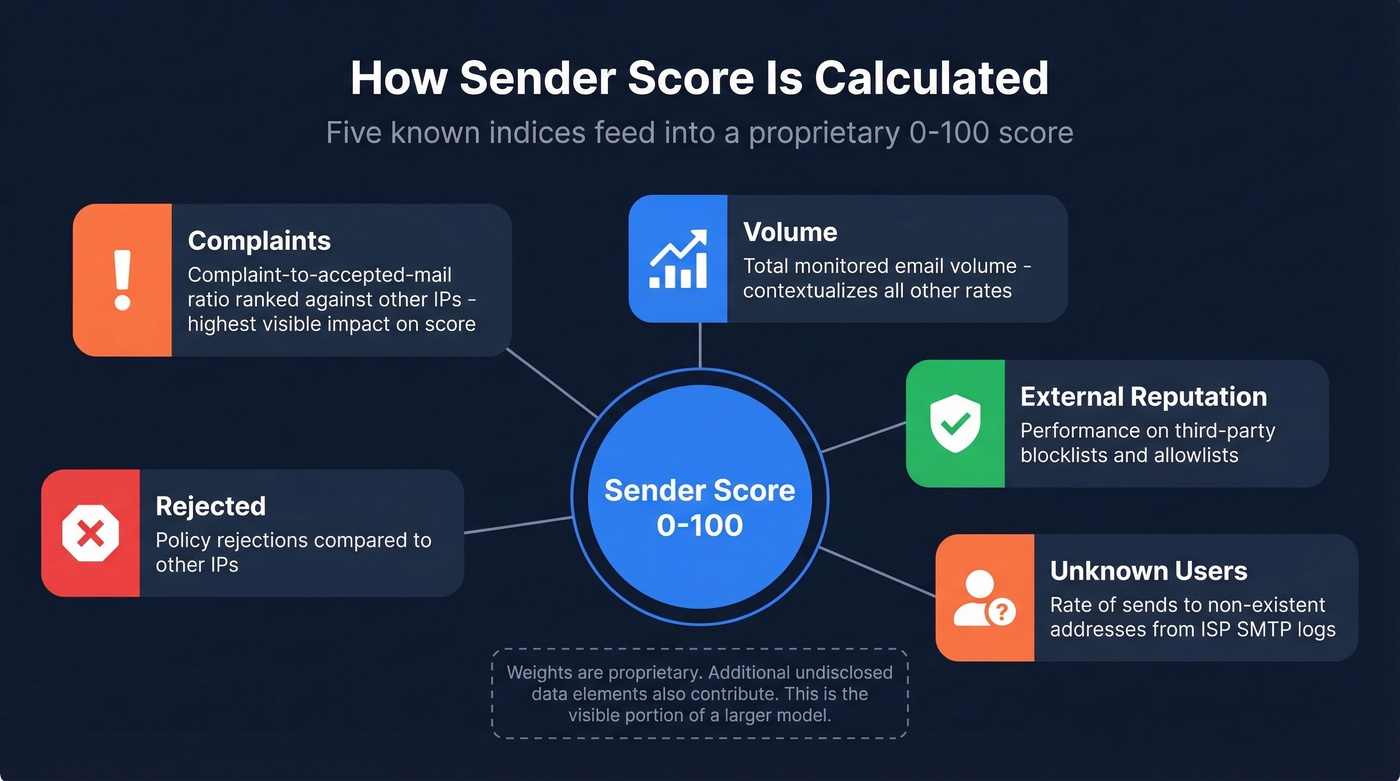
Validity publishes five component indices that feed the score but doesn't disclose the weights. The formula is proprietary, and additional data elements beyond these five also contribute.
| Index | What It Measures |
|---|---|
| Complaints | Complaint-to-accepted-mail ratio, ranked against other IPs |
| Volume | Total monitored volume; contextualizes complaint rates |
| External Reputation | Performance on third-party blocklists and allowlists |
| Unknown Users | Rate of sends to non-existent addresses (from ISP SMTP logs) |
| Rejected | Policy rejections compared to other IPs |
The lack of published weights is frustrating but intentional - Validity doesn't want senders gaming individual factors. In practice, complaints and unknown users have the most visible impact on score movement. Volume acts as a contextualizer: a sender doing 500K emails/month with 50 complaints looks very different from one doing 500 emails/month with the same 50 complaints.
This isn't a simple average of five numbers. Validity has said the algorithm includes data elements beyond these indices, so don't treat the table above as a complete picture. It's the visible portion of a larger model. For a deeper breakdown, see the algorithm includes data elements beyond these indices.
What's a Good Score?
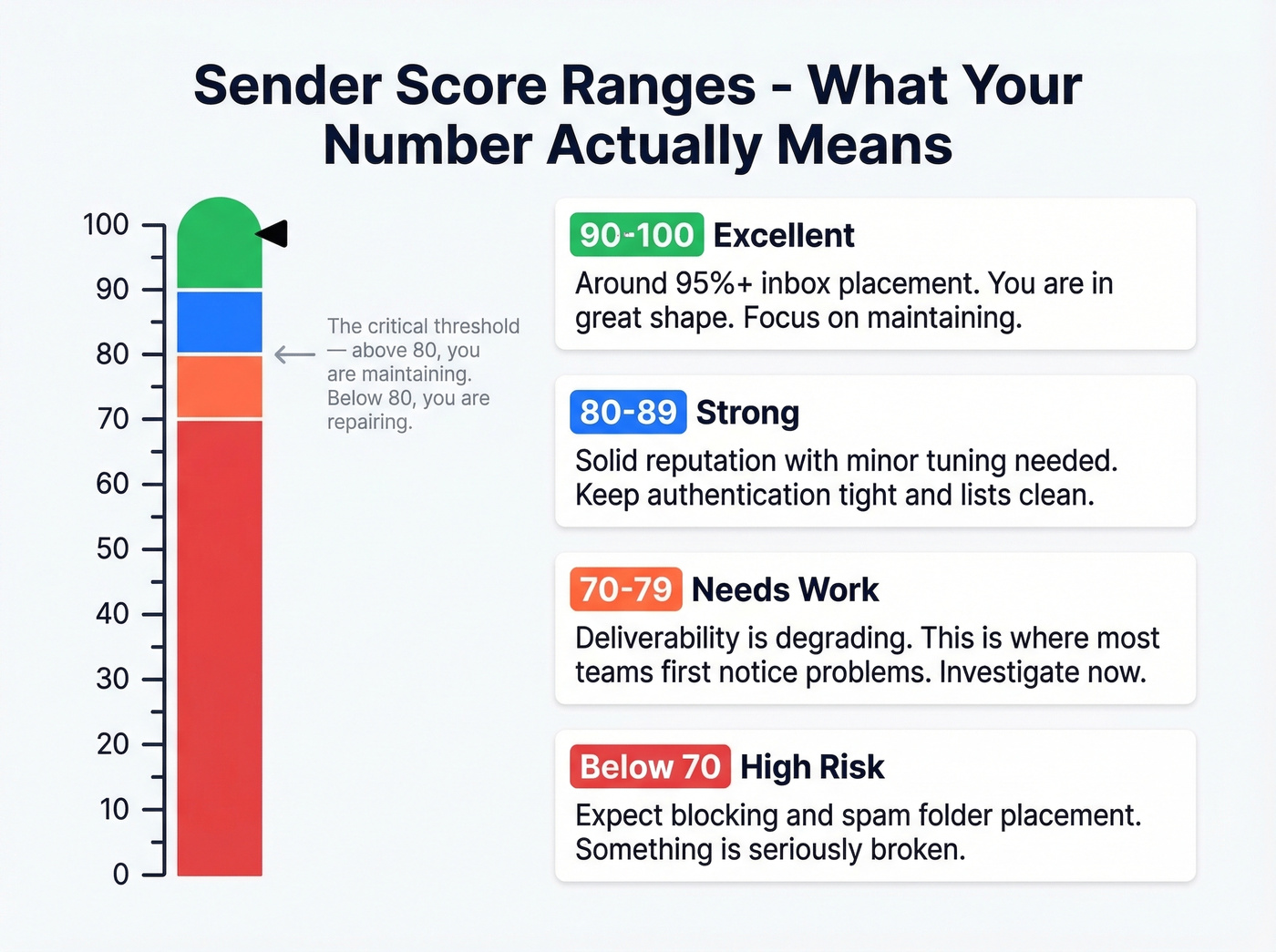
The inbox placement percentages below are directional rules of thumb, not hard science - but they're useful for setting expectations.
| Score Range | Rating | What It Means |
|---|---|---|
| 90-100 | Excellent | ~95%+ inbox placement; you're in great shape |
| 80-89 | Strong | Solid reputation; minor tuning helps |
| 70-80 | Needs work | Deliverability is degrading; investigate now |
| Below 70 | High risk | Expect blocking and spam folder placement |
Above 80, your priority is maintaining what you've built - keep authentication tight, lists clean, and complaint rates low. In our experience, the 70-80 range is where most teams first notice deliverability problems. Something specific is dragging you down, and the improvement checklist below will help you find it. If you want a dedicated explainer, start with What's a Good Score?.
Below 70? You probably already know things are broken.
IP Reputation vs Domain Reputation
These are related but distinct concepts, and confusing them leads to misdiagnosis.
Domain reputation is tied to the domain in your From address and DKIM signature - it's about who sent the message. IP reputation is about where the message came from - the physical sending server. Sender Score specifically measures IP reputation.
That distinction matters because if you're on a shared IP (common with ESPs), other senders on that same IP can tank your reputation along with theirs. You did nothing wrong, but you're guilty by association. If you send enough volume consistently and need tighter control, a dedicated IP helps. For lower-volume senders, shared IPs are often fine - just know the risk exists and monitor accordingly. (Related: shared IP vs dedicated IP.)

Your sender score drops when you hit unknown users and rack up bounces. Prospeo's 5-step email verification - with catch-all handling, spam-trap removal, and honeypot filtering - delivers 98% accuracy. Teams switching from other providers cut bounce rates from 35%+ to under 4%.
Stop letting bad data destroy your IP reputation.
Sender Score vs Google Postmaster vs Microsoft SNDS
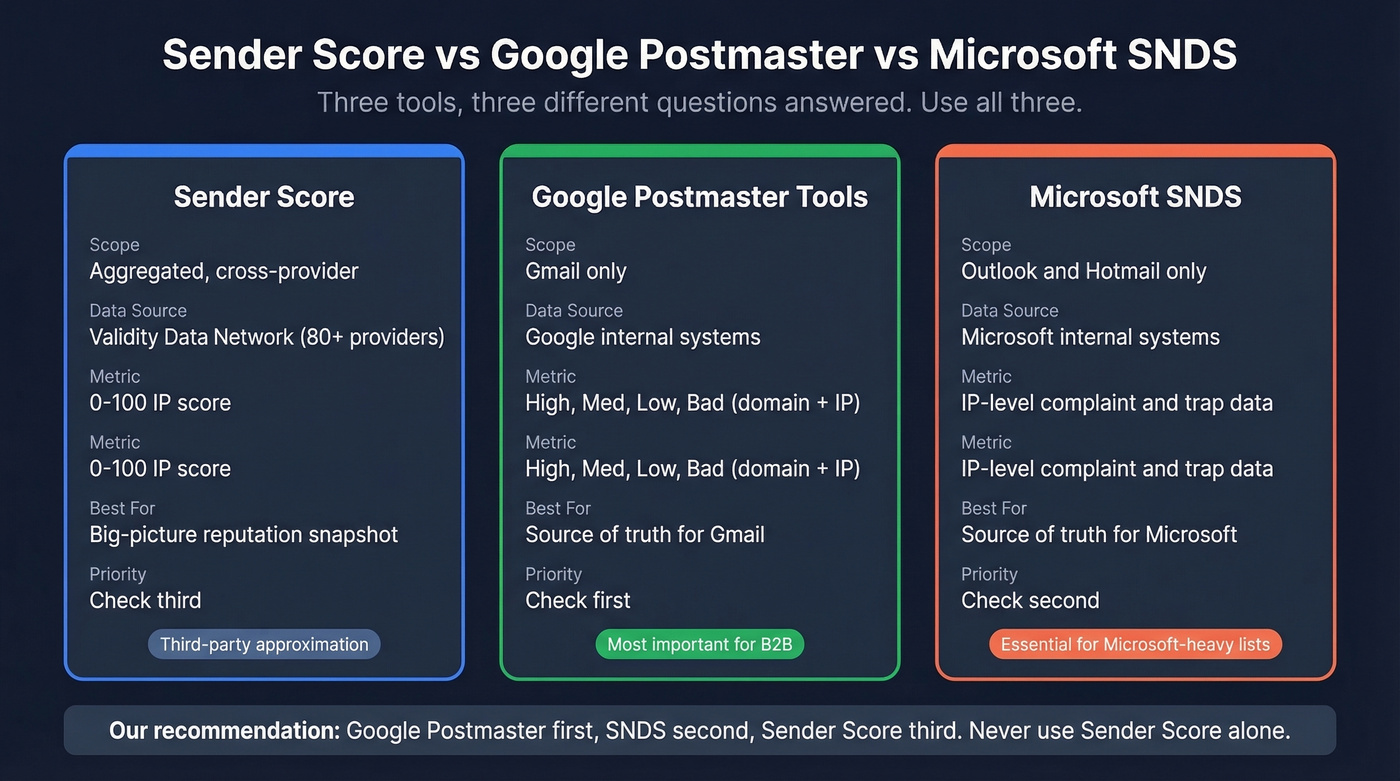
These three tools answer different questions. Using only one gives you an incomplete picture.
| Attribute | Sender Score | Google Postmaster | Microsoft SNDS |
|---|---|---|---|
| Scope | Aggregated, cross-provider | Gmail only | Outlook/Hotmail only |
| Data source | Validity Data Network (80+ providers) | Google's internal systems | Microsoft's internal systems |
| Metric type | 0-100 IP score | High/Med/Low/Bad (domain + IP) | IP-level complaint + trap data |
| Best for | Big-picture reputation snapshot | Source of truth for Gmail | Source of truth for Microsoft |
Here's the thing: if you only check one, check Google Postmaster Tools. It's the source of truth for Gmail, which is where most B2B emails land. Microsoft SNDS comes second. Sender Score comes third as a useful aggregated view, but it's a third-party approximation, not a provider-native signal. If you need the full workflow, use our Google Postmaster Tools guide.
We've seen teams obsess over their Sender Score while ignoring Postmaster Tools entirely. That's backwards. Check all three, in that order: Google Postmaster, SNDS, then Sender Score.
Why a High Score Doesn't Guarantee Inbox
You've got a Sender Score of 85, SPF/DKIM/DMARC all passing, clean lists - and Google Postmaster Tools shows your domain reputation as "Low." What gives?
The disconnect happens because Sender Score is a third-party aggregation, while Gmail, Microsoft, and Yahoo each run their own internal reputation systems. A high Sender Score means you look good to the Validity Data Network. It doesn't mean Gmail agrees. Reddit threads in r/emaildeliverability are full of senders describing exactly this scenario - excellent Sender Score, campaigns still landing in Promotions or getting flagged as untrusted.
There's also a real low-volume limitation. If you're only sending a small number of emails, Sender Score won't have enough signal to be a useful diagnostic. For small senders doing under a few hundred emails per week, skip Sender Score entirely and focus on Google Postmaster and SNDS.
Community sentiment on Reddit is consistently skeptical of Sender Score as a standalone metric. The consensus: use it alongside provider-native tools, never instead of them. Validity doesn't publish weights and sells Everest as its paid platform. Treat Sender Score as one data point among several, not your primary diagnostic. If you're building a monitoring stack, see email deliverability monitoring.
Our hot take: Sender Score is the most over-monitored, under-useful metric in email ops. It's fine as a monthly gut check. But if you're making decisions based on it instead of Google Postmaster Tools, you're optimizing for the wrong scoreboard.
How to Improve Your Sender Score
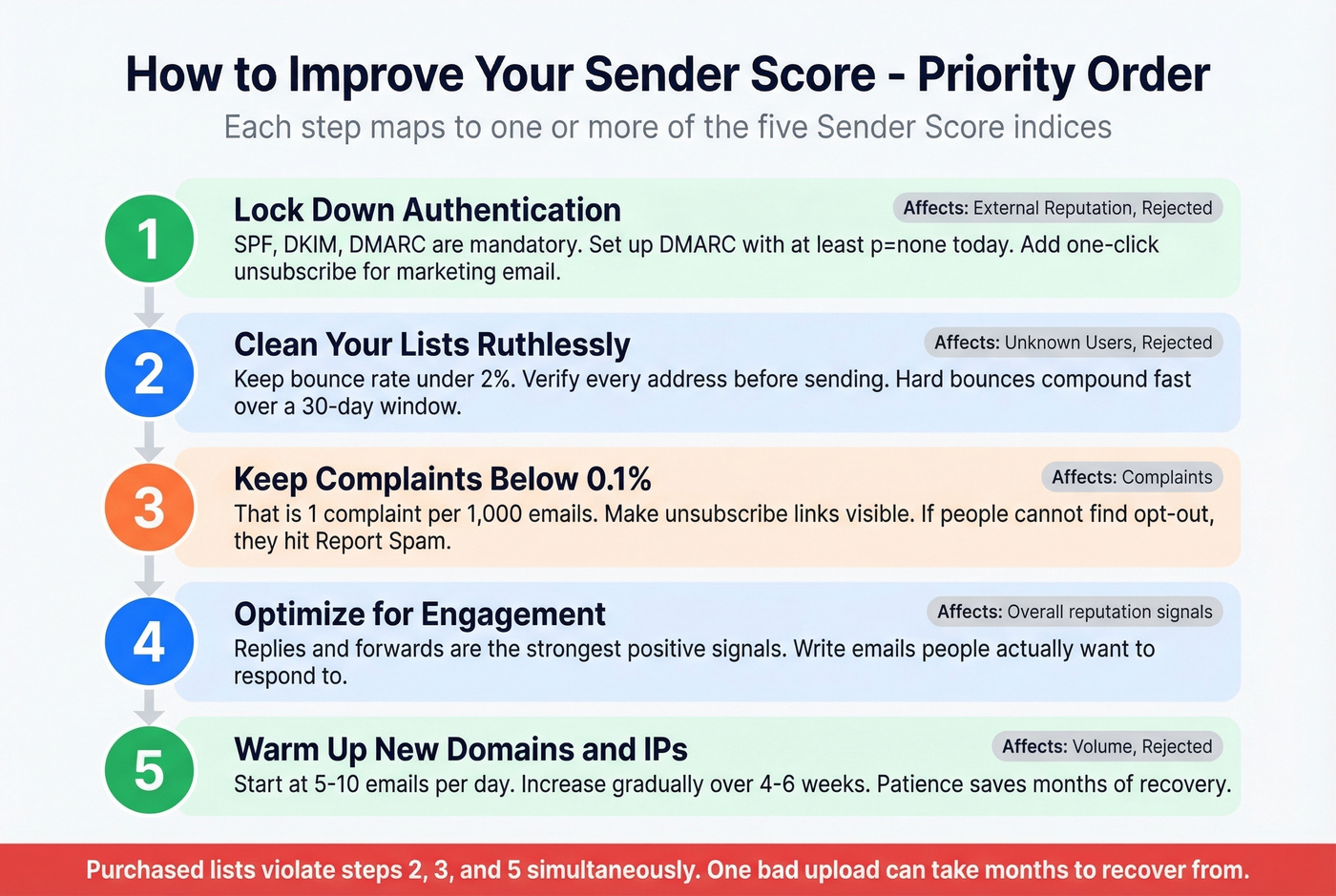
Every item here maps to at least one of the five indices, listed in priority order.
1. Lock Down Authentication
SPF, DKIM, and DMARC aren't optional. Under the bulk-sender rules that took effect in 2025, all three are mandatory for high-volume senders, along with RFC 8058 one-click unsubscribe for marketing email. If you haven't set up DMARC with at least a p=none policy, do that today. It directly affects the External Reputation and Rejected indices. If you need a step-by-step, use our email authentication guide.
2. Clean Your Lists Ruthlessly
Unknown Users and Rejected - two of the five indices - are directly caused by sending to invalid addresses. Keep your bounce rate under 2%. Every hard bounce signals to mailbox providers that you don't know who you're emailing, and that signal compounds fast over a 30-day window. (Benchmarks: average email bounce rate.)
We use Prospeo's email finder for this - its 5-step verification catches invalid addresses, spam traps, and honeypots before they hit your sending infrastructure. But any solid verification tool will reduce bounce-driven score damage. Verify before you send, every time. If you’re troubleshooting bounces, start with email bounce codes.
3. Keep Complaints Below 0.1%
That's 1 complaint per 1,000 emails. Google and Yahoo enforce a 0.3% spam rate threshold, but best practice is staying well under that. Make unsubscribe links visible and functional - if people can't find the opt-out, they hit "Report Spam" instead. It's that simple. For compliance details, see email unsubscribe requirements.
4. Optimize for Engagement
Replies and forwards are the strongest positive signals you can send to mailbox providers. Write emails people actually want to respond to. Personalization, relevance, and brevity all matter here, and generic templates that read like they were written for 10,000 people at once will get treated accordingly. (More on this: what is email engagement.)
5. Warm Up New Domains and IPs Properly
Start at 5-10 emails/day and increase gradually over 4-6 weeks. Spiking from 10 to 10,000 emails overnight is the fastest way to crater a new IP's reputation. Patience here saves you months of recovery later. If you want a schedule you can follow, use our email warm up schedule and domain warm-up for cold email playbook.
Let's be honest about that purchased list scenario from the intro: it violates rules 2, 3, and 5 simultaneously. Unknown users spike, complaints spike, volume spikes - three indices hit at once. One bad list upload can take months to recover from, and we've watched teams burn through multiple domains learning this lesson the hard way.
Shared IPs are risky. Purchased lists are worse. The fastest way to rebuild a damaged sender score is to only send to verified addresses. Prospeo refreshes 300M+ profiles every 7 days - not every 6 weeks - so you're never emailing stale contacts that spike your unknown user rate.
Clean data at $0.01 per email beats repairing a wrecked sender score.
Free Reputation Monitoring Tools
You don't need to spend money to monitor sender reputation. Eight free tools, each covering a different angle:
Google Postmaster Tools - Gmail domain/IP reputation, spam rate, authentication pass rates. Your first stop for understanding how Gmail treats your mail.
Microsoft SNDS - IP-level reputation and complaint rates for Outlook/Hotmail. Essential if your list skews Microsoft.
Sender Score - Aggregated 0-100 IP score on a 30-day rolling window. Good for big-picture snapshots, less useful for diagnosing specific problems.
MXToolbox - Checks 100+ DNS-based blacklists plus mail server health. Free for basic lookups; their paid Delivery Center starts around $129/mo.
MultiRBL - Scans 300+ blacklists in one query. Broader coverage than MXToolbox for blocklist monitoring.
BarracudaCentral - Reputation lookup plus delisting instructions if you're flagged.
Talos Intelligence (Cisco) - Classifies your IP as Good, Neutral, or Poor. Relevant if recipients use Cisco-powered email security.
Mail-Tester - Send a test email, get a detailed SPF/DKIM/content breakdown. Perfect for pre-send diagnostics on new templates.
Our recommended cadence: check Google Postmaster and SNDS weekly, run a Sender Score and MXToolbox check monthly, and use Mail-Tester before launching any new campaign or template. If you want a broader tool stack, see our roundup of email deliverability tools.
FAQ
Is Sender Score free?
Yes. Check your IP at senderscore.org for free. Validity's paid platform Everest adds historical trends and competitive benchmarking, but the core lookup costs nothing.
How often does it update?
Scores recalculate on a rolling 30-day average. A single bad send won't crater your score overnight, but sustained problems compound quickly across the window.
Does Gmail use Sender Score for filtering?
No. Gmail uses its own internal reputation system. Check Google Postmaster Tools for Gmail's actual view of your domain and IP reputation.
What if my volume is too low for an accurate score?
Known limitation. Low-volume senders don't generate enough data for a reliable score. Under a few hundred emails per week, focus on Google Postmaster Tools and Microsoft SNDS instead.
Can bad email data lower my Sender Score?
Absolutely. Invalid addresses spike your unknown-user and rejection rates - two of the five indices. Verifying emails before sending prevents this damage at the source. Clean data is the single highest-impact fix for a declining score.