

Automated Email Campaigns: The Complete 2026 Playbook
392.5 billion emails hit inboxes every day in 2026. With 4.73 billion global email users and the average office worker drowning in 121 business emails before lunch, your automated email campaigns need to earn every open. Most don't - because teams build elaborate workflows on top of garbage data and unauthenticated domains.
Automation without clean data is just automated failure. A welcome series with a 50% open rate beats eight half-built flows collecting dust in your ESP.
What You Need Before Anything Else
Nail these three, in order:
- Authenticate your sending domain. SPF, DKIM, DMARC - all three. Skip this and you're lighting cash on fire.
- Verify your list. Run your contacts through an email verification tool before they touch any automation. Bounces above 2% tank your sender reputation fast. (If you need a deeper breakdown, start with email bounce rate.)
- Build three automations first - welcome series, abandoned cart (or lead nurture for SaaS), and re-engagement. Get these running well before layering in complexity.
Three flows, clean data, authenticated domain. Everything else is optimization.
What Is Email Automation?
An automated email campaign fires when a person does something - or doesn't do something - without you pressing send. The mechanics break down into three parts: triggers, conditions, and actions.
Triggers, Conditions, and Actions
A trigger starts the workflow. Someone signs up, abandons a cart, visits a pricing page, or hits a birthday. A condition filters the audience: did they open the last email? Are they in the enterprise segment? An action is what happens next: send an email, wait two days, update a CRM field, split-test a subject line. (For subject line testing ideas, see email subject line examples.)
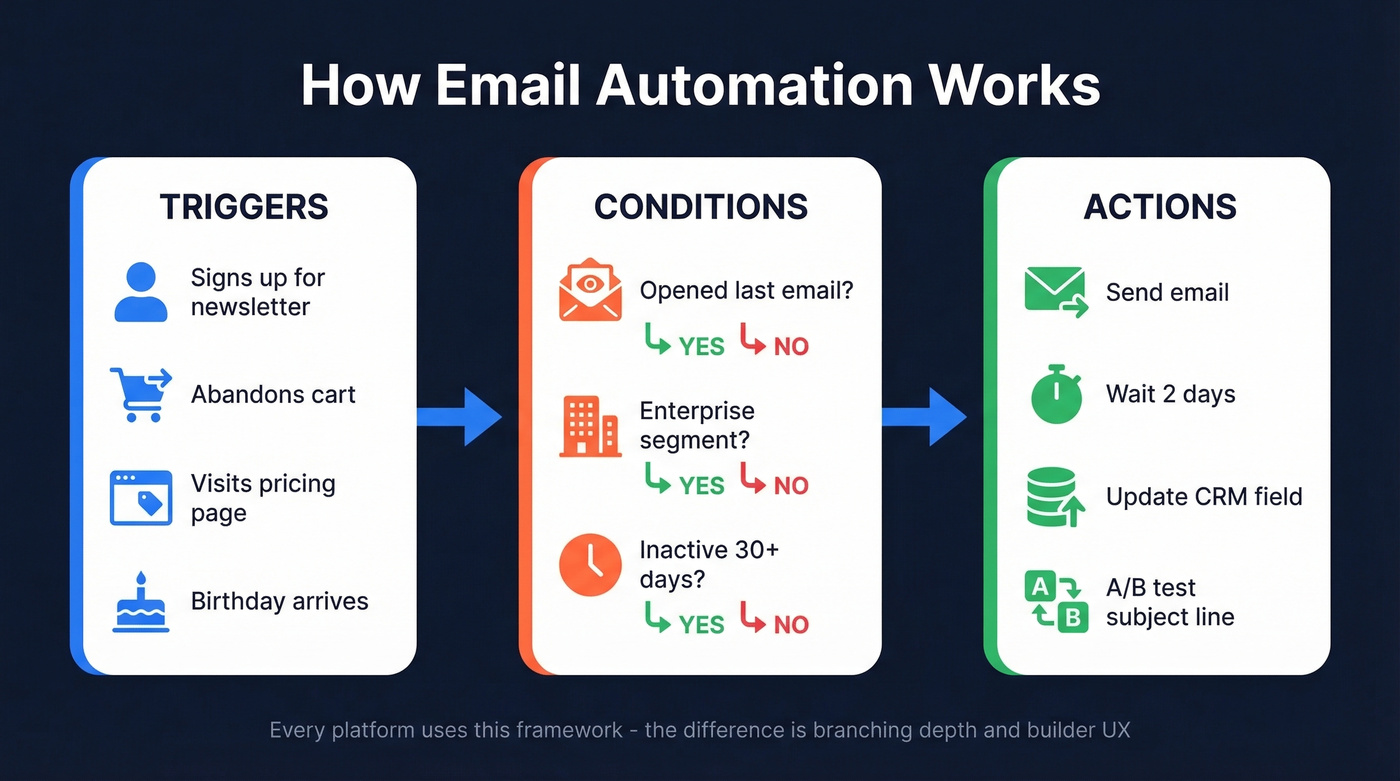
Every automation platform uses this framework. The difference is how deep the branching goes and how cleanly the builder lets you visualize it.
Why Automation Outperforms Manual Sends
The numbers aren't close. Klaviyo's 2026 benchmark data across 183,000+ customers tells the story: automated flows generate roughly 41% of total email revenue from just 5.3% of sends. Revenue per recipient runs about 18x higher for flows than for manual campaigns. Click rates hit 5.58% versus 1.69% for batch sends, and the placed order rate is 13x higher.
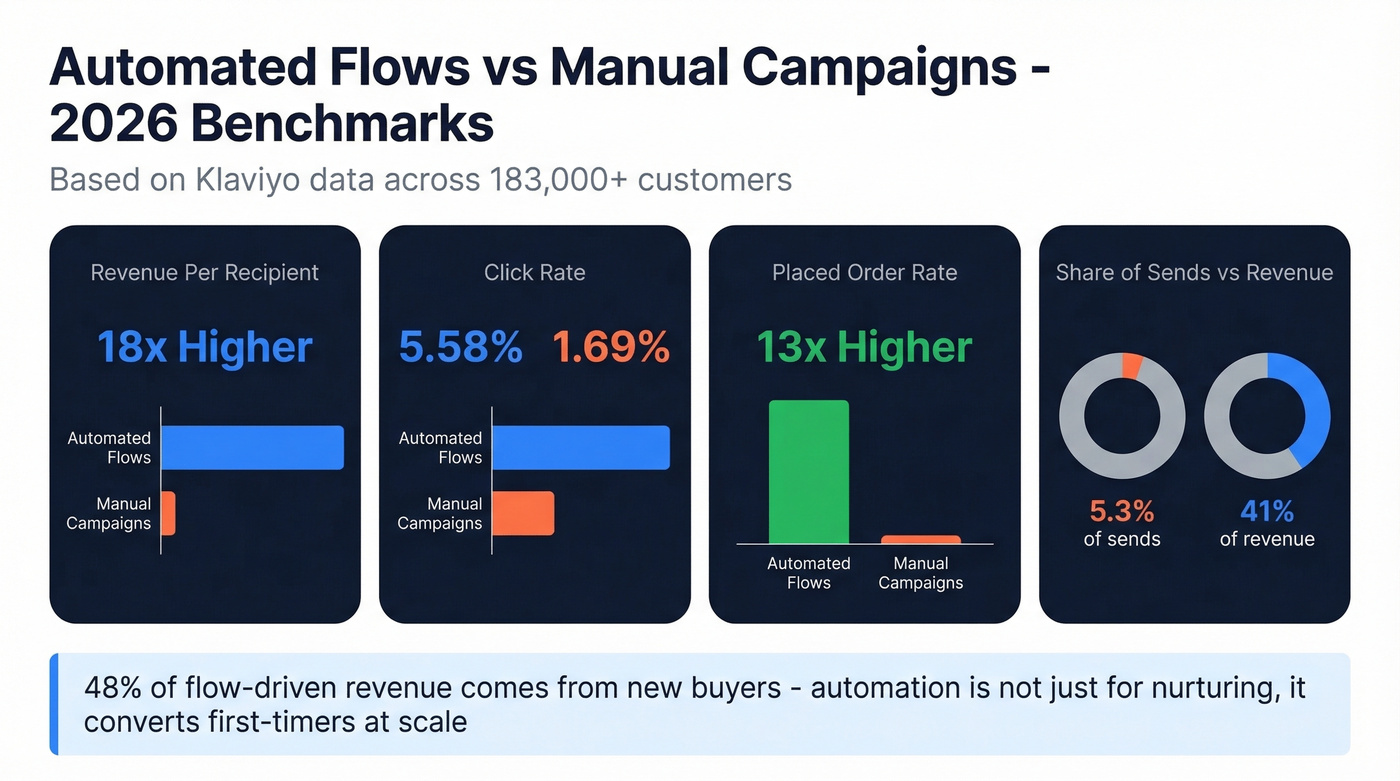
Here's the part most people miss: about 48% of flow-driven revenue comes from new buyers. Automation isn't just nurturing existing customers - it's converting first-timers at scale.
8 Campaigns That Drive Revenue
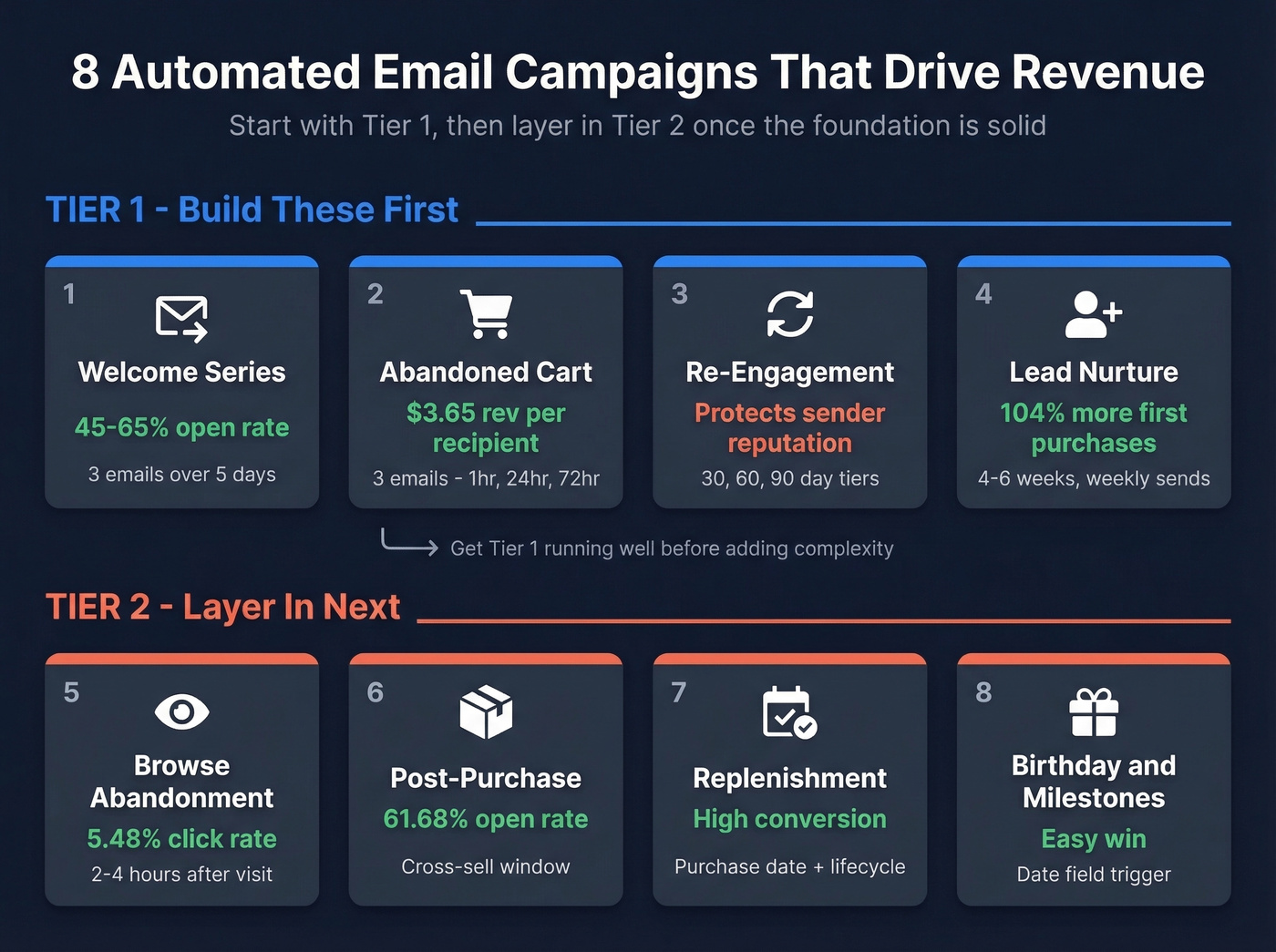
Most guides list 10+ flows you "need." That's counterproductive. Start with the Tier 1 flows, then layer in Tier 2 once the foundation is solid. A/B test subject lines and send times within each flow from day one - the data compounds faster than you'd expect. (If you want a tighter framework for behavior-based targeting, use targeted email campaigns.)
Welcome Series
Your highest-engagement window. Send the first email immediately on signup, follow up on day 2 with value, and close the loop on day 5 with a clear CTA. Target a 45-65% open rate - anything below 40% means your subject lines or sender reputation need work.
Ask for a reply in email one. That reply signals engagement to inbox providers and boosts deliverability from the start.
Abandoned Cart Recovery
The benchmark dataset pegs this at $3.65 revenue per recipient - the highest of any automated flow. First email at 1 hour (reminder), second at 24 hours (social proof), third at 72 hours (incentive if you're willing to discount). Three emails is the sweet spot. Go beyond that and you're training customers to wait for coupons.
Browse Abandonment
Lower intent than cart abandonment, but click rates still average 5.48%. Fire 2-4 hours after a product page visit with no add-to-cart. Use product recommendations rather than hard sells - the person was browsing, not buying.
Post-Purchase
61.68% open rates. That number alone should tell you why this flow matters. The buyer is still engaged, so this is your cross-sell window - recommend complementary products or ask for a review. Send immediately after purchase confirmation. (If you’re building this into lifecycle logic, personalized drip campaigns can help.)
Re-Engagement / Win-Back
The consensus on r/smallbusiness treats this as a survival tool, and they're right. Set inactivity tiers at 30, 60, and 90 days. Run a re-engagement sequence before removing anyone from your list - this is the automation that keeps your sender reputation intact. Run it quarterly.
Lead Nurture Sequence
Remix ran a 3-step nurture sequence: save preferences, showcase brands, highlight savings. The result was a 104% jump in first purchases versus the previous quarter. Nurture sequences don't need to be long - 4-6 weeks of weekly emails - they need to be relevant. (For B2B teams, pair this with a clear ideal customer profile.)
Replenishment & Renewal Reminders
Trigger based on purchase date plus product lifecycle. Someone bought a 90-day supply? Email them on day 75. High conversion, minimal effort.
Birthday & Milestone Emails
Trigger off a date field. Low volume, high engagement, easy win.
SaaS Flows Most Guides Skip
Ecommerce gets all the automation love. SaaS teams have their own critical flows that most playbooks ignore - and if you run email automation for a B2B product, these are the ones that move the needle.
Onboarding & Activation
Compress time-to-value inside 7 days. If a user hasn't completed the key activation action by day 3-5, fire a nudge email with a single CTA pointing them to that action. Target an 8-15% CTR. We've seen teams build 12-email onboarding sequences that nobody reads past email three. Keep it to 4-5 emails max, each focused on a single job the user needs to accomplish.
Upsell & Churn-Save
Upsell triggers fire on usage milestones - 80% of plan limit, a feature adjacent to a premium tier, or team size growth. Churn-save triggers fire on drop-off signals: declining login frequency, unused features, billing failures. The churn-save email needs to arrive before the cancellation page, not after. (If you want to systematize the signals, use a simple churn analysis model.)

This article makes it clear: bounces above 2% destroy your sender reputation and kill automated campaigns. Prospeo's 5-step email verification delivers 98% accuracy - with catch-all handling, spam-trap removal, and honeypot filtering. At $0.01 per email, cleaning your list before it touches any automation is a no-brainer.
Stop automating bounces. Verify every email before it enters your workflow.
Deliverability: The Real Foundation
You can build the most sophisticated automation in the world. If your emails land in spam, none of it matters. (For a full checklist, see our email deliverability guide.)
This is especially true for automated cold email campaigns, where you're reaching contacts with no prior relationship and inbox providers scrutinize every signal.
Authentication & Compliance
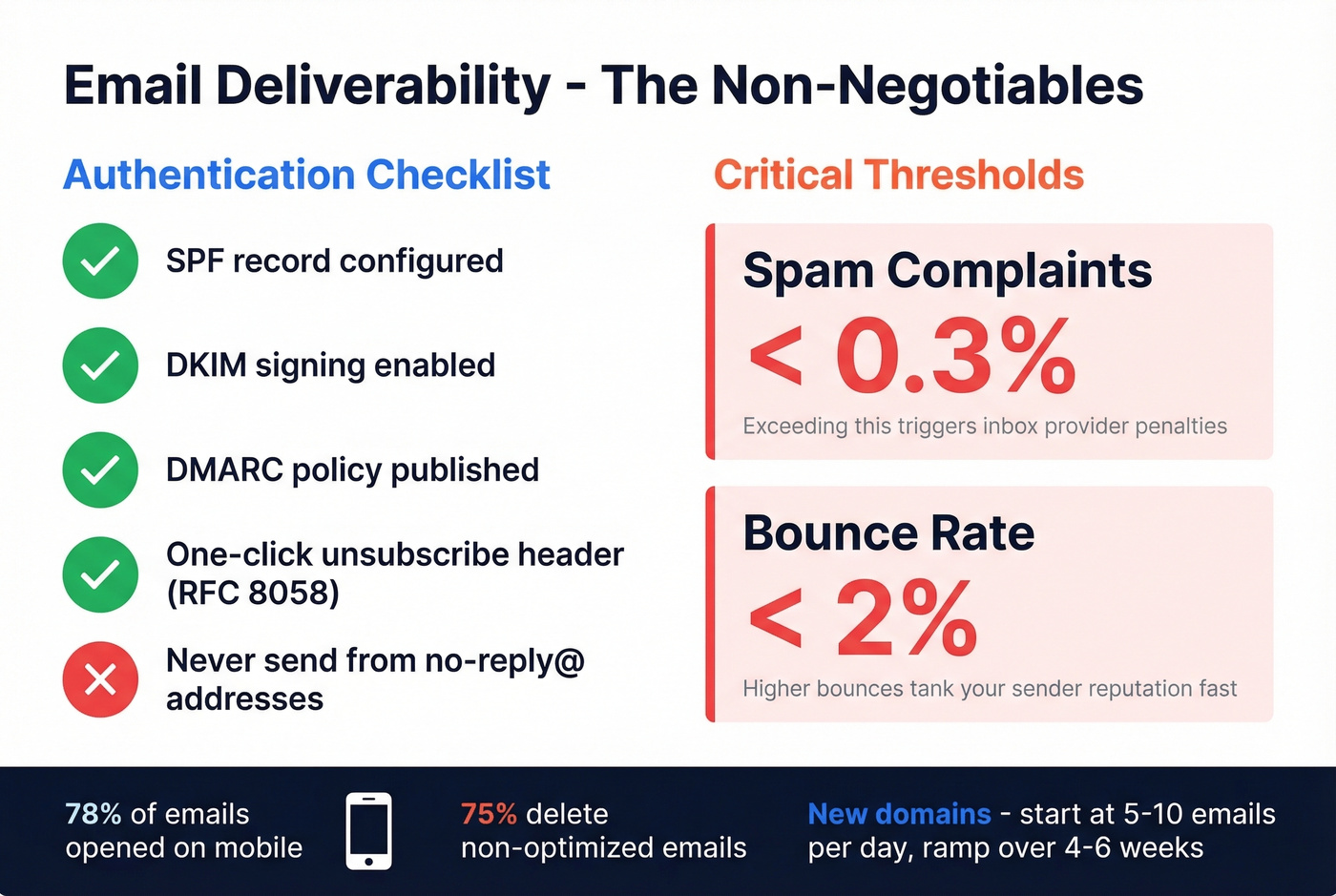
SPF, DKIM, and DMARC are non-negotiable for bulk senders. Google and Yahoo enforce these now, and Microsoft has tightened similar requirements. You also need RFC 8058 one-click unsubscribe headers. If your ESP doesn't handle this automatically, switch ESPs. And send from a real address - no-reply@ signals to inbox providers that you don't want engagement, which is exactly how they'll treat you. (If you’re troubleshooting, start with how to verify DKIM is working.)
Thresholds & Warmup
Keep spam complaints under 0.3% and bounces under 2%. Those aren't suggestions - they're the thresholds that trigger inbox provider penalties. New domains should start at 5-10 emails per day and ramp over 4-6 weeks. (To avoid over-sending, track email velocity.)
Even hitting 90%+ deliverability consistently is hard, as Reddit threads on cold email will tell you. Cold campaign automation demands even more patience during warmup - rushing the ramp is the fastest way to burn a domain.
Mobile-First Design
78% of emails are opened on mobile, and 75% of users delete emails that aren't optimized for their device. Single-column layouts, large tap targets, preview text that works in 40 characters. Design for mobile first, desktop second.
Data Quality Makes or Breaks Automation
Look - you spent two weeks building a 5-email abandoned cart sequence. Open rates: 8%. Bounce rate: 14%. The problem isn't your copy. It's your list. (If you’re fixing list health at the source, data enrichment services can help keep records current.)
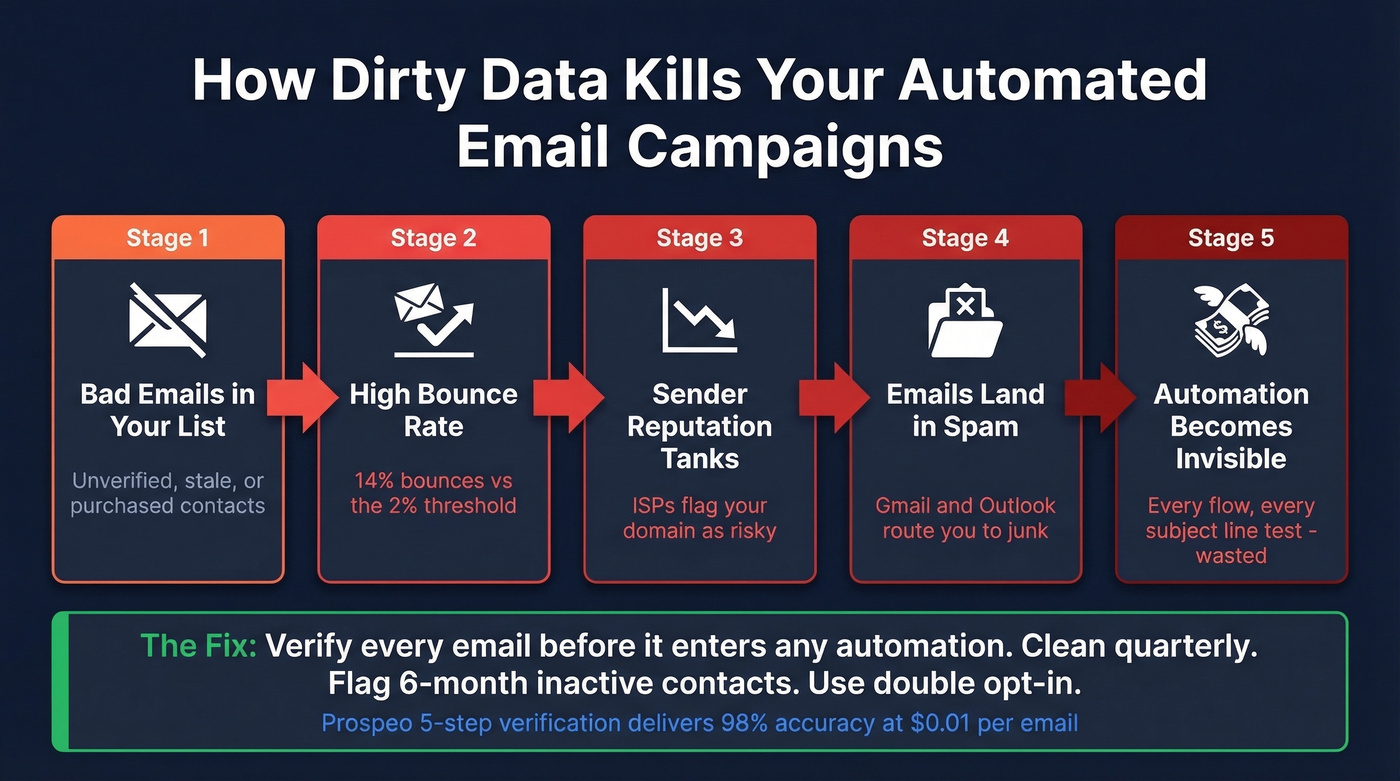
Bad emails bounce, bounces tank your sender reputation, Gmail and Outlook route you to spam, and your automation becomes invisible. Every flow you built, every subject line you tested - wasted because your data was dirty from the start.
Clean your list quarterly. Flag contacts who haven't opened in 6 months. Run a re-engagement campaign before removing them. Use double opt-in as a quality gate for new subscribers. In our experience, teams that verify their list before launching automated email campaigns see 2-3x better deliverability from day one.
For verification, Prospeo runs every email through a 5-step process - syntax check, domain validation, catch-all handling, spam-trap removal, and honeypot filtering - delivering 98% accuracy on verified emails. Stack Optimize built from $0 to $1M ARR using it for client list verification, maintaining 94%+ deliverability and under 3% bounce rates across every client with zero domain flags. (If you’re cleaning risky addresses, spam trap removal is worth understanding.)
The best automated flows fail when they're built on stale data. Prospeo refreshes 300M+ professional profiles every 7 days - not the 6-week industry average. That means your lead nurture sequences, re-engagement campaigns, and cold outreach hit real inboxes with current contact data, not dead addresses that tank deliverability.
Fresh data every 7 days means your automations actually reach real people.
Best Automation Tools for 2026
We evaluated these platforms across automation depth, pricing transparency, and deliverability support. Here's where each one fits.
| Tool | Best For | Starting Price | Automation Depth |
|---|---|---|---|
| ActiveCampaign | SMB all-rounder | $19/mo (1K contacts) | Deep (visual builder, branching, scoring) |
| Klaviyo | Ecommerce | Free to 250; $20/mo | Deep (ecommerce-native triggers) |
| Brevo | Budget teams | Free (300/day); $9/mo | Moderate (solid for basics) |
| MailerLite | Beginners | Free to 500; $15/mo | Basic (simple workflows) |
| HubSpot | CRM-first orgs | $20/mo Starter; $890 Pro | Deep at Pro (Starter caps at 10 actions) |
| Omnisend | Ecommerce (budget) | Free (250); $16/mo | Moderate (pre-built ecom flows) |
| Mailchimp | Legacy users only | Free (250; limited automation) | Moderate (more on paid plans) |
Hot take: Most teams with deal sizes under $15K don't need a $890/mo HubSpot plan or a Klaviyo-level platform. MailerLite or Brevo will carry you further than you think. The money you save is better spent on list quality.
Ecommerce: Klaviyo. The 183K-customer benchmark dataset cited throughout this article exists because no other platform has that depth of ecommerce intelligence.
SMB with complex workflows: ActiveCampaign. Best automation builder under $200/mo, with conditional logic that rivals platforms three times the price. Note that ActiveCampaign's entry-level plan caps you at 5 actions per automation - go Plus or higher.
Just starting out: MailerLite or Brevo. Simple, affordable, sufficient for your first few thousand subscribers.
CRM-first: HubSpot, but only on Professional at $890/mo. Starter is too limited for real automation - that pricing gap is HubSpot's most frustrating feature.
Skip Mailchimp unless you're already locked in. The free plan is very limited for automation, and most teams outgrow it fast. (If you’re already seeing issues, start with Mailchimp deliverability issues.)
5 Mistakes That Kill Your Flows
Over-mailing. Stacking a welcome series, browse abandonment, and a promo campaign on the same contact in the same week. Set frequency caps - two to three emails per week maximum.
No segmentation. Everyone getting the same message is the fastest way to train subscribers to ignore you. Segment by behavior, lifecycle stage, and engagement level at minimum. (A practical starting point is intent based segmentation.)
No sunset policy. Contacts who haven't engaged in 12+ months drag down deliverability. Remove them. A smaller, engaged list outperforms a bloated one every time.
Ignoring authentication. No SPF/DKIM/DMARC means your emails are one complaint spike away from the spam folder.
Weak unsubscribe UX. Burying the unsubscribe link doesn't reduce churn - it increases spam complaints. One click. Done.
How to Set Up Automated Email Campaigns
For teams starting from scratch, here's the step-by-step order that prevents the most common failures:
- Authenticate your domain - configure SPF, DKIM, and DMARC records before sending a single automated message.
- Verify your existing list - remove invalid addresses so your first sends don't crater your reputation.
- Choose a platform that matches your stage (see the tool comparison above).
- Build your welcome series first - it's the highest-ROI flow and gives you baseline engagement data.
- Add one behavior-triggered flow - cart abandonment for ecommerce, lead nurture for SaaS.
- Set frequency caps and a sunset policy from day one so you don't over-mail as you add more flows.
- Monitor deliverability weekly - watch bounce rates, spam complaints, and inbox placement before scaling volume.
Let's be honest: most teams try to launch five flows at once and end up with five mediocre automations instead of one great one. Start with the welcome series, get it performing above 45% open rate, then expand.
FAQ
What's the Difference Between a Drip Campaign and an Automated Email Campaign?
A drip campaign is time-based - day 1, day 3, day 7 - sent regardless of behavior. Automated campaigns include drips but also behavior-triggered flows like cart abandonment and purchase events. Most modern platforms blur the line by letting you add behavioral conditions to time-based sequences.
How Many Emails Should I Send Per Week?
Set frequency caps at two to three emails per contact per week across all active flows. A welcome series might send three in a week; a win-back flow might send one per month. Use suppression rules to prevent overlap between concurrent automations.
What's a Good Open Rate for Automated Emails?
Target 45-65% for welcome series, 40-50% for cart abandonment, and 15-25% for re-engagement. Below these ranges, check deliverability and list hygiene first - the content is rarely the problem.
Can I Automate Cold Email Campaigns?
Yes, but the rules are stricter. You need a warmed domain, verified contact data, and personalized messaging - generic blasts get flagged immediately. Start with low daily volume, ramp gradually, and always include a clear opt-out. For contact verification, Prospeo's free tier gives you 75 email checks at 98% accuracy to validate your list before launch.
Do I Need to Verify My List Before Automating?
Absolutely. High bounce rates from unverified lists tank your sender reputation, which means your automations land in spam regardless of quality. Verify before you automate - even a single campaign sent to a dirty list can trigger inbox provider penalties that take weeks to recover from.