

B2B Buyer Journey Mapping: How to Build One That Actually Gets Used
Your Miro board hasn't been touched since Q1. Color-coded sticky notes, stakeholder swim lanes, the works - and nobody's opened it since the workshop. You're not alone: 67% of customer journey maps fail to drive change. The consensus on r/sales and r/RevOps is even blunter - "boards haven't been updated in months because it's too much work." The problem isn't the map. It's what happens after you build it.
A map that works needs real buyer input, CRM-connected stages, and a plan to keep the data fresh. Let's break down all three.
What Is a Buyer Journey Map?
It's a visual representation of the stages, touchpoints, and decision points a buying committee moves through - from recognizing a problem to signing a contract. Most maps fail because 70% are built without direct customer input. Teams project their own assumptions onto the buyer and produce something that reflects the seller's reality, not the buyer's.
B2B maps differ from B2C in fundamental ways. You're dealing with 6-10 stakeholders per deal, buying cycles that stretch for months, and a non-linear process where committees loop back through stages repeatedly. A single-persona, left-to-right funnel doesn't capture any of that.
Why Mapping Matters in 2026
Buyers have changed faster than most sales orgs have adapted. Gartner's survey of 632 B2B buyers found that 61% prefer a rep-free buying experience, 73% actively avoid suppliers who send irrelevant outreach, and 69% flag inconsistencies between a vendor's website and what sellers actually say.
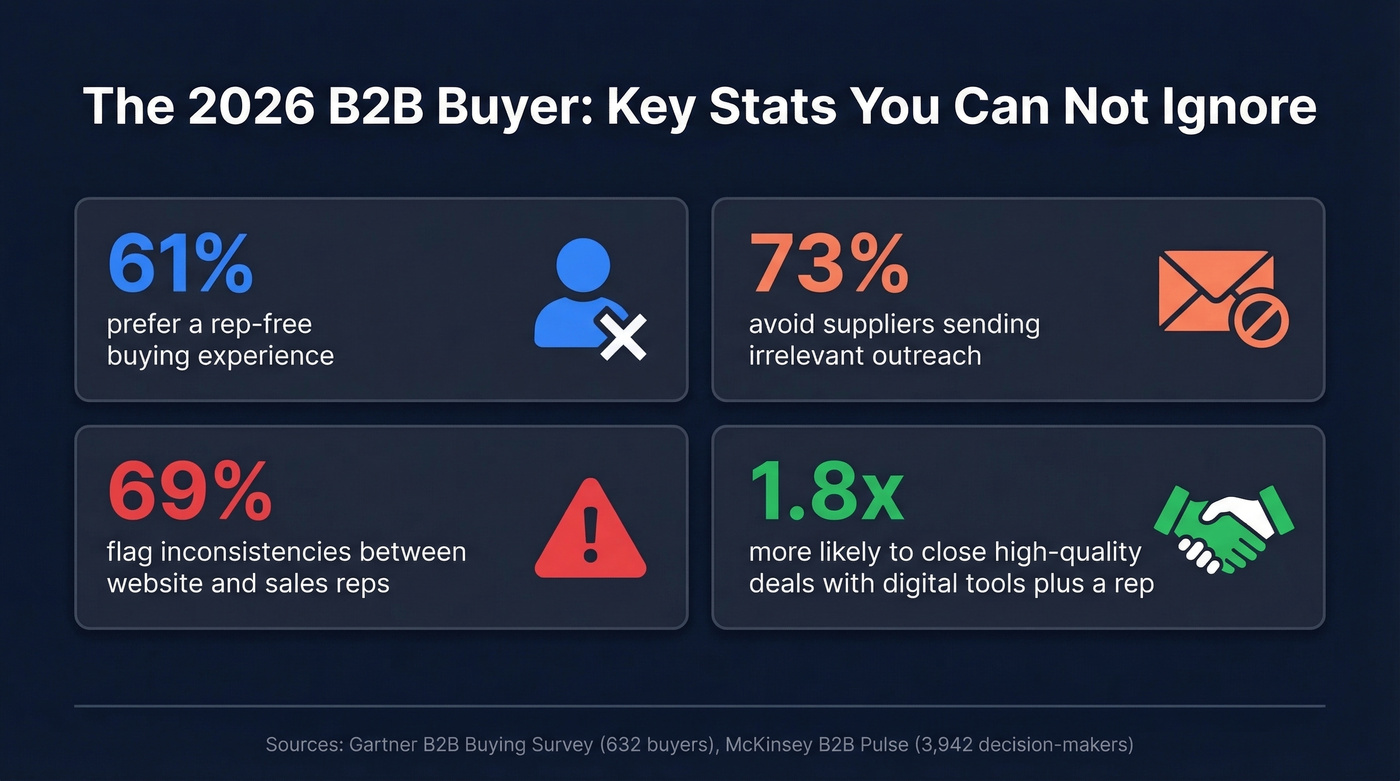
Here's the tension: buyers want self-serve, but deals close faster with human help. Buyers are 1.8x more likely to complete a high-quality deal when they use digital tools alongside a rep. McKinsey's B2B Pulse Survey - 3,942 decision-makers across 13 countries - found 19% of B2B orgs already implementing genAI in buying and selling workflows. Gartner predicts that by 2030, 75% of buyers will swing back toward preferring human-first experiences over AI.
Your journey map needs to account for a hybrid buyer - one who self-serves early, loops back, and wants a human at high-stakes moments. A static, linear funnel diagram won't cut it.
The Five B2B Buyer Journey Stages
Five stages is the sweet spot. Three is too simple to be actionable; eight creates analysis paralysis. Gartner's framework describes buyers as completing six "buying jobs" they loop through - not a clean left-to-right funnel. We've found five stages give you enough granularity to act on without drowning in complexity. Use this filled-in map as your starting template:
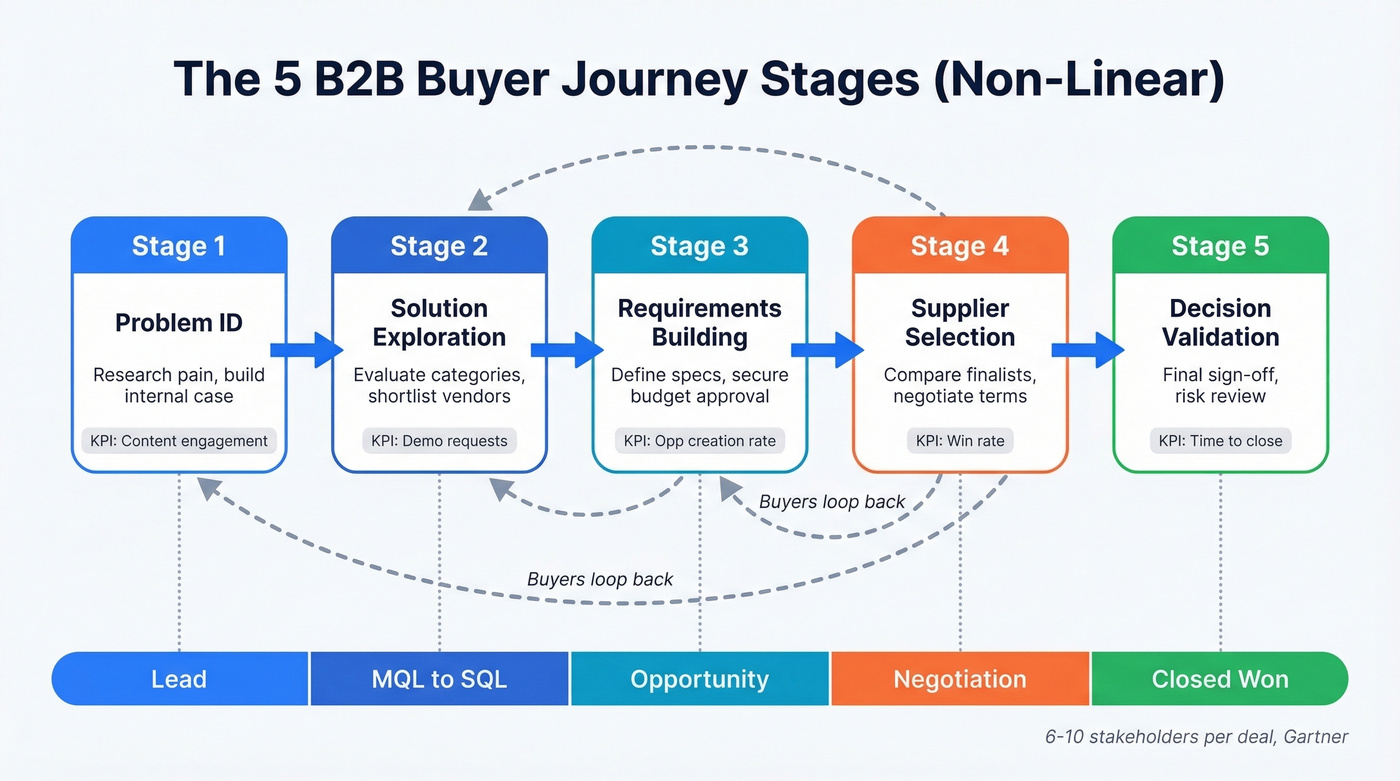
| Stage | Buyer Actions | Key Stakeholders | Content Needed | CRM Stage |
|---|---|---|---|---|
| Problem ID | Research pain, build case | End users, champion | Blog posts, benchmarks | Lead |
| Solution Exploration | Evaluate categories, shortlist | Champion, influencer | Comparisons, demos | MQL to SQL |
| Requirements Building | Define specs, get budget | Finance, IT, procurement | ROI calcs, security docs | Opportunity |
| Supplier Selection | Compare finalists, negotiate | Decision maker, legal | Case studies, proposals | Negotiation |
| Decision Validation | Final sign-off, risk review | Executive sponsor | Implementation plans | Closed Won |
Map this to your HubSpot or Salesforce lifecycle stages - that's what turns a wall poster into an operational tool. Track a leading metric per stage: content engagement for Problem ID, demo requests for Solution Exploration, opp creation rate for Requirements Building, win rate for Supplier Selection, and time-to-close for Decision Validation. If you need a baseline for what “good” looks like, start with funnel metrics and then pressure-test your stage definitions against sales pipeline benchmarks.

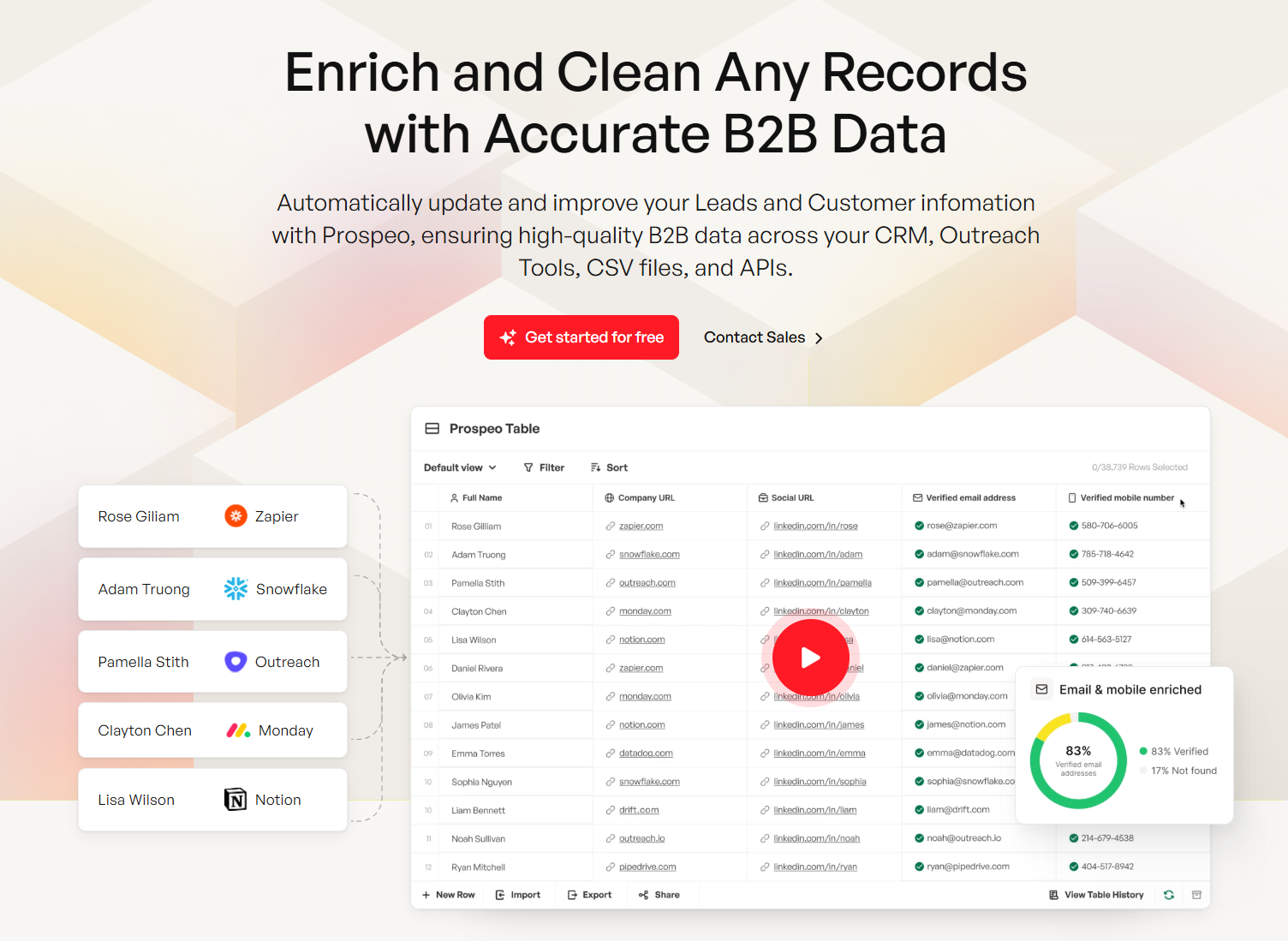
Your journey map says a prospect is in Solution Exploration - but their champion changed jobs and the email on file bounces. Prospeo's 7-day data refresh and 98% email accuracy keep every CRM stage connected to real, reachable buyers.
Stop mapping journeys to contacts that no longer exist.
How to Create Your Map
Here's our contrarian take: stop trying to map the entire journey at once. Map the three highest-friction moments first - where deals stall, where stakeholders drop off, where information gaps cause confusion. This friction-first approach surfaces 80% of the value in 20% of the time. Expand later.
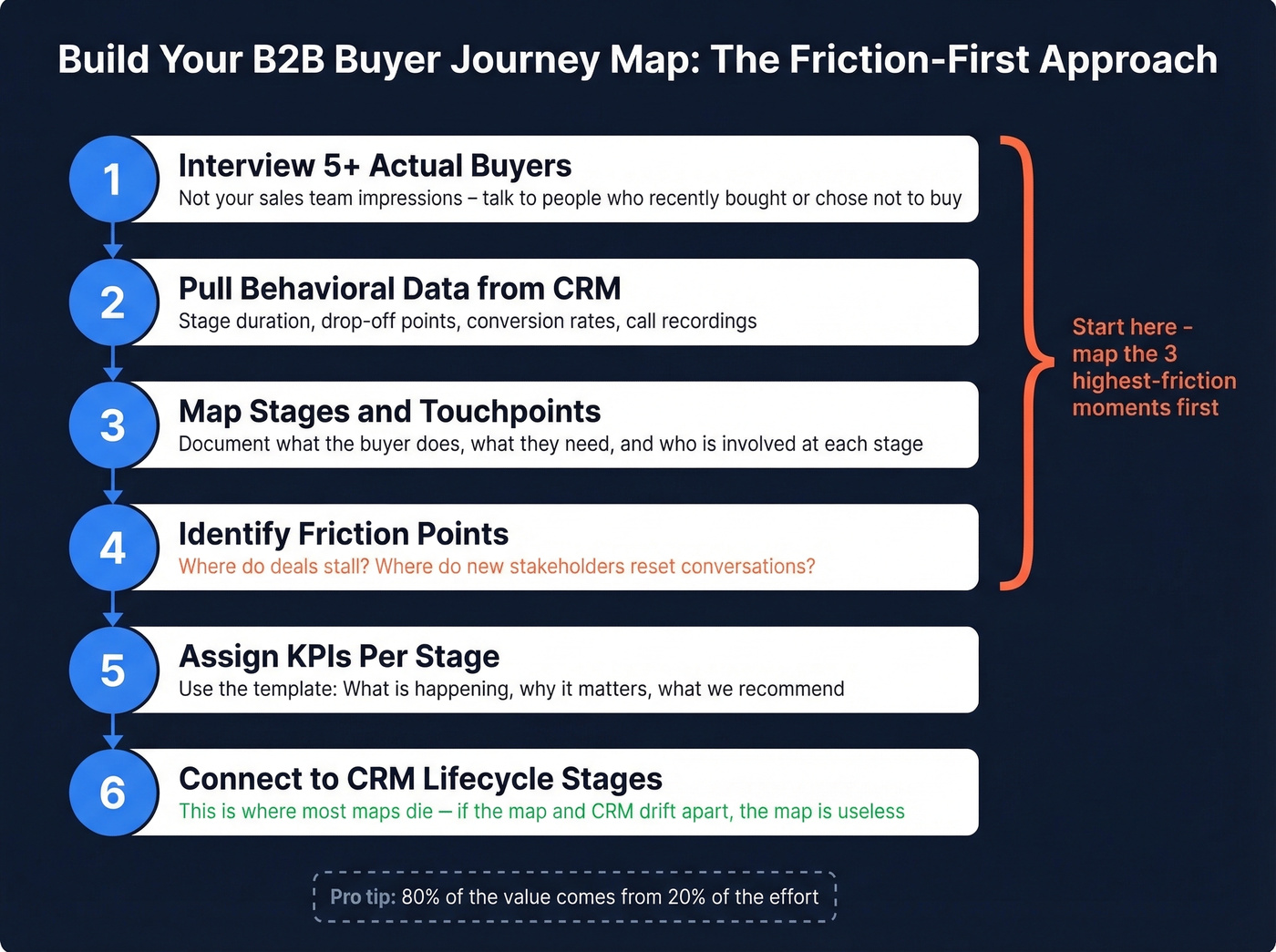
1. Interview 5+ actual buyers. Not your sales team's impression of buyers. People who recently bought - or didn't buy - from you. Ask where they got stuck and who else was involved. We ran this exercise last year and discovered that procurement blockers in Stage 4 were killing more deals than we'd ever tracked in our CRM. That single insight reshaped our entire proposal process.
2. Pull behavioral data from your CRM. Stage duration, drop-off points, conversion rates. Layer in analytics for digital touchpoints and call recordings for seller interactions. If your CRM stages are messy, clean up your lead status definitions first so the data is usable.
3. Map stages and touchpoints using the five-stage model. For each stage, document what the buyer does, what they need, and who's involved on their side.
4. Identify friction points. Where do deals stall for multiple weeks? Where do new stakeholders appear and reset the conversation? Where does your website say one thing and your reps say another? This is also where sales pipeline challenges tend to show up in disguise.
5. Assign KPIs per stage using the actionable insight template: What's happening, why it matters, what we recommend.
6. Connect to CRM lifecycle stages and automations. This is where most maps die. If your journey map lives in Miro but your automations live in HubSpot, they'll drift apart within weeks. You'll end up in an endless loop: update Miro, rebuild HubSpot workflows, check reports, realize everything's out of sync again. If you're standardizing your stack, use a simple checklist to connect outreach tool to CRM.
For your workshop, structure it like this: pre-work with CRM reports, call recordings, and NPS data, then persona creation, current-state map, pain point identification, future-state map, and finally an action plan with owners, metrics, and a 30/60/90-day timeline. (If you want a template for that rollout, borrow the structure from a 30-60-90 day plan for sales reps.)
Common Mistakes and Fixes
Inside-out mapping. We've seen teams spend two full days workshopping a journey map without a single buyer quote in the room. That's building a fantasy. Interview at least five recent buyers before you touch a whiteboard.
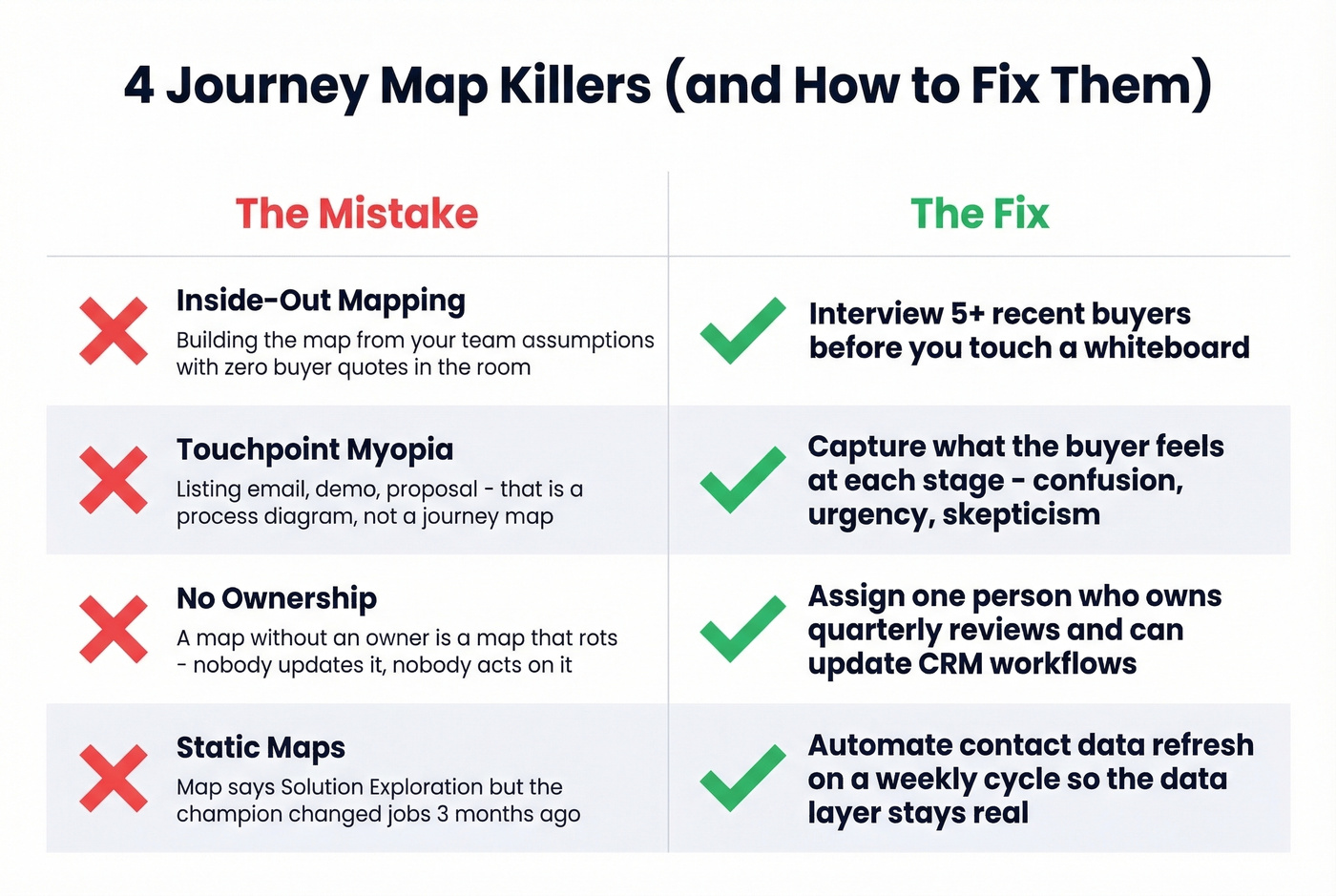
Touchpoint myopia. Listing "email, demo, proposal" isn't a journey map - it's a process diagram. Capture what the buyer feels at each stage: confusion, urgency, skepticism. One Reddit user nailed it: they wanted to "see which actual contacts are stuck at each journey stage," not just which channels were active. If your team needs better stage-by-stage messaging, keep sales communication and sales follow-up templates close at hand.
No ownership. A map without an owner is a map that rots. One person should own quarterly reviews and have the authority to update CRM workflows based on what the map reveals. Skip this if you don't have someone willing to own it - you'll waste the team's time building something nobody maintains.
Static maps. Look, a journey map that says a prospect is in "Solution Exploration" while your CRM shows their email bounces and their champion changed jobs three months ago is fiction. The map needs to reflect reality, and reality changes weekly.
Keeping Your Map Alive
Think of your map as three layers: the buyer experience (what they see and feel), the internal process (what your team does), and the CRM architecture (where the data lives). All three need to stay in sync.
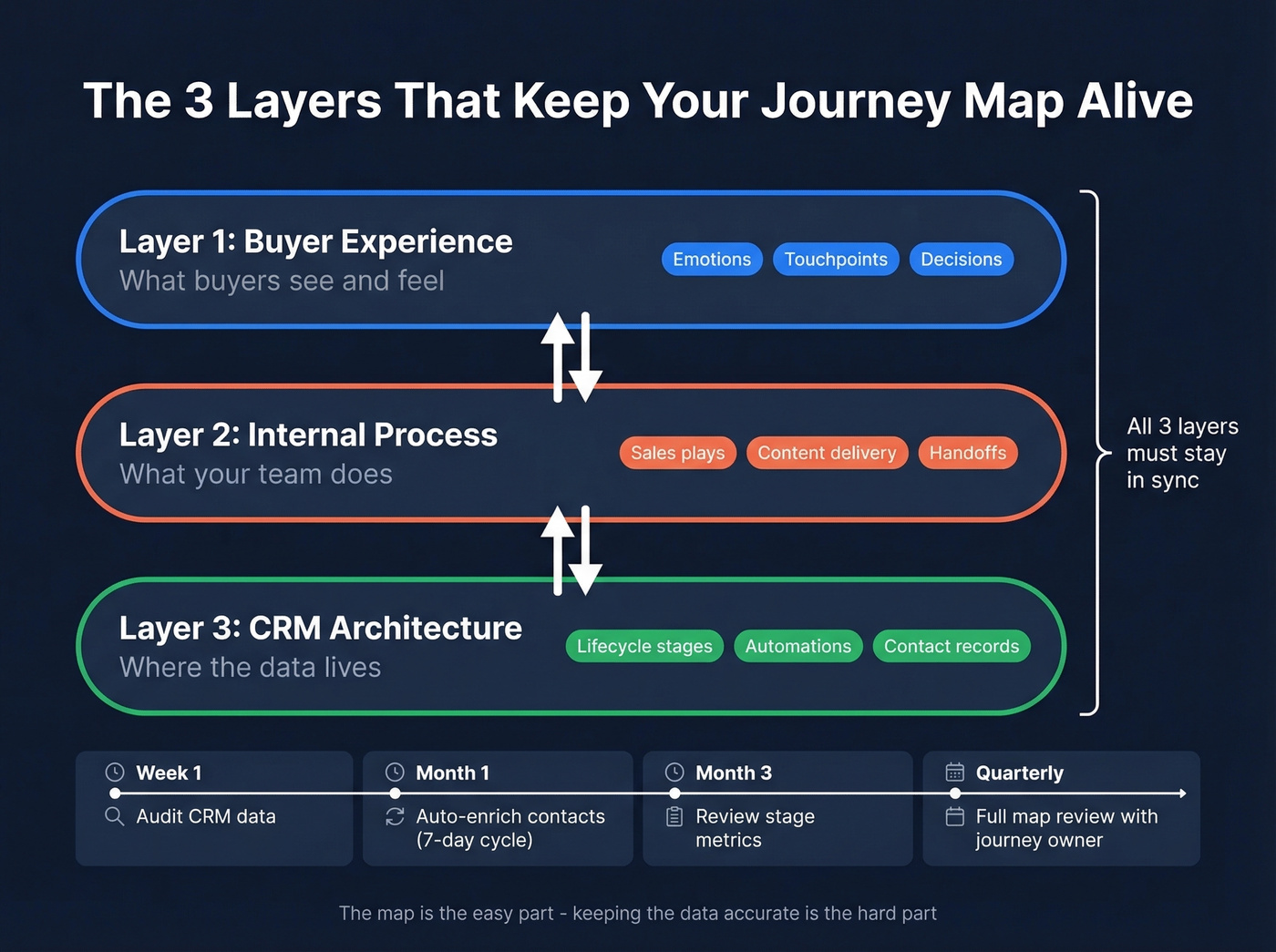
Schedule quarterly reviews. Assign a journey owner who cross-references the map against CRM stage durations, conversion rates, and deal velocity. The map itself is the easy part - the hard part is keeping your CRM data accurate enough for the map to mean anything. A prospect your map places in "Supplier Selection" might have changed companies two months ago. Tools like Prospeo, which refreshes contact records on a 7-day cycle with 98% email accuracy, help keep the CRM layer grounded in reality instead of decaying into guesswork. Native HubSpot and Salesforce integrations push enriched data directly into your lifecycle stages, so the data layer updates without manual intervention. If you're evaluating vendors for that layer, compare options in data enrichment services and get the fundamentals right with lead enrichment.
Tools and Pricing
You don't need expensive software to build a buyer journey map. You need a whiteboarding tool and a data layer.
| Tool | Free Tier | Starting Price |
|---|---|---|
| Miro | Yes | $8/user/mo |
| FigJam | Yes | $5/seat/mo |
| Lucidchart | Yes | $9/user/mo |
| UXPressia | No | $160/mo |
| Smaply | No | $25/user/mo |
Miro or FigJam at under $10/user/month is enough for most teams. Dedicated tools like UXPressia or Smaply only make sense if journey mapping is a core, ongoing discipline across your org - for everyone else, they're overkill. For the data layer that keeps your CRM contacts accurate, Prospeo starts free with 75 emails/month and 100 Chrome extension credits, scaling at roughly $0.01/email with 15,000 intent topics to flag when mapped accounts are actively in-market. If you’re building the top of funnel alongside this, pair the map with sales prospecting techniques and a shortlist of free lead generation tools.
Mapping 6-10 stakeholders per deal means nothing if you can't reach them. Prospeo gives you 300M+ verified profiles, 125M+ direct dials, and 30+ filters - including buyer intent signals across 15,000 topics - so every stage of your journey map has real contacts behind it.
Fill every stage of your buyer journey with verified decision-makers.
FAQ
How many stages should a B2B buyer journey map have?
Five stages hit the sweet spot: Problem ID, Solution Exploration, Requirements Building, Supplier Selection, and Decision Validation. Three is too vague to act on; eight creates paralysis. Map each stage to a CRM lifecycle stage with a leading KPI.
How often should you update a buyer journey map?
Quarterly at minimum, monthly if your market moves fast. Assign a journey owner and tie reviews to CRM data - automated contact enrichment that refreshes on a weekly cycle prevents the map's data layer from going stale between reviews.
What's the difference between a buyer journey map and a customer journey map?
A buyer journey map covers pre-purchase stages through the signed deal. A customer journey map extends post-purchase - onboarding, retention, advocacy. Start with the buyer journey and expand once it's operationalized.
How does B2B differ from B2C journey mapping?
B2B buyer journey mapping accounts for multiple stakeholders (typically 6-10), longer sales cycles, and non-linear decision paths. Where a B2C map tracks a single consumer from ad click to checkout, a B2B map needs to capture the looping behavior of an entire buying committee - often across months of evaluation, with different people entering and exiting the process at unpredictable points.