

The Business Introduction Email Format That Gets Replies - Not Ignored
You spent 20 minutes crafting the perfect introduction email. Researched the prospect, wrote three drafts, agonized over the subject line. Then it landed in spam - or worse, got opened and ignored.
The average cold email reply rate is 3.43%. That means roughly 97 out of 100 introduction emails fail. Most guides on business introduction email format blame your copy. That's only 20% of the equation. Format, deliverability, and targeting do the heavy lifting.
What You Need (Quick Version)
If you've only got five minutes, nail these three things - ranked by actual impact on reply rates:
- Verified contact data. Your format is irrelevant if the email bounces or hits a dead inbox. Verify every address before you send. Keep bounces under 2% or your deliverability will fall off a cliff.
- A personalized 2-4 word subject line. Personalized subjects hit 46% open rates vs. 35% without - a 31% lift from a few extra seconds of work. (If you want more options, pull from these subject lines.)
- A sub-80-word body with a single CTA. If your email requires scrolling on mobile, it's too long. One ask. No walls of text.
Introduction Email Format, Line by Line
Every high-performing business introduction email has six components. Skip one and you create friction. (If you’re building a full sequence, pair this with a B2B cold email sequence.)
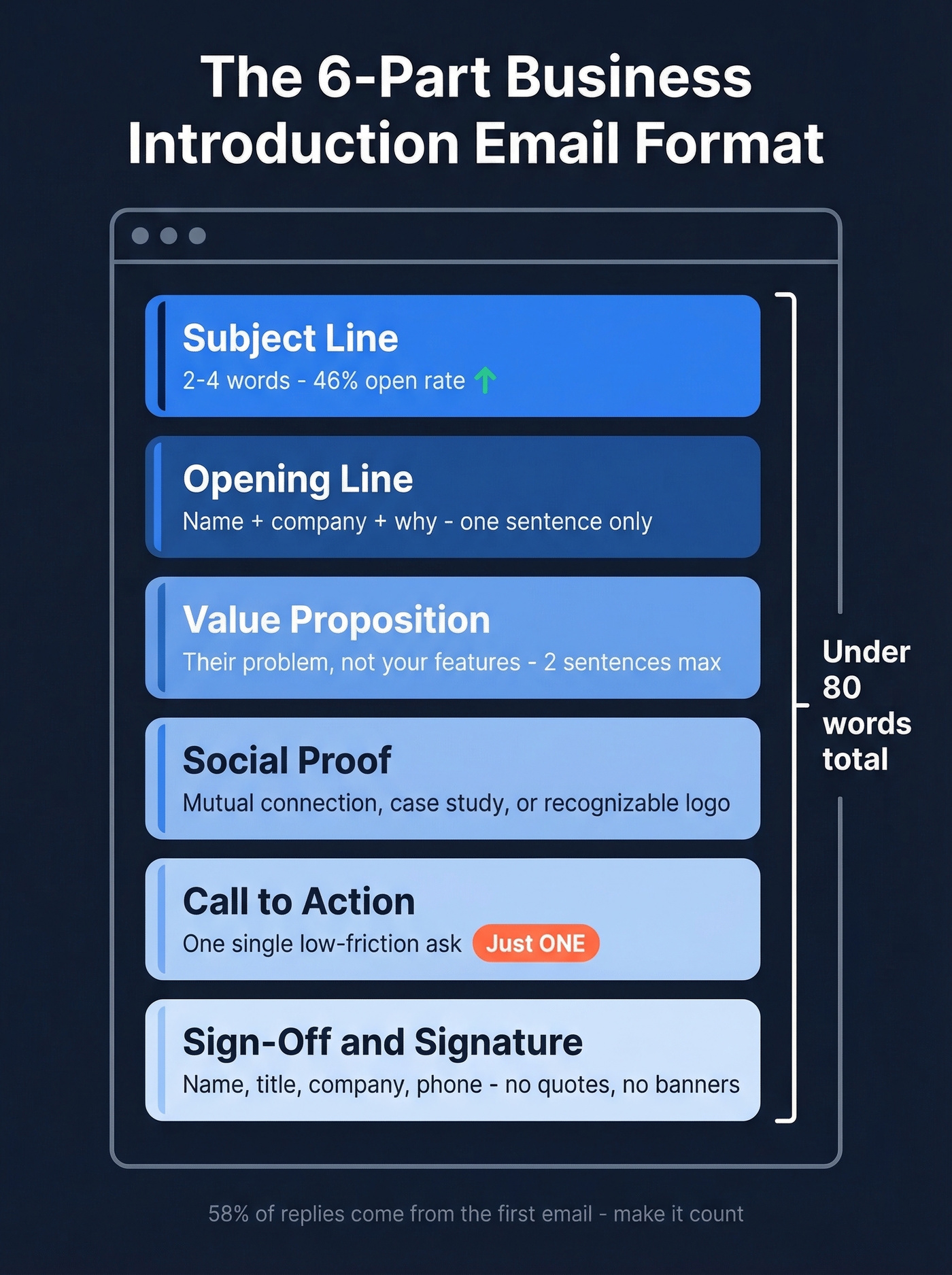
Subject Line (2-4 Words)
A study of 5.5M emails found that 2-4 word subject lines hit 46% open rates. Performance drops steadily after that - 7-word subjects fall to around 37%, and 10+ words bottom out near 34%. Questions are the top-performing format in this dataset, also averaging 46%.
Good examples: "Quick question, {{firstName}}" or "{{Company}} + growth." Bad examples: anything starting with "URGENT" or "Hello, friend." (More data-backed patterns here: cold email subject line examples.)
Opening Line (One Sentence)
State your name, your company, and why you're reaching out - in one sentence. Not two. Not a paragraph. The prospect needs to know who you are within three seconds of opening the email, or they're gone.
"Hi Sarah - I'm James at Acme, and I help B2B teams cut their list-building time in half." That's it. Move on.
Value Proposition (Their Problem)
This is where most introduction emails die. They pivot to features instead of staying on the prospect's problem. The consensus on r/coldemail is clear: prospects disengage the moment an email reads like a sales pitch. Write like a peer starting a conversation, not a vendor delivering a demo. (If you want a tighter framework for this section, use proven email copywriting principles.)
"Most Series B sales teams spend 6+ hours a week manually building prospect lists. We automated that for three companies in your space." Two sentences. Problem, then proof you've solved it.
Social Proof or Connection Point
A mutual connection, a shared event, a recognizable client logo - anything that answers "why should I trust this stranger?" If you don't have a mutual contact, a relevant case study works. "We helped [similar company] increase pipeline by 40%" is more persuasive than any feature list.
Call to Action (One Ask)
One CTA. Not two. A single, low-friction ask: "Worth a 15-minute call next week?" or "Mind if I send a 2-minute case study?" The easier it is to say yes, the more replies you get. (More examples and rules: email call to action.)
Sign-Off and Signature
Keep it simple. "Best," or "Thanks," followed by your name, title, company, and phone number. No inspirational quotes. No five-line disclaimers. Avoid banner images - keep images minimal or nonexistent in first-touch emails.
Subject Lines That Actually Work
The Belkins study across 5.5M emails gives us concrete numbers:
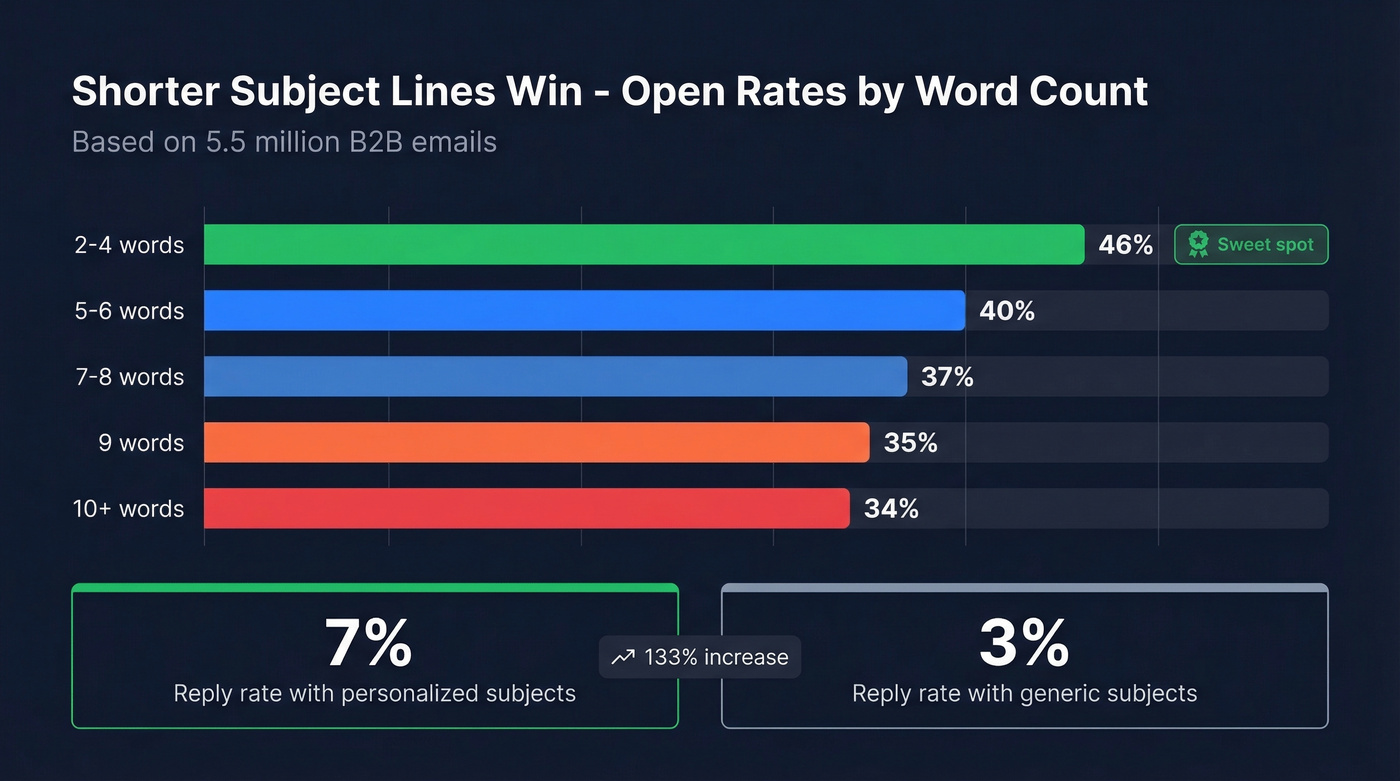
| Word Count | Avg. Open Rate |
|---|---|
| 2-4 words | 46% |
| 5-6 words | ~40% |
| 7-8 words | ~37% |
| 9 words | ~35% |
| 10+ words | ~34% |
Personalized subject lines don't just lift opens - they more than double reply rates: 7% vs. 3% for generic subjects. That's a 133% increase from adding a first name or company name.
Words to avoid: "ASAP," "Hello, friend," and anything that reads like marketing hype. These pull open rates below 36%. Numbers in subject lines performed slightly worse than text-only in this dataset (27% vs. 28%), which surprised us - skip the "3 tips" format for intro emails.
Strong subject lines: "{{firstName}}, quick question" / "Intro - {{mutual connection}}" / "{{Company}} + [your value]" / "Saw your talk at {{event}}."
Templates by Scenario
Cold Prospect - Professional Tone
Subject: Quick question, {{firstName}}
Hi {{firstName}} - I'm [Your Name] at [Company]. We help [target role] at [industry] companies [specific outcome].
[Similar company] cut their [metric] by [result] in [timeframe]. Curious if that's a priority for {{Company}} right now.
Worth a 15-minute call next Tuesday?
Best, [Signature]
Cold Prospect - Casual Tone
Subject: {{firstName}} - quick one
Hey {{firstName}}, [Your Name] here from [Company]. We've been helping [industry] teams [specific outcome] - just wrapped a project with [similar company] where they saw [result].
Any chance that's on your radar? Happy to share what worked.
Cheers, [Signature]
Both versions stay under 80 words. The casual version drops the formal structure and reads more like a message you'd send to a colleague. Use the professional tone for C-suite and enterprise; use casual for startup founders, mid-market managers, and anyone whose own content has a conversational voice.
Warm Introduction (Forwardable Email)
This is the template you send to your connector - not the prospect. Make it dead simple to forward. David A. Fields' 4-part structure nails this: brief opener, the target's credibility, your credibility and value, explicit instruction to connect.
Subject: Quick intro - {{Your Name}} + {{Prospect Name}}
Hey {{Connector}} - would you mind introducing me to {{Prospect}}? Here's a forwardable blurb:
"Hi {{Prospect}} - I'd like to introduce you to [Your Name] at [Company]. They've helped [similar companies] with [specific outcome]. [Your Name], meet {{Prospect}}, who leads [role] at [Company]. Email addresses are above - please connect!"
Time this based on your connector's engagement. If they just liked your post or replied to a thread, that's the moment to ask - the relationship is warm and top of mind.
Conference Follow-Up
Subject: Good meeting you at {{Event}}
Hi {{firstName}} - enjoyed our conversation about [topic] at {{Event}}. You mentioned [specific challenge they raised]. We've been working on exactly that with [similar company]. Happy to share what's working - coffee next week?
Reference something specific from the conversation. Generic "great to meet you" emails get deleted.
Partnership Pitch - Professional
Subject: {{Your Company}} + {{Their Company}}
Hi {{firstName}} - I run [partnerships/BD] at [Company]. Our customers keep asking for [thing their product does], and your platform is the best fit I've found.
Would love to explore a [co-marketing / integration / referral] partnership. Worth 20 minutes?
Partnership Pitch - Casual
Subject: Idea for {{Their Company}} + us
Hey {{firstName}} - our users keep bringing up [thing their product does], and honestly your product is the one they mention most. I think there's something here.
Want to jump on a quick call and see if it makes sense?
Lead with what's in it for them, not what you need. The casual version works well for founders and heads of partnerships at companies under 500 employees.
Introducing Two People (Connector Template)
Subject: Intro - {{Person A}} + {{Person B}}
{{Person A}}, meet {{Person B}} - they lead [role] at [Company] and have been doing impressive work on [topic]. {{Person B}}, {{Person A}} runs [role] at [Company] and I think you'd both benefit from a conversation about [shared interest].
Emails are above - I'll let you two take it from here.
When you're the connector, keep it short and give both parties a reason to reply. State the shared interest explicitly so neither person has to guess why they should care.

You just read that verified contact data is the #1 factor in reply rates - above subject lines, above copy. Prospeo delivers 98% email accuracy with a 7-day refresh cycle, so every introduction email you craft actually reaches a real inbox. Bounce rates drop under 2%, and your domain stays clean.
Stop perfecting emails that bounce. Start with data that connects.
Benchmarks - What Good Looks Like
Most teams don't know whether their introduction emails are performing well or poorly. These industry benchmarks give you a baseline. (For deeper deliverability + performance targets, see email bounce rate.)
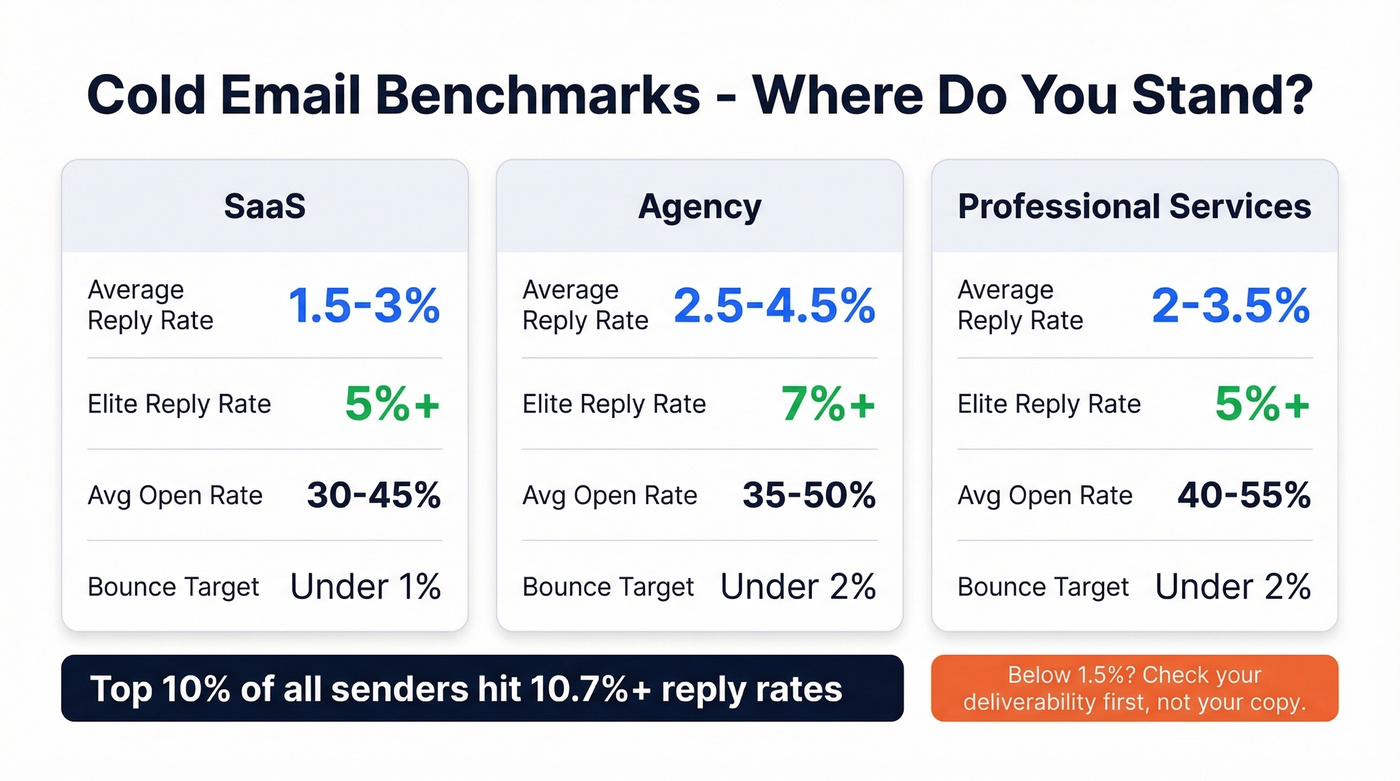
| Metric | SaaS | Agency | Prof. Services |
|---|---|---|---|
| Reply Rate (Avg) | 1.5-3% | 2.5-4.5% | 2-3.5% |
| Reply Rate (Elite) | 5%+ | 7%+ | 5%+ |
| Open Rate (Avg) | 30-45% | 35-50% | 40-55% |
| Bounce Rate (Target) | <1% | <2% | <2% |
If your reply rate is below 1.5%, you're below typical SaaS averages - and the issue is usually deliverability or targeting, not your copy. Between 3-5%, you're doing well. The top 10% of senders hit 10.7%+ reply rates, but that requires dialed-in infrastructure, verified data, and genuinely relevant messaging all working together.
Here's the thing: 58% of replies come from the first email. Your introduction email carries the majority of the weight in any sequence, which is exactly why getting the format right matters more than obsessing over follow-up #4. (If you need follow-up copy, use these sales follow-up templates.)
Mistakes That Kill Your Intro Email
These aren't style preferences - they're measurable errors that tank deliverability and reply rates.
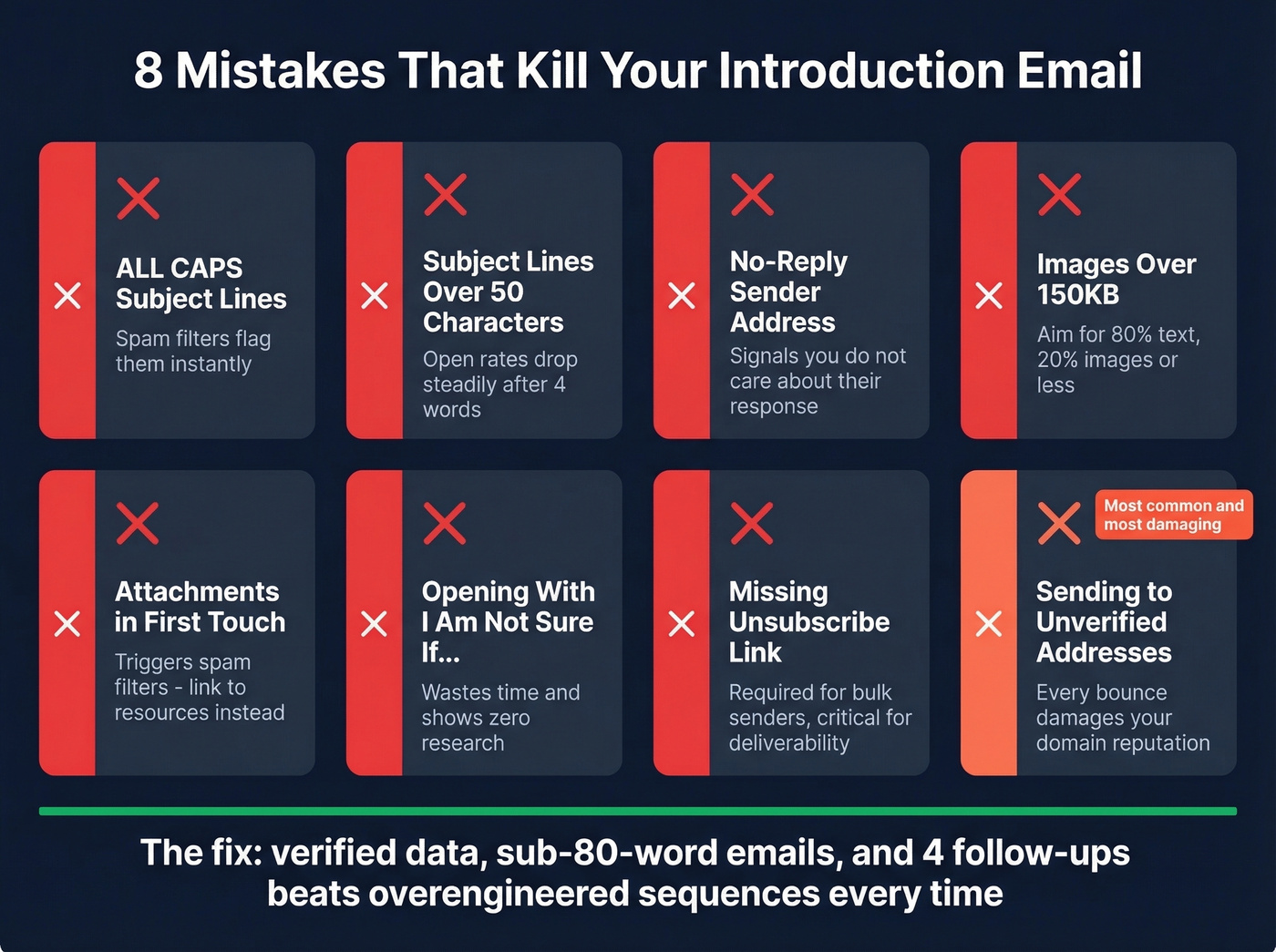
- ALL CAPS subject lines. Spam filters flag them. Humans distrust them.
- Subject lines over 50 characters. The data is unambiguous - keep them short.
- "No-reply" sender addresses. They signal "I don't care about your response." Use a real, domain-based email.
- Images over 150KB. Aim for 80% text, 20% images - or better yet, no images in first-touch emails.
- Attachments in first-touch emails. Link to resources instead. Attachments trigger spam filters.
- Opening with "I'm not sure if you're the right person." This wastes the recipient's time and signals you didn't do your research.
- Missing one-click unsubscribe. Required for bulk senders and critical for deliverability.
- Sending to unverified addresses. Every bounce damages your domain reputation. Keep bounces under 2%.
We've watched teams pour hours into A/B testing subject lines while 8% of their list was bouncing. If your deal sizes are under $10k, you probably don't need a 12-step sequence with branching logic and AI-generated personalization. A verified list, a tight 80-word email, and 4 follow-ups will outperform the overengineered approach every time. The teams that waste the most money on cold email are the ones who invest in tooling before they invest in data quality.
Before You Hit Send - Deliverability Checklist
Your format doesn't matter if the email bounces. This is the operational layer that most introduction email guides skip entirely. (Full playbook: email deliverability guide.)
Authenticate Your Domain
SPF, DKIM, and DMARC aren't optional anymore. As of 2026, bulk sender rules require all three plus one-click unsubscribe for marketing mail. DMARC at p=none is acceptable as a starting point, but you need it configured. Without authentication, your emails land in spam regardless of how good your copy is. (If you’re troubleshooting, start with how to verify DKIM is working.)
Don't send cold outreach from your primary domain. The consensus on r/coldemail is clear - use secondary domains. Set up 2-3 inboxes per domain, cap each at 10-15 emails per day, and scale volume by adding domains, not by blasting more from one inbox. (Related: safe email velocity limits.)
Warm Up Before You Scale
New domains need a ramp-up period. Start at 5-10 emails per day for the first two weeks, increase to 15-20 in weeks three and four, then 30-40 in weeks five and six. Never exceed 50 emails per day from a single inbox. Rushing this process is the fastest way to torch a domain. (Tooling options: unlimited email warmup.)
Keep your spam complaint rate under 0.3% and your bounce rate under 2%. Consider disabling open-rate tracking for cold outreach too - tracking pixels can hurt deliverability with some providers, and open rates became unreliable after Apple's Mail Privacy Protection anyway.
Verify Every Address
This is step zero. Before any sequence launches, every email address on your list needs verification. Prospeo runs a 5-step verification process - catch-all handling, spam-trap removal, honeypot filtering - and delivers 98% email accuracy. The free tier covers 75 verifications per month, enough to test your first campaign without spending a dollar. (If you’re comparing tools, see AI email checker.)
In our experience, teams with great copy and solid targeting still fail because a chunk of their list is invalid. An 8% bounce rate cascades into domain reputation damage that takes weeks to recover from. Skip this step at your own risk.
Those templates above only work when you're sending to the right person at a verified address. Prospeo's 300M+ profiles with 30+ filters let you find exact decision-makers by role, industry, intent signals, and company size - then gives you verified emails at $0.01 each. No more 20-minute research sessions per prospect.
Cut list-building from hours to minutes and send introductions that land.
Timing and Follow-Up Cadence
In Instantly's 2026 dataset, Tuesday through Wednesday outperform other days for introduction emails, with Wednesday pulling the highest reply rates. Monday works well for launching new sequences - people are clearing inboxes and more receptive to fresh threads. Avoid Friday. Auto-reply rates spike and your email gets buried under the weekend pile. (More detail: best time to send cold emails.)
The sweet spot for follow-up sequences is 4-7 touchpoints. Since 42% of replies come from follow-ups, stopping after one email leaves nearly half your potential responses on the table. But each follow-up needs to add new value - a case study, a relevant insight, a different angle. Repeating "just checking in" is a waste of everyone's time. (If you need better language, see how to say just checking in professionally.)
One tactic that works well for our team: make your follow-ups feel like replies rather than formal follow-up emails. Drop the "Following up on my previous email" opener. Add a new piece of value and keep the thread going naturally. This approach outperforms formal follow-ups by roughly 30%.
FAQ
How long should a business introduction email be?
Elite senders keep first-touch emails under 80 words. Most replies come from emails between 50-125 words - long enough to establish context and credibility, short enough to respect the reader's time.
What's the best day to send introduction emails?
Tuesday through Wednesday outperform other weekdays, with Wednesday showing the highest reply rates in Instantly's 2026 dataset. Monday is ideal for launching new sequences when inboxes are fresh. Avoid Friday.
How many follow-ups should I send?
The sweet spot is 4-7 touchpoints total. 58% of replies come from the first email, but follow-ups capture the remaining 42%. Beyond seven touches, returns diminish sharply unless each message adds genuinely new value.
What's the difference between cold and warm introductions?
A cold intro goes to someone with no prior connection - you're a stranger earning attention. A warm intro uses a mutual contact who forwards a ready-made email on your behalf. Warm intros convert dramatically better because trust is pre-established through the connector.
Do I need to verify email addresses before sending?
Yes. Sending to invalid addresses increases your bounce rate, which damages domain reputation and pushes future emails to spam. Even a small percentage of bad addresses can cascade into deliverability problems that take weeks to fix.