

Cold Emailing Tips That Actually Work in 2026
61% of decision makers prefer cold email over cold calls. Yet 71% of recipients ignore the cold emails they receive because they're irrelevant. That gap between a channel people want to use and emails people actually read is where most teams lose.
The average reply rate across 16.5M cold emails studied was 5.8%, down from 6.8% the year before. The bar keeps rising. Here are the cold emailing tips that'll help you clear it.
The Cheat Sheet
Before you read another word:
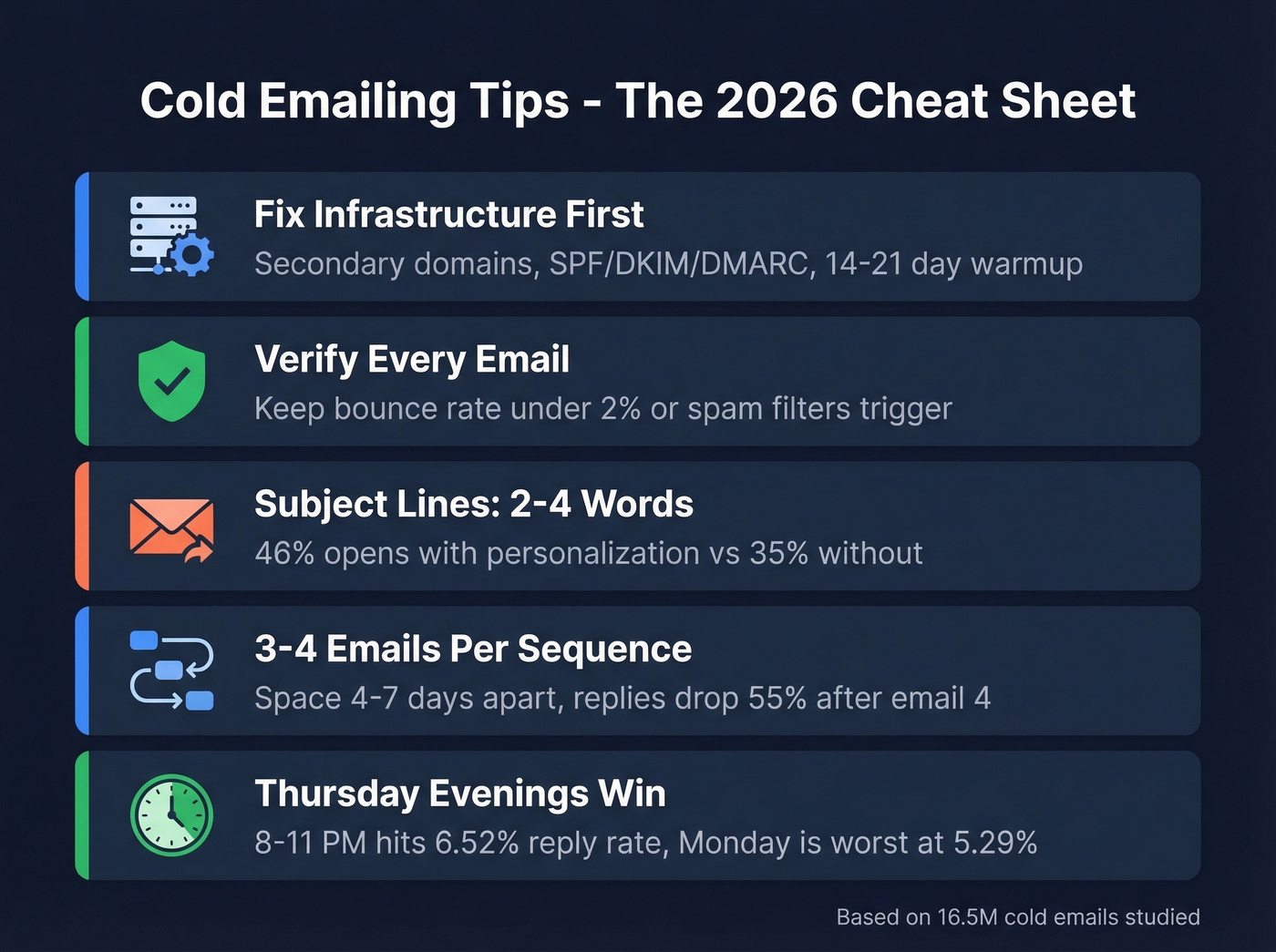
- Fix your infrastructure before touching your copy. Secondary domains, SPF/DKIM/DMARC authentication, and a 14-21 day warmup period are non-negotiable.
- Verify every email on your list. A bounce rate above 2% triggers spam filters. One bad list can torch a domain.
- Keep subject lines to 2-4 words. Personalized subject lines pull 46% opens vs 35% without. Questions outperform statements.
- Send 3-4 emails max per sequence, spaced 4-7 days apart. After the 4th follow-up, replies drop 55% and spam complaints spike.
- Thursday produces the highest reply rates, and evenings perform best overall. The 8-11 PM window hits 6.52% reply rate. Monday is the worst day at 5.29%.
Infrastructure Setup
Practitioners on r/coldemail are blunt: technical setup matters more than copy. You can write the best cold email ever crafted, and it won't matter if it lands in spam.
Secondary Domains and Inboxes
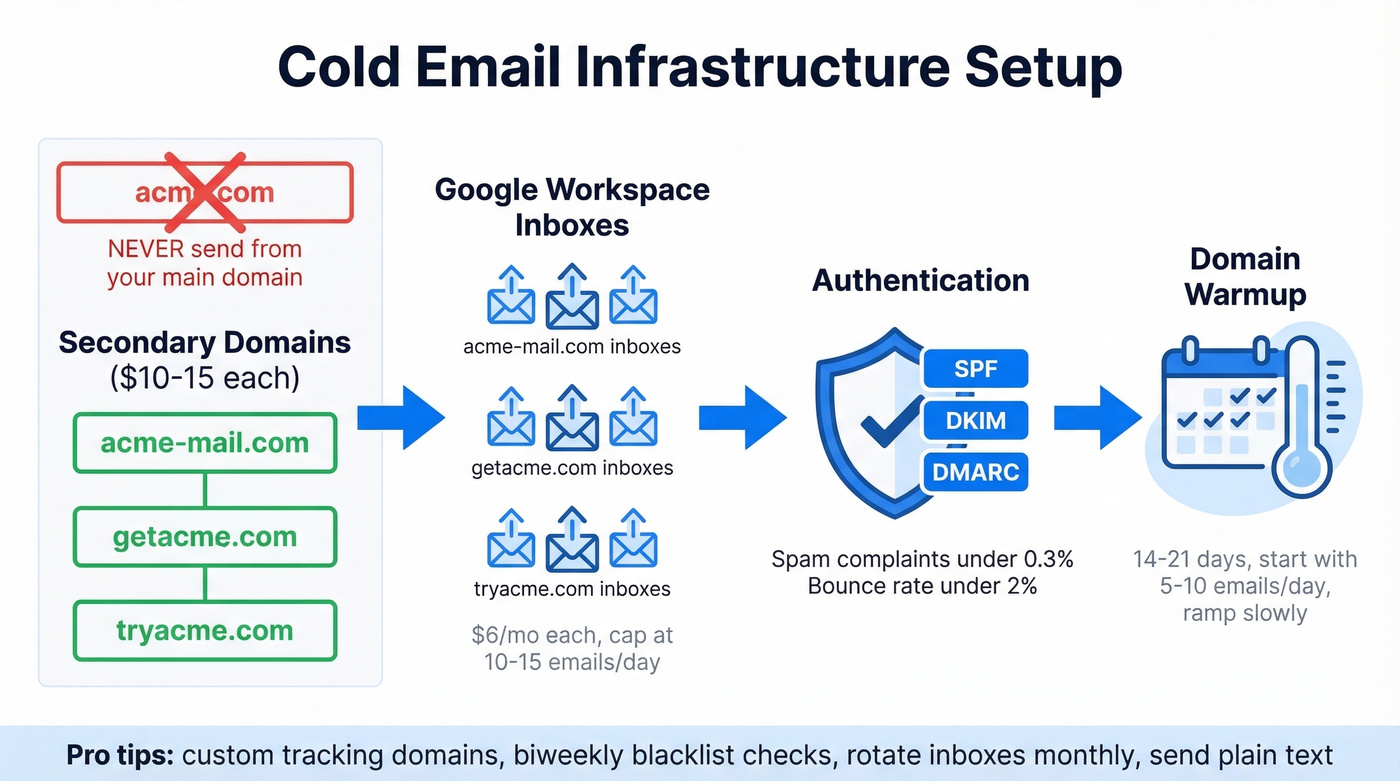
Never send cold email from your main business domain. If your company is acme.com, register acme-mail.com, getacme.com, and tryacme.com. Domains run $10-15 each.
Set up 2-3 inboxes per domain on Google Workspace ($6/mo per account). Cap each inbox at 10-15 emails per day. The math: to send ~400 cold emails daily, you need roughly 10-12 secondary domains with 2-3 inboxes each. That sounds like a lot of infrastructure, but it's the only way to scale without getting flagged.
Authentication: SPF, DKIM, DMARC
Google, Yahoo, and Microsoft now enforce bulk sender requirements that make authentication non-optional. Every sending domain needs SPF, DKIM, and DMARC records configured. You also need RFC 8058 one-click unsubscribe headers for any marketing-style sends.
The enforcement thresholds are clear: spam complaint rate under 0.3%, bounce rate under 2%. Blow past either number and your deliverability craters. Use a free tool like dmarcian to verify your records are set up correctly.
If you want a deeper technical breakdown, start with email deliverability fundamentals and then validate your SPF record and DMARC alignment.
Domain Warming
New domains need 14-21 days of warmup before you send a single cold email. Start with 5-10 emails per day - replies to real contacts, newsletter signups, anything that generates engagement. Ramp slowly. Tools like Instantly and Smartlead automate this, but don't rush it. We've seen teams skip warmup and burn a domain in 48 hours.
If you're scaling, keep an eye on email velocity and consider dedicated unlimited email warmup tools.
Tactics Nobody Talks About
Most cold email best practices stop at SPF records. Here's what separates teams that stay out of spam long-term.
Set up custom tracking domains. Default tracking links from your sending tool share reputation with every other user on that platform. A custom tracking domain isolates your reputation and improves deliverability. (More on this in our tracking domain guide.)
Run biweekly blacklist checks. Use MXToolbox to monitor your sending IPs and domains. Catching a blacklisting early - before it cascades - saves weeks of recovery.
Rotate inboxes monthly. Run two batches of sending accounts. Send from Batch A for a month while Batch B cools, then swap. This keeps your sending footprint healthier over time.
Send plain text. No images, minimal links, no HTML formatting. Every tracking pixel and embedded image gives spam filters another reason to flag you. These tricks sound simple, but they're the difference between 40% inbox placement and 90%+.
Build a Clean List
Here's the uncomfortable truth: 70% of emails show at least one spam-related issue before they're even sent. Most of those issues trace back to list quality.
One high-volume operator saw deliverability jump from 60% to 92% after adding email validation to their workflow. Stack Optimize, an outbound agency using Prospeo, built from $0 to $1M ARR and maintains 94%+ deliverability across all their clients with bounce under 3% and zero domain flags.
A proper verification system catches invalid addresses, spam traps, catch-all domains, and honeypots before they ever hit your sending tool. Prospeo's 5-step verification process - including catch-all handling, spam-trap removal, and honeypot filtering - delivers 98% email accuracy. The free tier gives you 75 verified emails per month to test, enough to validate a small campaign. For volume senders, it works out to roughly $0.01 per email. Compare that to the cost of rebuilding a burned domain.
If you're evaluating tools, see our breakdown of data enrichment services and email reputation tools.

Every cold emailing tip in this guide falls apart if your emails bounce. Prospeo's 5-step verification catches spam traps, honeypots, and catch-all domains before they torch your sending reputation. Teams using Prospeo maintain sub-3% bounce rates and 94%+ deliverability - the exact thresholds this article says you need to hit.
Get 98% email accuracy at ~$0.01/lead - start with 75 free verified emails.
Subject Lines That Get Opens
A study of 5.5M B2B cold emails found that personalized subject lines hit 46% open rates versus 35% without - and more importantly, 7% reply rates versus 3%. That's a 133% lift in replies just from the subject line.
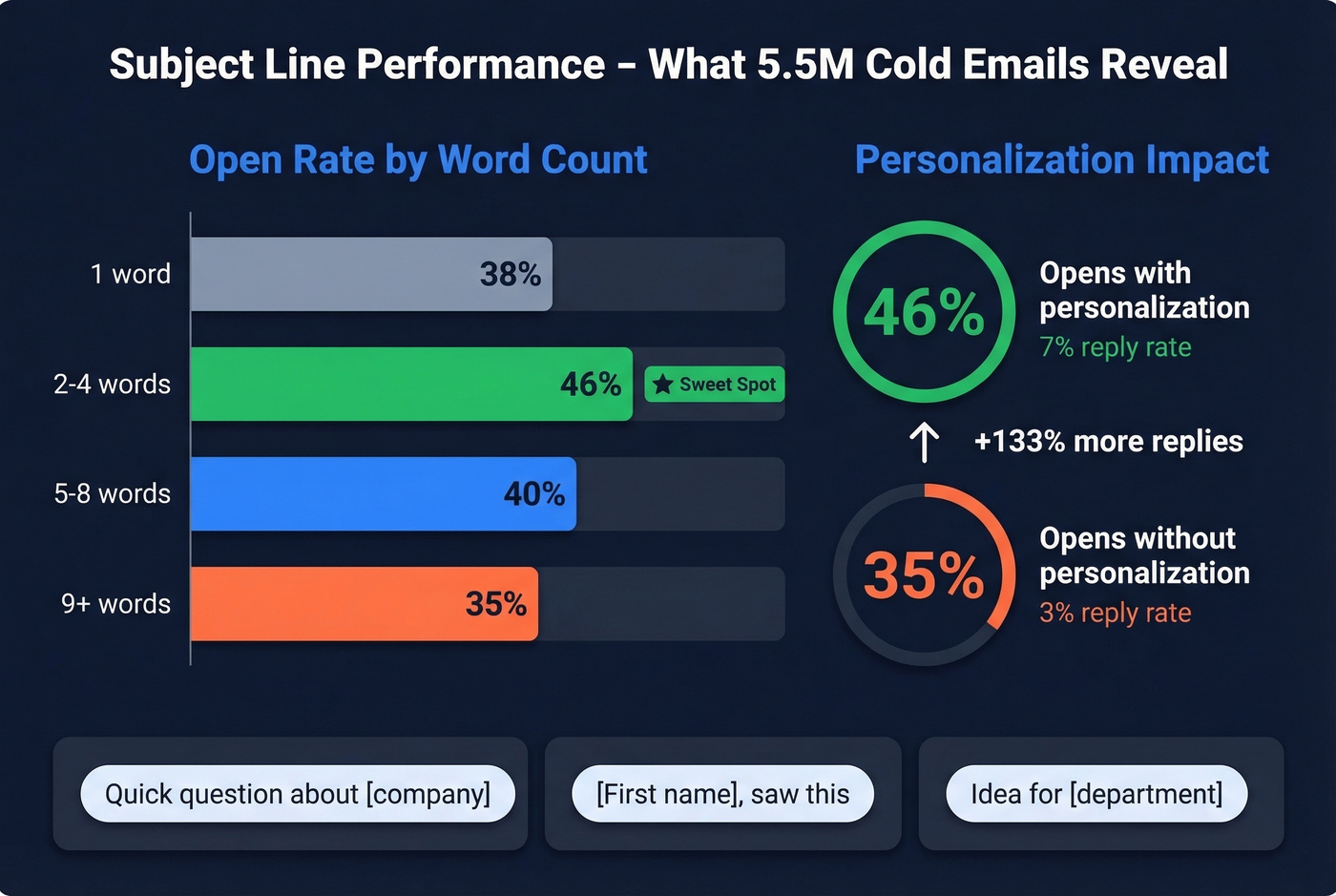
The sweet spot is 2-4 words. Single-word subjects underperform at 38%. Longer than 9 words drops you to 34-35%. Questions outperform statements, averaging 46% opens. Urgency language and hype terms ("ASAP," "limited time," generic greetings like "Hello, friend") push opens below 36%.
If you want more options, pull from these cold email subject line examples and broader email subject line examples.
Examples that follow the data:
- "Quick question about [company]" - question format, personalized, 4 words
- "[First name], saw this" - personalized, 3 words
- "Idea for [department]" - context-specific, 3 words
Skip the clever wordplay. Skip the ALL CAPS. The subject line's only job is to get the email opened - not to sell.
Body Copy That Earns Replies
Recipients spend 5-7 seconds scanning a cold email before deciding to delete or engage. The same 16.5M-email dataset confirms it: emails with 6-8 sentences hit 42.67% open rates and 6.9% reply rates. Anything over 200 words sees diminishing returns.
For a deeper framework, see our guide to email copywriting and emails that get responses.
Context Beats Tokens
Let's be honest: most "personalization" in cold email is theater. Dropping someone's first name into a template isn't personalization - it's mail merge. Real personalization means referencing their company's specific situation: a recent funding round, a job posting that reveals a tech stack gap, a quarterly earnings comment about expansion plans.
The data backs this up. Reply rates drop when your segmented list exceeds 100 people, and cramming more than 5 personalization variables into a single email backfires - the message starts reading like a mad lib instead of something a human wrote. Pick one or two genuinely relevant observations and build your email around them.
Template: Pain-Agitate-Solve
Subject: Bounce rates at [Company]?
Hi [First name],
Saw [Company] is scaling outbound - congrats. Most teams at your stage hit a wall when 15-20% of their list bounces and sender reputation tanks.
That usually means reps spend more time fixing deliverability than actually selling.
We help teams like [similar company] keep bounce rates under 3% so every email actually lands. Worth a 10-minute look?
Six sentences. One specific pain point. Soft close. Notice what's not here: no company history, no feature list, no "I hope this email finds you well."
Template: Direct Value
Subject: Idea for [Department]
Hi [First name],
[Company]'s job postings mention [specific tech/challenge]. Teams running that stack usually struggle with [specific problem].
We built [brief description] that cuts [metric] by [number]. [Similar company] saw [result] in [timeframe].
Open to a quick call this week?
The job-posting angle works because it's publicly available, specific, and signals genuine research. It's the difference between "I noticed you're in SaaS" and "I saw you're hiring a Salesforce admin, which usually means your CRM data is a mess."
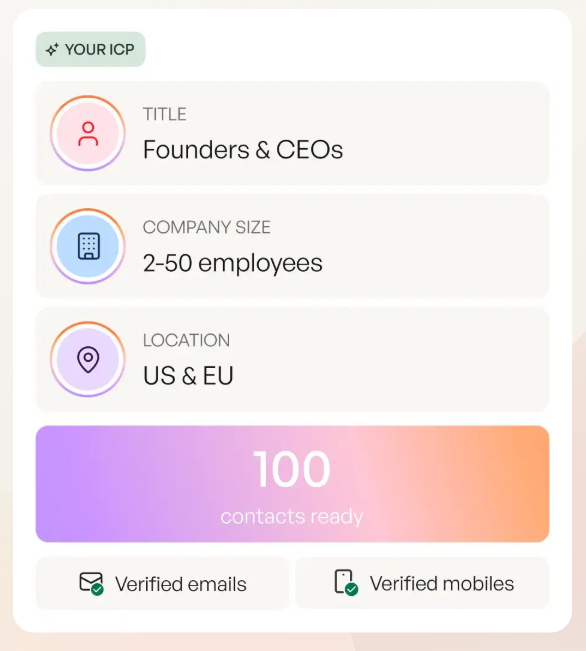
You just read that reply rates tank when lists exceed 100 contacts without real personalization. Prospeo's 30+ search filters - buyer intent, technographics, job changes, funding signals - let you build hyper-targeted lists where every prospect is genuinely relevant. That's how teams book 35% more meetings than Apollo users.
Build laser-targeted cold email lists that actually deserve a reply.
The Follow-Up Sequence
The follow-up data from the 16.5M-email dataset is the most useful thing we've seen published this year. First follow-up lifts reply rates by up to 49%. But by the 4th follow-up, responses drop 55% compared to earlier emails, spam complaints jump from 0.5% to 1.6%, and unsubscribes hit 2%.
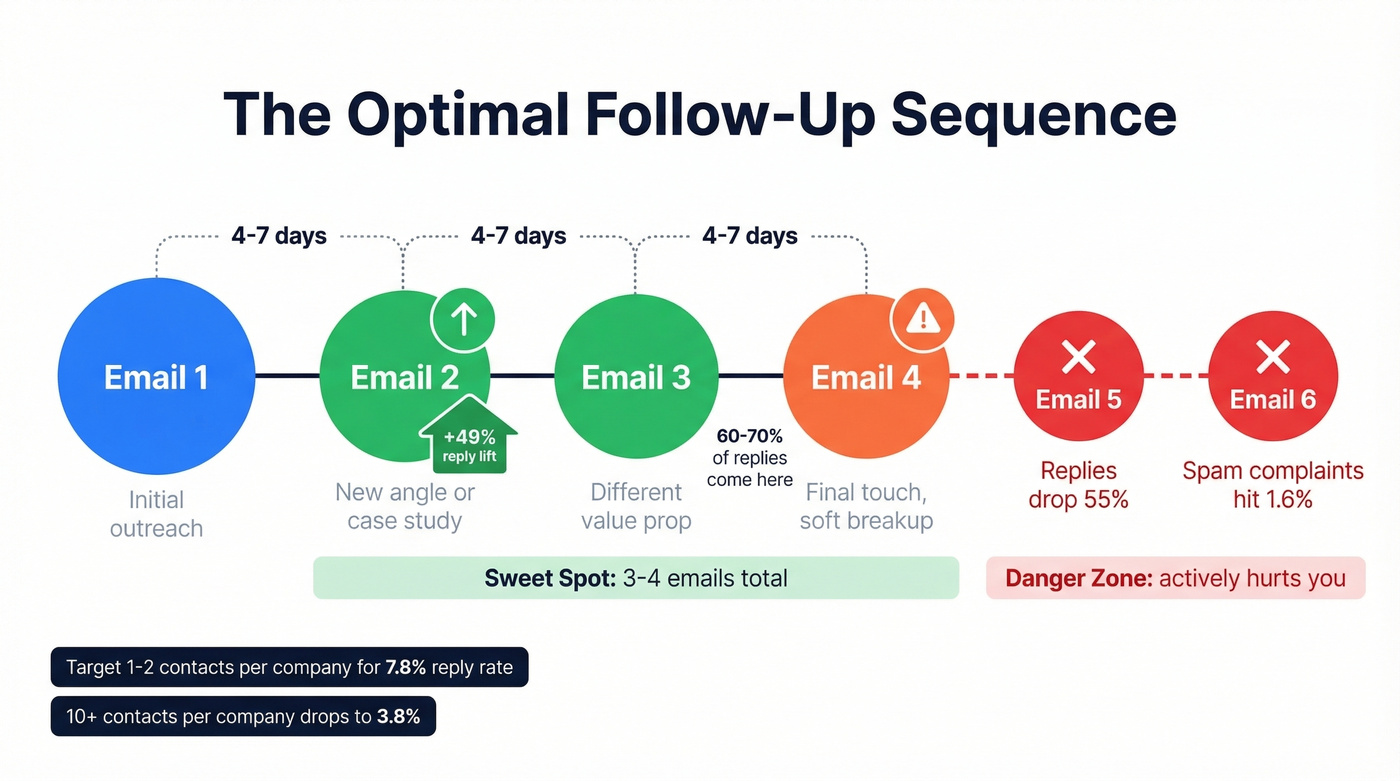
The sweet spot is 3-4 emails total, spaced 4-7 days apart. Reddit threads on r/coldemail consistently report that 60-70% of replies come after email #3 or #4 - but pushing to email #5 or #6 actively hurts you.
If you need copy, use these cold email follow-up templates and sales follow-up templates.
One underrated finding: emailing 1-2 contacts per company yields a 7.8% reply rate versus 3.8% when you spray 10+ contacts at the same company. Targeted threading beats carpet bombing every time.
Each follow-up should add new value - a different angle, a relevant case study, a useful resource. Never just "bumping this to the top of your inbox." That phrase is a fast track to the spam folder.
Timing, Testing, and Sending
Operational rules based on the 16.5M-email dataset:
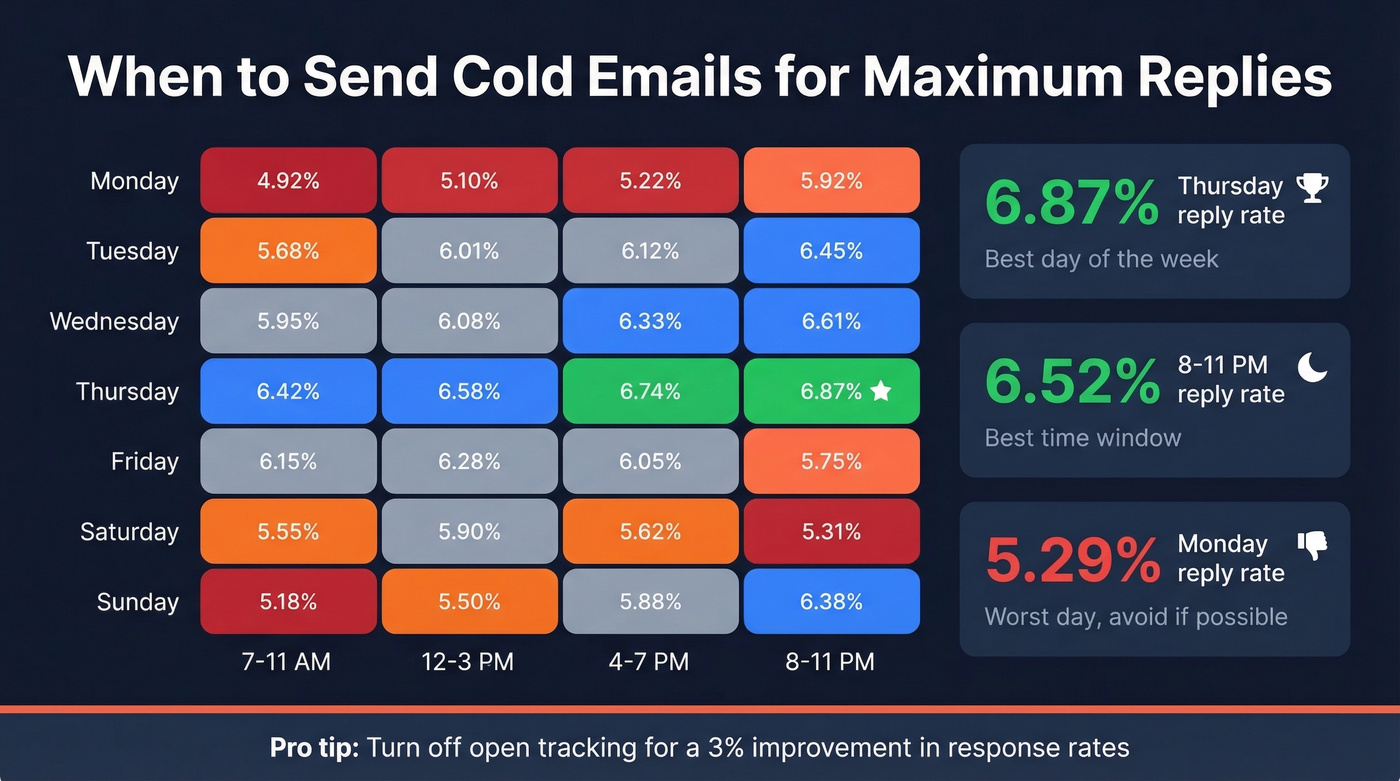
- Best day: Thursday at 6.87% reply rate. Monday is worst at 5.29%.
- Best time: 8-11 PM in the recipient's timezone, peaking at 6.52%. Morning sends from 7-11 AM are also solid.
- Turn off open tracking. The same study found a 3% improvement in response rates when open tracking was disabled. Tracking pixels add weight and trigger spam filters.
- Use spintax after 500-600 sends. Identical email copy across hundreds of sends gets flagged. Rotate phrasing, intros, and CTAs.
- Don't trust open rates. Apple Mail Privacy Protection inflates opens across the board. MailerLite's benchmarks confirm the distortion. Track reply rate and meetings booked instead.
For a deeper dive, see our guide on the best time to send cold emails.
A/B test relentlessly, but correctly. Test one variable at a time: subject line, opening line, or CTA. Run each variant for at least 200 sends before drawing conclusions. Testing two variables simultaneously tells you nothing.
Go Multichannel
Cold email alone works. Cold email combined with a social touch and one polite phone call works roughly 3X better. The email warms them up, the social connection adds credibility, and the call converts.
This doesn't mean tripling your workload. Add a connection request after email #1 and a brief call attempt after email #3. Multichannel amplifies good email fundamentals - it doesn't replace them. If you're not doing this yet, skip the fancy automation tools and just block 15 minutes a day for manual social touches on your hottest prospects.
If you're building a broader outbound motion, pair this with sales prospecting techniques and a structured B2B cold email sequence.
What Cold Email Actually Costs
Cold email infrastructure is cheap compared to almost any other outbound channel. For context, email ROI runs around 4,400% - dwarfing the roughly 28% return from social selling. Here's what a setup capable of ~450 emails/day actually runs:
| Component | Monthly Cost |
|---|---|
| Secondary domains (3) | ~$2.50/mo |
| Google Workspace (9 accts) | $54/mo |
| Sending tool (Instantly etc.) | $30-100/mo |
| Email verification | Free or ~$0.01/email |
| Total | $85-155/mo |
That's the cost of one bad dinner for two in a major city. The expensive part isn't the tools - it's the domain reputation damage from skipping verification. One burned domain costs you weeks of warmup time and thousands of emails that never land.
If your average deal size is under $10k, you probably don't need a $15-40k/year data platform. A $100/month cold email stack with verified data will outperform a bloated tech stack that nobody fully uses.
Stay Legal
Cold email is legal in most jurisdictions, but the rules differ meaningfully by region:
| CAN-SPAM | GDPR | CASL | |
|---|---|---|---|
| Consent | Opt-out | Opt-in (legitimate interest) | Opt-in (express/implied) |
| Unsubscribe | 10 business days | Immediate | 10 business days |
| Max penalty | $50,120/email | EUR 20M or 4% revenue | $10M CAD/violation |
| Private action | No | Yes | Yes |
Always include a physical mailing address, honor opt-outs immediately regardless of jurisdiction, and keep records of your consent basis. GDPR's "legitimate interest" provision covers most B2B cold outreach in the EU, but you need to document why you believe the recipient would find your email relevant. When in doubt, talk to a lawyer - not a blog post.
FAQ
Is cold emailing legal?
Yes, in most jurisdictions. CAN-SPAM requires an opt-out mechanism and physical address. GDPR allows cold B2B email under legitimate interest with a clear unsubscribe option. CASL requires express or implied consent. Include an unsubscribe link and honor opt-outs immediately.
How many cold emails should I send per day?
Cap at 10-15 per inbox per day using 2-3 inboxes per secondary domain. To reach 400 daily sends, you need roughly 10-12 domains. Never exceed 50 per account - that's where spam filters start paying attention.
What's a good cold email reply rate?
The 16.5M-email study found a 5.8% average. Anything consistently above 5% at scale is solid. Elite campaigns can exceed 10%, but ignore case studies claiming 30%+ - those are tiny samples emailing warm-adjacent lists.
Should I use AI to write cold emails?
AI is useful for drafting variations and generating spintax, but generic AI output is exactly what recipients delete. Use it for speed, then add context personalization manually. Over-automating with more than 5 variables backfires - the email reads like a mad lib.
How do I verify emails before sending?
Use a verification tool that checks deliverability before you hit send. Prospeo's 5-step verification catches invalid addresses, spam traps, and catch-all domains at 98% accuracy. Unverified lists regularly bounce above 10%, which destroys domain reputation and can take weeks to recover from.