

Email Content Spam Checker: What Actually Works in 2026
You ran your cold email through a spam checker, scored 9 out of 10, hit send - and watched 40% of your messages land in spam anyway. You're not alone. Over 160 billion spam emails are sent daily, and Litmus found that 70% of emails have at least one spam-related issue. Email still returns $42 for every $1 spent - when it actually reaches the inbox. That gap between potential and reality isn't a content problem. It's a filtering problem. Content is one of five layers modern filters evaluate, and it's nowhere near the most important one.
The Short Version
Content spam checkers are a useful sanity check, but they only cover one of five filtering layers. Authentication, sender reputation, and engagement matter far more.
Quick tool picks by category:
- Content check: Mail-Tester - free, fast spam-level test
- Full deliverability test: MailGenius - free, thorough
- List hygiene: Prospeo - 98% email accuracy, removes spam traps before they wreck your domain
How Spam Filters Actually Work
Gmail checks authentication before it even looks at your content. That's not an opinion - it's the operational reality of modern filtering. If your SPF, DKIM, or DMARC records are misconfigured, your beautifully crafted email never gets a fair trial. Rejected at the door. (If you want the full setup path, start with email authentication and then validate with a SPF DKIM DMARC check.)
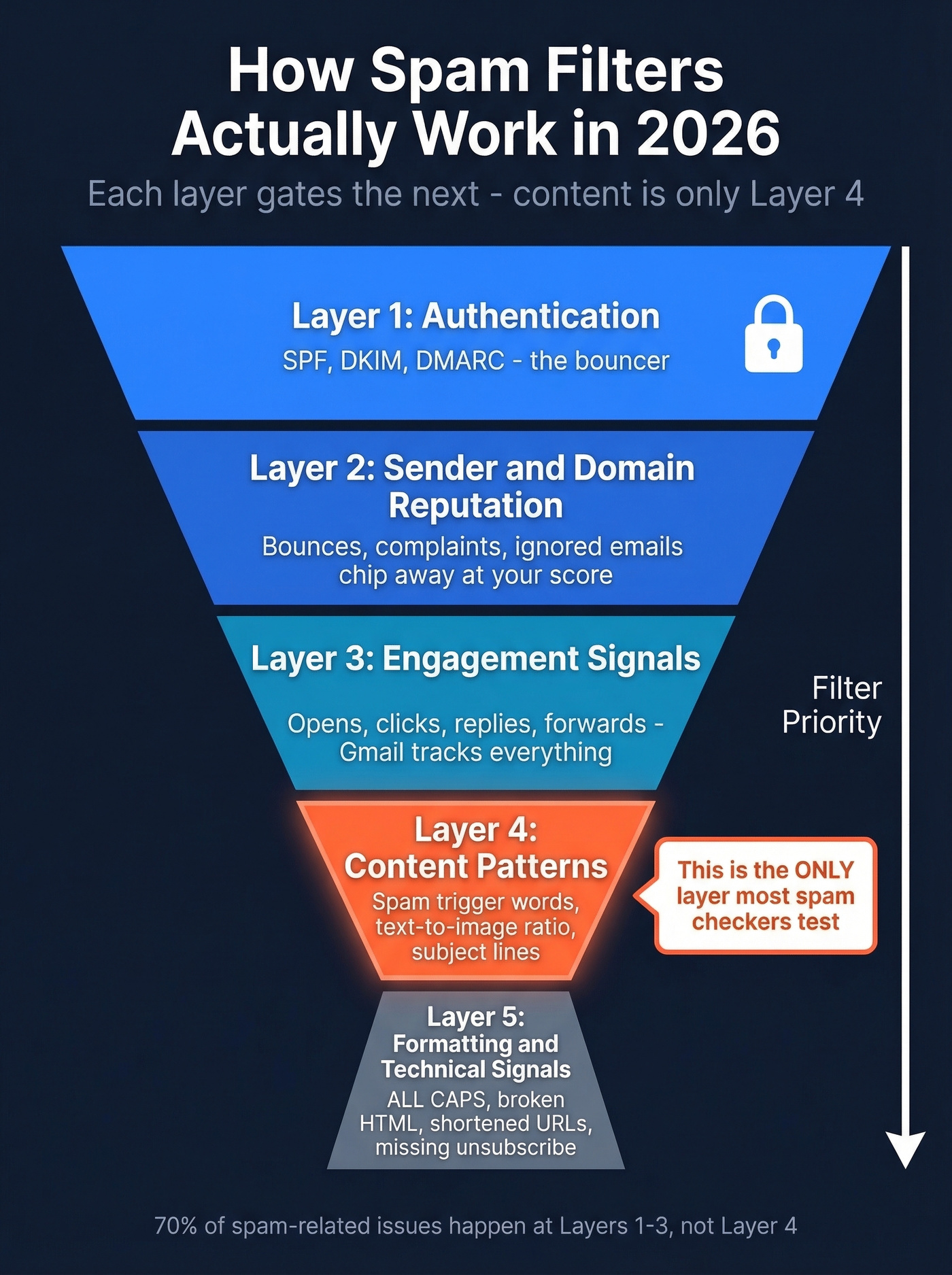
Think of spam filtering as a five-layer hierarchy where each layer gates the next:
Layer 1 - Authentication (SPF/DKIM/DMARC). This is the bouncer. Gmail requires proper authentication before anything else happens, and Outlook and Yahoo strongly enforce it too. Gmail classifies anyone sending over 5,000 messages per day as a bulk sender, with stricter requirements for one-click unsubscribe and DMARC alignment. (If you’re troubleshooting alignment specifically, use a DMARC alignment check.)
Layer 2 - Sender and domain reputation. Your domain has a score. Every bounce, every spam complaint, every ignored email chips away at it. A damaged reputation means your emails get filtered regardless of what they say. (See how to run a proper domain reputation check and what to do if your sender domain reputation is slipping.)
Layer 3 - Engagement signals. Gmail tracks opens, clicks, replies, and forwards. Its "Most Relevant" sorting in the Promotions tab now prioritizes emails based on engagement rather than recency, and Gmail's Manage Subscriptions dashboard now prioritizes emails based on engagement rather than recency, and Gmail's Manage Subscriptions dashboard lets users see exactly how often you email them and unsubscribe in one click. Low engagement is a death sentence. A practical rule: re-engage inactive subscribers at 90 days and suppress them entirely by 180 days. After six months of silence, you're just feeding the spam filter. (If you need a system for this, build an email suppression list.)
Layer 4 - Content patterns. This is where spam trigger words, text-to-image ratio, and subject line analysis live. It matters - but it's fourth in line. A content checker can help you catch obvious red flags here, but it can't compensate for failures higher up the stack. (For a deeper list, see our spam keywords list.)
Layer 5 - Formatting and technical signals. ALL CAPS, broken HTML, shortened URLs, excessive links, strange fonts, links to dangerous sites, and missing unsubscribe headers. The final checks. (Make sure you’re compliant with the List-Unsubscribe header requirements.)
Here's the thing: most of those 70% of emails with spam-related issues are failing on authentication, list quality, and technical setup - not word choice. A content-focused spam checker only sees Layer 4.
What Content Checkers Actually Test
Content-only checkers scan for keyword patterns like "act now" or "guaranteed," subject line red flags, text-to-image ratio, and sometimes link structure. That's it. They can't test whether your SPF/DKIM/DMARC records pass, your domain's sender reputation, how recipients have engaged with your previous emails, whether your list contains spam traps, or actual inbox placement across providers.
Tools like Mail-Tester and MailGenius go beyond content and check authentication too, which gives you a much clearer picture. But even the best pre-send tools have limits. As EmailToolTester notes, seed-test emails are effectively "cold" - they have no engagement history - and may understate real deliverability. MailGenius also hosts all tests on public links, worth knowing if you're testing sensitive content.
Set your expectations correctly: a content-level spam check tests one of five factors. It can't predict inbox placement. (If you want a more complete workflow, use an email deliverability checklist.)
Spam Trigger Words by Category
Spam trigger words still matter - they're just not the dealbreaker most people think. Context is everything. "Free" in a SaaS trial email isn't the same as "FREE $$$" in all caps. But stacking multiple trigger words in a single email absolutely raises your risk score.
Here are the categories that modern filters flag most consistently:
| Category | Example Words |
|---|---|
| Urgency | Act now, Limited time, Hurry, Expires, Don't miss out |
| Money/Financial | Double your income, $$$, Make money, Earn cash, No cost |
| Scam/Fraud | No risk, 100% free, Winner, Congratulations, You've been selected |
| Overpromise | Guaranteed, Miracle, Once in a lifetime, Best price |
| Phishing/Unnatural | Dear friend, Click below, Verify your account, Urgent action, Confidential |
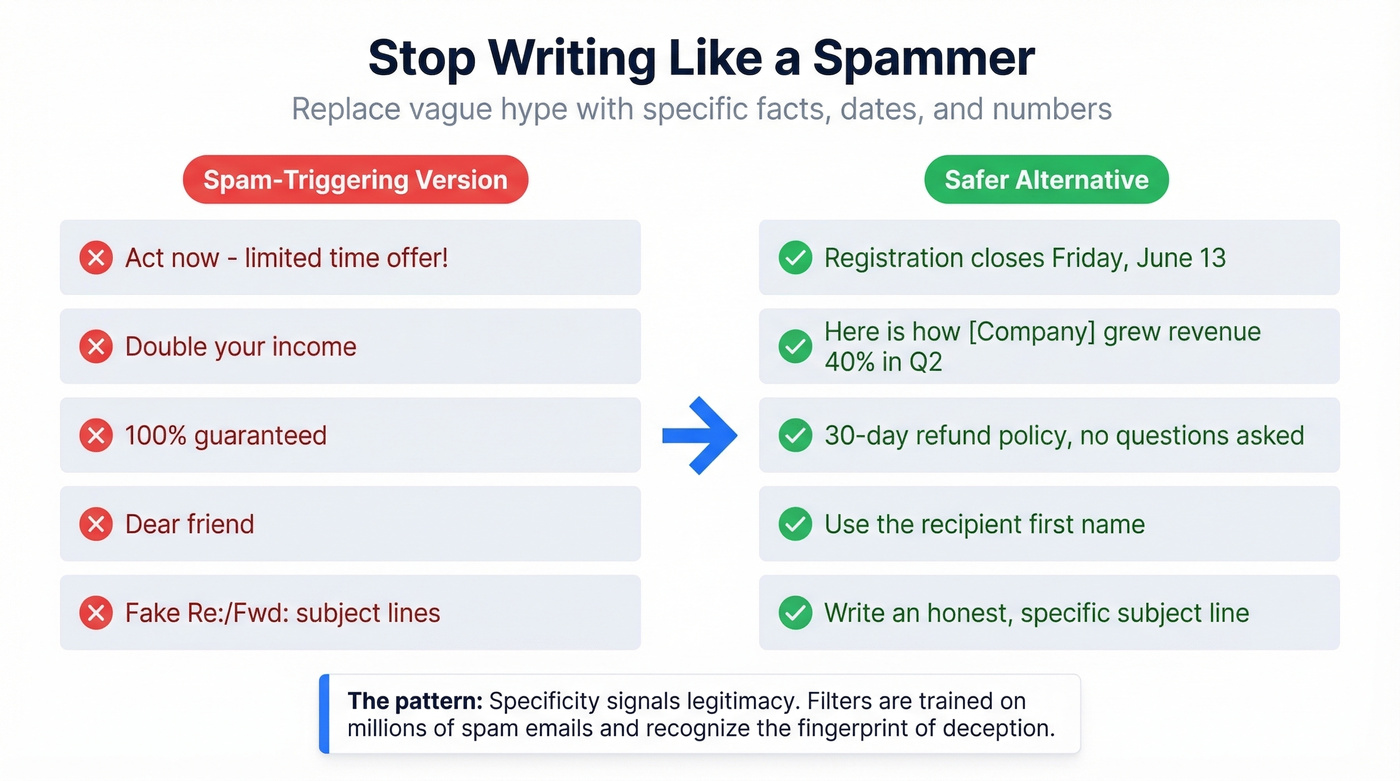
For a full reference, Snov.io maintains 550+ categorized trigger words - useful as a lookup when you're drafting. But knowing the words isn't enough. You need to know what to write instead:
| Spam-Triggering Version | Safer Alternative |
|---|---|
| Act now - limited time offer! | Registration closes Friday, June 13 |
| Double your income | Here's how [Company] grew revenue 40% in Q2 |
| 100% guaranteed | 30-day refund policy, no questions asked |
| Dear friend | Use the recipient's first name |
| Fake Re:/Fwd: subject lines | Write an honest, specific subject line |
The pattern: replace vague hype with specific facts, dates, and numbers. Filters are trained on millions of spam emails, and they recognize the linguistic fingerprint of deception. Specificity signals legitimacy.

Content spam checkers can't catch the #1 deliverability killer: bad email addresses. Spam traps, invalid contacts, and catch-all domains tank your sender reputation at Layer 2 - before filters even read your words. Prospeo's 5-step verification delivers 98% email accuracy and removes spam traps before they wreck your domain.
Fix the layer that actually matters - start with a clean list.
Best Spam Checker Tools Compared
| Tool | What It Checks | Pricing | Best For |
|---|---|---|---|
| Mail-Tester | Spam-level test (send to an address, get a score) | Free (limited/day) | Quick all-in-one check |
| MailGenius | Auth, content, links, HTML, blacklists | Free basic; premium available | Free technical test |
| GlockApps | Inbox placement + DMARC + content | Free (2 tests); from $59/mo | Serious inbox monitoring |
| Folderly | Content/spam word scanning | Free tool; platform ~$200/mo | Fast content-only check |
| Mailmeteor | Content/spam word scanning | Free | Categorized word flagging |
| BetterMerge | AI-powered content analysis | Free | AI content suggestions |
| Unspam | Deliverability + design scoring | Free tier; ~$9-29/mo paid | Design + deliverability |
| Google Postmaster | Reputation + spam rate + auth | Free | Post-send Gmail monitoring |
| Microsoft SNDS | IP reputation + spam data | Free | Outlook monitoring |
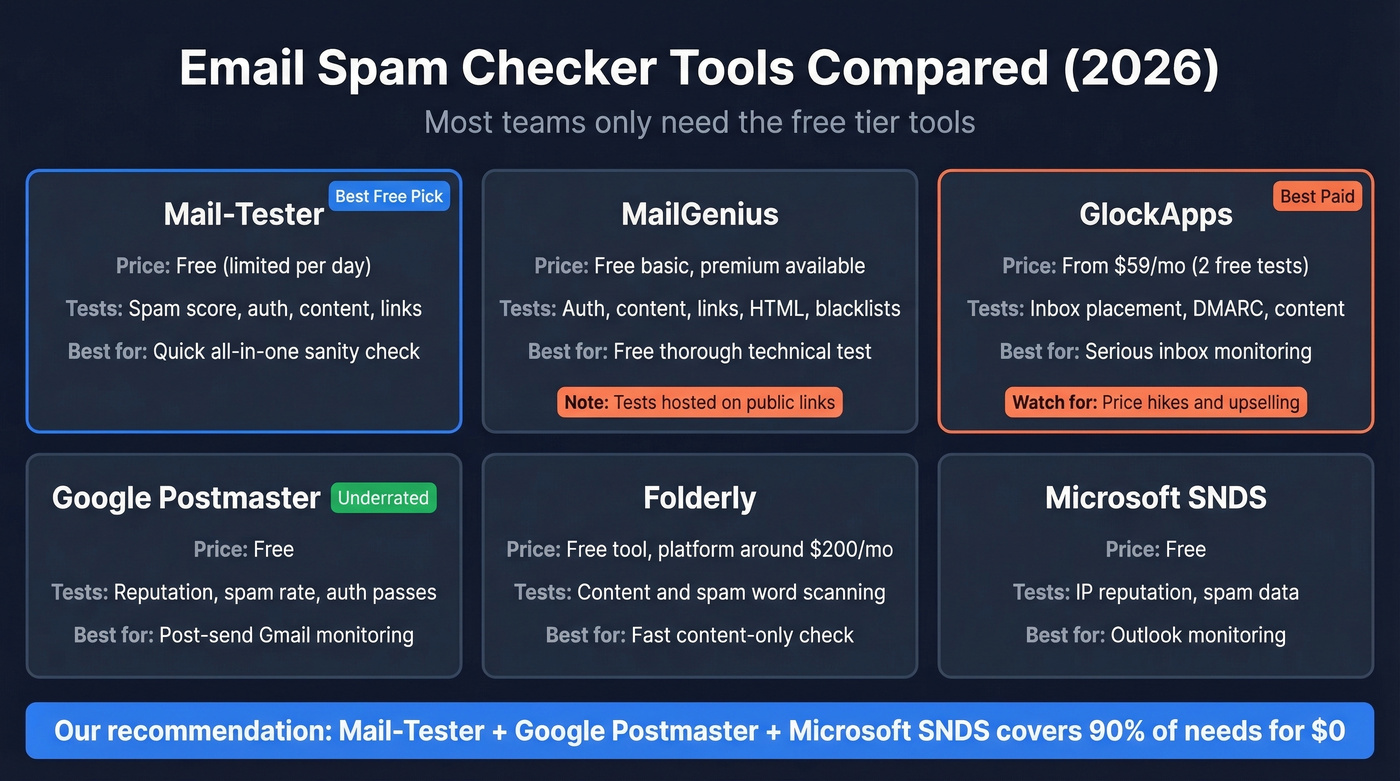
Best free all-rounder: Mail-Tester. Paste your email, get a score in one report. It's the tool we recommend to anyone who asks "where do I start?" Simple, fast, and surprisingly thorough for free. (If you want to understand what the score misses, read our Mail Tester guide.)
Most comprehensive paid: GlockApps. It tests inbox placement across major providers - not just content scoring. The Essential plan runs $59/mo for 360 spam test credits, with higher tiers around $85+/mo. Fair warning: aggressive price hikes, heavy upselling toward consulting services, and information overload are common complaints in user reviews. If you need inbox placement testing, GlockApps is one of the few options. Just go in with your eyes open. (For alternatives, compare inbox placement tools.)
Most underrated: Google Postmaster Tools. Free, from Google, shows you exactly how Gmail treats your domain - reputation, spam rate, authentication pass rates. Most people ignore it. Don't. Pair it with Microsoft SNDS for Outlook coverage and you've got post-send monitoring locked down without spending a dollar.
The Reddit consensus on deliverability checkers? Inconsistent results and heavy upsells. One thread on r/Emailmarketing summed it up: "Results are laughable - some say inbox, others say spam." That's not the tools being broken. That's the reality of testing a system with five variables using a tool that checks one or two.
Most Teams Don't Need a Better Spam Checker
Let's be honest. If your average deal size is under $10k and you're sending fewer than 5,000 emails a month, you don't need GlockApps or Folderly's $200/mo platform. Mail-Tester plus Google Postmaster Tools will cover 90% of your needs for free. The real money should go toward verified contact data and proper authentication - the two things that actually move the needle on deliverability. (If you’re ramping outbound volume, follow a cold email ramp plan to protect reputation.)
Spending $200/mo on content analysis while emailing unverified lists is like buying a sports car and filling it with the wrong fuel.
The Factor Nobody Talks About: Your Contact Data
Your cold outreach campaign has a 15% bounce rate and your domain reputation is tanking. You run your email through a spam checker - it scores 9/10. The problem isn't your words. It's your list.
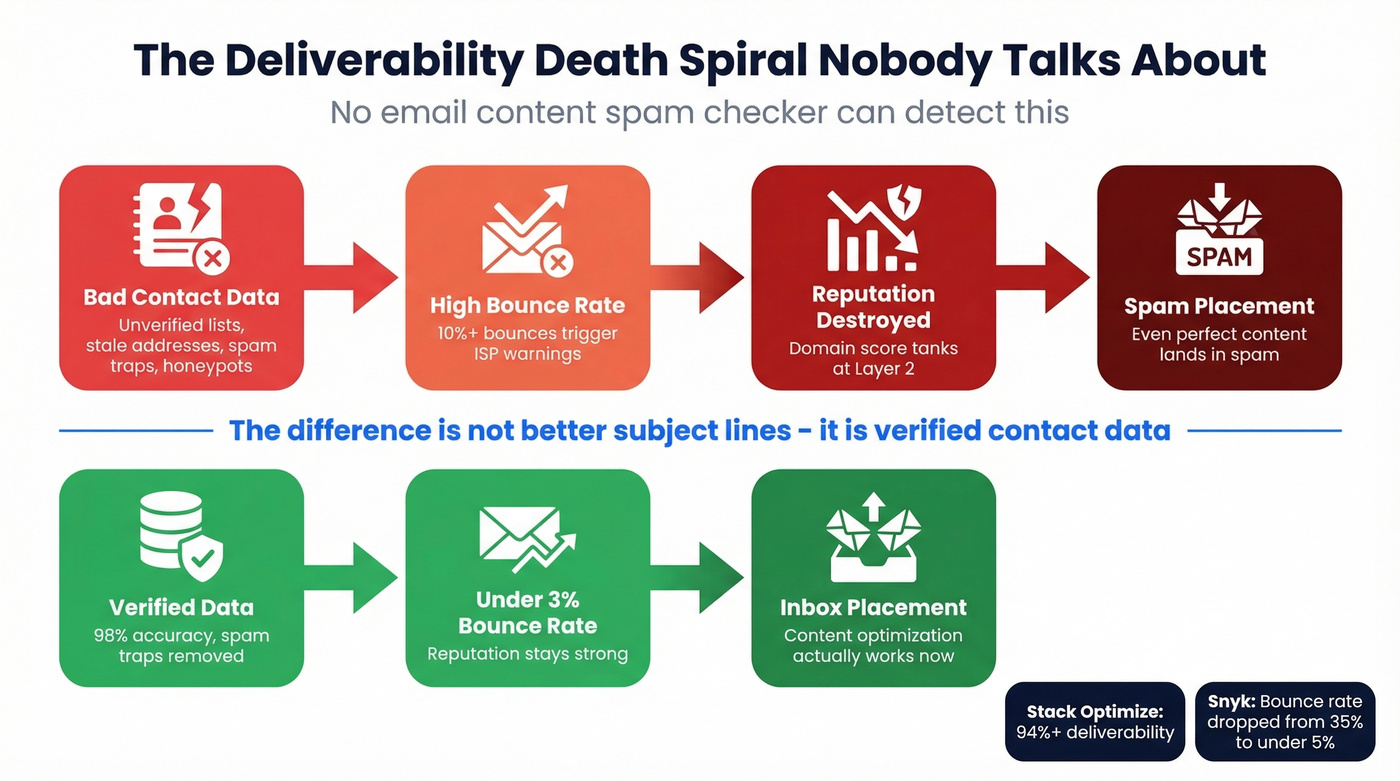
The chain is simple and brutal: bad data leads to bounces, bounces destroy reputation, and destroyed reputation means spam placement. No content checker can detect this. It's invisible to every tool in the comparison table above, yet it's the single fastest way to kill your sender reputation. (If you want the deeper breakdown, see email deliverability & bad data.)
We've seen this pattern repeatedly. Stack Optimize built from zero to $1M ARR running outbound campaigns and maintained 94%+ deliverability with under 3% bounce rates across all clients. Snyk's 50-person AE team cut bounce rates from 35-40% down to under 5%. The difference wasn't better subject lines - it was verified contact data. Prospeo's 5-step verification process handles catch-all domains, removes spam traps, and filters honeypots, with a 7-day data refresh cycle that keeps contacts from going stale between list-building and send day.

You can optimize your content all day, but if 10% of your list is invalid addresses and spam traps, you're fighting a battle you can't win at the content layer.
You just optimized your content. Now make sure you're sending to real inboxes. Every bounced email chips away at the sender reputation you can't spam-check your way out of. Prospeo verifies emails through proprietary infrastructure with catch-all handling, spam-trap removal, and honeypot filtering - refreshed every 7 days, not 6 weeks.
Stop feeding spam filters with dead addresses at $0.01 per verified email.
Complete Pre-Send Checklist
Every email campaign should pass through these seven steps before you hit send. Skip one and the others can't compensate.
Authenticate your domain. SPF, DKIM, and DMARC must all pass. Non-negotiable - it's the first thing filters check.
Verify your email list. Bounce rate must stay under 3%. Run your list through a verification tool to catch invalid addresses, spam traps, and catch-all domains before they do damage. (Benchmarks: average email bounce rate.)
Check sender reputation. Google Postmaster Tools for Gmail, Microsoft SNDS for Outlook. Both free. Set them up once and monitor weekly.
Run a content spam check. Mail-Tester or MailGenius. Look for flagged trigger words, broken links, and authentication warnings in the report.
Review formatting. No ALL CAPS. One primary link. Proper text-to-image ratio. Working unsubscribe link. Clean HTML without broken tags or strange fonts.
Send a test. To seed accounts across Gmail, Outlook, and Yahoo. Check where it actually lands - inbox, promotions, or spam.
Monitor post-send. Track inbox placement, spam complaints, and engagement metrics. If inbox placement drops below 90%, investigate immediately - that's the threshold where problems compound fast.
FAQ
What's the best free email content spam checker?
Mail-Tester is the best free all-rounder - send a test email and get a spam score covering authentication, content, and blacklist status in one report. MailGenius is another strong free option with broader technical checks. For content-only scanning, Mailmeteor and BetterMerge are both free and effective.
Do spam trigger words still matter in 2026?
They matter, but far less than authentication, sender reputation, and engagement signals. A single "free" won't tank your email, but stacking five trigger words in one message raises your risk score. Fix infrastructure first, then optimize word choice.
Why does my email land in spam after passing a content check?
Content checkers only test one of five filtering layers. Your email may have authentication failures, a damaged sender reputation, or a high bounce rate - none of which content analysis can detect. Check Google Postmaster Tools for your actual domain reputation.
Can cleaning my email list improve deliverability?
Yes - directly and measurably. High bounce rates from invalid addresses damage sender reputation, which is a top-three spam filtering factor. A proper verification process that catches spam traps and invalid emails keeps bounce rates under 3% and protects your domain.
How often should I run spam checks on my emails?
Run a content check whenever you change your email template significantly. Monitor sender reputation continuously with Google Postmaster Tools. Verify your contact list before every campaign - stale data degrades faster than most teams realize, which is why a weekly refresh cycle matters more than a monthly one.