

The 12 Best Lead Generation Management Software Tools in 2026
The lead generation software market hit $7.4 billion in 2025 and is on track for $16.2 billion by 2034. That's a lot of money chasing a problem most teams still haven't solved: 79% of marketing leads never convert into sales. Meanwhile, 97% of people ignore cold calls, and 44% of sales reps say they're too busy to follow up on the leads they already have.
The right lead generation management software should fix this. The wrong stack makes it worse.
Here's the thing: there's no single tool that handles generation, qualification, scoring, routing, and nurturing well. The teams that win combine a data platform with a CRM and sometimes an automation layer. This list covers all three categories, ranked by what actually matters - data quality, usability, and whether the pricing makes sense for your team size.
Our Picks (TL;DR)
| Pick | Tool | Starting Price | G2 Rating |
|---|---|---|---|
| Best for data accuracy | Prospeo | Free (75 emails/mo) | 4.8/5 |
| Best free CRM | HubSpot | Free | 4.4/5 |
| Best for growing teams | Pipedrive | $14.90/user/mo | 4.2/5 |
| Best for enterprise | Salesforce | $25/user/mo | 4.4/5 |
| Best for outbound + data | Apollo.io | Free plan available | 4.8/5 |
| Best all-in-one SMB suite | Zoho CRM | ~$14/user/mo | 4.0/5 |
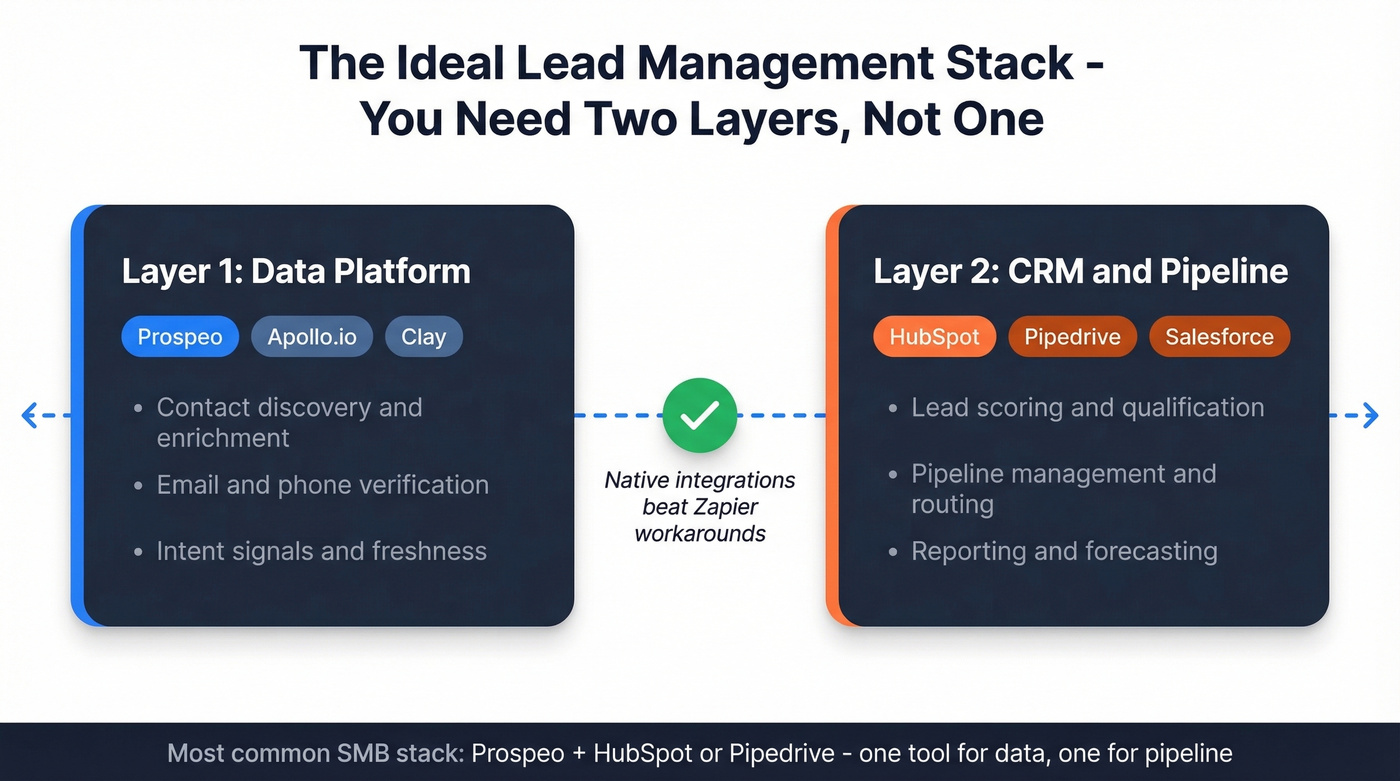
Most teams need one tool from the "data" column and one from the "CRM" column. Don't try to solve both problems with a single platform - you'll overpay or underperform. In practice, the most common SMB stack we see is a CRM like HubSpot or Pipedrive paired with a dedicated data tool.
What to Look For in Lead Management Software
Before you compare features, get clear on what your stack actually needs to do. Most tools excel at one or two of these. None nail all of them.
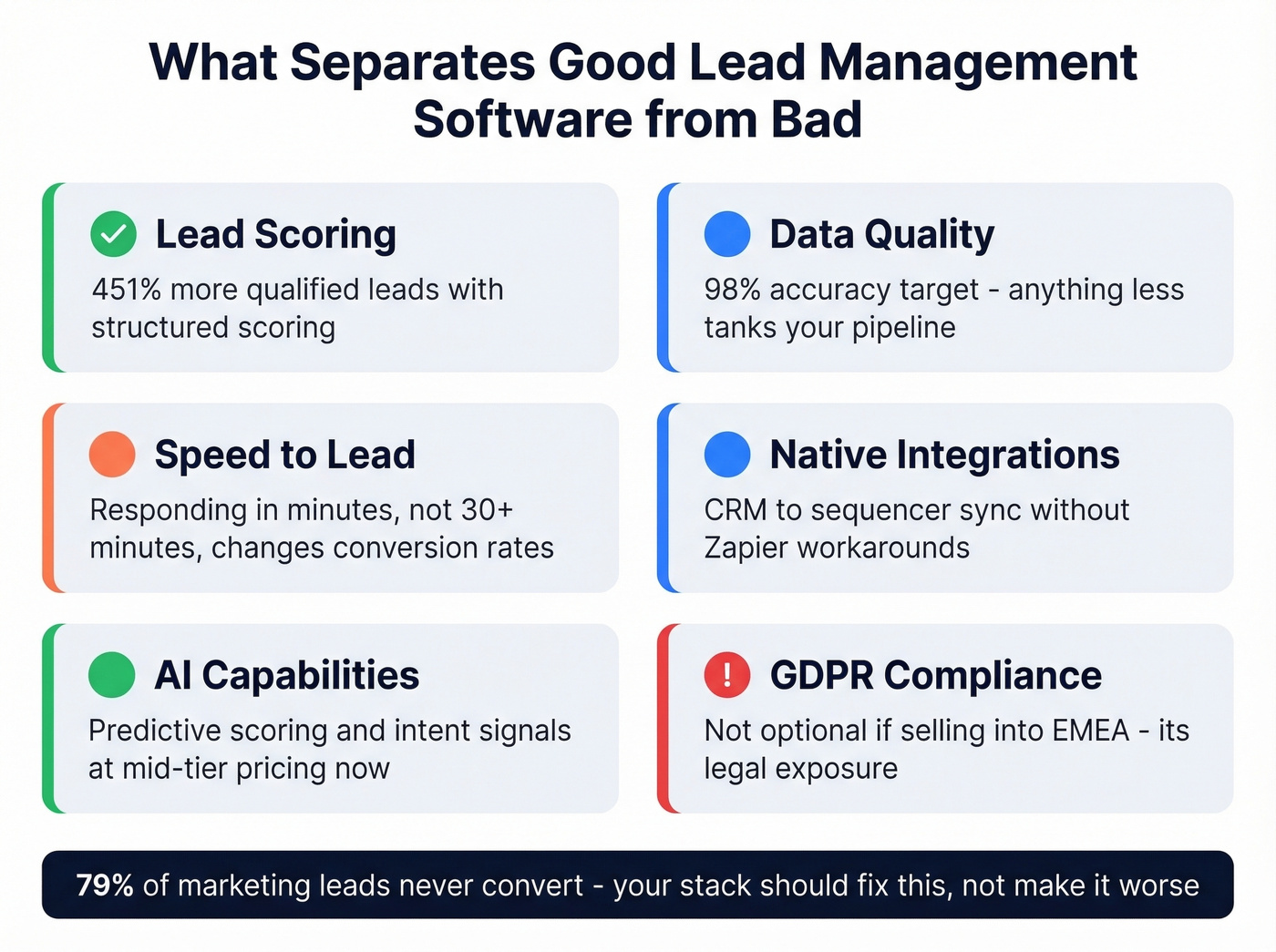
Lead scoring that reflects reality. Manual point systems break within months. Look for tools that support behavioral and firmographic scoring at minimum, and predictive AI if your volume justifies it. Marketing automation tied to structured scoring drives a 451% increase in qualified leads.
Data quality and verification. Your scoring model, routing logic, and rep productivity all collapse if a third of your emails bounce. This is the most underrated criterion on the list, and the one that bites hardest when you ignore it. If you're evaluating data enrichment vendors, prioritize verification and refresh cadence over raw database size.
Routing and assignment. Round-robin is table stakes. You need territory-based, weighted, and threshold-based routing - plus auto-reassignment when reps miss SLAs. Responding in minutes instead of waiting 30+ minutes can materially improve conversion rate.
Integrations that actually work. A CRM that doesn't sync with your sequencer or data platform creates manual work and duplicate records. Native integrations beat Zapier workarounds every time. If you're building a repeatable process, follow a simple checklist to connect outreach tool to CRM before you scale.
AI capabilities. Predictive scoring, AI-assisted sequencing, and intent signals are available at mid-tier pricing now. Tools like Salesforce Einstein, Zoho Zia, and Freshsales Freddy offer them without enterprise contracts. If you're comparing approaches, it helps to understand B2B predictive analytics basics first.
GDPR and compliance. If you're selling into EMEA, your data platform needs opt-out enforcement and DPA availability. Not optional - it's legal exposure.
Pricing transparency. If a vendor won't publish pricing, budget 2-3x what you'd expect.
Full Comparison Table
Here are all 12 tools side by side. For context, only 4% of software products earned a G2 Leader badge in recent reports - several tools on this list hold one. Pricing reflects the lowest published tier; actual costs scale with seats, contacts, and modules.
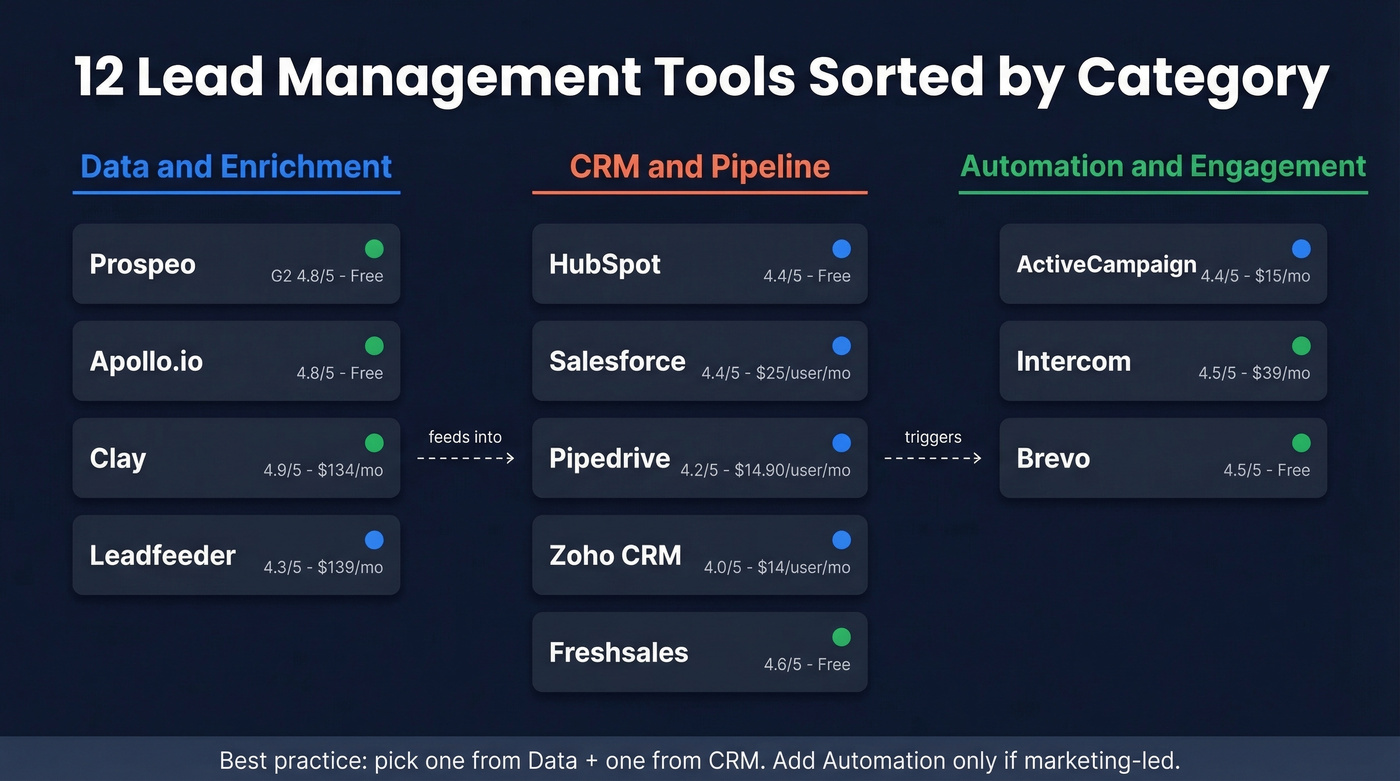
| Tool | Best For | Starting Price | G2 Rating | Free Plan? | AI Features |
|---|---|---|---|---|---|
| Prospeo | Email accuracy & B2B data | Free | 4.8/5 | Yes | Intent data (Bombora) |
| HubSpot | Free CRM | Free | 4.4/5 | Yes | Predictive scoring (Pro+) |
| Salesforce | Enterprise | $25/user/mo | 4.4/5 | No | Einstein AI |
| Pipedrive | Growing sales teams | $14.90/user/mo | 4.2/5 | No | AI sales assistant |
| Apollo.io | Outbound + data | Free | 4.8/5 | Yes | AI sequencing |
| Zoho CRM | All-in-one SMB | ~$14/user/mo | 4.0/5 | Yes | Zia AI (higher tiers) |
| ActiveCampaign | Marketing automation | $15/mo | 4.4/5 | No | Predictive sending |
| Freshsales | Small team CRM | Free | 4.6/5 | Yes | Freddy AI |
| Clay | Enrichment orchestration | $134/mo | 4.9/5 | No | AI enrichment agents |
| Leadfeeder | Visitor identification | ~$139/mo | 4.3/5 | Yes | Company matching |
| Intercom | Conversational capture | $39/mo | 4.5/5 | No | AI chatbot (Fin) |
| Brevo | Email on a budget | Free | 4.5/5 | Yes | Send-time optimization |

Your lead scoring and routing logic are only as good as the data underneath them. Prospeo's 7-day refresh cycle and 98% email accuracy mean your CRM stays clean, your sequences actually land, and reps chase real buyers - not dead ends.
Stop managing leads that were never real. Start with verified data.
The 12 Best Lead Management Tools
Prospeo
Use this if: You need verified contact data that won't tank your sequences or poison your lead scores.
Pair with: HubSpot or Pipedrive for the complete stack - Prospeo handles data, your CRM handles pipeline.
Prospeo's database covers 300M+ professional profiles with 143M+ verified emails at 98% accuracy and 125M+ verified mobile numbers delivering a 30% pickup rate. Used by 15,000+ companies, the differentiator is freshness: a 7-day data refresh cycle versus the 6-week industry average. Stale data is the silent killer of outbound campaigns, and that gap matters more than most teams realize. If you're building a repeatable outbound motion, pair this with proven sales prospecting techniques so the data actually turns into meetings.

The proof point that sticks with us: Snyk's 50-person AE team was running 35-40% bounce rates before switching. After the move, bounces dropped under 5%, and AE-sourced pipeline jumped 180%. That's not a marginal improvement - it's a different business.
Pricing is self-serve and transparent. The free tier gives you 75 verified emails and 100 Chrome extension credits per month. Paid plans run roughly $0.01 per email with no annual contracts. Native integrations cover Salesforce, HubSpot, Clay, Lemlist, Instantly, Make, and Zapier. If you're troubleshooting deliverability, start with email bounce rate benchmarks and fixes.
HubSpot
HubSpot is the obvious starting point for teams that don't have a CRM yet. The free plan supports up to one million contacts - one of the most generous free CRM limits on the market. The interface is clean, onboarding is fast, and the ecosystem of integrations is massive. G2 gives it 4.4/5 across 14,556 reviews, with users praising customization and workflow flexibility. If you're still deciding what counts as a CRM, see these examples of a CRM with real pricing.
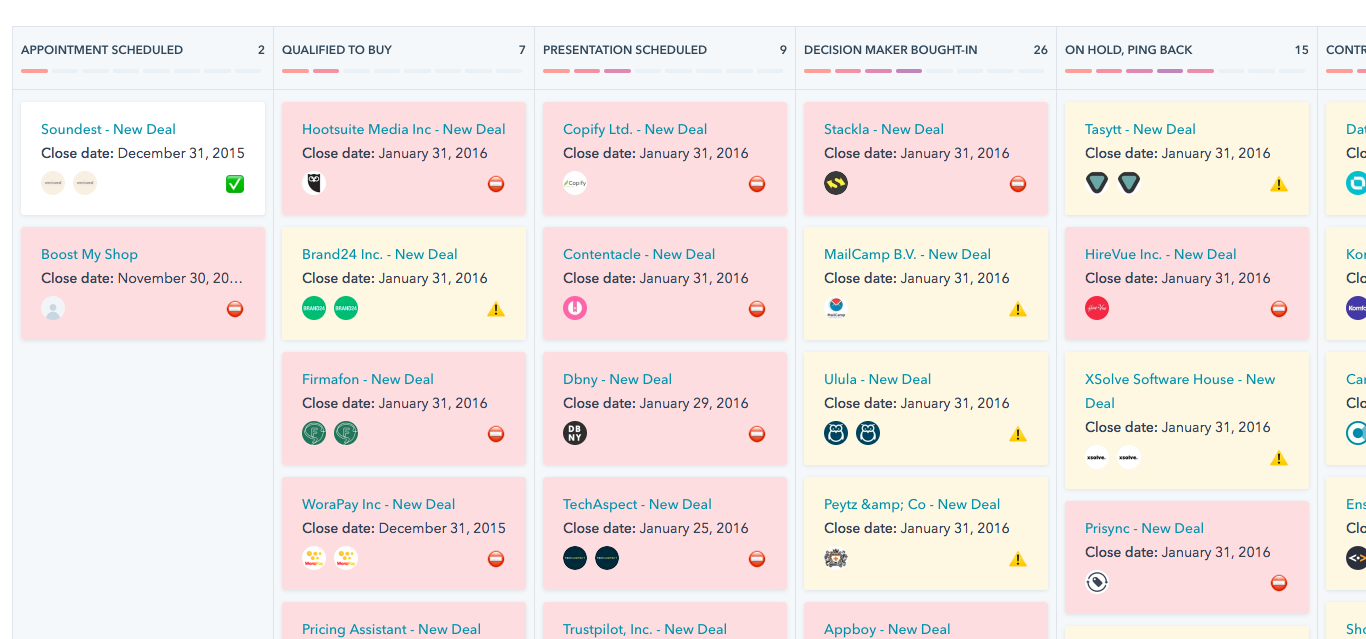
The catch is the pricing cliff. You'll start free, graduate to Starter at $20/seat/month, and then hit Professional at $890/month for three seats. Enterprise jumps to $3,600/month. Worse, marketing contacts scale separately - $250/month per 5,000 additional contacts at the Professional tier.
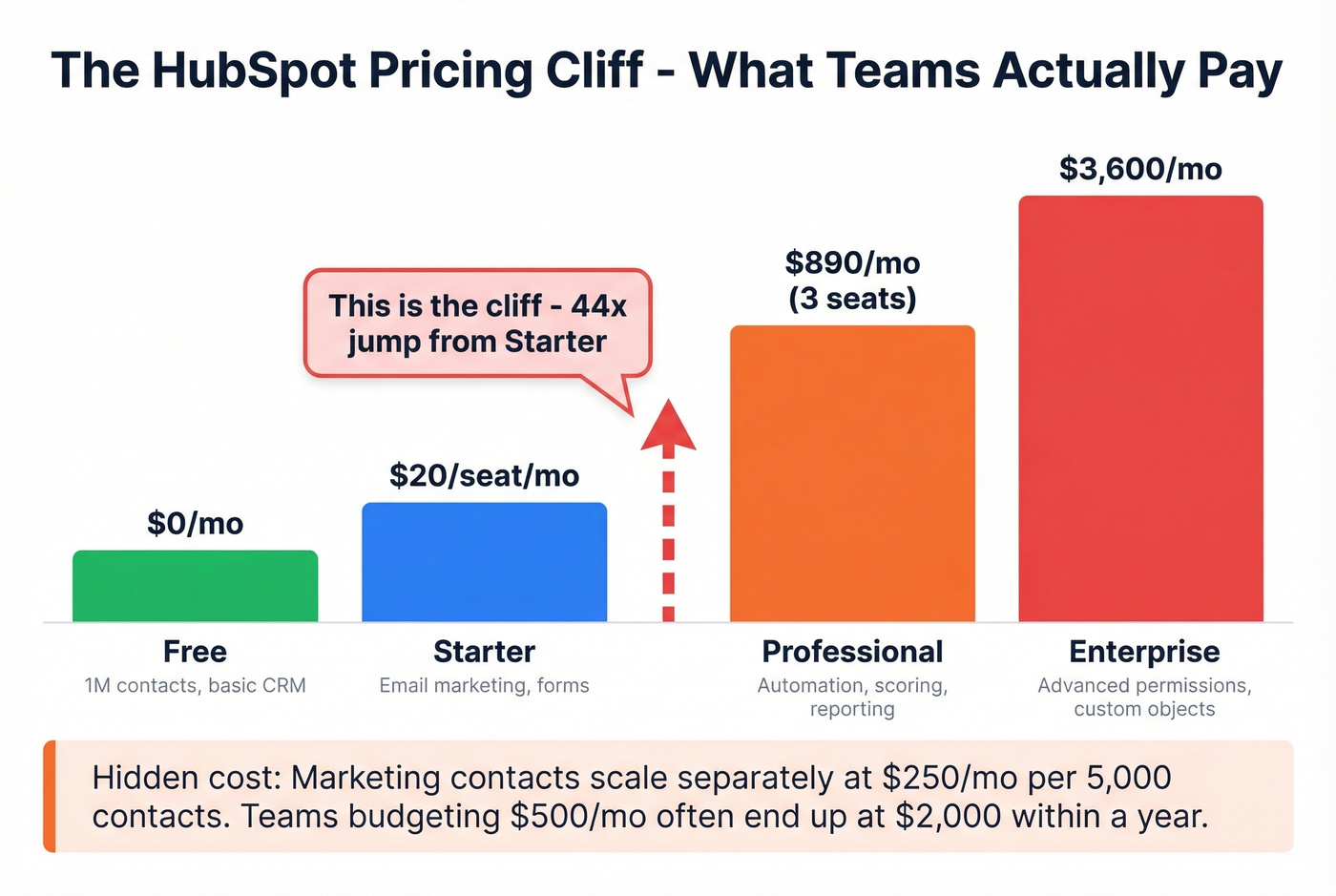
We've seen teams budget $500/month and end up at $2,000 within a year because of contact-based scaling. Plan for that before you commit. The G2 complaints are consistent: complexity creeps in at higher tiers, and reporting can lag. But for a team going from spreadsheets to a real CRM, nothing beats the free-to-paid ramp.
Salesforce Sales Cloud
Salesforce is the enterprise default for a reason. The customization depth, AppExchange marketplace, and workflow automation are unmatched. PCMag gives it a 4.5 Outstanding rating, and G2 has it at 4.4/5 with 25,479 reviews - more than any other tool in this space. If you need complex routing rules, territory management, and Einstein AI scoring, this is the platform. If you're trying to forecast impact, align your CRM rollout with sales pipeline benchmarks so you can measure lift.
The key tradeoff: starting at $25/user/month sounds reasonable until you realize most teams need Enterprise at $175/user/month to unlock the features that justify Salesforce in the first place. Add implementation costs ($10,000-$50,000+ depending on complexity), a dedicated admin ($80-120k/year), and a 3-12 month ramp time. The G2 complaints mirror this - complexity, setup time, and high licensing costs dominate the negative reviews.
Pricing signal: Starter $25 -> Professional $80 -> Enterprise $175 -> Unlimited $350/user/month. Budget for Enterprise unless your needs are genuinely basic.
Pipedrive
We watched a 15-person sales team evaluate Pipedrive against HubSpot and Salesforce last year. They picked Pipedrive in three days. The visual pipeline UI clicked immediately - reps were dragging deals between stages within an hour of setup, no training needed. That's Pipedrive's superpower: it's built for salespeople, not for admins.

Starting at $14.90/user/month, it's the most accessible paid CRM on this list. The LeadBooster add-on handles chatbots, web forms, and prospecting. G2 rates it 4.2/5 - slightly lower than HubSpot and Salesforce, mostly because it lacks the marketing automation depth of those platforms. For sales-first teams under 50 people who don't need a marketing suite, Pipedrive is the right call. The 14-day free trial is enough to know if it fits. If your reps struggle with consistency, add lightweight sales activities examples to standardize what “good” looks like.
Apollo.io
Apollo combines a massive contact database with built-in sequencing, making it the only tool on this list that handles both prospecting and engagement in one platform. The free plan is legitimately useful - not a bait-and-switch trial. Paid plans start at $49/user/month.
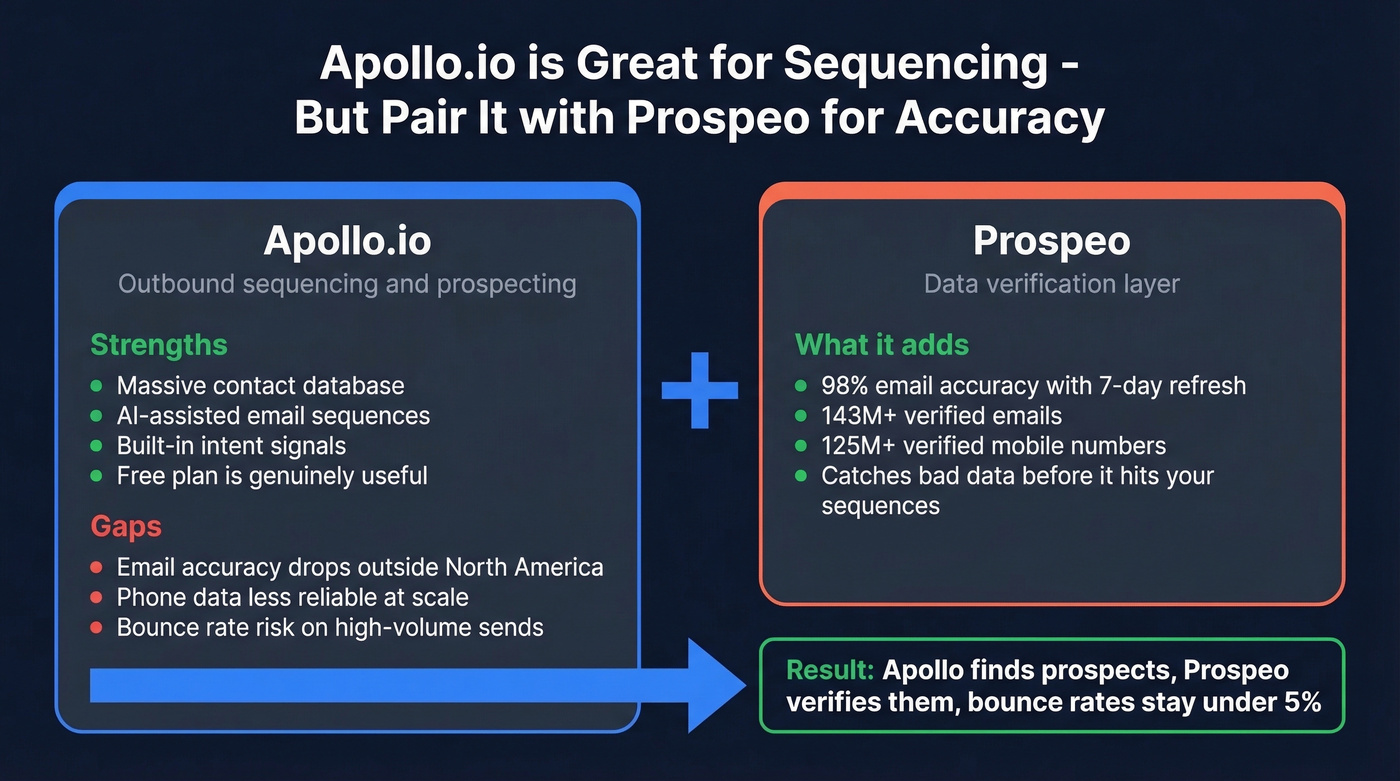
The numbers back up the hype: Apollo generated 1,100 G2 reports in recent reporting cycles. AI-assisted sequencing, intent signals, and a contact database that rivals ZoomInfo's US coverage make it the default for SMB outbound teams.
Where Apollo falls short is data accuracy on emails and mobiles, particularly outside North America. If you're running high-volume outbound, pair Apollo's sequencing with a dedicated verification layer to avoid the bounce-rate tax. Apollo finds the prospects; you still need to make sure you can actually reach them. If you're building outbound from scratch, start with these outbound lead generation tools to round out the stack.
Zoho CRM
The best total cost of ownership play for SMBs that need CRM, marketing, and support in one suite. Zoho CRM starts around $14/user/month, but the real value is Zoho One - that bundles 45+ apps across departments for roughly $37/employee/month on annual billing. PCMag gives it a 4.5 Outstanding rating. Zia AI kicks in at higher tiers for predictive scoring and anomaly detection. If your team is under 30 people and you want one vendor for everything, Zoho's hard to beat on value.
ActiveCampaign
Use this if: You're a marketing-led org that needs email automation, CRM, and lead scoring in one tool.
Skip this if: You're a pure sales team - ActiveCampaign's CRM is functional but secondary to its automation engine.
Starting at $15/month with a G2 rating of 4.4/5 across 14,606 reviews, it's the strongest mid-market marketing automation platform. The email builder, conditional workflows, and scoring models are genuinely sophisticated. Just don't expect it to replace a sales-focused CRM like Pipedrive or Salesforce.
Freshsales
Clean, sales-first CRM with a genuinely free plan. Paid tiers start at $9/user/month - one of the cheapest paid CRMs here. Freddy AI handles lead scoring and next-best-action recommendations at higher tiers. Built-in calling is a nice touch for teams that don't want to bolt on a separate dialer. Best for small sales teams under 15 reps who want simplicity without sacrificing AI-powered scoring.
Quick Hits: Three More Worth Knowing
Clay isn't a CRM - it's an enrichment orchestration layer that chains multiple data sources into automated workflows. Starting at $134/month for 2,000 enrichment credits, it's built for RevOps teams who want custom data pipelines without writing code. If you're manually copying data between tools, Clay eliminates that entirely. If you want a step-by-step workflow, see Clay list building.
Leadfeeder (Dealfront) identifies companies visiting your website and maps them to CRM contacts for warm outbound. Free plan available; premium starts around $139/month. Best for inbound-heavy teams that want to convert anonymous traffic into pipeline.
Intercom handles conversational lead capture via AI chatbots. Starting at $39/month, it qualifies visitors in real time and routes them to sales. Best for product-led growth or inbound-heavy SaaS companies - not a fit for outbound-first teams.
Brevo
Email marketing and basic CRM on a budget. Free plan available, with paid plans starting low. If your lead management needs are primarily nurturing existing contacts through email sequences, Brevo handles it without the complexity or cost of HubSpot. Don't expect advanced scoring or routing - this is a focused tool for a focused job.
Lead Scoring Models Explained
Scoring is where lead management tools earn their keep - or waste your time. Four models worth understanding:
| Model | How It Works | Best For |
|---|---|---|
| Demographic | Scores on job title, company size, industry | Teams with clear ICP |
| Behavioral | Scores on actions (page visits, downloads, email opens) | High-traffic inbound |
| Predictive | ML models analyze historical conversions | 1,000+ leads/month |
| Hybrid | Combines demographic + behavioral + predictive | Most teams |
Start with hybrid. Pure demographic scoring misses intent, and pure behavioral scoring can't distinguish a curious intern from a VP with budget. Review your scoring criteria quarterly, add negative scoring for unsubscribes, competitor domains, and free email addresses, and make it a cross-functional exercise between sales and marketing.
Structured scoring paired with automated routing can lift conversion rates by up to 40% and hit 97% assignment accuracy - 360Learning's implementation is a good example. But your scoring model trains on your data. If a third of your emails bounce, every MQL score is fiction. Verify first. For a deeper setup guide, use this lead scoring framework.
Benchmarks by Channel
Before you pick tools, know what "good" looks like. These benchmarks help you set realistic expectations and allocate budget:
| Channel | Conversion Rate | CPL | Notes |
|---|---|---|---|
| 6.5% | $30-$45 | Highest ROI channel | |
| Webinars | 11.2% | $60-$80 | Best conversion rate |
| Google Search Ads | 4.5% | $90-$150 | High intent traffic |
| LinkedIn Ads | 3.2% | $120-$200 | Expensive but targeted |
| SEO/Content | 1.8% | $30-$60 | Slow build, long payoff |
The mean cost per lead across all industries is $198.44, and organizations generate roughly 1,877 leads per month on average. If your CPL is significantly above these benchmarks, the problem isn't always your tools - it's often your targeting or data quality.
Funnel-stage thresholds to aim for: Visitor-to-Lead conversion above 5% is good. MQL-to-SQL above 60% means your scoring is working. Lead-to-Customer above 20% means the full stack is dialed in. If your MQL-to-SQL rate is below 30%, your scoring model needs surgery before you buy another tool.
Let's be honest about something the consensus on r/sales backs up: if your deals average under $15k, you probably don't need Salesforce-level infrastructure. A $15/month Pipedrive plan with clean data will outperform a $175/user/month Salesforce instance full of stale contacts every single time. The teams spending the most on their lead management stack are rarely the ones converting the best.
Implementation Mistakes That Kill ROI
Your marketing team hands sales 500 "qualified" leads. SDRs call 200. Seventy numbers are disconnected. Forty emails bounce. That's not a lead management problem - it's a data problem wearing a lead management costume.
Here are seven mistakes we see kill ROI over and over:
1. Poor data quality. Bounce rates above 10% poison your lead scores, wreck sender reputation, and waste rep time. Run your list through a verification tool and see how many are actually deliverable before you blame your CRM.
2. Skipping user training. An expensive tool nobody uses is worse than a spreadsheet. Budget 2-3 hours of structured onboarding per rep, minimum. Salesforce implementations fail at this more than any other step. A simple 30-60-90 day plan for sales reps helps drive adoption.
3. Over-customizing on day one. Complexity kills adoption. Start with default workflows, run them for 30 days, then customize based on what's actually broken - not what you think might theoretically be suboptimal.
4. Neglecting integrations. If your CRM doesn't sync with your sequencer, reps will manually copy data. Manual work means errors, duplicates, and missed follow-ups.
5. No defined KPIs. If you can't measure the impact of your lead management stack, you can't justify the spend. Define MQL-to-SQL conversion rate, speed-to-lead, and cost-per-opportunity before you launch. If you need a measurement baseline, start with lead generation metrics.
6. Wrong tool for team size. Salesforce for a 5-person startup is like buying a semi-truck for grocery runs. Pipedrive or HubSpot Free will get you further, faster, and cheaper.
7. No ongoing maintenance. Stale data, broken workflows, and outdated scoring rules accumulate silently. Schedule a quarterly audit - two hours saves you months of degraded performance.
Snyk's 50 AEs cut bounce rates from 35% to under 5% and grew AE-sourced pipeline 180%. The difference wasn't a better CRM or fancier scoring model - it was switching to verified contact data at $0.01 per email with no contracts.
Your lead management stack is only as strong as your data layer.
FAQ
What's the difference between lead generation and lead management software?
Lead generation software finds new prospects - data platforms, capture forms, ad tools. Lead management software qualifies, scores, routes, and nurtures those leads through your pipeline. CRMs handle management; data tools handle generation. Most teams need one from each category working together.
Is there good free lead management software?
HubSpot offers a free CRM supporting up to one million contacts, and Freshsales has a free plan for small sales teams. Both are production-ready, not time-limited trials. For data quality specifically, Prospeo provides 75 verified emails per month on its free tier - enough to test outbound before committing budget.
How does AI improve lead scoring?
Predictive AI models analyze historical conversion patterns to score leads automatically - no manual point assignment needed. Salesforce Einstein, Zoho Zia, and Freshsales Freddy all offer built-in AI scoring at higher pricing tiers. You'll need at least 1,000+ converted leads in your CRM for these models to produce reliable results.
Do I need a CRM or a standalone lead management tool?
If you handle fewer than 10 leads per week, a spreadsheet works. Beyond that, a CRM like HubSpot, Pipedrive, or Zoho gives you scoring, routing, and pipeline visibility that spreadsheets can't replicate. Layer a data platform on top for prospecting accuracy and verified contact information.
How do I fix bad lead data in my CRM?
Audit bounce rates and duplicate records first - those are the clearest signals of data decay. Use a verification tool to validate emails and phone numbers in bulk, then set up ongoing enrichment via API or CRM integration to keep records fresh automatically rather than running one-time cleanups.