

=== CURRENT ARTICLE (slug: sales-workflow-management) ===
Sales Workflow Management: The Practitioner's Playbook for 2026
Reps spend 64% of their time on non-selling activities - admin, research, follow-ups, CRM updates. That's not a productivity gap. That's a sales workflow management problem, and it's costing your team real pipeline every single week.
With 60% of companies already using automation and rep turnover hitting 35% while ramp time exceeds three months, a documented workflow isn't optional. It's how you survive attrition without rebuilding tribal knowledge from scratch every quarter.
What Sales Workflow Management Actually Means
Sales workflow management is the operational layer that turns your sales process into something repeatable. It covers every step from lead entry to close to post-sale nurture - the specific actions, owners, tools, and automation triggers at each stage. Reps use it for execution. Managers use it for diagnosis: where are deals stalling, where are handoffs breaking, where is time leaking?
A workflow that works needs three things: a documented process before you automate anything, clean contact data feeding every stage, and measurement at each handoff. That's the framework. The rest is execution detail.
The 7 Stages Every Team Should Follow
Every B2B sales workflow follows a similar arc. The stages aren't revolutionary - what matters is clear owners, triggers, and exit criteria at each one.
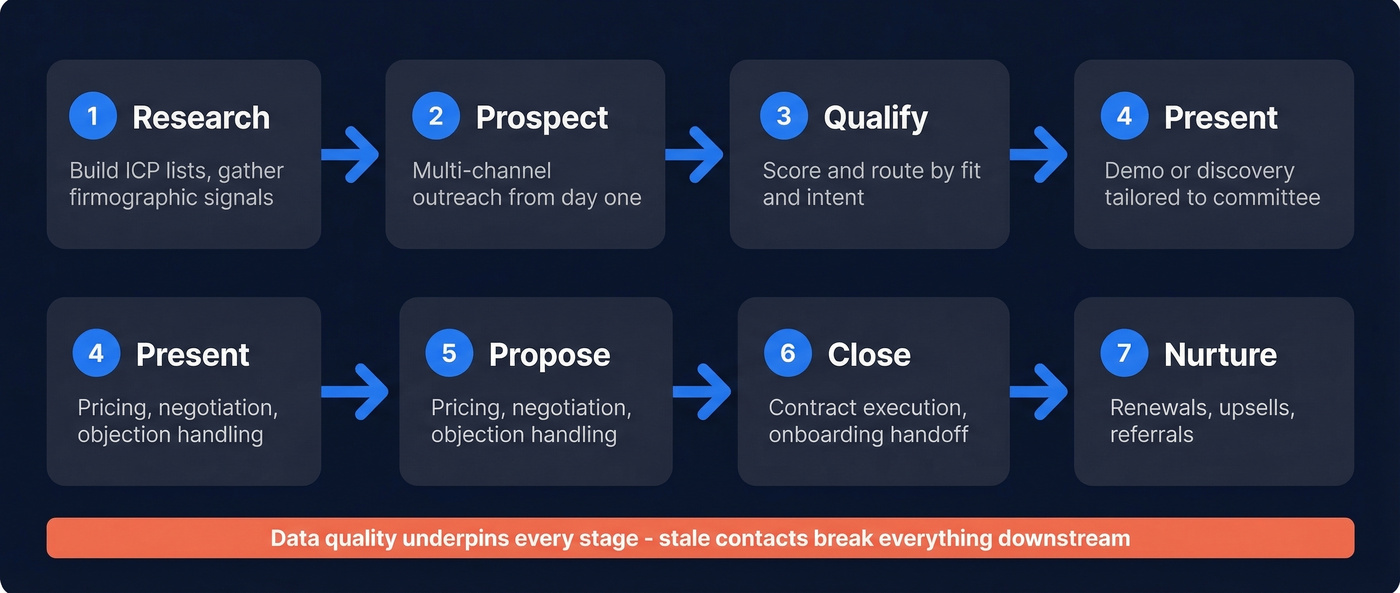
- Research - Identify your ICP, build target account lists, gather firmographic and technographic signals.
- Prospect - Reach out via email, phone, and social. Multi-channel from day one. (If you need a system, start with these sales prospecting techniques.)
- Qualify - Score and route leads based on fit and intent. Typical B2B buying groups involve 6-10 decision-makers, and each spends less than 17% of their time with sellers. Qualify fast. (A structured lead scoring model makes this stage measurable.)
- Present - Demo, discovery call, or value presentation tailored to the buying committee. Use a repeatable product demo checklist.
- Propose - Send pricing, negotiate terms, handle objections. (Tighten your negotiation with an anchor in negotiation framework.)
- Close - Contract execution, handoff to onboarding. If your close stage is messy, revisit the steps to close a sale.
- Nurture - Post-sale engagement for renewals, upsells, and referrals. This stage gets ignored constantly, but it's where compounding revenue lives. Track it with a clean renewal rate definition.
Data quality underpins every stage. If your contact data is stale or wrong, nothing downstream works - sequences bounce, routing breaks, reps waste hours chasing ghosts.
How to Automate Your Workflow
Automation amplifies whatever you already have. If your process is broken - unclear ICP, sloppy handoffs - automation just breaks things faster.
Here's the thing: a recurring theme on r/salesops and similar forums is teams buying the automation tool before documenting the process, then blaming the tool when it doesn't work. We've seen this firsthand with clients who come to us after burning through two or three platforms. Fix the process first.
Map your full sales cycle end-to-end. Document owners, tools, inputs, outputs, and bottlenecks. Then automate tasks that are repetitive, rule-based, and high-volume: lead routing, follow-up sequences, CRM field updates, meeting scheduling. (For ready-to-use copy, pull from these sales follow-up templates.)
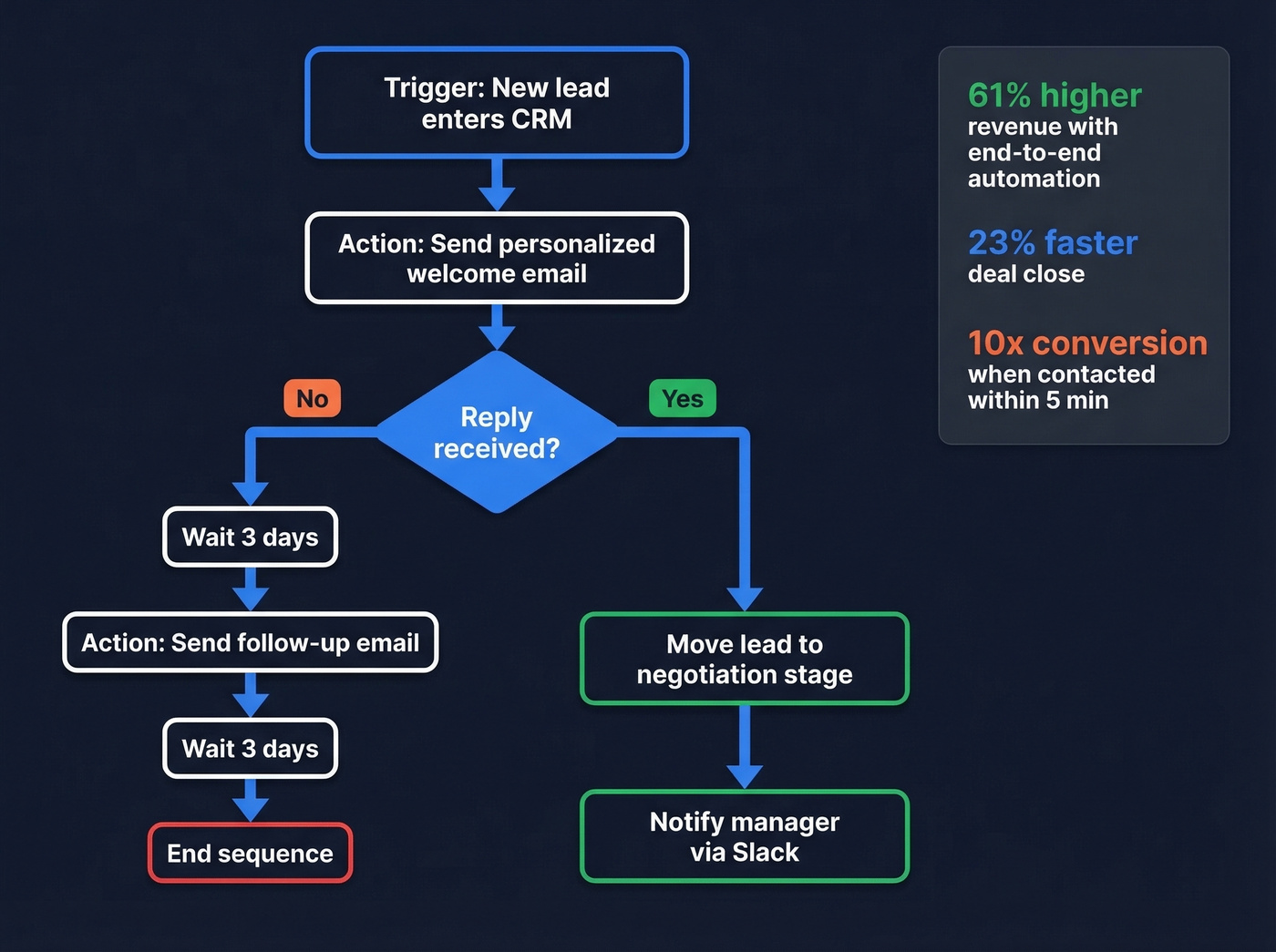
A concrete workflow template:
- Trigger: New lead enters CRM
- Action: Send personalized welcome email
- Branch A: No reply -> wait 3 days -> send follow-up -> wait 3 days -> end sequence
- Branch B: Reply received -> move lead to negotiation stage -> notify manager via Slack
If/then logic, not rocket science. Companies with end-to-end automation achieve 61% higher revenue and close deals 23% faster. Teams that automate these patterns save 20-30% of rep time. And eliminating the 4-7% manual data entry error rate that plagues CRM hygiene is a direct win for forecasting and routing accuracy.
One benchmark worth obsessing over: speed-to-lead. Leads contacted within 5 minutes convert 10x more than those contacted after 30 minutes. Automation is the only way to consistently hit that window. OpenPhone went from 2.5 days to under 2 hours just by automating routing - that kind of improvement is impossible to achieve manually.
Building a Connected Workflow
The biggest gap in most sales orgs isn't missing tools. It's disconnected ones.
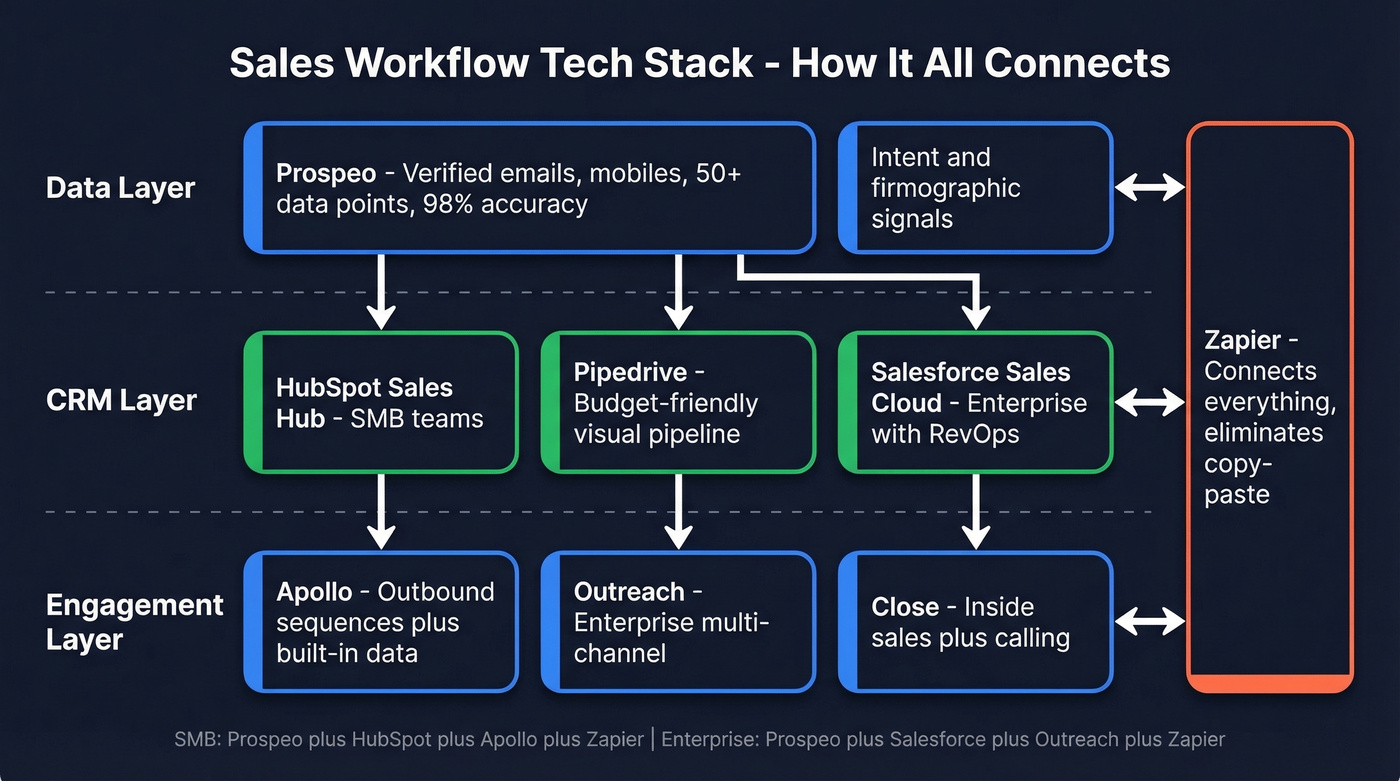
A connected workflow means every stage feeds data forward seamlessly: enrichment results populate CRM fields, CRM updates trigger sequences, sequence engagement scores inform routing. When your stack operates as a single pipeline rather than isolated silos, reps stop context-switching and start selling.
To get there, audit every handoff between tools. If a rep has to copy-paste data from one platform to another, that's a broken connection. Use native integrations or an iPaaS layer like Zapier to close those gaps. The goal is zero manual data movement between stages.

A connected workflow breaks the moment your contact data decays. Prospeo's 7-day refresh cycle keeps every CRM field, sequence, and routing rule running on verified data - 98% email accuracy, 125M+ direct dials, and 50+ data points per enrichment. No more reps chasing ghosts through broken automations.
Stop automating on top of rotten data. Start with Prospeo.
KPIs That Actually Matter
Speed-to-lead is the metric most teams track poorly and benefit from most. Under five minutes from form fill to first rep touch is the target. If 80% of customers expect a response within 10 minutes, anything slower is leaving revenue on the table.
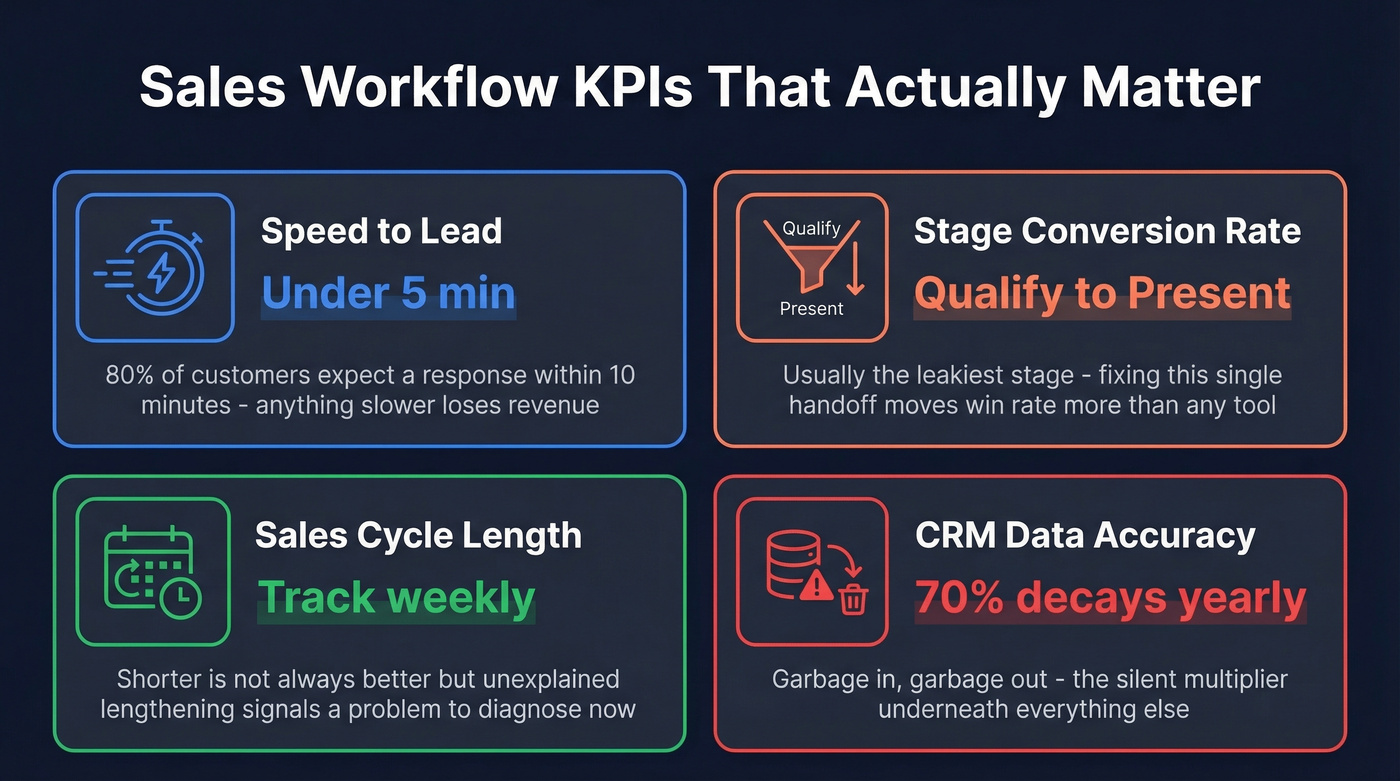
Stage conversion rate tells you where deals die. Qualify-to-present is usually the leakiest stage - in our experience, fixing this single handoff often moves win rate more than any tool purchase. Sales cycle length matters too: shorter isn't always better, but unexplained lengthening signals a problem your team needs to diagnose immediately.
And CRM data accuracy is the silent multiplier underneath everything else - garbage in, garbage out. (If you want a tighter measurement layer, use a simple sales operations metrics scorecard.)
Mistakes That Kill Workflows
Automating without strategy. Turning on workflows without defining what they should accomplish is like hiring someone without a job description. Define the goal, the trigger, and the success metric before you build anything.
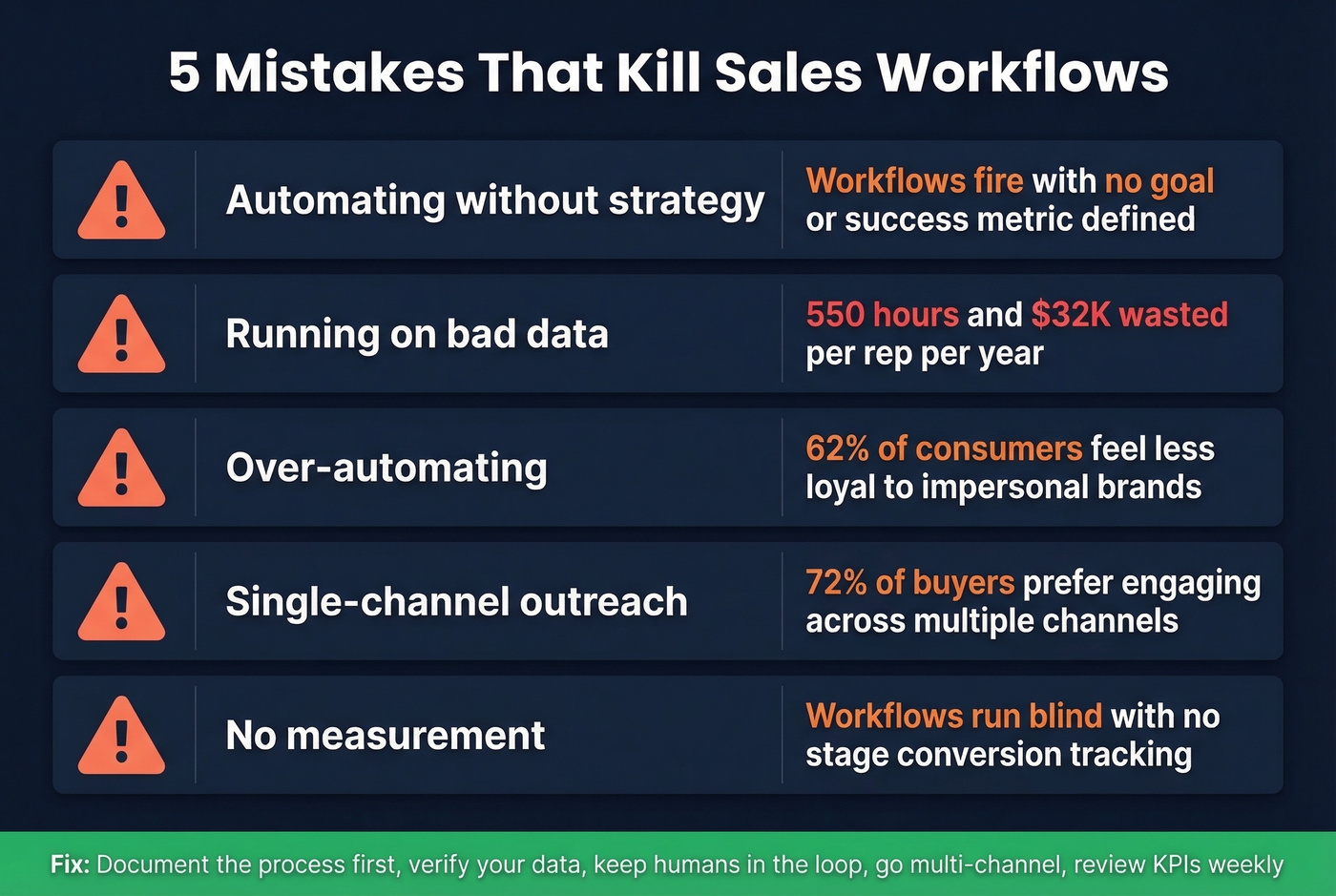
Running on bad data. This is the silent killer. 70% of CRM data decays annually. That means the contact list you built six months ago is already rotting. The cost? Roughly 550 hours and $32K wasted per rep per year chasing dead leads and fixing records. Prospeo's email finder verifies addresses in real time and refreshes data every 7 days, so your automated sequences hit real inboxes instead of bouncing into the void.

Over-automating. 62% of consumers feel less loyal to brands that deliver impersonal experiences. Keep humans in the loop for anything relationship-sensitive. Let's be honest - nobody wants a "just checking in!" email from a bot when they're evaluating a six-figure contract. (If you must send a nudge, use these alternatives to just checking in.)
Single-channel outreach. Email-only sequences leave money on the table. 72% of buyers prefer engaging across multiple channels - build cadences that span phone, email, social, and video.
No measurement. Skip this if you want your workflow to run blind. Otherwise, review stage conversion rates and speed-to-lead weekly, minimum.
Best Tools for Managing Sales Workflows
Look, 42% of sales reps feel overwhelmed by their tools, and overwhelmed sellers are 45% less likely to hit quota. You don't need 10 tools. You need the right three or four, connected cleanly. Most teams are under-data'd, not under-tooled - your CRM, sequencer, and automation tools are only as good as the contact data they run on. (If you're rebuilding your stack, start with these best contact management software options.)
| Tool | Category | Starting Price | Best For |
|---|---|---|---|
| Prospeo | Data & enrichment | Free (75 emails/mo), ~$0.01/email | 98% verified emails + mobiles |
| HubSpot Sales Hub | CRM + automation | Free CRM, $45+/mo/seat | SMB CRM + workflows in one |
| Pipedrive | CRM | $14/mo/user | Visual pipeline on a budget |
| Salesforce Sales Cloud | CRM (enterprise) | $75/mo/user | Teams with RevOps staff |
| Apollo | Prospecting + sequences | Free tier, $49/mo/user | Outbound with built-in data |
| Outreach | Sales engagement | ~$100+/mo/user | Enterprise multi-channel |
| Close | CRM + calling | $25/mo/user | Inside sales teams |
| Zapier | Automation / iPaaS | Free tier, $19.99/mo | Connecting non-native tools |
For SMBs, pair HubSpot or Pipedrive with Apollo for sequencing and Zapier to connect everything. Enterprise teams will gravitate toward Salesforce Sales Cloud plus Outreach - just budget for the implementation time, because it's substantial.
Regardless of stack, feed everything with verified data. A 98% email accuracy rate means far fewer bounces and better deliverability, which keeps your automation from wrecking your domain reputation. We've seen teams cut bounce rates from 35% to under 4% just by swapping their data source - that's the difference between a healthy sending domain and one that's blacklisted within weeks. (If deliverability is a recurring issue, follow an email deliverability guide and monitor email bounce rate benchmarks.)
How to Democratize Workflows Across Your Org
One of the most common failure modes is keeping workflow knowledge locked inside a single manager's head or buried in a spreadsheet only ops can edit.
To democratize your playbooks, make templates and automation logic accessible to every rep - not just the power users. Use a shared platform where reps can see the full pipeline logic, suggest improvements, and self-serve common automations like follow-up sequences or lead routing rules. When the entire team owns the process, adoption climbs and tribal knowledge stops walking out the door with every departing rep. For teams that lose 35% of reps annually, this isn't a nice-to-have - it's survival.
70% of CRM data decays annually - that's 550 hours per rep wasted on dead leads. Prospeo's 5-step verification and weekly refresh eliminate the bad data that silently kills your sales workflows. At $0.01 per email, fixing this costs less than one lost deal.
Replace decayed records before your next sequence fires.
FAQ
What's the difference between a sales process and a sales workflow?
A sales process defines the stages a deal moves through - prospecting, qualifying, closing. A workflow adds the specific actions, owners, tools, and automation triggers that make each stage repeatable. Effective workflow management bridges the gap between strategy and daily execution.
How long does it take to implement workflow automation?
Basic automation - lead routing, follow-up sequences, CRM field updates - goes live in one to two weeks. Full cross-team alignment with measurement dashboards and iterative optimization typically takes one to three months.
How do you keep CRM data clean for automated workflows?
Use a data provider with frequent refresh cycles - 70% of contact data decays every year. Prospeo refreshes records every 7 days at 98% email accuracy, compared to the 6-week industry average. Pair that with deduplication rules and mandatory field validation in your CRM, and you'll catch decay before it poisons your pipeline.